Google Search processes billions of queries per day. Those results include search listings, AI answers, local businesses, hotel prices, flight routes, shopping cards, reviews, and page metadata. Each result set changes by country, language, device, account state, cookies, and search history.
Google scrapers convert those changing pages into structured rows for SEO tracking, lead generation, travel pricing, brand monitoring, and market research. A production scraper needs browser handling, proxy routing, retries, parsing, and output checks. A request loop with one CSS selector fails when Google changes modules, blocks an IP range, or serves a localized page.
ScrapeNow’s Google scrapers are pre-built extractors for supported Google data types. You send inputs such as prompt, route, hotel URL, CID, query, or filter URL. ScrapeNow handles page access, proxy routing, retry behavior, parsing, and structured output.
Why Google scraping fails in production
Google is one of the hardest public websites to scrape at production volume. DataResearchTools ranks Google Search as the number 1 scraped website in 2026, with an estimated 50B+ scraping requests per month and a “Very High” anti-bot level. That volume explains Google’s heavy investment in request scoring, browser checks, and traffic filtering.
Blocks appear early in a run. You see CAPTCHAs, consent pages, 429 responses, empty SERPs, localized redirects, and HTML that changes by device. A scraper that passes ten local tests can fail after a few hundred requests from one IP range.
IP reputation changes the result. Browser fingerprinting changes the result. Request timing changes the result. Geo-targeting changes the result.
A hotel price in Paris, a flight route in India, and a Maps result in Austin return different data. A production scraper without geo control mixes markets and corrupts reporting. A production scraper without session control drops rows during filters, pagination, and review extraction.
Google also changes output based on query intent. A commercial query can show ads, shopping cards, People Also Ask, organic links, and a map pack. An informational query can show AI answers, citations, videos, news, and follow-up prompts.
Official APIs cover narrow cases and enforce quota boundaries. Google’s Custom Search JSON API gives 100 free search queries per day, then paid quota rules apply. That works for small internal search tools with predictable query counts.
Production SERP extraction has irregular data shapes. AI answers, ads, People Also Ask, map packs, organic results, shopping cards, hotel modules, and local packs share one page. The modules change by query, location, device, and time.
AIMultiple benchmarked 1,200 query result pages and 18,000 live requests across search engines for its SERP API study. That scale reflects real testing. A 20-query sample tells you little about Google reliability.
The failure mode costs engineering time. Teams spend hours on browser patches, proxy swaps, selector fixes, queue tuning, and retry logic. Then Google changes a module, and the parser starts returning empty fields.
The problem compounds when the scraper feeds reporting tables. A missing price field becomes a false price drop. A localized SERP becomes an incorrect rank change for the wrong market.
ScrapeNow's Google scrapers
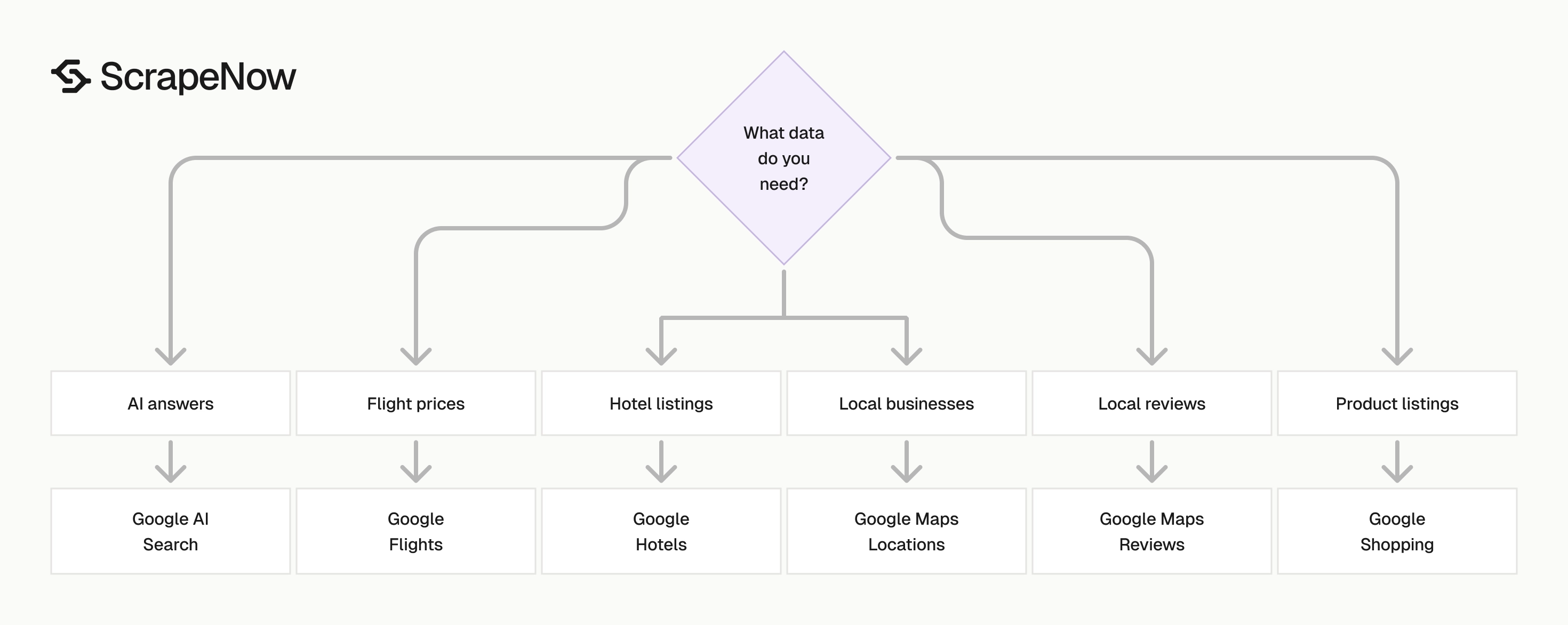
ScrapeNow’s Google scrapers target specific Google surfaces. You choose the scraper for the data type, send the input, and receive structured rows. Supported workflows include AI Search, Flights, Hotels, Maps locations, Maps reviews, and Shopping.
Each scraper maps to one Google surface. Maps, Flights, Hotels, Shopping, and AI Search use different page behavior and different output shapes. Surface-specific extractors reduce false positives, missing fields, and wasted retries.
ScrapeNow supports two run paths. You can run a scraper from the web interface for one-off jobs and QA checks. You can use the REST API for scheduled pipelines, database loads, and recurring reports.
The catalog uses credit pricing. One returned row costs 1 credit, so a 10,000-row export consumes 10,000 credits. That pricing model makes test runs predictable before you schedule daily or weekly jobs.
The right scraper depends on the source surface, the input type, and the table you need to fill. A hotel discovery run starts from filters. A hotel enrichment run starts from known hotel URLs.
Where ScrapeNow differs
Many SERP tools expose one generic search endpoint. That approach works for basic organic rankings. It fails when you need flight routes, hotel filters, Maps CIDs, review pagination, Shopping offers, or AI citations.
ScrapeNow separates those workflows into named scrapers. The Google Flights scraper accepts route, date, passenger, and cabin inputs. The Google Hotels scraper starts from a hotel page and returns property-level fields.
That split matters in production. A travel pricing job needs route and date fidelity. A local SEO job needs place identifiers, coordinates, phone numbers, hours, and review metadata.
ScrapeNow also keeps input and output formats tied to the job. A Maps location run produces business records. A Maps review run produces review rows with author, rating, text, date, owner response, and place metadata when Google exposes them.
Generic browser APIs leave parsing to your team. ScrapeNow ships parsed rows for supported Google workflows. You still validate outputs, and you skip selector maintenance and page-shape guessing.
This matters when Google changes a module name or inserts a new block above the old result. A generic browser response still returns HTML. Your parser takes the failure.
Google AI Search scraper
The Google AI Search scraper extracts AI answer text, cited URLs, prompt context, and visible SERP context from a prompt or URL. Use it for brand visibility checks, citation tracking, and RAG source monitoring across large query sets. It fits teams that need repeatable AI answer records instead of screenshots or manual notes.
A common workflow is weekly AI visibility tracking. You submit brand, product, and competitor prompts, then store answer text and citations. The output shows which domains Google cites and how often your brand appears.
Track the prompt, location, language, timestamp, answer text, and cited URLs together. That structure lets you compare citation movement over time. It also separates answer changes from input changes.
Store citations in a child table when you run large prompt sets. One answer can cite several URLs, and one domain can appear across hundreds of prompts. A separate citation table makes domain-level reporting easier.
The detailed Google AI Search guide with code examples covers setup and fields. The Extract Google AI search results is the product endpoint for this workflow. Start there when you need prompt-driven AI result extraction.
Google Flights scraper
The Google Flights scraper pulls route options, airlines, prices, departure times, arrival times, duration, stops, and booking metadata from filter-based searches. It is built for fare monitoring, route analysis, and travel price intelligence. The scraper accepts structured travel inputs instead of forcing your team to build fragile Google Flights URLs by hand.
Travel teams use this scraper to track fare movement by route and travel date. A run can compare nonstop routes, one-stop routes, cabin classes, and carrier availability. Store results daily to measure price changes and route coverage.
A practical table uses route, departure date, return date, cabin, passengers, airline, fare, stops, and timestamp. That schema supports price trend charts and carrier coverage checks. It also keeps route filters separate from parsed fare rows.
Add run identifiers when you monitor the same route across dates. A fare row means little without its search date, currency, passenger count, and cabin. Those fields prevent bad comparisons between economy and premium cabin results.
The detailed Google Flights guide with code examples shows the filter setup. The Search Google Flights data takes route, date, passenger, and cabin inputs. Use it when you need structured flight data from repeatable search filters.
Google Hotels Search scraper
The Google Hotels Search scraper returns hotel listings from location and filter searches. Typical fields include hotel name, price, rating, review count, location, amenities, and visible deal snippets. Use this scraper when discovery is part of the job.
For example, you can monitor hotels in Madrid with specific date filters, guest counts, and price ranges. The result set gives you listing-level data for comparison and trend tracking. Store location, dates, guests, price filters, and result timestamp with every row.
This workflow fits market scans. You can compare hotel availability across neighborhoods, price bands, and travel dates. You can also track which properties appear repeatedly for a high-value destination.
Search output works best when you keep filter state with every result. Check-in date, check-out date, guest count, price range, and currency belong beside the parsed hotel row. That makes reruns and audits much easier.
The detailed Google Hotels guide with code examples covers hotel search and extraction patterns. The Search Google Hotels by filters is the right entry point when you start from search filters. Use it before hotel-level enrichment when you still need discovery.
Google Hotels Extract scraper
The Google Hotels Extract scraper pulls structured data from a specific hotel URL. Use it when you already have target hotel pages and need details like pricing, rating, address, amenities, review metadata, and availability snippets. It removes search noise from hotel enrichment jobs.
This scraper fits known-property workflows. You start with a hotel list, then pull current fields from each page. That workflow keeps the input tied to specific properties.
A hotel enrichment table should include hotel URL, property name, address, rating, review count, amenities, price, and timestamp. Keep the original URL after you normalize fields. The URL helps debug cases where a property changes name or Google redirects the page.
URL-based extraction also gives cleaner QA rules. You can compare one input URL to one output object. That makes missing addresses, null prices, and rating changes easier to detect.
The detailed Google Hotels guide with code examples covers the URL-based flow as well. The Extract Google Hotels data fits jobs where the URL list already exists. Use it after discovery or when your source system already stores Google hotel links.
Google Maps Locations scraper
The Google Maps Locations scraper extracts local business records from Google Maps using CIDs. It returns business name, category, address, phone number, website, coordinates, rating, review count, hours, and place metadata when Google exposes those fields. CIDs keep place-level extraction tied to a specific Google business record.
Local SEO teams use Maps location data for rank tracking, prospect lists, branch audits, and competitor monitoring. A plumbing company search in Phoenix returns a different business set than the same query in Dallas. Location control keeps those outputs separate.
Maps data needs careful deduplication. Two businesses can share a phone number, and one business can have multiple locations. Store CID, coordinates, address, website, and category fields before you merge records.
Use CID as the stable join key when you can. Business names change, addresses get formatted differently, and phone numbers get reused across branches. CID gives you a cleaner link back to the original Google record.
The detailed Google Maps Location guide with code examples covers location extraction and standard fields. The Look up Google Maps locations by CID is the product endpoint for place-level extraction. Use it as the first step when you need business records before review collection.
Google Maps Reviews scraper
The Google Maps Reviews scraper extracts review text, star rating, author name, review date, owner response, and place metadata when Google exposes those fields. It works for reputation tracking, local competitor analysis, and customer feedback mining. The scraper handles review extraction where weak pagination drops rows.
Review data changes often, and pagination fails under weak browser handling. Use the scraper when you need repeatable review pulls for the same locations. Store review IDs, dates, ratings, and owner responses to prevent duplicate analysis.
Review workflows need stable place inputs. Start with the business record, then collect reviews. Join reviews back to CID or place metadata rather than business name alone.
Store the raw review text before running sentiment or topic classification. Normalized tags change as your model changes. Raw text gives you a stable source for reprocessing.
The detailed Google Maps Reviews guide with code examples covers review pagination and field mapping. Start with the Google Maps Locations scraper when you need to resolve the place record before pulling reviews. That sequence keeps review rows tied to the right business.
Google Shopping scraper
The Google Shopping scraper extracts product title, price, seller, rating, image URL, shipping snippets, and result position from shopping searches. Use it for price tracking, seller monitoring, and product assortment checks. Shopping result position gives context that price alone cannot provide.
Retail teams run shopping searches on product names, SKUs, and category terms. The output helps compare sellers, watch price changes, and detect new competitors. Position data also shows which offers appear above or below your listings.
Keep query, SKU, seller, price, shipping snippet, rating, result position, and timestamp in the same table. That layout supports price movement reports and seller churn tracking. It also makes category monitoring easier across repeated runs.
Shopping data needs strict normalization. Sellers format names differently, prices can include shipping, and product titles contain noisy tokens. Store raw seller and title fields beside cleaned values.
The detailed Google Shopping guide with code examples covers the shopping-specific fields and search inputs. The Google section in the ScrapeNow scraper catalog lists the current Shopping scraper and related Google extractors. Use the catalog as the hub when you need multiple Google data sources.
Which Google scraper to use
| Data you need | Scraper to use | Best input | Common output |
|---|---|---|---|
| AI answers and citations | Google AI Search | Prompt or search URL | Answer text, cited URLs, SERP context |
| Flight prices | Google Flights | Route, dates, cabin, passenger filters | Airline, fare, stops, duration, times |
| Hotel listings | Google Hotels Search | Location and filter URL | Hotel name, price, rating, amenities |
| One hotel page | Google Hotels Extract | Hotel URL | Address, price, rating, amenities, availability |
| Local businesses | Google Maps Locations | CID or place identifier | Name, address, phone, website, coordinates |
| Local reviews | Google Maps Reviews | Place record or review target | Rating, text, author, date, owner response |
| Product listings | Google Shopping | Search query or shopping URL | Title, price, seller, rating, image URL |
Use search-based scrapers when discovery is part of the job. Use extract-by-URL scrapers when you already have the target list and need enrichment. That split keeps crawls smaller and outputs cleaner.
A local SEO pipeline usually starts with Maps locations, then moves to Maps reviews. A travel pricing pipeline usually runs Flights and Hotels Search on a schedule. The stored output then supports daily price change reports.
For retail monitoring, start with Shopping searches across target categories and tracked products. Keep seller names, prices, shipping snippets, and result positions in the same table. That structure makes price movement and seller churn easier to measure.
For AI monitoring, start with Google AI Search prompts and store citations as separate rows. Keep the answer text in a raw field and normalize citation domains in a second table. That design makes weekly domain-level reporting straightforward.
For hotel monitoring, split discovery and enrichment into separate jobs. Search jobs find the market set. Extract jobs refresh fields for known hotel pages.
Pricing
ScrapeNow charges per returned row. One row costs one credit, starting at $0.04 per credit for small runs and dropping with volume. No monthly contracts, no proxy fees, no charges for failed rows. See the pricing page for current rates.
How ScrapeNow handles Google scale
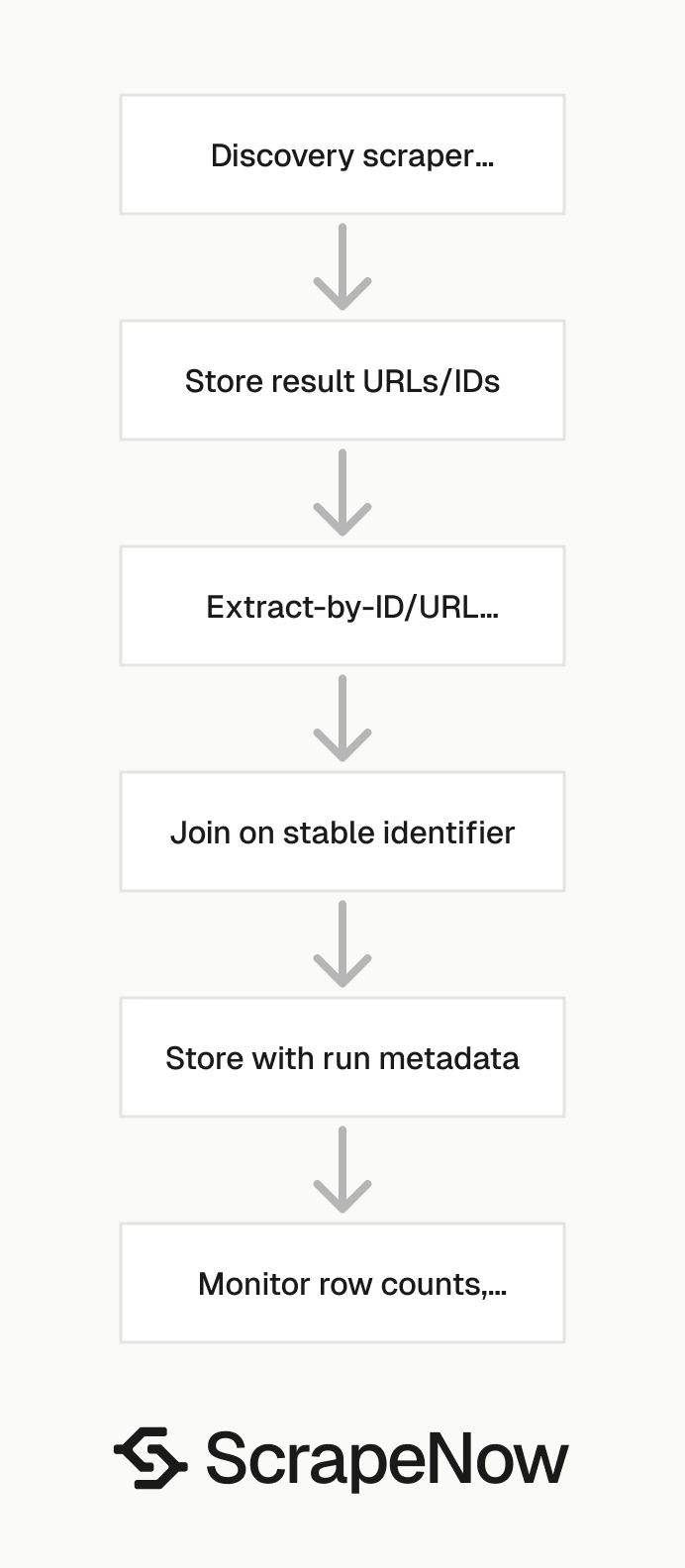
Google scraping fails when you treat every page the same. Maps, Flights, Hotels, Shopping, and AI Search use different request patterns. They also use different bot checks and parsing rules.
ScrapeNow uses purpose-built scrapers for each supported Google surface. Each scraper handles the target page type, expected fields, retries, and data cleanup. That reduces custom parsing work for supported workflows.
Under the hood, proxy routing can use 10M+ residential IPs and 50,000+ datacenter IPs across 186 countries. Sticky sessions run up to 30 minutes when a workflow needs continuity. Instant rotation handles failed sessions.
Geo-routing matters for Google data. A Maps query near a city center returns different businesses than the same query from a suburb. Hotel and flight results also change by market, currency, and language.
Session behavior matters too. Some flows need continuity across pages, filters, or pagination. Other jobs perform better with per-request rotation, especially large search runs where each query stands alone.
Breakage happens on Google. Layout changes, module changes, and anti-bot changes are normal. ScrapeNow’s managed scraper maintenance targets fixes in under 24 hours when a supported extractor fails.
You should still monitor your own outputs. Track row counts, empty-field rates, HTTP failures, and duplicate rates. Alert when a normal job returns fewer rows than expected or when core fields disappear.
Good monitoring catches three common failures. The first is a sudden row-count drop. The second is a spike in null values for fields such as price, phone, rating, or citation URL.
The third is output drift. A field still exists, and the meaning changes because Google moved a module or renamed a label. Store raw output beside normalized records so you can inspect failures without rerunning the job.
Add job-level thresholds before the data reaches reports. For example, fail a run when accepted rows drop below 90% of the last clean run. Flag any run where required fields exceed your null-rate limit.
When to use a pre-built Google scraper
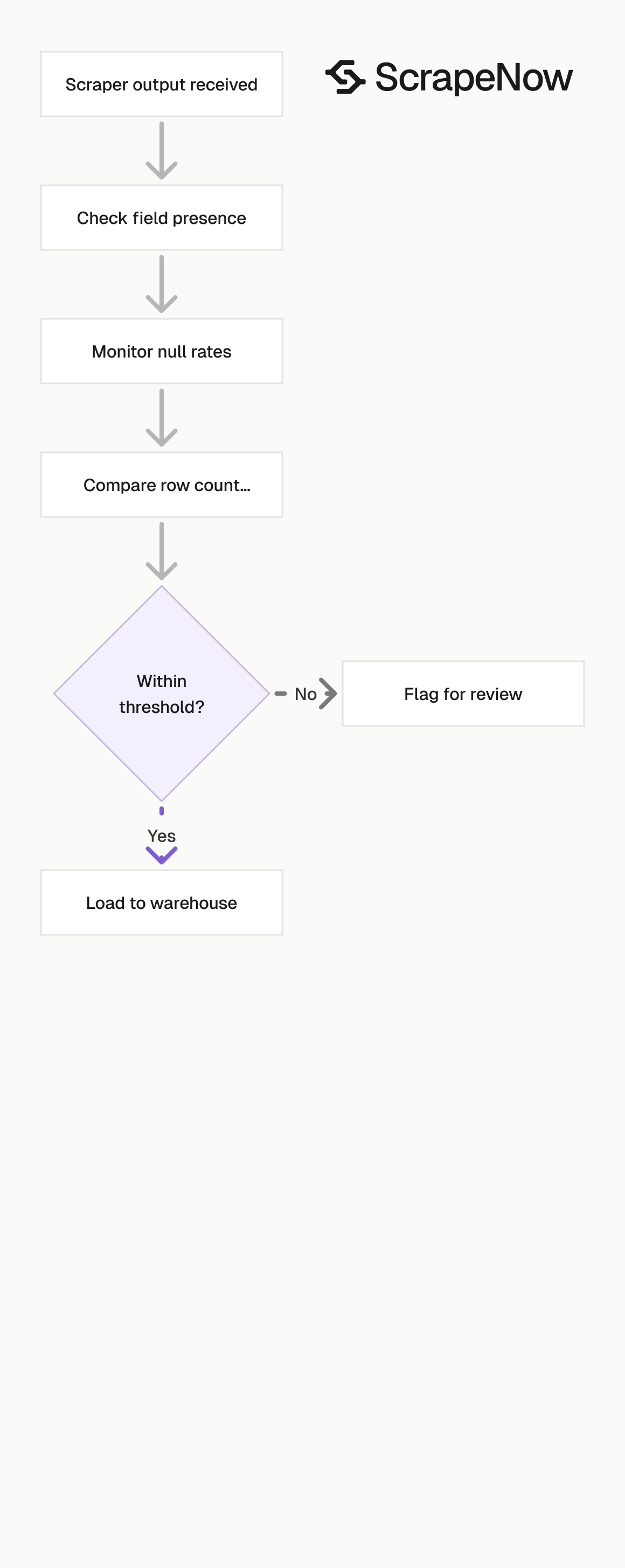
Use a pre-built scraper when ScrapeNow already supports the target data type. You save time on browser automation, selector maintenance, proxy routing, CAPTCHA handling, and output cleanup. You also get a stable output schema for downstream jobs.
Build your own crawler when the target is small, stable, and low-risk. A 200-row one-time scrape from a static page does not need a managed extractor. A short script with requests and a parser can finish that job.
Google production jobs pass that threshold quickly. A 10K-request Maps run needs retries and geo control. A daily hotel pricing job across 50 cities needs scheduling, monitoring, and field validation.
AI citation tracking has the same requirement. A weekly report across thousands of prompts needs consistent prompt inputs, stored citations, and repeatable parsing. Manual browser checks do not scale for that job.
Use pre-built scrapers when missed rows cost more than the scraper run. That is usually true for SEO monitoring, sales prospecting, travel pricing, brand tracking, and retail price checks. The cost of incorrect data shows up later in reporting and decisions.
Pre-built scrapers also reduce maintenance load. Your team owns the inputs, storage, QA checks, and reporting layer. ScrapeNow owns the supported extraction workflow and parser maintenance for the selected scraper.
This split keeps your engineering time on the parts specific to your business. You still control schemas, deduplication rules, and refresh schedules. ScrapeNow handles the supported Google extraction path.
Build the workflow around the Google data type
Pick the scraper that matches the data you need. Run a 100-row test and inspect the fields before scheduling a larger job. Check row counts, missing fields, location behavior, and output shape.
If the test matches your schema, schedule the full run. Store raw outputs and normalized tables separately. Raw outputs help with debugging when Google changes a module or adds new fields.
If you need more than one Google source, start from the Google section in the ScrapeNow scraper catalog. Then move into the deeper guides for Google AI Search, Google Flights, Google Hotels, Google Maps Locations, Google Maps Reviews, and Google Shopping. Those pages give field-level setup details for each scraper.
Build the workflow around input format and refresh schedule. A daily fare monitor needs route and date inputs. A quarterly local prospecting export needs Maps place inputs and deduplication.
Keep the first implementation narrow. Choose one scraper, one market, one output table, and one QA rule. Expand after the test produces stable rows.
Version your output schema from the start. Add new fields without changing old field meanings. That protects reports when Google adds modules or ScrapeNow exposes more fields.
Test a Google scraper through the API
Use the product endpoint page to confirm the current scraper slug and request fields. The example below shows the implementation pattern for a Google Flights run. Replace the API key and payload values with your route, dates, passengers, and cabin.
curl -X POST "https://api.scrapenow.io/api/v1/scraping/scrape?scraper=google-flights-search-by-filters" \
  -H "Authorization: Bearer $SCRAPENOW_API_KEY" \
  -H "Content-Type: application/json" \
  -d '{
    "origin": "JFK",
    "destination": "LHR",
    "departure_date": "2026-04-15",
    "return_date": "2026-04-22",
    "passengers": 1,
    "cabin": "economy",
    "currency": "USD",
    "language": "en"
  }'
Start with a small run and write the response to raw storage. Validate fare, airline, stops, duration, departure time, arrival time, and timestamp before building reports. After the schema passes QA, schedule the same endpoint with your full route list.
For production jobs, add request IDs and persist the original payload. Store the run status, scraper slug, start time, end time, row count, and validation result. Those fields make failed reruns easier to diagnose.


