One API call returns Google Shopping product records as JSON. ScrapeNow’s Google Shopping scraper extracts product titles, Google product IDs, descriptions, ratings, review counts, image URLs, and Google Shopping result URLs from a keyword search.
Teams use it for price tracking, catalog enrichment, marketplace monitoring, and product discovery. ScrapeNow maintains the Google selectors, request handling, and result parsing so your code deals with inputs, polling, and JSON files.
The scraper returns structured product records from Google Shopping search pages. Your code sends a keyword, an optional country code, and a result limit. Then it polls the job endpoint until the completed JSON file is ready.
A generic browser scraper usually gives you HTML, screenshots, or brittle CSS selectors. This scraper returns normalized fields with the original input attached to every row. That row-level input context matters when you compare US, GB, and DE results in the same warehouse.
How to use this scraper
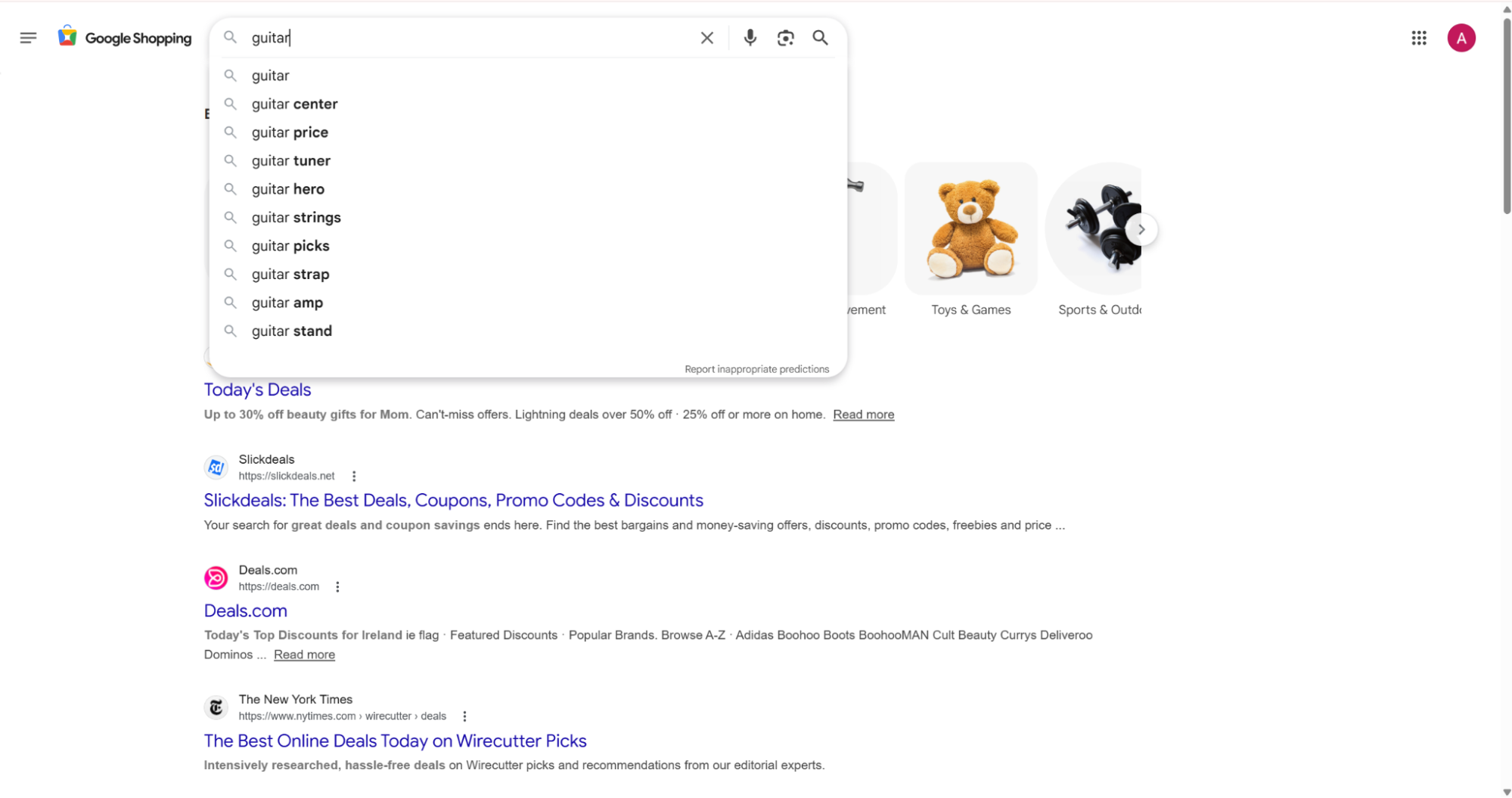
The scraper slug is google-shopping-search-by-keyword. It takes a search keyword and an optional country code. It returns product records from Google Shopping.
Use one input row per keyword and country pair. That keeps US, GB, and DE results separate in your downstream tables. It also makes retries safer because each row maps to one search context.
ScrapeNow treats each input row as its own search context. A batch with guitar in the US and guitar in GB produces rows that keep those countries attached through the full result payload. You do not need to infer country later from a URL, proxy route, or scheduler name.
Step 1. Set the input variables
Use these inputs:
| Input | Required | Example | Notes |
|---|---|---|---|
keyword |
Yes | guitar |
The search term to run on Google Shopping |
country |
No | US |
Two-letter ISO 3166-1 country code in string format |
The dashboard shows the same fields before you run the scraper.
[
  {
    "country": "US",
    "keyword": "guitar"
  }
]
Keep each Google scraper separate when you collect data from multiple Google surfaces. Product search belongs in the Google Shopping scraper. Local business discovery belongs in Google Maps locations search, and travel pricing belongs in Google Flights search.
This separation saves cleanup time later. Shopping products, Maps locations, and Flights results use different IDs, ranking signals, and refresh schedules. Mixing them into one early table creates extra parsing work and weaker QA checks.
Generic scraping setups often mix these sources because they start from a URL queue. That creates rows with incompatible IDs and fields. ScrapeNow keeps the scraper boundary at the API level, so each job returns one predictable record shape.
Step 2. Run the API request
Use this Python script. Replace YOUR_API_KEY with your ScrapeNow API key.
"""
Configuration:
    - Set SCRAPER_SLUG to the scraper you want to run.
    - Set SCRAPER_INPUTS to the list of input dicts matching that scraper's schema.
    - Set API_KEY to your scraper API key.
"""

import sys
import time
import json
import requests
import os

API_KEY = "YOUR_API_KEY"

SCRAPER_SLUG = "google-shopping-search-by-keyword"

SCRAPER_INPUTS = [
    {
        "country": "US",
        "keyword": "guitar"
    }
]

BASE_URL = "https://api.scrapenow.io/api/v1/scraping"
TIMEOUT_SECONDS = 3600
POLL_INTERVAL = 5
SPINNER = "|/-\\"


def build_headers(api_key: str, content_type: str | None = None) -> dict:
    """Build headers using your API key."""
    headers = {"Authorization": f"Bearer {api_key}"}
    if content_type:
        headers["Content-Type"] = content_type
    return headers


def trigger_scrape(slug: str, inputs: list[dict]) -> str:
    """POST to the scrape endpoint and return the job_id."""
    url = f"{BASE_URL}/scrape?scraper={slug}"

    response = requests.post(
        url,
        headers=build_headers(API_KEY, "application/json"),
        json={"inputs": inputs, "limit_per_input": 1},
    )
    response.raise_for_status()
    return response.json()["data"]["job_id"]


def poll_until_done(job_id: str) -> str:
    """Poll the job status until it reaches a terminal state."""
    start = time.time()
    i = 0
    while True:
        elapsed = time.time() - start
        if elapsed > TIMEOUT_SECONDS:
            print(f"\nTimeout after {TIMEOUT_SECONDS}s")
            sys.exit(1)

        response = requests.get(
            f"{BASE_URL}/jobs/{job_id}",
            headers=build_headers(API_KEY),
        )
        response.raise_for_status()

        data = response.json()
        status = data["data"]["status"]

        mins, secs = divmod(int(elapsed), 60)
        sys.stdout.write(f"\r[{SPINNER[i % 4]}] Waiting... {status} ({mins}m {secs:02d}s)  ")
        sys.stdout.flush()

        if status in ("completed", "failed"):
            print()
            return status

        time.sleep(POLL_INTERVAL)
        i += 1


def fetch_results(job_id: str) -> dict:
    """Download the completed job results as JSON."""
    response = requests.get(
        f"{BASE_URL}/jobs/{job_id}/results?format=json",
        headers=build_headers(API_KEY),
    )
    response.raise_for_status()
    return response.json()


def save_results(data: dict, slug: str) -> str:
    """Write results to {slug}.json and return the filename."""
    filename = f"{slug}.json"
    directory = os.path.dirname(filename)

    if directory:
        os.makedirs(directory, exist_ok=True)

    with open(filename, "w", encoding="utf-8") as f:
        json.dump(data, f, indent=2, ensure_ascii=False)

    return filename


def main() -> None:
    print(f"Triggering scraper: {SCRAPER_SLUG}")
    job_id = trigger_scrape(SCRAPER_SLUG, SCRAPER_INPUTS)
    print(f"Job started: {job_id}")

    final_status = poll_until_done(job_id)

    if final_status != "completed":
        print(f"Job failed with status: {final_status}")
        sys.exit(1)

    print("Fetching results...")
    results = fetch_results(job_id)

    output_file = save_results(results, os.path.join("output", SCRAPER_SLUG))
    print(f"Results saved to: {output_file}")


if __name__ == "__main__":
    main()
The script does 4 things:
- Starts a scrape job with
SCRAPER_SLUG - Polls the job every
5seconds - Stops after
3600seconds if the job hangs - Saves the JSON response to an output file
The example uses limit_per_input: 1, so it returns 1 result for the guitar keyword. Raise that limit when you need more products per keyword. Keep the first run small.
A one-result smoke test verifies authentication, input formatting, polling, and file writing before you run a larger batch. It also confirms that your output directory exists. The test also verifies that your API key has access to the scraper.
ScrapeNow’s job model is safer than a long-running local browser script for scheduled work. Your worker starts a job, records the job ID, polls status, and downloads results after completion. If your worker restarts, you can resume from the stored job ID instead of rerunning the search blindly.
Step 3. Read the output file
A completed job writes results to:
output/google-shopping-search-by-keyword.json
The saved file contains the inputs, scrape status, product URL, product identifiers, title, description attributes, rating, review count, and image URLs.
Open the file before you wire it into your pipeline. Check that the keyword, country, and product fields match the shape your database expects. This takes a few minutes and prevents a failed insert job later.
Review the first result by hand during setup. Confirm that inputs.country matches the country you sent. Confirm that product_id, title, and url exist before you build insert logic around the file.
JSON output sample
Here is a trimmed response from the Google Shopping scraper:
[
  {
    "inputs": {
      "country": "US",
      "keyword": "guitar"
    },
    "scrape_status": "success",
    "url": "https://www.google.com/search?ibp=oshop&q=Best+Choice+Products+Beginner+Electric+Guitar+Kit&prds=imageDocid:5074466642015424205,catalogid:441982288537830844,productid:6295719691674662631,headlineOfferDocid:13737682657471134121,gpcid:9643529718547858094,mid:576462816713298272,pvt:hg,rds:PC_9643529718547858094%7CPROD_PC_9643529718547858094&pvorigin=25&hl=en&gl=US&shem=damc,pvflt,shrtsdl&shndl=37&udm=28&source=sh/x/prdct/hdr/m1/1",
    "product_id": "imageDocid:5074466642015424205,catalogid:441982288537830844,6295719691674662631,headlineOfferDocid:13737682657471134121,gpcid:9643529718547858094,mid:576462816713298272,pvt:hg,rds:PC_9643529718547858094|PROD_PC_9643529718547858094",
    "title": "Best Choice Products Beginner Electric Guitar Kit",
    "product_description": [
      "Number of Strings:6",
      "Handedness:Right-Handed",
      "Instrument Type:Guitar",
      "Sub Type:Electric",
      "Body Orientation:Right-Handed",
      "Body Type:Electric",
      "Body Material:Wood",
      "Body Color:Cherry Red/White, Green Flametop/Black, Hollywood Blue/White, Midnight Blue/Black, Natural Flametop/Black",
      "Body Construction:Solid Body",
      "Body Finish:Satin",
      "Body Semi-hollow:No",
      "Pickup Configuration:HSS",
      "Number of Frets:23",
      "Pickup Type:Single-coil, Humbucker",
      "Pickup Position:Bridge (humbucker)",
      "Electronics Pickup Type:Single-coil",
      "Electronics Controls:5-way selector",
      "Preamp:Yes",
      "Body Depth:12.5 inches",
      "Body Width:12.5\"",
      "Overall Length:39\"",
      "Weight:6 lbs",
      "Finish Type:Satin",
      "Skill Level:Beginner",
      "Top Use Cases:Practice",
      "Age Range:Adult",
      "Included Accessories:String winding/cutting tool, Carrying case, Extra strings, Headphone amplifier, Over-ear headphones",
      "Supported Accessories:Music books",
      "Highlighted Features:No Assembly Required"
    ],
    "rating": 3.6,
    "reviews_count": 18,
    "images": [
      "https://encrypted-tbn1.gstatic.com/shopping?q=tbn:ANd9GcQRqU8OwEn5ihKHgZPiqv7_LnXsg8GAoKBztHY9TWFRv7VA2hLjqSupolFWBvrVa6sbAKn6JAjvHYJJVizpaV8FvpK9NYpaNdTtvCX-9ZTeebFlaXOpXRvI",
      "https://encrypted-tbn3.gstatic.com/shopping?q=tbn:ANd9GcQxXlkDEzD3AQ-UBxdFD-ub1yZ8PGF7dgChSVK1wrfCDE5i4vi0tMidI92uR7CHg-HBcjR4w02XggNsW5_88MIowiRNLYhTsWZ3U92p0GXiA4WvwMf3nmwg",
      "https://encrypted-tbn2.gstatic.com/shopping?q=tbn:ANd9GcSWgixjXflk1eLkUImRucCQXYPyIssqx1UKwKaNFVjI0lhhHJ2jl2hcKZEd7oLarJ6qdERgip-I_E6C1b9DJeZsBAgupOC1py7A7zTp33v-EdH-Ou6dpkGUaQ"
    ]
  }
]
This response gives you a stable starting point for storage. Every row includes the original input, a status flag, a Google Shopping URL, identifiers, product text, ratings, and image references.
Common alternatives usually require extra parsing after the scrape. Browser automation gives you raw DOM nodes. Search API wrappers often return a title and URL only, which leaves you rebuilding attribute parsing yourself.
ScrapeNow’s record shape keeps field names consistent across runs. Category-specific attributes still vary because Google Shopping varies them. The outer structure stays predictable for ingestion code.
What data you get back
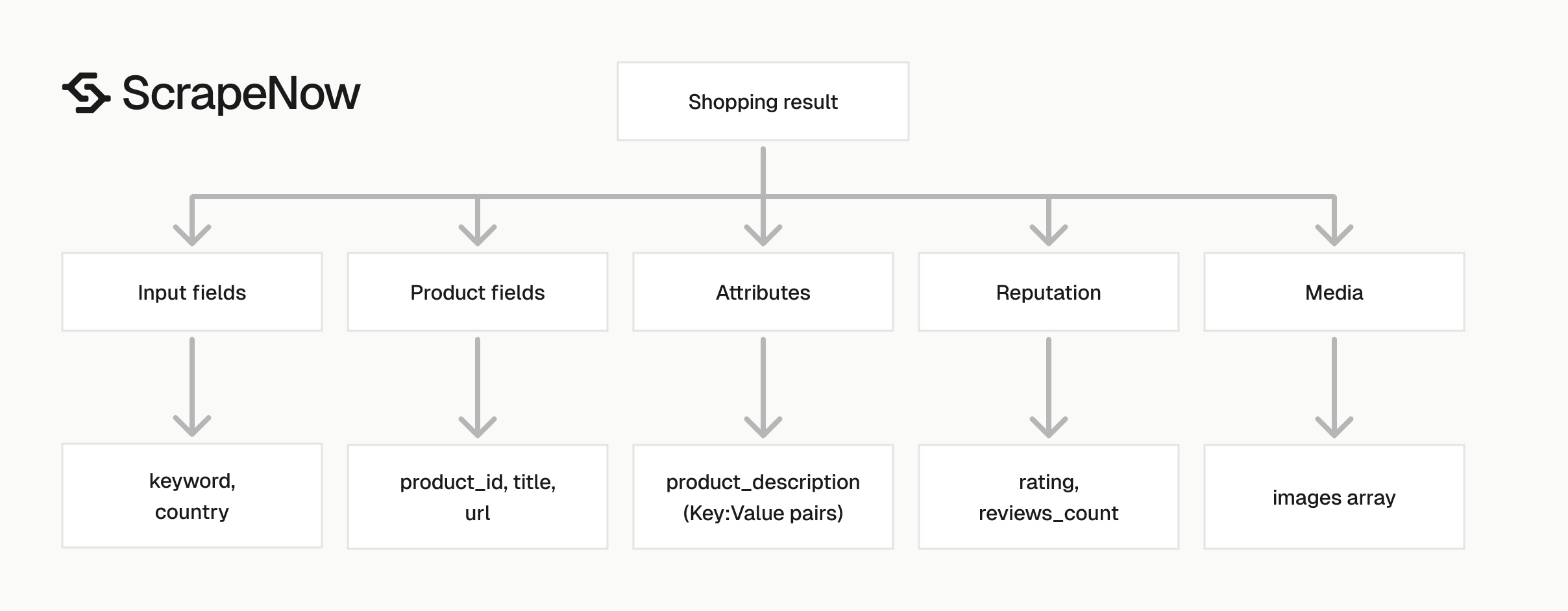
Each result includes the original input, scrape status, and normalized product fields. Store the raw JSON first, then map fields into your own database schema. Raw storage gives you a recovery path when your schema changes.
Product attributes vary by category, so the original payload helps during backfills. Keep it in object storage, a JSON column, or a warehouse table. Use one raw payload per row so you can replay parsing safely.
A useful production row stores both raw and parsed data. The raw JSON answers audit questions. The parsed columns make reporting fast.
inputs
The inputs object repeats the keyword and country used for that result.
This matters when you batch 100 keywords across 5 countries. You can trace every row back to the request that produced it. That trace helps when one market shows different products from another.
"inputs": {
  "country": "US",
  "keyword": "guitar"
}
Use these fields in your run logs and warehouse tables. They make QA faster when a keyword produces unexpected products.
Do not rely on the job name or file name for this context. Put keyword and country on every warehouse row. That makes ad hoc debugging faster when analysts export rows without the original file.
scrape_status
scrape_status tells you whether the row was extracted cleanly.
For production jobs, filter on success before writing to your product table. Keep failed rows in a separate table for retry logic and debugging.
"scrape_status": "success"
A failed row still has operational value. It tells you which keyword, country, and run need a retry. Store the failure beside the job ID so you can trace it through your scheduler.
Use scrape_status as a gate before dedupe and matching. A failed extraction should not enter fallback title matching. That prevents low-quality rows from contaminating product identity logic.
url
The url field is the Google Shopping product result URL.
Use it as a source URL for audits, QA, and downstream review. Store it as text, since Google URLs can be long.
Avoid fixed-width URL columns. Google result URLs can exceed the limits that teams set for normal product URLs. A VARCHAR(255) column truncates this field in many databases.
Use this URL when an analyst needs to verify a record manually. Keep the exact URL from the scrape result. Rebuilding it later from IDs adds unnecessary parsing risk.
product_id
product_id is the strongest identifier in this response.
Use it for deduplication before falling back to title matching. Titles change more often than product IDs, especially when merchants test product names.
Keep the ID as a string. It can contain multiple Google identifiers joined into one value. Numeric casting can corrupt long IDs or remove leading characters.
Do not split the ID until you have a specific reason. Store the full string first. Add parsed identifier columns later if a downstream system needs one component.
title
title gives you the product name shown in Google Shopping.
Treat it as display text. If you need a canonical product name, create a cleaned field in your warehouse. Keep this raw value beside it.
For example, remove merchant-specific suffixes in your cleaned field. Keep the original title for audits and match debugging. This gives analysts a way to compare your normalized name with Google’s displayed text.
Title cleanup should run after ingestion. Keep ingestion strict about required fields and permissive about text content. Product naming rules change faster than the scrape schema.
product_description
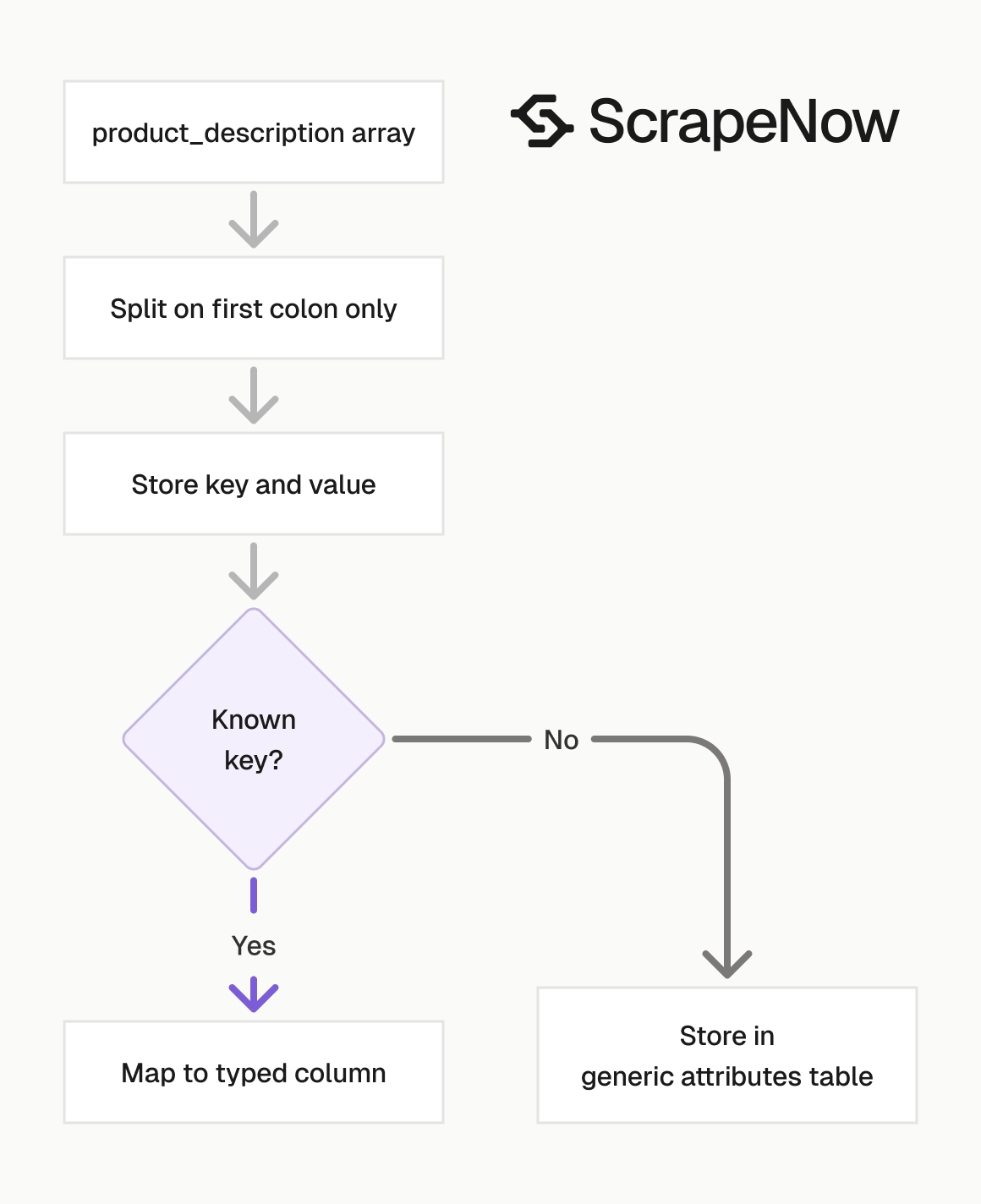
product_description is an array of product attributes as strings.
The format is usually Key:Value, as shown here:
[
  "Number of Strings:6",
  "Handedness:Right-Handed",
  "Instrument Type:Guitar"
]
Parse this array into a map when you need attribute-level filters. Keep the original array because product attributes vary by category.
A guitar result can expose pickup configuration and fret count. A laptop result can expose processor, memory, storage, screen size, and model year. A shoe result can expose size range, color, material, and gender.
A single product category can also change over time. Google can add an attribute to new rows without adding it to older rows. Your parser should accept missing keys and new keys without failing the whole row.
rating and reviews_count
rating is a number and reviews_count is an integer.
Use both fields together. A product with 4.8 stars and 3 reviews should rank below a product with 4.5 stars and 1200 reviews when trust matters.
For scoring, combine rating with review count and position. A high rating with low review volume deserves a lower confidence score. Store the raw fields as separate columns before you build any composite score.
Keep null handling explicit. Some products have no visible rating or review count. Treat missing review data differently from a product with 0 reviews.
images
images is an array of image URLs.
Store all image URLs in a child table if you use a relational database. In document stores, keep the array on the product document.
Treat image URLs as source asset references. If your application needs stable images, download and store copies under your own retention rules. Also store the original URL for audit trails and duplicate checks.
Use a separate image table when you need image-level dedupe. The same product can return multiple image URLs. The same image can also appear across variant products.
For other Google surfaces, keep separate schemas. Hotel extraction belongs in Google Hotels extract by URL. Hotel discovery belongs in Google Hotels search by filter URL.
How this differs from common scraping alternatives
ScrapeNow returns structured fields from the first response you store. A browser script gives you HTML and forces your team to maintain selectors. A generic search API often stops at title, URL, snippet, and thumbnail.
For Google Shopping, that difference shows up in your database design. You get product_id, product_description, rating, reviews_count, and images as named fields. You spend less time writing glue code around DOM parsing.
Country handling is also explicit. Each input row carries its own country value. Your output rows preserve that value, so US and GB results do not merge during loading.
Polling is also predictable. The API exposes a job ID and terminal statuses. Your scheduler can store the job ID, retry failed jobs, and download results after completion.
A local scraping setup usually needs browser lifecycle code, proxy routing, timeout handling, and selector monitoring. ScrapeNow moves those concerns behind the scraper slug. Your integration stays focused on inputs, polling, storage, validation, and dedupe.
Production tips
Google Shopping output is structured enough to load directly, and your pipeline still needs validation. The scraper gives you records. Your code decides which rows qualify for storage.
Use a small staging table before your main product table. That gives you one place to inspect failures, parse attributes, and reject incomplete records. It also gives you a rollback path after faulty mapping code reaches production.
Treat the scraper output as an external data contract. Validate the fields you need, store the raw record, and make every transformation reproducible. That discipline pays off when categories change or reporting teams request a backfill.
Validate required fields before insert
At minimum, require scrape_status, product_id, title, and url.
def is_valid_product(row: dict) -> bool:
    if row.get("scrape_status") != "success":
        return False

    required = ["product_id", "title", "url"]
    return all(bool(row.get(field)) for field in required)


valid_rows = [row for row in results if is_valid_product(row)]
This prevents empty rows from entering your main product table.
Add a second validation layer for your business rules. For price tracking, you need merchant offer data from the target source. For catalog enrichment, title and attributes carry more weight.
Run validation before dedupe. A row with no product_id should fail fast. That row should not land in a fallback matching path.
Add validation metrics to your run logs. Track total rows, successful rows, rejected rows, and rejection reasons. A sudden rise in missing titles or URLs should alert the owner of the pipeline.
Deduplicate by product ID
Use product_id as the primary dedupe key. If you scrape the same keyword daily, you will see repeat products.
def dedupe_by_product_id(rows: list[dict]) -> list[dict]:
    seen = set()
    deduped = []

    for row in rows:
        product_id = row.get("product_id")
        if not product_id or product_id in seen:
            continue

        seen.add(product_id)
        deduped.append(row)

    return deduped
For keyword tracking, store the product once and store keyword appearances in a separate table.
A clean relational shape looks like this:
| Table | Primary key | Purpose |
|---|---|---|
products |
product_id |
One row per Google Shopping product |
product_images |
product_id, image_url |
One row per image URL |
product_attributes |
product_id, attribute_name |
Parsed description attributes |
keyword_results |
product_id, keyword, country, run_date |
Tracks where the product appeared |
This model separates product identity from search visibility. A product can appear for many keywords, across countries, and on different run dates.
Use keyword_results for reporting and trend analysis. Use products for stable product fields such as title, source URL, and raw attributes.
Keep run_id on every table that receives rows from the job. That lets you trace a production row back to the exact API job and input batch. It also makes deletion safer when you need to remove one faulty run.
Parse description attributes safely
The description array mixes product specs, dimensions, colors, and features. Split only on the first : character.
def parse_attributes(description: list[str]) -> dict:
    attributes = {}

    for item in description or []:
        if ":" not in item:
            continue

        key, value = item.split(":", 1)
        attributes[key.strip()] = value.strip()

    return attributes


attrs = parse_attributes([
    "Number of Strings:6",
    "Body Width:12.5\"",
    "Highlighted Features:No Assembly Required"
])

print(attrs)
Expected output:
{
  "Number of Strings": "6",
  "Body Width": "12.5\"",
  "Highlighted Features": "No Assembly Required"
}
Do not force every category into the same set of columns. Guitars, shoes, laptops, and coffee machines expose different attributes.
Store common fields as columns and long-tail attributes as key-value rows. That pattern handles category drift without weekly schema changes. It also keeps your product table readable after you add new categories.
Use a normalized key only after you preserve the original key. For example, store Body Width as the source key and body_width as the normalized key. This keeps audits easy when a parser rule changes.
Retry failed jobs without duplicating rows
The API returns a job status of completed or failed. Your script exits on failed jobs.
For scheduled runs, log every job ID with its input payload before polling starts.
run_log = {
    "scraper": "google-shopping-search-by-keyword",
    "inputs": SCRAPER_INPUTS,
    "job_id": job_id,
    "status": final_status
}
If a job fails, retry the same input batch. Deduplication by product_id prevents duplicate product rows after a retry succeeds.
Keep run logs for at least one retention window that matches your scrape schedule. For daily jobs, 30 days gives you enough history to spot repeated failures. If weekly reporting depends on this data, keep at least 8 weeks.
Store retry attempts as separate records. Include the original job ID, retry job ID, status, and timestamp. That structure makes scheduler behavior auditable.
Keep batch size predictable
Start with 10 to 50 keywords per run while you test your schema and QA checks. Then raise volume once your inserts, dedupe, and retry logic work.
Use one country code per input row:
[
  { "country": "US", "keyword": "guitar" },
  { "country": "US", "keyword": "acoustic guitar" },
  { "country": "GB", "keyword": "guitar" }
]
This keeps country-level results separate and makes analysis easier.
Avoid mixing unrelated categories in the same first test. A batch of guitars, shoes, laptops, and coffee machines will produce different attribute arrays. Start with one category, confirm your mappings, then add the next category.
Keep batch definitions in source control when the job feeds reporting. Store the keyword list, country list, limit, and schedule together. That gives you a change history when result counts move.
Track changes over time
Daily Shopping scrapes work well for monitoring product visibility. Store each keyword appearance with a run_date, even when the product already exists.
That lets you answer questions your product table cannot answer alone. You can see when a product first appeared, when it dropped, and which country showed the change.
A minimal tracking row needs product_id, keyword, country, run_date, and the source URL. Add rank or position fields if your downstream process records ordering. Keep the run ID as well so you can replay one day of data during QA.
Track both product presence and product attributes. A product can remain visible while its rating, review count, image set, or displayed title changes. Keep history tables for fields that drive business decisions.
Separate raw, staged, and production tables
Use three layers when this scraper feeds a production workflow. Raw storage keeps the downloaded JSON untouched. Staging tables hold parsed fields, validation flags, and error messages.
Production tables should contain only rows that pass your required checks. This keeps downstream reports from mixing complete products with partial records. It also gives engineers a clear place to inspect rejected rows.
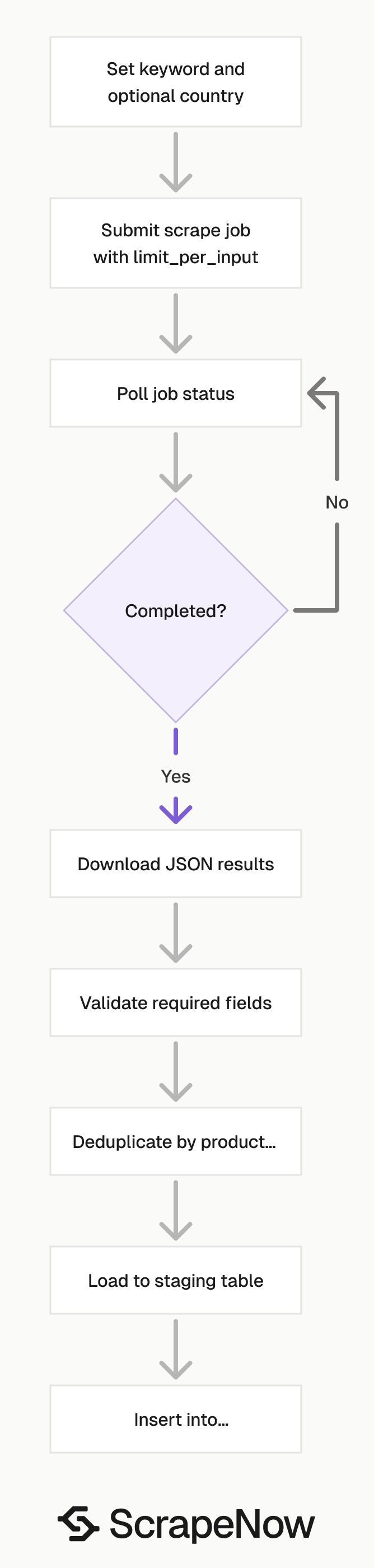
A practical flow looks like this:
- Save the API JSON response to raw storage
- Load parsed rows into staging
- Validate required fields and attribute parsing
- Deduplicate by
product_id - Insert or update production product tables
- Insert keyword appearances for the current run
This flow adds a small amount of code. It saves hours when a category introduces new attributes or a scheduled job needs a retry.
Keep raw storage append-only. If a transform bug reaches production, rerun the transform from the raw file. Do not rerun the scrape unless you need fresh Google Shopping data.
Watch for category-specific parsing rules
Google Shopping attributes change by product category. A single parser should handle missing fields, repeated keys, empty arrays, and values that contain additional punctuation.
Keep the parser permissive at ingestion time. Reject rows only when required fields are missing. Add category-specific cleanup after the raw attributes have landed in staging.
For example, guitar specs can use inches and pounds in plain strings. Laptop specs can mix memory, processor model, and storage in one attribute list. Shoe specs can include size ranges and gender labels.
Treat category cleanup as a separate transform. That keeps the scraper ingestion path stable while merchandising logic changes.
Use category-specific tables only after you have enough volume to justify them. A few thousand mixed products usually work better with key-value attributes. Category tables make sense when analysts query the same fields repeatedly.
Protect the pipeline from schema drift
Schema drift happens when a source adds, removes, or renames fields. Google Shopping category attributes change often enough to plan for it. Your loader should accept new description keys without a deploy.
Log unknown attributes into staging. Review them during QA and promote recurring keys into typed columns when they earn that treatment. This avoids turning every new attribute into a schema migration.
Keep required fields limited to fields your pipeline cannot run without. For this scraper, product_id, title, url, and scrape_status are the minimum set for most ingestion flows. Rating, review count, and images can be nullable.
Add basic run-level metrics
A production scrape should produce more than a JSON file. It should also produce run metrics that tell you whether the job behaved normally.
Track these counts:
| Metric | Why it matters |
|---|---|
input_count |
Confirms the scheduler sent the expected keyword and country rows |
result_count |
Shows how many product rows came back |
success_count |
Measures rows ready for staging or production |
failure_count |
Flags inputs that need retry review |
missing_product_id_count |
Catches rows that cannot dedupe safely |
empty_description_count |
Shows category or extraction changes that affect attribute parsing |
Store metrics beside the job ID. Alert on sharp changes rather than absolute numbers. Search results change naturally, but sudden drops usually deserve review.
Pricing
ScrapeNow charges per returned row. One row costs one credit, starting at $0.04 per credit for small runs and dropping with volume. No monthly contracts, no proxy fees, no charges for failed rows. See the pricing page for current rates.


