Crunchbase profile pages hydrate company fields after the first HTML response.
That implementation detail breaks lightweight scrapers. A requests.get() script fetches the page shell and misses funding rounds, founders, investors, categories, locations, and growth signals.
Crunchbase stores company profiles, funding history, investors, acquisitions, founders, categories, locations, and operating signals. Teams use that data for account enrichment, market maps, investor research, competitor tracking, and sales prospecting.
The Crunchbase API serves approved customers who need licensed Crunchbase data inside internal systems. ScrapeNow gives you scraper endpoints for public Crunchbase company data from search results or profile URLs, with browser execution, proxy routing, retries, and parsing handled behind the endpoint.
ScrapeNow offers two Crunchbase scrapers. The Crunchbase Companies Scraper guide covers both the Search Crunchbase companies and the Extract Crunchbase company data.
What data Crunchbase exposes
Crunchbase connects company identity, funding, leadership, investor, and acquisition data in one place. A company profile can include company name, website, headquarters, industries, operating status, employee range, total funding, investor names, founders, social links, and acquisition data.
Crunchbase says its data platform includes 600+ endpoints for funding data, firmographics, private market signals, and predictions. Its API product page cites 30M+ verified annual updates and seven prediction models, including models for funding rounds, acquisitions, IPOs, closures, layoffs, and high-growth companies.
Teams pull Crunchbase data for four common jobs:
| Job | Data pulled | Typical volume |
|---|---|---|
| Account enrichment | Company URL, category, funding, location, employee range | 1K to 100K companies |
| Investor research | Funding rounds, investors, lead investor, round size | 500 to 50K rounds |
| Market mapping | Companies by keyword, category, country, or funding stage | 5K to 250K profiles |
| Sales prospecting | Company name, website, description, founders, LinkedIn links | 1K to 1M records |
The official Crunchbase API fits approved teams that need licensed Crunchbase data inside internal tools. Scraping fits workflows that start from public search results, public profile URLs, analyst lists, or one-off enrichment files.
Those workflows start with different input shapes. API jobs usually start with an endpoint request, a saved query, or a licensed data feed.
Scraper jobs usually start with a keyword, a category, or a CSV of Crunchbase URLs. That input shape decides how much matching, deduplication, and analyst review you need later.
A keyword job creates a discovery problem. You need to decide which returned companies belong in the market, which names refer to subsidiaries, and which profiles overlap.
A URL job creates an enrichment problem. You already know the target profile, so the work moves to field coverage, null handling, and clean joins back to the source system.
Where the Crunchbase API fits
The official API is a read-only REST service for approved developers, according to Crunchbase's Using the API documentation. Crunchbase access depends on the package and fields included in your contract.
Use the official API when you have a data license, need contractual access, and want stable endpoints for production systems. It is the right path for teams loading Crunchbase data into CRMs, warehouses, scoring models, and customer-facing apps.
The API also works well when your data team needs repeatable field definitions. You get a documented access pattern, versioned endpoints, and a direct relationship with Crunchbase as the data provider.
Use a scraper when you need public company pages, keyword searches, or enrichment from URLs without waiting on API approval. Scrapers also fit short research projects where paying per extracted row beats committing to a larger API contract.
A scraper reduces setup work. You do not need to maintain browser sessions, tune proxy rotation, repair selectors, or normalize field names after every markup change.
That setup work becomes the project once volume increases. The first 500 profiles test selectors, and the next 50,000 profiles test retries, browser memory, rate control, and blocked-session recovery.
For an analyst queue, the API path often adds too much process. A scraper run lets the team test a market, export rows, inspect coverage, and decide whether the data deserves a licensed integration.
For an embedded product, the API path usually wins. Contract terms, field guarantees, and data usage rights matter when Crunchbase data appears inside a customer-facing workflow.
Scraping Crunchbase has real friction
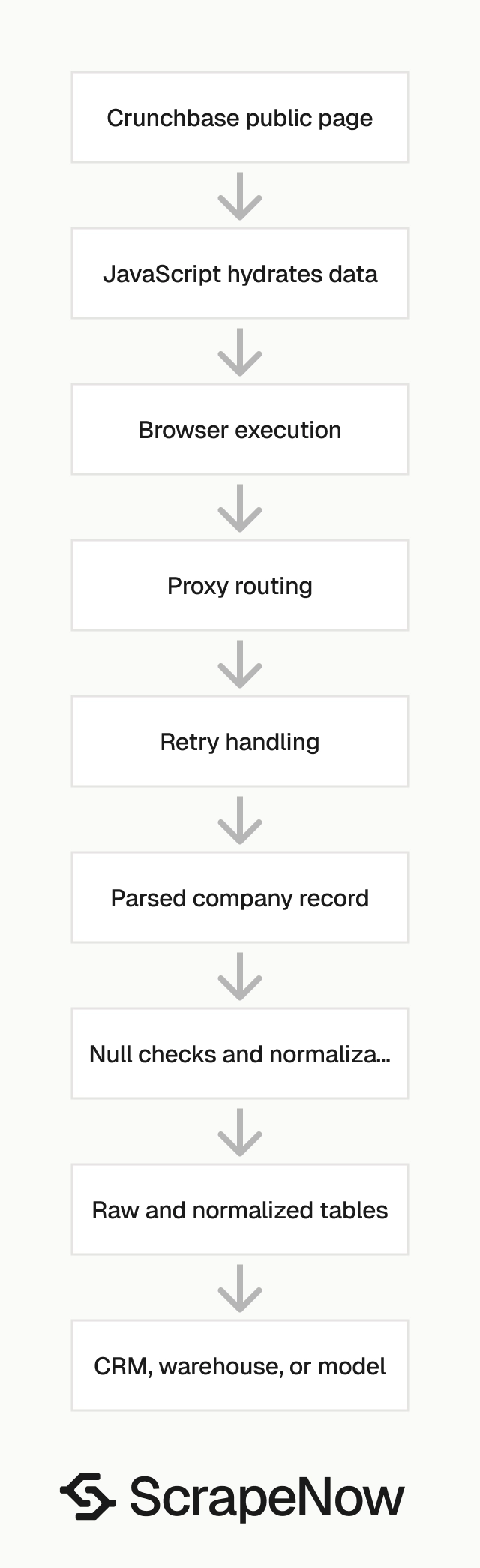
Crunchbase pages rely on JavaScript, client-side data loading, and markup that changes often. A script that reads static HTML with requests misses fields when the page hydrates data after load.
Login walls affect data access. Some public fields render in search and profile pages, while deeper company details require a logged-in session or paid Crunchbase access.
Rate limits and anti-bot checks appear quickly when you run keyword searches at scale. Crunchbase throttles repeated requests, challenges suspicious browser fingerprints, and blocks IPs that send too many requests from one network.
The expensive parts are session handling, browser fingerprinting, proxy rotation, retries, and field normalization. Parsing one page is the smallest part of the job.
A production scraper needs backoff rules, retry budgets, status logging, and failed-row replay. Without those pieces, a 1,000-row test passes and a 100,000-row run produces gaps.
Field consistency also takes work. Company names, locations, funding amounts, employee ranges, and investor names need normalization before they join cleanly to CRM or warehouse records.
The failure mode is predictable. Your first script returns rows, your second run hits throttling, and your third run creates duplicates because Crunchbase changed one label or pagination pattern.
The next failure happens inside the data model. A company changes its domain, a profile uses an acquired brand name, or a location field shifts from city-level to region-level.
Those changes do not break the HTTP request. They break the join logic that sends a funded startup to the correct account owner, market map, or scoring table.
ScrapeNow's Crunchbase scrapers
ScrapeNow has two Crunchbase scrapers for the workflows teams run most often. One starts from a keyword search, and the other starts from known company profile URLs.
Both scrapers return structured records. You send the input, run the job, and store the returned rows in your system.
ScrapeNow handles browser execution, proxy routing, retries, and parser maintenance behind the endpoint. Your application receives normalized fields instead of HTML, screenshots, and partial page state.
The two scrapers share the same operating model. You provide the input, ScrapeNow runs the extraction job, and each returned record costs 1 credit.
ScrapeNow does not require your Crunchbase login for these scraper endpoints. The scrapers extract public page data, so paywalled fields and fields hidden behind account access stay outside the response.
That limit matters for planning. Treat ScrapeNow scrapers as public web data extraction endpoints, then use the official API when your workflow requires licensed Crunchbase fields.
ScrapeNow also separates discovery from enrichment. That split keeps keyword result expansion away from URL-level enrichment, which makes pipeline behavior easier to debug.
Crunchbase Companies Search by Keyword
The Search Crunchbase companies extracts company records from Crunchbase search queries. Use it when you want companies matching terms like AI security, fintech lending, carbon accounting, or B2B SaaS.
It returns structured company data from matching Crunchbase results. That saves you from building search pagination, retries, proxy rotation, browser execution, and field cleanup.
For request setup and field coverage, read the detailed guide with code examples. Use that guide when you want to wire the scraper into a script, dashboard job, or data pipeline.
This scraper fits market maps, lead lists, category research, and investor pipeline sourcing. If you need 10K companies matching a market theme, start with keyword search.
A common workflow starts with broad terms, then filters by location, category, funding stage, or employee range. After that, your team exports selected Crunchbase profile URLs for deeper enrichment.
Keyword search also works when your source data has no Crunchbase links. Start with a market term, review the returned profiles, and pass approved URLs into the URL extraction scraper.
For example, a VC platform team can search developer tools observability and review the first returned batch. Analysts remove public companies, agencies, and irrelevant infrastructure vendors before paying for deeper enrichment.
That workflow outcome is a cleaner seed list. The scraper does the repetitive collection work, and analysts spend their time deciding which companies belong in the market.
Crunchbase Companies Extract by URL
The Extract Crunchbase company data extracts data from specific Crunchbase company profile URLs. Use it when you already have a company list and need normalized fields back.
This scraper is the stronger fit for enrichment jobs. Feed it Crunchbase URLs from your CRM, warehouse, search results, or internal lead database.
The returned company records can sit next to your existing account data. That makes the join cleaner because every input row maps to a known Crunchbase profile.
For setup details, the Crunchbase Companies Scraper guide walks through the data model and usage patterns. Use URL extraction when precision matters more than discovery.
URL extraction also works well after a manual review step. Analysts can approve a smaller set of companies, then enrich only the records worth storing.
This pattern reduces downstream cleanup. You already know the target profile, so your pipeline spends less time resolving duplicate names, old domains, and lookalike companies.
For example, a RevOps team can export 80K CRM accounts with stored Crunchbase URLs. URL extraction returns one profile per input URL, which keeps owner assignments and territory rules tied to the original account IDs.
That workflow outcome is a cleaner backfill. Your data team spends less time resolving matches and more time validating null rates, field formats, and scoring rules.
Request example for URL extraction
Use the URL extraction scraper when your input file already contains Crunchbase profile links. The request shape below shows the pattern.
Use the exact REST endpoint and parameter names shown in your ScrapeNow dashboard if your account displays a different route.
curl -X POST "https://api.scrapenow.io/api/v1/scraping/scrape?scraper=crunchbase-companies-extract-by-url" \
  -H "Authorization: Bearer $SCRAPENOW_API_KEY" \
  -H "Content-Type: application/json" \
  -d '{
    "urls": [
      "https://www.crunchbase.com/organization/openai",
      "https://www.crunchbase.com/organization/stripe"
    ]
  }'
A typical response gives you one structured object per company profile. Store the raw payload and your normalized version.
{
  "status": "completed",
  "records": [
    {
      "input_url": "https://www.crunchbase.com/organization/openai",
      "crunchbase_url": "https://www.crunchbase.com/organization/openai",
      "company_name": "OpenAI",
      "website": "https://openai.com",
      "headquarters": "San Francisco, California, United States",
      "industries": ["Artificial Intelligence", "Machine Learning", "Software"],
      "operating_status": "Active",
      "employee_range": "1001-5000",
      "total_funding": "$11.3B",
      "founders": ["Greg Brockman", "Ilya Sutskever", "Sam Altman"],
      "investors": ["Microsoft", "Thrive Capital", "Khosla Ventures"],
      "linkedin_url": "https://www.linkedin.com/company/openai",
      "scraped_at": "2026-05-31T10:15:30Z"
    }
  ]
}
Field coverage depends on what Crunchbase exposes on the public page at extraction time. Treat missing values as normal data quality events and log them with the source URL.
For production runs, add your own source_record_id to each input row. That ID lets you join the returned profile to the original CRM account, warehouse row, or analyst spreadsheet.
Also store the request batch ID from your side. If a downstream import fails, you can replay the same source rows and compare the returned payloads against the previous run.
Do not overwrite the original input URL. Keep input_url, crunchbase_url, and your internal record ID as separate fields, because redirects and canonical profiles change over time.
Which Crunchbase scraper to use
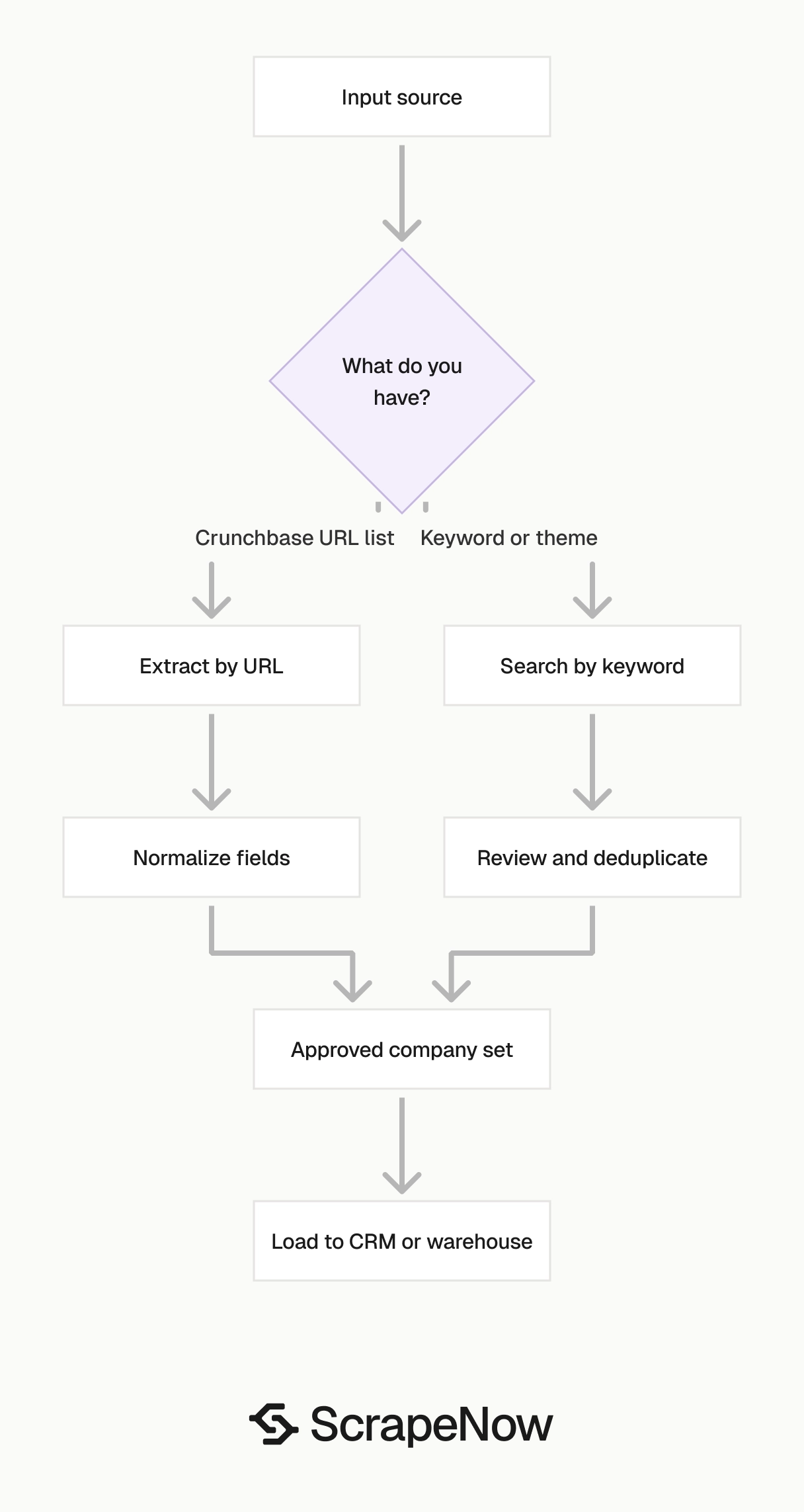
Pick the scraper based on your input data. The incorrect choice creates extra joins, duplicate cleanup, and manual review later.
| You have | Use this scraper | Why |
|---|---|---|
| A market keyword | Companies Search by Keyword | Finds matching companies from Crunchbase search |
| A category or niche | Companies Search by Keyword | Fits market maps and prospect lists |
| A list of Crunchbase URLs | Companies Extract by URL | Enriches known companies directly |
| A CRM account list with Crunchbase links | Companies Extract by URL | Keeps matching clean |
| A seed list from search results | Both | Search finds companies, URL extraction enriches selected profiles |
For example, a VC analyst mapping AI infrastructure startups should start with keyword search. The analyst can filter the result set, then run URL extraction on companies worth deeper review.
A RevOps team with 80K accounts and existing Crunchbase links should skip search and use URL extraction. That keeps the job to one row per known profile and avoids duplicate company matching.
A data team building a market map can use both scrapers in sequence. Search builds the first list, and URL extraction refreshes the final set before the data goes into a warehouse.
A sales team working from CRM records should avoid keyword discovery unless the account list lacks Crunchbase links. Direct URL extraction keeps account ownership, territory rules, and existing IDs intact.
A growth team running account scoring should keep the scraper choice tied to the scoring input. If the score starts from named accounts, extract by URL and preserve account IDs.
A private equity team building a sector screen should start with keyword search when it lacks a canonical account list. After analyst review, URL extraction creates a stable dataset for scoring and outreach.
A customer success team enriching installed-base accounts should start with URL extraction. The source records already exist, so discovery creates duplicate work and weaker joins.
Pricing
ScrapeNow charges per returned row. One row costs one credit, starting at $0.04 per credit for small runs and dropping with volume. No monthly contracts, no proxy fees, no charges for failed rows. See the pricing page for current rates.
Crunchbase API versus ScrapeNow scrapers
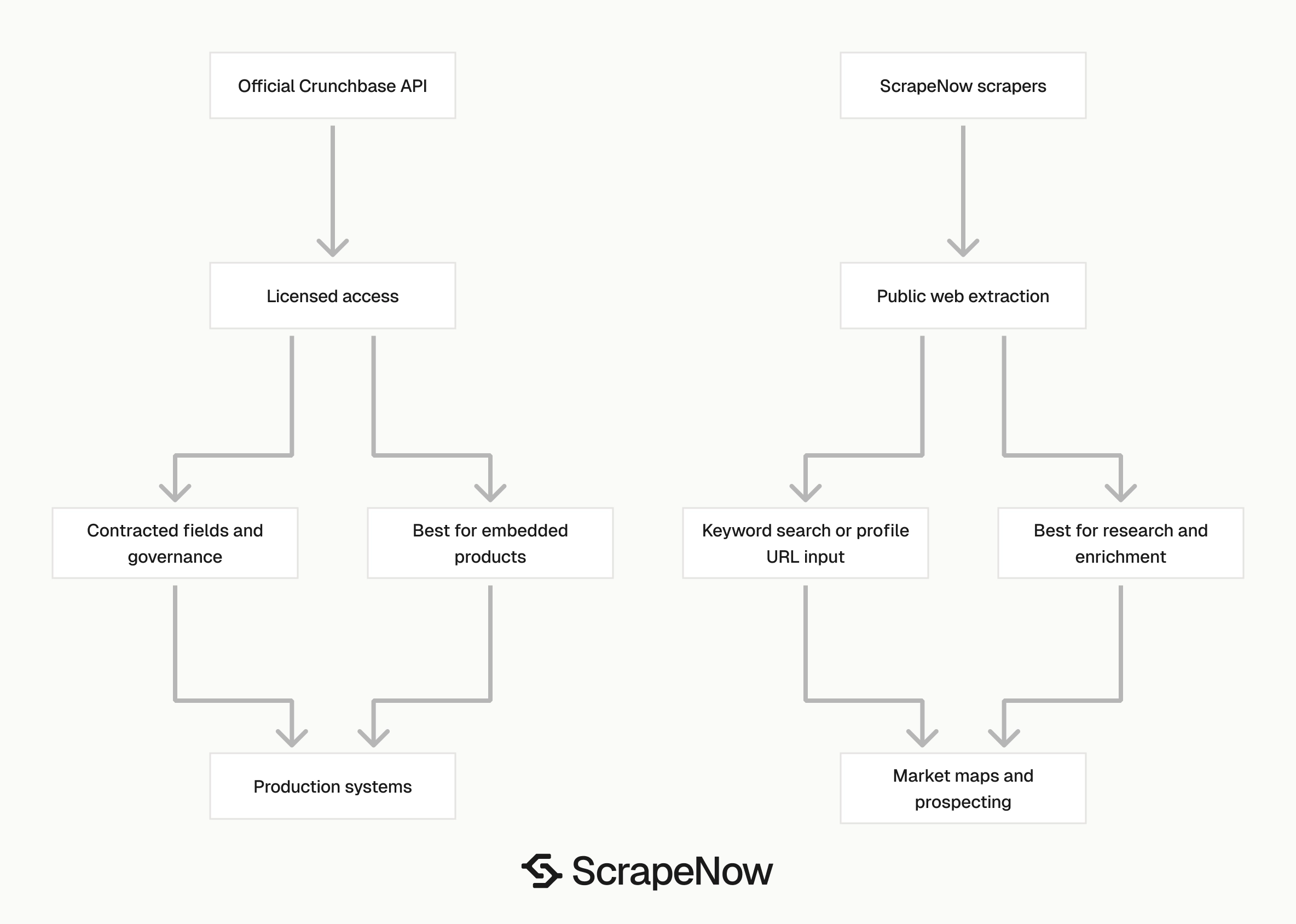
The official Crunchbase API and ScrapeNow's Crunchbase scrapers serve different build paths. The API gives licensed data access through Crunchbase.
ScrapeNow extracts public Crunchbase web data through purpose-built scrapers. Use it when the job starts from public search results, public profile URLs, or short research queues.
| Requirement | Crunchbase API | ScrapeNow Crunchbase scrapers |
|---|---|---|
| Access model | Approved API package | Self-serve scraper run |
| Data source | Licensed Crunchbase API data | Public Crunchbase web data |
| Best input | API query or endpoint request | Keyword or company URL |
| Setup time | Sales and API access flow | Run from dashboard or REST API |
| Billing shape | Contract or package based | Per row, 1 credit per result |
| Best fit | Licensed app integrations | Prospecting, enrichment, research, market maps |
If your team has a Crunchbase contract and needs guaranteed package fields, use the official API. If your team needs public company data from searches or profile URLs this week, use a scraper.
The API gives you a formal data relationship and package-defined access. Scrapers give you faster setup for public data extraction and one-off research runs.
For production systems, choose based on governance as much as engineering effort. Legal, procurement, and data ownership rules often decide the API path for embedded products.
For analyst-led research, enrichment backfills, and short market studies, scraper endpoints remove weeks of setup. The team can run the job, inspect returned rows, and decide whether the dataset deserves more investment.
Use the Crunchbase Companies Scraper guide for the full implementation details. It covers the field model, request flow, and workflow notes for both ScrapeNow Crunchbase endpoints.
A clean decision rule works in practice. Use the API for licensed system-of-record data, and use ScrapeNow scrapers for public web extraction jobs with clear row counts.
That rule also keeps engineering work focused. Your team should not build browser infrastructure for a one-time market map, and it should not use public scraping for a contracted data product.
Data quality checks before you ship
Normalize company URLs before you join Crunchbase data to your CRM or warehouse. Strip tracking parameters, lowercase domains, and store both the Crunchbase URL and company website.
Deduplicate by Crunchbase profile URL first. Then deduplicate by website domain because companies can appear under old names, acquired brands, or subsidiaries.
Track extraction timestamps. Funding data, employee ranges, and operating status change over time, so every saved record needs a scraped_at field in your database.
Keep raw records for replay. Your normalized schema will change after the first few runs, and raw payloads prevent repeat scraping for the same 50K companies.
Store the input that produced each record. For keyword search, keep the search term, run ID, and page context.
For URL extraction, keep the source system and source record ID. Those fields let you trace an incorrect join back to the source row.
Add validation checks before loading records into production tables. Reject empty company names, malformed domains, missing Crunchbase URLs, and records with impossible funding values.
Use separate tables for raw payloads and normalized entities. Raw data preserves the original response, while normalized tables support joins, filters, and reporting.
Log failed rows with reason codes. A failure caused by a malformed URL needs a different fix than a failure caused by access limits or a temporary browser error.
Also log field-level null rates. If 35 percent of returned profiles lack employee range, your scoring model should treat that field as optional.
Create a small exceptions table for analyst review. Store the record ID, source URL, failure reason, and suggested fix so cleanup does not happen inside Slack threads.
Version your normalized schema. Add fields with explicit migration notes, because funding and investor fields often change after the first few enrichment runs.
Common workflow patterns
A market mapping run usually starts with three to five keyword searches. Analysts merge the results, remove duplicates, and score companies by category, location, funding stage, and investor fit.
An account enrichment run starts with known records. The data team sends Crunchbase profile URLs, receives normalized company fields, and joins the output to CRM account IDs.
An investor research run starts from companies or funding themes. The team pulls companies by keyword, filters the list, and reviews funding fields and investor names.
A competitor tracking run runs on a schedule. The team stores previous records, compares new fields against old values, and flags changes in funding, operating status, or acquisition data.
Each pattern needs a different input strategy. Search is for discovery, and URL extraction is for enrichment.
Combining both works when discovery creates a smaller approved list. That pattern keeps analysts in control of the final company set before the enrichment spend starts.
For market mapping, save every keyword that produced a company. A company found through AI infrastructure and MLOps carries a stronger category signal than a company found once.
For account enrichment, preserve the CRM account ID through every step. If the enrichment output loses that ID, the data team has to rebuild the match after extraction.
For investor research, separate company-level fields from funding-event fields. Company headquarters and employee range belong on the company table, while round date and lead investor belong on the funding table.
For competitor tracking, compare new values against the last stored snapshot. Store changes as events so analysts can see when a company added funding, changed status, or updated its category.
Implementation notes for production jobs
Start every run with a small validation batch. A few hundred rows will show you missing fields, duplicate profiles, and malformed input URLs before the full run starts.
Use a stable run ID for every job. Store that ID in raw records, normalized records, logs, and downstream exports.
Keep the input file immutable after submission. If an analyst changes a CSV during the run, your output review becomes harder than the extraction itself.
Set expected row counts before the job starts. For URL extraction, the expected maximum equals your input URL count.
For keyword search, the expected count depends on the search term and filter set. Run a sample search and record the returned volume before scheduling a large export.
Review company identity fields before using funding or employee range in scoring. An incorrect company match creates cleaner-looking data and worse decisions.
Join on Crunchbase URL whenever you have it. Join on domain only after normalization, and keep the original domain for audit work.
Add a retry policy around your own downstream writes. ScrapeNow returns the extracted records, and your database, queue, or warehouse load still needs failure handling.
Keep extraction and loading separate. Save the raw response first, then transform and load it into normalized tables after validation passes.
Use idempotent writes. If you replay a failed job, the same source_record_id and crunchbase_url pair should update the existing row instead of creating a duplicate.
Alert on sudden field coverage changes. A large drop in website, funding, or employee range coverage deserves review before the data reaches sales or scoring workflows.
Document the exact scraper endpoint and input parameters for each scheduled job. Six months later, that note saves time when a team asks why two datasets contain different company counts.
Practical data model for Crunchbase scraper output
A simple schema keeps most teams out of trouble. Use one raw table, one company table, and one run table before you add specialized funding or investor tables.
The raw table should store the full scraper response. Include the run ID, input URL or keyword, returned payload, status, error reason, and extraction timestamp.
The company table should store normalized fields. Include Crunchbase URL, company name, website domain, headquarters, industries, operating status, employee range, total funding, and social links.
The run table should store job metadata. Include the scraper name, input type, submitted row count, returned row count, credit count, owner, and completion time.
For keyword search, add a result table that links keywords to company URLs. That table explains why a company entered the market map and supports later analyst review.
For URL extraction, add a source mapping table. Store your CRM account ID, warehouse entity ID, source file name, and Crunchbase URL in the same row.
This structure prevents one common mistake. Teams often merge discovery metadata and company metadata into one spreadsheet, then lose the source context during cleanup.
Compliance and usage boundaries
ScrapeNow's Crunchbase scrapers extract public web data exposed on Crunchbase pages. They do not give you licensed API fields, private account data, or access to fields behind your Crunchbase subscription.
Review Crunchbase terms and your internal data policies before sending extracted data into production systems. Legal review matters when the dataset feeds customer-facing products, scored leads, or automated decisions.
Keep usage purpose clear. A one-time analyst market map has a different risk profile than a resold dataset or embedded product feature.
Respect deletion and correction workflows in your own systems. If a company record changes, your stored snapshot should have a timestamp and a path for refresh.
Use the official Crunchbase API when your contract requires it. Use scraper endpoints for public data collection tasks where a row-based extraction job fits the workflow.
Use the scraper that matches the file in front of you
Use Search Crunchbase companies if you are discovering companies from a market, category, or theme. Use Extract Crunchbase company data if you already have Crunchbase profile links and need enrichment.
Run a specific test before committing the full job. For enrichment, open Extract Crunchbase company data, upload 100 CRM records with Crunchbase URLs, and include your internal source_record_id.
Check four numbers from that test run. Review returned row count, duplicate Crunchbase URLs, field-level null rates, and join accuracy back to your CRM export.
For discovery, open Search Crunchbase companies and run one narrow market term before a broad export. Inspect the first returned batch, remove irrelevant companies, and pass approved profile URLs into URL extraction.