Crunchbase company pages load data through JavaScript after the initial HTML response, which breaks simple HTTP scrapers.
The Crunchbase Companies Scraper extracts profile data from Crunchbase organization pages. It returns name, URL, rank, industries, employee range, location, website, social links, featured-list metadata, UUID, active technology count, and operating status.
Use it for CRM enrichment, lead list building, investment research, market mapping, company dataset backfills, and research queues. The output is structured JSON, so your loader can send records into Postgres, BigQuery, Snowflake, S3, or a CRM queue.
How to use this scraper
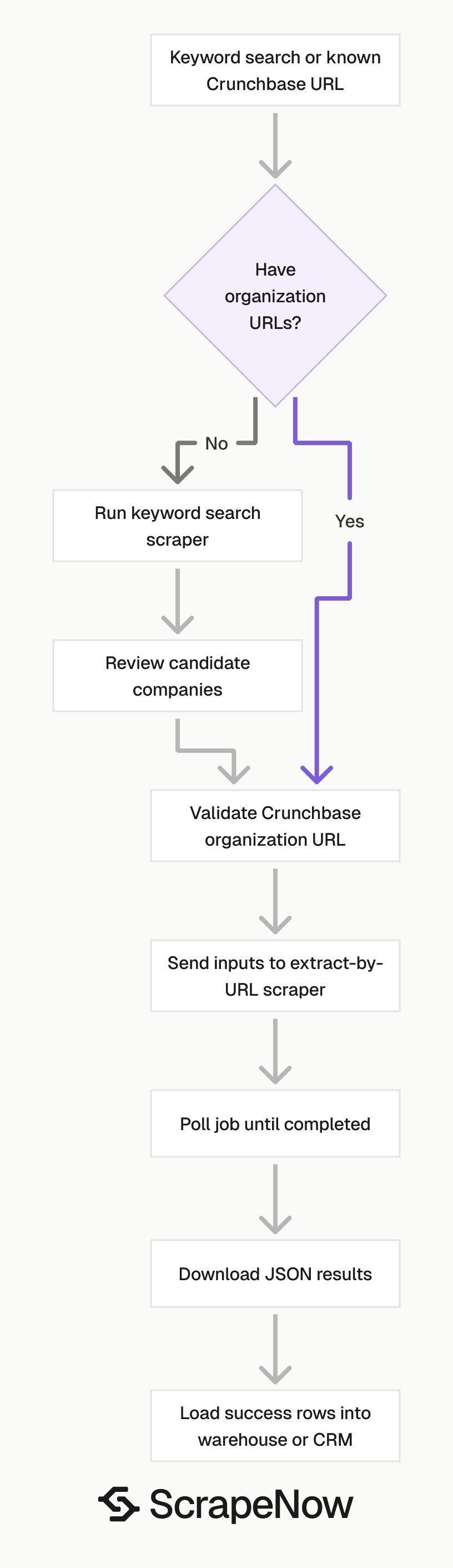
ScrapeNow has two Crunchbase company scrapers for this workflow.
| Scraper | Use it when | Input |
|---|---|---|
| Extract Crunchbase company data | You already have Crunchbase organization URLs | url |
| Search Crunchbase companies | You want to search Crunchbase by a term like Music Venues |
keyword |
The extract-by-URL scraper is the direct path for enrichment jobs. Feed it known company URLs and get one structured company record per input.
The keyword search scraper works for discovery. Search by keyword, collect matching organizations, then pass selected company URLs into the URL extractor.
Use the search scraper to build a candidate list. Use the URL extractor to enrich the companies you plan to store, score, contact, or analyze.
For adjacent Crunchbase workflows, use the Browse all 86+ scrapers. The catalog lists ready-made extractors you can pair with company enrichment, including people, investor, and search workflows.
Keep those related records in the same data model when they support the same account, investor, or market research workflow. That makes joins predictable when analysts connect companies to people, investors, funding lists, and search results.
Step 1. Get the Crunchbase company URL
For the Crunchbase Companies Extract by URL scraper, the input variable is url.
The URL must point to a direct Crunchbase company page. It must start with https://www.crunchbase.com/.
Open Crunchbase in your browser.
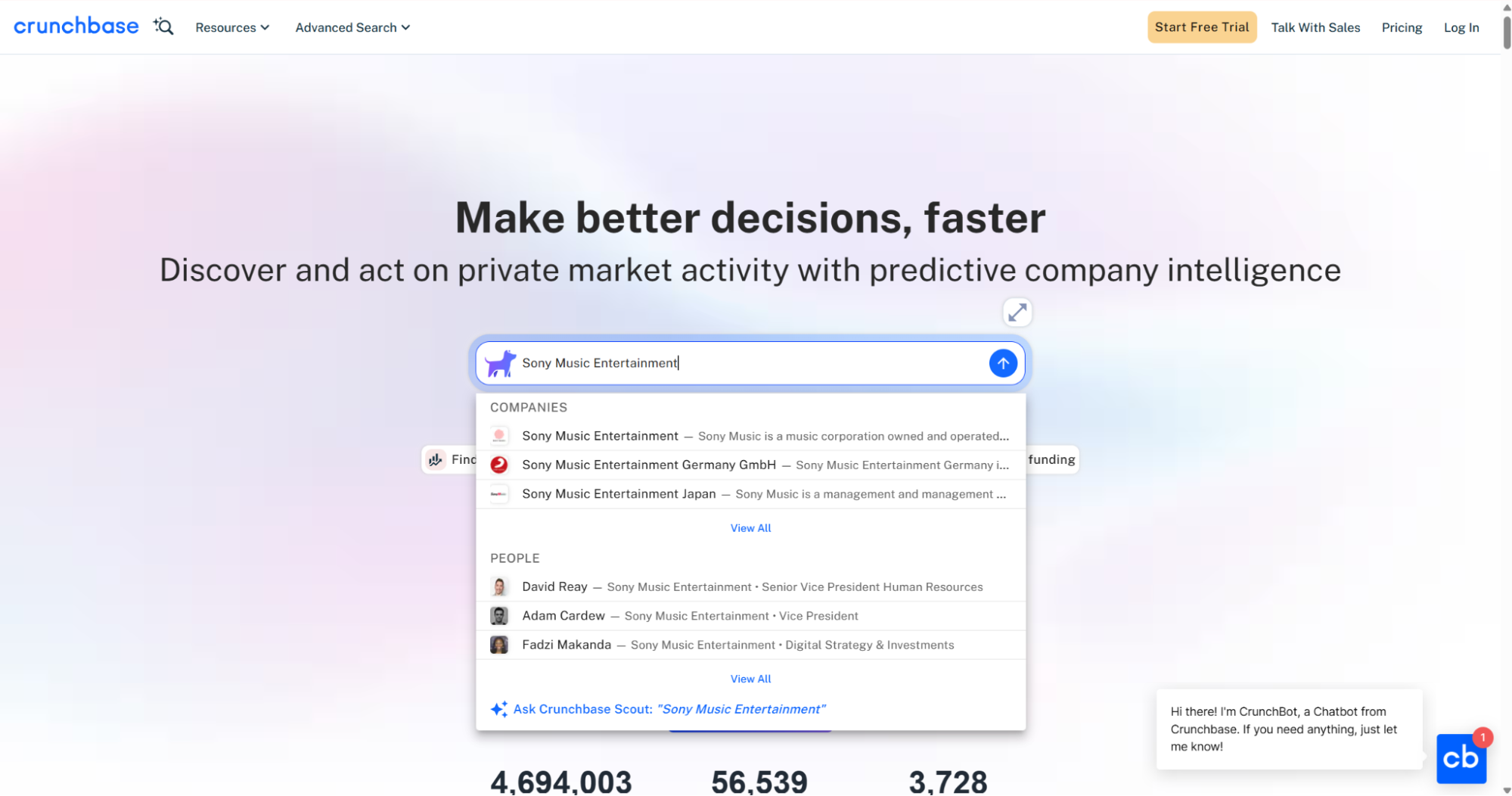
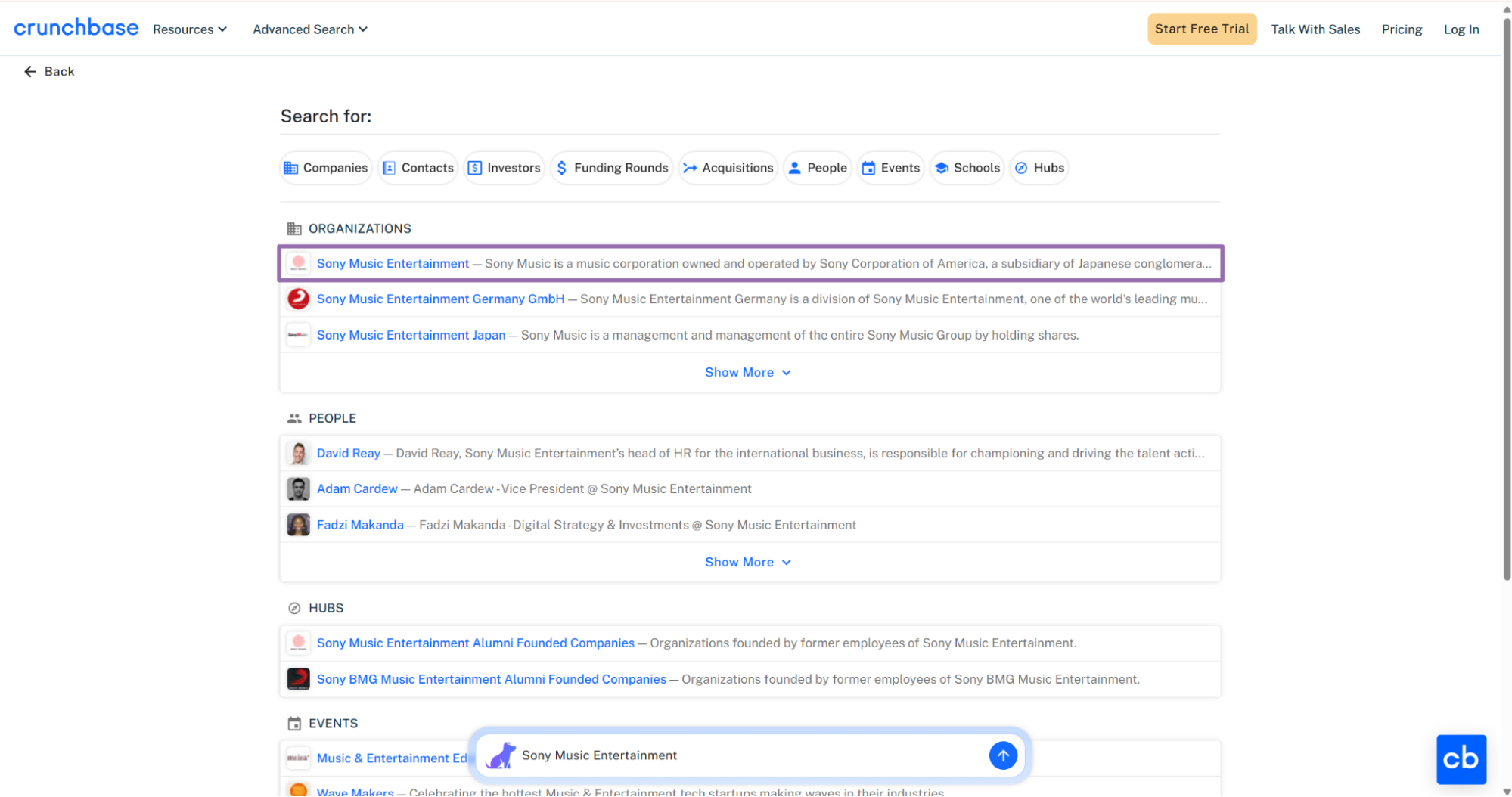
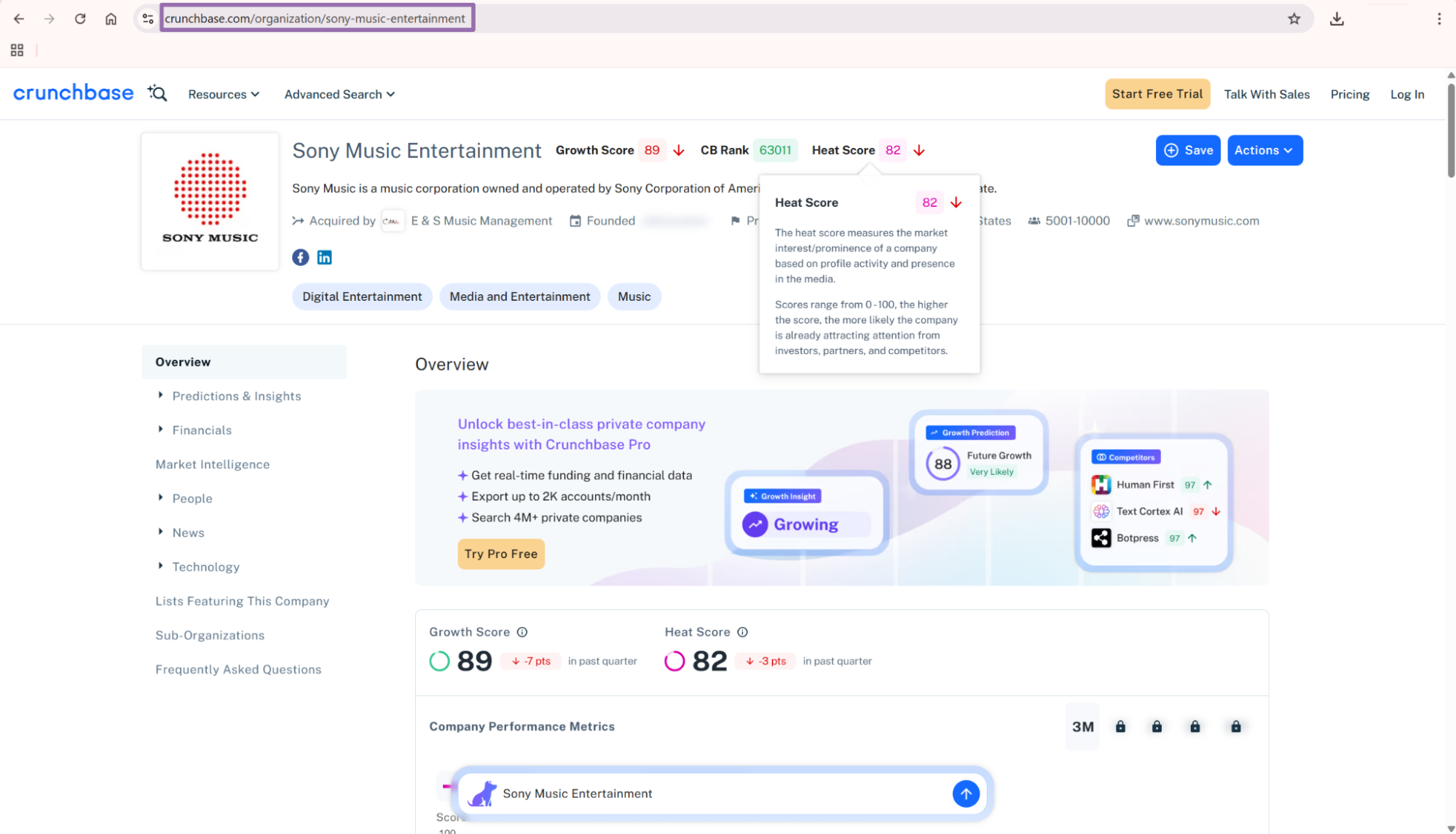
For Sony Music Entertainment, the input value is:
{
  "url": "https://www.crunchbase.com/organization/sony-music-entertainment"
}
Send only organization URLs to this scraper. Person pages, investor pages, hub pages, and acquisition pages belong in separate workflows.
A valid organization URL follows this pattern:
https://www.crunchbase.com/organization/{company-slug}
Reject anything outside that pattern before it reaches the API. That single check prevents wasted credits from pasted profile URLs, search result URLs, and internal admin links.
Keep URL validation close to the input source. If a CSV upload feeds the job, validate the CSV before you create the API payload.
Step 2. Use keyword search when you do not have company URLs
For the Crunchbase Companies Search by Keyword scraper, the input variable is keyword.
Use a search term like Music Venues, AI infrastructure, or FinTech.
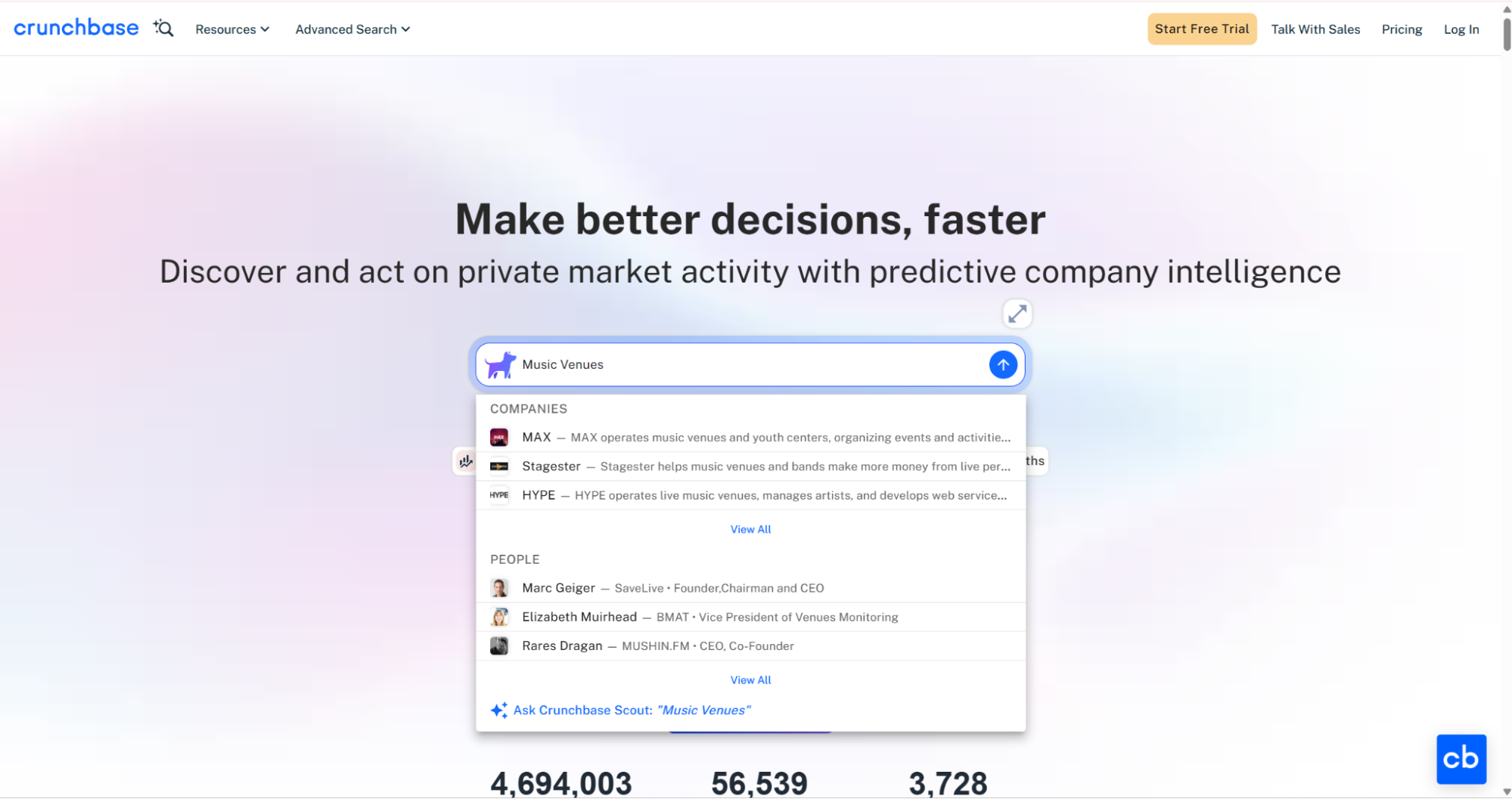
{
  "keyword": "Music Venues"
}
The same API pattern works for the other scrapers in this group, including Search Crunchbase companies. Change the scraper slug and input values in the code for each scraper.
Keyword search returns organizations that match the term. Store the returned Crunchbase URLs, review the list, then enrich the companies you need with the URL extractor.
A practical discovery run has two stages. Pull broad search results first, then send approved organization URLs into the extractor.
That separation keeps your warehouse cleaner. Search results often include companies that share a keyword without matching your target market.
For example, a search for Music Venues can return ticketing companies, media brands, promoters, and local venue operators. Review candidates before enrichment so your CRM does not mix suppliers, buyers, and unrelated publishers.
Step 3. Run the scraper through the API
Use this Python script. Replace YOUR_API_KEY with your ScrapeNow API key.
The script starts a job, polls until completion, downloads JSON results, and writes them to disk.
"""
Configuration:
    - Set SCRAPER_SLUG to the scraper you want to run.
    - Set SCRAPER_INPUTS to the list of input dicts matching that scraper's schema.
    - Set API_KEY to your scraper API key.
"""

import sys
import time
import json
import requests
import os

API_KEY = "YOUR_API_KEY"

SCRAPER_SLUG = "crunchbase-companies-extract-by-url"

SCRAPER_INPUTS = [
    {
        "url": "https://www.crunchbase.com/organization/sony-music-entertainment"
    }
]


BASE_URL = "https://api.scrapenow.io/api/v1/scraping"
TIMEOUT_SECONDS = 3600
POLL_INTERVAL = 5
SPINNER = "|/-\\"


def build_headers(api_key: str, content_type: str | None = None) -> dict:
    headers = {"Authorization": f"Bearer {api_key}"}
    if content_type:
        headers["Content-Type"] = content_type
    return headers


def trigger_scrape(slug: str, inputs: list[dict]) -> str:
    url = f"{BASE_URL}/scrape?scraper={slug}"
    response = requests.post(
        url,
        headers=build_headers(API_KEY, "application/json"),
        json={"inputs": inputs},
    )
    response.raise_for_status()
    return response.json()["data"]["job_id"]


def poll_until_done(job_id: str) -> str:
    start = time.time()
    i = 0
    while True:
        elapsed = time.time() - start
        if elapsed > TIMEOUT_SECONDS:
            print(f"\nTimeout after {TIMEOUT_SECONDS}s")
            sys.exit(1)
        response = requests.get(
            f"{BASE_URL}/jobs/{job_id}",
            headers=build_headers(API_KEY),
        )
        response.raise_for_status()
        data = response.json()
        status = data["data"]["status"]
        mins, secs = divmod(int(elapsed), 60)
        sys.stdout.write(
            f"\r[{SPINNER[i % 4]}] Waiting... {status} ({mins}m {secs:02d}s)  "
        )
        sys.stdout.flush()
        if status in ("completed", "failed"):
            print()
            return status
        time.sleep(POLL_INTERVAL)
        i += 1


def fetch_results(job_id: str) -> dict:
    response = requests.get(
        f"{BASE_URL}/jobs/{job_id}/results?format=json",
        headers=build_headers(API_KEY),
    )
    response.raise_for_status()
    return response.json()


def save_results(data: dict, slug: str) -> str:
    os.makedirs("output", exist_ok=True)
    filename = os.path.join("output", f"{slug}.json")
    with open(filename, "w", encoding="utf-8") as f:
        json.dump(data, f, indent=2, ensure_ascii=False)
    return filename


def main() -> None:
    print(f"Triggering scraper: {SCRAPER_SLUG}")
    job_id = trigger_scrape(SCRAPER_SLUG, SCRAPER_INPUTS)
    print(f"Job started: {job_id}")
    final_status = poll_until_done(job_id)
    if final_status != "completed":
        print(f"Job failed with status: {final_status}")
        sys.exit(1)
    print("Fetching results...")
    results = fetch_results(job_id)
    output_file = save_results(results, SCRAPER_SLUG)
    print(f"Results saved to: {output_file}")


if __name__ == "__main__":
    main()
The script performs 4 operations.
- Starts a scraping job with
POST /scrape - Polls the job every
5seconds - Stops after
3600seconds if the job does not finish - Downloads results as JSON and writes them to
output/{the scraper slug}.json
For batch jobs, add more objects to SCRAPER_INPUTS.
SCRAPER_INPUTS = [
    {"url": "https://www.crunchbase.com/organization/sony-music-entertainment"},
    {"url": "https://www.crunchbase.com/organization/spotify"},
    {"url": "https://www.crunchbase.com/organization/universal-music-group"},
]
Keep each input as a separate object. That makes row-level retries easier when one company fails and the rest of the batch succeeds.
For large enrichment runs, store the input list before you send it. The saved input file becomes your replay source if a job stops, a network request fails, or your downstream loader rejects rows.
Keep the input file immutable once the run starts. If you change the file mid-run, your retry logs stop matching the original request.
Add a client-side request ID if your internal job runner supports one. Store it with the ScrapeNow job_id so support, billing, and data teams can trace the same run.
Step 4. Read the JSON output
A successful job returns one result object per input.
[
  {
    "inputs": {
      "url": "https://www.crunchbase.com/organization/sony-music-entertainment"
    },
    "scrape_status": "success",
    "name": "Sony Music Entertainment",
    "url": "https://www.crunchbase.com/organization/sony-music-entertainment",
    "id": "sony-music-entertainment",
    "cb_rank": 62605,
    "region": "New York",
    "about": "Sony Music is a music corporation owned and operated by Sony Corporation of America, a subsidiary of Japanese conglomerate.",
    "industries": [
      {
        "id": "digital-entertainment",
        "value": "Digital Entertainment"
      },
      {
        "id": "media-and-entertainment",
        "value": "Media and Entertainment"
      },
      {
        "id": "music",
        "value": "Music"
      }
    ],
    "operating_status": "active",
    "company_type": "for_profit",
    "social_media_links": [
      "http://www.facebook.com/sonymusic",
      "http://in.linkedin.com/company/sony-music-entertainment",
      "https://x.com/SonyMusicGlobal"
    ],
    "num_employees": "5001-10000",
    "country_code": "United States",
    "website": "http://www.sonymusic.com",
    "contact_phone": "(493) 013-8880",
    "featured_list": [
      {
        "org_funding_total": {
          "currency": "USD",
          "value": 38687712975,
          "value_usd": 38687712975,
          "formatted_value": "$38.69B"
        },
        "org_num": 307,
        "org_num_investors": 127,
        "title": "Corporate VC Investors with Investments in Germany"
      },
      {
        "org_funding_total": {
          "currency": "USD",
          "value": 375330551710,
          "value_usd": 375330551710,
          "formatted_value": "$375.33B"
        },
        "org_num": 1810,
        "org_num_investors": 1495,
        "title": "Investors Active in Santa Monica, California"
      },
      {
        "org_funding_total": {
          "currency": "USD",
          "value": 1540852018126,
          "value_usd": 1540852018126,
          "formatted_value": "$1.54T"
        },
        "org_num": 3759,
        "org_num_investors": 4235,
        "title": "East Coast Companies With More Than $500 in Revenue"
      },
      {
        "org_funding_total": {
          "currency": "USD",
          "value": 283114728244,
          "value_usd": 283114728244,
          "formatted_value": "$283.11B"
        },
        "org_num": 3496,
        "org_num_investors": 3201,
        "title": "Media and Entertainment Companies that Exited"
      }
    ],
    "full_description": "Sony Music is a United States music corporation owned and operated by Sony Corporation of America, a subsidiary of Japanese conglomerate Sony Corporation. It is a global music company with a roster of current artists that includes both local and international superstars, as well as a vast catalog that comprises some of the most important recordings in history.",
    "type": "company",
    "uuid": "65eb0c9f-e312-ec5b-b281-813ef1c522a0",
    "active_tech_count": 60

    ... truncated ...
  }
]
Read scrape_status before you load the row. A completed API job can contain row-level failures, so treat each result object as its own unit of work.
The inputs object stays attached to each row. Keep it in storage because it tells you which URL produced the record.
Retain the original URL after deduplication. You need that URL later when a data owner asks why a record exists.
Store the raw result and the normalized record together. The raw payload preserves source context, and the normalized row gives your warehouse predictable columns.
What data you get back
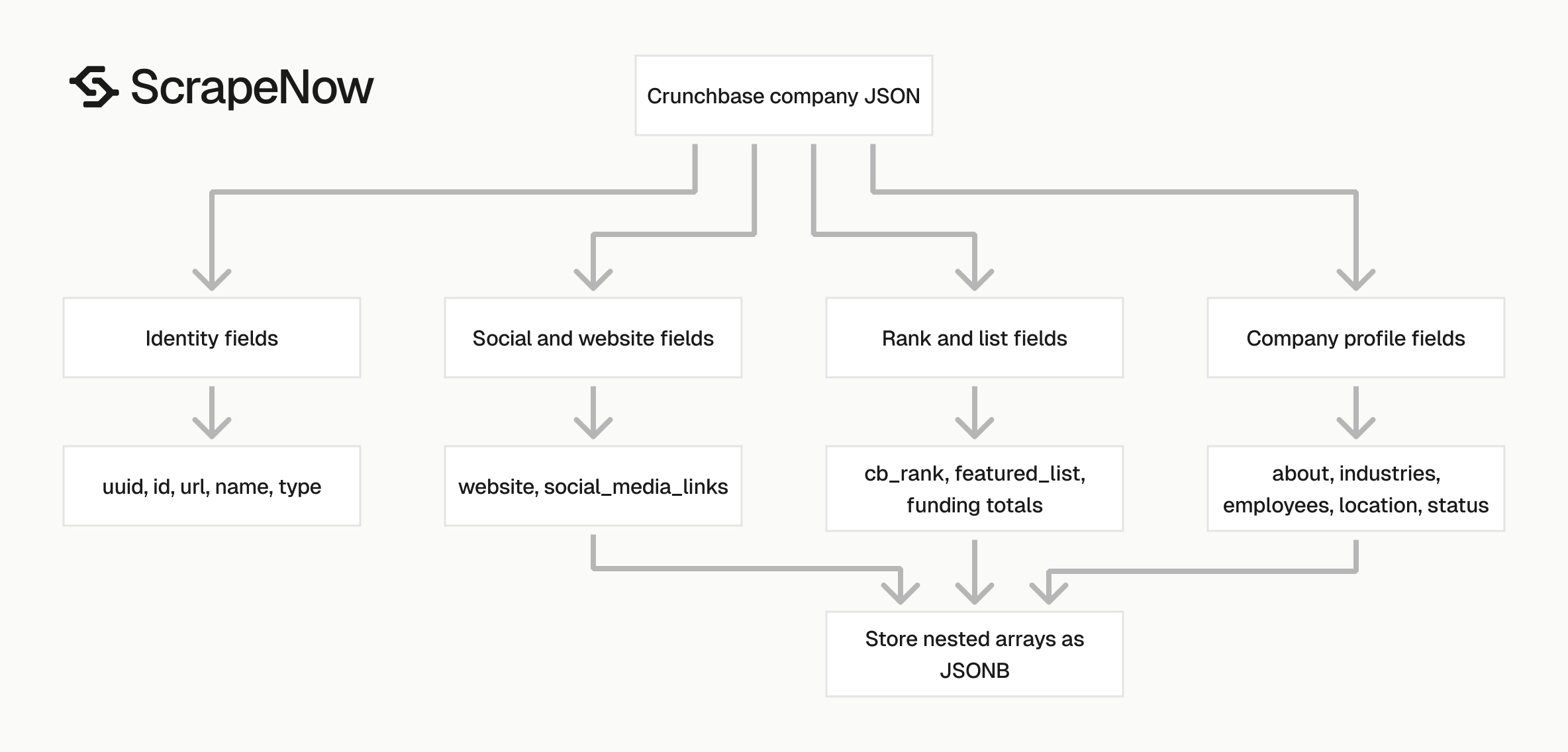
The Crunchbase company response is already shaped for downstream storage. You can write it into Postgres, BigQuery, Snowflake, S3, or a CRM enrichment queue without scraping HTML yourself.
The record has three groups that matter in production. Identity fields drive deduplication, profile fields enrich the company, and nested fields preserve relationships.
Plan your schema around those groups. That keeps ingestion simple while leaving room for reporting tables later.
Identity fields
Use these fields as your primary identifiers.
| Field | Example | Use |
|---|---|---|
name |
Sony Music Entertainment |
Display name |
url |
https://www.crunchbase.com/organization/sony-music-entertainment |
Source URL |
id |
sony-music-entertainment |
Slug-level ID |
uuid |
65eb0c9f-e312-ec5b-b281-813ef1c522a0 |
Stable record key when present |
type |
company |
Record type |
Use uuid as the strongest dedupe key. Fall back to id, then normalized url.
Keep name as a display field rather than a primary key. Company names change, contain punctuation differences, and collide across regions.
If your CRM already has account IDs, store the Crunchbase identifiers as external IDs. That gives you a clean mapping without replacing your internal keys.
For account matching, keep all three source identifiers in your table. A later import can match on UUID even when the URL slug changes.
Company profile fields
These fields describe the company.
| Field | Example |
|---|---|
about |
Short summary |
full_description |
Longer profile description |
industries |
Array of industry objects |
operating_status |
active |
company_type |
for_profit |
num_employees |
5001-10000 |
country_code |
United States |
region |
New York |
website |
http://www.sonymusic.com |
contact_phone |
(493) 013-8880 |
The industries field returns an array. Keep the nested structure if your warehouse supports JSON columns.
For relational reporting, create a child table later. Store one row per company and one row per industry link, keyed by uuid or normalized Crunchbase URL.
Treat num_employees as a range string. Convert it to a lower bound and upper bound only if your scoring model needs numeric comparisons.
For example, 5001-10000 can become employee_min = 5001 and employee_max = 10000. Keep the original range string so dashboards can display the same value users see in the source.
Rank and list fields
cb_rank gives you Crunchbase rank as a number. In the sample response, Sony Music Entertainment has cb_rank set to 62605.
featured_list returns list metadata that Crunchbase associates with the organization. Each list item can include a title, organization count, investor count, and funding total object.
The funding total object includes raw numbers and a formatted value.
{
  "org_funding_total": {
    "currency": "USD",
    "value": 38687712975,
    "value_usd": 38687712975,
    "formatted_value": "$38.69B"
  }
}
Store value_usd as a numeric column. Store formatted_value only for display.
Keep the currency field with the numeric amount. That gives your finance or data team a clean path when they compare records across currencies.
Store list titles as source metadata instead of canonical categories. A company can appear on several lists that reflect different filters, time periods, or editorial groupings.
If you build filters from featured_list, keep them separate from your internal taxonomy. Crunchbase list titles change more often than internal market definitions.
Social and website fields
social_media_links returns an array of profile URLs. In the sample, the scraper returns Facebook, LinkedIn, and X profile links.
website gives you the company website from the Crunchbase profile. Treat it as source data and normalize it before matching against your domain table.
A good domain normalizer lowercases the hostname, removes www., strips tracking parameters, and stores both the original URL and normalized domain. This prevents http://www.sonymusic.com and https://sonymusic.com/ from becoming two accounts.
Do the same for social URLs before account matching. Normalize hostnames, remove trailing slashes, and keep the original URL for audit.
Store social links as an array even when your CRM accepts only one LinkedIn field. You can map the primary link downstream without losing Facebook, X, or regional profile URLs.
Ready to get this data? Extract Crunchbase company data.
Production tips for validation, deduplication, schema, and error handling
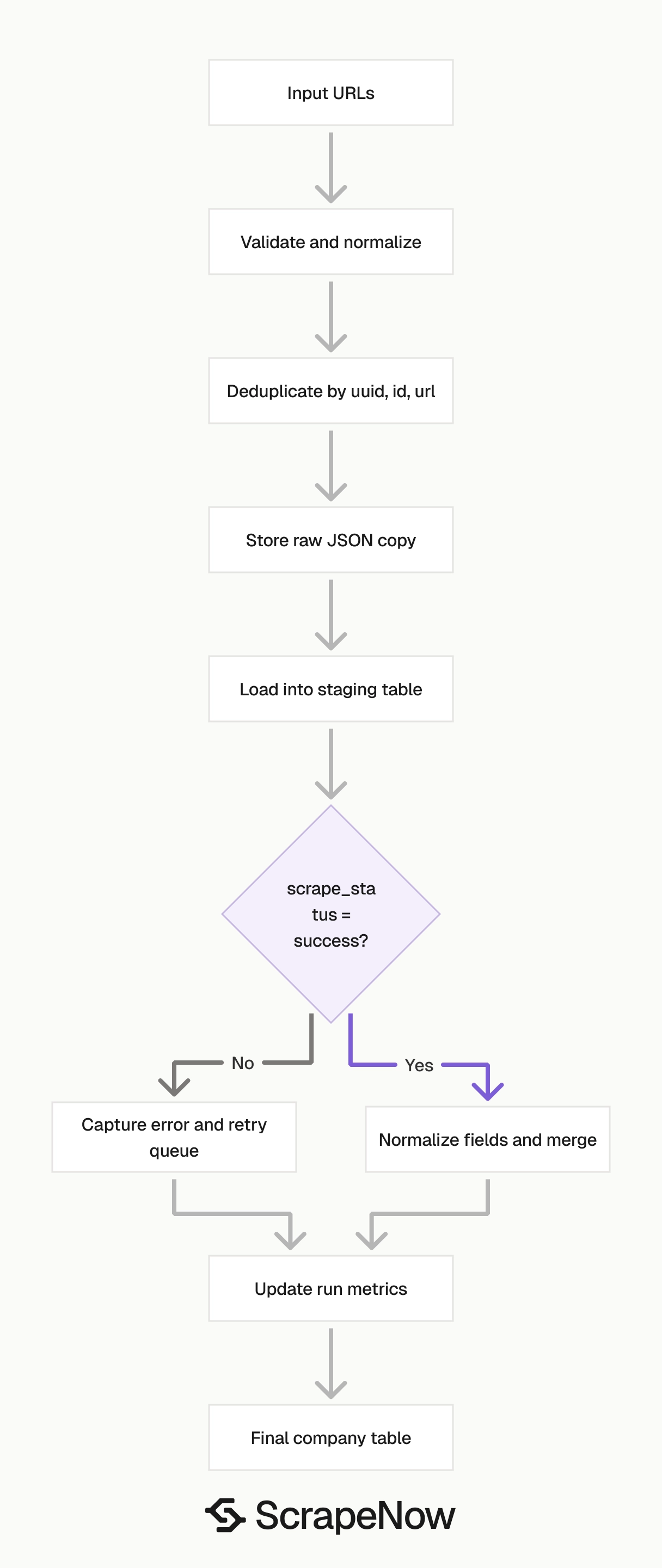
Validate inputs before they reach the API. Reject invalid URLs locally, then send only valid records to the scraper.
Validate Crunchbase URLs before sending jobs
The URL extractor expects company URLs that start with https://www.crunchbase.com/.
Use a small validator before building SCRAPER_INPUTS.
from urllib.parse import urlparse

def is_valid_crunchbase_company_url(url: str) -> bool:
    parsed = urlparse(url)

    if parsed.scheme != "https":
        return False

    if parsed.netloc != "www.crunchbase.com":
        return False

    parts = [part for part in parsed.path.split("/") if part]

    if len(parts) < 2:
        return False

    return parts[0] == "organization"


urls = [
    "https://www.crunchbase.com/organization/sony-music-entertainment",
    "https://www.crunchbase.com/person/example",
    "http://www.crunchbase.com/organization/spotify",
]

valid_inputs = [{"url": url} for url in urls if is_valid_crunchbase_company_url(url)]

print(valid_inputs)
Expected output:
[
  {
    "url": "https://www.crunchbase.com/organization/sony-music-entertainment"
  }
]
Normalize the URL before validation so copied browser URLs do not create duplicate inputs.
def normalize_crunchbase_url(url: str) -> str:
    parsed = urlparse(url)
    path = parsed.path.rstrip("/")
    return f"{parsed.scheme}://{parsed.netloc}{path}"
Run normalization before deduplication. For stricter validation, reject paths with extra segments after the slug.
def is_strict_crunchbase_company_url(url: str) -> bool:
    normalized = normalize_crunchbase_url(url)
    parsed = urlparse(normalized)
    parts = [part for part in parsed.path.split("/") if part]

    return (
        parsed.scheme == "https"
        and parsed.netloc == "www.crunchbase.com"
        and len(parts) == 2
        and parts[0] == "organization"
        and bool(parts[1])
    )
Deduplicate by UUID, slug, then URL
Deduplicate before writing to your warehouse.
def company_dedupe_key(record: dict) -> str:
    if record.get("uuid"):
        return f"uuid:{record['uuid']}"

    if record.get("id"):
        return f"id:{record['id']}"

    if record.get("url"):
        return f"url:{record['url'].rstrip('/').lower()}"

    return f"name:{record.get('name', '').strip().lower()}"


def dedupe_companies(records: list[dict]) -> list[dict]:
    seen = set()
    output = []

    for record in records:
        key = company_dedupe_key(record)

        if key in seen:
            continue

        seen.add(key)
        output.append(record)

    return output
Avoid company name as the first dedupe key since names collide and punctuation changes between systems.
Store nested fields as JSON
Avoid flattening every field on the first pass. Keep arrays like industries, social_media_links, and featured_list in JSON columns.
A practical table shape looks like this:
CREATE TABLE crunchbase_companies (
    uuid TEXT,
    crunchbase_id TEXT,
    name TEXT,
    crunchbase_url TEXT,
    cb_rank INTEGER,
    region TEXT,
    country_code TEXT,
    website TEXT,
    operating_status TEXT,
    company_type TEXT,
    num_employees TEXT,
    about TEXT,
    full_description TEXT,
    industries JSONB,
    social_media_links JSONB,
    featured_list JSONB,
    active_tech_count INTEGER,
    scrape_status TEXT,
    scraped_at TIMESTAMP DEFAULT NOW(),
    PRIMARY KEY (crunchbase_url)
);
Use crunchbase_url as the primary key if you want every saved row tied to the source page. Use uuid if your pipeline trusts the UUID as the canonical company key.
Keep raw nested fields even if you also create reporting tables. Crunchbase can add fields inside arrays, and raw JSON lets you backfill without another scrape.
Add typed columns only after you know the query pattern. If analysts filter by operating_status daily, make it a column.
If they inspect featured_list twice a quarter, keep it as JSON. That saves migrations for fields that do not drive regular reporting.
For Postgres, use JSONB so you can index nested values later. For BigQuery and Snowflake, store the raw object in a variant or JSON field and extract typed columns in views.
Handle row-level scrape failures
The job can complete while individual rows return a failed scrape status. Treat job status and row status as separate checks.
def split_success_and_failed(results: list[dict]) -> tuple[list[dict], list[dict]]:
    success = []
    failed = []

    for row in results:
        if row.get("scrape_status") == "success":
            success.append(row)
        else:
            failed.append(row)

    return success, failed


success_rows, failed_rows = split_success_and_failed(results)

print(f"success={len(success_rows)} failed={len(failed_rows)}")
Retry failed rows with backoff and stop after 3 attempts. Store the error payload to separate invalid inputs from temporary fetch failures.
Keep a raw copy of every response
Store the full JSON response before transforming it. Write raw JSON to object storage, parse fields into typed warehouse columns, and reprocess raw files when you add new fields.
Load data in two stages
Use a staging table before merging into your production company table. Load raw results, filter for scrape_status = 'success', normalize URLs, deduplicate, and merge into the final table.
Track each run
Save the job_id, scraper slug, input count, success count, failed count, start time, and end time. This gives you a clear audit trail when a sales or research team asks where a record came from.
A minimal run table needs these columns.
CREATE TABLE scraper_runs (
    job_id TEXT PRIMARY KEY,
    scraper_slug TEXT NOT NULL,
    input_count INTEGER NOT NULL,
    success_count INTEGER DEFAULT 0,
    failed_count INTEGER DEFAULT 0,
    started_at TIMESTAMP DEFAULT NOW(),
    finished_at TIMESTAMP,
    status TEXT
);
Store the same job_id on every company row loaded from that run.
Pricing
ScrapeNow charges per returned row. One row costs one credit, starting at $0.04 per credit for small runs and dropping with volume. No monthly contracts, no proxy fees, no charges for failed rows. See the pricing page for current rates.
Start with the URL extractor if you already have company pages. Run the Extract Crunchbase company data scraper with the Python script above.
Use the Search Crunchbase companies scraper when you need company lists from search terms. Pass the selected organization URLs into the extractor for structured enrichment.