Flipkart product reviews contain rating, review text, reviewer name, date, upvotes, and product context. The ScrapeNow Flipkart reviews scraper extracts all of these from a product SKU and returns structured JSON.
Where this scraper fits
Use the Flipkart Reviews Search by SKU scraper when you already have Flipkart product SKUs. If your pipeline starts earlier in the product discovery flow, use a product or category scraper first.
| Starting point | Scraper to use | Output you get |
|---|---|---|
| You have a Flipkart SKU | Extract Flipkart reviews by SKU | Review rows for that product |
| You have a product URL | Extract Flipkart product data | Product metadata and identifiers |
| You have a category path | Flipkart products by category | Product list for a category |
| You have a search URL | Search Flipkart results | Product results from a search page |
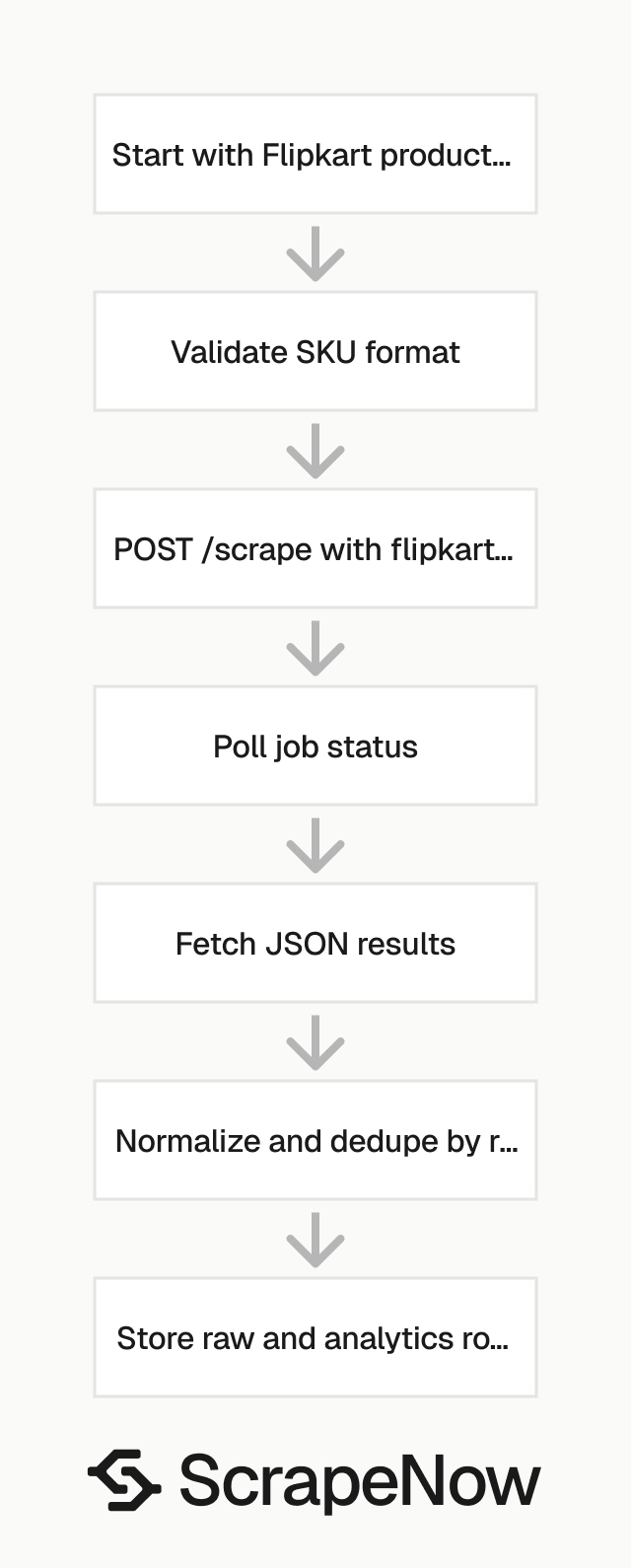
A production review pipeline usually has five steps:
- Extract products from category pages, search pages, or product URLs.
- Store each product SKU in your product table.
- Send those SKUs to the reviews scraper on a schedule.
- Normalize review rows into your warehouse.
- Deduplicate records by
review_id.
The reviews scraper starts at step 3. It assumes your system already knows the product SKU and needs review data for that SKU.
How to use this scraper
The ScrapeNow scraper slug is the Flipkart Reviews Search by SKU scraper. It takes one input field named sku.
The input must be the SKU value only. Send itm5309cefa035da, not a full Flipkart product URL.
A valid request input looks like this:
{
  "sku": "itm5309cefa035da"
}
Step 1. Find the Flipkart SKU
Open flipkart.com/search.
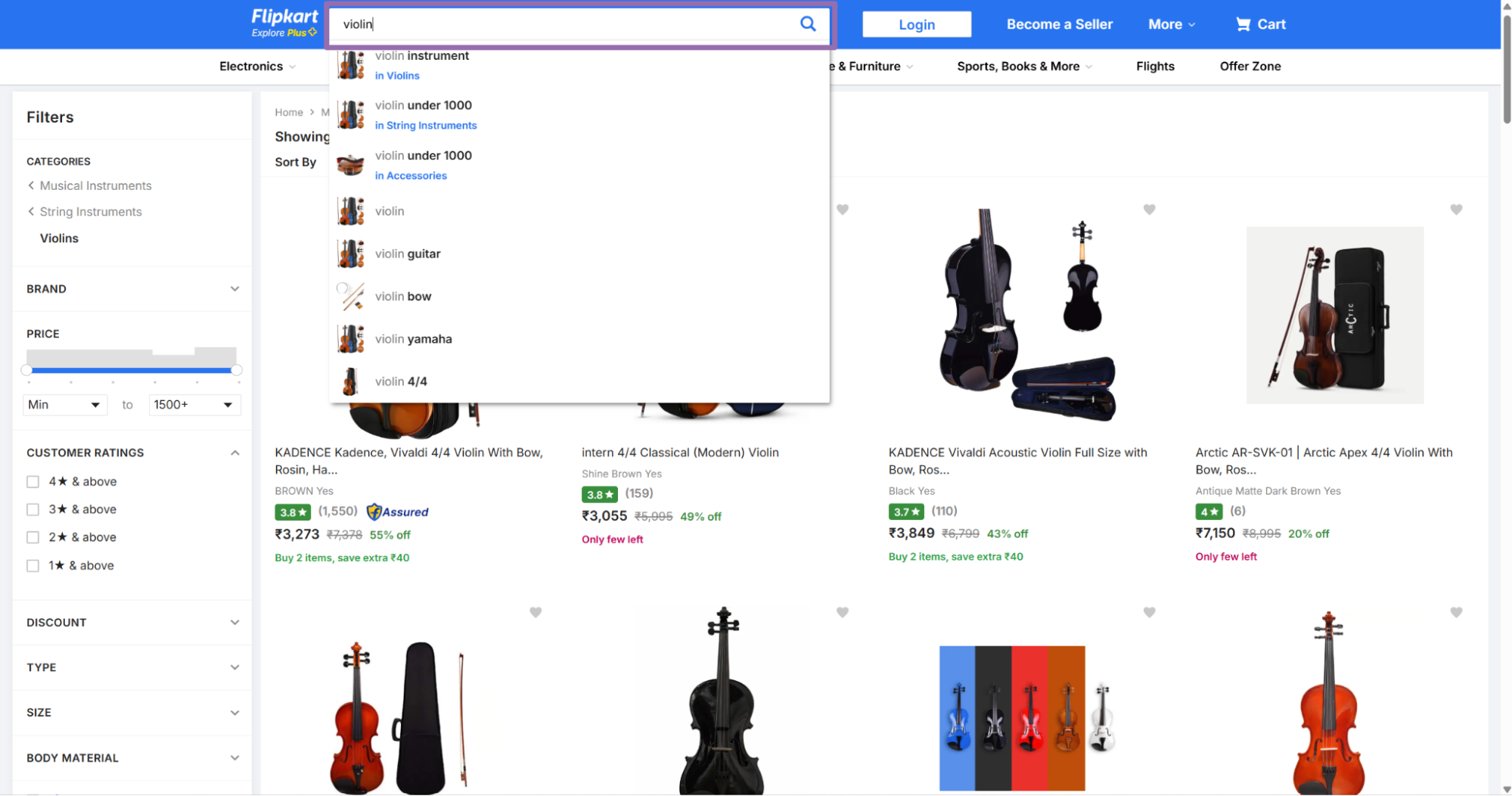
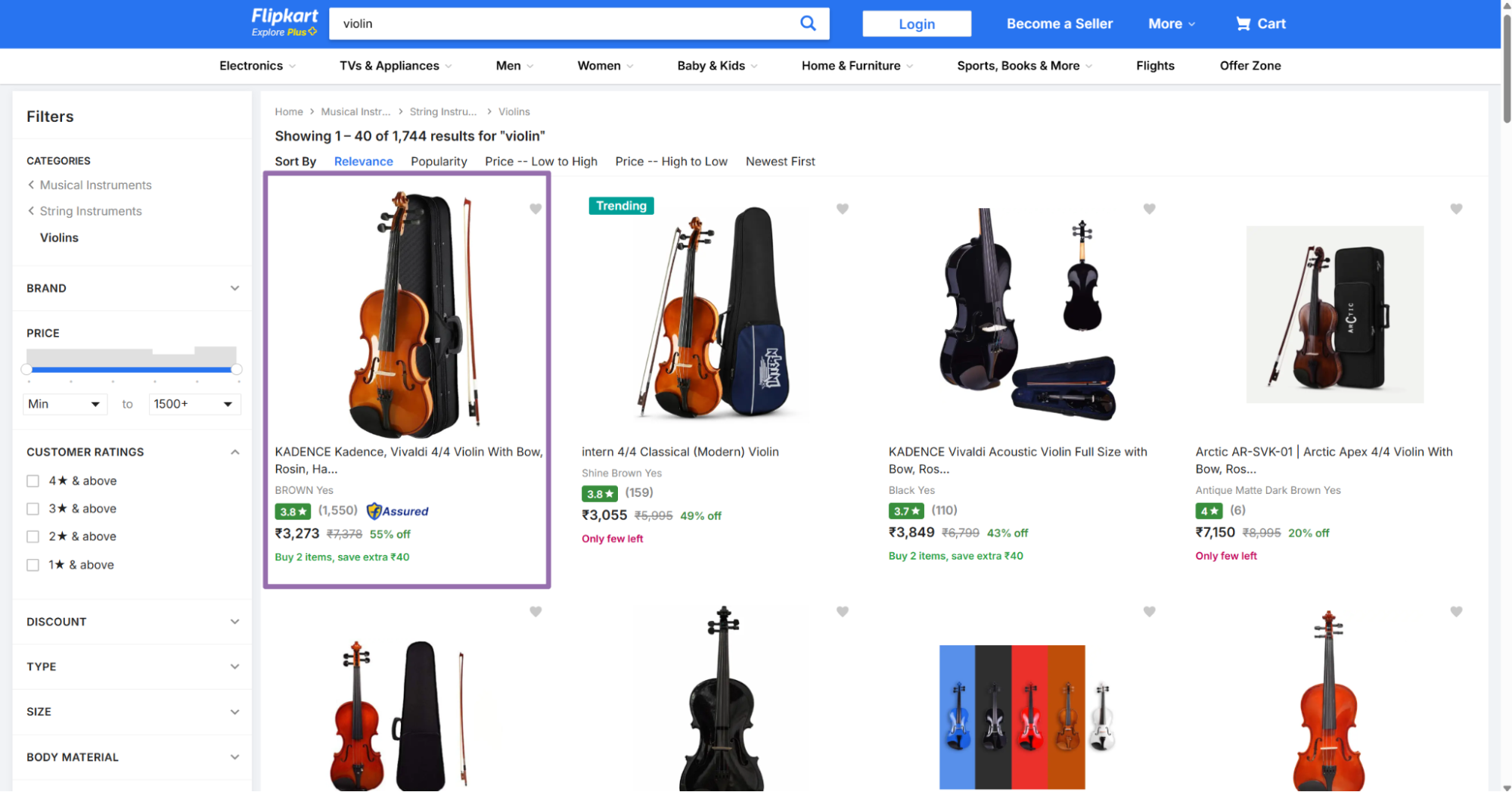
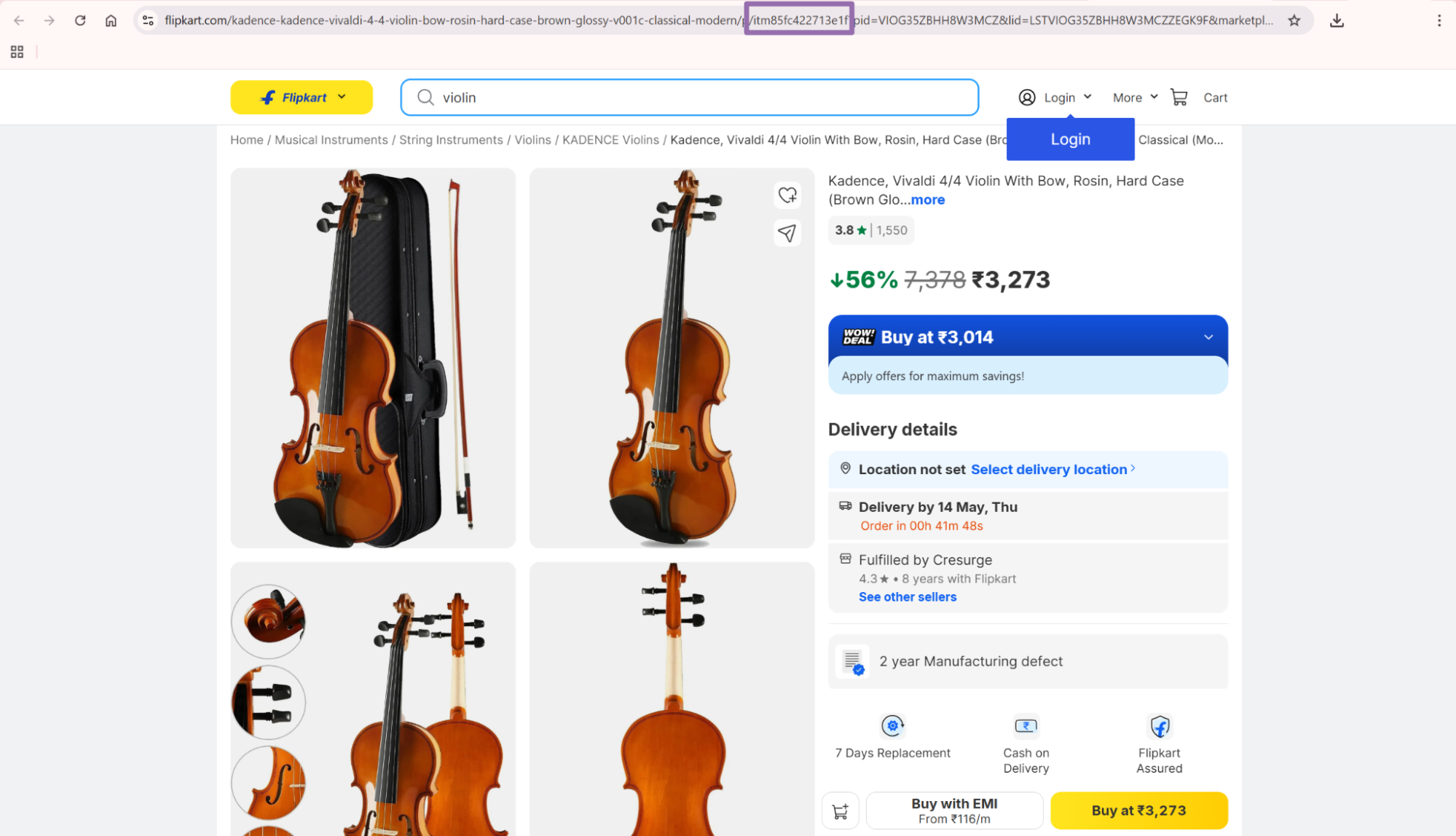
Example SKU:
itm5309cefa035da
Use that value as the sku input. Keep only the SKU value.
For example, this URL contains the SKU in the product path:
https://www.flipkart.com/example-product/p/itm5309cefa035da?pid=ACGGX9M23RZ2UPZE
The scraper input should contain this value:
{
  "sku": "itm5309cefa035da"
}
If you already store Flipkart product URLs, extract the SKU once during ingestion. Store the SKU as its own column, then reuse it for review jobs.
Step 2. Run the API request
Install the dependency:
pip install requests
Then run this Python script with your ScrapeNow API key:
"""
Configuration:
    - Set SCRAPER_SLUG to the scraper you want to run.
    - Set SCRAPER_INPUTS to the list of input dicts matching that scraper's schema.
    - Set API_KEY to your scraper API key.
"""

import sys
import time
import json
import requests
import os

API_KEY = "YOUR_API_KEY"

SCRAPER_SLUG = "flipkart-reviews-search-by-sku"

SCRAPER_INPUTS = [
    {
        "sku": "itm5309cefa035da"
    }
]


BASE_URL = "https://api.scrapenow.io/api/v1/scraping"
TIMEOUT_SECONDS = 3600
POLL_INTERVAL = 5
SPINNER = "|/-\\"


def build_headers(api_key: str, content_type: str | None = None) -> dict:
    headers = {"Authorization": f"Bearer {api_key}"}
    if content_type:
        headers["Content-Type"] = content_type
    return headers


def trigger_scrape(slug: str, inputs: list[dict]) -> str:
    url = f"{BASE_URL}/scrape?scraper={slug}"
    response = requests.post(
        url,
        headers=build_headers(API_KEY, "application/json"),
        json={"inputs": inputs},
    )
    response.raise_for_status()
    return response.json()["data"]["job_id"]


def poll_until_done(job_id: str) -> str:
    start = time.time()
    i = 0
    while True:
        elapsed = time.time() - start
        if elapsed > TIMEOUT_SECONDS:
            print(f"\nTimeout after {TIMEOUT_SECONDS}s")
            sys.exit(1)
        response = requests.get(
            f"{BASE_URL}/jobs/{job_id}",
            headers=build_headers(API_KEY),
        )
        response.raise_for_status()
        data = response.json()
        status = data["data"]["status"]
        mins, secs = divmod(int(elapsed), 60)
        sys.stdout.write(
            f"\r[{SPINNER[i % 4]}] Waiting... {status} ({mins}m {secs:02d}s)  "
        )
        sys.stdout.flush()
        if status in ("completed", "failed"):
            print()
            return status
        time.sleep(POLL_INTERVAL)
        i += 1


def fetch_results(job_id: str) -> dict:
    response = requests.get(
        f"{BASE_URL}/jobs/{job_id}/results?format=json",
        headers=build_headers(API_KEY),
    )
    response.raise_for_status()
    return response.json()


def save_results(data: dict, slug: str) -> str:
    os.makedirs("output", exist_ok=True)
    filename = os.path.join("output", f"{slug}.json")
    with open(filename, "w", encoding="utf-8") as f:
        json.dump(data, f, indent=2, ensure_ascii=False)
    return filename


def main() -> None:
    print(f"Triggering scraper: {SCRAPER_SLUG}")
    job_id = trigger_scrape(SCRAPER_SLUG, SCRAPER_INPUTS)
    print(f"Job started: {job_id}")
    final_status = poll_until_done(job_id)
    if final_status != "completed":
        print(f"Job failed with status: {final_status}")
        sys.exit(1)
    print("Fetching results...")
    results = fetch_results(job_id)
    output_file = save_results(results, SCRAPER_SLUG)
    print(f"Results saved to: {output_file}")


if __name__ == "__main__":
    main()
The script performs these steps:
- Starts a scrape job with
POST /scrape?scraper=flipkart-reviews-search-by-sku. - Polls the job every
5seconds. - Stops after
3600seconds if the job does not finish. - Saves the JSON output to
output/flipkart-reviews-search-by-sku.json.
Run the script:
python flipkart_reviews.py
For production runs, keep POLL_INTERVAL at 5 seconds or higher. Faster polling adds API traffic and does not make Flipkart extraction finish faster.
Set limit_per_input based on the number of reviews you need per SKU. The sample uses 1 so you can test the request and inspect one row before running a larger job.
For scheduled jobs, treat the script as a starting point. Move API_KEY, BASE_URL, batch size, and output paths into environment variables or your job configuration.
Step 3. Read the JSON output
A successful result looks like this:
[
  {
    "inputs": {
      "sku": "itm5309cefa035da"
    },
    "scrape_status": "success",
    "rootdomain": "flipkart.com",
    "sku": "itm5309cefa035da",
    "variant_sku": null,
    "review_id": "2d8f0692-24bf-4030-afb5-e1ff620d7090",
    "author": "Santu  Roy",
    "rating": "4",
    "date": "2026-04-13T00:00:00.000Z",
    "purchased_date": null,
    "location": "Birpara Tea Garden, West Bengal",
    "attributes": "Verified Buyer",
    "title": "Wonderful",
    "text": "Good product 👌",
    "product_name": "KADENCE KAD-BB01-NAT(with Online Classes) Acoustic Guitar Hard Wood Rosewood Right Hand Orientation",
    "recommended_review": null,
    "product_has_been_tried": null,
    "is_verified_purchase": true,
    "is_verified_buyer": true,
    "is_incentivized": null,
    "sold_and_shipped_by": null,
    "helpful_count": {
      "up": 0,
      "down": null
    },
    "brand_response": null,
    "syndicated": null,
    "program": null,
    "link": "https://flipkart.com/reviews/ACGGX9M23RZ2UPZE:146?reviewId=2d8f0692-24bf-4030-afb5-e1ff620d7090",
    "review_images_url": [],
    "seller_id": null,
    "variant_attributes": null,
    "url": "https://flipkart.com/",
    "timestamp": "2026-05-13T09:30:46.910Z",
    "input": {
      "url": "https://flipkart.com/",
      "sku": "itm5309cefa035da"
    },
    "discovery_input": {
      "sku": "itm5309cefa035da"
    },
    "scrape_error": null,
    "scrape_error_code": null
  }
]
Store the full raw row for audit and debugging. Write a normalized row into analytics tables after type conversion, deduplication, and error checks.
Keep raw JSON in object storage or a raw warehouse table. Raw rows help when Flipkart changes a field, your downstream schema changes, or analysts ask why a metric moved.
A raw row also preserves fields you do not model today. That matters when a product team asks for review images or badge history six months later.
What data you get back

Each result row is one Flipkart review. The API returns normalized fields, so your code does not parse review cards, star icons, badges, or dates from the page.
| Field | Type | What it means |
|---|---|---|
sku |
string | Flipkart product identifier used as the input |
review_id |
string | Stable review identifier from the review URL |
author |
string | Reviewer display name |
rating |
string | Rating value, usually 1 through 5 |
date |
ISO string | Review date in UTC format |
location |
string or null | Reviewer location shown by Flipkart |
attributes |
string or null | Review badges, for example Verified Buyer |
title |
string | Review headline |
text |
string | Full review body |
product_name |
string | Product name attached to the review |
is_verified_purchase |
boolean or null | Purchase verification flag |
is_verified_buyer |
boolean or null | Buyer verification flag |
helpful_count.up |
number or null | Upvotes on the review |
helpful_count.down |
number or null | Downvotes on the review |
review_images_url |
array | Image URLs attached to the review |
link |
string | Direct review URL |
scrape_status |
string | success for completed rows |
scrape_error_code |
string or null | Error code if extraction failed |
Ready to get this data? Extract Flipkart reviews by SKU.
Use review_id as your primary key. It is safer than author + date + text because names repeat, text changes, and dates are not unique.
For product monitoring, join review rows back to product rows by sku. The Flipkart products scraper guide covers product extraction when your pipeline needs product metadata before reviews.
Keep both sku and product_name in your warehouse. Product names change, and the SKU gives you the stable join key.
Treat nullable fields as expected output. Flipkart does not show every badge, image, location, seller response, or verification marker on every review.
Production tips
Validate SKUs before you send jobs
Invalid SKU inputs waste credits and add unnecessary retry entries. Reject any value that does not start with itm.
import re

SKU_RE = re.compile(r"^itm[a-zA-Z0-9]+$")

def validate_sku(sku: str) -> str:
    sku = sku.strip()

    if not SKU_RE.match(sku):
        raise ValueError(f"Invalid Flipkart SKU: {sku}")

    return sku


raw_skus = [
    "itm5309cefa035da",
    "https://www.flipkart.com/some-product/p/itm5309cefa035da",
    "5309cefa035da"
]

valid_skus = []

for sku in raw_skus:
    try:
        valid_skus.append(validate_sku(sku))
    except ValueError as exc:
        print(exc)

print(valid_skus)
Expected output:
["itm5309cefa035da"]
If your source data contains full Flipkart URLs, extract the SKU before validation. This keeps the validation function strict and keeps URL parsing in one place.
from urllib.parse import urlparse

def extract_sku_from_flipkart_url(url: str) -> str:
    path = urlparse(url).path
    parts = [part for part in path.split("/") if part]

    for part in reversed(parts):
        if part.startswith("itm"):
            return part

    raise ValueError(f"No SKU found in URL: {url}")


url = "https://www.flipkart.com/example-product/p/itm5309cefa035da?pid=ACGGX9M23RZ2UPZE"
print(extract_sku_from_flipkart_url(url))
Expected output:
itm5309cefa035da
Add this check before you create API jobs.
Deduplicate by review ID
Run review scraping on a schedule and store new rows only. The right key is review_id.
def dedupe_reviews(reviews: list[dict]) -> list[dict]:
    seen = set()
    output = []

    for review in reviews:
        review_id = review.get("review_id")

        if not review_id:
            continue

        if review_id in seen:
            continue

        seen.add(review_id)
        output.append(review)

    return output
For warehouse tables, use a unique index on review_id. If you track multiple marketplaces in the same table, use (rootdomain, review_id).
Use a warehouse upsert keyed by review_id for cleaner scheduled runs.
Store ratings as integers
The response returns rating as a string. Cast it before writing analytics tables.
def normalize_review(row: dict) -> dict:
    return {
        "rootdomain": row.get("rootdomain"),
        "sku": row.get("sku"),
        "review_id": row.get("review_id"),
        "author": row.get("author"),
        "rating": int(row["rating"]) if row.get("rating") else None,
        "date": row.get("date"),
        "title": row.get("title"),
        "text": row.get("text"),
        "product_name": row.get("product_name"),
        "is_verified_buyer": row.get("is_verified_buyer"),
        "helpful_up": (row.get("helpful_count") or {}).get("up"),
        "helpful_down": (row.get("helpful_count") or {}).get("down"),
        "link": row.get("link"),
        "scrape_timestamp": row.get("timestamp"),
    }
A compact normalized schema works well:
| Column | Suggested type |
|---|---|
rootdomain |
text |
sku |
text |
review_id |
text unique |
author |
text |
rating |
integer |
date |
timestamp |
title |
text |
text |
text |
product_name |
text |
is_verified_buyer |
boolean |
helpful_up |
integer |
helpful_down |
integer |
link |
text |
scrape_timestamp |
timestamp |
Keep date and scrape_timestamp separate. The review date tells you when the customer posted the review.
The scrape timestamp tells you when your system observed the review. That difference matters when you backfill old products or compare daily snapshots.
Use integer ratings for averages, distribution charts, and alert rules. Keep the raw rating value in your raw table if you need replayable transformations.
Handle row-level scrape errors
Treat job success and row success as separate checks. A job can complete while individual inputs return scrape_error_code.
def split_success_and_errors(rows: list[dict]) -> tuple[list[dict], list[dict]]:
    success = []
    errors = []

    for row in rows:
        if row.get("scrape_status") == "success" and not row.get("scrape_error_code"):
            success.append(row)
        else:
            errors.append({
                "input": row.get("input") or row.get("inputs"),
                "scrape_status": row.get("scrape_status"),
                "scrape_error": row.get("scrape_error"),
                "scrape_error_code": row.get("scrape_error_code"),
            })

    return success, errors
Retry only the failed SKUs, and cap retries at 2 attempts. Write failed inputs to a separate table with the input, job ID, and error code.
Batch inputs by product list
The sample sends 1 SKU with limit_per_input set to 1. In production, build inputs from product or search pipelines and send a list.
skus = [
    "itm5309cefa035da",
    "itm123456789abcd",
    "itmabcdef1234567"
]

SCRAPER_INPUTS = [{"sku": sku} for sku in skus]
If your SKU source starts from search pages, use the Search Flipkart results scraper to build the product list first. Browse all 86+ scrapers to see all available Flipkart scrapers.
Set a batch size that matches your downstream retry model, such as one batch per category or brand.
Monitor review volume changes
Review count changes tell you when a product gains traction or receives negative attention. Store daily counts by sku, then compare today’s count with the previous scrape.
A small table with sku, scrape_date, and review_count is enough for most teams. Add rating averages after you normalize the rating field to an integer.
For QA pipelines, alert when a product receives multiple 1-star reviews in a short period. For catalog monitoring, alert when a product stops returning reviews after previous successful runs.
Track rating distribution as buckets from 1 to 5. Averages hide movement when both 1-star and 5-star counts rise at the same time.
A basic monitoring table looks like this:
| Column | Suggested type | Use |
|---|---|---|
sku |
text | Product join key |
scrape_date |
date | Daily snapshot date |
review_count |
integer | Total reviews returned |
avg_rating |
numeric | Mean rating after casting |
one_star_count |
integer | QA alert input |
five_star_count |
integer | Positive trend input |
This table gives analysts a stable daily series. It also keeps your alert code away from raw scraper output.
Use the daily table for alerting, not raw review rows. Raw review rows work for audit and debugging, while aggregates work for monitoring.
Keep review ingestion idempotent
Scheduled review scraping reruns the same SKU many times. Your write path should handle duplicate rows without manual cleanup.
Use an upsert keyed by review_id or (rootdomain, review_id). Update mutable fields such as helpful_up, helpful_down, scrape_timestamp, and product_name.
Avoid delete-and-reload for review tables. It creates gaps in dashboards when a scheduled run fails halfway through the product list.
A simple warehouse pattern looks like this:
- Load raw scraper output into
flipkart_review_raw. - Split successful rows and failed rows.
- Normalize successful rows into a staging table.
- Upsert staging rows into
flipkart_review. - Insert failed rows into
flipkart_review_error.
This pattern keeps reruns safe. It also gives your team a clear place to inspect failures without mixing them into analytics rows.
Pick a review limit per use case
limit_per_input controls how many review rows the API returns for each SKU. Use a small value for smoke tests and a larger value for production backfills.
| Use case | Suggested limit_per_input |
|---|---|
| API smoke test | 1 |
| Daily monitoring | 25 to 100 |
| New product backfill | 500 or higher |
| Sentiment dataset build | Match your dataset target |
The right limit depends on how many SKUs you run and how much history you need. A daily monitor usually needs recent reviews, while a sentiment dataset often needs a larger sample.
Start with 1 row while testing credentials, schema, and storage. Increase the limit after your pipeline writes raw rows and normalized rows correctly.
Pricing
ScrapeNow charges per returned row. One row costs one credit, starting at $0.04 per credit for small runs and dropping with volume. No monthly contracts, no proxy fees, no charges for failed rows. See the pricing page for current rates.