Flipkart product pages contain title, brand, category, images, pricing, seller details, ratings, and stock status. The ScrapeNow Flipkart products scraper extracts all of these from a product URL and returns clean JSON for SKU monitoring, catalog enrichment, and price tracking.
Use this scraper when you already have Flipkart product URLs. It works well for scheduled monitoring jobs, internal catalog joins, and pipelines that need the current state of a known product page.
How to use this scraper
The Extract Flipkart product data scraper takes one input field.
| Input | Type | Required | Rule |
|---|---|---|---|
url |
string | yes | Must start with https://www.flipkart.com/ |
Use URL extraction when you already have product pages and need full product detail. If you need product discovery from categories first, run the Flipkart Products Search by Category scraper and pass the returned product URLs into this scraper.
This two-step flow keeps discovery separate from detail extraction. Category pages change often, while product pages hold the fields your warehouse usually needs.
Step 1. Find the product URL
Open flipkart.com/search.
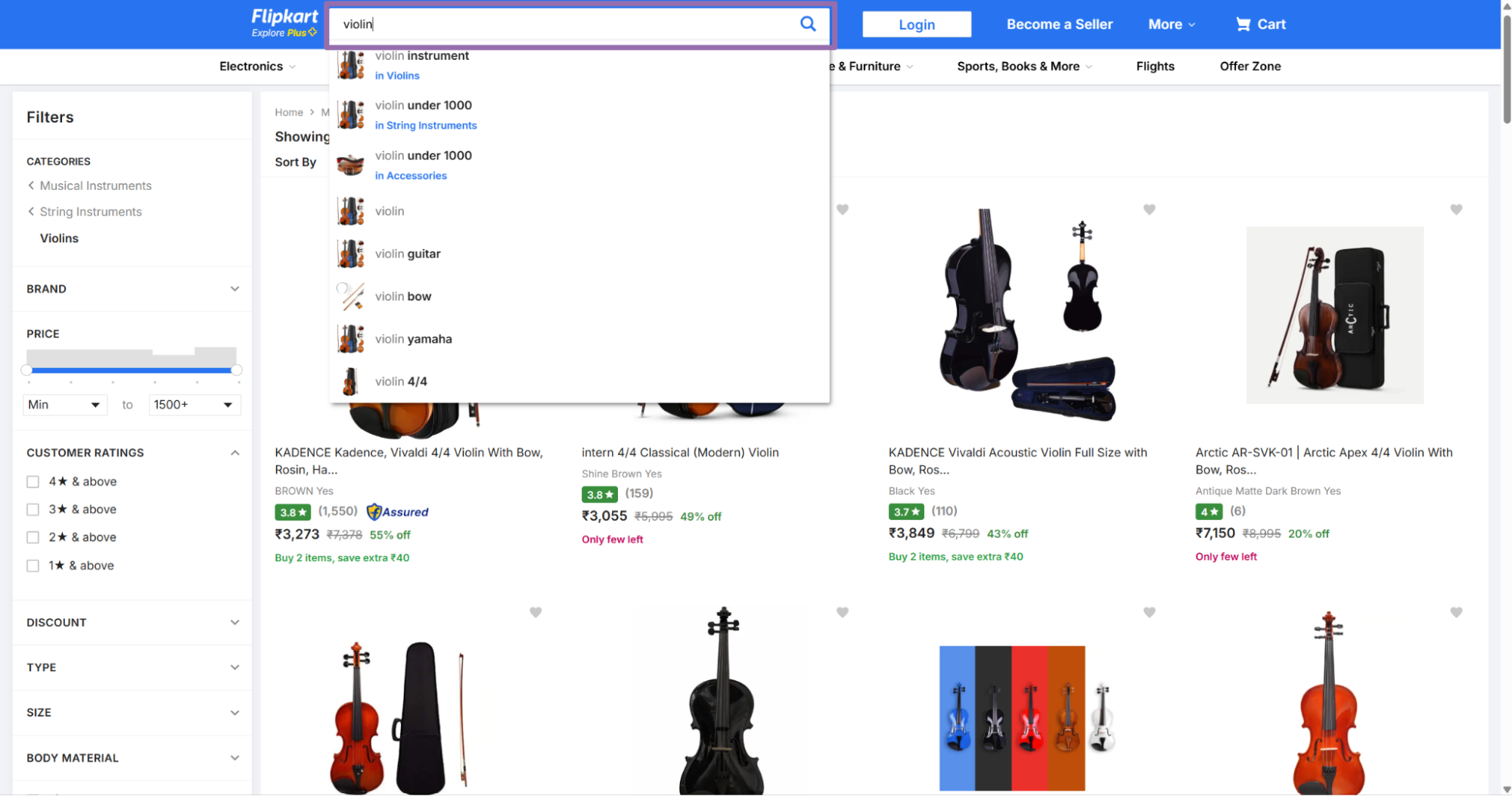
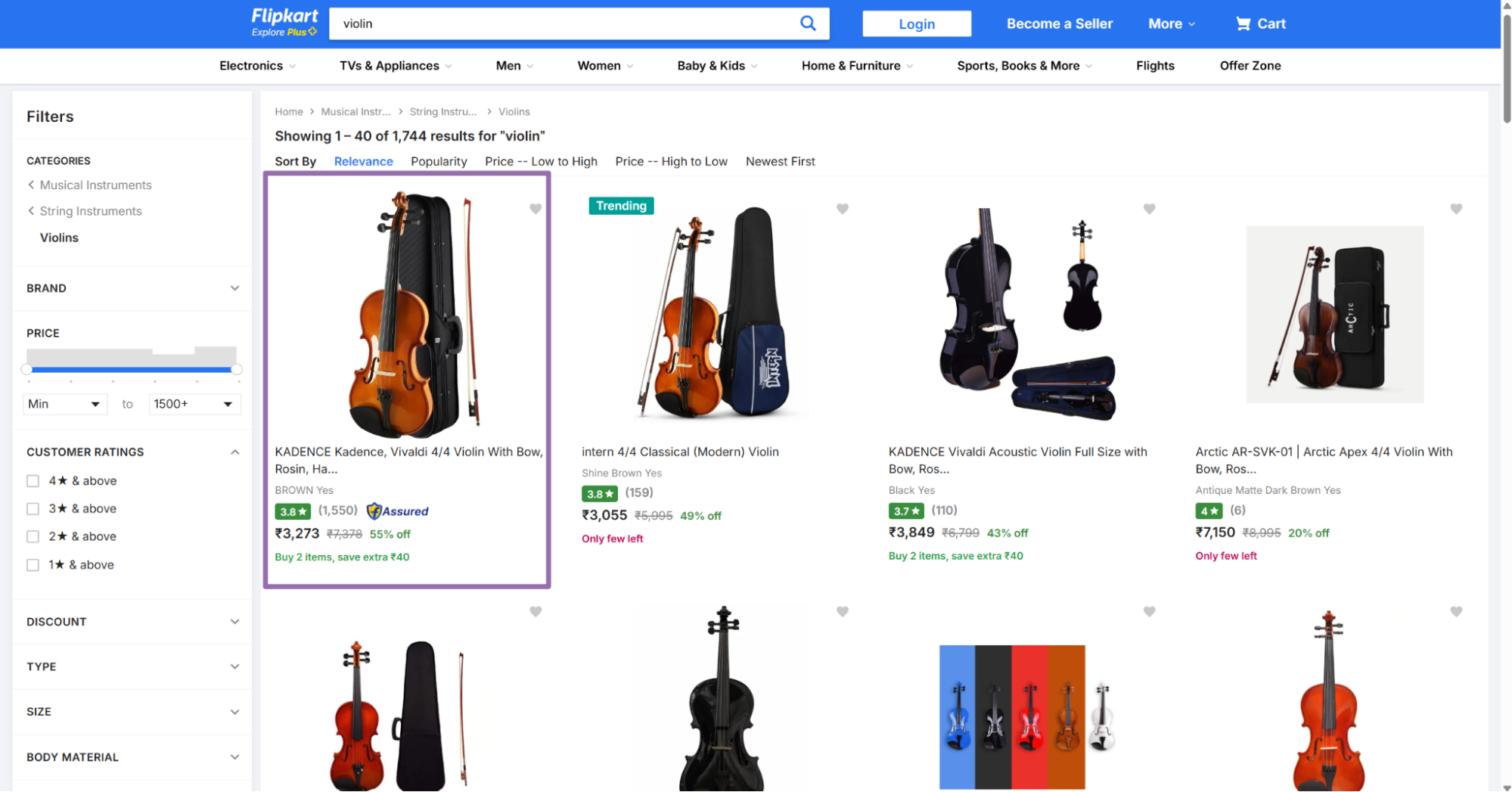
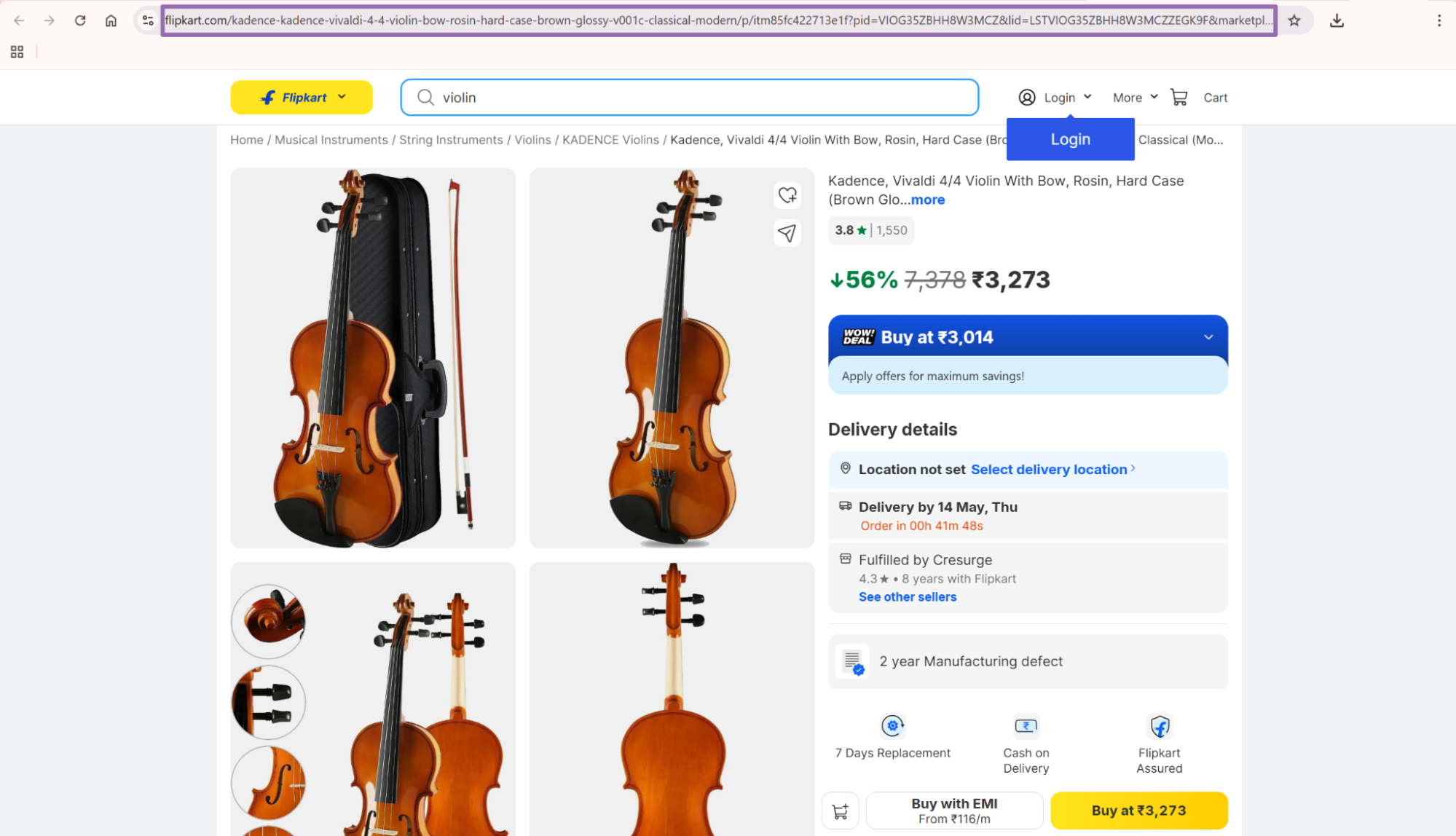
Flipkart URLs often include pid, lid, marketplace, and tracking parameters. The scraper returns the resolved product URL in the output, so you can store both input and resolved URLs.
Step 2. Run the API job
Use this Python script. Replace YOUR_API_KEY with your ScrapeNow API key.
"""
Configuration:
    - Set SCRAPER_SLUG to the scraper you want to run.
    - Set SCRAPER_INPUTS to the list of input dicts matching that scraper's schema.
    - Set API_KEY to your scraper API key.
"""

import sys
import time
import json
import requests
import os

API_KEY = "YOUR_API_KEY"

SCRAPER_SLUG = "flipkart-products-unified-extract-by-url"

SCRAPER_INPUTS = [
    {
        "url": "https://www.flipkart.com/yamaha-f280tbs-in-acoustic-guitar-rosewood-right-hand-orientation/p/itm0b10981c8d907?pid=ACGGF22AGSWKRK4N&lid=LSTACGGF22AGSWKRK4NYFFBL9&hl_lid=&marketplace=FLIPKART&fm=eyJ3dHAiOiJyZWNvIiwicHJwdCI6ImNscCIsIm1pZCI6InBlcnNvbmFsaXNlZFJlY29tbWVuZGF0aW9uL3AycC1zYW1lIn0%3D&pageUID=1778510618204"
    }
]


BASE_URL = "https://api.scrapenow.io/api/v1/scraping"
TIMEOUT_SECONDS = 3600
POLL_INTERVAL = 5
SPINNER = "|/-\\"


def build_headers(api_key: str, content_type: str | None = None) -> dict:
    headers = {"Authorization": f"Bearer {api_key}"}
    if content_type:
        headers["Content-Type"] = content_type
    return headers


def trigger_scrape(slug: str, inputs: list[dict]) -> str:
    url = f"{BASE_URL}/scrape?scraper={slug}"
    response = requests.post(
        url,
        headers=build_headers(API_KEY, "application/json"),
        json={"inputs": inputs},
    )
    response.raise_for_status()
    return response.json()["data"]["job_id"]


def poll_until_done(job_id: str) -> str:
    start = time.time()
    i = 0
    while True:
        elapsed = time.time() - start
        if elapsed > TIMEOUT_SECONDS:
            print(f"\nTimeout after {TIMEOUT_SECONDS}s")
            sys.exit(1)
        response = requests.get(
            f"{BASE_URL}/jobs/{job_id}",
            headers=build_headers(API_KEY),
        )
        response.raise_for_status()
        data = response.json()
        status = data["data"]["status"]
        mins, secs = divmod(int(elapsed), 60)
        sys.stdout.write(
            f"\r[{SPINNER[i % 4]}] Waiting... {status} ({mins}m {secs:02d}s)  "
        )
        sys.stdout.flush()
        if status in ("completed", "failed"):
            print()
            return status
        time.sleep(POLL_INTERVAL)
        i += 1


def fetch_results(job_id: str) -> dict:
    response = requests.get(
        f"{BASE_URL}/jobs/{job_id}/results?format=json",
        headers=build_headers(API_KEY),
    )
    response.raise_for_status()
    return response.json()


def save_results(data: dict, slug: str) -> str:
    os.makedirs("output", exist_ok=True)
    filename = os.path.join("output", f"{slug}.json")
    with open(filename, "w", encoding="utf-8") as f:
        json.dump(data, f, indent=2, ensure_ascii=False)
    return filename


def main() -> None:
    print(f"Triggering scraper: {SCRAPER_SLUG}")
    job_id = trigger_scrape(SCRAPER_SLUG, SCRAPER_INPUTS)
    print(f"Job started: {job_id}")
    final_status = poll_until_done(job_id)
    if final_status != "completed":
        print(f"Job failed with status: {final_status}")
        sys.exit(1)
    print("Fetching results...")
    results = fetch_results(job_id)
    output_file = save_results(results, SCRAPER_SLUG)
    print(f"Results saved to: {output_file}")


if __name__ == "__main__":
    main()
This script starts a job, polls every 5 seconds, waits up to 3600 seconds, downloads JSON, and writes the result to disk. It also creates the output directory before writing the file.
For production, pass inputs from a file or database instead of hardcoding them. Keep the polling interval stable unless your scheduler has strict runtime limits.
Step 3. Read the JSON output
A successful run returns an array of product records. This trimmed response comes from the URL in the script above.
[
  {
    "inputs": {
      "url": "https://www.flipkart.com/yamaha-f280tbs-in-acoustic-guitar-rosewood-right-hand-orientation/p/itm0b10981c8d907?pid=ACGGF22AGSWKRK4N&lid=LSTACGGF22AGSWKRK4NYFFBL9&hl_lid=&marketplace=FLIPKART&fm=eyJ3dHAiOiJyZWNvIiwicHJwdCI6ImNscCIsIm1pZCI6InBlcnNvbmFsaXNlZFJlY29tbWVuZGF0aW9uL3AycC1zYW1lIn0%3D&pageUID=1778510618204"
    },
    "scrape_status": "success",
    "url": "https://www.flipkart.com/yamaha-f280tbs-in-acoustic-guitar-rosewood-right-hand-orientation/p/itm0b10981c8d907?pid=ACGGF22AGSWKRK4N&lid=LSTACGGF22AGSWKRK4NYFFBL9&hl_lid=&marketplace=FLIPKART&fm=eyJ3dHAiOiJyZWNvIiwicHJwdCI6ImNscCIsIm1pZCI6InBlcnNvbmFsaXNlZFJlY29tbWVuZGF0aW9uL3AycC1zYW1lIn0%3D&pageUID=1778510618204",
    "item_id": "ACGGF22AGSWKRK4N",
    "variant_id": "ACGGF22AGSWKRK4N",
    "title": "YAMAHA F280TBS//IN Acoustic Guitar Rosewood Rosewood Right Hand Orientation",
    "description": "Buy YAMAHA F280TBS//IN Acoustic Guitar Rosewood Rosewood Right Hand Orientation for Rs.7990.0 online. YAMAHA F280TBS//IN Acoustic Guitar Rosewood Rosewood Right Hand Orientation at best prices with FREE shipping & cash on delivery. Only Genuine Products. 30 Day Replacement Guarantee.",
    "product_category": "Musical Instruments > String Instruments > Acoustic Guitars > YAMAHA Acoustic Guitars > See other sellers",
    "category_tree": [
      {
        "name": "Musical Instruments",
        "url": "https://www.flipkart.com/musical-instruments/pr?sid=ypu&marketplace=FLIPKART"
      },
      {
        "name": "String Instruments",
        "url": "https://www.flipkart.com/musical-instruments/string-instruments/pr?sid=ypu,ujd&marketplace=FLIPKART"
      },
      {
        "name": "Acoustic Guitars",
        "url": "https://www.flipkart.com/musical-instruments/string-instruments/acoustic-guitars/pr?sid=ypu,ujd,7wz&marketplace=FLIPKART"
      },
      {
        "name": "YAMAHA Acoustic Guitars",
        "url": "https://www.flipkart.com/musical-instruments/string-instruments/acoustic-guitars/yamaha~brand/pr?sid=ypu,ujd,7wz&marketplace=FLIPKART"
      },
      {
        "name": "See other sellers",
        "url": "https://www.flipkart.com/sellers?pid=ACGGF22AGSWKRK4N"
      }
    ],
    "brand": "YAMAHA",
    "image_url": "https://rukmini1.flixcart.com/image/1500/1500/xif0q/acoustic-guitar/e/w/j/-original-imahffkzqecs5egh.jpeg?q=70",
    "price": "₹7,990.00",
    "sale_price": "₹7,191.00",
    "availability": "in_stock",
    "availability_date": "2026-05-13",
    "group_id": "ACGGF22AGSWKRK4N",
    "listing_has_variations": true,
    "variant_attributes": [
      {
        "name": "color",
        "value": "Brown"
      }
    ],
    "variants": [
      {
        "variant_type": "Color",
        "variant_options": [
          {
            "option_id": "ACGG2A3MAMCWUB9W",
            "option_name": "Beige",
            "option_price": null,
            "in_stock": true,
            "image": null
          },
          {
            "option_id": "ACGGF22AGSWKRK4N",

... (truncated)
Keep one raw copy of every response row. Typed columns make queries faster, and raw JSON protects you when Flipkart changes page markup or adds a field.
What data you get back, key API response fields
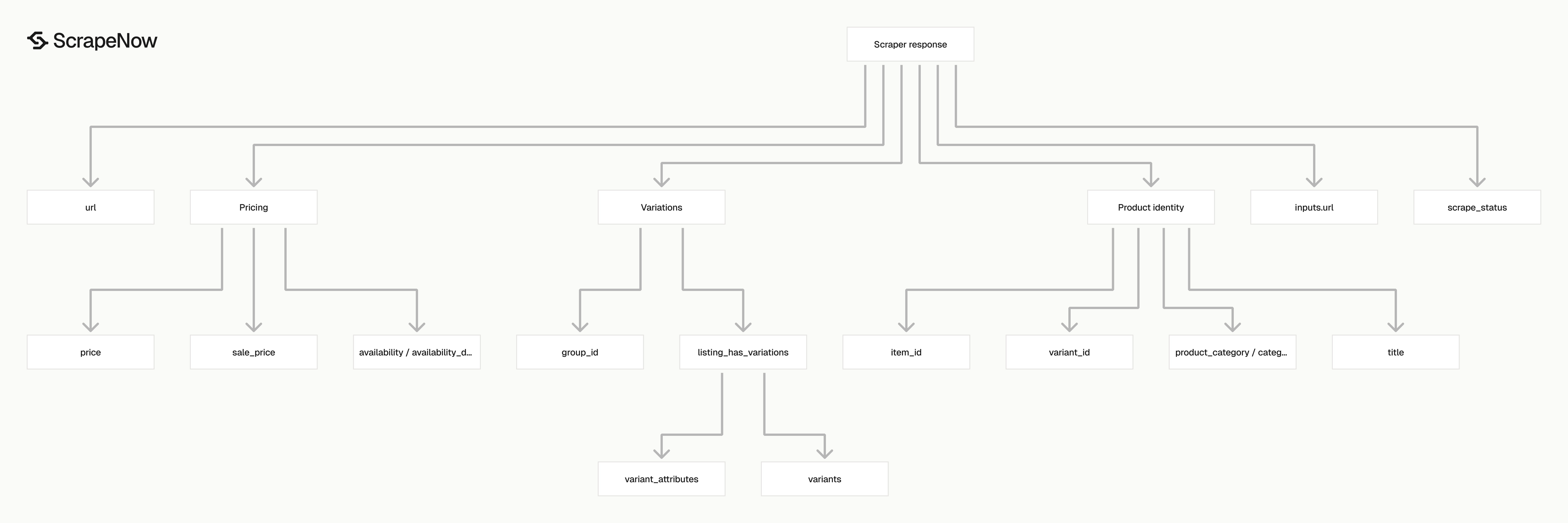
inputs.url is the original URL you sent. Keep it in your warehouse because it gives you a stable join key between your input batch and ScrapeNow output.
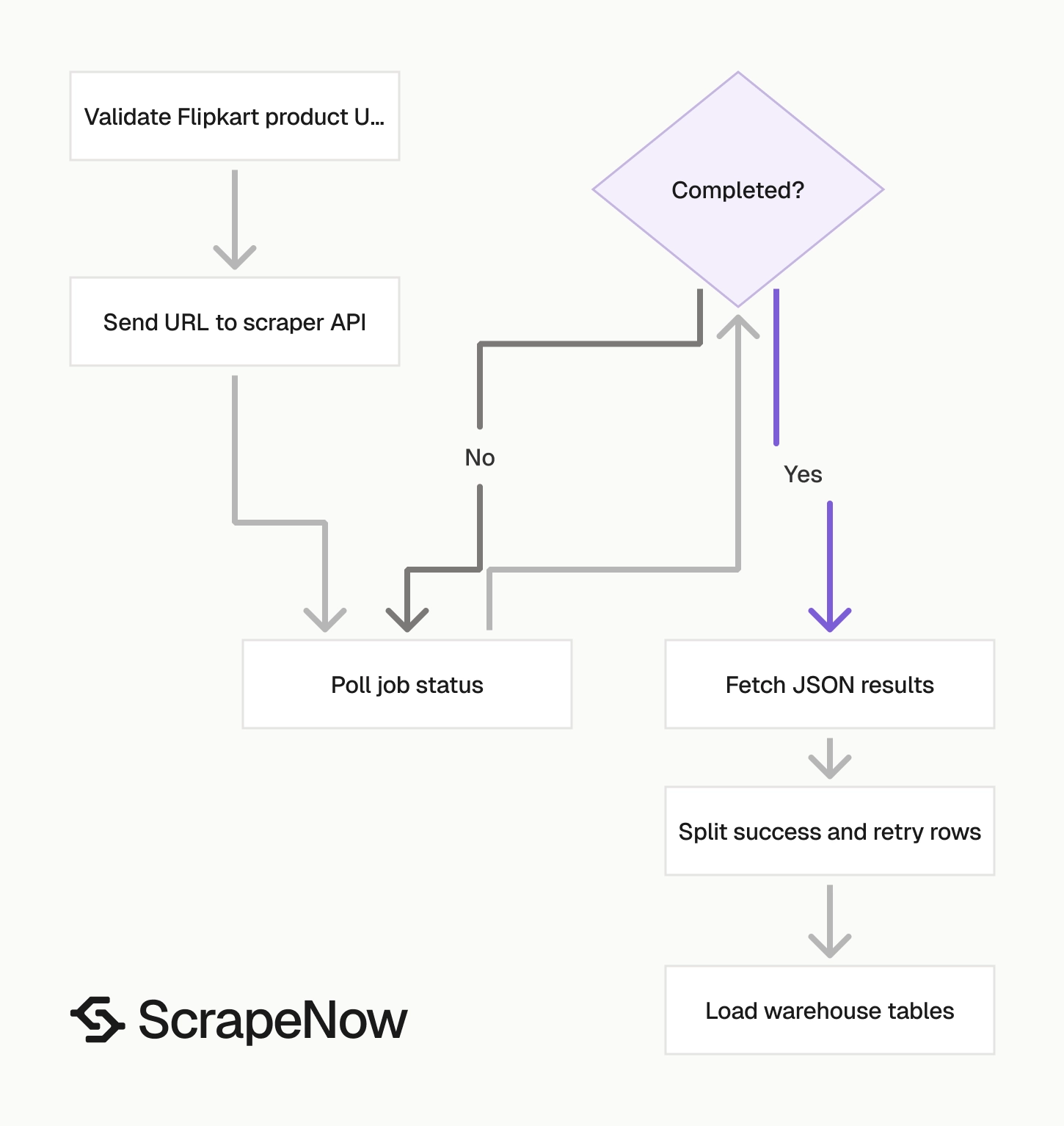
scrape_status tells you whether extraction worked for that row. Treat success as loadable data and route every other status to a retry queue or review table.
url is the resolved Flipkart product URL returned by the scraper. Store it separately from inputs.url if your pipeline tracks redirects, canonical URLs, or URL cleanup.
item_id is the product identifier from Flipkart. In the sample, item_id is ACGGF22AGSWKRK4N.
variant_id identifies the selected variant. For products with color, size, storage, pack size, or model changes, the variant ID tracks the exact listing state.
title is the product title shown on the product page. Use it for matching, search indexing, catalog display, and manual review screens.
description contains the product description text. In the sample, it includes the product name, listed price, shipping text, cash-on-delivery text, and replacement guarantee copy.
product_category is a flattened category path. The sample value is Musical Instruments > String Instruments > Acoustic Guitars > YAMAHA Acoustic Guitars > See other sellers.
category_tree returns the same path as structured objects with name and url. Use this field when you build category tables or breadcrumb navigation.
brand is the detected brand. In the sample, the value is YAMAHA.
image_url is the primary product image. Download it later from your own worker if you store media, rather than doing that inside the scraper job flow.
price and sale_price are formatted strings with the currency symbol. Parse them into numeric columns before loading them into analytics, dashboards, or alerting jobs.
availability gives stock status. The sample returns in_stock.
availability_date gives the detected availability date when Flipkart exposes one. The sample value is 2026-05-13.
group_id groups variants for the same product family. Use it to connect color or size variants under one parent product.
listing_has_variations is a boolean flag. If it is true, read variant_attributes and variants.
variant_attributes describes the selected variant. The sample product has color set to Brown.
variants lists available variant groups and options. In the sample, the Color group includes options like Beige and Brown, each with an option_id, stock flag, and image field.
For review data on the same SKU, use the Extract Flipkart reviews by SKU scraper. That scraper uses product identifiers instead of product page URLs.
Field mapping for warehouses
Most teams need two tables. Store the latest state in one table, then store every scrape as history in another table.
Use item_id and variant_id as the natural product key. Use scraped_at as the time key for historical price and stock tracking.
A current-state table answers operational questions. A history table answers price movement, stockout duration, and catalog drift questions.
For example, a stock monitor reads the current-state table. A pricing analyst reads the history table and groups rows by item_id, variant_id, and date.
Ready to get this data? Extract Flipkart product data.
Choose the right Flipkart scraper for the job
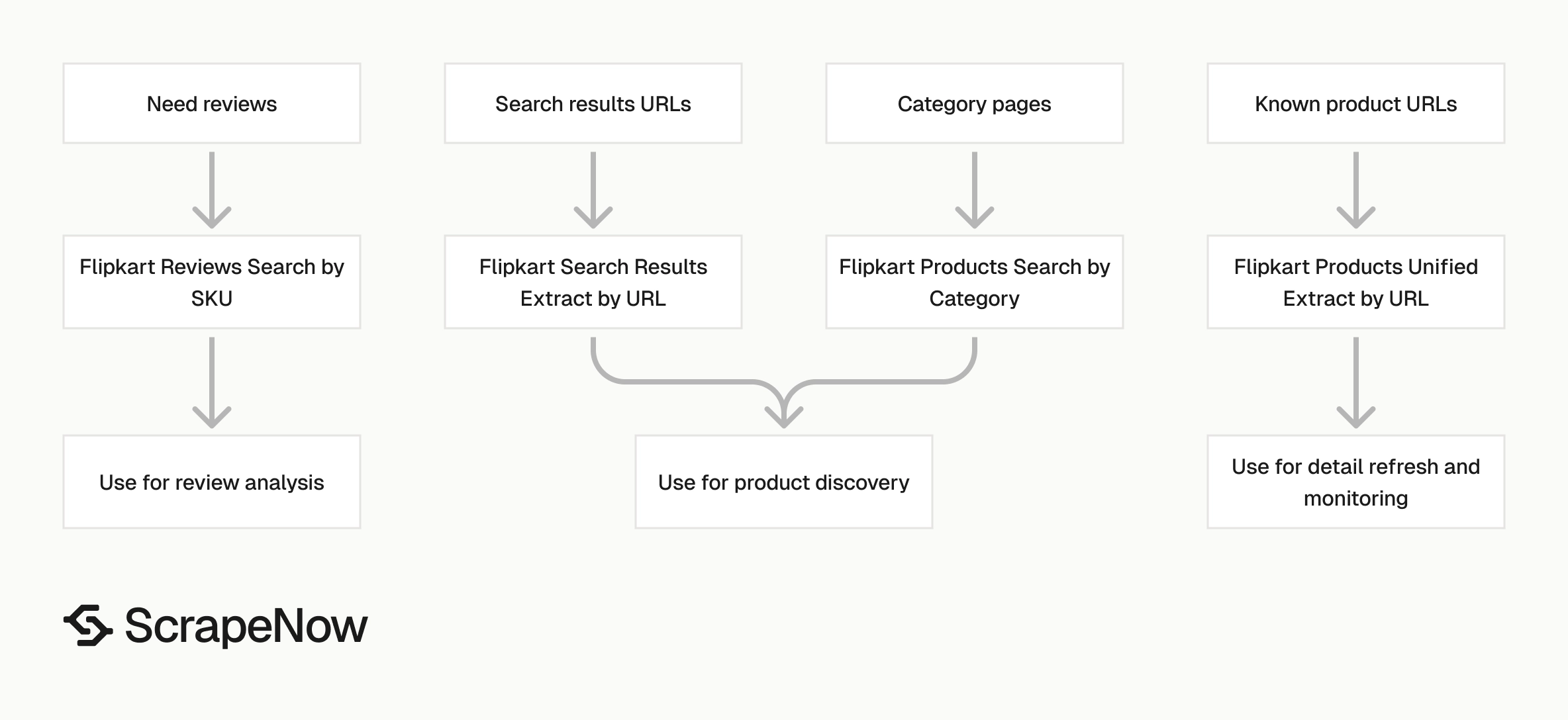
Use the URL extractor when product URLs already exist in your database. Use search and category scrapers when you need to discover products first.
| Job | Scraper |
|---|---|
| Extract full detail from known product URLs | Extract Flipkart product data |
| Find products inside a category | Flipkart Products Search by Category |
| Extract products from a search results URL | Search Flipkart results |
| Search Flipkart by category input | Search Flipkart results |
| Collect reviews for a SKU | Extract Flipkart reviews by SKU |
The full ScrapeNow catalog has 86+ pre-built scrapers across 14 platforms. Use the Browse all 86+ scrapers hub when you need the broader Flipkart scraper set or want to pair Flipkart extraction with Amazon, Google, LinkedIn, YouTube, Zillow, Indeed, or other sources.
A common flow starts with a category scraper, stores every discovered URL, and then runs URL extraction on a schedule. That keeps discovery frequency separate from detail refresh frequency.
For example, refresh categories weekly and refresh known product URLs daily. This cuts duplicate category crawling while keeping price and stock data current.
Production tips, validation, deduplication, schema, error handling
Validate input URLs before sending jobs
Reject invalid inputs before they hit the API. Flipkart product URLs must start with https://www.flipkart.com/.
from urllib.parse import urlparse

def validate_flipkart_url(url: str) -> None:
    parsed = urlparse(url)

    if parsed.scheme != "https":
        raise ValueError(f"Flipkart URL must use https: {url}")

    if parsed.netloc != "www.flipkart.com":
        raise ValueError(f"Flipkart URL must use www.flipkart.com: {url}")

    if "/p/" not in parsed.path:
        raise ValueError(f"URL does not look like a product page: {url}")


urls = [
    "https://www.flipkart.com/yamaha-f280tbs-in-acoustic-guitar-rosewood-right-hand-orientation/p/itm0b10981c8d907?pid=ACGGF22AGSWKRK4N"
]

for url in urls:
    validate_flipkart_url(url)
Run this validation where you build the batch, not after the API call.
Deduplicate by item ID and variant ID
For product detail tracking, dedupe on item_id plus variant_id. If variant_id is missing, fall back to item_id and normalized URL.
def dedupe_products(records: list[dict]) -> list[dict]:
    seen = set()
    output = []

    for record in records:
        item_id = record.get("item_id")
        variant_id = record.get("variant_id")
        url = record.get("url")

        key = (item_id, variant_id or url)

        if key in seen:
            continue

        seen.add(key)
        output.append(record)

    return output
Run dedupe after every batch. Search and category flows can rediscover the same product through multiple paths.
Parse money fields into integers or decimals
price and sale_price arrive as formatted strings like ₹7,990.00. Store raw text and parsed numeric values.
import re
from decimal import Decimal

def parse_inr(value: str | None) -> Decimal | None:
    if not value:
        return None

    cleaned = re.sub(r"[^\d.]", "", value)

    if cleaned == "":
        return None

    return Decimal(cleaned)


record = {
    "price": "₹7,990.00",
    "sale_price": "₹7,191.00"
}

record["price_amount"] = parse_inr(record["price"])
record["sale_price_amount"] = parse_inr(record["sale_price"])
record["currency"] = "INR"
Keep the currency as its own column. Do not infer it later from the symbol if you mix sources.
For analytics warehouses, decimals are safer than floats. A float can introduce small rounding differences that break exact price comparisons.
If you store paise, multiply by 100 after parsing and store an integer. That works well for alerting systems that compare exact values.
Normalize availability values
Stock fields drive alerts, so treat them as controlled values. Store the raw availability value and map it into your internal status list.
def normalize_availability(value: str | None) -> str:
    if value == "in_stock":
        return "available"

    if value == "out_of_stock":
        return "unavailable"

    if value is None:
        return "unknown"

    return "review"


record = {
    "availability": "in_stock"
}

record["availability_normalized"] = normalize_availability(record["availability"])
This gives dashboards a stable field even when source text changes. Keep the raw field for debugging and audit trails.
Use the normalized value for alerts. Use the raw value when you need to inspect a specific page result.
Use a stable warehouse schema
A practical table for product monitoring needs raw JSON plus typed columns. Raw JSON saves you when Flipkart adds a field and you want to backfill later.
| Column | Type | Notes |
|---|---|---|
input_url |
text | From inputs.url |
resolved_url |
text | From url |
scrape_status |
text | success, failed, or other row state |
item_id |
text | Flipkart product ID |
variant_id |
text | Selected variant |
group_id |
text | Parent product group |
title |
text | Product title |
brand |
text | Product brand |
category_path |
text | From product_category |
price_amount |
numeric | Parsed from price |
sale_price_amount |
numeric | Parsed from sale_price |
currency |
text | Use INR |
availability |
text | Stock status |
availability_date |
date | If present |
listing_has_variations |
boolean | Variant flag |
raw_json |
jsonb | Full API row |
scraped_at |
timestamp | Your load time |
Use item_id, variant_id, and scraped_at for history. Use item_id and variant_id without timestamp for the current-state table.
Add a unique constraint on the current-state table. That lets you upsert the latest row without creating duplicate product records.
For the history table, add an index on item_id, variant_id, and scraped_at. Price charts and stock timelines read faster with that access pattern.
Split success rows from retry rows
Do not treat job completion as row success. A completed job can still contain failed rows.
def split_results(records: list[dict]) -> tuple[list[dict], list[dict]]:
    good = []
    retry = []

    for record in records:
        if record.get("scrape_status") == "success":
            good.append(record)
        else:
            retry.append({
                "input": record.get("inputs"),
                "status": record.get("scrape_status"),
                "raw": record,
            })

    return good, retry
Retry failed rows in smaller batches. If the same URL fails 3 times, send it to a dead-letter table and move on.
Track input batches
Batch IDs make scraper output easier to audit. Add your own batch_id before loading results into the warehouse.
from datetime import datetime, timezone
from uuid import uuid4

batch_id = str(uuid4())
scraped_at = datetime.now(timezone.utc).isoformat()

for record in records:
    record["batch_id"] = batch_id
    record["scraped_at"] = scraped_at
Store the same batch_id on every row created from one API run for easier reruns and audits.
Common use cases
Price tracking
Run the URL extractor on a fixed schedule and store price_amount, sale_price_amount, and scraped_at. Compare the latest row against the previous row for the same item_id and variant_id.
Alert only on real changes after parsing the money fields. String comparisons fail when formatting changes but the numeric price stays the same.
Stock monitoring
Use availability, availability_date, and scraped_at to track inventory state. A product moving from in_stock to another state should update the current-state table and append a history row.
For reporting, calculate stockout duration from the history table. That gives buyers and catalog teams a defensible timeline.
Catalog enrichment
Use title, brand, category_tree, image_url, and description to enrich internal SKU records. Match against your own SKU table with item_id, variant_id, or a stored product URL.
Keep enrichment writes separate from price and stock writes. Catalog fields change less often, while price and stock change frequently.
Variant audits
Use group_id, variant_attributes, and variants to monitor available options. This works for color, size, storage, pack size, and model families.
Store variant options as nested JSON or split them into a child table. Use a child table if analysts need to query option-level stock.
Pricing
ScrapeNow charges per returned row. One row costs one credit, starting at $0.04 per credit for small runs and dropping with volume. No monthly contracts, no proxy fees, no charges for failed rows. See the pricing page for current rates.
Start with the Extract Flipkart product data scraper if you already have product URLs. If you need product discovery first, Browse all 86+ scrapers and pick the Flipkart search or category scraper before running URL extraction.
For a small test, run ten known product URLs and inspect the raw JSON before building the warehouse loader. Once the field mapping looks right, move the same script into your scheduler and add batch IDs, retry handling, and dedupe.


