One API request returns normalized Google Maps review rows as JSON.
The Google Maps Reviews Scraper extracts review text, star rating, reviewer name, review date, business URL, owner response, likes count, and reviewer metadata from a Google Maps business listing URL. Teams use it to monitor store feedback, audit franchise locations, build review datasets, and feed sentiment models without maintaining a browser scraper for Google Maps.
Use this scraper when you already have the Google Maps URL for a business. If you need to find locations first, run the Google Maps locations search scraper, store each listing URL, then pass those URLs into this reviews scraper.
If your workflow starts with hotels, use the Google Hotels extract by URL scraper or the Google Hotels search by filter URL scraper before review extraction. The Google scrapers hub lists the rest of the Google extractors you can chain with this job.
How to use this scraper
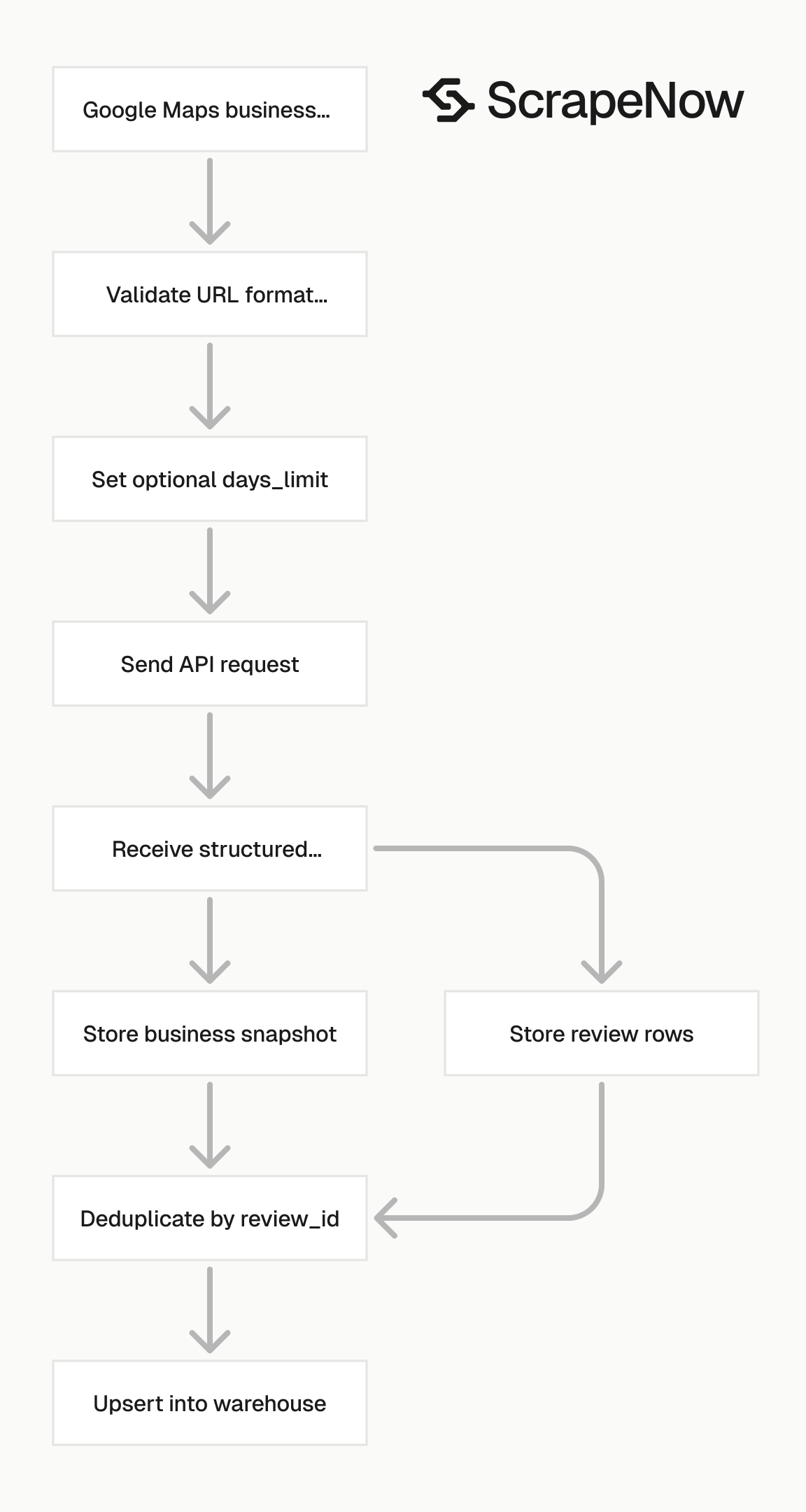
The scraper takes a Google Maps business URL and an optional days_limit value. Pass days_limit when you only need recent reviews.
That keeps the response smaller, lowers credit usage, and avoids processing old rows in daily jobs. Omit days_limit for a historical pull on a listing.
A typical daily job sends one URL per location, with days_limit set to 2 or 3. A one-time backfill sends the same URL without days_limit.
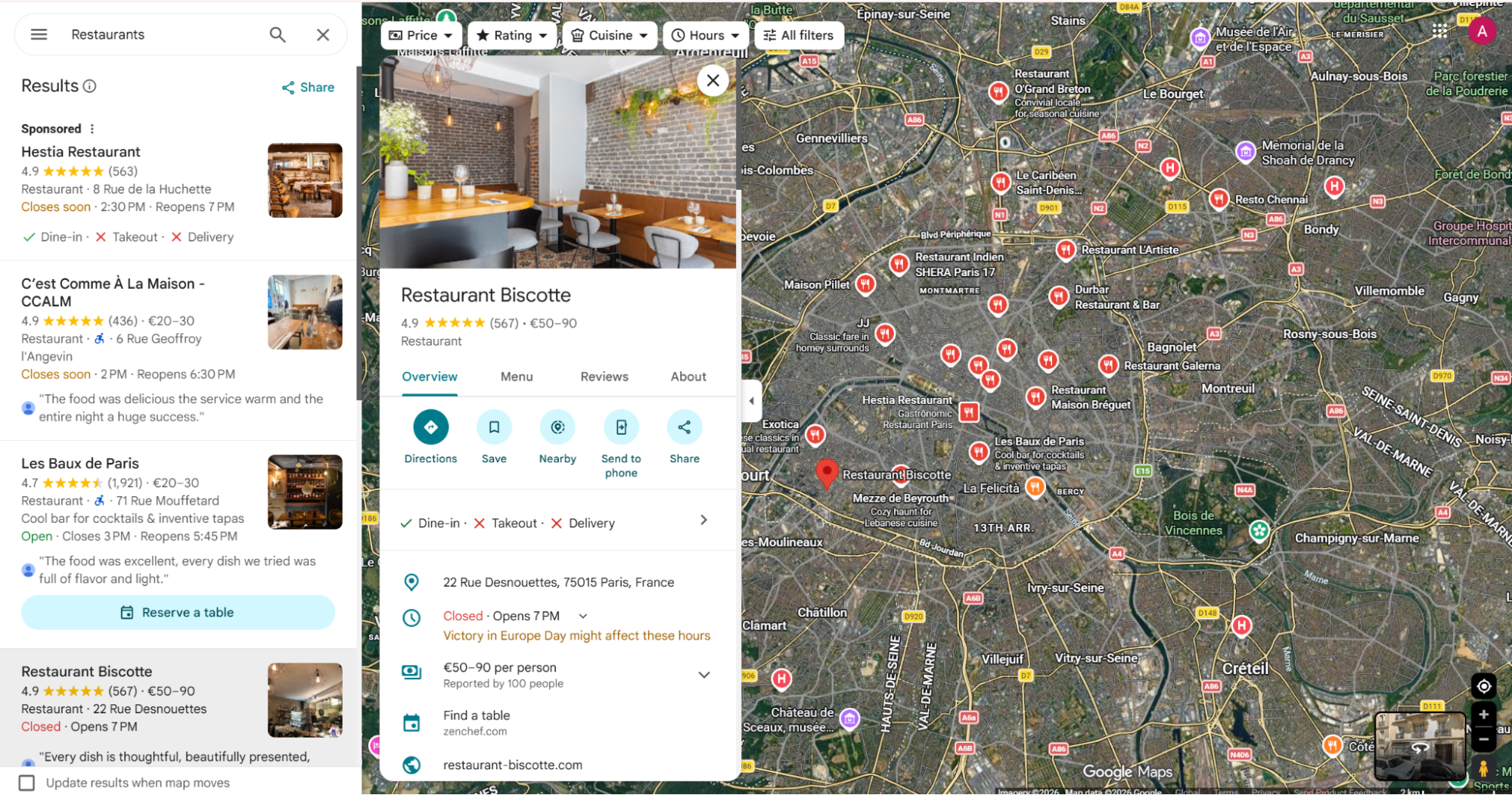
Step 1. Open Google Maps
Open google.com/maps/ in your browser.
Search for the business you want to extract reviews from, or click a business directly on the map. This example uses Restaurant Biscotte.
Step 2. Copy the business URL
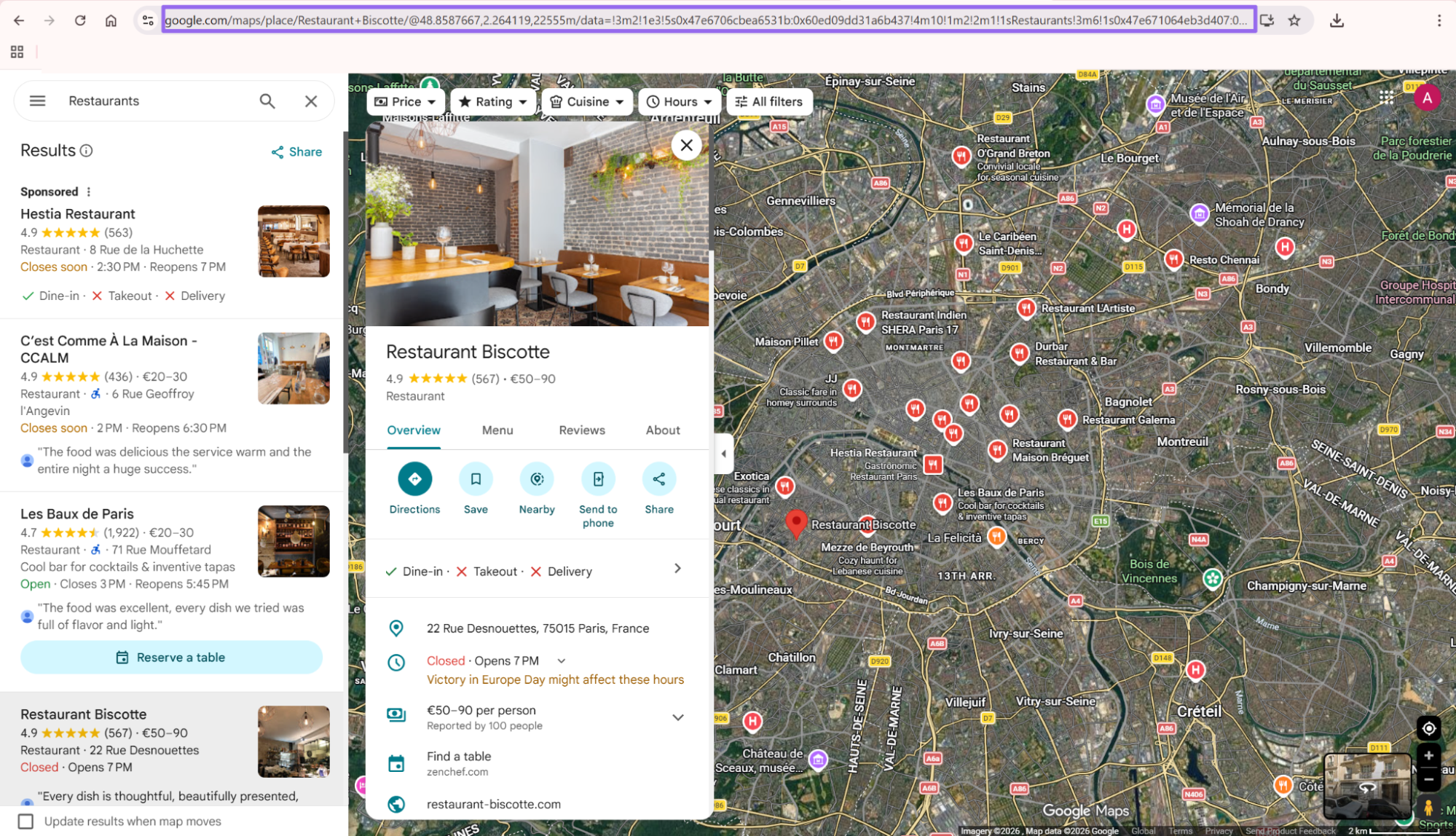
After the business listing opens, copy the URL from the browser address bar.
The url value must start with https://www.google.com/. Shared URLs and shortened URLs often redirect in a browser, then fail in batch jobs.
Use the canonical Maps URL from the listing page when you can. It makes retries, deduplication, and audit logs cleaner across scheduled runs.
Step 3. Send the API request
Use this request shape:
curl --request POST \
  --url "https://api.scrapenow.io/api/v1/scraping/scrape?scraper=google-maps-reviews-extract-by-url" \
  --header "Authorization: Bearer YOUR_API_KEY" \
  --header "Content-Type: application/json" \
  --data '{
    "url": "https://www.google.com/maps/place/Restaurant+Biscotte/@45.5088,-73.5878,17z/data=!4m6!3m5!1s0x4cc91a4f8f5f5f5f:0x123456789abcdef!8m2!3d45.5088!4d-73.5878!16s%2Fg%2F11example",
    "days_limit": 30
  }'
Replace YOUR_API_KEY with your ScrapeNow API key. Replace the url value with the Google Maps business URL you copied.
Use days_limit when you want reviews from the last N days. Remove it when you want the full available review set for the listing.
curl --request POST \
  --url "https://api.scrapenow.io/api/v1/scraping/scrape?scraper=google-maps-reviews-extract-by-url" \
  --header "Authorization: Bearer YOUR_API_KEY" \
  --header "Content-Type: application/json" \
  --data '{
    "url": "https://www.google.com/maps/place/Restaurant+Biscotte/@45.5088,-73.5878,17z/data=!4m6!3m5!1s0x4cc91a4f8f5f5f5f:0x123456789abcdef!8m2!3d45.5088!4d-73.5878!16s%2Fg%2F11example"
  }'
Send one request per listing URL. That gives you per-location errors, per-location credit counts, and cleaner retry behavior.
Step 4. Run the same request from Python
Use requests when you wire this into a pipeline. Set a timeout because Maps extraction takes longer on listings with many reviews.
import requests
import json

API_KEY = "YOUR_API_KEY"

payload = {
    "url": "https://www.google.com/maps/place/Restaurant+Biscotte/@45.5088,-73.5878,17z/data=!4m6!3m5!1s0x4cc91a4f8f5f5f5f:0x123456789abcdef!8m2!3d45.5088!4d-73.5878!16s%2Fg%2F11example",
    "days_limit": 30
}

response = requests.post(
    "https://api.scrapenow.io/api/v1/scraping/scrape?scraper=google-maps-reviews-extract-by-url",
    headers={
        "Authorization": f"Bearer {API_KEY}",
        "Content-Type": "application/json"
    },
    json=payload,
    timeout=120
)

response.raise_for_status()
data = response.json()

print(json.dumps(data, indent=2))
For scheduled jobs, wrap this call with input validation, retry handling, and a run log. The sections below show the pieces I use in production pipelines.
Run the first test against one known listing before you queue thousands of URLs. That gives you a baseline for row count, credits used, and field coverage.
JSON output sample
The API returns structured JSON. You can write rows into Postgres, BigQuery, Snowflake, S3, or a queue without parsing HTML.
{
  "status": "success",
  "input": {
    "url": "https://www.google.com/maps/place/Restaurant+Biscotte/@45.5088,-73.5878,17z/data=!4m6!3m5!1s0x4cc91a4f8f5f5f5f:0x123456789abcdef!8m2!3d45.5088!4d-73.5878!16s%2Fg%2F11example",
    "days_limit": 30
  },
  "business": {
    "name": "Restaurant Biscotte",
    "rating": 4.6,
    "reviews_count": 842,
    "address": "123 Example Street, Montréal, QC",
    "google_maps_url": "https://www.google.com/maps/place/Restaurant+Biscotte/@45.5088,-73.5878,17z/data=!4m6!3m5!1s0x4cc91a4f8f5f5f5f:0x123456789abcdef!8m2!3d45.5088!4d-73.5878!16s%2Fg%2F11example"
  },
  "reviews": [
    {
      "review_id": "ChZDSUhNMG9nS0VJQ0FnSUN4eExuR1ZBEAE",
      "reviewer_name": "Maya Tremblay",
      "reviewer_profile_url": "https://www.google.com/maps/contrib/112233445566778899000",
      "reviewer_photo_url": "https://lh3.googleusercontent.com/a/example",
      "reviewer_reviews_count": 37,
      "rating": 5,
      "review_text": "Great brunch spot. The service was fast and the pancakes were excellent.",
      "review_date": "2026-01-12",
      "review_relative_date": "2 weeks ago",
      "likes_count": 3,
      "owner_response": {
        "text": "Thanks Maya. Glad you enjoyed brunch with us.",
        "date": "2026-01-13"
      },
      "language": "en"
    },
    {
      "review_id": "ChdDSUhNMG9nS0VJQ0FnSUN4bUp6bW9nRRAB",
      "reviewer_name": "Alex Martin",
      "reviewer_profile_url": "https://www.google.com/maps/contrib/998877665544332211000",
      "reviewer_photo_url": "https://lh3.googleusercontent.com/a/example2",
      "reviewer_reviews_count": 12,
      "rating": 4,
      "review_text": "Good food and fair prices. Weekend wait time was around 20 minutes.",
      "review_date": "2026-01-03",
      "review_relative_date": "3 weeks ago",
      "likes_count": 1,
      "owner_response": null,
      "language": "en"
    }
  ],
  "meta": {
    "scraper": "google-maps-reviews-extract-by-url",
    "rows_returned": 2,
    "credits_used": 2
  }
}
If you need business records before extracting reviews, use the Google Maps locations search scraper. Collect target listings first, then feed each listing URL into the reviews scraper.
ScrapeNow returns normalized objects, so your application consumes fields instead of selectors. That matters because Google Maps markup changes often enough to break homemade parsers during routine UI updates.
What data you get back
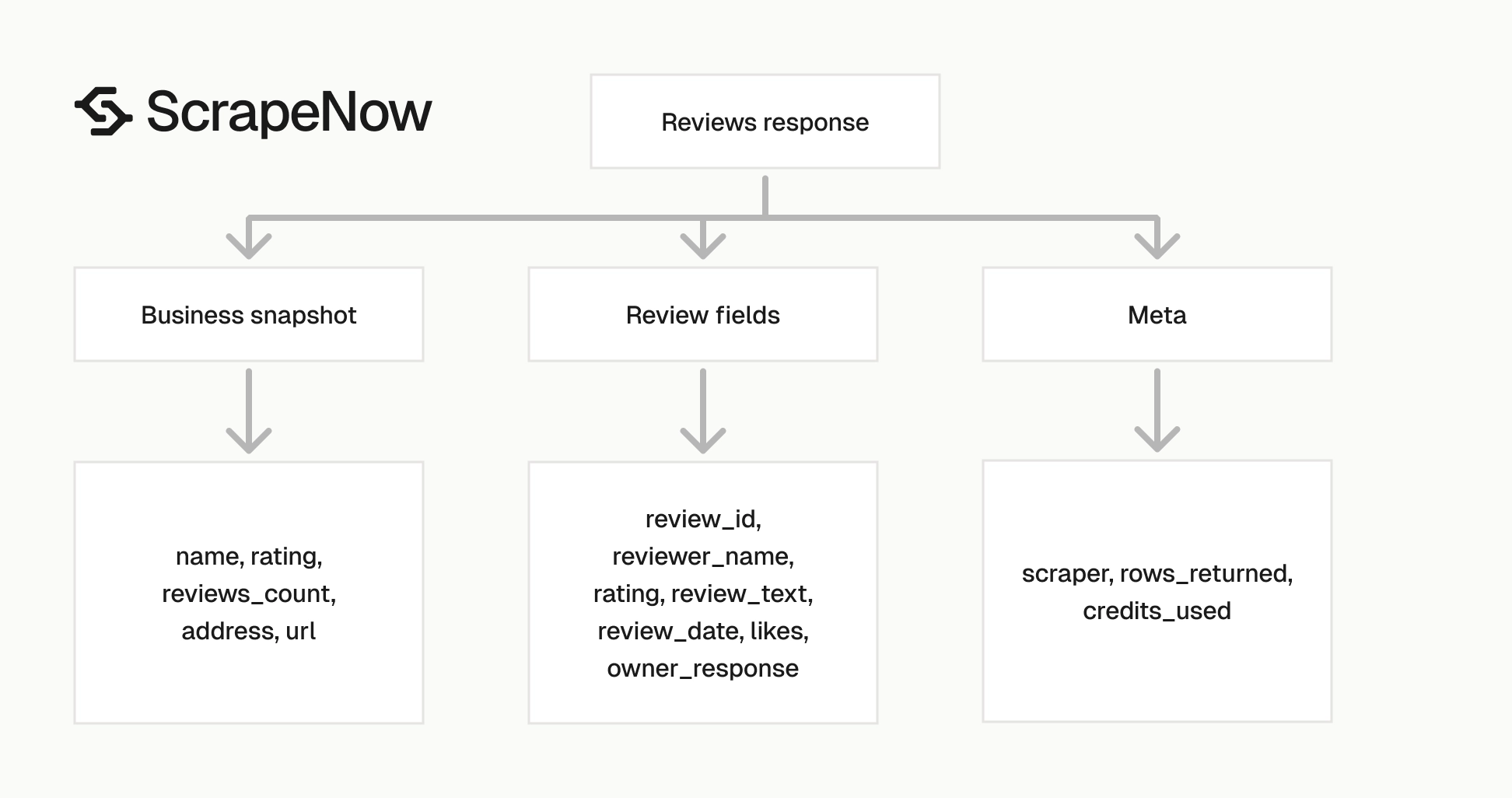
The response has five practical parts.
| Field group | What it contains | How to use it |
|---|---|---|
status |
Request result | Gate retries and alerts |
input |
URL and days_limit used for the run |
Debug invalid inputs |
business |
Name, rating, review count, address, Maps URL | Join reviews back to a place |
reviews |
One object per review | Store as rows |
meta |
Scraper name, row count, credit count | Track cost and volume |
Store the response as received before you transform it. Raw JSON gives you a replay source when your table schema changes later.
Business fields
business.name is the place name shown on Google Maps. Use it for reporting.
Avoid treating business.name as a unique ID. Chains, franchises, and duplicate listings can share the same displayed name.
business.google_maps_url works better for joins because it points back to the source listing. If you scrape many locations from search, store the original Maps URL with every review.
business.rating and business.reviews_count describe the listing at scrape time. Store a scraped_at timestamp beside them because these numbers change.
For audits, keep the business snapshot with the review rows. That lets analysts compare review text against the public rating at the time of extraction.
Use your internal location ID when you have one. The Maps URL should sit beside that ID as an external source reference.
Review fields
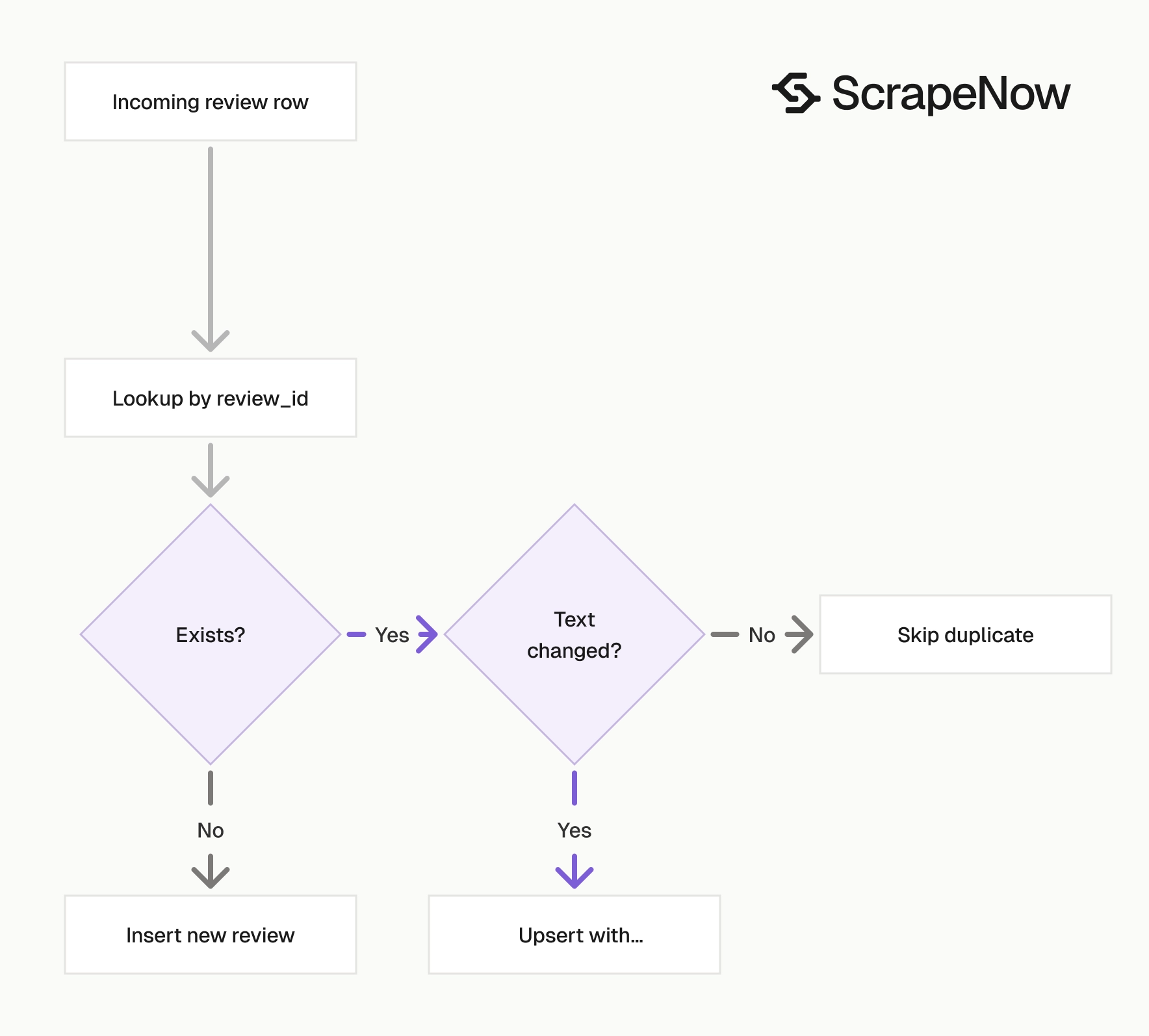
review_id is the first field to use for deduplication. Review text can change when a user edits a review, so keep the latest version for each review_id.
rating is an integer from 1 to 5. Treat missing or non-numeric ratings as invalid rows and send them to a dead-letter table.
review_text contains the written review. Some Google reviews have a star rating without text, so allow an empty string or null value in your schema.
review_date is the normalized date when available. review_relative_date keeps the original label, such as 2 weeks ago.
Keep both date fields. Relative dates help when Google displays a label before a normalized date becomes available in the extracted output.
likes_count helps rank reviews when you build summaries. A negative review with many likes deserves different handling than a zero-like review from the same week.
Owner response fields
owner_response is null when the business has no reply.
When present, it includes response text and date. This supports response-time reporting for operations teams.
A common metric is the share of one-star and two-star reviews with an owner reply within seven days. Store the response fields even if your first report does not use them.
Owner responses also show whether a local manager follows the brand playbook. You can review response tone, apology language, escalation offers, and follow-up instructions.
Meta fields
meta.rows_returned tells you how many review rows came back. meta.credits_used maps the scrape result to your ScrapeNow usage.
Store the meta object with every run. It gives you a clean audit trail when a scheduled job pulls more rows than expected.
Use the row count for monitoring. A zero-row response on a listing with known reviews should trigger a check.
Also store the input URL next to the meta object. That makes it faster to trace spend spikes back to specific locations.
Production tips for review extraction
Validate the input URL before calling the API
Reject invalid URLs before they hit the scraper. This saves credits and makes errors faster to debug.
from urllib.parse import urlparse

def validate_google_maps_url(url: str) -> None:
    parsed = urlparse(url)

    if parsed.scheme != "https":
        raise ValueError("URL must use https")

    if parsed.netloc not in {"www.google.com", "google.com"}:
        raise ValueError("URL must start with https://www.google.com/")

    if "/maps/" not in parsed.path:
        raise ValueError("URL must be a Google Maps URL")

validate_google_maps_url(
    "https://www.google.com/maps/place/Restaurant+Biscotte/@45.5088,-73.5878,17z"
)
Use the same validation in batch jobs. Invalid CSV inputs are common when business teams paste Maps links from browser tabs, shared links, or shortened URLs.
Normalize inputs before storing them. Remove surrounding spaces, reject empty strings, and log the original source file row number.
Keep the rejected rows in a separate table. Include the error message, original URL, normalized URL, source file name, and row number.
Use days_limit for recurring jobs
For daily monitoring, set days_limit to 2 or 3. That gives you overlap for late-arriving reviews and edited reviews.
For a weekly run, set days_limit to 8 or 10. The extra days protect the job when a previous run fails.
| Job type | Suggested days_limit |
Reason |
|---|---|---|
| Daily review monitoring | 3 | Covers weekends and delayed jobs |
| Weekly location audit | 10 | Covers missed runs |
| One-time historical pull | Omit the field | Pulls the available review set |
| Backfill after outage | Outage days plus 2 | Catches review edits |
Use a wider window after holidays, long weekends, or known scheduler downtime. A few extra days cost less than missing review edits.
Set the value per workflow instead of per developer. Store it in a job config table so production runs stay consistent.
Deduplicate by review_id
Use review_id as the primary key. If you track edits, store versions by review_id and scraped_at.
from datetime import datetime, timezone

def normalize_review_rows(api_response: dict) -> list[dict]:
    business = api_response.get("business", {})
    scraped_at = datetime.now(timezone.utc).isoformat()

    rows = []

    for review in api_response.get("reviews", []):
        review_id = review.get("review_id")

        if not review_id:
            continue

        rows.append({
            "review_id": review_id,
            "business_name": business.get("name"),
            "business_url": business.get("google_maps_url"),
            "business_rating_at_scrape": business.get("rating"),
            "business_reviews_count_at_scrape": business.get("reviews_count"),
            "reviewer_name": review.get("reviewer_name"),
            "reviewer_profile_url": review.get("reviewer_profile_url"),
            "rating": review.get("rating"),
            "review_text": review.get("review_text"),
            "review_date": review.get("review_date"),
            "review_relative_date": review.get("review_relative_date"),
            "likes_count": review.get("likes_count"),
            "owner_response_text": (
                review.get("owner_response") or {}
            ).get("text"),
            "owner_response_date": (
                review.get("owner_response") or {}
            ).get("date"),
            "language": review.get("language"),
            "scraped_at": scraped_at
        })

    return rows
Run an upsert on review_id. If you need history, add scraped_at to the key and keep a current view on the latest row per review.
For sentiment pipelines, dedupe before scoring. Scoring duplicate reviews inflates location-level metrics and wastes model calls.
Keep the original review text with every version if you track edits. That gives analysts a way to compare wording changes after owner responses or service recovery.
Use a schema that allows missing values
Google Maps reviews vary. Some reviews have no text, some reviewer counts are missing, and some owner responses have no date.
A strict schema should allow null values for every optional field. Keep review_id, business_url, rating, and scraped_at as required fields.
CREATE TABLE google_maps_reviews (
    review_id TEXT PRIMARY KEY,
    business_name TEXT,
    business_url TEXT NOT NULL,
    business_rating_at_scrape NUMERIC,
    business_reviews_count_at_scrape INTEGER,
    reviewer_name TEXT,
    reviewer_profile_url TEXT,
    rating INTEGER NOT NULL CHECK (rating BETWEEN 1 AND 5),
    review_text TEXT,
    review_date DATE,
    review_relative_date TEXT,
    likes_count INTEGER,
    owner_response_text TEXT,
    owner_response_date DATE,
    language TEXT,
    scraped_at TIMESTAMPTZ NOT NULL
);
Add an index on business_url if you query reviews by location. Add an index on review_date if you run daily or weekly reports.
For warehouse tables, partition by scraped_at or review_date. Pick scraped_at when replay and cost tracking matter more than review chronology.
If you store multi-brand data, add account_id or brand_id to the table. That keeps customer data separated and makes billing reports cleaner.
Retry failed requests with backoff
Use retries for network failures, 429s, and 5xx responses. Reject validation errors because the input needs fixing.
import time
import requests

RETRY_STATUS_CODES = {429, 500, 502, 503, 504}

def run_reviews_scraper(api_key: str, url: str, days_limit: int | None = None) -> dict:
    payload = {"url": url}

    if days_limit is not None:
        payload["days_limit"] = days_limit

    for attempt in range(1, 4):
        response = requests.post(
            "https://api.scrapenow.io/api/v1/scraping/scrape?scraper=google-maps-reviews-extract-by-url",
            headers={
                "Authorization": f"Bearer {api_key}",
                "Content-Type": "application/json"
            },
            json=payload,
            timeout=120
        )

        if response.status_code < 400:
            return response.json()

        if response.status_code not in RETRY_STATUS_CODES:
            raise RuntimeError(
                f"Non-retryable error {response.status_code}: {response.text}"
            )

        sleep_seconds = attempt * 5
        time.sleep(sleep_seconds)

    raise RuntimeError("Scraper request failed after 3 attempts")
Three attempts cover most scheduled jobs. If a URL fails after three tries, write it to a retry table with the error body.
Fix failed URLs outside the request path. That keeps the main job moving when one listing changes, disappears, or returns an access error.
Use a retry table with status values such as queued, retried, failed, and fixed. That makes operational cleanup simple without reprocessing the whole batch.
Track credits per run
The scraper charges per result. One returned review row equals one credit.
Store meta.credits_used and meta.rows_returned for every run. That catches sudden spikes when a location has thousands of reviews.
It also catches operator mistakes. A full historical pull costs more than a three-day sync on the same location.
def build_run_log(api_response: dict, input_url: str) -> dict:
    meta = api_response.get("meta", {})

    return {
        "scraper": meta.get("scraper"),
        "input_url": input_url,
        "rows_returned": meta.get("rows_returned", 0),
        "credits_used": meta.get("credits_used", 0),
        "status": api_response.get("status")
    }
Add a run ID and started timestamp in your own job wrapper. Those fields make retries and incident reviews faster.
ScrapeNow has 86+ pre-built scrapers across 14 platforms. The full scrapers catalog lists Google scrapers and the rest of the pre-built extractors.
A common alternative is a Playwright script with residential proxies, scroll logic, locale handling, and selector maintenance. That works for a controlled internal tool, then becomes expensive when Google changes the page or anti-bot checks start returning partial results.
Use the API when review data is the output you need. Maintain your own scraper when browser behavior itself is the product you are testing.
Common job patterns
One business, recent reviews
Use this for brand monitoring on one listing.
{
  "url": "https://www.google.com/maps/place/Restaurant+Biscotte/@45.5088,-73.5878,17z/data=!4m6!3m5!1s0x4cc91a4f8f5f5f5f:0x123456789abcdef!8m2!3d45.5088!4d-73.5878!16s%2Fg%2F11example",
  "days_limit": 7
}
This keeps the result set small and controls daily spend. It also keeps downstream review queues from filling with old rows.
Use this pattern for one store, one clinic, one restaurant, or one competitor location. Store the last successful run time with the listing.
Alert when rows drop to zero for a listing that usually receives reviews. That signal often catches URL issues, category changes, or removed listings.
Many businesses from Maps search
Start with a location search, store the listing URLs, then run the reviews scraper on each URL.
The Google Maps locations search scraper fits jobs that need businesses by category, city, or search result. After that, the reviews scraper handles each listing one by one.
For large batches, queue each listing URL as a separate job. That gives you per-location retries, cleaner logs, and better rate control.
Store the search query that produced each listing. Later, you can explain why a location entered the pipeline and rerun the same discovery step.
Franchise and multi-location audits
For franchise audits, keep a locations table with the canonical business ID used by your company. Store the Google Maps URL as an external identifier.
Join reviews back to the internal location ID after extraction. That prevents reporting errors when two locations share a name or operate in the same city.
Track response time, rating distribution, and review volume per location. These metrics find stores that need operational follow-up faster than reading raw reviews.
Add a weekly snapshot table for location-level metrics. It gives executives a stable trend line without recalculating every review on every dashboard load.
Hotel listings
If your target data starts from hotel URLs or filtered hotel search pages, use the hotel-specific scrapers before review extraction. The Google Hotels extract by URL scraper works from a hotel page.
The Google Hotels search by filter URL scraper works from filtered hotel search URLs. Use it when you start from a destination, date filter, or hotel search result page.
Keep Maps reviews and hotel search data in separate tables. Their fields overlap, and they serve different jobs.
Hotel pages often include availability, pricing, amenities, and search context. Maps reviews focus on place reputation and reviewer feedback.
Sentiment and topic modeling
Review text works well as input for sentiment classification, issue detection, and location summaries. Keep the raw text unchanged before sending it to a model.
Add model outputs to a separate table keyed by review_id. That lets you rerun the model without overwriting the source review.
Common labels include service, wait time, cleanliness, price, food quality, staff, parking, and delivery. Keep the label list stable so reports remain comparable.
Store the model name, prompt version, and scored timestamp with each classification. That makes drift analysis and reruns much cleaner.
Ready to get this data? Try the Google Maps reviews scraper with your own URLs.
Pricing
ScrapeNow charges per returned row. One row costs one credit, starting at $0.04 per credit for small runs and dropping with volume. No monthly contracts, no proxy fees, no charges for failed rows. See the pricing page for current rates.


