
Extract Google AI Mode answers with three inputs and JSON output.
The Google AI Search Scraper returns the prompt, country, final Google AI Mode URL, generated answer text, and scrape status from each request. Use it when you need repeatable Google AI Mode answer collection across prompts, countries, and scheduled runs.
Developers and data teams use this scraper to run prompt sets across markets, compare AI answers, and store structured responses. You get data records instead of screenshots, manual checks, or a fragile Playwright script tied to one laptop.
ScrapeNow handles the browser execution, Google AI Mode request flow, polling, and result packaging. Your pipeline sends inputs and stores JSON. With a generic browser automation setup, you own Chrome updates, session handling, locale parameters, retries, anti-bot failures, and selector changes.
Use this scraper for generated answer text from Google AI Mode. Keep Maps, Hotels, Flights, and Shopping extraction in separate scrapers so each pipeline keeps a stable schema.
How to use this scraper
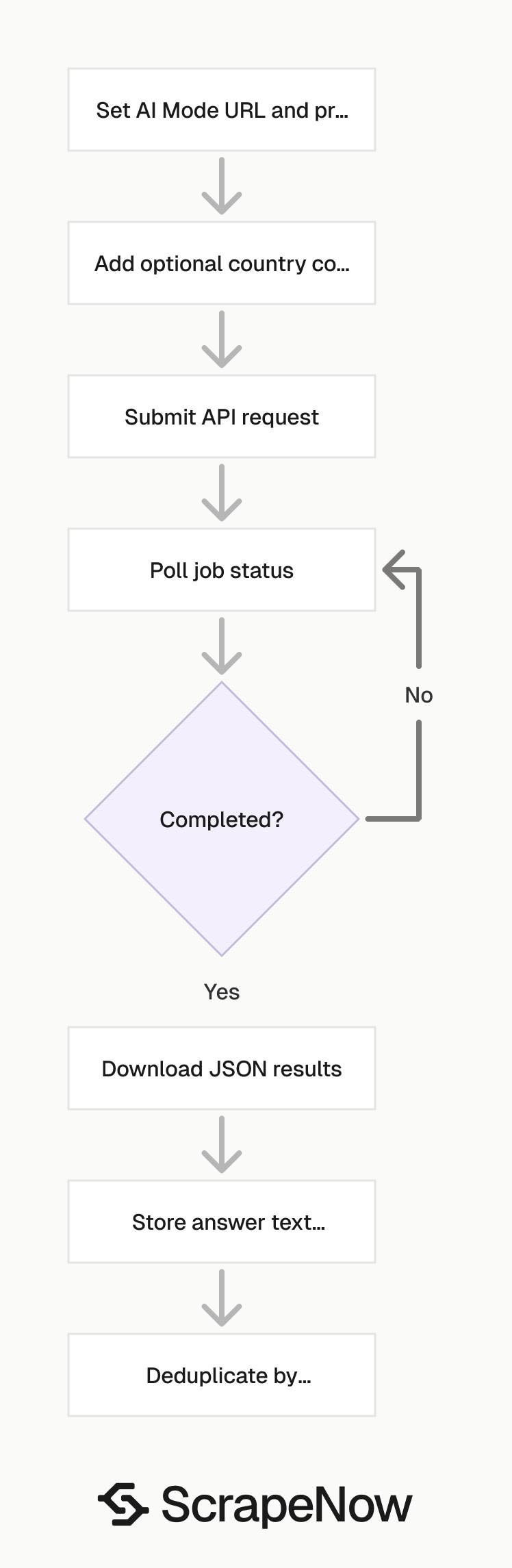
The Extract Google AI search results takes three inputs and returns JSON. Start on that scraper page when you are ready to run a job.
If you pull other Google datasets, use the google scrapers hub after this setup. The hub links to Google Maps, Hotels, Flights, Shopping, and other Google-specific scrapers.
Send the AI Mode URL, a prompt, and an optional country code. The scraper returns the final Google URL, the generated answer text, and the scrape status for that input.
For most teams, the first working run should use one prompt and one country. After that, add validation, deduplication, and failed-row retries before submitting large batches.
A clean production flow starts with this article, moves to the scraper page for the API call, then uses the hub for other Google data types. That path keeps generated AI answers separate from structured Google datasets.
Step 1. Set the Google AI Mode URL
Use this value for the url input:
https://google.com/aimode
This is the Google AI Mode entry point used by the scraper. Keep this value fixed unless the scraper page documents a new entry URL.
The scraper expects this URL because the input schema maps to Google AI Mode requests. Passing a regular Google Search URL changes the request type and breaks the expected output shape.
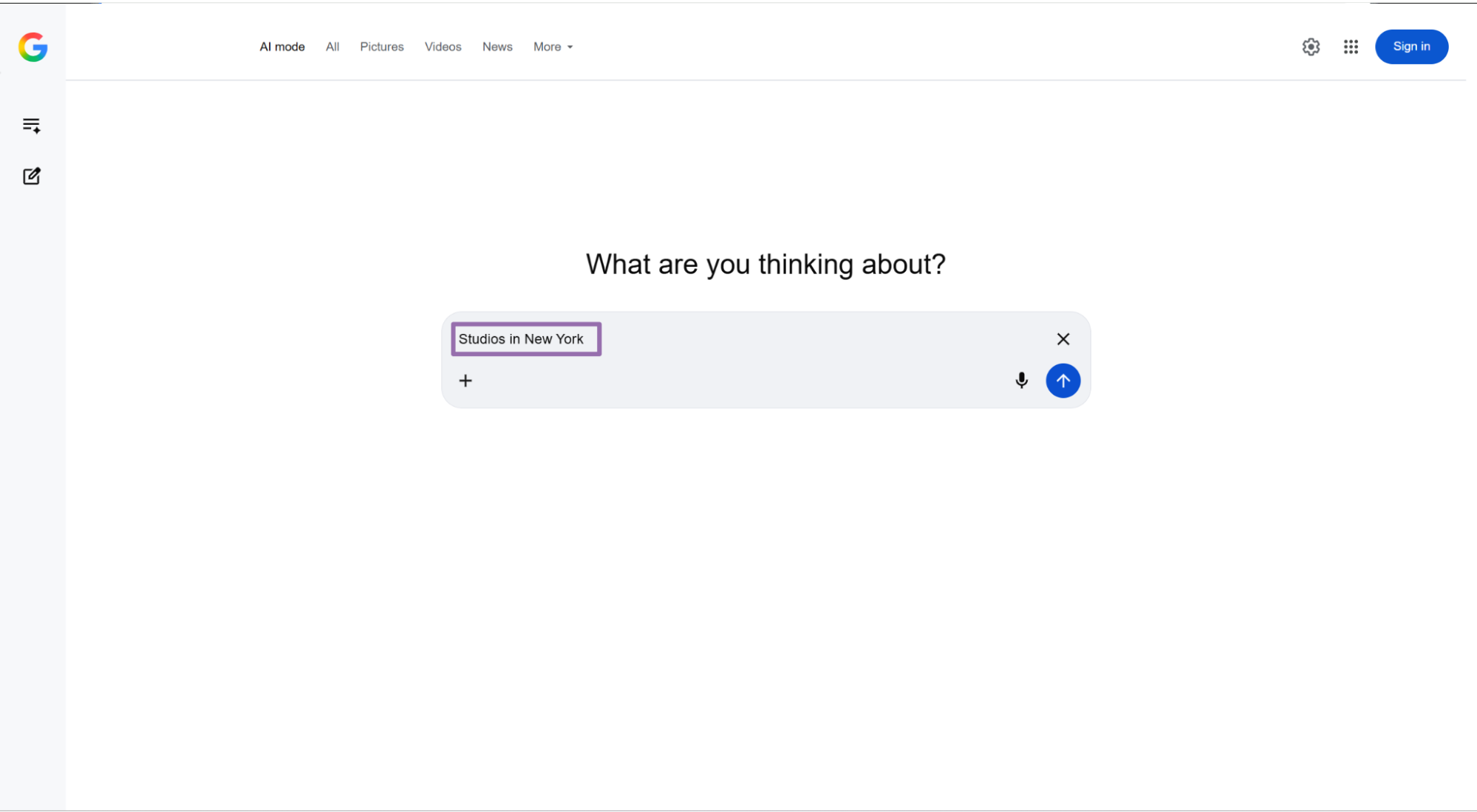
Step 2. Set the prompt
Use the prompt field for the text you want to send to Google AI Mode.
Example:
Studios in New York
Prompts should be specific enough to return usable answer text. Short generic prompts produce broad answers that are harder to compare across countries.
For batch runs, keep one prompt per input object. That structure keeps each result tied to one source request and makes retries safer.
A good prompt names the entity, location, product, or question you want Google AI Mode to answer. For example, Studios in New York gives you cleaner output than studios, because the location is part of the request.
Use consistent prompt casing and wording when you compare runs. A small wording change changes generated output, even when the target country stays the same.
Step 3. Set the country code
The country field is optional. For API usage, send a two-letter ISO 3166-1 country code as a string.
Examples:
| Country | API value |
|---|---|
| United States | US |
| United Kingdom | GB |
| Germany | DE |
| France | FR |
| Canada | CA |
Use country-level runs when you need localized answer text. A prompt like best coworking studios returns different businesses and wording across US, GB, and DE.
Country also affects the final Google URL. Store it with every row so analysts can reproduce comparisons later.
If your product uses market codes, map them to ISO country values before calling the scraper. Keep that mapping in code or a reference table.
Avoid spreading country conversion logic across job scripts. One mapping file reduces silent errors in scheduled runs.
Step 4. Run the API request
Use this ScrapeNow API code. Replace YOUR_API_KEY with your scraper API key.
"""
Configuration:
    - Set SCRAPER_SLUG to the scraper you want to run.
    - Set SCRAPER_INPUTS to the list of input dicts matching that scraper's schema.
    - Set API_KEY to your scraper API key.
"""

import sys
import time
import json
import requests
import os

API_KEY = "YOUR_API_KEY"

SCRAPER_SLUG = "google-ai-search-extract-by-prompt-url"

SCRAPER_INPUTS = [
    {
        "url": "https://google.com/aimode",
        "prompt": "Studios in New York",
        "country": "US"
    }
]

BASE_URL = "https://api.scrapenow.io/api/v1/scraping"
TIMEOUT_SECONDS = 3600
POLL_INTERVAL = 5
SPINNER = "|/-\\"


def build_headers(api_key: str, content_type: str | None = None) -> dict:
    """Build headers using your API key"""
    headers = {"Authorization": f"Bearer {api_key}"}
    if content_type:
        headers["Content-Type"] = content_type
    return headers


def trigger_scrape(slug: str, inputs: list[dict]) -> str:
    """POST to the scrape endpoint and return the job_id."""
    url = f"{BASE_URL}/scrape?scraper={slug}"

    response = requests.post(
        url,
        headers=build_headers(API_KEY, "application/json"),
        json={"inputs": inputs},
    )
    response.raise_for_status()
    return response.json()["data"]["job_id"]


def poll_until_done(job_id: str) -> str:
    """Poll the job status until it reaches a terminal state. Returns final status."""
    start = time.time()
    i = 0
    while True:
        elapsed = time.time() - start
        if elapsed > TIMEOUT_SECONDS:
            print(f"\nTimeout after {TIMEOUT_SECONDS}s")
            sys.exit(1)

        data = requests.get(
            f"{BASE_URL}/jobs/{job_id}",
            headers=build_headers(API_KEY),
        ).json()
        status = data["data"]["status"]

        mins, secs = divmod(int(elapsed), 60)
        sys.stdout.write(f"\r[{SPINNER[i % 4]}] Waiting... {status} ({mins}m {secs:02d}s)  ")
        sys.stdout.flush()

        if status in ("completed", "failed"):
            print()
            return status

        time.sleep(POLL_INTERVAL)
        i += 1


def fetch_results(job_id: str) -> dict:
    """Download the completed job results as JSON."""
    response = requests.get(
        f"{BASE_URL}/jobs/{job_id}/results?format=json",
        headers=build_headers(API_KEY),
    )
    response.raise_for_status()
    return response.json()


def save_results(data: dict, slug: str) -> str:
    """Write results to {slug}-output.json and return the filename."""
    filename = f"{slug}.json"
    with open(filename, "w", encoding="utf-8") as f:
        json.dump(data, f, indent=2, ensure_ascii=False)
    return filename


def main() -> None:
    print(f"Triggering scraper: {SCRAPER_SLUG}")
    job_id = trigger_scrape(SCRAPER_SLUG, SCRAPER_INPUTS)
    print(f"Job started: {job_id}")

    final_status = poll_until_done(job_id)

    if final_status != "completed":
        print(f"Job failed with status: {final_status}")
        sys.exit(1)

    print("Fetching results...")
    results = fetch_results(job_id)

    output_file = save_results(results, os.path.join("output", SCRAPER_SLUG))
    print(f"Results saved to: {output_file}")


if __name__ == "__main__":
    main()
The script starts a job, polls every 5 seconds, waits up to 3600 seconds, then saves the result as JSON. That timeout gives long AI Mode responses enough room to finish.
Create the output directory before running it:
mkdir -p output
python google_ai_search.py
If you run this from CI, pass the API key through an environment variable. Hard-coded keys work for a local smoke test and create risk in shared repositories.
A production runner should log the job_id before polling. If the local process exits, the job ID lets you fetch status and results from another machine.
ScrapeNow job polling also gives you a clean boundary between submission and storage. Your worker does not need to keep a browser open while Google returns the generated answer.
Step 5. Read the JSON output
The API returns an array of result objects. Here is a trimmed version of a real response:
[
  {
    "inputs": {
      "url": "https://google.com/aimode",
      "prompt": "Studios in New York",
      "country": "US"
    },
    "scrape_status": "success",
    "url": "https://www.google.com//search?q=Studios+in+New+York&hl=en&gl=US&udm=50&aep=11&newwindow=1&sei=21IEaqVg96aa2Q-t5MehDQ&mstk=AUtExfC1TjNZ63FoXdBuPmfHCGW1pw6_9zOCuZ1iPa-cEx1HaX-ATF1MFVLd41wLGG0zpgnnceuiI_oSAlv4lsLOoH9jtAX1rM_RjBpx4vN9Vsco2IskPGqbPNeKUx7gJxANC9rlWizLvytFrwMyF_oEAy6_xVI269bmTJc&csuir=1",
    "prompt": "Studios in New York",
    "answer_text": "New York City offers thousands of multi-functional spaces ranging from world-class creative production soundstages to residential studio apartments. For professionals looking to book production space in 2026, premier facilities like the iconic Silvercup Studios in Queens, the legendary Quad Recording Studios in Midtown, and the sustainable massive multi-stage PIER59 Studios at Chelsea Piers anchor the city's commercial creative industry. Meanwhile, the city's residential market features thousands of compact studio flats spread across the five boroughs, tracked daily on local real estate platforms. Creative & Production Studios Silvercup Studios Historic Long Island City production lot hosting iconic television series and films. Quad Recording Studios NYC 4.7 (261) Recording studio Open Theater District High-end 24-hour Midtown facility featuring legendary acoustics and top-tier engineering. PIER59 Studios 4.7 (267) Photography studio Closed 59 Chelsea Piers Massive Chelsea Piers destination specializing in sustainable high-fashion multimedia campaigns. Lounge Studios 4.9 (410) Recording studio Closed Midtown South Versatile Times Square-area multimedia hub featuring a 12-foot wide cyclorama and 4K video wall. Flux Studios NYC 4.9 (62) Recording studio Open East Village Alphabet City facility featuring specialized Dolby Atmos setups and vintage gear racks. Contra Studios 5.0 (57) Photography studio Open Chelsea Expansive Chelsea floor optimized with pre-lit 2-corner soundstages and full commercial kitchens. Peerspace +5 Residential Studios for Rent Manhattan: Densest inventory of single-room layouts concentrated heavily in neighborhoods like Murray Hill and Kips Bay. Brooklyn: Popular artistic options spanning industrial-style live-work conversions across Bushwick and Williamsburg. Market Pricing: Median rates hover around $3,500 per month for central Manhattan neighborhoods like Hell's Kitchen. Sourcing Platforms: Real-time lease inventory is consolidated daily across localized broker portals like StreetEasy and Zillow. Studio Rental Market Comparison Studio Type Primary Use Case Booking/Leasing Structure Popular Neighborhood Hubs Soundstages / Photo Film, TV, Commercials, Fashion Hourly or Daily Rates Chelsea, Long Island City, Astoria Audio / Recording Music Tracking, Podcasts, Mixing Session Packages or Hourly Rates Midtown Manhattan, Lower East Side Fitness / Dance Classes, Rehearsals, Auditions Hourly Floor Rentals No... (truncated)"
  }
]
The sample shows how much Google can pack into one answer. A single response can include business names, ratings, neighborhoods, prices, categories, and summary text.
For larger Google extraction work, keep each scraper tied to its data type. Use the AI Mode scraper for generated answer text.
Use the Extract Google Hotels data for hotel detail pages. Use the Search Google Flights data for flight search results.
This separation keeps schemas stable. AI Mode output is long generated text, while hotel and flight outputs contain structured fields with different refresh patterns.
What ScrapeNow handles for you
A generic browser script works for a demo. It becomes expensive when you schedule prompt sets across countries.
With a self-managed Playwright or Puppeteer runner, you maintain the browser version, page timing, proxy routing, retry rules, and result parsing. Google UI changes force code changes, and local browser state creates inconsistent runs.
ScrapeNow exposes this flow as a job API. You submit input rows, receive a job_id, poll status, and download JSON results when the job completes.
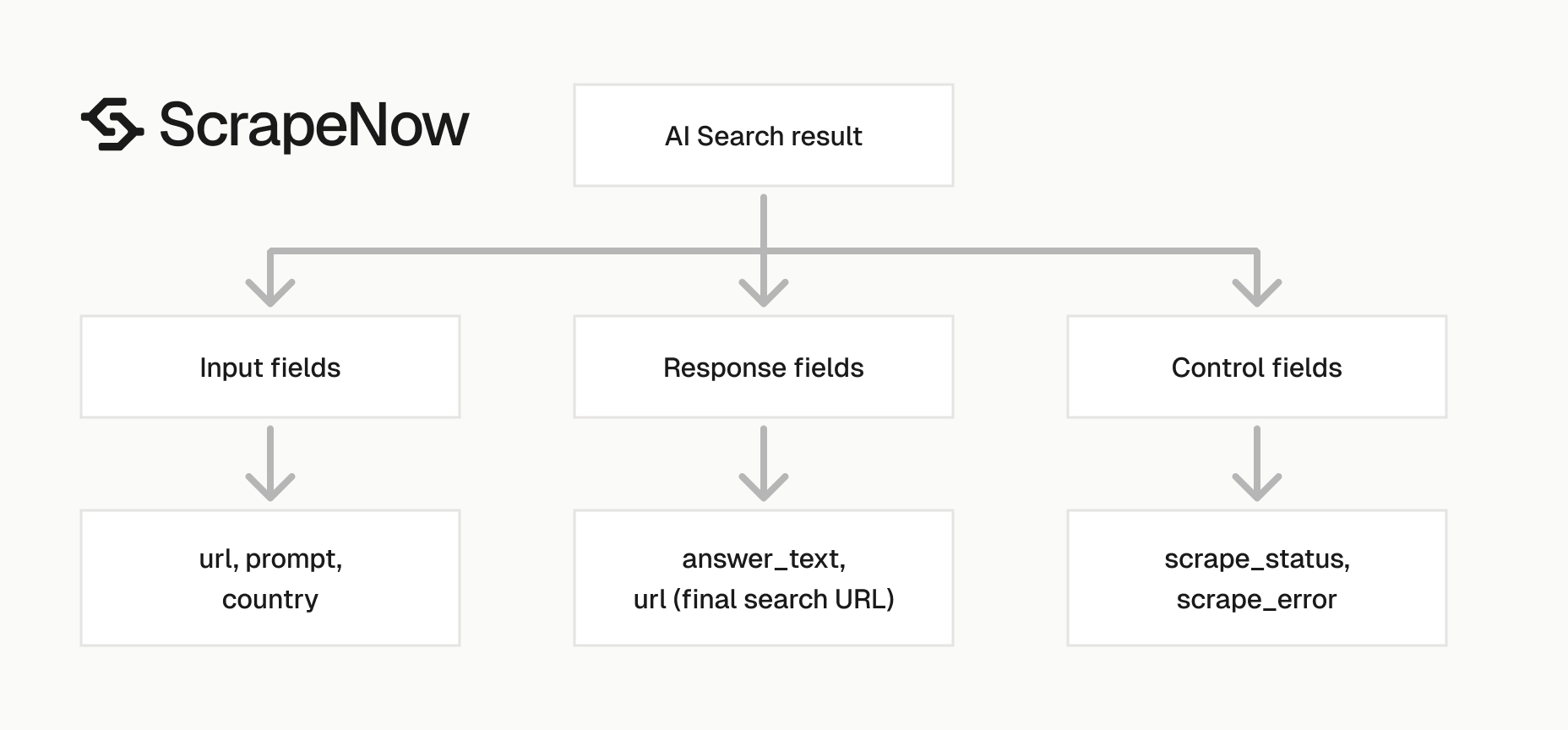
The implementation detail that matters is the row-level result shape. Each output keeps the original input beside the final URL, status, prompt, and answer text.
That shape makes retries and audits straightforward. A failed row carries the same input object you need to resubmit.
It also keeps your warehouse design simple. Store the input hash, original prompt, country, final URL, status, and answer text as one source record.
What data you get back
Each result contains the original input and the extracted Google AI Mode response. Store both fields together.
The input tells you why the answer exists. The output tells you what Google returned for that specific request.
| Field | Type | What it means |
|---|---|---|
inputs.url |
string | The Google AI Mode URL sent to the scraper |
inputs.prompt |
string | The prompt sent in the job input |
inputs.country |
string | The two-letter country code used for localization |
scrape_status |
string | success when extraction completed for that input |
url |
string | The final Google search URL generated during the run |
prompt |
string | The prompt copied into the output object |
answer_text |
string | The extracted Google AI answer text |
inputs
The inputs object is your audit trail. It contains the exact url, prompt, and country sent to the scraper.
Use this object for joins instead of matching on answer text. AI answers change between runs, while input values stay stable.
For warehouse storage, flatten these values into columns. Querying country = 'US' is faster and cleaner than parsing nested JSON in every report.
Keep the original prompt string even if you also store a normalized version. The raw prompt shows what you submitted.
The normalized prompt supports deduplication and grouping. Store both values when your reporting team compares prompts over time.
scrape_status
scrape_status tells you whether extraction worked for that row. Treat any value other than success as a retry or review item.
A batch job can contain mixed results. One prompt can fail while the other 99 complete.
Build retry logic around this field. A completed job status does not prove every input returned usable answer text.
Store the failed status with the input hash and run ID. That gives you a clean queue for retries, alerts, and manual review.
Keep the original failure row in storage. Support and engineering need the raw record when a retry fails more than once.
url
The url field is the final Google URL produced for the AI Mode request. It includes the encoded query and country parameters.
For example, the URL can include q=Studios+in+New+York and gl=US. Those parameters help you confirm which request Google received.
Store this field if you need reproducibility in logs. It also helps when debugging why two prompts returned different answer text.
The URL is useful for sampling. Analysts can inspect a small set of final URLs when they audit answer quality or localization behavior.
Keep in mind that the URL can include long session and request parameters. Use a TEXT column, not a short URL field copied from an analytics table.
answer_text
answer_text is the main payload. It contains Google AI Mode’s generated response as plain text.
For storage, use a text column that can handle long responses. The sample response includes ratings, neighborhoods, business names, pricing, and categorized sections in one field.
Avoid short varchar columns for this field. Truncated AI answers break downstream classification, QA review, and change detection.
If you run NLP or entity extraction after scraping, keep the original answer alongside derived fields. Derived entities change when your parser changes.
The original answer remains the source record. That source record lets you rerun parsers without scraping the same prompt again.
Production tips
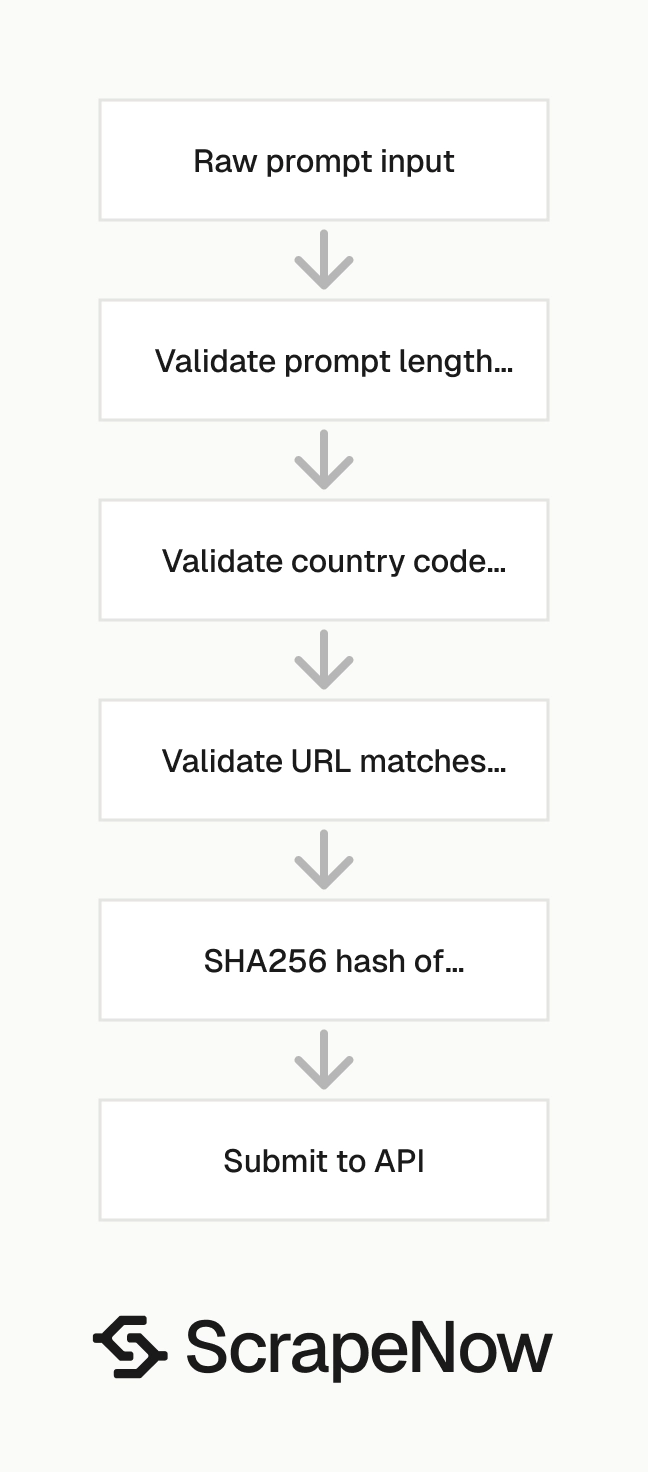
A single prompt takes little setup. Production runs need validation, deduplication, retries, and a schema that handles long answer text.
Treat the scraper output as an external data feed. Validate every input before submission, then validate every result before inserting it into main tables.
A stable pipeline has three layers. The first layer prepares inputs, the second layer submits and polls jobs, and the third layer stores validated results.
Run the first version with small batches. A 10-row batch exposes schema, prompt, and storage issues without filling a retry queue.
Validate inputs before you send a job
Invalid inputs waste credits and make output harder to review. Validate the URL, prompt, and country before calling the API.
import re

VALID_COUNTRY = re.compile(r"^[A-Z]{2}$")

def validate_google_ai_input(row: dict) -> dict:
    url = row.get("url")
    prompt = row.get("prompt")
    country = row.get("country", "US")

    if url != "https://google.com/aimode":
        raise ValueError(f"Invalid Google AI Mode URL: {url}")

    if not isinstance(prompt, str) or len(prompt.strip()) < 3:
        raise ValueError("Prompt must be a string with at least 3 characters")

    if not isinstance(country, str) or not VALID_COUNTRY.match(country):
        raise ValueError(f"Country must be a two-letter ISO code: {country}")

    return {
        "url": url,
        "prompt": prompt.strip(),
        "country": country
    }


rows = [
    {
        "url": "https://google.com/aimode",
        "prompt": "Studios in New York",
        "country": "US"
    }
]

validated_rows = [validate_google_ai_input(row) for row in rows]
print(validated_rows)
Expected output:
[
  {
    "url": "https://google.com/aimode",
    "prompt": "Studios in New York",
    "country": "US"
  }
]
This validation catches common failures before they reach the API. In production, add checks for empty prompt templates and unsupported country values from your business rules.
Also validate generated prompts after template rendering. Template bugs often produce strings like Studios in {city} or Studios in.
Both should fail before submission. A failed validation error costs less than a scraped row with unusable text.
Deduplicate by prompt and country
For AI Mode scraping, the natural key is prompt + country. Two identical prompts in the same country cost twice and return duplicate rows.
Use a stable hash before submitting a batch:
import hashlib
import json

def input_key(row: dict) -> str:
    normalized = {
        "url": row["url"].strip(),
        "prompt": " ".join(row["prompt"].lower().split()),
        "country": row.get("country", "US").upper()
    }
    payload = json.dumps(normalized, sort_keys=True)
    return hashlib.sha256(payload.encode("utf-8")).hexdigest()


def dedupe_inputs(rows: list[dict]) -> list[dict]:
    seen = set()
    unique = []

    for row in rows:
        key = input_key(row)
        if key in seen:
            continue

        seen.add(key)
        unique.append(row)

    return unique


inputs = [
    {"url": "https://google.com/aimode", "prompt": "Studios in New York", "country": "US"},
    {"url": "https://google.com/aimode", "prompt": "studios   in new york", "country": "US"},
    {"url": "https://google.com/aimode", "prompt": "Studios in New York", "country": "GB"}
]

print(dedupe_inputs(inputs))
Expected output:
[
  {
    "url": "https://google.com/aimode",
    "prompt": "Studios in New York",
    "country": "US"
  },
  {
    "url": "https://google.com/aimode",
    "prompt": "Studios in New York",
    "country": "GB"
  }
]
This hash normalizes whitespace and casing. It preserves the country, so the same prompt can run once per market.
Keep the hash in your database. It gives you an idempotency key for inserts, retries, and backfills.
Add the URL to the hash because it is part of the request contract. If Google changes the AI Mode entry point later, old and new request formats stay separate.
Store the hash before submission. That lets you reject duplicates before a worker sends rows to the API.
Store long answer text safely
Avoid sizing answer_text like a title field. AI answers can run thousands of characters.
A practical SQL table looks like this:
CREATE TABLE google_ai_search_results (
    id BIGSERIAL PRIMARY KEY,
    input_hash CHAR(64) NOT NULL,
    input_url TEXT NOT NULL,
    prompt TEXT NOT NULL,
    country CHAR(2) NOT NULL,
    scrape_status VARCHAR(32) NOT NULL,
    result_url TEXT,
    answer_text TEXT,
    scraped_at TIMESTAMPTZ NOT NULL DEFAULT NOW(),
    UNIQUE (input_hash)
);
The UNIQUE (input_hash) constraint blocks duplicate inserts. Keep answer_text as TEXT, because truncating generated answers ruins downstream review.
Add a separate raw JSON column if your team audits provider responses. Raw payloads make incident review faster when a parser, warehouse load, or prompt template changes.
If you store results in an object store, keep a pointer in the database. A common pattern is one row per result plus a raw_payload_uri field.
For Postgres, TEXT does not require you to guess answer length. Let application code enforce practical limits if your warehouse has cost constraints.
Retry failed rows only
Batch jobs can return partial failures. Retrying the full batch duplicates successful rows and creates extra cleanup work.
Filter failed rows and resubmit only those inputs:
def failed_inputs(results: list[dict]) -> list[dict]:
    retry_rows = []

    for row in results:
        if row.get("scrape_status") != "success":
            retry_rows.append(row["inputs"])

    return retry_rows


results = [
    {
        "inputs": {
            "url": "https://google.com/aimode",
            "prompt": "Studios in New York",
            "country": "US"
        },
        "scrape_status": "success"
    },
    {
        "inputs": {
            "url": "https://google.com/aimode",
            "prompt": "Studios in London",
            "country": "GB"
        },
        "scrape_status": "failed"
    }
]

print(failed_inputs(results))
Expected output:
[
  {
    "url": "https://google.com/aimode",
    "prompt": "Studios in London",
    "country": "GB"
  }
]
Set a retry limit in your job runner. Three attempts usually separate transient failures from persistent input or availability problems.
Log the retry count with the input hash. That makes failed-row reports easy to group by prompt, country, and failure pattern.
Use backoff between retry attempts instead of resubmitting failed inputs immediately. A 5-minute wait between attempts gives temporary upstream issues time to clear.
Keep retry jobs small. A retry batch should contain only failed inputs from one run or one failure class.
Keep prompt versions
Prompt wording changes output. Store the exact prompt text and add a version field in your own system if prompts come from templates.
Example prompt registry:
| prompt_version | prompt_template | country |
|---|---|---|
studio_search_v1 |
Studios in {city} |
US |
studio_search_v2 |
Best production studios in {city} |
US |
rental_search_v1 |
Studio apartments in {city} |
US |
Ready to get this data? Try the Google scraper with your own URLs.
This matters when you compare runs over time. A wording change from Studios in New York to Best studios in New York changes the answer.
Store the rendered prompt as well as the template version. The rendered prompt is what Google saw, and the version tells you which internal rule created it.
Keep template variables in their own columns when they matter for analysis. For a city-based prompt, store city, state, and country separately.
Do the same for language. Store prompt_language when you run English, German, French, or translated prompts in separate batches.
Compare countries with the same prompt set
Country comparisons work only when the prompt set stays stable. Use the same prompt list across all target countries.
Then group results by prompt hash and country. This structure makes country-level differences easier to inspect.
For example, run Studios in New York in US, GB, and DE only if that comparison has analytical value. For local business discovery, use cities that match the market.
Keep the prompt language consistent during a comparison run. Mixing translated and untranslated prompts in one report makes answer differences harder to interpret.
If you need translated prompts, treat each language set as its own experiment. Store the source language, translated prompt, and translation method with run metadata.
Add a run note when country comparisons use local city names. A DE run for Berlin and a US run for New York answer different business questions.
Track run metadata
Add run-level metadata outside the scraper response. Store a run_id, submission timestamp, source file name, and operator or service name.
This metadata gives you a clean boundary between scraper output and your pipeline. It also helps when you reprocess one batch.
A minimal run table can contain run_id, scraper_slug, submitted_at, input_count, and status. Link result rows back to run_id.
Add counts for submitted, completed, failed, and retried rows. Those numbers make daily monitoring useful without opening raw result files.
Store the source file checksum if you load prompts from CSV or object storage. That checksum proves which prompt set created the run.
Validate results before loading the warehouse
Run output checks before inserting rows into main reporting tables. At minimum, require inputs, scrape_status, prompt, and url.
For successful rows, require a non-empty answer_text. Empty text with a success status should go to review.
A small validation function is enough for most pipelines:
def validate_result(row: dict) -> None:
    if "inputs" not in row:
        raise ValueError("Missing inputs object")

    if "scrape_status" not in row:
        raise ValueError("Missing scrape_status")

    if row["scrape_status"] == "success" and not row.get("answer_text"):
        raise ValueError("Successful row has empty answer_text")

    if not row.get("url"):
        raise ValueError("Missing final Google URL")
Keep invalid rows in a quarantine table or object store path. You need the raw record for support tickets, parser fixes, and backfill decisions.
Validate field types too. A malformed inputs object should fail before it reaches reporting tables.
Keep generated text separate from derived fields
Generated answers are source data. Derived fields such as business names, prices, ratings, and categories belong in separate tables or columns.
This separation keeps your pipeline easier to debug. If a parser extracts the wrong price, compare the derived field against the original answer_text.
For example, one AI Mode answer can contain Silvercup Studios, 4.7, Queens, and soundstage. Store those extracted entities with a parser version.
Each derived row should point to the original result row. That pointer lets you rerun extraction when your parser improves.
Do the same for classifiers. If you label an answer as local_business, real_estate, or travel, store the classifier version next to the label.
Common use cases
The Google AI Mode scraper works best when you need answer text at scale and want each answer tied to an input record. It is a poor fit for extracting highly structured Google Maps or Shopping data.
Those data types deserve their own schemas. Use the google scrapers hub to choose the correct scraper for each Google surface.
Localized answer monitoring
Run the same prompt set across countries to see how Google AI Mode changes recommendations, wording, and cited entities. This works for brands, marketplaces, and agencies that track search behavior across markets.
Store one row per prompt-country pair. Then compare answer length, named entities, category mentions, and source URLs if your downstream parser extracts them.
Keep runs scheduled at the same time if timing matters. Search behavior changes by day, news cycle, and product availability.
Prompt regression testing
AI answer text changes over time. If your product depends on answer behavior, run a fixed prompt set daily or weekly and compare results.
Track changes in entity presence, answer sections, and sentiment labels. Alert only on meaningful changes, because generated text rarely stays byte-for-byte identical.
A practical regression test checks for missing entities, large answer-length changes, and category changes. Store thresholds in config so analysts can adjust them without code changes.
Research dataset collection
Teams building market research datasets can use AI Mode output as one layer in a larger collection process. Combine generated answers with structured Google scrapers when you need narrative text and entity-level records.
For example, use this scraper to collect AI summaries for best hotels near LAX. Use a hotel-specific scraper to collect prices, amenities, and property details with stable fields.
This approach keeps the generated summary and structured hotel records separate. Analysts can join them later with location, brand, or entity matching.
Content and SERP monitoring
SEO and content teams can track how Google AI Mode describes topics, products, and competitors. Store prompt, country, final URL, and answer text for each run.
Then extract brand mentions, citations, categories, and answer sections. These fields show whether Google changes its generated response after a product launch or content update.
Keep monitoring prompts fixed for trend reports. Create a separate prompt set for experiments and ad hoc research.
Pricing
ScrapeNow charges per returned row. One row costs one credit, starting at $0.04 per credit for small runs and dropping with volume. No monthly contracts, no proxy fees, no charges for failed rows. See the pricing page for current rates.


