This Google Maps location scraper extracts one business profile from a Google Maps CID. It returns name, address, phone, website, rating, coordinates, categories, claimed status, and closure flags.
Use this scraper when your pipeline already stores CIDs and needs structured location records without browser automation. CID-based scraping fits refresh jobs, enrichment pipelines, entity matching, and dedupe checks where the business identity already exists.
A CID is the stable Google Maps customer ID attached to a business listing. With that ID, you can skip keyword search and pull the target record directly. Each input maps to one expected business profile, which gives refresh jobs a tighter control path.
How to use this scraper
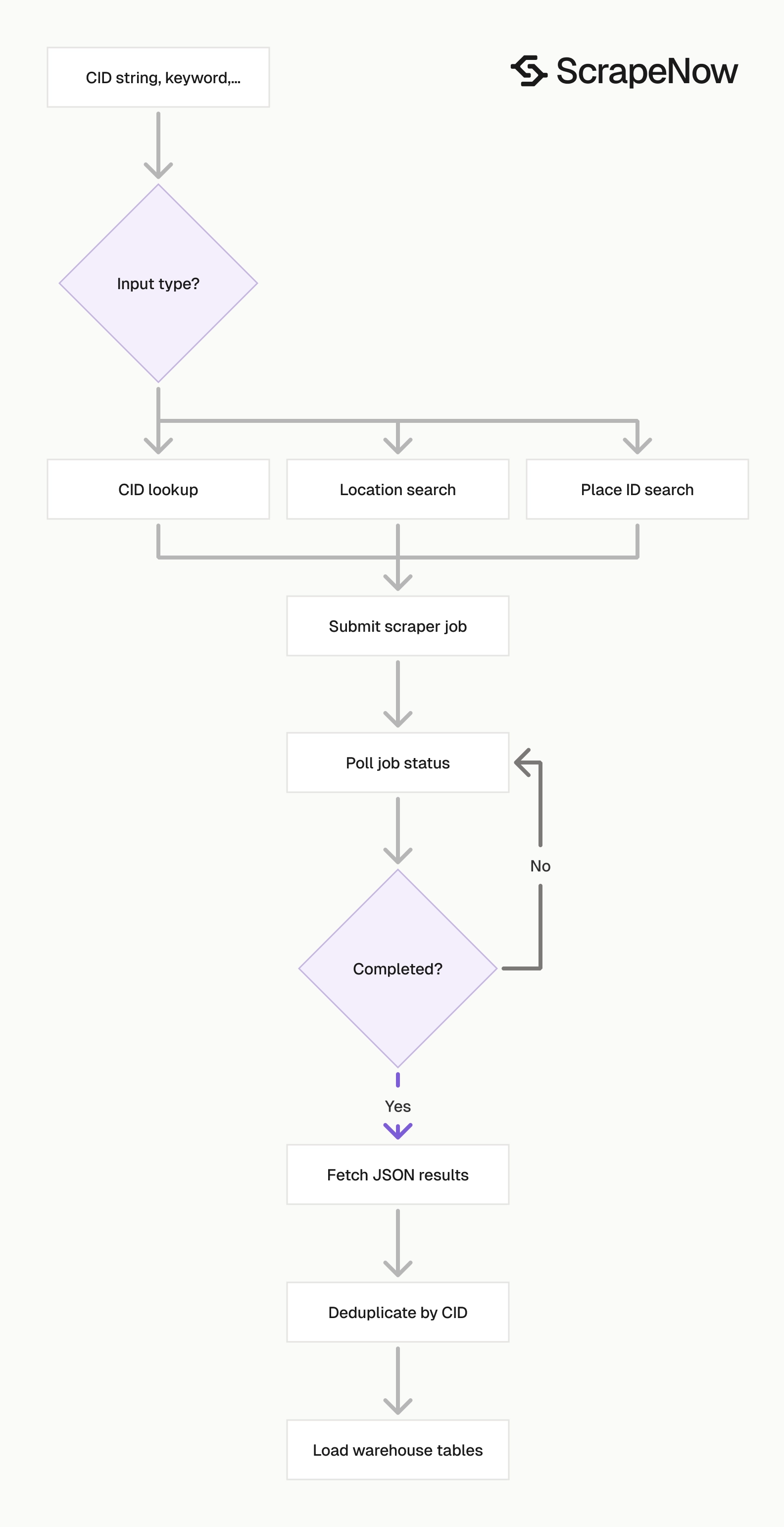
The CID scraper takes one required input, CID, sent as a string. The ScrapeNow product page for Look up Google Maps locations by CID uses the same input shape as the API example below.
Send CIDs as strings through the full pipeline. A Google Maps CID can exceed safe integer limits in JavaScript, spreadsheets, and some warehouse import tools.
That detail matters in production. If a spreadsheet converts 2476046430038551731 into scientific notation, the request targets a different value and misses the business.
Step 1. Find the CID input
The CID scraper accepts this input:
CIDis the Google Maps customer ID.- For API usage, send it as a string to prevent number formatting defects.
- Example value is
"2476046430038551731".
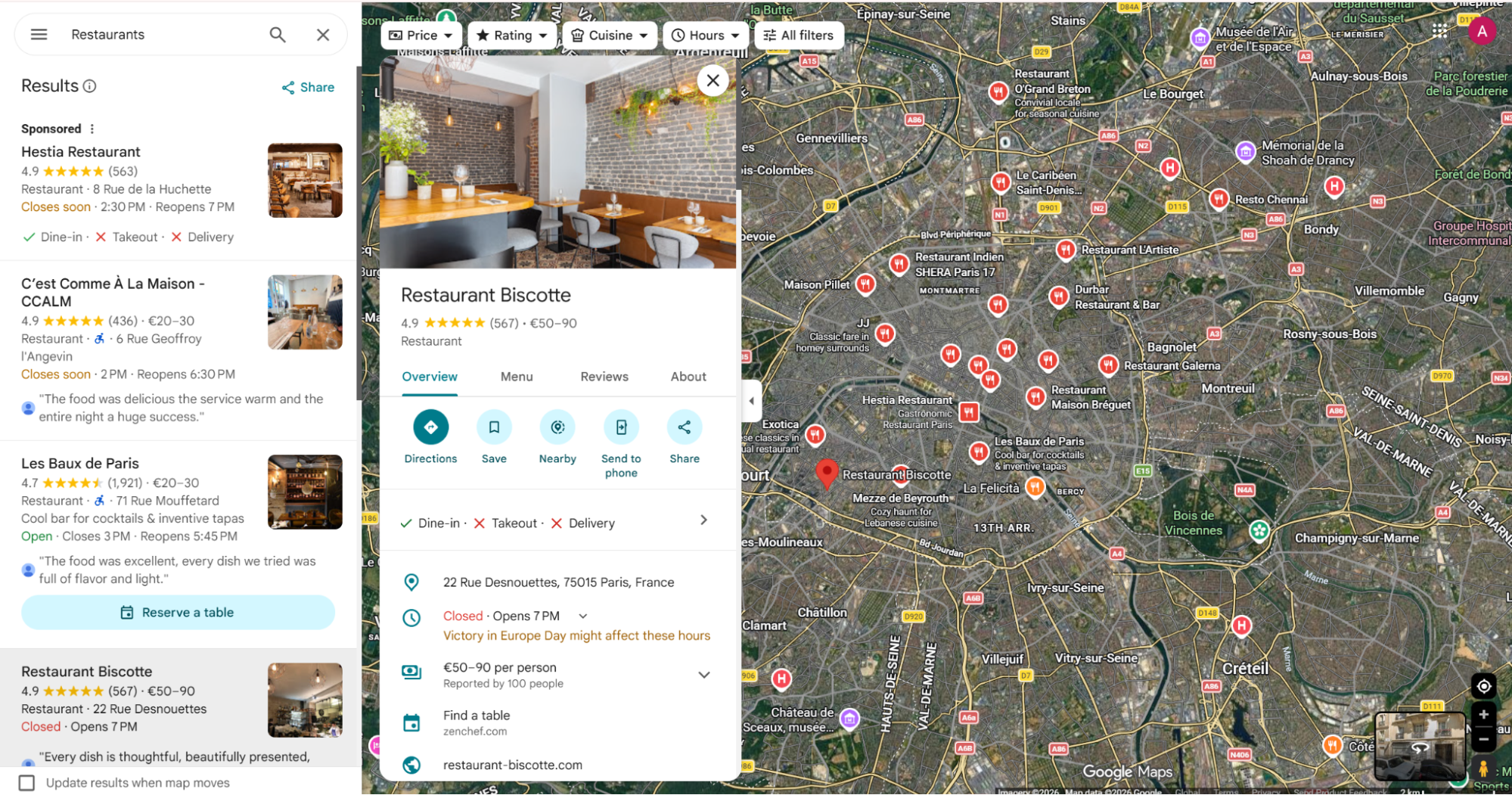
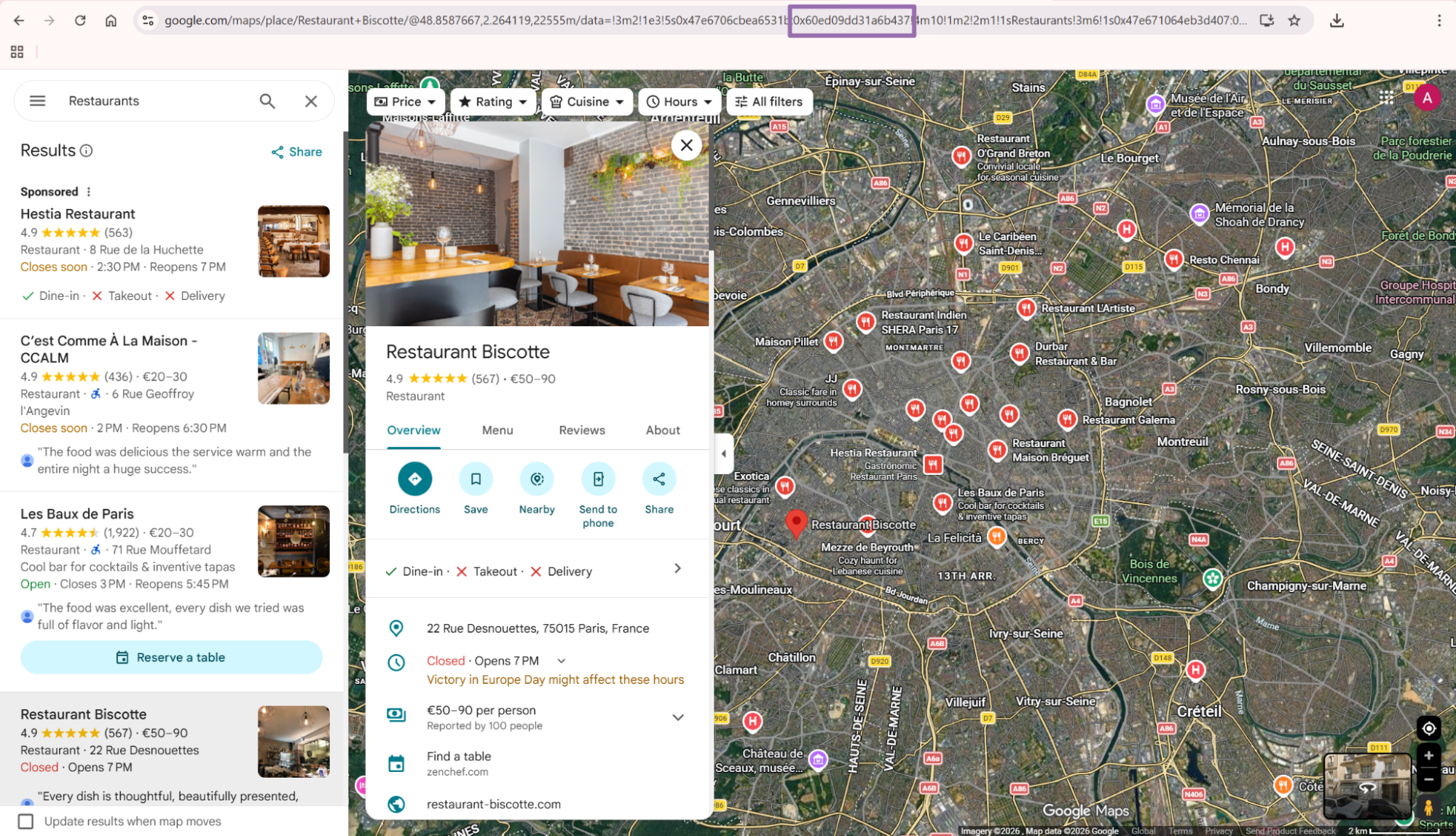
To get the CID:
- Open
google.com/maps. - Find the business to scrape and click it on the map or in search results, for example Restaurant Biscotte.
- In the URL, find the CID in hex format.
- After the
data=parameter, Google uses the structure!1s{placeID}:{customerID}. - The customer ID is the value after
:. - Convert the hex number to a decimal number.
- Send the decimal value as a string in the API request.
The CID flow works when you already have exact business identifiers. Use the location-based scraper for discovery by keyword, coordinates, or map area.
Store both the original identifier and the converted decimal CID. That gives you an audit path when a source system sends hex IDs, Place IDs, or mixed Google Maps URLs.
For batch jobs, keep a column for the source identifier type. A field like source_id_type with values such as cid_decimal, cid_hex, place_id, or maps_url saves time during failure review.
Keep the raw source value too. If a vendor sends a full Maps URL, store that URL beside the parsed CID so you can rerun parsing logic later.
Step 2. Run the API request
Use this Python script. Replace YOUR_API_KEY and keep the CID as a string.
"""
Configuration:
    - Set SCRAPER_SLUG to the scraper you want to run.
    - Set SCRAPER_INPUTS to the list of input dicts matching that scraper's schema.
    - Set API_KEY to your scraper API key.
"""

import sys
import time
import json
import requests
import os

API_KEY = "YOUR_API_KEY"

SCRAPER_SLUG = "google-maps-locations-search-by-cid"

SCRAPER_INPUTS = [
    {
        "CID": "2476046430038551731"
    }
]

BASE_URL = "https://api.scrapenow.io/api/v1/scraping"
TIMEOUT_SECONDS = 3600
POLL_INTERVAL = 5
SPINNER = "|/-\\"


def build_headers(api_key: str, content_type: str | None = None) -> dict:
    """Build headers using your API key."""
    headers = {"Authorization": f"Bearer {api_key}"}
    if content_type:
        headers["Content-Type"] = content_type
    return headers


def trigger_scrape(slug: str, inputs: list[dict]) -> str:
    """POST to the scrape endpoint and return the job_id."""
    url = f"{BASE_URL}/scrape?scraper={slug}"

    response = requests.post(
        url,
        headers=build_headers(API_KEY, "application/json"),
        json={"inputs": inputs, "limit_per_input": 1},
    )
    response.raise_for_status()
    return response.json()["data"]["job_id"]


def poll_until_done(job_id: str) -> str:
    """Poll the job status until it reaches a terminal state."""
    start = time.time()
    i = 0

    while True:
        elapsed = time.time() - start
        if elapsed > TIMEOUT_SECONDS:
            print(f"\nTimeout after {TIMEOUT_SECONDS}s")
            sys.exit(1)

        data = requests.get(
            f"{BASE_URL}/jobs/{job_id}",
            headers=build_headers(API_KEY),
        ).json()
        status = data["data"]["status"]

        mins, secs = divmod(int(elapsed), 60)
        sys.stdout.write(f"\r[{SPINNER[i % 4]}] Waiting... {status} ({mins}m {secs:02d}s)  ")
        sys.stdout.flush()

        if status in ("completed", "failed"):
            print()
            return status

        time.sleep(POLL_INTERVAL)
        i += 1


def fetch_results(job_id: str) -> dict:
    """Download the completed job results as JSON."""
    response = requests.get(
        f"{BASE_URL}/jobs/{job_id}/results?format=json",
        headers=build_headers(API_KEY),
    )
    response.raise_for_status()
    return response.json()


def save_results(data: dict, slug: str) -> str:
    """Write results to output/{slug}.json and return the filename."""
    os.makedirs("output", exist_ok=True)
    filename = os.path.join("output", f"{slug}.json")

    with open(filename, "w", encoding="utf-8") as f:
        json.dump(data, f, indent=2, ensure_ascii=False)

    return filename


def main() -> None:
    print(f"Triggering scraper: {SCRAPER_SLUG}")
    job_id = trigger_scrape(SCRAPER_SLUG, SCRAPER_INPUTS)
    print(f"Job started: {job_id}")

    final_status = poll_until_done(job_id)

    if final_status != "completed":
        print(f"Job failed with status: {final_status}")
        sys.exit(1)

    print("Fetching results...")
    results = fetch_results(job_id)

    output_file = save_results(results, SCRAPER_SLUG)
    print(f"Results saved to: {output_file}")


if __name__ == "__main__":
    main()
The script starts a job, polls every 5 seconds, waits up to 3600 seconds, downloads JSON results, and writes them to output/google-maps-locations-search-by-cid.json.
The script creates the output/ directory before writing the file. That prevents local runs from failing on a missing directory.
The same API pattern works for the other scrapers in this group, including google-maps-locations-search-by-location and google-maps-locations-search-by-place-id. Change the SCRAPER_SLUG and SCRAPER_INPUTS values for each scraper.
For larger input lists, keep limit_per_input at 1 for CID jobs. One CID should return one location record, so higher limits add no value for this scraper.
In production, keep the polling interval stable unless your job queue requires tighter feedback. A 5-second interval gives enough status visibility without hammering the jobs endpoint.
Log the job_id beside your batch ID. When a downstream row fails, that join lets you trace the record back to the exact scraper run.
Step 3. Use location search when you have keywords instead of CIDs
The location scraper uses keyword search plus optional geo inputs. Use it when the input starts as "restaurant", "dentist", "storage unit", or another local business query.
Input variables for Google Maps Locations Search by Location:
countryis optional. Send it as a two-letter ISO 3166-1 country code string, for example"US".keywordis required. Use a Google Maps search term, for example"Restaurant Biscotte".latitudeis optional. Use a number between-90and90.longitudeis optional. Use a number between-180and180.zoom_levelsets the map search area.
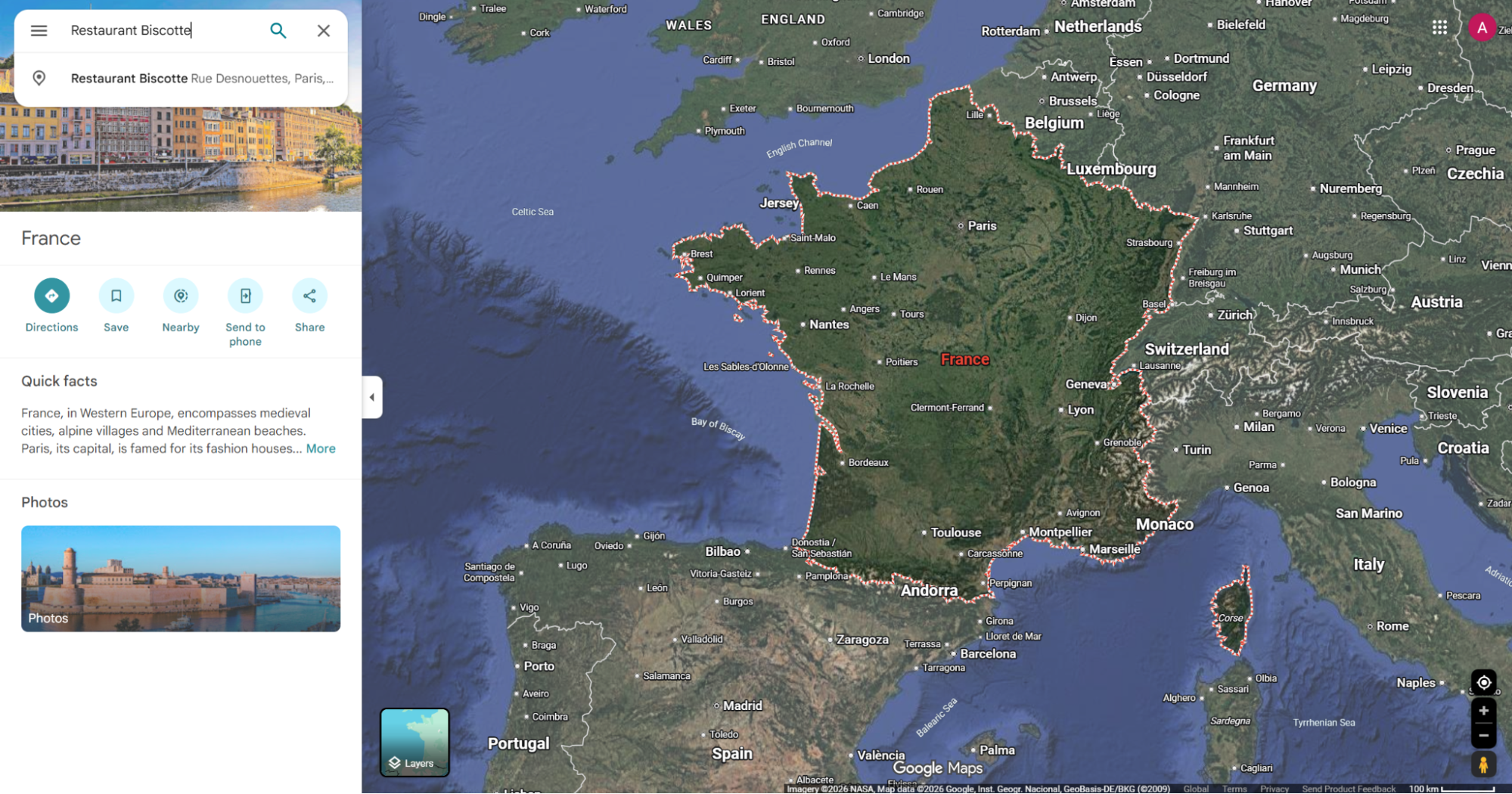
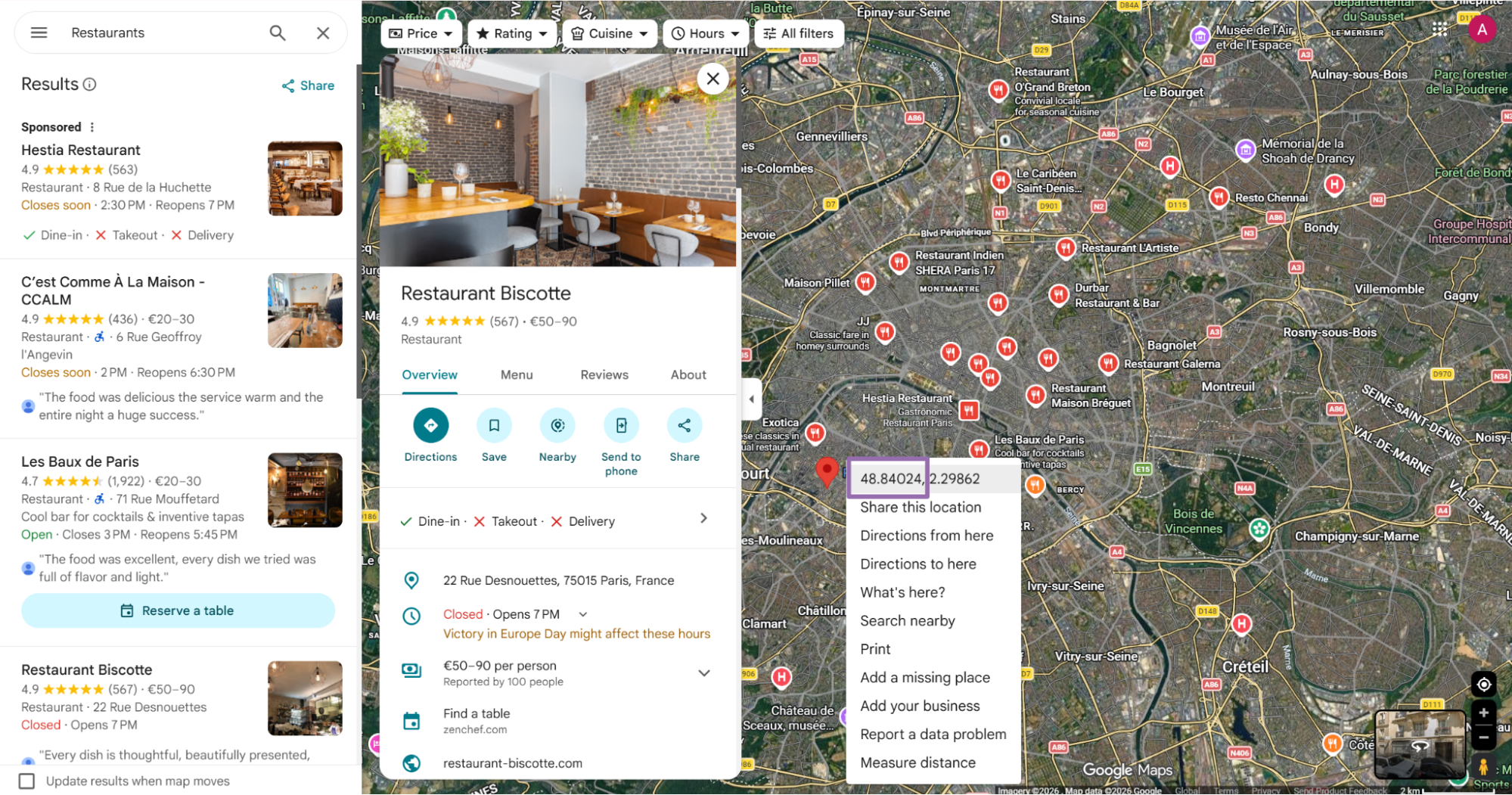
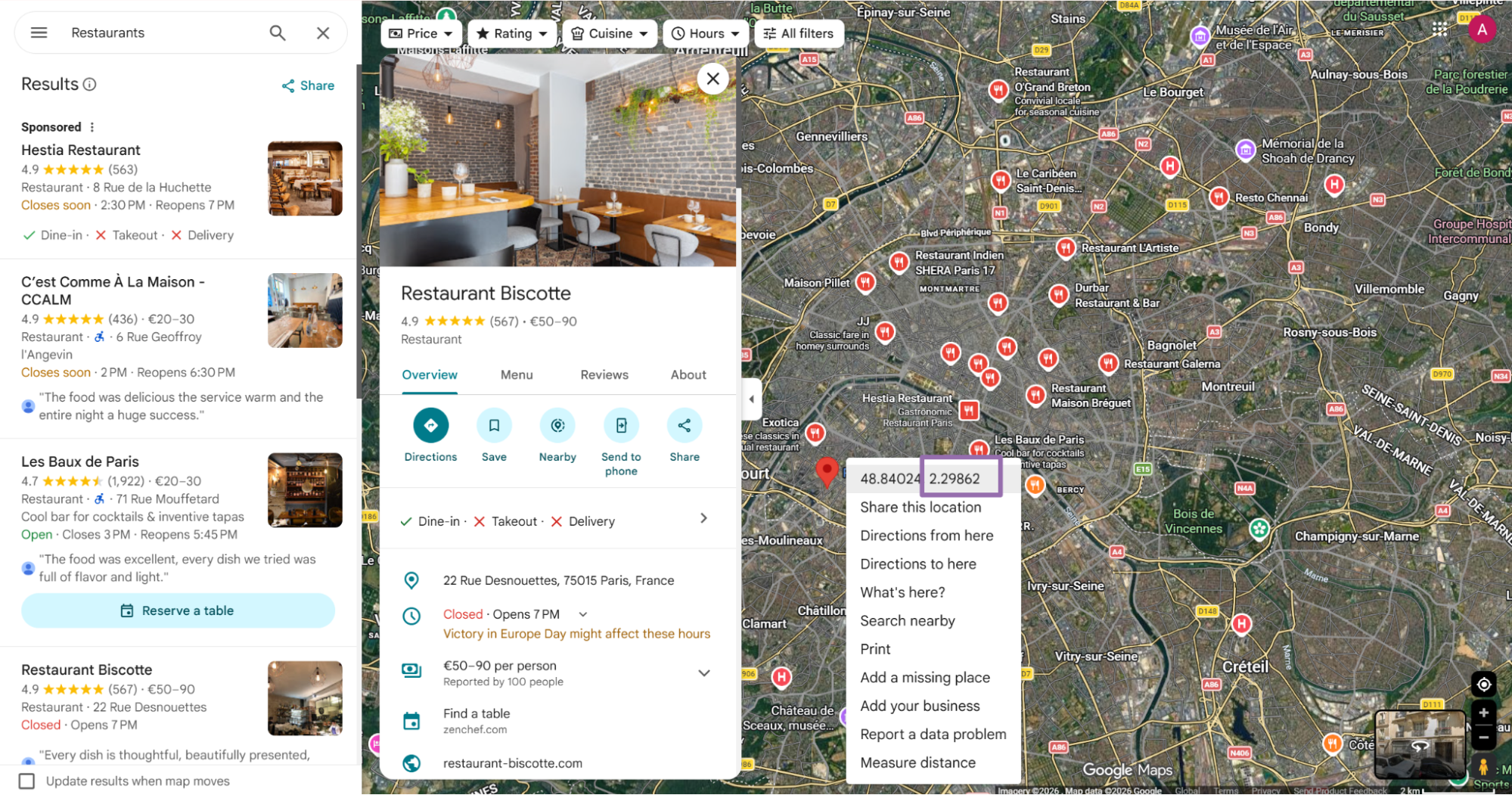
To find latitude and longitude, right-click the target point on the map. The first value in the pop-up is latitude, and the second value is longitude.
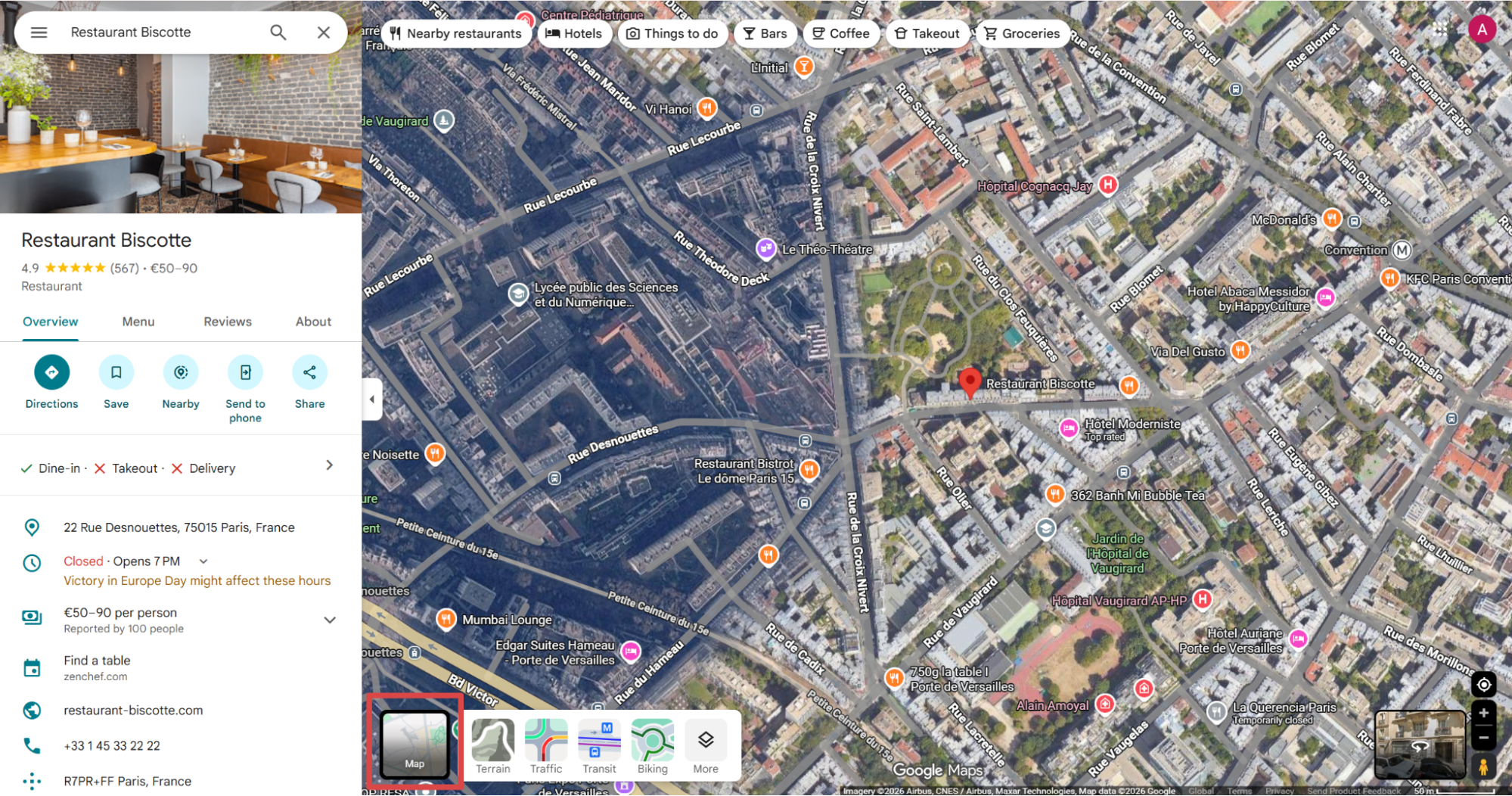
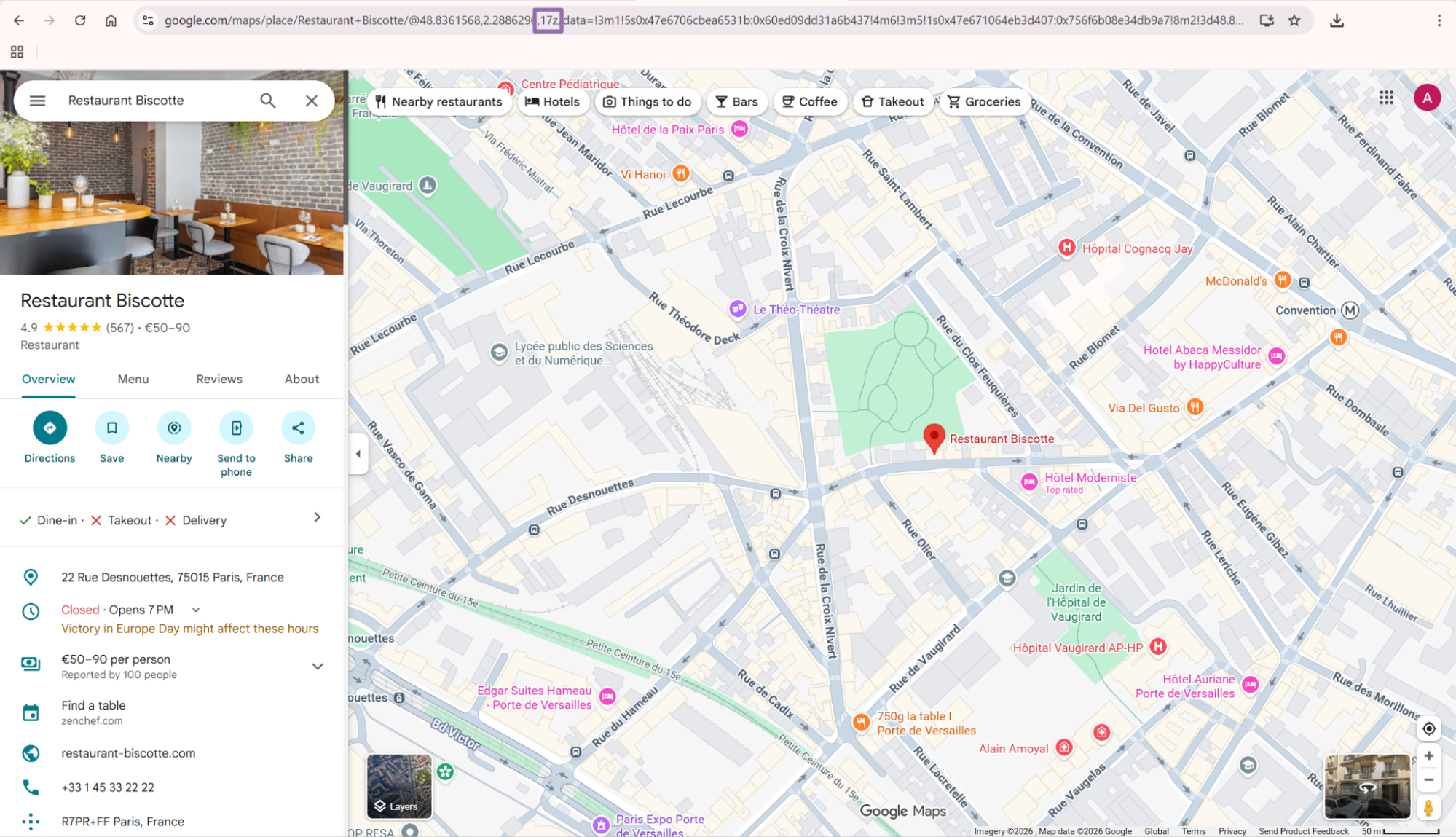
To find zoom level:
- Open the business page in Google Maps.
- Change the view from Satellite to Map with the View type button in the bottom-left corner.
- Read the URL segment after the business name.
- Look for
@{latitude},{longitude},{zoom-level}z. - The zoom level is the third number before the
zcharacter.
For local discovery runs, keep your keyword specific. "restaurant" across a city returns broad profiles, and "vegan restaurant" or "self storage" gives tighter category matches.
Use latitude, longitude, and zoom level when the business area matters. A center point without a zoom level gives less control over the search radius.
The location scraper fits market mapping, lead list creation, and category coverage checks. It also works when your source file has only brand names and city names.
For repeatable discovery runs, store the exact keyword, coordinates, zoom level, country, and run time. That context explains why two discovery jobs for the same category return different business sets.
Discovery jobs need stricter run metadata than CID refreshes. A keyword query changes with map viewport, language, user locale, and Google’s ranking order.
Store the full discovery payload before you submit the job. That gives you enough context to reproduce the search or explain a changed result set.
Step 4. Use place ID search when that is your stored key
Some pipelines store Google Place IDs instead of CIDs. Keep the same API wrapper and swap the scraper slug plus input payload.
Place IDs work well when your source data comes from Google Places API, CRM enrichment, or third-party local data vendors. Store the returned CID after the scrape so future refreshes can use the CID-based scraper.
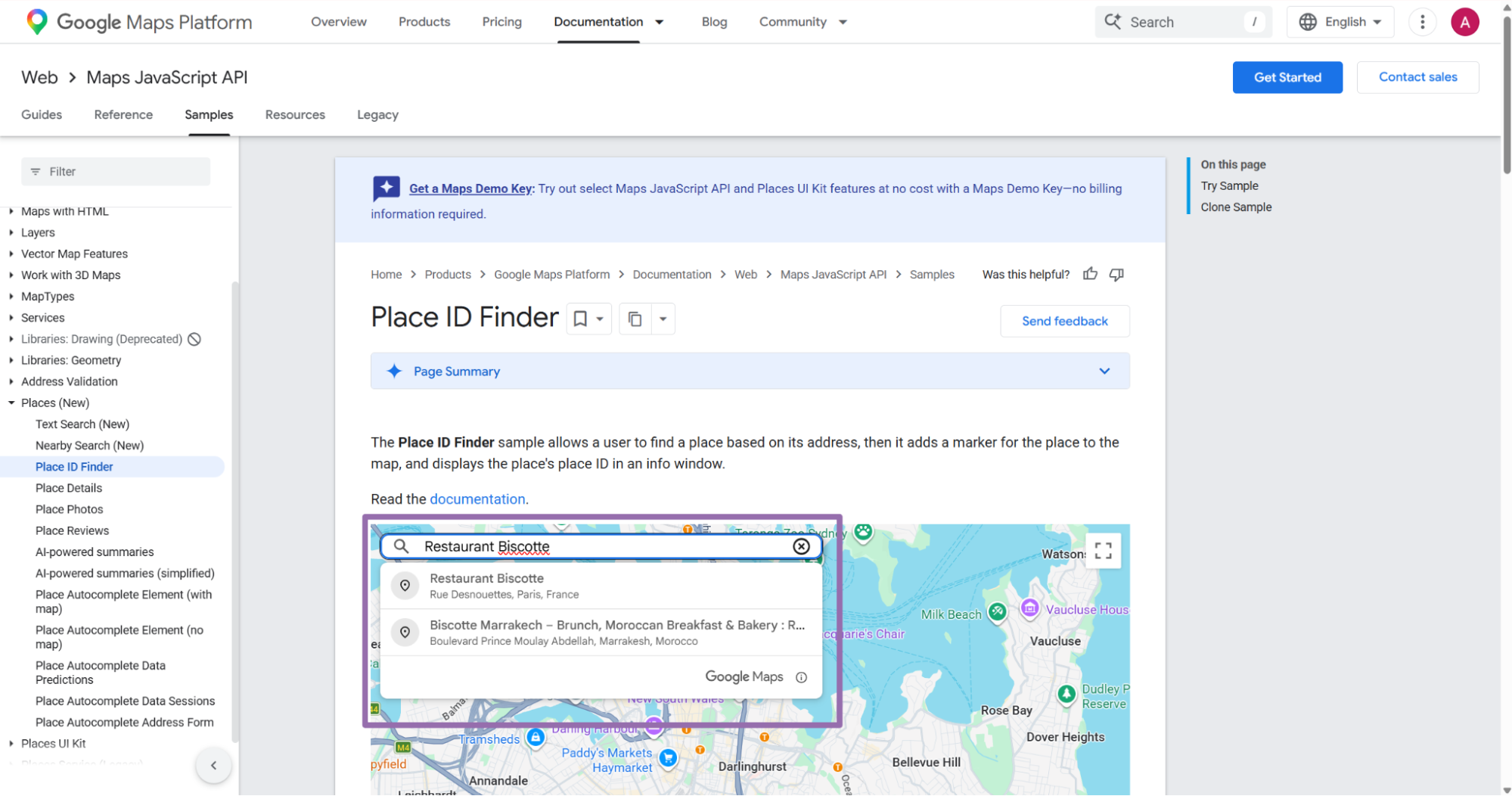
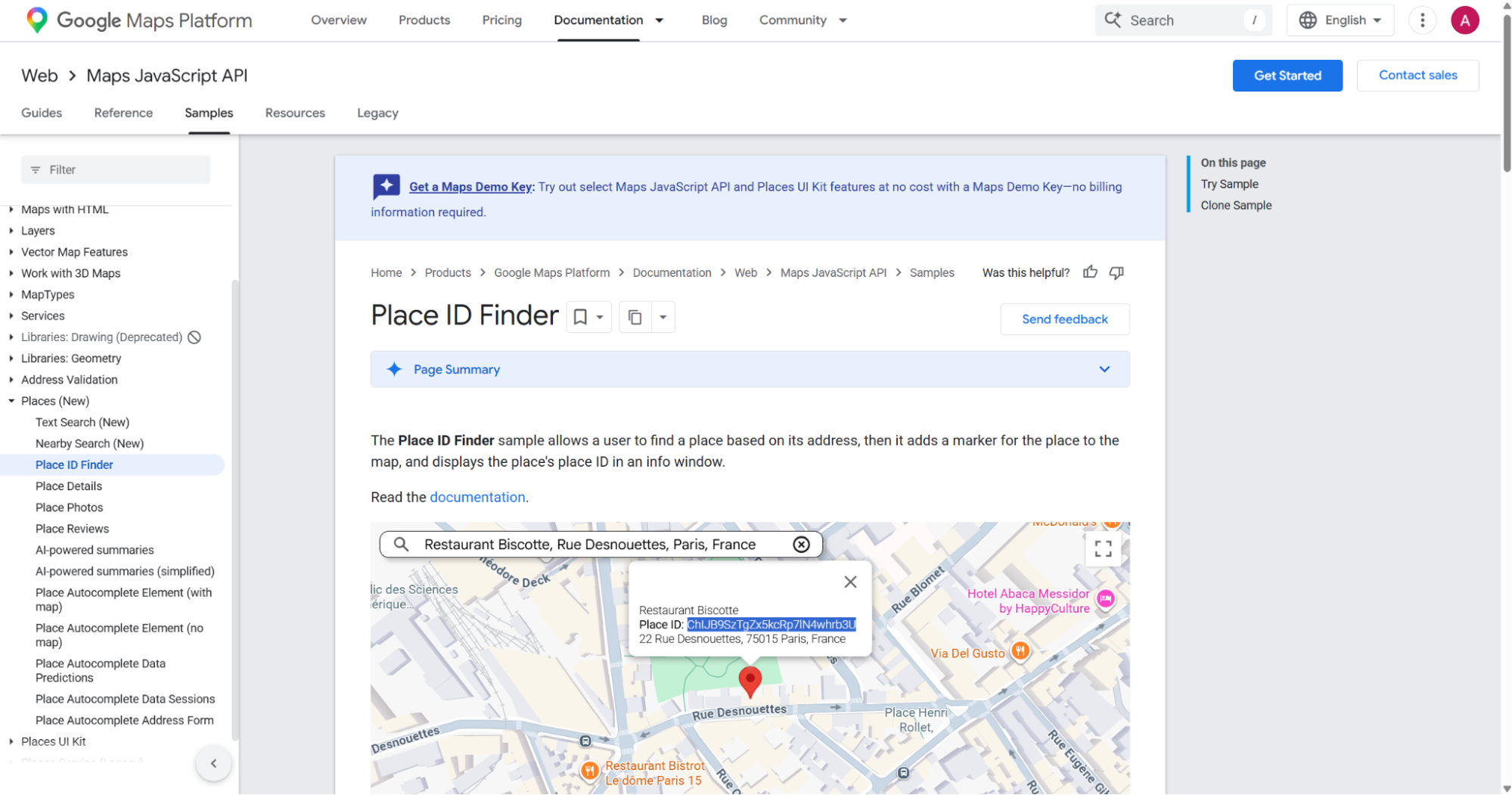
Place IDs and CIDs serve different jobs in a data model. Place IDs integrate well with Google API workflows, while CIDs are practical for direct Maps record refreshes.
When both identifiers exist, store both. That gives you more join paths when a vendor sends one identifier and your internal table uses another.
Use Place ID search for backfills when the source table already uses Google API identifiers. After that first pass, keep the CID for cheaper refresh logic and simpler joins.
Input decision table
| Input you have | Scraper to run | Use case |
|---|---|---|
CID like 2476046430038551731 |
google-maps-locations-search-by-cid |
Refresh known business records |
| Keyword plus map area | google-maps-locations-search-by-location |
Discover businesses in an area |
| Google Place ID | google-maps-locations-search-by-place-id |
Enrich records keyed by Place ID |
If your data work spans more Google surfaces, the full ScrapeNow scrapers catalog includes Google-specific extractors for search, maps, hotels, and flights. Hotel pipelines can pair Maps location records with Extract Google Hotels data when the source record points at a hotel page.
Use one scraper per input type. Mixing CID, keyword, and Place ID flows in the same job makes retry logic harder to reason about and harder to monitor.
Keep separate queues for refresh, discovery, and enrichment jobs. Separate queues make failure rates easier to read and prevent one input type from hiding another.
What data you get back
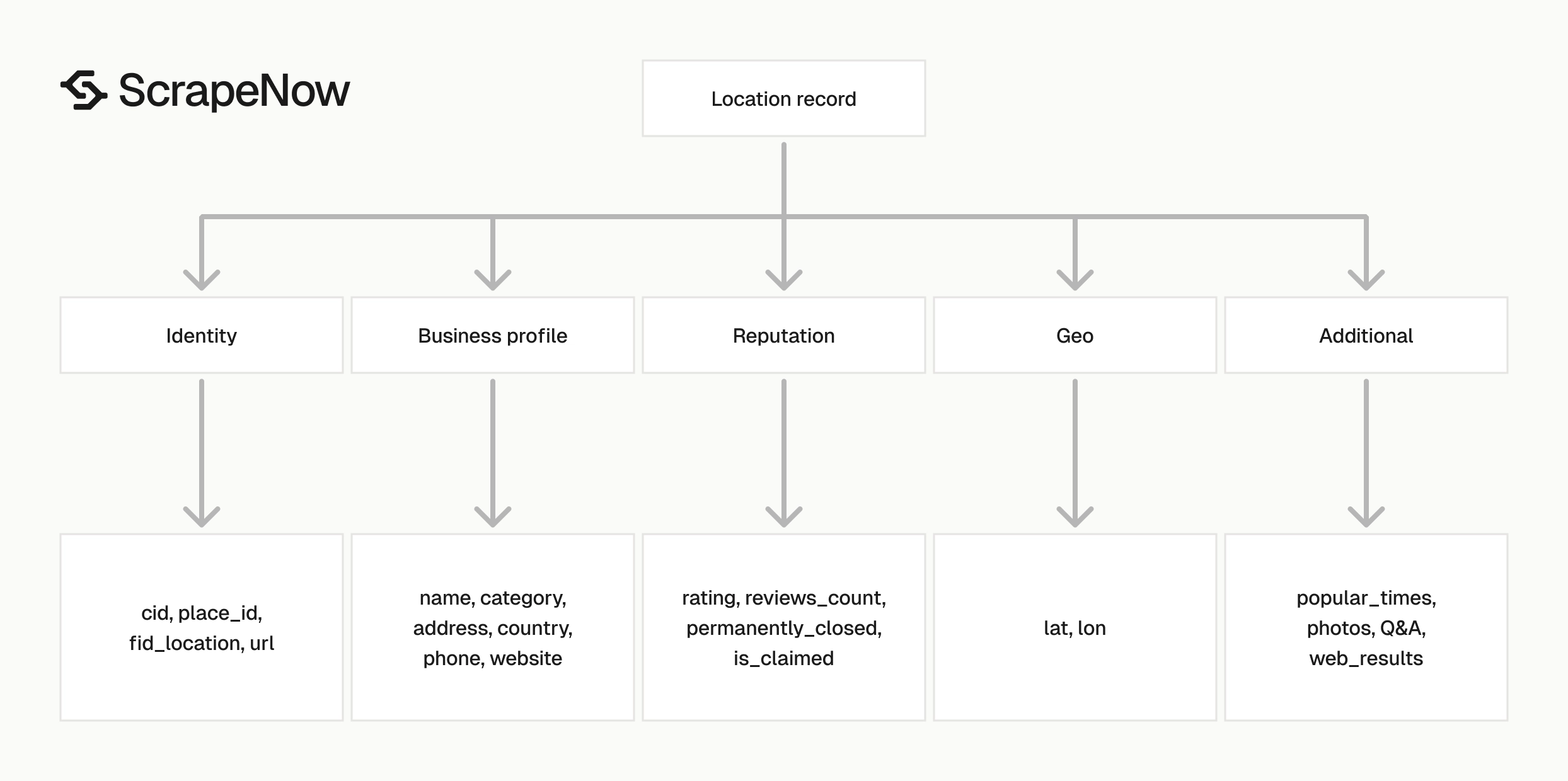
A successful CID scrape returns one record per input. This trimmed response shows the fields you should expect from the API.
[
  {
    "inputs": {
      "CID": "2476046430038551731"
    },
    "scrape_status": "success",
    "place_id": "ChIJ6Ua0sEprTIYRs2zSBRyvXCI",
    "url": "https://www.google.com/maps?cid=2476046430038551731",
    "country": "United States",
    "name": "Public Storage",
    "category": "Opslag dienst",
    "address": "5903 N Custer Rd, McKinney, TX 75071, Verenigde Staten",
    "business_details": [
      {
        "field_name": "address",
        "details": "5903 N Custer Rd, McKinney, TX 75071, Verenigde Staten ",
        "link": null
      },
      {
        "field_name": "oh",
        "details": "Geopend ⋅ Sluit om 21:00·Meer openingstijden weergeven",
        "link": null
      },
      {
        "field_name": "authority",
        "details": "publicstorage.com ",
        "link": "https://www.publicstorage.com/self-storage-tx-mckinney/6185.html?pspid=pslocalsearch&utm_source=google&utm_medium=local_maps"
      },
      {
        "field_name": "phone",
        "details": "+1 469-343-0350 ",
        "link": null
      },
      {
        "field_name": "oloc",
        "details": "7768+CP McKinney, Texas, Verenigde Staten",
        "link": null
      }
    ],
    "reviews_count": 0,
    "rating": 4.9,
    "lat": 33.2610664,
    "lon": -96.7332041,
    "services_provided": [
      "Rolstoeltoegankelijke ingang",
      "Rolstoeltoegankelijke parking"
    ],
    "open_website": "https://www.publicstorage.com/self-storage-tx-mckinney/6185.html?pspid=pslocalsearch&utm_source=google&utm_medium=local_maps",
    "phone_number": "+1 469-343-0350",
    "permanently_closed": false,
    "photos_and_videos": null,
    "people_also_search": null,
    "web_results": null,
    "reservation_link": null,
    "questions_answers": null,
    "top_reviews": null,
    "reviews_snippets": null,
    "directory_categories": null,
    "directory_locations": null,
    "popular_times": null,
    "cid_location": "2476046430038551731",
    "is_claimed": true,
    "fid_location": "0x864c6b4ab0b446e9:0x225caf1c05d26cb3",
    "review_distribution": null,
    "all_categories": [
      "Opslag dienst",
      "Opslag van auto's",
      "Winkel voor verhuisbenodigdheden",
      "Opslagbedrijf"
    ],
    "country_code": "US",
    "cid": "2476046430038551731",
    "temporarily_closed": false,
    "timestamp": "2026-05-13T12:56:58.690Z",
    "input": {
      "url": "https://www.google.com/maps?cid=2476046430038551731"
    },
    "discovery_input": {
      "CID": "2476046430038551731"
    },
    "scrape_error": null,
    "scrape_error_code": null
  }
]
Identity fields
Use these fields for primary keys and joins:
| Field | Meaning |
|---|---|
cid |
Google Maps customer ID returned as a string |
cid_location |
CID from the location payload |
place_id |
Google Place ID |
fid_location |
Google Maps feature ID |
url |
Google Maps URL built from the CID |
Ready to get this data? Try the Google scraper with your own URLs.
For storage, use cid as the main key when the input source is CID. Keep place_id and fid_location as secondary identifiers because upstream sources often send one of those values.
Treat url as a reference field. URLs can change format over time, while the CID gives you a stable key for refreshes and joins.
Keep inputs and discovery_input when you need traceability. Those fields tell you which payload produced the record after it moves through queues, warehouses, and exports.
If you build a slowly changing dimension table, store each identifier on the current row and in history. That makes merges safer when one vendor sends a Place ID and another sends a CID.
Business profile fields
The main profile fields are name, category, address, country, country_code, phone_number, and open_website.
The business_details array gives you a lower-level view of address, hours, authority website, phone, and plus-code style location data. Store it as JSONB or flatten it into a child table when downstream users query those fields.
Keep raw strings from Google Maps when you need auditability. The sample response includes localized Dutch labels, which means translation and normalization belong in your processing layer.
Do not treat localized labels as data defects. They reflect the language and presentation Google returned for that scrape.
Normalize phone numbers only after storage. Write the original value to raw, then add an E.164 column if your dialing or matching system needs it.
Do the same for websites. Keep the raw URL, then derive a normalized domain for joins against CRM, web crawl, or vendor tables.
Reputation and status fields
The response includes rating, reviews_count, review_distribution, top_reviews, and reviews_snippets. Some review fields return null when the Maps page does not expose that data in the scrape result.
Use permanently_closed and temporarily_closed as status flags. Missing phone numbers and missing websites are weak signals, so keep them out of closure logic.
For reporting, separate missing review data from zero reviews. A reviews_count value of 0 means Google returned zero reviews, while null means the field was unavailable in the result.
Track status changes as events when your use case cares about business availability. A location that moves from open to temporarily closed should appear in history.
Do not overwrite closure history without storing the prior state. A single current-status column cannot answer when the business changed status.
Coordinates and category fields
Use lat and lon for geospatial indexing. The sample returns 33.2610664 and -96.7332041, which is precise enough for location matching and distance queries.
Use category as the primary category and all_categories for secondary labels. The sample has 4 categories, including "Opslag dienst" and "Opslagbedrijf".
For distance search in Postgres, store coordinates as numeric columns and keep the original values in raw. That gives you fast filters and an untouched source record for debugging.
If you run cross-country category analysis, normalize categories after ingestion. Google can return localized category names, so a direct string group-by will split the same business type across languages.
Keep coordinate precision from the scrape result. Rounding coordinates too early creates false matches in dense areas like malls, hospitals, airports, and city centers.
For geocoding joins, compare both distance and identity. Two businesses can share an address and coordinates while having different CIDs, phone numbers, and categories.
Production tips for validation, deduplication, schema, and error handling
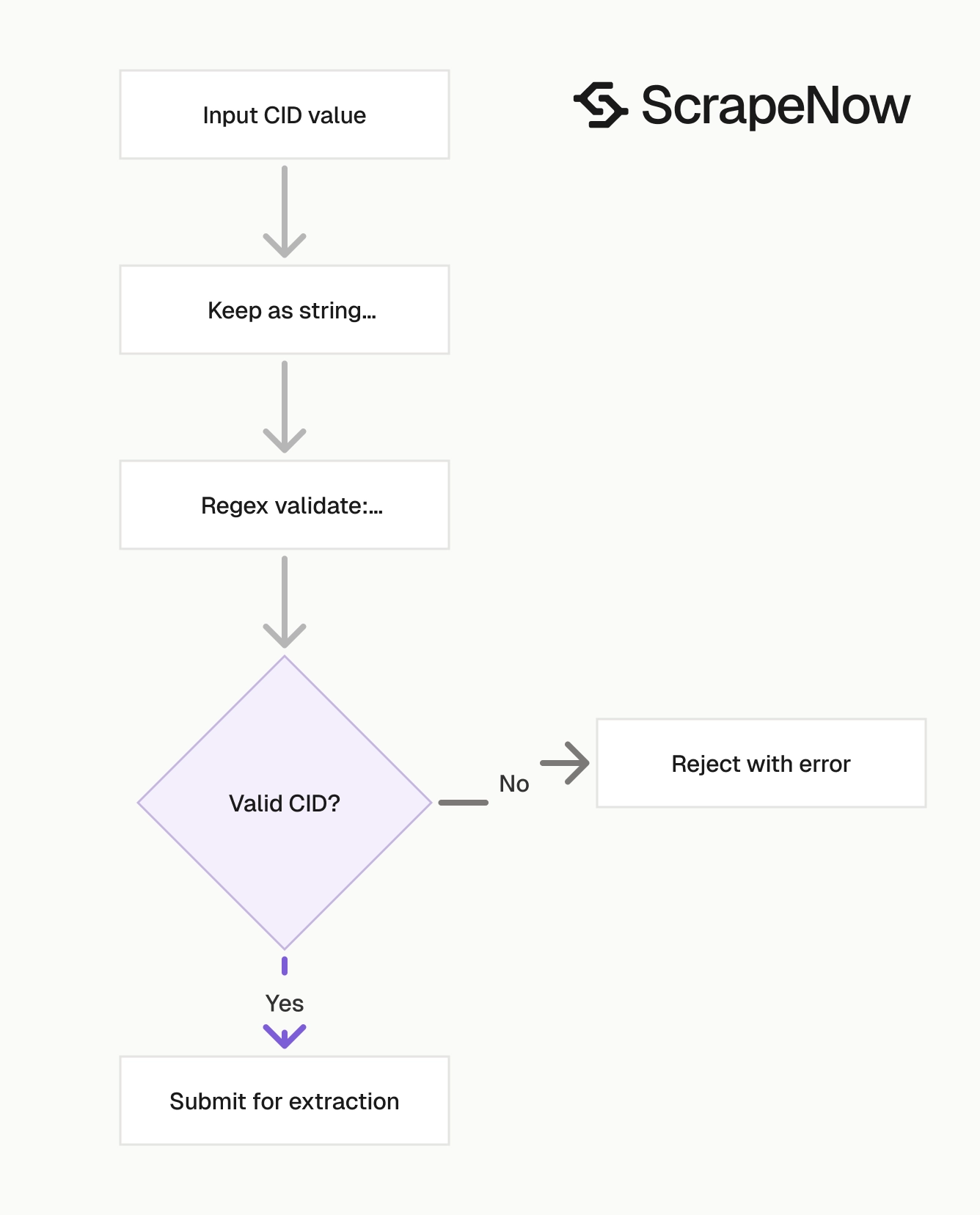
Treat Maps records as semi-structured data. Google exposes different fields by country, language, business type, and profile completeness.
A storage model that handles nulls, nested arrays, and localized labels survives more scraper runs. A wide table with every Maps field as a column creates migration work.
Plan for partial records. A complete identity record with a missing phone number still works for matching, distance search, and closure tracking.
Keep the ingestion layer boring. Validate identifiers, store raw payloads, split success from error rows, and defer business-specific cleanup to downstream jobs.
Validate CID strings before submitting jobs
CIDs can exceed safe integer ranges in JavaScript, spreadsheets, and some databases. Keep them as strings from input to storage.
import re

def validate_cid_input(row: dict) -> dict:
    cid = str(row.get("CID", "")).strip()

    if not cid:
        raise ValueError("CID is required")

    if not re.fullmatch(r"\d{5,25}", cid):
        raise ValueError(f"CID must be a decimal string, got {cid!r}")

    return {"CID": cid}


inputs = [
    validate_cid_input({"CID": "2476046430038551731"})
]
This catches empty values, hex values that were never converted, and IDs cast into scientific notation by a spreadsheet.
Run this validation before you submit jobs. Invalid CIDs waste credits and add noise to retry queues.
For CSV imports, read the CID column as text. In pandas, pass dtype={"CID": "string"} so the parser does not convert the value before validation runs.
For warehouse loads, check the staging table type. A numeric staging column can damage the CID before your application code sees the row.
Add a rejected-inputs table for validation failures. Store the original row, file name, line number, rejection reason, and load time.
That table pays for itself during support work. You can prove whether a failure came from a malformed CID, a spreadsheet conversion, or an upstream export bug.
Deduplicate by CID first, then Place ID
Use cid as the first dedupe key for this scraper. If your inputs come from multiple sources, fall back to place_id.
def dedupe_maps_records(records: list[dict]) -> list[dict]:
    seen = set()
    output = []

    for record in records:
        key = record.get("cid") or record.get("cid_location") or record.get("place_id")
        if not key:
            key = f"{record.get('name')}|{record.get('address')}"

        if key in seen:
            continue

        seen.add(key)
        output.append(record)

    return output
For large runs, enforce uniqueness in the database too. Application-level dedupe prevents repeated processing, and database constraints protect you during retries.
Use the name and address fallback only as a last resort. Business names change, addresses get localized, and suite numbers often move between fields.
If two records share a CID and differ on profile fields, keep the newest timestamp as current. Store the older raw payload in history when you need change tracking.
Use a deterministic merge rule. For example, prefer non-null phone numbers from the newest scrape, and never replace a stored CID with a fallback key.
Keep duplicate reports separate from scraper error reports. Duplicate records are pipeline hygiene issues, while scrape errors need retry or input review.
Use a schema that keeps raw JSON
Avoid flattening every field into columns. You will end up changing migrations every time a Maps profile exposes a new section.
A practical Postgres shape:
CREATE TABLE google_maps_locations (
    cid TEXT PRIMARY KEY,
    place_id TEXT,
    fid_location TEXT,
    name TEXT,
    category TEXT,
    address TEXT,
    country_code TEXT,
    phone_number TEXT,
    open_website TEXT,
    rating NUMERIC,
    reviews_count INTEGER,
    lat DOUBLE PRECISION,
    lon DOUBLE PRECISION,
    permanently_closed BOOLEAN,
    temporarily_closed BOOLEAN,
    is_claimed BOOLEAN,
    scraped_at TIMESTAMPTZ,
    raw JSONB NOT NULL
);

CREATE INDEX google_maps_locations_place_id_idx
    ON google_maps_locations (place_id);

CREATE INDEX google_maps_locations_geo_idx
    ON google_maps_locations (lat, lon);
This gives analysts normal columns for common filters and keeps raw for less common fields like services_provided, business_details, and popular_times.
For higher-volume geo queries, add a PostGIS geography(Point, 4326) column. The simple (lat, lon) index works for basic filters, while PostGIS handles radius queries better.
Keep raw immutable for audit use. If you normalize categories, phone numbers, or websites, write those results into separate columns or a derived table.
Add a separate history table when refreshes matter. Store cid, scraped_at, a payload hash, the raw JSON, and the ingestion batch ID.
A payload hash gives you cheap change detection. Hash the canonical JSON payload after sorting keys, then compare it against the previous hash for that CID.
Handle failed records separately from failed jobs
A job can complete while individual inputs return scrape errors. Check both the job status and each record’s scrape_status.
def split_success_and_errors(results: list[dict]) -> tuple[list[dict], list[dict]]:
    success = []
    errors = []

    for record in results:
        if record.get("scrape_status") == "success" and not record.get("scrape_error"):
            success.append(record)
        else:
            errors.append({
                "inputs": record.get("inputs"),
                "scrape_error": record.get("scrape_error"),
                "scrape_error_code": record.get("scrape_error_code"),
                "timestamp": record.get("timestamp"),
            })

    return success, errors
Retry errors in a separate queue. Keep the original input payload, error code, and timestamp so you can spot invalid CIDs versus temporary scrape failures.
Do not retry every failure forever. Set a retry limit, then move persistent failures to a dead-letter table for review.
Use different retry policies for validation errors and scrape errors. A CID with letters in it should fail once, while a temporary fetch error can go through a bounded retry queue.
Use exponential backoff for temporary scrape errors. A common pattern is 5 minutes, 30 minutes, then 2 hours before dead-lettering the input.
Track error rates by source file and vendor. If one vendor’s CIDs fail at a higher rate, fix that feed before you spend more credits.
Normalize nullable fields before export
Several fields can be null, including photos_and_videos, people_also_search, web_results, reservation_link, questions_answers, top_reviews, reviews_snippets, directory_categories, directory_locations, and popular_times.
Use default values only when your downstream system needs them. Empty arrays and null carry different meanings.
def normalize_for_csv(record: dict) -> dict:
    return {
        "cid": record.get("cid") or "",
        "place_id": record.get("place_id") or "",
        "name": record.get("name") or "",
        "address": record.get("address") or "",
        "country_code": record.get("country_code") or "",
        "phone_number": record.get("phone_number") or "",
        "website": record.get("open_website") or "",
        "rating": record.get("rating"),
        "reviews_count": record.get("reviews_count"),
        "lat": record.get("lat"),
        "lon": record.get("lon"),
        "permanently_closed": bool(record.get("permanently_closed")),
        "temporarily_closed": bool(record.get("temporarily_closed")),
        "is_claimed": bool(record.get("is_claimed")),
    }
For analytics exports, keep booleans as booleans. For CSV exports, document whether blank means missing, false, or unavailable.
If your warehouse supports nested data, keep arrays as arrays. Flatten only the fields your users filter, group, or join on.
Watch boolean defaults during export. Converting null to False can make an unknown claimed status look like an unclaimed profile.
Use explicit column names for derived values. For example, use is_claimed_export_bool if you coerce missing values for a legacy CSV consumer.
Keep a data dictionary beside the export job. It should define every nullable field, every derived field, and every value you coerce.
Track scrape timestamps
Use the timestamp field from the response as the source scrape time. Store it separately from your database insert time.
A profile scraped on Monday and inserted on Wednesday should keep Monday as scraped_at. That matters for audit logs, refresh windows, and stale-record checks.
For refresh jobs, compare the new scrape timestamp with the previous one. Then update changed fields and keep the prior raw JSON in history when you need change tracking.
A basic refresh table should track first_seen_at, last_scraped_at, and last_changed_at. Those three fields answer different operational questions during audits and data quality reviews.
first_seen_at tells you when the business entered your dataset. last_scraped_at tells you when the profile was checked. last_changed_at tells you when the extracted payload last changed.
Use the scraper timestamp for freshness checks, and use insert time for pipeline latency. Mixing those two timestamps makes stale-record alerts inaccurate.
For scheduled refreshes, keep a target interval per segment. High-value accounts can refresh daily, while low-priority long-tail records can refresh weekly or monthly.
Monitor batches with counts that catch real failures
Every batch should produce a small set of counters. Track submitted inputs, successful records, error records, duplicate records, validation failures, and dead-lettered records.
Add rate metrics next to raw counts. A batch with 50 errors out of 50,000 inputs is different from 50 errors out of 200 inputs.
Track null rates for fields your users depend on. If phone_number or open_website drops sharply, inspect the payload before changing downstream logic.
Keep one dashboard per scraper type. CID refresh metrics, location discovery metrics, and Place ID enrichment metrics have different baselines.
Pricing
ScrapeNow charges per returned row. One row costs one credit, starting at $0.04 per credit for small runs and dropping with volume. No monthly contracts, no proxy fees, no charges for failed rows. See the pricing page for current rates.


