The Google Hotels scraper extracts hotel name, rating, review count, star classification, address, phone number, photos, and source URL from a Google Hotels property page. Travel data teams, pricing analysts, and booking operations teams use it when they already have hotel URLs and need structured JSON.
The scraper works best in pipelines that start with known property pages. If your pipeline starts with a city search, date range, guest count, or filtered listing, run the search scraper first. Then pass each hotel entity URL into this extractor.
How to use this scraper
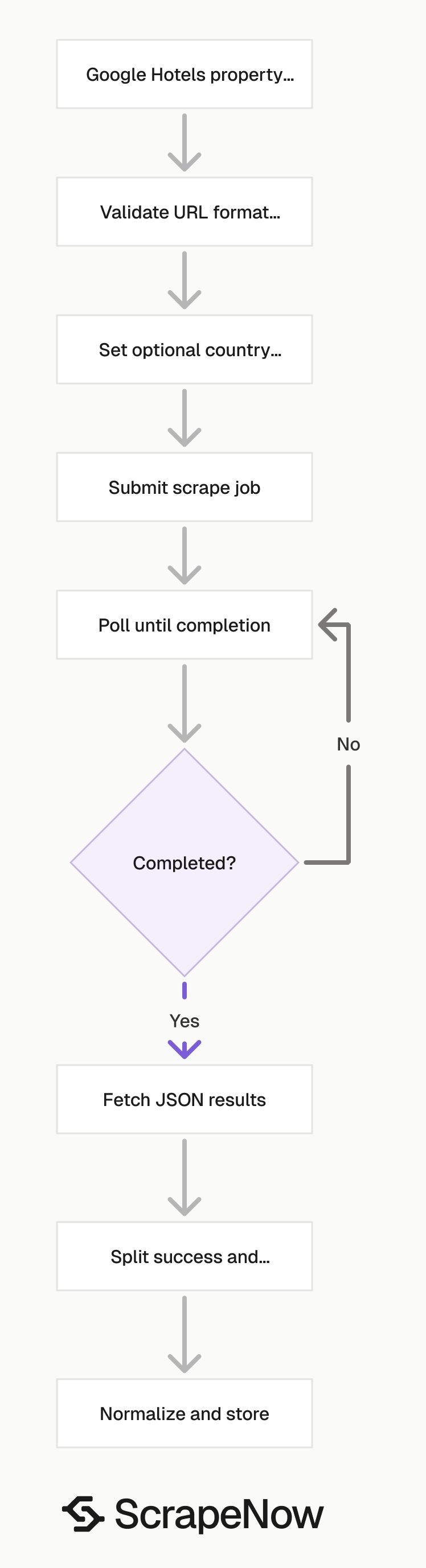
ScrapeNow has two Google Hotels scrapers. They accept different URL types and return different record shapes.
| Scraper | Use it when | Input |
|---|---|---|
| Extract Google Hotels data | You have a specific hotel property page | Google Hotels entity URL |
| Search Google Hotels by filters | You have a hotel listing or filtered search result | Google Hotels listing URL |
This guide uses the Extract Google Hotels data. The same API request flow works across ScrapeNow’s Google scrapers, including hotel search, flights, maps, and AI search extraction.
Use the extract scraper for profile fields. Use the search scraper for result sets, availability views, and filtered hotel lists.
Step 1. Get the hotel URL
The url input must point to a specific hotel or residency in Google Hotels. It must start with https://www.google.com/.
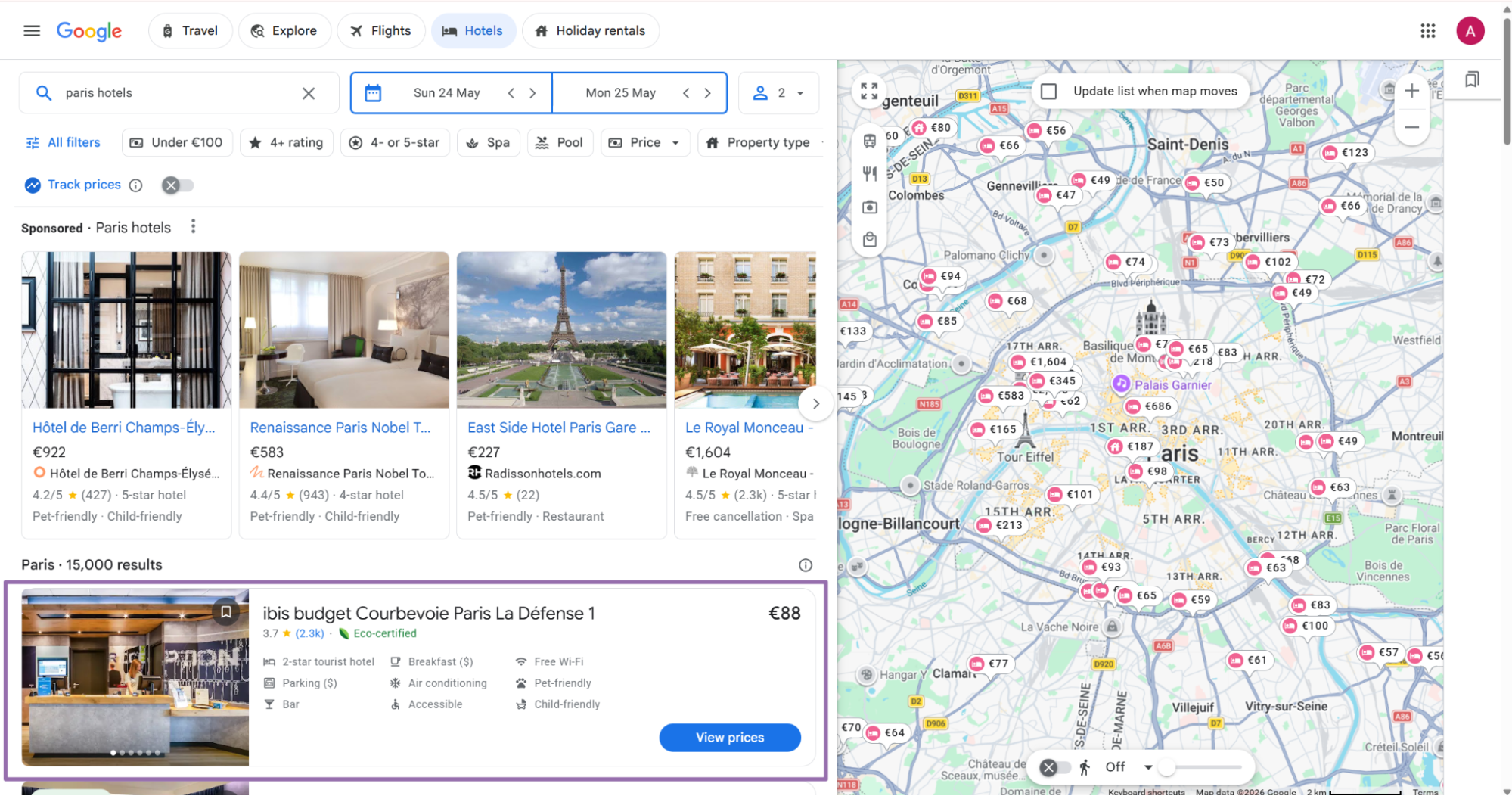
Open google.com/travel, then click the Hotels option in the top navigation.
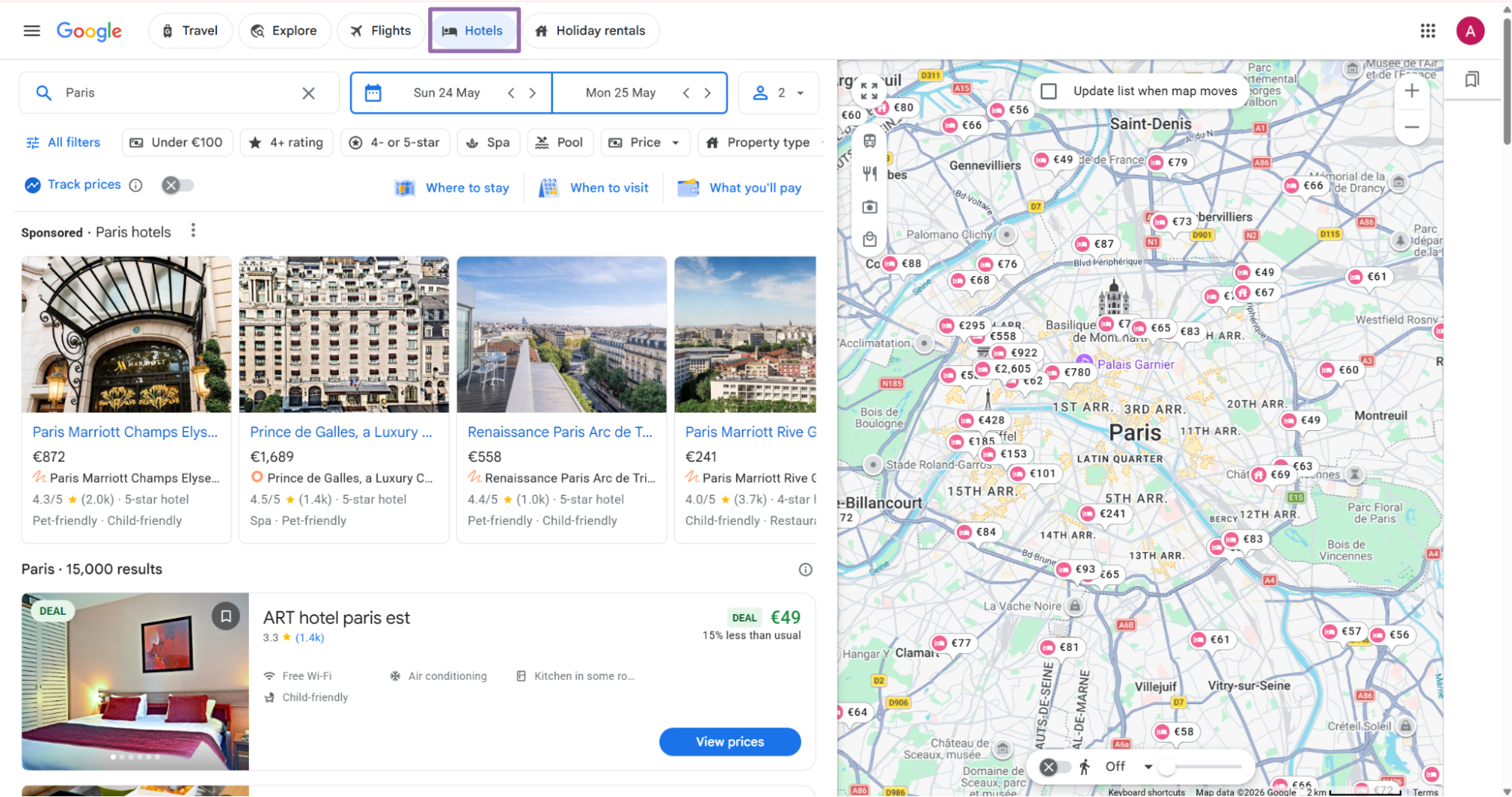
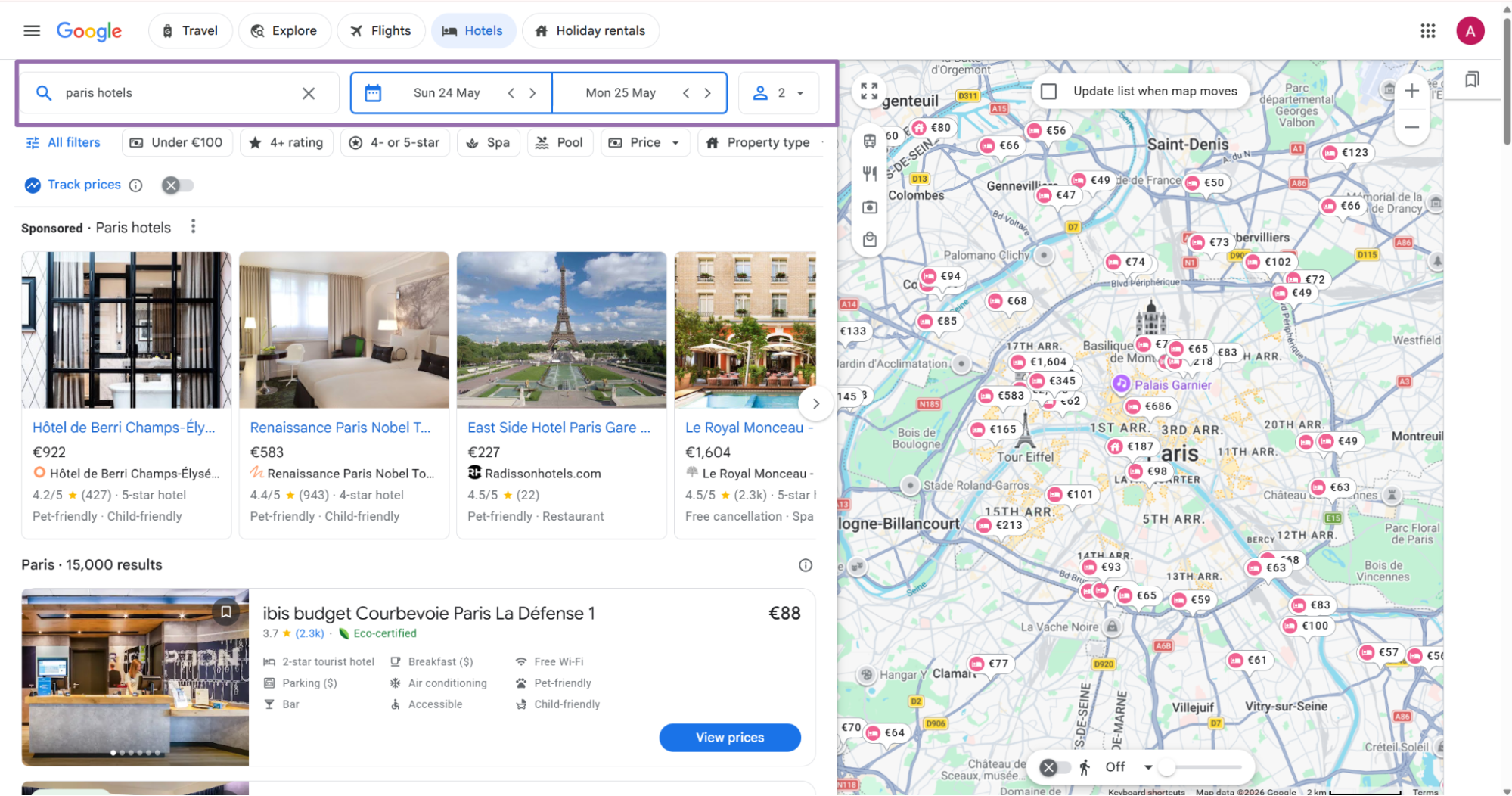
Enter the location, booking dates, and guest count. These inputs shape the Google Hotels page you open.
Choose the target hotel from the search results.
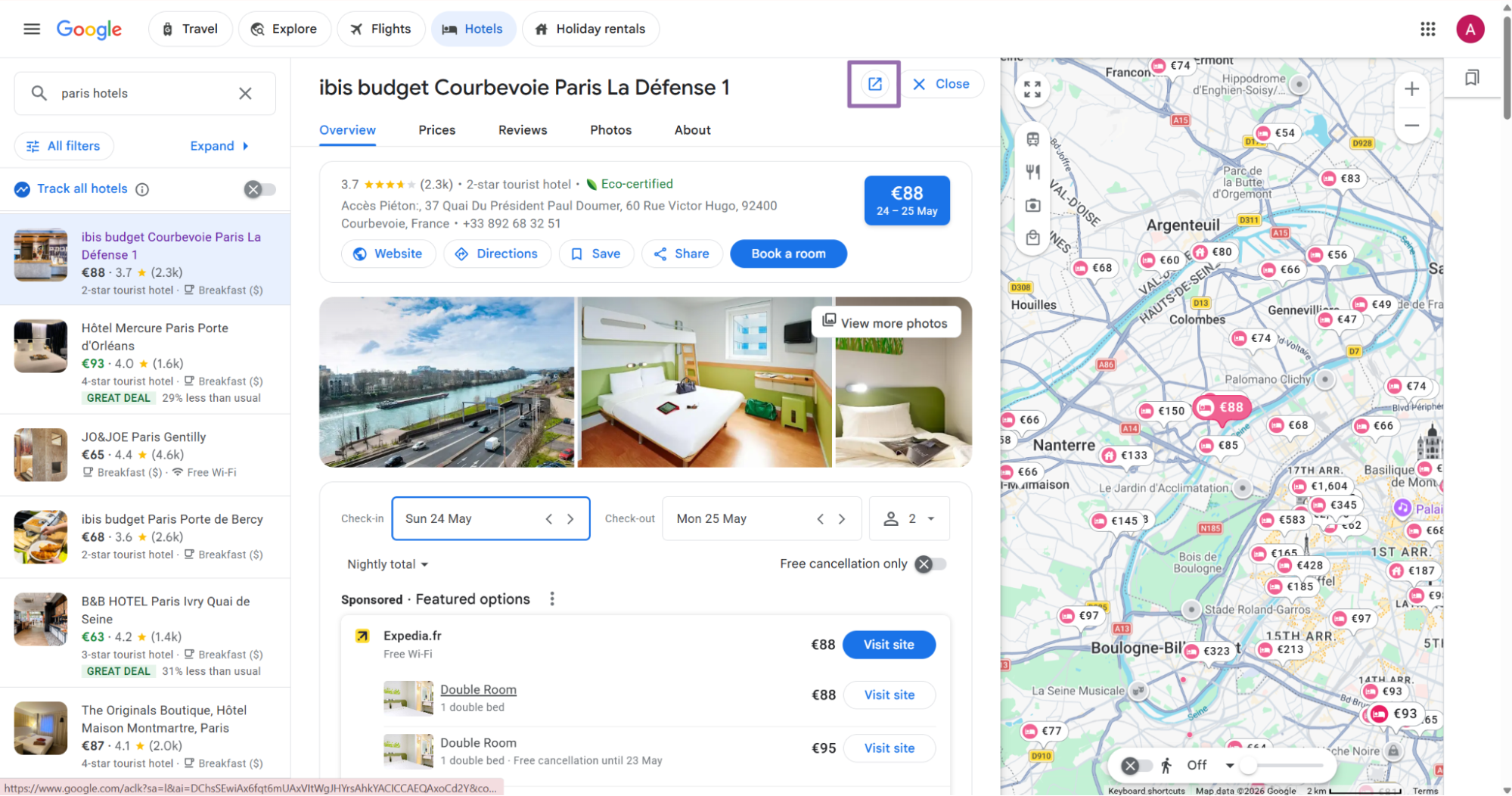
On the hotel result page, click the Open in new tab button next to the hotel name.
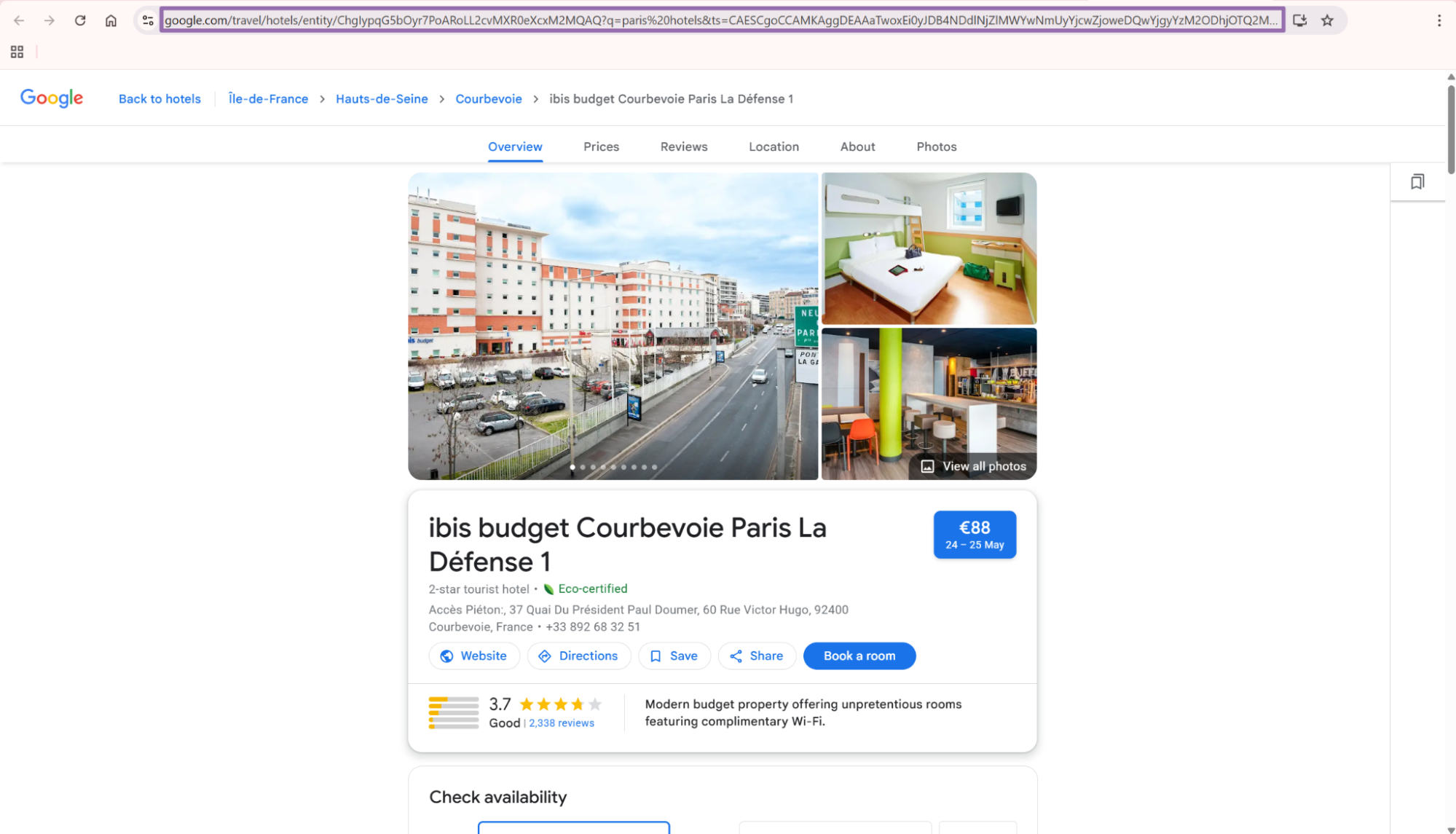
Copy the URL from the browser address bar. Keep the full URL, including the entity ID and query string.
A valid entity URL usually contains /travel/hotels/entity/. Reject URLs from general Google Search results before sending jobs.
Step 2. Set the country code
The country input is optional. For API usage, send it as a two-letter ISO 3166-1 country code string.
Examples:
{
  "country": "US"
}
{
  "country": "GB"
}
Use US for United States, CA for Canada, and AU for Australia. Store country codes in uppercase before building jobs.
Country affects localization. Google can return different phone formatting, language hints, and regional URLs for the same hotel.
Step 3. Run the API request
Use this Python script. Replace YOUR_API_KEY with your ScrapeNow API key.
"""
Configuration:
    - Set SCRAPER_SLUG to the scraper you want to run.
    - Set SCRAPER_INPUTS to the list of input dicts matching that scraper's schema.
    - Set API_KEY to your scraper API key.
"""

import sys
import time
import json
import requests
import os

API_KEY = "YOUR_API_KEY"

SCRAPER_SLUG = "google-hotels-extract-by-url"

SCRAPER_INPUTS = [
    {
        "url": "https://www.google.com/travel/hotels/entity/ChgIr_jb2Zu3x-GjARoLL2cvMXRkYmxyMGcQAQ?ts=CAESCgoCCAMKAggDEAEaXgpAEjwKCC9tLzA1amJuMiUweDg4NjRlYzMyMTNlYjkwM2Q6MHg3ZDNmYjlkMGExZTlkYWEwOglOYXNodmlsbGUaABIaEhQKBwjqDxAGGAESBwjqDxAGGAgYBzICEAAqCQoFOgNaQVIaAA",
        "country": "US"
    }
]

BASE_URL = "https://api.scrapenow.io/api/v1/scraping"
TIMEOUT_SECONDS = 3600
POLL_INTERVAL = 5
SPINNER = "|/-\\"


def build_headers(api_key: str, content_type: str | None = None) -> dict:
    """Build headers using your API key."""
    headers = {"Authorization": f"Bearer {api_key}"}
    if content_type:
        headers["Content-Type"] = content_type
    return headers


def trigger_scrape(slug: str, inputs: list[dict]) -> str:
    """POST to the scrape endpoint and return the job_id."""
    url = f"{BASE_URL}/scrape?scraper={slug}"

    response = requests.post(
        url,
        headers=build_headers(API_KEY, "application/json"),
        json={"inputs": inputs},
    )
    response.raise_for_status()
    return response.json()["data"]["job_id"]


def poll_until_done(job_id: str) -> str:
    """Poll the job status until it reaches a terminal state."""
    start = time.time()
    i = 0

    while True:
        elapsed = time.time() - start
        if elapsed > TIMEOUT_SECONDS:
            print(f"\nTimeout after {TIMEOUT_SECONDS}s")
            sys.exit(1)

        response = requests.get(
            f"{BASE_URL}/jobs/{job_id}",
            headers=build_headers(API_KEY),
        )
        response.raise_for_status()

        data = response.json()
        status = data["data"]["status"]

        mins, secs = divmod(int(elapsed), 60)
        sys.stdout.write(
            f"\r[{SPINNER[i % 4]}] Waiting... {status} ({mins}m {secs:02d}s)  "
        )
        sys.stdout.flush()

        if status in ("completed", "failed"):
            print()
            return status

        time.sleep(POLL_INTERVAL)
        i += 1


def fetch_results(job_id: str) -> dict:
    """Download the completed job results as JSON."""
    response = requests.get(
        f"{BASE_URL}/jobs/{job_id}/results?format=json",
        headers=build_headers(API_KEY),
    )
    response.raise_for_status()
    return response.json()


def save_results(data: dict, slug: str) -> str:
    """Write results to output/{slug}.json and return the filename."""
    os.makedirs("output", exist_ok=True)
    filename = os.path.join("output", f"{slug}.json")

    with open(filename, "w", encoding="utf-8") as f:
        json.dump(data, f, indent=2)

    return filename


def main() -> None:
    print(f"Triggering scraper: {SCRAPER_SLUG}")
    job_id = trigger_scrape(SCRAPER_SLUG, SCRAPER_INPUTS)
    print(f"Job started: {job_id}")

    final_status = poll_until_done(job_id)

    if final_status != "completed":
        print(f"Job failed with status: {final_status}")
        sys.exit(1)

    print("Fetching results...")
    results = fetch_results(job_id)

    output_file = save_results(results, SCRAPER_SLUG)
    print(f"Results saved to: {output_file}")


if __name__ == "__main__":
    main()
The same API request flow works for the other scraper in this group, google-hotels-search-by-filter-url. Change SCRAPER_SLUG and SCRAPER_INPUTS for each scraper.
Keep the polling loop in your caller. It gives you a clear job lifecycle and avoids long HTTP connections that fail under load balancers.
Step 4. Use a filter URL when you need hotel search results
The Search Google Hotels by filters takes a listing URL. Use it when the job starts from a Google Hotels section or filtered search result.
Open google.com and search for the target hotel, city, or lodging query.
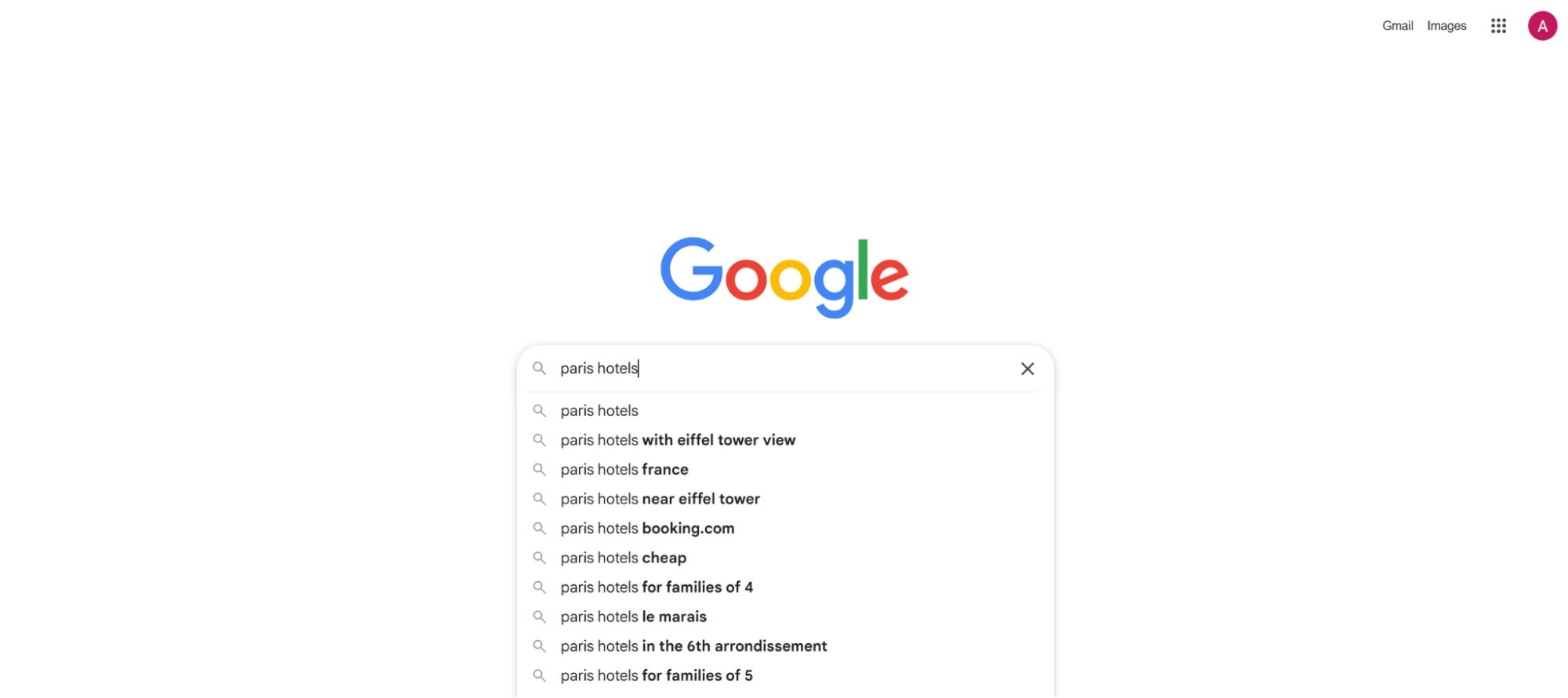
In the Google Hotels section, choose the target hotel. Right-click it, then copy the link address.
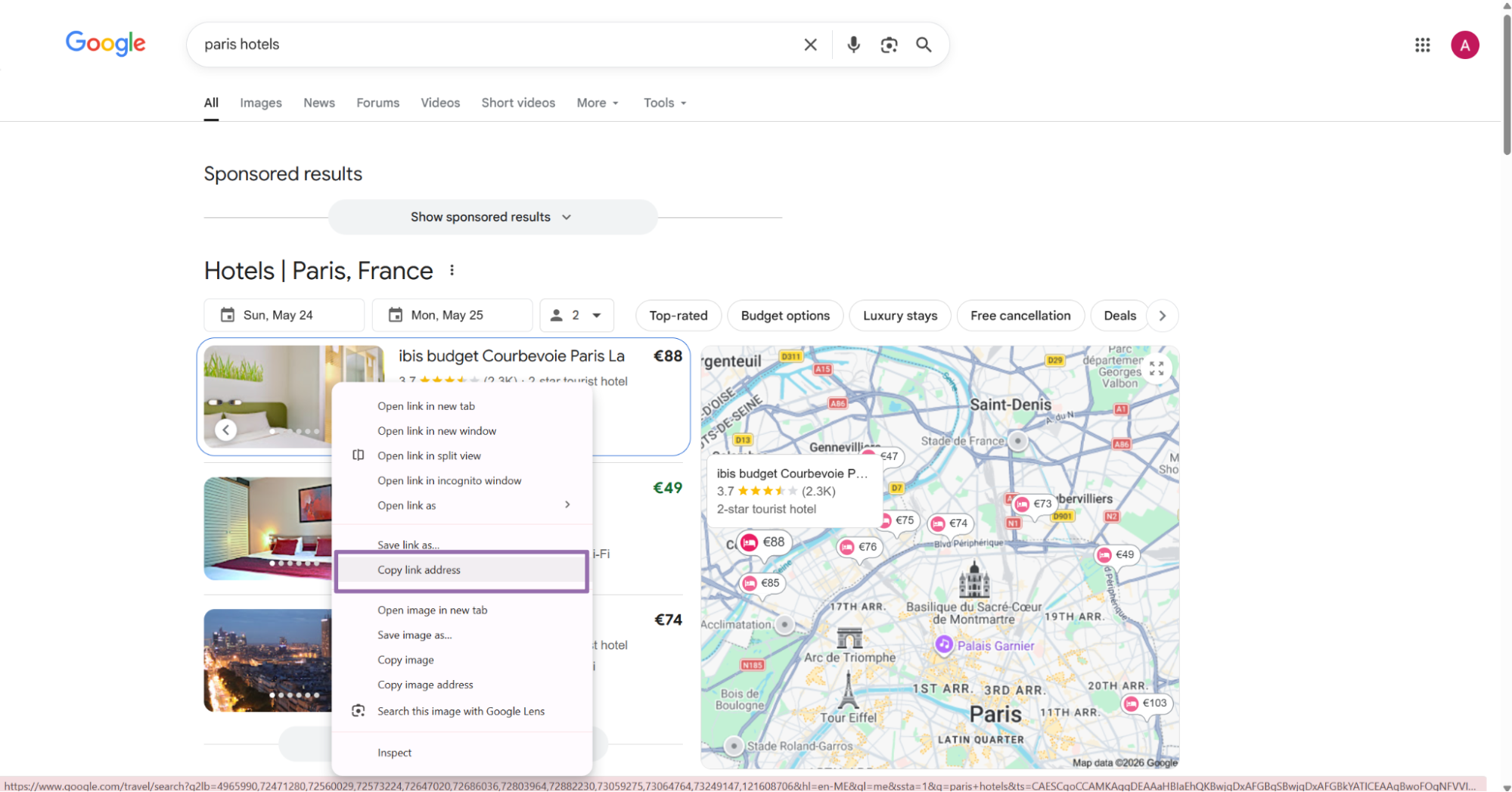
The search scraper also accepts optional country and currency inputs. Pass currency as the same string shown in the dropdown, such as USD.
Use search output as the discovery stage. Use extract output as the profile enrichment stage.
Step 5. Check the JSON output
A completed job returns an array of records. This trimmed response comes from google-hotels-extract-by-url.
[
  {
    "inputs": {
      "url": "https://www.google.com/travel/hotels/entity/ChgIr_jb2Zu3x-GjARoLL2cvMXRkYmxyMGcQAQ?ts=CAESCgoCCAMKAggDEAEaXgpAEjwKCC9tLzA1amJuMiUweDg4NjRlYzMyMTNlYjkwM2Q6MHg3ZDNmYjlkMGExZTlkYWEwOglOYXNodmlsbGUaABIaEhQKBwjqDxAGGAESBwjqDxAGGAgYBzICEAAqCQoFOgNaQVIaAA",
      "country": "US"
    },
    "scrape_status": "success",
    "url": "https://www.google.com/travel/hotels/entity/ChgIr_jb2Zu3x-GjARoLL2cvMXRkYmxyMGcQAQ?ts=CAESCgoCCAMKAggDEAEaXgpAEjwKCC9tLzA1amJuMiUweDg4NjRlYzMyMTNlYjkwM2Q6MHg3ZDNmYjlkMGExZTlkYWEwOglOYXNodmlsbGUaABIaEhQKBwjqDxAGGAESBwjqDxAGGAgYBzICEAAqCQoFOgNaQVIaAA&hl=en&utm_campaign=sharing&utm_medium=link&utm_source=htls&ved=0CAAQ5JsGahcKEwio-aPzk7aUAxUAAAAAHQAAAAAQAw",
    "hotel_id": "ChgIr_jb2Zu3x-GjARoLL2cvMXRkYmxyMGcQAQ",
    "hotel_name": "Alexis Inn and Suites Nashville",
    "rating": 3.7,
    "review_count": "1597",
    "star_classification": 2,
    "address": "600 Ermac Dr, Nashville, TN 37214",
    "phone_number": "(615) 889-4466",
    "photos": [
      {
        "photo_url": "https://lh4.googleusercontent.com/proxy/7mCKbbeQ93PvgL8g_B1r7Y9_G1Sud90JXaHqjpmdZ4nQVW0I3EfUn07ES3gsZrVZ8bffEL3dyI8UCYH5hy7-HKCvw_mZsJu00Ne-plu3MaNKTzohUTmf0VZ3if9FmuV0AzadqzFaHmLspuyiuL58MerHnQ2Hvw=w252-h168-k-no",
        "photo_caption": null
      },
      {
        "photo_url": "https://lh3.googleusercontent.com/p/AF1QipOORUGIakaS5GL9emdHIoLY7CSpqafTyQbYaAC9=w252-h168-k-no",
        "photo_caption": null
      },
      {
        "photo_url": "https://lh6.googleusercontent.com/proxy/OwHSA2sJrAOB8XE29-_LMS181bOZIcrstFnoSOYfpRiaw0q0B_5cX8LH-0ltkA2waEFWPT49scOyB9TbJ8gn3AB5pQsyxbP2QU5TwA4x3eWscMtVG6LEYpRu1xwy41Fp8S_mkX4GM5NXrdwG9GMjPyHlYFNIhIy5DofS=w252-h168-k-no",
        "photo_caption": null
      }
    ]
  }
]
The response includes the original input, scrape status, final Google URL, hotel identifiers, rating fields, contact fields, and photos. Treat the inputs object as audit data.
Save the full response before transforming it. Raw payloads help when Google changes a field or your warehouse schema changes.
Ready to get this data? Try the Google scraper with your own URLs.
What data you get back
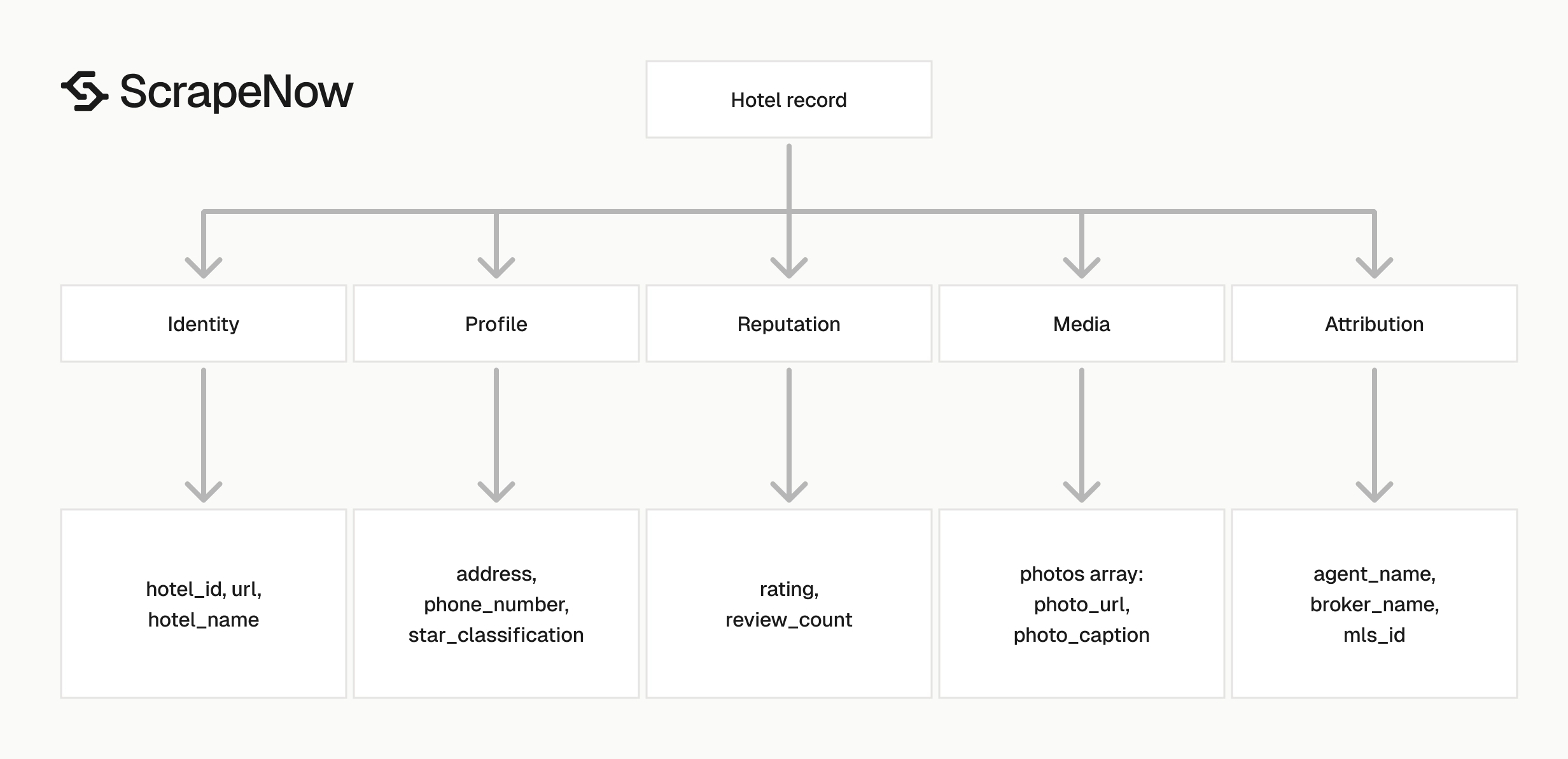
Each output record includes the original input, scrape status, canonical hotel URL, hotel identifiers, review data, address data, phone data, and photos. These fields cover most property profile use cases.
Use the output for hotel catalogs, pricing audits, destination research, and contact enrichment. Keep booking price extraction separate because rates change by date, occupancy, and source.
Identity fields
hotel_id is the stable Google Hotels entity ID returned from the property URL. Use it as your primary key when you store records.
hotel_name is the display name shown on the Google Hotels property page. Store it as text and expect punctuation, brand suffixes, and local language variants.
url is the final URL returned by Google Hotels. It can include query parameters such as hl, utm_source, utm_medium, and ved.
Do not use the full URL as your primary key. Query parameters change during sharing, localization, and browser navigation.
Rating and review fields
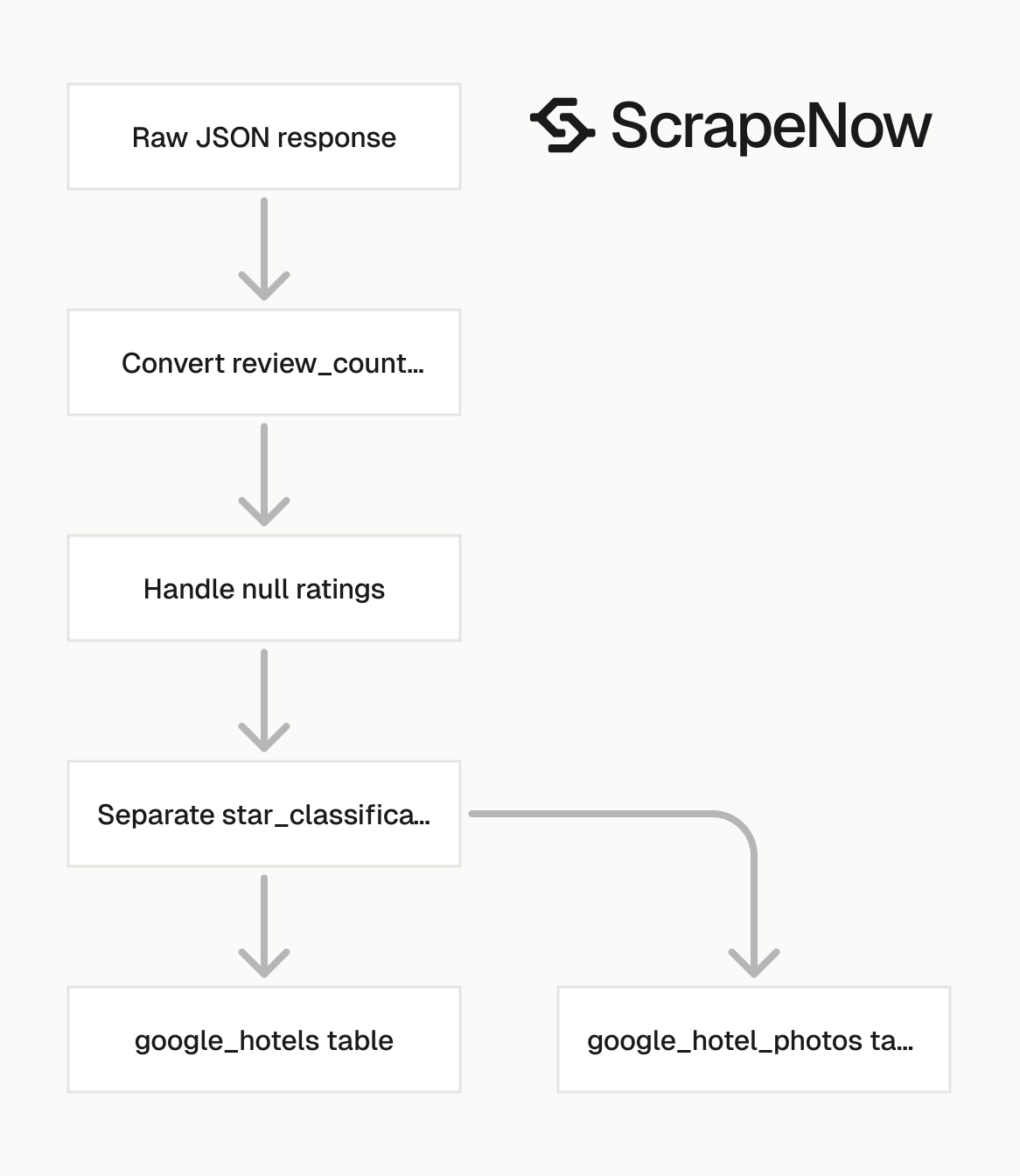
rating is returned as a number. In the sample, the hotel rating is 3.7.
review_count is returned as a string. Convert it to an integer before analytics, filtering, or sorting.
star_classification is the hotel class value shown by Google Hotels. In the sample, the hotel has a 2 star classification.
Keep rating and star_classification separate. A two-star hotel can have a high guest rating, and a five-star hotel can have weak reviews.
Location and contact fields
address contains the full display address, such as 600 Ermac Dr, Nashville, TN 37214. Parse it later if your database needs city, region, and postal code columns.
phone_number contains the phone number displayed on the hotel page. Treat it as a string because phone numbers include parentheses, spaces, plus signs, and regional formatting.
Do not cast phone numbers to integers. That removes leading zeros and destroys international formatting.
Photo fields
photos is an array. Each item contains photo_url and photo_caption.
Google often returns null for photo_caption. Store the field so your schema stays stable when captions exist.
Photo URLs can be long and can include Google image resizing parameters. Store the complete URL if you need the exact image asset returned by Google.
Production tips
Hotel extraction jobs fail for routine reasons most of the time. Invalid URLs, duplicate URLs, missing country codes, and loose schemas cause more damage than the scraper.
Build validation into your job builder. Catch invalid inputs before they reach the API.
Validate inputs before sending jobs
Reject invalid URLs before they hit the API. This saves credits and keeps job failure rates clean.
from urllib.parse import urlparse

def validate_google_hotel_input(item: dict) -> None:
    url = item.get("url", "")
    country = item.get("country")

    parsed = urlparse(url)

    if parsed.scheme != "https":
        raise ValueError(f"Invalid scheme for URL: {url}")

    if parsed.netloc != "www.google.com":
        raise ValueError(f"URL must start with https://www.google.com/: {url}")

    if "/travel/hotels/" not in parsed.path:
        raise ValueError(f"URL is not a Google Hotels URL: {url}")

    if country is not None:
        if not isinstance(country, str) or len(country) != 2:
            raise ValueError(f"country must be a two-letter code: {country}")

inputs = [
    {
        "url": "https://www.google.com/travel/hotels/entity/ChgIr_jb2Zu3x-GjARoLL2cvMXRkYmxyMGcQAQ",
        "country": "US"
    }
]

for item in inputs:
    validate_google_hotel_input(item)
Run this check in your job builder before calling trigger_scrape. Add a separate check for empty strings if users paste URLs into a dashboard.
For batch imports, write rejected rows to a dead-letter file. Include the source row ID, rejected URL, and validation error.
Deduplicate on hotel_id
Google Hotels URLs can change because query parameters change. The hotel_id is cleaner for storage.
Use this pattern after you fetch results:
def dedupe_hotels(records: list[dict]) -> list[dict]:
    seen = {}

    for record in records:
        hotel_id = record.get("hotel_id")
        if not hotel_id:
            continue

        seen[hotel_id] = record

    return list(seen.values())
If your input URLs include the same hotel with different dates or tracking parameters, this removes duplicate property records. It also reduces duplicate writes to your database.
If you care about date-specific context, store date inputs in a separate table. Keep the hotel profile table keyed by hotel_id.
Normalize types before writing to your database
The API returns review_count as a string. Ratings can be missing on some properties.
Normalize before loading:
def normalize_hotel(record: dict) -> dict:
    review_count = record.get("review_count")

    return {
        "hotel_id": record.get("hotel_id"),
        "hotel_name": record.get("hotel_name"),
        "rating": float(record["rating"]) if record.get("rating") is not None else None,
        "review_count": int(review_count.replace(",", "")) if review_count else None,
        "star_classification": record.get("star_classification"),
        "address": record.get("address"),
        "phone_number": record.get("phone_number"),
        "url": record.get("url"),
        "photo_count": len(record.get("photos") or []),
        "scrape_status": record.get("scrape_status")
    }
This gives you predictable columns for warehouse tables. It also prevents dashboard sorting issues caused by string values.
Add unit tests for type conversion. Test empty review_count, comma-formatted counts, missing rating, and empty photos.
Keep raw JSON next to normalized rows
Store the full API response as raw JSON. Then write normalized fields into your query table.
A simple schema works:
| Table | Key | Purpose |
|---|---|---|
google_hotels_raw |
job_id, hotel_id |
Full response payload |
google_hotels |
hotel_id |
Query-ready hotel profile |
google_hotel_photos |
hotel_id, photo_url |
One row per photo |
This split lets you reprocess old data after schema changes. It also gives analysts a stable table and engineers the original payload.
Use google_hotels_raw for replay jobs. Use google_hotels for reporting, deduplication, and joins.
Treat scrape_status as a control field
Do not load failed records into the same path as successful records. Split them right after fetch.
def split_success_failed(records: list[dict]) -> tuple[list[dict], list[dict]]:
    success = []
    failed = []

    for record in records:
        if record.get("scrape_status") == "success":
            success.append(record)
        else:
            failed.append(record)

    return success, failed
Send failed records to a retry queue with the original inputs. Keep the error payload with the failed item when the API returns one.
Set a retry limit. Three attempts catch transient failures without filling your queue with permanently invalid URLs.
Set timeouts and polling intervals deliberately
The sample script uses a 3600 second timeout and polls every 5 seconds. Keep those defaults for batch jobs.
For interactive tools, lower the timeout at the caller level and let the backend job finish. Then fetch results by job_id when the user returns.
Avoid polling every second from many workers. A 5 second interval gives fast feedback without creating unnecessary status traffic.
For large batches, store job_id immediately after trigger_scrape returns. That lets you resume polling after a process restart.
Log enough data to debug failed jobs
Log the job_id, scraper slug, input URL, country, final status, and result count. Those fields solve most support and retry cases.
Do not log API keys. Redact authorization headers before sending logs to shared systems.
For scheduled jobs, add a run ID. Use it to connect source inputs, ScrapeNow jobs, normalized rows, and failed records.
When to use the hotel extract scraper
Use the extract scraper when your input is a specific property page. It returns hotel-level details from one URL.
Use the search-by-filter scraper when your input is a listing page. It fits jobs that start from a query, location, dates, guests, or filters.
Google travel workflows often use both:
- Use Search Google Hotels by filters to collect hotel result URLs.
- Use Extract Google Hotels data to pull profile fields from each hotel URL.
- Store
hotel_idas the join key between listing data and property detail data.
This flow separates discovery from enrichment. It also lets you rerun extract jobs for existing hotels without repeating the full search stage.
For adjacent travel datasets, the Search Google Flights data follows the same request model with flight-specific inputs. Use separate tables for flights and hotels because the entities change at different rates.
Pricing
ScrapeNow charges per returned row. One row costs one credit, starting at $0.04 per credit for small runs and dropping with volume. No monthly contracts, no proxy fees, no charges for failed rows. See the pricing page for current rates.


