
LinkedIn has 1.3B registered users and 310M monthly active users, according to DemandSage. That makes it the largest public professional graph for jobs, companies, posts, and profile data.
A LinkedIn scraper turns public page data into rows your recruiting, sales, research, or market data pipeline can use. The output should land as structured records, not screenshots, browser logs, or HTML fragments.
What LinkedIn data teams extract
LinkedIn data changes daily. People change roles, companies publish jobs, hiring managers post team updates, and company pages change headcount fields.
That pace matters for recruiting pipelines, job market tracking, sales research, company monitoring, and content analysis. A one-time export ages quickly once people move jobs or companies close listings.
Most LinkedIn scraping work falls into four buckets:
| Data type | Common fields | Typical use |
|---|---|---|
| Profiles | Name, headline, location, current company, experience, education | Recruiting, lead research, talent mapping |
| Companies | Company name, industry, size, headquarters, website, follower count | Market maps, account lists, company monitoring |
| Jobs | Title, company, location, job ID, description, posting date | Job boards, hiring trend analysis, salary research |
| Posts | Author, text, engagement counts, post URL, timestamp | Content research, creator tracking, social monitoring |
Profiles work best when you already know the people you want to enrich. Company pages work best for account lists, market maps, and firmographic cleanup.
Jobs data needs tighter scheduling because listings open and close fast. Posts data needs timestamp handling because engagement counts change after publication.
Why LinkedIn scraping breaks so often
LinkedIn runs aggressive anti-bot checks. Expect browser fingerprinting, login walls, IP reputation scoring, request throttling, changing markup, and session-based access rules.
A scraper that works for 50 profile URLs can fail at 5,000. The failure pattern usually starts with soft blocks, then CAPTCHA, then empty HTML.
Logged-in scraping adds another failure mode. If the scraper reuses one account too aggressively, LinkedIn can restrict that account and cut off the run.
Self-built tools work when volume stays low and selectors stay stable. Open-source projects like joeyism/linkedin_scraper and vertexcover-io/linkedin-spider show the moving parts.
Those projects make the maintenance burden visible. You manage browser automation, login state, selector updates, retries, and blocked responses yourself.
Production scraping needs more than selectors. You need request pacing, fingerprint control, session handling, proxy routing, data normalization, and fast repairs when LinkedIn changes markup.
ScrapeNow handles those parts inside purpose-built extractors. You send URLs or search inputs, then receive structured rows.
ScrapeNow's LinkedIn scrapers
ScrapeNow has separate LinkedIn scrapers for profiles, companies, jobs, and posts. Each scraper targets one data shape.
That design keeps outputs predictable. A profile record needs work history and education, while a job record needs description, posting ID, and apply URL.
A generic extractor forces extra cleanup after every run. Dedicated extractors reduce that cleanup because each one returns fields for a specific LinkedIn page type.
LinkedIn profiles scraper
The profiles scraper extracts public professional profile fields. Typical fields include name, headline, location, current company, work history, education, and profile URL.
Use it when you already have LinkedIn profile URLs. Common sources include search results, CRM records, conference attendee lists, alumni lists, and recruiting workflows.
The detailed guide for LinkedIn profile scraping covers input prep, batching, and common profile extraction issues. The Get LinkedIn profile data takes profile URLs and returns structured profile records.
A typical profile input looks like this:
{
  "urls": [
    "https://www.linkedin.com/in/example-profile-1/",
    "https://www.linkedin.com/in/example-profile-2/"
  ]
}
The output fits enrichment workflows. You can match records to candidates, leads, or contacts by name, company, location, and profile URL.
LinkedIn companies scraper
The companies scraper extracts company page fields. Typical fields include company name, industry, headquarters, company size, website, description, follower count, and LinkedIn URL.
Use this scraper for account research, competitor tracking, and company database cleanup. It also works for building market maps from a known list of company URLs.
The detailed guide for LinkedIn company scraping walks through URL input, field coverage, and batch runs. The Extract LinkedIn company data takes company page URLs and returns company records.
Company records need normalization after extraction. Store LinkedIn URL as the stable key, then map domains, names, and locations into your internal schema.
LinkedIn jobs scraper by URL
The jobs by URL scraper extracts job details from known LinkedIn job posting URLs. It returns job title, company, location, posting ID, employment type, description, and apply URL when available.
Use this scraper when another system already collects job links. That system can be a crawler, applicant tracking workflow, job alert feed, or analyst-curated list.
The detailed guide for LinkedIn jobs scraping covers job URL extraction and output handling. The Pull structured LinkedIn job listings works best when your input is a list of job posting links.
Job URLs expire as listings close. Run URL batches soon after collection, and store posting ID beside the source URL.
LinkedIn jobs scraper by keyword
The jobs keyword search scraper finds job listings from a keyword and location query. Use it for scheduled tracking of specific labor markets.
Good queries include “data engineer Berlin,” “nurse Texas,” and “founding account executive remote.” Narrow queries produce cleaner data and reduce downstream filtering.
The detailed guide for LinkedIn jobs scraping includes search workflows and filtering patterns. The Search LinkedIn jobs by keyword turns search terms into job listing rows.
Use keyword search when discovery matters. The scraper handles pagination, result collection, and row formatting, so your code receives job records.
A scheduled jobs run can track new postings every morning. Store job IDs from prior runs, then mark newly seen IDs as fresh listings.
LinkedIn jobs scraper by search URL
The jobs search URL scraper starts from a LinkedIn jobs search results URL. Use it when your team builds filtered searches inside LinkedIn.
This input preserves filters encoded in the URL. Those filters can include location, date posted, experience level, work type, and company filters.
The detailed guide for LinkedIn jobs scraping explains when search URLs beat raw keywords. The Search LinkedIn jobs by URL converts those filtered results into structured rows.
Search URLs work well for analyst workflows. An analyst can tune the search manually, copy the URL, then hand it to the scraper.
LinkedIn posts scraper
The posts scraper extracts public post data. Typical fields include post text, author, post URL, timestamp, reaction count, comment count, repost count, and media metadata.
Use it for creator tracking, brand monitoring, hiring signal detection, and content research. Hiring signals often show up in posts before they appear as formal job listings.
The detailed guide for LinkedIn post scraping covers post URL inputs and engagement fields. The Extract LinkedIn post data takes post URLs and returns normalized post records.
Post data needs time-aware storage. Save the timestamp, scrape time, and engagement counts so later runs can calculate growth.
Which LinkedIn scraper to use
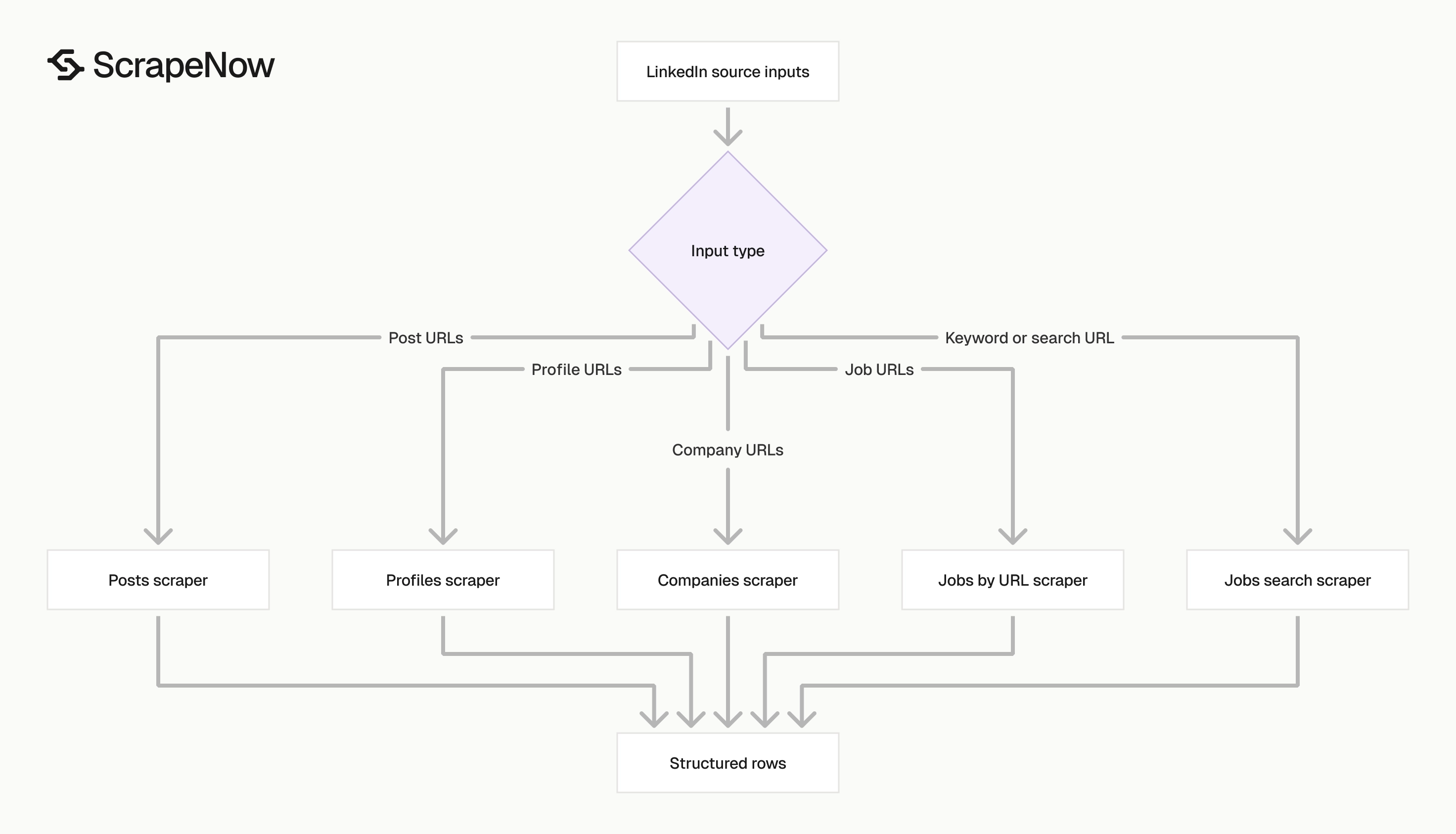
Pick the scraper based on your input. URL-based extractors are cleaner when you already have links.
Search-based jobs scrapers fit discovery workflows. They find listings from keywords or preserve filters from a LinkedIn search URL.
| Your input | Scraper to use | Output |
|---|---|---|
| Profile URLs | LinkedIn profiles extractor | Professional profile records |
| Company page URLs | LinkedIn companies extractor | Company records |
| Job posting URLs | LinkedIn jobs extractor by URL | Job posting records |
| Job keywords and locations | LinkedIn jobs keyword scraper | Matching job listings |
| LinkedIn jobs search URL | LinkedIn jobs search URL scraper | Filtered job listings |
| Post URLs | LinkedIn posts extractor | Post and engagement records |
A recruiting data pipeline usually combines profiles and jobs. Profiles enrich candidate records, while jobs show which companies are hiring.
A market data pipeline usually combines companies and jobs. Company pages define the account universe, while job listings show hiring demand.
A content monitoring pipeline usually combines posts and profiles. Posts show public activity, while profiles identify authors and their professional context.
Practical run patterns
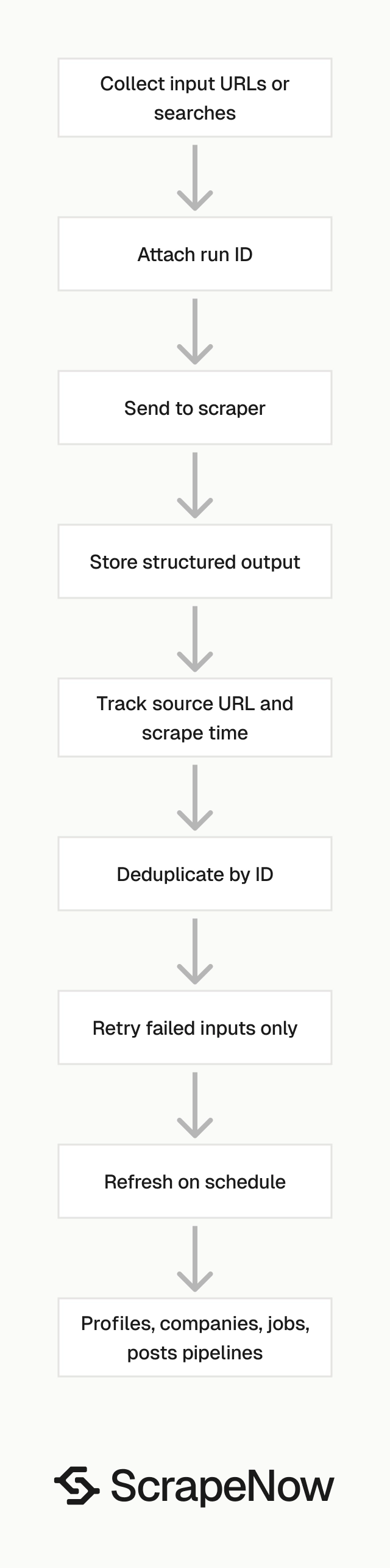
Batch size matters less than recovery behavior. A good pipeline can resume after failures without duplicating rows or losing source URLs.
Store every input with a run ID. Then store every output with the same run ID, source URL, scrape time, and extractor name.
That structure makes audits easier. You can trace a bad row back to the original URL and rerun only that input.
For scheduled jobs data, keep a table of seen job IDs. New IDs indicate fresh listings, while missing IDs suggest closed listings.
For profiles and companies, run refresh jobs on a slower schedule. Weekly or monthly refreshes work for most enrichment use cases.
For posts, schedule based on the metric you need. Engagement tracking needs repeat pulls, while archive collection needs one clean extraction.
Pricing
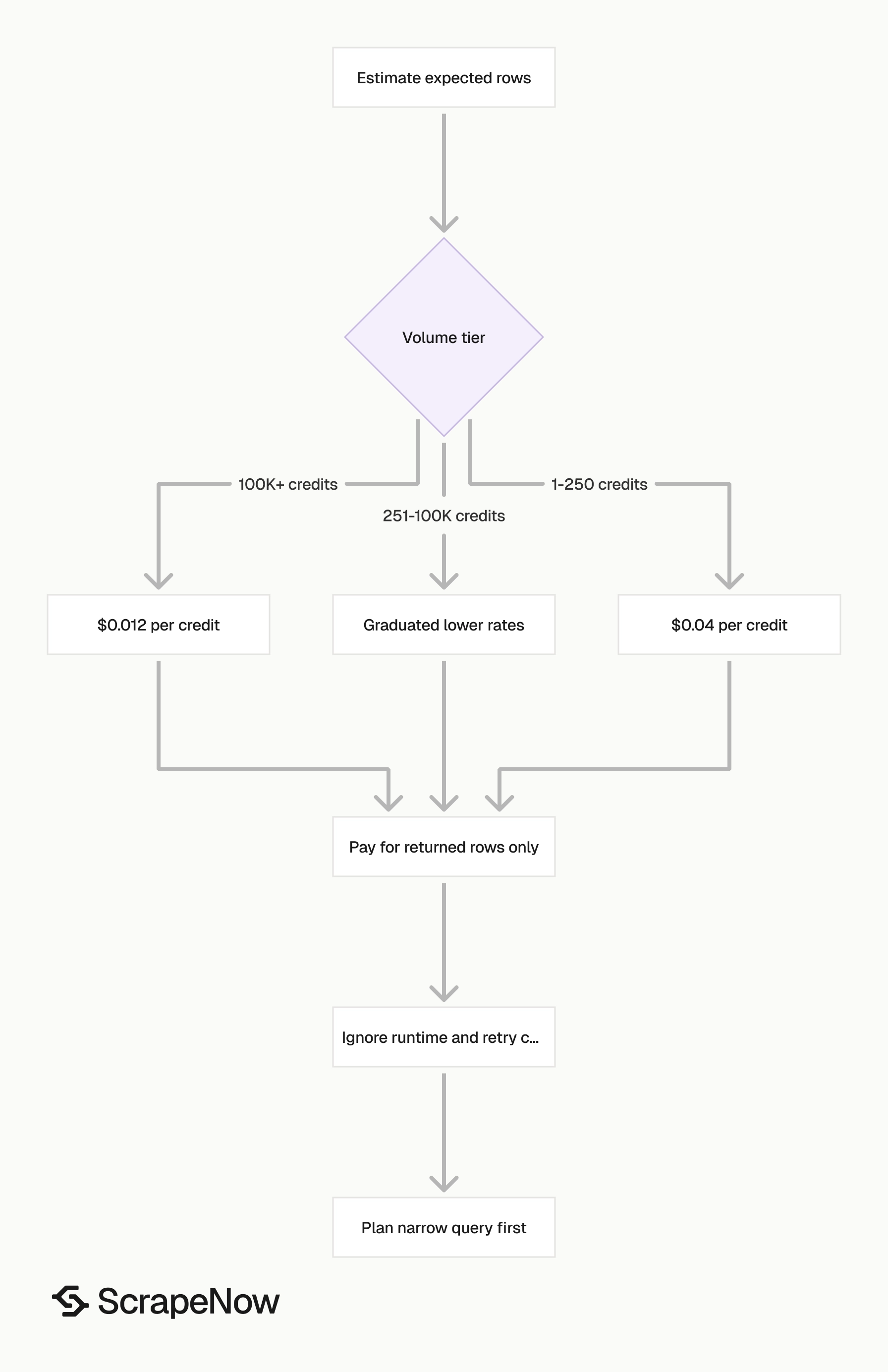
ScrapeNow charges per returned row. One row costs one credit, starting at $0.04 per credit for small runs and dropping with volume. No monthly contracts, no proxy fees, no charges for failed rows. See the pricing page for current rates.
Compliance and data boundaries
Scrape public data only. Do not scrape private messages, gated account data, or data you lack permission to access.
LinkedIn’s User Agreement restricts automated access. Legal review belongs in any production workflow that collects LinkedIn data.
For commercial use, define the fields you collect before the scraper runs daily. Also define retention periods, deletion handling, and user request handling.
ScrapeNow is built for public web data extraction and supports GDPR and CCPA workflows. Teams with stricter review needs can use custom pipelines with field-level rules.
Field-level rules reduce risk. For example, you can collect job title, company, and location while excluding profile fields your workflow does not need.
Next step
Pick the LinkedIn data type first. Use profiles for people, companies for account records, jobs for hiring data, and posts for content tracking.
The full catalog of 86+ pre-built extractors is available at Browse all 86+ scrapers. Start with the extractor that matches your current input format.
If your first LinkedIn run is jobs, start with the Search LinkedIn jobs by keyword. Run one narrow query, inspect the fields, then increase volume.


