LinkedIn company pages show industry, size, headquarters, specialties, and follower counts, but LinkedIn's anti-scraping measures block most automated tools. ScrapeNow's Extract LinkedIn company data scraper reads a public LinkedIn company page and returns one structured record per input URL.
How the scraper behaves
The scraper takes one required input field named url. The value must be a public LinkedIn company profile URL.
A valid input uses this pattern:
https://www.linkedin.com/company/{company-slug}/
Each input object returns one output record. The result keeps the original input under inputs.url, so your pipeline maps every response back to its source row.
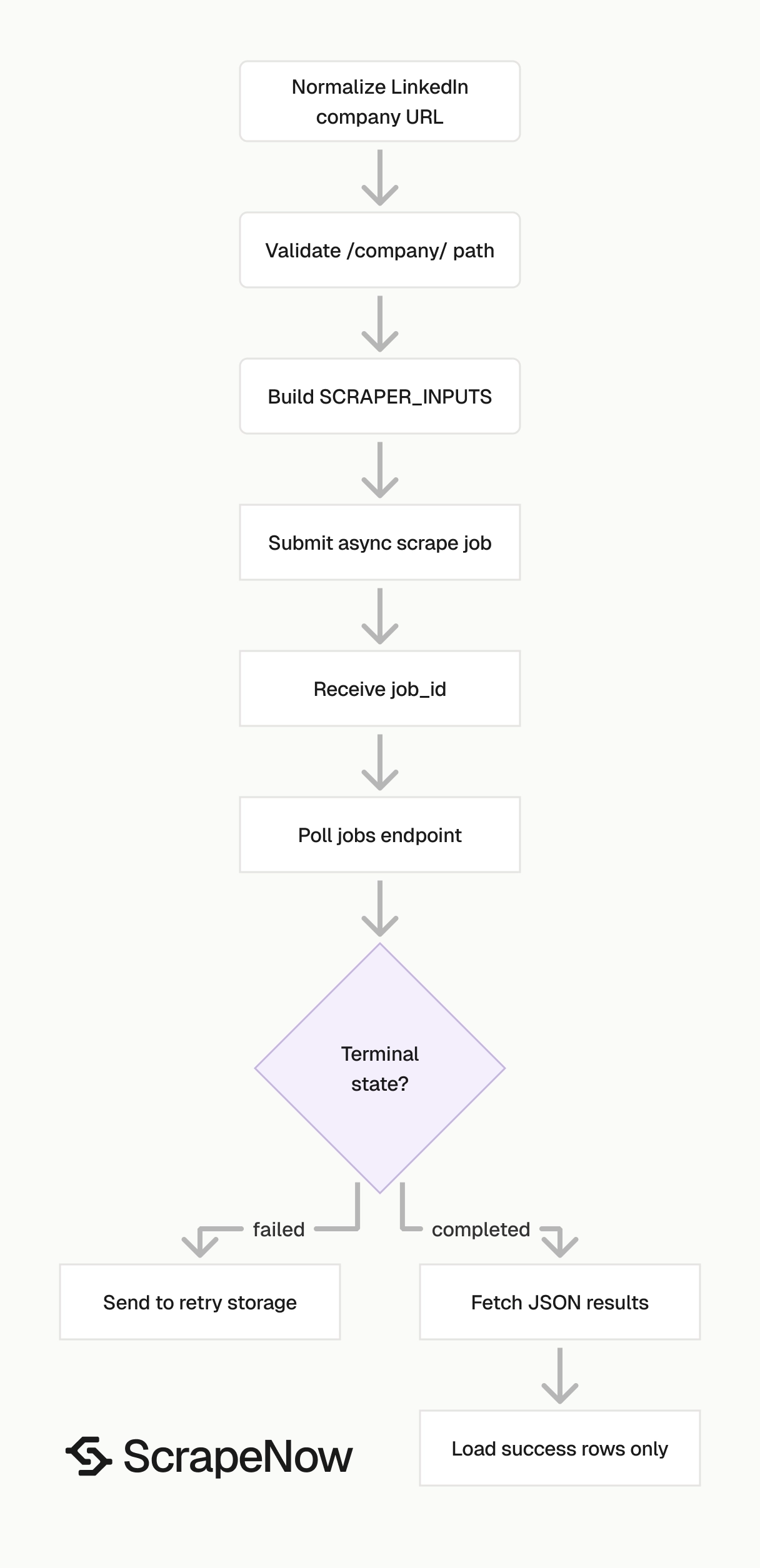
ScrapeNow runs the scrape as an async job. You submit inputs, receive a job_id, poll job status, then download results when the job reaches a terminal state.
The API returns job status values through the jobs endpoint. The sample script below treats completed and failed as terminal states.
This async flow works better than a long blocking request for batch scraping. If your client process exits during polling, the job still has a server-side ID you can query later.
How to use this scraper
ScrapeNow's Extract LinkedIn company data scraper takes one input value. That value is the public LinkedIn company profile URL.
The input URL must start with:
https://www.linkedin.com/
Example input:
{
  "url": "https://www.linkedin.com/company/universalmusicgroup/"
}
The scraper reads the company profile linked by that URL and returns one output record for that input. For batch runs, submit multiple input objects in the same inputs array.
Keep each input object small. Send the URL field only unless the scraper schema adds more fields later.
Step 1. Find the input field
The scraper accepts a single field named url.
A valid company input uses this path pattern:
https://www.linkedin.com/company/{company-slug}/
For example, universalmusicgroup is the company slug in this URL:
https://www.linkedin.com/company/universalmusicgroup/
Treat the slug as a useful dedupe signal. Treat the full normalized URL as the safer storage key, because slugs change after company rebrands.
If you store both, use the normalized URL as the primary lookup key. Keep the slug as a secondary field for matching and reporting.
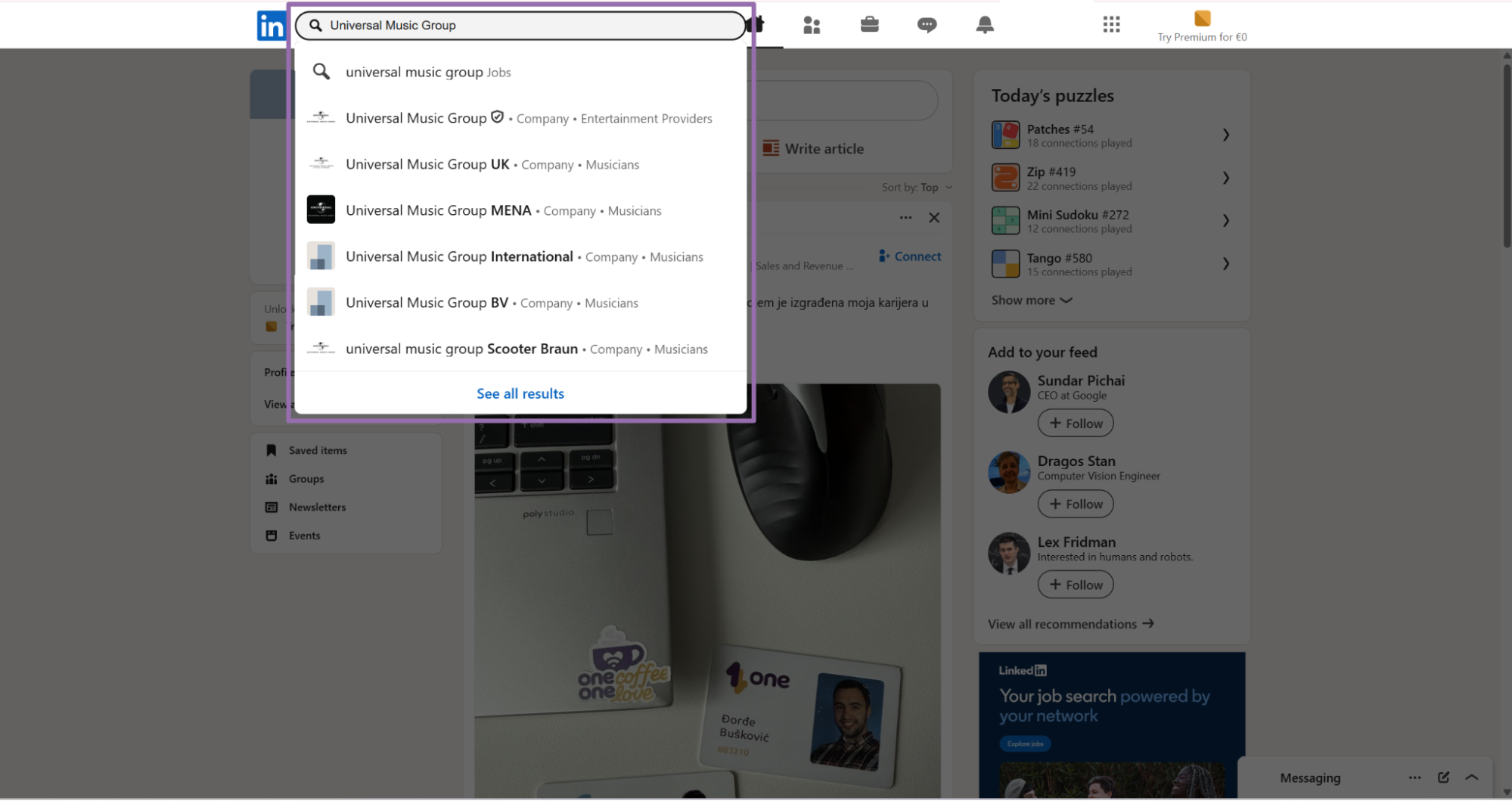
Step 2. Open LinkedIn
Open linkedin.com.
Use the company result that points to a company profile. LinkedIn search also returns people, jobs, posts, groups, and schools for the same query.
Check the browser path before copying the URL. Company pages use /company/, while job pages use /jobs/ and people profiles use /in/.
This check prevents a common ingestion error. A people URL and a company URL can share similar names, especially for founders and small businesses.
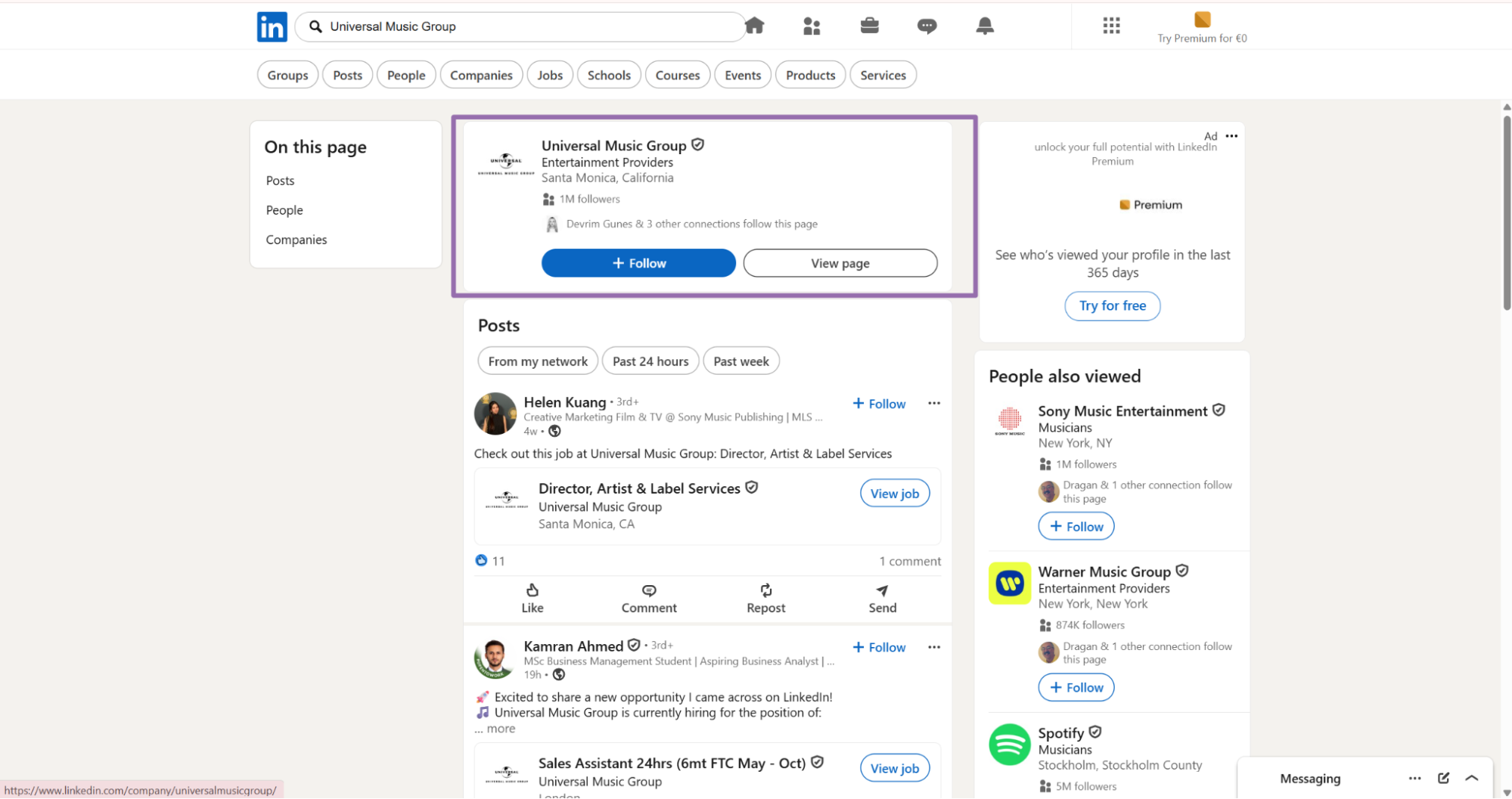
Step 3. Open the company card and copy the URL
On the results page, click the company's card.
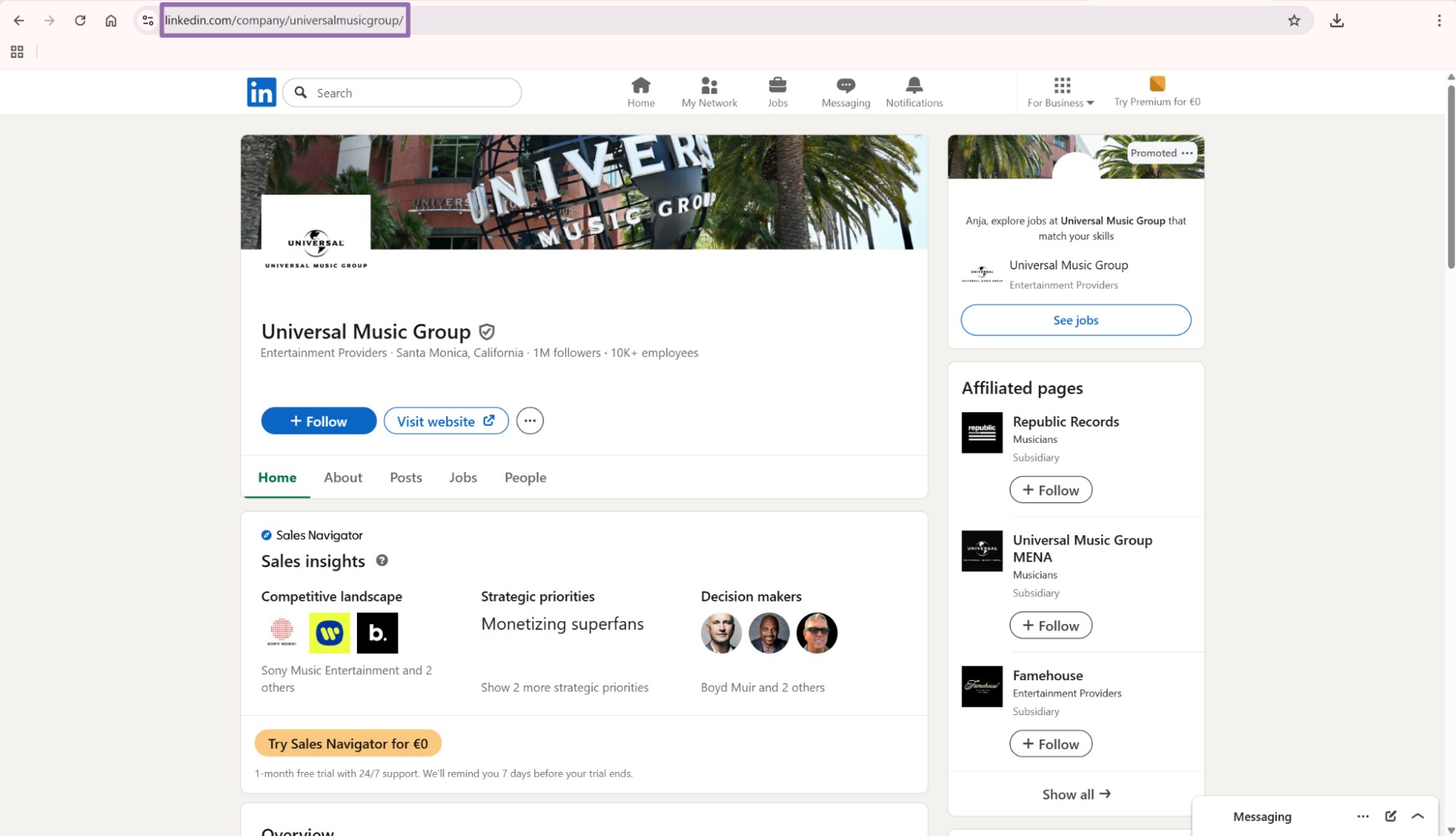
https://www.linkedin.com/company/universalmusicgroup/
Remove tracking parameters before storing the URL. Keep the clean company URL and remove ?trk=... from the end.
Clean URLs improve dedupe rates and reduce wasted rows. They also make retry files easier to inspect by hand.
Normalize URLs before you build the API payload. This keeps the source file, request batch, and warehouse key aligned.
Step 4. Run the API request
Use this Python script. It starts a scrape job, polls for completion, fetches the JSON result, and writes the output to disk.
"""
Configuration:
    - Set SCRAPER_SLUG to the scraper you want to run.
    - Set SCRAPER_INPUTS to the list of input dicts matching that scraper's schema.
    - Set API_KEY to your scraper API key.
"""

import sys
import time
import json
import requests
import os

API_KEY = "YOUR_API_KEY"

SCRAPER_SLUG = "linkedin-companies-extract-by-url"

SCRAPER_INPUTS = [
    {
        "url": "https://www.linkedin.com/company/universalmusicgroup/"
    }
]


BASE_URL = "https://api.scrapenow.io/api/v1/scraping"
TIMEOUT_SECONDS = 3600
POLL_INTERVAL = 5
SPINNER = "|/-\\"


def build_headers(api_key: str, content_type: str | None = None) -> dict:
    headers = {"Authorization": f"Bearer {api_key}"}
    if content_type:
        headers["Content-Type"] = content_type
    return headers


def trigger_scrape(slug: str, inputs: list[dict]) -> str:
    url = f"{BASE_URL}/scrape?scraper={slug}"
    response = requests.post(
        url,
        headers=build_headers(API_KEY, "application/json"),
        json={"inputs": inputs},
    )
    response.raise_for_status()
    return response.json()["data"]["job_id"]


def poll_until_done(job_id: str) -> str:
    start = time.time()
    i = 0
    while True:
        elapsed = time.time() - start
        if elapsed > TIMEOUT_SECONDS:
            print(f"\nTimeout after {TIMEOUT_SECONDS}s")
            sys.exit(1)
        response = requests.get(
            f"{BASE_URL}/jobs/{job_id}",
            headers=build_headers(API_KEY),
        )
        response.raise_for_status()
        data = response.json()
        status = data["data"]["status"]
        mins, secs = divmod(int(elapsed), 60)
        sys.stdout.write(
            f"\r[{SPINNER[i % 4]}] Waiting... {status} ({mins}m {secs:02d}s)  "
        )
        sys.stdout.flush()
        if status in ("completed", "failed"):
            print()
            return status
        time.sleep(POLL_INTERVAL)
        i += 1


def fetch_results(job_id: str) -> dict:
    response = requests.get(
        f"{BASE_URL}/jobs/{job_id}/results?format=json",
        headers=build_headers(API_KEY),
    )
    response.raise_for_status()
    return response.json()


def save_results(data: dict, slug: str) -> str:
    os.makedirs("output", exist_ok=True)
    filename = os.path.join("output", f"{slug}.json")
    with open(filename, "w", encoding="utf-8") as f:
        json.dump(data, f, indent=2, ensure_ascii=False)
    return filename


def main() -> None:
    print(f"Triggering scraper: {SCRAPER_SLUG}")
    job_id = trigger_scrape(SCRAPER_SLUG, SCRAPER_INPUTS)
    print(f"Job started: {job_id}")
    final_status = poll_until_done(job_id)
    if final_status != "completed":
        print(f"Job failed with status: {final_status}")
        sys.exit(1)
    print("Fetching results...")
    results = fetch_results(job_id)
    output_file = save_results(results, SCRAPER_SLUG)
    print(f"Results saved to: {output_file}")


if __name__ == "__main__":
    main()
Replace YOUR_API_KEY with your ScrapeNow API key.
The script starts a scrape job and polls every 5 seconds. It waits up to 3600 seconds, fetches JSON results, and writes them to output/linkedin-companies-extract-by-url.json.
For small test runs, one input URL is enough. For production runs, pass a list of input dictionaries under SCRAPER_INPUTS.
Example batch input:
SCRAPER_INPUTS = [
    {"url": "https://www.linkedin.com/company/universalmusicgroup/"},
    {"url": "https://www.linkedin.com/company/microsoft/"},
    {"url": "https://www.linkedin.com/company/google/"}
]
Keep batches small enough for your retry strategy. A 500-row batch is easier to replay than a 50,000-row batch when the upstream file contains invalid URLs.
For scheduled jobs, store the job_id with your batch metadata. That gives you a direct lookup path when a run fails during polling or result download.
Store the submitted input count with the job record. Compare that count with completed, failed, and loaded rows after every run.
Step 5. Check the output
A successful run returns one JSON object per input URL.
[
  {
    "inputs": {
      "url": "https://www.linkedin.com/company/universalmusicgroup/"
    },
    "scrape_status": "success",
    "id": "universalmusicgroup",
    "name": "Universal Music Group",
    "country_code": "US,NL,HK",
    "locations": [
      "2220 Colorado Avenue Santa Monica, California 90401, US",
      "Hilversum, NL",
      "1755 Broadway Ave New York, NY 10018, US",
      "21301 Burbank Blvd Los Angeles, CA 91367, US",
      "2220 Colorado Ave Santa Monica, CA 90404, US",
      "392 Kwun Tong Rd Kwun Tong, Hong Kong, HK"
    ],
    "followers": 1083276,
    "employees_in_linkedin": 19257,
    "about": "Universal Music Group (UMG) is the world leader in music-based entertainment, with a broad array of businesses engaged in recorded music, music publishing, merchandising and audiovisual content in more than 60 countries...",
    "specialties": "Music and entertainment",
    "company_size": "10,001+ employees",
    "organization_type": "Public Company",
    "industries": "Entertainment Providers",
    "website": "https://www.universalmusic.com/",
    "crunchbase_url": "https://www.crunchbase.com/organization/universal-music-group?utm_source=linkedin&utm_medium=referral&utm_campaign=linkedin_companies&utm_content=profile_cta_anon&trk=funding_crunchbase",
    "company_id": "30"
  }
]
Use the Pull structured LinkedIn job listings scraper for job post URLs. Use the company scraper when the source record is a LinkedIn company page.
The output preserves the input URL under inputs.url. Keep that value in your database so you can audit records, retry failures, and map results back to source rows.
Load the JSON into a staging table before merging it into production tables. Staging gives you a place to validate status, normalize keys, and inspect failed rows.
What data you get back
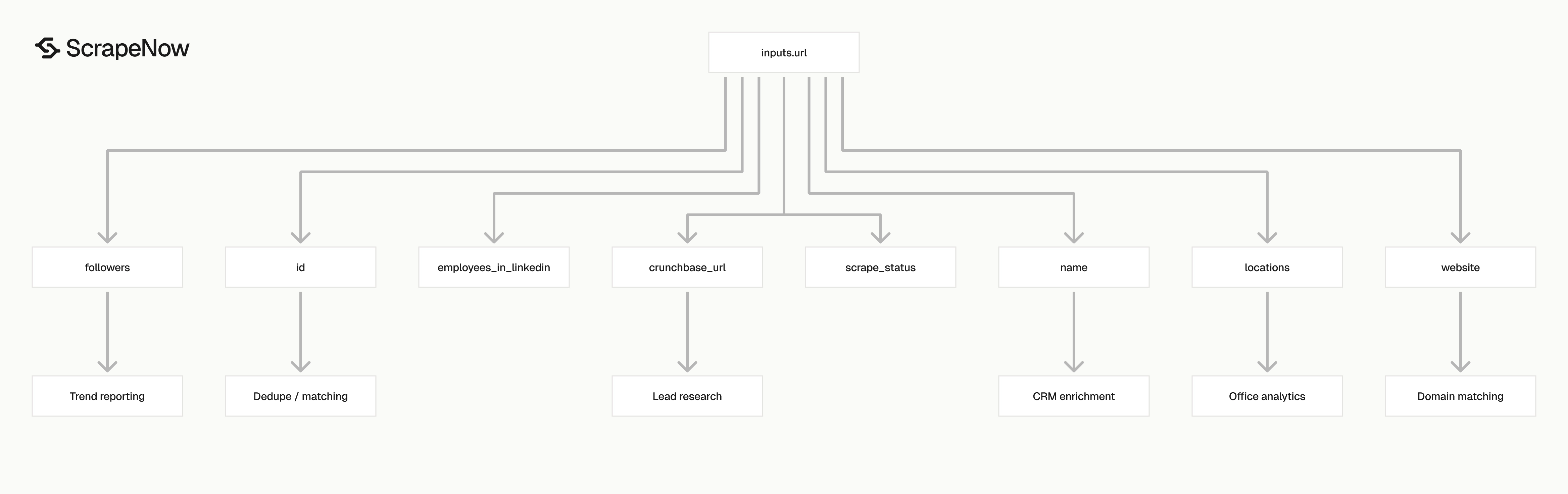
The response is built for storage. You get raw input tracking, scrape status, stable company identifiers, profile fields, and company metadata in one record.
| Field | Type | What to do with it |
|---|---|---|
inputs.url |
string | Store the original URL used for the scrape. Use it for audit logs and retries. |
scrape_status |
string | Check for success before loading the record into your warehouse. |
id |
string | LinkedIn company slug from the URL. Use it for dedupe support. |
name |
string | Company display name. Use it for CRM enrichment and account matching. |
country_code |
string | Comma-separated country codes found on the profile. |
locations |
array | Office addresses listed on the company profile. |
followers |
integer | LinkedIn follower count at scrape time. |
employees_in_linkedin |
integer | Number of LinkedIn members associated with the company. |
about |
string | Company description from the profile. |
specialties |
string | LinkedIn specialties text. |
company_size |
string | LinkedIn size band such as 10,001+ employees. |
organization_type |
string | Public company, privately held, nonprofit, and similar labels. |
industries |
string | LinkedIn industry category. |
website |
string | Company website listed on LinkedIn. |
crunchbase_url |
string | Crunchbase profile URL when LinkedIn includes it. |
company_id |
string | LinkedIn internal company ID when available. |
Ready to get this data? Extract company data from your LinkedIn URLs.
Use typed columns for fields that drive matching, filtering, or reporting. Store followers and employees_in_linkedin as integers, rather than strings.
Store locations as an array or JSON field. A single company profile can list multiple offices across countries.
Keep the raw JSON alongside your typed table during the first few runs. Raw records make field mapping reviews faster when business users ask where a value came from.
Document how each output field maps to your warehouse columns. This saves time when sales ops asks why CRM counts differ from LinkedIn counts.
Use scrape_status as your load gate
Do not load every row without checking it. Treat scrape_status as the first validation check.
import json

with open("output/linkedin-companies-extract-by-url.json", "r", encoding="utf-8") as f:
    rows = json.load(f)

clean_rows = []
failed_rows = []

for row in rows:
    if row.get("scrape_status") == "success":
        clean_rows.append(row)
    else:
        failed_rows.append({
            "url": row.get("inputs", {}).get("url"),
            "status": row.get("scrape_status")
        })

print(f"Loaded rows: {len(clean_rows)}")
print(f"Failed rows: {len(failed_rows)}")
Expected output for one successful company URL:
Loaded rows: 1
Failed rows: 0
Send failed rows to retry storage with the original input URL and the returned status. That gives you a clean replay file without searching logs.
Store the failed row as structured data. Logs expire, while retry files need to survive batch replays and warehouse backfills.
Include job_id in the retry record when your pipeline has it. That makes support tickets and internal investigations faster.
Use id and company_id for matching
The id field is the readable LinkedIn slug. For https://www.linkedin.com/company/universalmusicgroup/, the slug is universalmusicgroup.
company_id is useful when LinkedIn exposes a numeric ID. Store both because URLs and display names change more often than internal IDs.
Use this matching order in production:
- Match on
company_idwhen both records have it. - Match on normalized LinkedIn company URL.
- Match on slug when the URL is missing.
- Match on company name after adding website or domain checks.
Name-only matching creates false positives. Regional subsidiaries and parent companies often share similar display names.
A domain check removes many false matches. Compare normalized website domains before merging records with similar names.
Store the match method on merged records. A company_id match deserves more trust than a name plus domain match.
Production tips
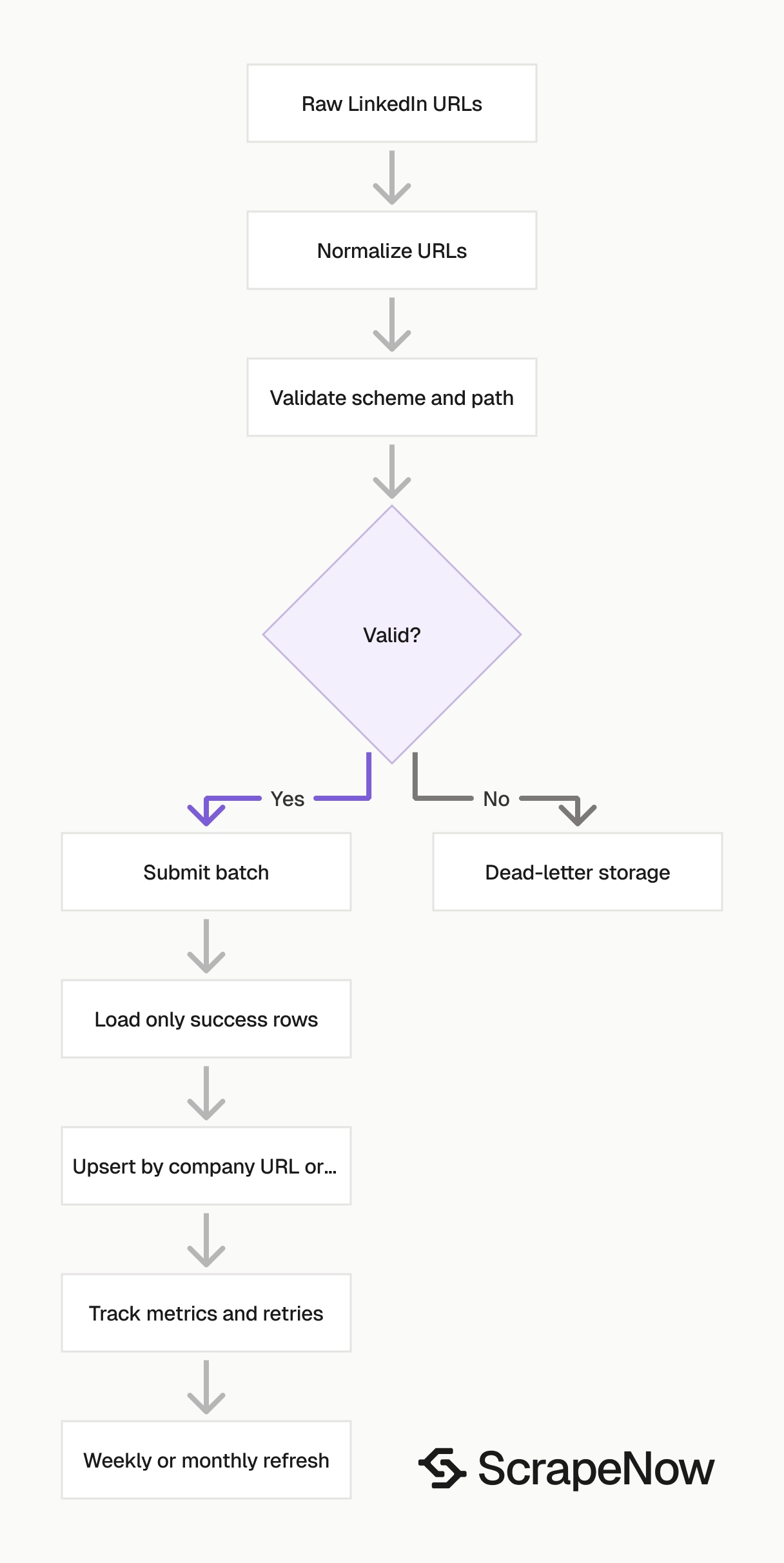
Run validation before you send jobs to the API. Keep raw responses in cold storage and track run-level metrics from the start.
Validate URLs before submitting jobs
The input URL must start with https://www.linkedin.com/. For company pages, also require /company/ in the path.
from urllib.parse import urlparse

def validate_linkedin_company_url(url: str) -> bool:
    parsed = urlparse(url)

    if parsed.scheme != "https":
        return False

    if parsed.netloc != "www.linkedin.com":
        return False

    if not parsed.path.startswith("/company/"):
        return False

    slug = parsed.path.replace("/company/", "").strip("/")
    return len(slug) > 0


urls = [
    "https://www.linkedin.com/company/universalmusicgroup/",
    "https://www.linkedin.com/jobs/view/123456789/",
    "http://www.linkedin.com/company/example/"
]

valid_urls = [url for url in urls if validate_linkedin_company_url(url)]

print(valid_urls)
Expected output:
['https://www.linkedin.com/company/universalmusicgroup/']
If your workflow starts from job listings, route job URLs into the Search LinkedIn jobs by keyword scraper or the Search LinkedIn jobs by URL scraper.
Add validation at the ingestion boundary, before the ScrapeNow API request. Return invalid rows to the source owner with a reason code like wrong_path, wrong_scheme, or empty_slug.
Normalize company URLs before dedupe
LinkedIn URLs often carry tracking parameters or trailing slashes. Normalize them before dedupe.
from urllib.parse import urlparse

def normalize_company_url(url: str) -> str:
    parsed = urlparse(url)
    path = parsed.path.rstrip("/") + "/"
    return f"https://www.linkedin.com{path}"


raw_urls = [
    "https://www.linkedin.com/company/universalmusicgroup/?trk=public_jobs",
    "https://www.linkedin.com/company/universalmusicgroup",
    "https://www.linkedin.com/company/universalmusicgroup/"
]

deduped = sorted({normalize_company_url(url) for url in raw_urls})

print(deduped)
Expected output:
['https://www.linkedin.com/company/universalmusicgroup/']
At 10,000 URLs, a 3 percent duplicate rate means 300 wasted rows. Normalize before you calculate batch size or write retry files. Keep the original URL too for debugging upstream source quality.
Store a fixed schema
Do not write raw JSON into random columns and clean it later. Store a fixed schema on day 1.
CREATE TABLE linkedin_companies (
    linkedin_company_url TEXT PRIMARY KEY,
    linkedin_slug TEXT,
    linkedin_company_id TEXT,
    name TEXT,
    website TEXT,
    industries TEXT,
    company_size TEXT,
    organization_type TEXT,
    followers INTEGER,
    employees_in_linkedin INTEGER,
    country_code TEXT,
    locations JSONB,
    about TEXT,
    specialties TEXT,
    crunchbase_url TEXT,
    scrape_status TEXT,
    scraped_at TIMESTAMP DEFAULT CURRENT_TIMESTAMP
);
For analytics warehouses that do not support JSONB, store locations as a JSON string. Split it into a child table later if you need office-level reporting.
A child table works well for location analytics:
CREATE TABLE linkedin_company_locations (
    linkedin_company_url TEXT,
    location_text TEXT,
    scraped_at TIMESTAMP DEFAULT CURRENT_TIMESTAMP,
    PRIMARY KEY (linkedin_company_url, location_text)
);
Keep the parent table focused on one row per company. Put a unique constraint on the normalized company URL to prevent duplicate account records.
Use idempotent inserts
Company data changes. Follower counts, employee counts, locations, and descriptions can change between runs.
Use an upsert keyed on the normalized LinkedIn company URL or company_id.
INSERT INTO linkedin_companies (
    linkedin_company_url,
    linkedin_slug,
    linkedin_company_id,
    name,
    website,
    industries,
    company_size,
    organization_type,
    followers,
    employees_in_linkedin,
    country_code,
    locations,
    about,
    specialties,
    crunchbase_url,
    scrape_status
)
VALUES (
    %(linkedin_company_url)s,
    %(linkedin_slug)s,
    %(linkedin_company_id)s,
    %(name)s,
    %(website)s,
    %(industries)s,
    %(company_size)s,
    %(organization_type)s,
    %(followers)s,
    %(employees_in_linkedin)s,
    %(country_code)s,
    %(locations)s,
    %(about)s,
    %(specialties)s,
    %(crunchbase_url)s,
    %(scrape_status)s
)
ON CONFLICT (linkedin_company_url)
DO UPDATE SET
    name = EXCLUDED.name,
    website = EXCLUDED.website,
    industries = EXCLUDED.industries,
    company_size = EXCLUDED.company_size,
    organization_type = EXCLUDED.organization_type,
    followers = EXCLUDED.followers,
    employees_in_linkedin = EXCLUDED.employees_in_linkedin,
    country_code = EXCLUDED.country_code,
    locations = EXCLUDED.locations,
    about = EXCLUDED.about,
    specialties = EXCLUDED.specialties,
    crunchbase_url = EXCLUDED.crunchbase_url,
    scrape_status = EXCLUDED.scrape_status,
    scraped_at = CURRENT_TIMESTAMP;
This keeps your company table current without creating duplicate rows. For trend reporting, add a history table to track follower and employee count changes across refreshes.
Separate empty fields from failed scrapes
A field can be missing because LinkedIn did not show it on the profile. That differs from a failed scrape.
Use this rule:
| Condition | Meaning | Action |
|---|---|---|
scrape_status != "success" |
Scrape failed | Retry or send to dead-letter storage |
scrape_status == "success" and website is empty |
Profile has no website field | Store null |
scrape_status == "success" and locations is empty |
Profile has no visible locations | Store empty array |
scrape_status == "success" and followers is null |
Field unavailable in output | Store null and keep the row |
A strict pipeline saves the input URL, status, and raw response for every row. That makes backfills easier when you change your schema.
Do not treat empty optional fields as scraper failures. Use nullable columns for optional profile fields and use scrape_status to classify actual failures.
Retry failed rows with limits
Cap retries at 3 attempts per URL. After the cap, write the input to a dead-letter file for manual inspection.
Pricing
ScrapeNow charges per returned row. One row costs one credit, starting at $0.04 per credit for small runs and dropping with volume. No monthly contracts, no proxy fees, no charges for failed rows. See the pricing page for current rates.


