The ScrapeNow LinkedIn profiles scraper extracts public profile data from any LinkedIn /in/ URL. One input returns the profile name, headline, location, about text, current company, work history, and recent posts as structured JSON.
Use the Get LinkedIn profile data scraper when you already have profile URLs. Feed it clean URLs, store the response, and join the fields to your CRM, ATS, or data warehouse.
| Starting input | Use this scraper |
|---|---|
https://www.linkedin.com/in/snoopdogg/ |
LinkedIn Profiles Extract by URL |
https://www.linkedin.com/company/scrapenow/ |
LinkedIn Companies Extract by URL |
https://www.linkedin.com/jobs/view/... |
LinkedIn Jobs Extract by URL |
| LinkedIn post URL | LinkedIn Posts Extract by URL |
| Keyword or job title | Search scraper first, then profile scraper |
How to use this scraper
This scraper takes one input field.
| Field | Required | Format | Example |
|---|---|---|---|
url |
Yes | Must start with https://www.linkedin.com |
https://www.linkedin.com/in/snoopdogg/ |
The input is a public LinkedIn profile URL. Remove tracking parameters like ?trk=public_profile before submitting a batch. For a 10,000 URL run, even a 3% duplicate rate creates 300 wasted credits.
Step 1. Open LinkedIn
Open linkedin.com.
Step 2. Search for the profile
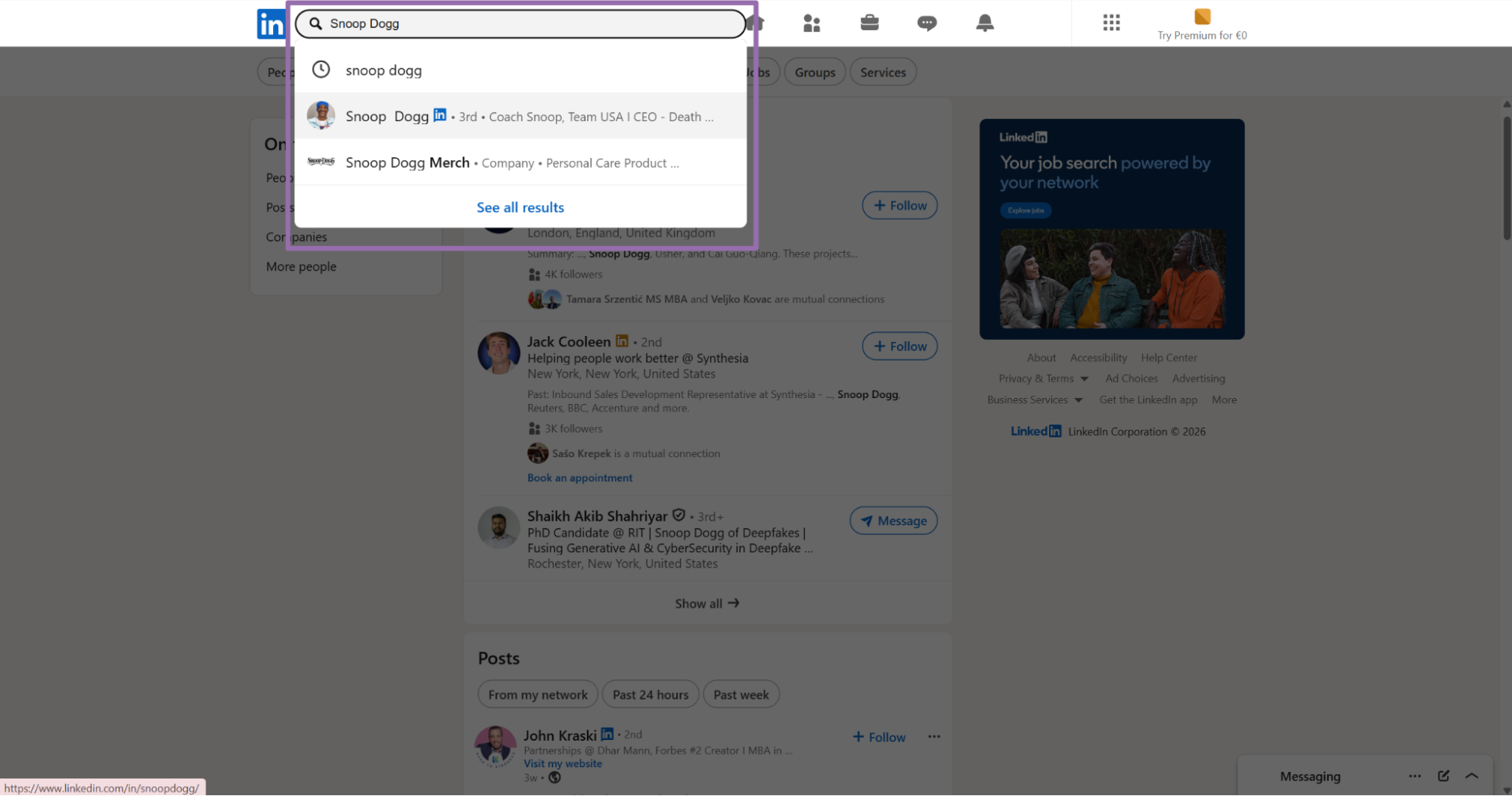
Use the LinkedIn search bar and type the keyword, full name, or user name.
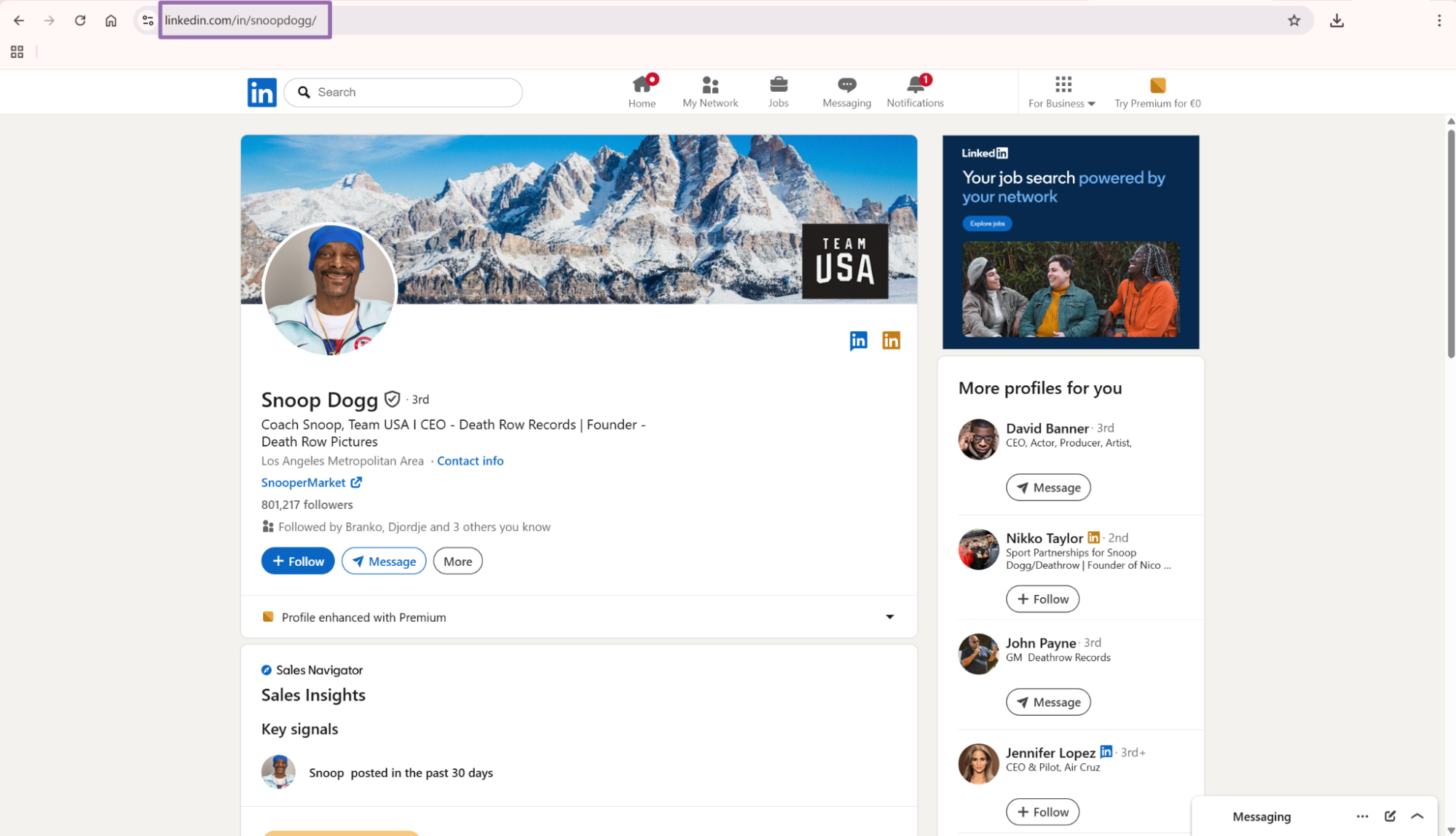
For example, type Snoop Dogg, open the profile result, and copy the URL from the address bar. The URL must start with https://www.linkedin.com.
The path should point to a person profile (/in/snoopdogg/). Company pages, job pages, and post URLs need different scrapers. A valid profile URL follows this shape:
https://www.linkedin.com/in/{profile-handle}/
Strip tracking parameters like ?trk=public_profile before creating the API job.
Step 3. Put the URL into the API input
In the code below, the scraper slug is the LinkedIn Profiles Extract by URL scraper.
The input payload contains one profile URL:
[
  {
    "url": "https://www.linkedin.com/in/snoopdogg/"
  }
]
For batch jobs, add more objects to the same array. Keep each object in the same shape, with one url field per profile.
A batch with three profiles looks like this:
[
  {
    "url": "https://www.linkedin.com/in/snoopdogg/"
  },
  {
    "url": "https://www.linkedin.com/in/example-one/"
  },
  {
    "url": "https://www.linkedin.com/in/example-two/"
  }
]
Keep one profile URL per object. Use a fixed input shape for every batch.
Step 4. Run the API job
Use this Python script.
"""
Configuration:
    - Set SCRAPER_SLUG to the scraper you want to run.
    - Set SCRAPER_INPUTS to the list of input dicts matching that scraper's schema.
    - Set API_KEY to your scraper API key.
"""

import sys
import time
import json
import requests
import os

API_KEY = "YOUR_API_KEY"

SCRAPER_SLUG = "linkedin-profiles-extract-by-url"

SCRAPER_INPUTS = [
    {
        "url": "https://www.linkedin.com/in/snoopdogg/"
    }
]


BASE_URL = "https://api.scrapenow.io/api/v1/scraping"
TIMEOUT_SECONDS = 3600
POLL_INTERVAL = 5
SPINNER = "|/-\\"


def build_headers(api_key: str, content_type: str | None = None) -> dict:
    headers = {"Authorization": f"Bearer {api_key}"}
    if content_type:
        headers["Content-Type"] = content_type
    return headers


def trigger_scrape(slug: str, inputs: list[dict]) -> str:
    url = f"{BASE_URL}/scrape?scraper={slug}"
    response = requests.post(
        url,
        headers=build_headers(API_KEY, "application/json"),
        json={"inputs": inputs},
    )
    response.raise_for_status()
    return response.json()["data"]["job_id"]


def poll_until_done(job_id: str) -> str:
    start = time.time()
    i = 0
    while True:
        elapsed = time.time() - start
        if elapsed > TIMEOUT_SECONDS:
            print(f"\nTimeout after {TIMEOUT_SECONDS}s")
            sys.exit(1)
        response = requests.get(
            f"{BASE_URL}/jobs/{job_id}",
            headers=build_headers(API_KEY),
        )
        response.raise_for_status()
        data = response.json()
        status = data["data"]["status"]
        mins, secs = divmod(int(elapsed), 60)
        sys.stdout.write(
            f"\r[{SPINNER[i % 4]}] Waiting... {status} ({mins}m {secs:02d}s)  "
        )
        sys.stdout.flush()
        if status in ("completed", "failed"):
            print()
            return status
        time.sleep(POLL_INTERVAL)
        i += 1


def fetch_results(job_id: str) -> dict:
    response = requests.get(
        f"{BASE_URL}/jobs/{job_id}/results?format=json",
        headers=build_headers(API_KEY),
    )
    response.raise_for_status()
    return response.json()


def save_results(data: dict, slug: str) -> str:
    os.makedirs("output", exist_ok=True)
    filename = os.path.join("output", f"{slug}.json")
    with open(filename, "w", encoding="utf-8") as f:
        json.dump(data, f, indent=2, ensure_ascii=False)
    return filename


def main() -> None:
    print(f"Triggering scraper: {SCRAPER_SLUG}")
    job_id = trigger_scrape(SCRAPER_SLUG, SCRAPER_INPUTS)
    print(f"Job started: {job_id}")
    final_status = poll_until_done(job_id)
    if final_status != "completed":
        print(f"Job failed with status: {final_status}")
        sys.exit(1)
    print("Fetching results...")
    results = fetch_results(job_id)
    output_file = save_results(results, SCRAPER_SLUG)
    print(f"Results saved to: {output_file}")


if __name__ == "__main__":
    main()
The script starts a scraping job with POST /scrape?scraper=linkedin-profiles-extract-by-url, polls every 5 seconds, times out after 3600 seconds, and downloads the result as JSON.
For production, move API_KEY into an environment variable:
export SCRAPENOW_API_KEY="YOUR_API_KEY"
python linkedin_profiles.py
Step 5. Read the JSON response
A successful run returns one record per input URL.
[
  {
    "inputs": {
      "url": "https://www.linkedin.com/in/snoopdogg/"
    },
    "scrape_status": "success",
    "id": "snoopdogg",
    "name": "Snoop Dogg",
    "city": "Los Angeles Metropolitan Area",
    "country_code": "US",
    "position": "Coach Snoop, Team USA I CEO - Death Row Records | Founder - Death Row Pictures",
    "about": "An entertainment industry mogul, Snoop Dogg has reigned for nearly three decades as a globally recognized performer, producer, and entrepreneur. Snoop Dogg is an American rapper, singer, songwriter, actor, record producer, DJ, media personality, businessman, and icon. His work spans music, Web 3.0, technology, entertainment, lifestyle, global consumer brands, food and beverage, and cannabis. Brand partnerships and endorsements: Snoop Dogg's brand is widely recognized, and companies work with him to promote products and services. Music and entertainment collaborations: Snoop Dogg works with brands on content, sponsored events, and marketing campaigns. Cannabis and related industries: Snoop Dogg has launched several cannabis businesses and has direct market experience. Social media marketing and influencer partnerships: Snoop Dogg has a large social following, and brands partner with him to reach that audience.",
    "posts": [
      {
        "title": "Building A Personal Brand",
        "attribution": "I’ll be honest I didn’t even know what LinkedIn was a year ago, and now being on the platform I realize this is the…",
        "link": "https://www.linkedin.com/pulse/building-personal-brand-snoop-dogg",
        "created_at": "2023-08-08T00:00:00.000Z",
        "interaction": "12,94 - 1,347 Comments",
        "id": "7094669212786311168"
      },
      {
        "title": "Life Lessons",
        "attribution": "One of my goals here on LinkedIn is to give back to the LinkedIn community by sharing some of the useful lessons I…",
        "link": "https://www.linkedin.com/pulse/life-lessons-snoop-dogg",
        "created_at": "2023-08-07T00:00:00.000Z",
        "interaction": "7,11 - 864 Comments",
        "id": "7094346011845808128"
      }
    ],
    "current_company": {
      "name": "United States Olympic & Paralympic Committee",
      "company_id": "united-states-olympic-and-paralympic-committee",
      "title": "Coach Snoop, Team USA",
      "location": "Greater Milan Metropolitan Area"
    },
    "experience": [
      {
        "title": "Coach Snoop, Team USA",
        "location": "Greater Milan Metropolitan Area",
        "description_html": null,
        "start_date": "Dec"
      }
    ]
  }
]
Public profiles vary across accounts, regions, and visibility settings. Treat nullable fields as expected data, not parser failures.
What data you get back
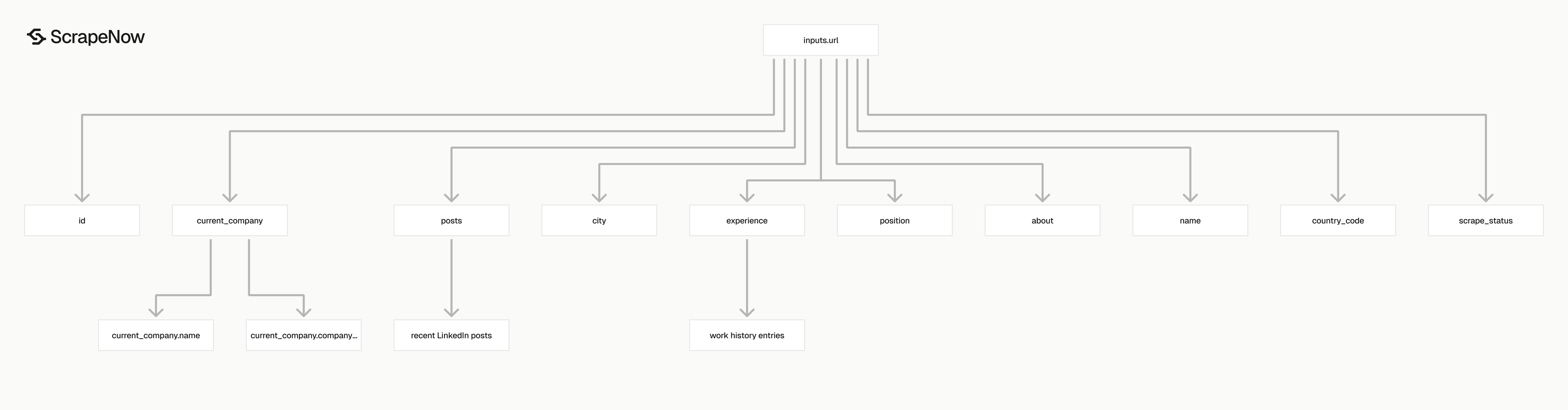
The profile scraper returns a flat profile object with nested arrays for posts and experience.
Use scrape_status as the first filter. Store successful rows, route failed rows into a retry table, and keep the original inputs.url for traceability.
| Field | Type | Use it for |
|---|---|---|
inputs.url |
string | Original URL submitted to the scraper |
scrape_status |
string | Job-level result for that input |
id |
string | LinkedIn public profile handle |
name |
string | Full profile name |
city |
string | Public location text |
country_code |
string | 2-letter country code when available |
position |
string | Current headline |
about |
string | Profile summary text |
posts |
array | Recent LinkedIn articles or posts found on the profile |
current_company |
object | Current employer name, ID, title, and location |
experience |
array | Work history entries |
Ready to get this data? Get LinkedIn profile data.
Use the id field as your primary person key for deduplication. The public handle stays stable even when URLs include different tracking parameters or trailing slashes.
The current_company.company_id field pairs well with the Extract LinkedIn company data scraper when you need company-level fields after extracting a person profile.
Keep the full response in storage even if your application uses only a few fields today. Raw JSON saves a backfill job when your team adds post analysis, company matching, or experience filters later.
Field mapping for common workflows
Recruiting teams usually care about name, position, city, current_company, and experience. These fields support candidate matching, hiring manager enrichment, and account research.
Sales teams usually care about name, position, current_company.company_id, and recent posts. Those fields help connect a person record to an account record.
Data teams should store every field and add typed columns only for fields they query. This keeps ingestion simple and leaves room for new downstream models.
| Workflow | Fields to index |
|---|---|
| Recruiting enrichment | id, name, position, city, experience |
| CRM enrichment | id, name, current_company.company_id, position |
| Account research | current_company.company_id, posts, position |
| Data warehouse joins | id, inputs.url, scrape_status, country_code |
Do not build business logic around display text alone. Use profile IDs and company IDs wherever the response provides them.
Production tips
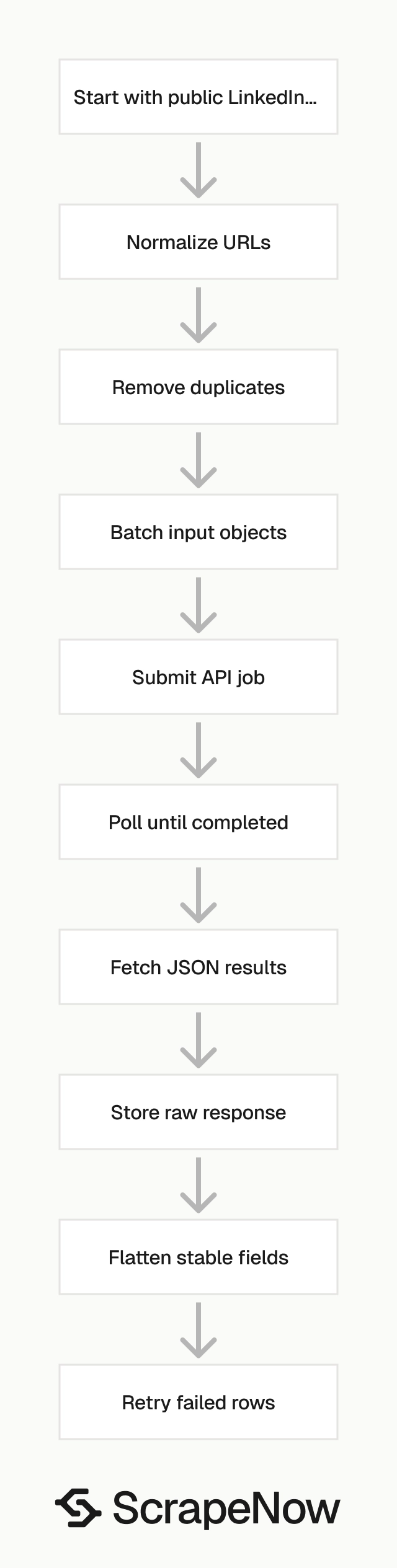
A production pipeline follows this sequence: normalize URLs, remove duplicates, submit batches, poll jobs, store raw results, flatten stable fields, retry failed rows.
Validate LinkedIn profile URLs before sending jobs
Invalid inputs waste credits. Use a strict URL validator before calling the API:
from urllib.parse import urlparse

def is_valid_linkedin_profile_url(url: str) -> bool:
    parsed = urlparse(url)

    if parsed.scheme != "https":
        return False

    if parsed.netloc != "www.linkedin.com":
        return False

    if not parsed.path.startswith("/in/"):
        return False

    profile_id = parsed.path.strip("/").split("/")[-1]
    return len(profile_id) > 0


urls = [
    "https://www.linkedin.com/in/snoopdogg/",
    "http://www.linkedin.com/in/example/",
    "https://linkedin.com/in/example/",
    "https://www.linkedin.com/company/scrapenow/"
]

valid_urls = [url for url in urls if is_valid_linkedin_profile_url(url)]
print(valid_urls)
Expected output:
[
  "https://www.linkedin.com/in/snoopdogg/"
]
If your input list contains company pages, route those to the Extract LinkedIn company data scraper instead.
Normalize URLs before submission
Normalize URLs to remove query strings and trailing slash differences before batching:
from urllib.parse import urlparse, urlunparse

def normalize_linkedin_url(url: str) -> str:
    parsed = urlparse(url)
    path = parsed.path.rstrip("/") + "/"

    return urlunparse((
        "https",
        "www.linkedin.com",
        path,
        "",
        "",
        ""
    ))


raw_urls = [
    "https://www.linkedin.com/in/snoopdogg/",
    "https://www.linkedin.com/in/snoopdogg/?trk=public_profile",
    "https://www.linkedin.com/in/snoopdogg"
]

deduped = sorted({normalize_linkedin_url(url) for url in raw_urls})
print(deduped)
Expected output:
[
  "https://www.linkedin.com/in/snoopdogg/"
]
Run normalization before splitting work into batches. If you dedupe inside each batch only, the same profile still lands in multiple jobs.
Dedupe by profile handle after extraction
The response id field catches profile-level duplicates that URL normalization misses. Use the profile handle as your person key:
def profile_key(record: dict) -> str:
    profile_id = record.get("id")
    source_url = record.get("inputs", {}).get("url")

    if profile_id:
        return f"linkedin_id:{profile_id}"

    return f"source_url:{source_url}"
Apply this key before inserting into your person table. Do not use name as a unique key since names change and duplicates are common.
Store results with a stable schema
Store stable fields in typed columns and keep the full JSON payload for backfills:
def flatten_profile(record: dict) -> dict:
    current_company = record.get("current_company") or {}

    return {
        "profile_id": record.get("id"),
        "source_url": record.get("inputs", {}).get("url"),
        "name": record.get("name"),
        "city": record.get("city"),
        "country_code": record.get("country_code"),
        "position": record.get("position"),
        "about": record.get("about"),
        "current_company_id": current_company.get("company_id"),
        "current_company_name": current_company.get("name"),
        "scrape_status": record.get("scrape_status"),
        "raw_json": record
    }
Keep posts and experience in separate child tables if you query them often. For PostgreSQL, store raw_json as jsonb. For BigQuery, use a JSON column or keep it in object storage with a row pointer.
Handle partial data
Public LinkedIn profiles expose different fields across accounts. Some profiles have no about, no visible posts, or sparse experience data. Write nullable parsing from day one:
def extract_current_company_id(record: dict) -> str | None:
    company = record.get("current_company") or {}
    return company.get("company_id")
Treat missing arrays as empty lists and missing objects as empty dicts. One sparse profile should never stop a 5,000 URL batch.
Track and retry failed inputs
Store failed records with the original URL, job ID, and timestamp. Cap retries at 3 attempts. Separate scraper failures from import failures since retrying the scraper will not fix a database constraint error.
Combine profile data with other LinkedIn scrapers
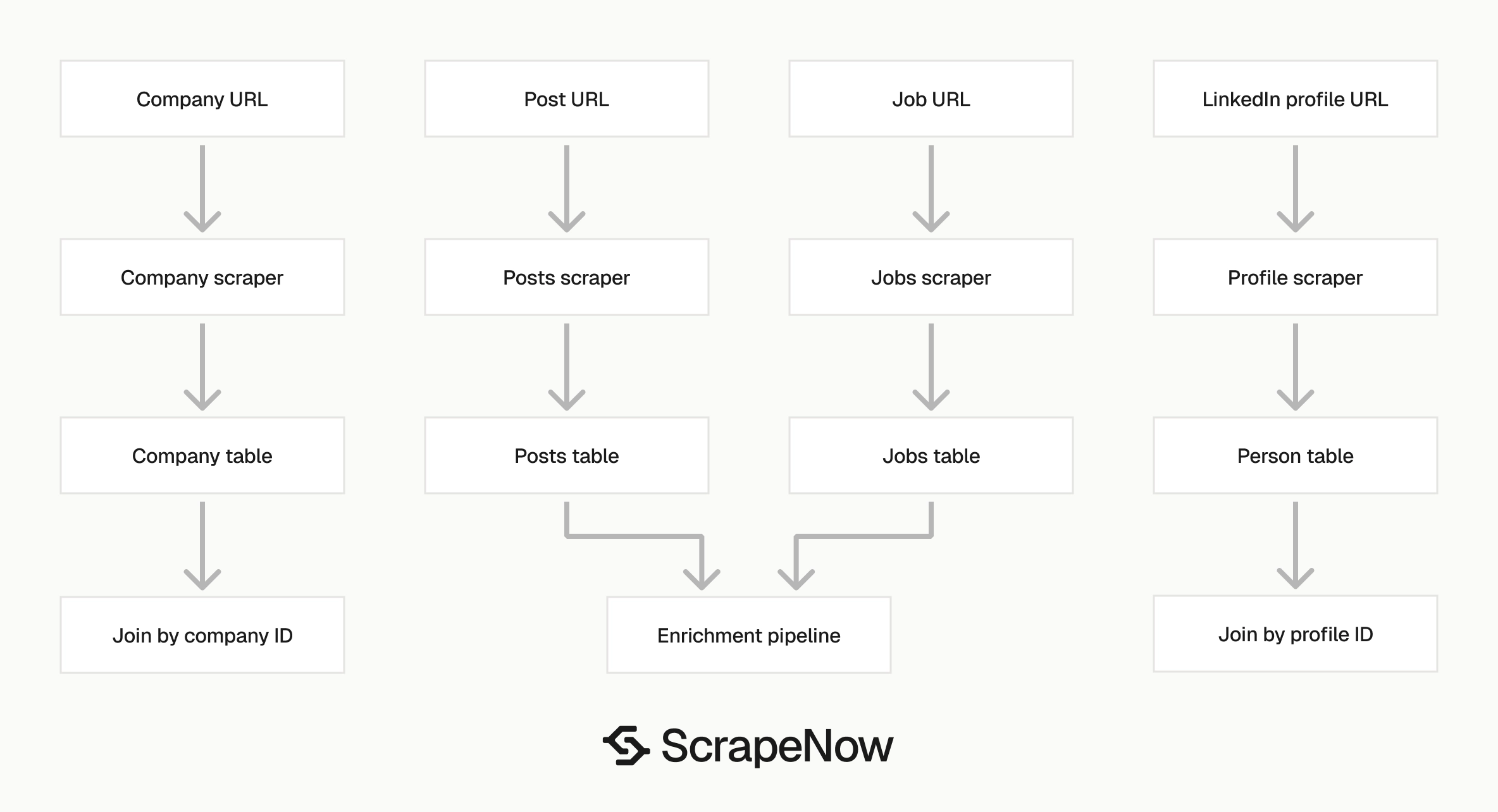
Profile URLs are one part of a LinkedIn data pipeline. Most production setups combine people, companies, jobs, and posts.
| Starting point | Scraper to use | Output |
|---|---|---|
| Person profile URL | Get LinkedIn profile data | Name, headline, company, experience, posts |
| Company URL | Extract LinkedIn company data | Company name, industry, size, location |
| Job URL | Pull structured LinkedIn job listings | Job title, company, location, description |
| Keyword search | Search LinkedIn jobs by keyword | Job listings from search terms |
| Post URL | Extract LinkedIn post data | Post text, author, engagement fields |
A recruiting pipeline typically starts with job URLs, extracts company data, then adds public people profiles for founders and hiring managers. A sales pipeline often starts with company pages, then enriches decision makers by profile URL. The LinkedIn Jobs scraper guide and LinkedIn Posts scraper guide cover those steps.
Join current_company.company_id from a profile record to the company scraper output for company size, industry, and location fields. Keep each scraper output in its own table and use separate refresh schedules since company data changes slower than profile headlines.
Browse all 86+ scrapers across 14 platforms.
Pricing
ScrapeNow charges per returned row. One row costs one credit, starting at $0.04 per credit for small runs and dropping with volume. No monthly contracts, no proxy fees, no charges for failed rows. See the pricing page for current rates.
Open the Get LinkedIn profile data scraper, paste one known public /in/ URL, and confirm the JSON fields match your table schema. Then submit your normalized batch and route company, job, or post URLs through the matching scraper from the Browse all 86+ scrapers.


