Zillow listing status can change before feeds refresh.
Zillow publishes listing prices, rent estimates, beds, baths, square footage, agent details, photos, property history, tax records, school data, and neighborhood signals across millions of U.S. homes. A Zillow scraper turns page data into rows for market analysis, lead lists, pricing models, comp tracking, and inventory monitoring.
The small version takes three steps. Fetch a search page. Parse the cards. Save the fields.
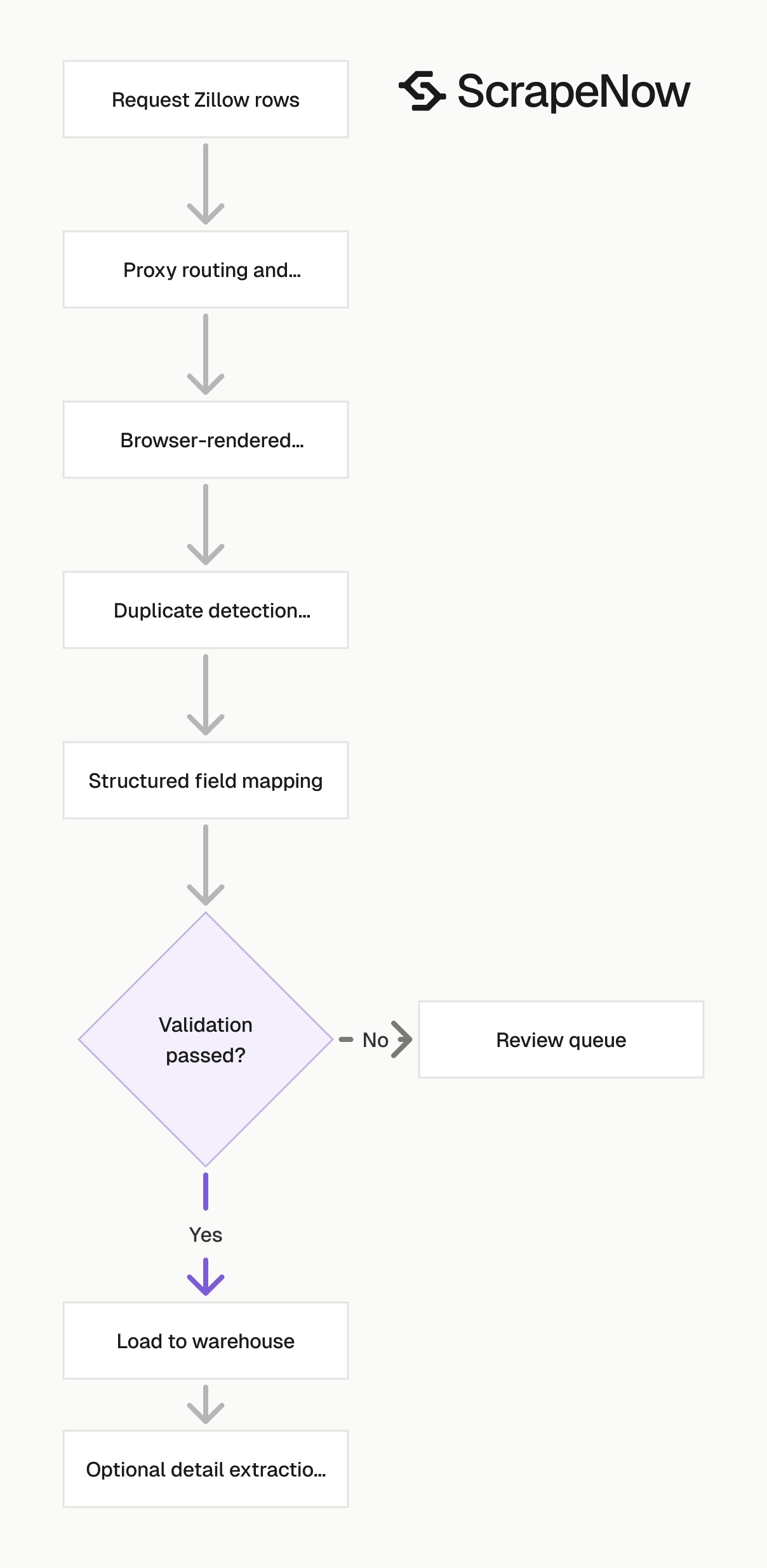
Production Zillow scraping takes more engineering. You need session management, proxy routing, duplicate detection, browser rendering, retries, and schema checks. Without those pieces, the scraper fails when you add volume, concurrency, or a daily schedule.
Zillow data is useful because it changes fast
Real estate data goes stale in hours. A property can move from active to pending, drop price by $25,000, or receive new photos before many third-party feeds refresh.
Zillow is one of the largest public sources for this data. A 2026 real estate scraping analysis states that Zillow tracks 110M+ U.S. properties. That reach makes Zillow useful for investors, brokerages, proptech teams, data vendors, and market research teams.
The useful fields usually fall into 5 groups:
| Data type | Example fields | Common use |
|---|---|---|
| Search listings | Address, price, beds, baths, URL, status | Inventory monitoring |
| Property details | Zestimate, rent estimate, lot size, year built | Valuation models |
| Listing metadata | Agent, broker, days on Zillow, listing ID | Lead generation |
| Media | Photo URLs, virtual tour links | Listing QA and enrichment |
| Location data | City, ZIP, latitude, longitude | Market mapping |
Search result data works for inventory counts, price ranges, and new listing alerts. Detail page data works for valuation, rental comps, property enrichment, and ownership research. Combining both gives you a better dataset because search cards often omit fields from the full property page.
For example, a search card often gives you price, beds, baths, address, and status. The detail page can add price history, tax history, HOA fees, parking, heating, cooling, and nearby schools. Those extra fields change how you score a property.
A rental comp model needs more than the visible rent price. It needs beds, baths, square footage, property type, year built, parking, and location. A lead workflow needs status, listing agent, broker, days on market, and source URL.
The useful split is operational. Search pages answer, "What changed in this market today?" Detail pages answer, "Is this property worth underwriting, contacting, or enriching?" Run the cheaper search step first when you only need market movement.
Run detail extraction when the extra columns affect a decision. A pricing model gains nothing from 20 photo URLs. A listing QA workflow needs those photos, along with media count and source URL.
Zillow scraping breaks more often than basic websites
Zillow uses bot checks, JavaScript-rendered data, changing page structures, request throttling, and location-specific result sets. A plain requests script works for a small sample. It fails once you add volume, concurrency, or daily scheduling.
The common failure points are predictable:
| Problem | What happens | Production fix |
|---|---|---|
| Bot detection | CAPTCHA or blocked response | Residential proxy routing and browser-like sessions |
| Dynamic rendering | Missing listing data in raw HTML | Extract from rendered page state or structured payloads |
| Search pagination | Duplicate or missing results | Track listing IDs and search boundaries |
| Rate limits | 403s and empty responses | Queue requests and rotate sessions |
| Login walls | Some fields disappear | Use public fields only or authenticated workflows where allowed |
A separate DEV Community writeup on Zillow blocking names CAPTCHAs, IP bans, changing selectors, and headless browser detection as the main reasons internal scrapers fail.
The parser rarely fails alone. Search URLs change. Map boundaries affect pagination. Duplicate listings appear across overlapping ZIP codes.
Some fields load after the initial HTML response. The first response can look complete while price history, school data, or listing metadata loads later. A scraper that only reads raw HTML returns partial rows and hides the failure.
A production scraper has to handle those cases before data reaches your database. Malformed rows create incorrect counts, distorted comp sets, and noisy sales workflows. One broken selector can turn a clean daily run into thousands of null prices.
ScrapeNow handles proxy rotation, extraction logic, retries, duplicate handling, and output formatting. You send a URL or search input. ScrapeNow returns structured rows.
That matters when a job runs every morning at 6 a.m. A failed batch should retry cleanly, preserve source URLs, and return the same schema every run. Your downstream code should not care when Zillow changes one class name overnight.
You also need run-level observability. Store input filters, source URLs, row counts, status codes, retry counts, and timestamps. Those values explain whether a count changed because the market moved or because the crawl returned fewer pages.
Use ScrapeNow when you want rows instead of scraper maintenance
ScrapeNow has purpose-built Zillow scrapers for listing search pages, listing URLs, and property detail pages. Each scraper maps to a specific input type. That keeps the output cleaner than a generic web scraping API that returns raw HTML or partial JSON.
The practical difference is direct. A generic scraping API gives your team a rendered page, HTML, screenshot, or extraction block. ScrapeNow gives you Zillow-specific fields with stable column names.
Generic scraping APIs charge you for pages, browser sessions, or render credits. Your team still writes selectors, normalizes fields, deduplicates listings, and fixes breakage when Zillow changes markup. ScrapeNow charges per result row and returns fields like listing_id, status, price, beds, baths, source_url, and scraped_at.
Use the scraper that matches your starting point. If you already have URLs, extract those URLs directly. If you need discovery, start from filters or a Zillow search page.
If you need full records, run detail extraction after discovery. That two-step path keeps broad market pulls cheaper. It also gives your team a clean checkpoint between discovery and enrichment.
ScrapeNow's Zillow scrapers are built around five production behaviors:
- Browser-rendered extraction for fields that do not appear in raw HTML
- Proxy routing and session handling for Zillow's anti-bot checks
- Retry handling for blocked, partial, or empty responses
- Duplicate handling across overlapping searches and repeated runs
- Structured output with source URLs, listing IDs, timestamps, and status fields
Those pieces remove the highest-maintenance parts of a Zillow scraper. Your team still owns the business rules. ScrapeNow owns the extraction path.
The clean boundary matters in production. Your code should decide which markets to pull, which rows to accept, and which records to send downstream. The scraper should return the same schema every run.
Example request and output
A typical enrichment job starts with known Zillow URLs. The request sends those URLs to the listing extractor and asks for structured output.
curl -X POST "https://api.scrapenow.io/api/v1/scraping/scrape?scraper=zillow-listings-extract-by-url" \
  -H "Authorization: Bearer YOUR_API_KEY" \
  -H "Content-Type: application/json" \
  -d '{
    "input": {
      "urls": [
        "https://www.zillow.com/homedetails/123-example-st-austin-tx-78704/123456_zpid/",
        "https://www.zillow.com/homedetails/456-example-ave-austin-tx-78704/789012_zpid/"
      ]
    },
    "output": {
      "format": "json"
    }
  }'
The output returns one row per listing URL. Field names stay consistent across runs, which keeps the warehouse load simple.
[
  {
    "listing_id": "123456_zpid",
    "source_url": "https://www.zillow.com/homedetails/123-example-st-austin-tx-78704/123456_zpid/",
    "address": "123 Example St, Austin, TX 78704",
    "status": "For sale",
    "price": 725000,
    "beds": 3,
    "baths": 2,
    "living_area_sqft": 1840,
    "property_type": "Single family",
    "zestimate": 718400,
    "rent_estimate": 3650,
    "days_on_zillow": 12,
    "agent_name": "Sample Agent",
    "broker_name": "Sample Brokerage",
    "latitude": 30.2457,
    "longitude": -97.7688,
    "scraped_at": "2026-02-18T06:10:22Z"
  }
]
For discovery jobs, the input changes. Send filters such as location, price range, beds, baths, sale status, and property type. The scraper returns listings that match those filters.
{
  "input": {
    "location": "Austin, TX 78704",
    "status": "for_sale",
    "min_price": 400000,
    "max_price": 900000,
    "min_beds": 2,
    "property_type": "single_family"
  }
}
This pattern works well for recurring jobs. Store the run ID, input filters, source URLs, and scraped timestamp. That gives you a reproducible path when an analyst asks why inventory moved between Monday and Tuesday.
For scheduled runs, treat the run ID as a batch key. Load the raw output into a staging table before transforming it. Then compare the new batch against the previous batch by listing ID and status.
A minimal warehouse table needs these fields:
| Field | Why it matters |
|---|---|
run_id |
Ties every row to one extraction job |
listing_id |
Deduplicates the same property across runs |
source_url |
Gives your team an audit path |
status |
Separates active, pending, sold, and off-market rows |
scraped_at |
Supports time-based inventory and price tracking |
input_location |
Shows which market or boundary produced the row |
Ready to get this data? Try the Zillow scraper with your own URLs.
Do not rely on address as the primary key. Addresses change formatting, unit numbers get normalized differently, and listing pages can represent the same property with different text. Listing ID and source URL are safer join keys.
ScrapeNow's Zillow scrapers
ScrapeNow's Zillow products cover the usual pipeline stages. Start with discovery when you need a market. Start with URL extraction when your database already has property links.
Use detail extraction when you need property-level fields. Each product keeps the input contract narrow. Narrow inputs reduce ambiguity and make failures easier to debug.
Zillow Listings Extract by URL
Use this when you already have Zillow listing URLs and want listing-level fields from each page. It extracts address, price, beds, baths, area, listing status, property type, images, and page metadata.
This scraper fits saved listing enrichment, CRM cleanup, lead research, and periodic checks on a known property set. Feed it a list of URLs from your database, a spreadsheet, or a previous search export. The output gives your team one structured row per listing URL.
This is the fastest way to test the ScrapeNow Zillow workflow. Take 10 URLs from your target market, run them through the extractor, then compare the output with the fields your pipeline needs.
Use this path when your source system already knows the properties. Common sources include CRM records, analyst spreadsheets, prior Zillow exports, and saved lead lists. The extractor turns those links into current listing rows.
The detailed guide with code examples is the Zillow Listings Scraper. The production scraper is Extract Zillow listing data.
Zillow Listings Search by Filters
Use this when you want to search Zillow by filters instead of starting with URLs. Typical filters include location, price range, beds, baths, sale or rent status, and property type.
This scraper works well for market discovery. You can pull active rentals in Phoenix, homes for sale under a price ceiling in Tampa, or condos with a minimum bedroom count in Chicago. The scraper returns listing rows for a sheet, database, dashboard, or lead workflow.
Use this scraper when your input comes from a business rule. Examples include rentals under $2,500 in a ZIP code, homes with at least 3 beds in a city, or active listings under a target acquisition price.
This path also works for scheduled inventory checks. Keep the same filters across runs and compare listing IDs. New IDs represent new inventory, while missing IDs require a follow-up status check.
The detailed guide with code examples is the Zillow Search Scraper. The production scraper is Zillow Listings Search by Filters.
Zillow Listings Search by URL
Use this when your team already builds Zillow search URLs in the browser and wants structured rows from those result pages. This path works for city, ZIP, neighborhood, school district, and map-boundary searches.
Browser-built URLs are useful when the search area is more specific than a city or ZIP. Your analyst can draw a map boundary, apply Zillow filters, copy the URL, and pass it to the scraper. That removes ambiguity from the job input.
Use this scraper for irregular shapes, school zones, and hand-reviewed search areas. It preserves the exact search context your analyst created in the browser.
This path is also useful during analysis handoff. An analyst can create the exact Zillow view, copy the URL, and attach it to a ticket. Engineering then runs the same search without rebuilding the filter logic.
The detailed guide with code examples is the Zillow Search Scraper. The production scraper is Zillow Listings Search by URL.
Zillow Property Details Extract by URL
Use this when you need one row per property with deeper fields than a search result card gives you. It extracts Zestimate, rent estimate, tax history, price history, lot size, year built, HOA data, parking, heating, cooling, and school fields when Zillow shows them publicly.
This scraper fits valuation workflows, rental comp models, due diligence, and property enrichment. Search result cards answer broad market questions. Detail pages give the fields needed for a property-level record.
Use this scraper after you have narrowed the property set. It costs less engineering time to enrich 5,000 known property URLs than to crawl broad searches and discard most results later.
This is the right product when a model needs property context. For rental comps, square footage and property type matter as much as asking rent. For acquisition screens, tax history and price history can change the score.
The detailed guide with code examples is the Zillow Property Details Scraper. The production scraper is Get Zillow property details.
Zillow Property Details Extract from Search Page
Use this when you want search discovery and detail extraction in one run. The scraper starts from a Zillow search page, collects the property URLs, then extracts detail fields for each listing.
This is the right fit for pipelines that need a full dataset from a market search. For example, you can start with active rentals in a ZIP code, collect every listing URL, then extract rent estimate, year built, parking, and school fields from the detail pages.
This scraper is heavier than listing search because it visits more pages. Use it when you need detail fields for most results. Use a listing search first when you plan to filter aggressively before enrichment.
The main tradeoff is cost versus completeness. Search output gives you more rows with fewer page visits. Search-to-detail output gives you richer records and takes more extraction work.
The detailed guide with code examples is the Zillow Property Details Scraper. The production scraper is Zillow Property Details Extract from Search Page.
Pick the Zillow scraper by input type
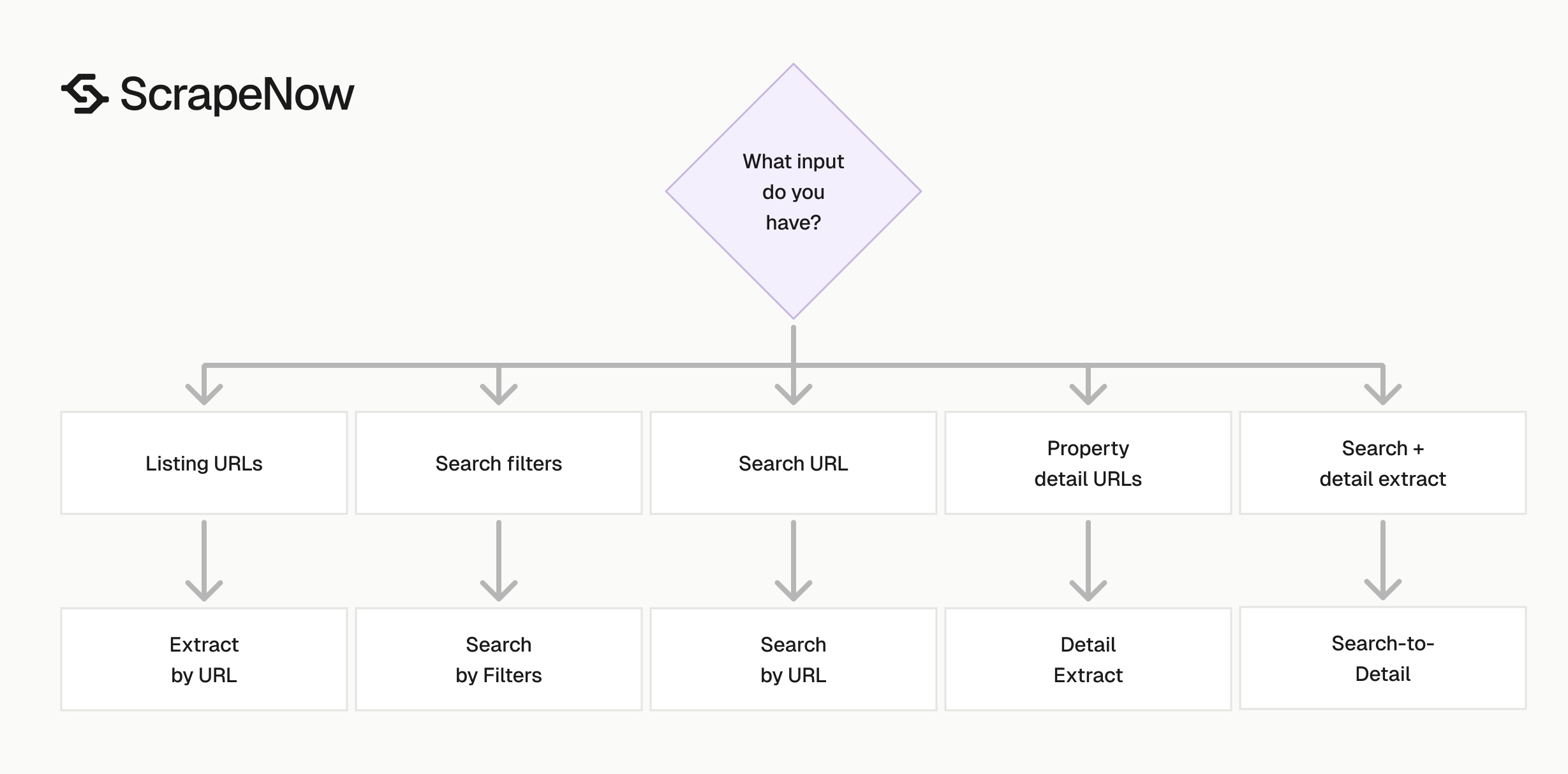
Start with the data you already have. The input usually decides the scraper.
| You have | Use this scraper | Use case |
|---|---|---|
| A list of Zillow listing URLs | Listings Extract by URL | Enriching saved listings |
| A city, ZIP, or filter set | Listings Search by Filters | Building inventory datasets |
| A Zillow search URL | Listings Search by URL | Reusing browser-built searches |
| A list of property detail URLs | Property Details Extract by URL | Valuation and property research |
| A search page plus detail fields | Property Details Extract from Search Page | Full search-to-detail pipelines |
For a one-time pull of 500 homes in Austin, the search-by-filters scraper is enough. For a daily job that tracks 20,000 active listings across 30 ZIP codes, use search discovery plus property details. Deduplicate by listing ID before loading rows into your warehouse.
For lead generation, keep the first run narrow. Pull one market, verify the fields, then expand ZIP by ZIP. This prevents overlapping searches from inflating counts and sending duplicate contacts to sales tools.
For pricing models, store both the scraped timestamp and the listing status. A price from an active listing and a price from a pending listing answer different questions. Your model needs that context.
For market dashboards, keep the same filter inputs across runs. Changing a search boundary changes the count, even when the underlying market has not moved. Store every input parameter with the run record.
For underwriting workflows, separate discovery from enrichment. Pull the market first, filter by price and property type, then enrich the remaining URLs. That pattern reduces unnecessary detail extraction.
For CRM workflows, reject duplicate contacts before sync. A listing can appear in multiple searches when ZIP codes, neighborhoods, and map boundaries overlap. Listing ID dedupe should happen before records reach sales tools.
Pricing
ScrapeNow charges per returned row. One row costs one credit, starting at $0.04 per credit for small runs and dropping with volume. No monthly contracts, no proxy fees, no charges for failed rows. See the pricing page for current rates.
When to use a pre-built Zillow scraper
Use a pre-built scraper when your team wants data extraction without selector maintenance. Zillow changes markup, bot checks, and embedded page state often enough that upkeep becomes recurring engineering work.
A pre-built scraper makes sense for:
- Daily market inventory tracking
- Rental comp collection
- Price change monitoring
- Agent and broker lead lists
- Property enrichment from saved URLs
- Neighborhood-level price analysis
- Listing QA for media, address, and status fields
- Market dashboards that refresh on a schedule
A custom scraper makes sense when you need a private workflow, a custom schema, or delivery into your warehouse. ScrapeNow also builds custom web scraping pipelines when the pre-built Zillow scrapers do not match the job.
Custom work usually starts with a sample output file. Define the required columns, accepted null behavior, refresh schedule, and delivery target. That gives engineering a testable contract instead of a vague scraping request.
For example, a data team can request a daily CSV delivered to S3 with listing ID, address, price, status, agent, broker, and source URL. A valuation team can request JSON with property details, tax history, school ratings, and scraped timestamp. Clear output rules reduce rework.
The best pre-built use cases share one trait. The fields match a standard Zillow workflow. Search rows, listing rows, and detail rows cover most production needs without a private parser.
Custom work becomes worth it when the output contract is specific. Examples include joining Zillow rows with internal property IDs, writing directly to Snowflake, or adding post-processing rules before delivery. Those rules belong in a pipeline, rather than in a one-off spreadsheet.
Data quality checks to run after extraction
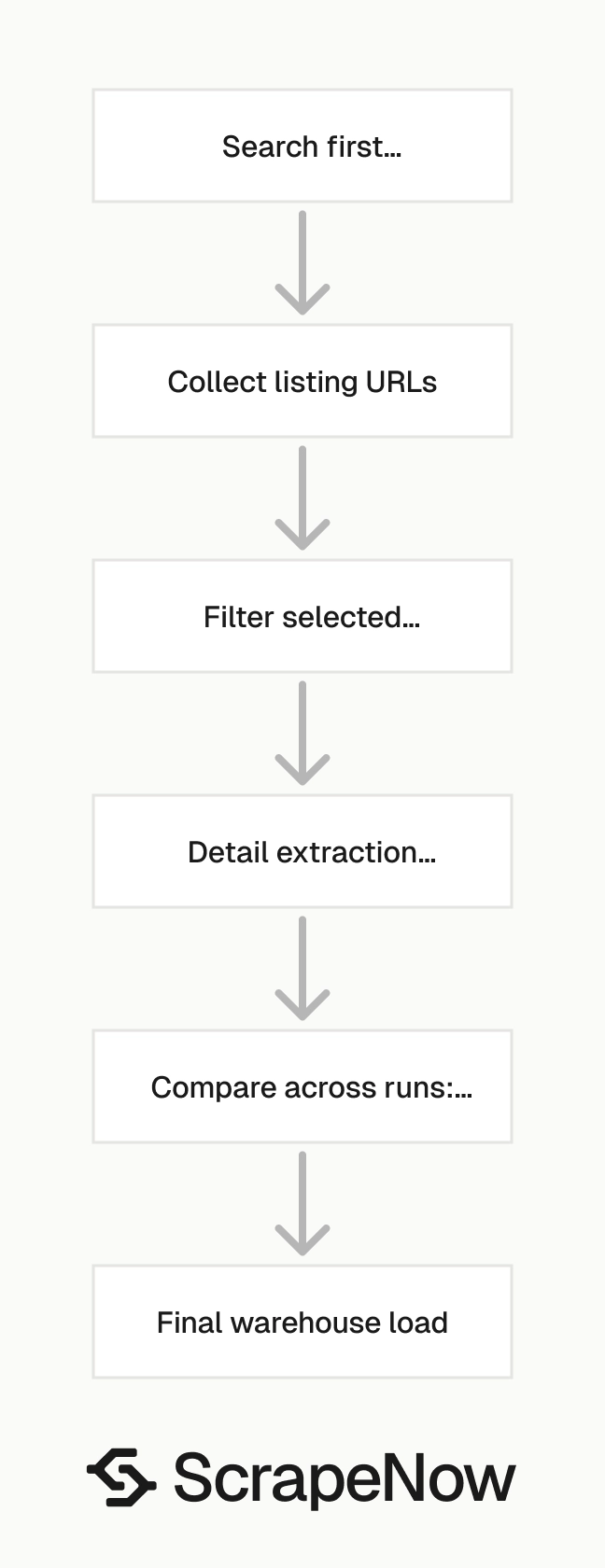
Treat Zillow rows like any other production data source. Validate the fields before you send them into reporting, lead routing, or pricing models.
Start with row counts by location and status. A sudden drop for one ZIP code usually means the search boundary changed, inventory moved, or Zillow served a limited result set. Track listing IDs across runs so you can separate new listings from updated listings.
Check price, bed, bath, and square footage ranges before loading rows. A missing square footage value should not break a model. A zero price on a for-sale listing should be flagged before it reaches a dashboard.
Store the source URL for every row. When a requester questions a value, the URL gives your team a direct audit path back to the Zillow page. It also helps debug extraction issues when Zillow changes field labels or page structure.
Add null checks for fields your workflow treats as required. If your CRM requires agent name, broker name, and listing URL, reject rows missing those fields before sync. If your model requires square footage, route missing values to a separate review table.
Track status transitions across runs. Active to pending, pending to sold, and active to off-market each mean something different. A status history table gives analysts better context than a single current-status column.
Add duplicate checks before any warehouse merge. Use listing ID as the primary key when it is present. Use source URL as a fallback key when the listing ID is missing.
Normalize numeric fields before modeling. Store price as an integer, square footage as an integer, and coordinates as decimals. Do not push formatted strings like $725,000 into analytical tables.
Keep raw output for a short retention window. Seven to 30 days is enough for most debugging workflows. Raw rows help you compare parser output when a downstream transform changes.
A simple validation query can catch most failures:
select
  input_location,
  status,
  count(*) as row_count,
  sum(case when price is null then 1 else 0 end) as null_prices,
  sum(case when source_url is null then 1 else 0 end) as null_urls
from zillow_listings_staging
where run_id = 'RUN_ID'
group by input_location, status;
Run this check before the merge step. If null prices jump or row counts collapse, stop the load and inspect the run. Fixing one batch is cheaper than cleaning incorrect dashboard history.
Connect Zillow scraping to the rest of your data pipeline
Zillow rarely sits alone in a production data workflow. Teams often pair Zillow rows with county records, rental platforms, CRM records, ad spend, or internal underwriting data.
The source URL and listing ID act as stable join keys inside that workflow. Keep them in every export, even when the downstream table hides them from end users. They save time during audits and backfills.
ScrapeNow's scrapers hub lists 86+ pre-built scrapers across 14 platforms. Use the hub when your Zillow workflow needs supporting data from other sites. For example, a rental team can pair Zillow inventory with apartment listings, maps data, or business records.
The Zillow guide guides cover deeper implementation paths. Use the Zillow Listings Scraper when you already have property URLs. Use the Zillow Search Scraper when the job starts with a market.
Use the Zillow Property Details Scraper when you need full property records. Keep these guides close to the matching product. That mapping reduces mistakes when teams move from prototype to scheduled runs.
A clean pipeline usually has four stages:
- Discovery from filters or search URLs
- Detail extraction for selected listings
- Validation and deduplication in staging
- Delivery to a warehouse, CRM, sheet, or model table
Each stage should write a batch record. That record needs run ID, input, start time, end time, row count, and failure count. Without that metadata, a daily scraper becomes hard to audit after the third production issue.
Keep business logic out of the scraper when possible. The scraper should collect Zillow fields. Your pipeline should decide which markets, statuses, and price ranges matter.
This separation makes changes safer. If sales changes the lead threshold from $600,000 to $700,000, you change a filter or transform. You do not rewrite extraction code.
Common production patterns
The simplest recurring pattern is a daily market snapshot. Run the search scraper for each ZIP code at the same time each morning. Load rows into a staging table and compare listing IDs against yesterday.
A second pattern tracks price changes. Pull a known URL list daily and store price, status, and scraped timestamp. Then create a history table keyed by listing ID.
A third pattern enriches leads before sales outreach. Search a market, filter for target properties, then extract details for the selected URLs. Send only deduplicated rows with agent, broker, and source URL into the CRM.
A fourth pattern supports rental comps. Start with rental search filters, then run detail extraction for properties that match your bed, bath, and location rules. Store rent estimate, asking rent, square footage, and property type together.
Each pattern needs a different failure threshold. A dashboard can tolerate a small number of missing detail fields. A CRM sync should reject rows without listing URL or agent data.
Set those thresholds before scheduling the job. For example, stop the batch if more than 5 percent of rows lack source URLs. Warn the data team if square footage nulls increase from the previous run.
Test with one URL
Start with Extract Zillow listing data. Paste 10 listing URLs from your target market and compare the output columns against your required schema.
Keep listing IDs, source URLs, timestamps, and statuses in the output from the first test. Those fields save hours when you compare runs, debug missing inventory, or rebuild a dataset after Zillow changes page structure.
After the first run passes validation, schedule the same URL set as a daily job. That gives you a controlled baseline before you expand to search discovery, detail extraction, or multi-market monitoring.


