This Zillow search scraper accepts a Zillow search results URL and returns structured listing records. Each row includes price, address, ZPID, location, status, property type, brokerage, timestamps, and error fields.
Developers use it to pull listings from a filtered Zillow search page. You do not need to maintain browser automation, rotate proxies, repair selectors, or parse Zillow card markup yourself.
Use this scraper when the URL already contains the Zillow filters you want. That includes price range, listing status, home type, bedroom count, days on Zillow, sort order, and map bounds.
The input URL is the source of truth for the run. If Zillow shows the listing in that filtered search, the scraper returns the card data that Zillow exposes for that result.
How to use this scraper
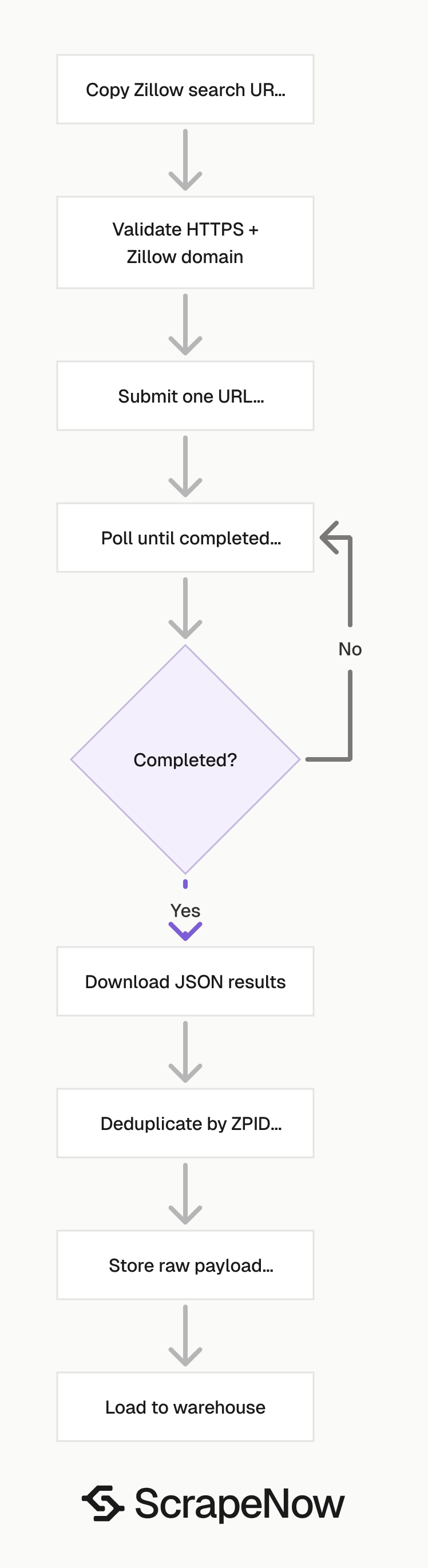
The scraper input is one Zillow search results URL. The URL must start with https://www.zillow.com/.
Use this scraper when you already have a Zillow search page with the filters you need. If you want ScrapeNow to build the search from filter values, use the Zillow listings search by filters scraper.
If you already have a search URL and want listing rows from that page, use the Zillow listings search by URL scraper. This workflow fits saved searches, user-created searches, internal admin tools, and lead pipelines that store Zillow URLs.
Keep one search URL per input object. That makes retry logic, error logging, and billing reconciliation easier to trace.
Step 1. Get the Zillow search URL
Open Zillow.
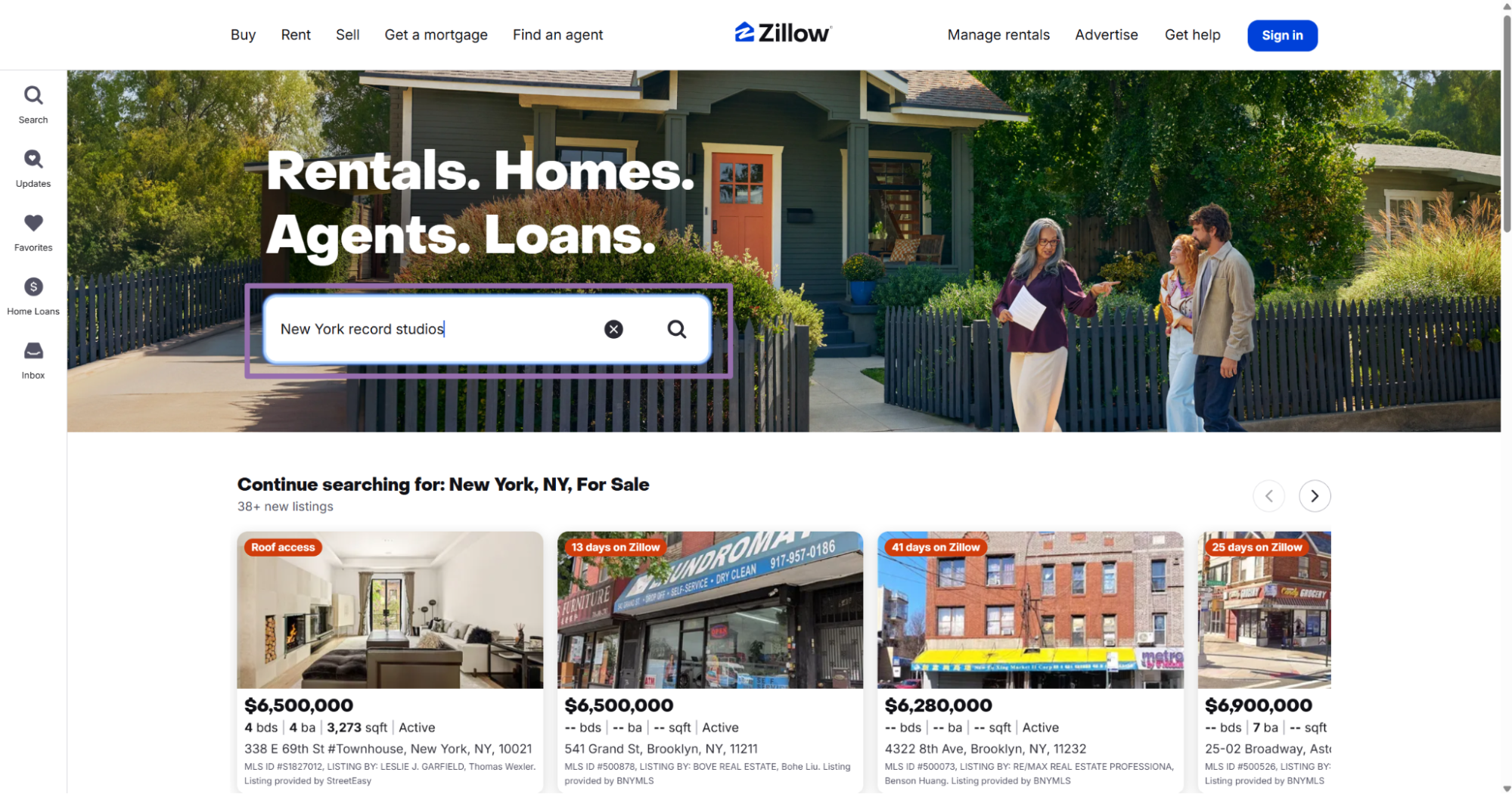
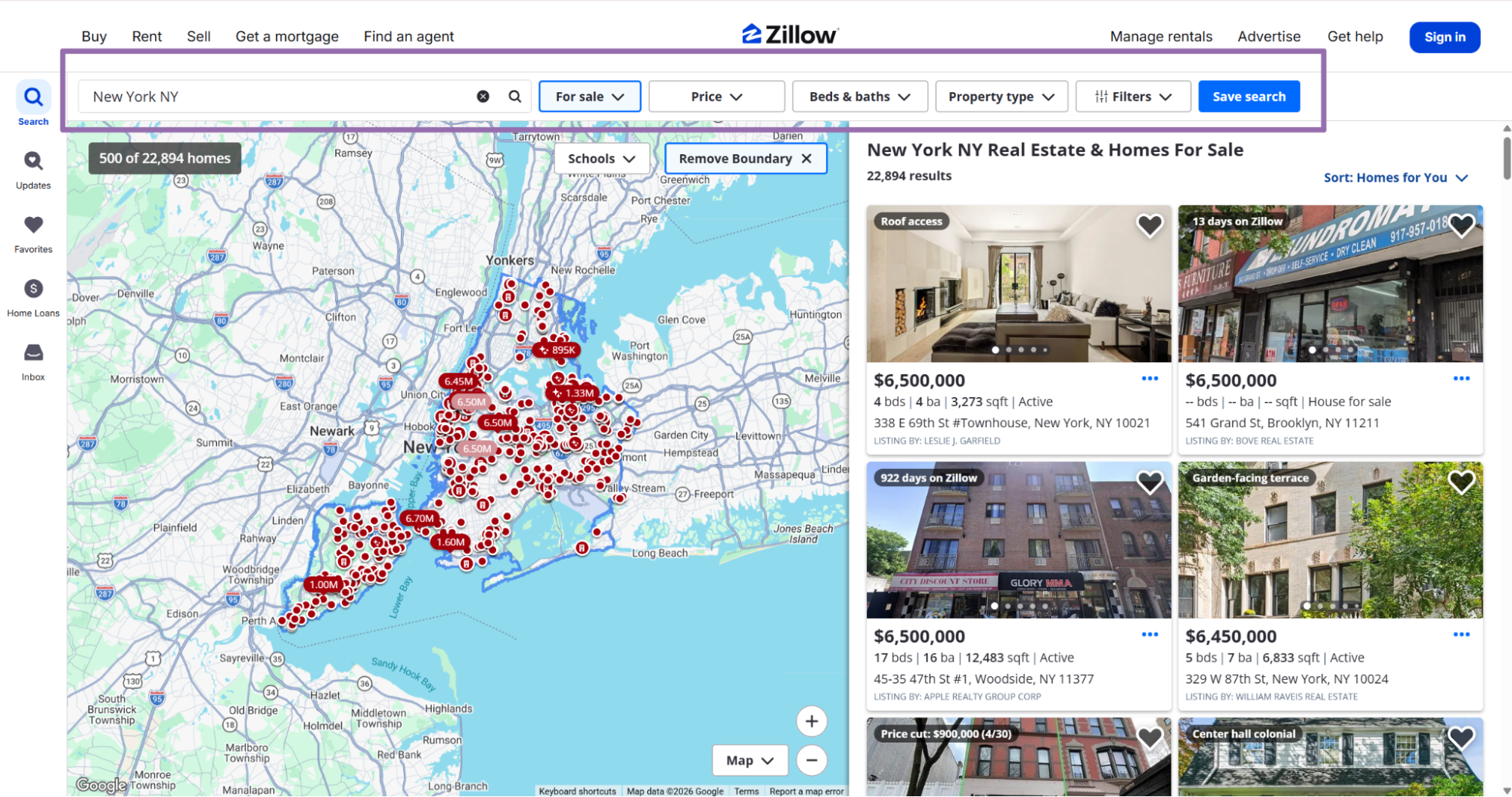
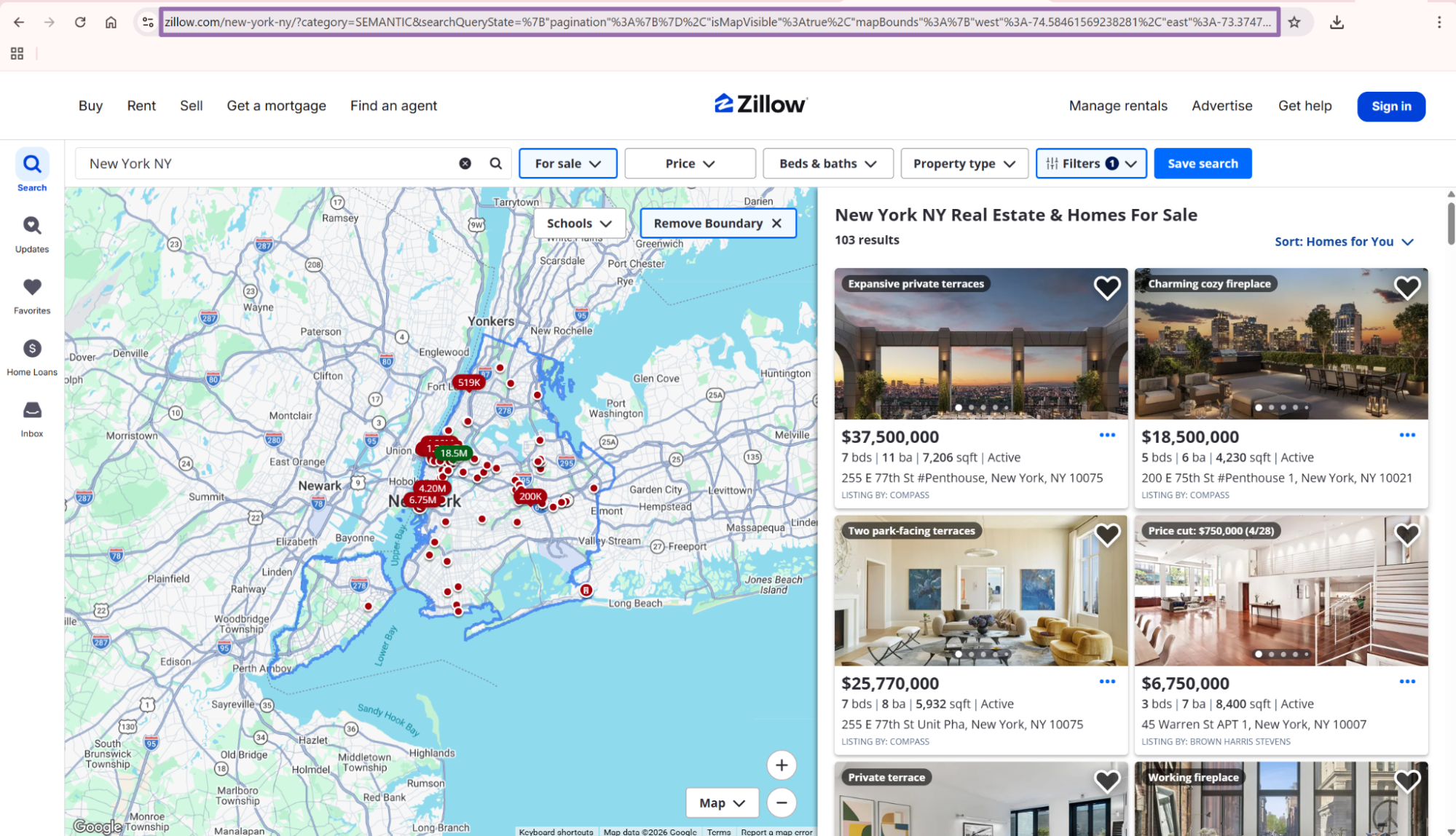
A valid input looks like this:
{
  "url": "https://www.zillow.com/homes/for_sale/?searchQueryState=..."
}
Keep the URL unchanged after copying it. URL-decoding and re-encoding the searchQueryState payload changes how Zillow reads the filter state.
Do not trim query parameters unless you know what each parameter controls. Zillow stores map bounds, search terms, filters, and list visibility inside that encoded payload.
If you save URLs in your own app, store them as plain text. Avoid rebuilding the URL from partial filter state during ingestion.
Step 2. Run the API job
Create an API key in ScrapeNow, replace YOUR_API_KEY, and run the script. The script submits one URL, polls the job, downloads JSON results, and writes them to disk.
Before running it, create the output directory:
mkdir -p output
python zillow_search_results.py
Use this API code:
"""
Configuration:
    - Set SCRAPER_SLUG to the scraper you want to run.
    - Set SCRAPER_INPUTS to the list of input dicts matching that scraper's schema.
    - Set API_KEY to your scraper API key.
"""

import sys
import time
import json
import requests
import os

API_KEY = "YOUR_API_KEY"

SCRAPER_SLUG = "zillow-search-results-extract-by-url"

SCRAPER_INPUTS = [
    {
        "url": "https://www.zillow.com/homes/for_sale/?searchQueryState=%7B%22isMapVisible%22%3Atrue%2C%22mapBounds%22%3A%7B%22north%22%3A41.09387394349713%2C%22south%22%3A40.299460866793%2C%22east%22%3A-73.3740596621094%2C%22west%22%3A-74.58530233789065%7D%2C%22filterState%22%3A%7B%22sort%22%3A%7B%22value%22%3A%22globalrelevanceex%22%7D%2C%22sf%22%3A%7B%22value%22%3Afalse%7D%2C%22tow%22%3A%7B%22value%22%3Afalse%7D%2C%22mf%22%3A%7B%22value%22%3Afalse%7D%2C%22con%22%3A%7B%22value%22%3Afalse%7D%2C%22land%22%3A%7B%22value%22%3Afalse%7D%2C%22manu%22%3A%7B%22value%22%3Afalse%7D%2C%22doz%22%3A%7B%22value%22%3A%2214%22%7D%7D%2C%22isListVisible%22%3Atrue%2C%22curatedCollection%22%3Anull%2C%22pagination%22%3A%7B%7D%2C%22usersSearchTerm%22%3A%22%22%7D"
    }
]

BASE_URL = "https://api.scrapenow.io/api/v1/scraping"
TIMEOUT_SECONDS = 3600
POLL_INTERVAL = 5
SPINNER = "|/-\\"


def build_headers(api_key: str, content_type: str | None = None) -> dict:
    """Build headers using your API key."""
    headers = {"Authorization": f"Bearer {api_key}"}
    if content_type:
        headers["Content-Type"] = content_type
    return headers


def trigger_scrape(slug: str, inputs: list[dict]) -> str:
    """POST to the scrape endpoint and return the job_id."""
    url = f"{BASE_URL}/scrape?scraper={slug}"

    response = requests.post(
        url,
        headers=build_headers(API_KEY, "application/json"),
        json={"inputs": inputs},
    )
    response.raise_for_status()
    return response.json()["data"]["job_id"]


def poll_until_done(job_id: str) -> str:
    """Poll the job status until it reaches a terminal state."""
    start = time.time()
    i = 0

    while True:
        elapsed = time.time() - start
        if elapsed > TIMEOUT_SECONDS:
            print(f"\nTimeout after {TIMEOUT_SECONDS}s")
            sys.exit(1)

        data = requests.get(
            f"{BASE_URL}/jobs/{job_id}",
            headers=build_headers(API_KEY),
        ).json()
        status = data["data"]["status"]

        mins, secs = divmod(int(elapsed), 60)
        sys.stdout.write(f"\r[{SPINNER[i % 4]}] Waiting... {status} ({mins}m {secs:02d}s)  ")
        sys.stdout.flush()

        if status in ("completed", "failed"):
            print()
            return status

        time.sleep(POLL_INTERVAL)
        i += 1


def fetch_results(job_id: str) -> dict:
    """Download the completed job results as JSON."""
    response = requests.get(
        f"{BASE_URL}/jobs/{job_id}/results?format=json",
        headers=build_headers(API_KEY),
    )
    response.raise_for_status()
    return response.json()


def save_results(data: dict, output_path: str) -> str:
    """Write results to the output path and return the filename."""
    filename = f"{output_path}.json"
    with open(filename, "w", encoding="utf-8") as f:
        json.dump(data, f, indent=2)
    return filename


def main() -> None:
    print(f"Triggering scraper: {SCRAPER_SLUG}")
    job_id = trigger_scrape(SCRAPER_SLUG, SCRAPER_INPUTS)
    print(f"Job started: {job_id}")

    final_status = poll_until_done(job_id)

    if final_status != "completed":
        print(f"Job failed with status: {final_status}")
        sys.exit(1)

    print("Fetching results...")
    results = fetch_results(job_id)

    output_file = save_results(results, os.path.join("output", SCRAPER_SLUG))
    print(f"Results saved to: {output_file}")


if __name__ == "__main__":
    main()
For batch jobs, add more objects to SCRAPER_INPUTS. Each object should contain one url field.
Keep batches small while testing. Start with one search URL, verify the output shape, then run larger batches through the same loader.
For production batches, keep each URL tied to your internal job ID. That gives you a clean path from a failed row back to the source search.
Step 3. Read the output file
The script saves results to this path:
output/zillow-search-results-extract-by-url.json
The job polling interval is 5 seconds. The timeout is 3600 seconds, which gives large searches up to 60 minutes before the client exits.
A timeout in the local script does not prove the scrape failed. It means the client stopped waiting.
Check the job endpoint again before re-running a large job. Re-running the same large search too quickly creates duplicate work in your pipeline.
API response sample
This is a trimmed response from the Zillow search results scraper:
[
  {
    "inputs": {
      "url": "https://www.zillow.com/homes/for_sale/?searchQueryState=%7B%22isMapVisible%22%3Atrue%2C%22mapBounds%22%3A%7B%22north%22%3A41.09387394349713%2C%22south%22%3A40.299460866793%2C%22east%22%3A-73.3740596621094%2C%22west%22%3A-74.58530233789065%7D%2C%22filterState%22%3A%7B%22sort%22%3A%7B%22value%22%3A%22globalrelevanceex%22%7D%2C%22sf%22%3A%7B%22value%22%3Afalse%7D%2C%22tow%22%3A%7B%22value%22%3Afalse%7D%2C%22mf%22%3A%7B%22value%22%3Afalse%7D%2C%22con%22%3A%7B%22value%22%3Afalse%7D%2C%22land%22%3A%7B%22value%22%3Afalse%7D%2C%22manu%22%3A%7B%22value%22%3Afalse%7D%2C%22doz%22%3A%7B%22value%22%3A%2214%22%7D%7D%2C%22isListVisible%22%3Atrue%2C%22curatedCollection%22%3Anull%2C%22pagination%22%3A%7B%7D%2C%22usersSearchTerm%22%3A%22%22%7D"
    },
    "scrape_status": "success",
    "url": "https://www.zillow.com/homedetails/502-E-Broad-St-1-Westfield-NJ-07090/458000493_zpid/",
    "zpid": 458000493,
    "zipcode": "07090",
    "description": "20 hours ago",
    "city": "Westfield",
    "country": "USA",
    "state": "NJ",
    "address": {
      "city": "Westfield",
      "street_address": "502 E Broad Street #1",
      "zipcode": "07090",
      "state": "NJ"
    },
    "longitude": -74.34426,
    "latitude": 40.65547,
    "listing_data_source": "For Sale by Agent",
    "bathrooms": 6,
    "price": 3500000,
    "currency": "USD",
    "property_status": "Apartment for sale",
    "home_status": "FOR_SALE",
    "living_area": 7109,
    "living_area_units": "acres",
    "brokerage_name": "Coldwell Banker Realty",
    "available_properties": [
      {
        "bedrooms": null,
        "price": 3500000,
        "currency": "USD"
      }
    ],
    "tags": [
      "20 hours ago"
    ],
    "listing_category": "FOR_SALE",
    "home_type": "APARTMENT",
    "timestamp": "2026-05-14T15:44:27.983Z",
    "input": {
      "url": "https://www.zillow.com/homes/for_sale/?searchQueryState=%7B%22isMapVisible%22%3Atrue%2C%22mapBounds%22%3A%7B%22north%22%3A41.09387394349713%2C%22south%22%3A40.299460866793%2C%22east%22%3A-73.3740596621094%2C%22west%22%3A-74.58530233789065%7D%2C%22filterState%22%3A%7B%22sort%22%3A%7B%22value%22%3A%22globalrelevanceex%22%7D%2C%22sf%22%3A%7B%22value%22%3Afalse%7D%2C%22tow%22%3A%7B%22value%22%3Afalse%7D%2C%22mf%22%3A%7B%22value%22%3Afalse%7D%2C%22con%22%3A%7B%22value%22%3Afalse%7D%2C%22land%22%3A%7B%22value%22%3Afalse%7D%2C%22manu%22%3A%7B%22value%22%3Afalse%7D%2C%22doz%22%3A%7B%22value%22%3A%2214%22%7D%7D%2C%22isListVisible%22%3Atrue%2C%22curatedCollection%22%3Anull%2C%22pagination%22%3A%7B%7D%2C%22usersSearchTerm%22%3A%22%22%7D"
    },
    "scrape_error": null,
    "scrape_error_code": null
  },
  {
    "inputs": {},
    "scrape_status": "success",
    "url": "https://www.zillow.com/homedetails/175-3rd-St-Staten-Island-NY-10306/462371341_zpid/",
    "zpid": 462371341,
    "zipcode": "10306",
    "description": "2 days on Zillow",
    "city": "Staten Island",
    "country": "USA",
    "state": "NY",
    "address": {
      "...": "truncated"
    }
  }
]
The sample shows two common row shapes. Some rows include the full input object, and later rows carry a smaller inputs object after trimming.
Your loader should read both input and inputs. Store the raw row so field-level changes do not block ingestion.
Also treat nested objects as optional. Zillow search cards do not expose the same fields for every property type, every market, or every grouped listing.
What data you get back
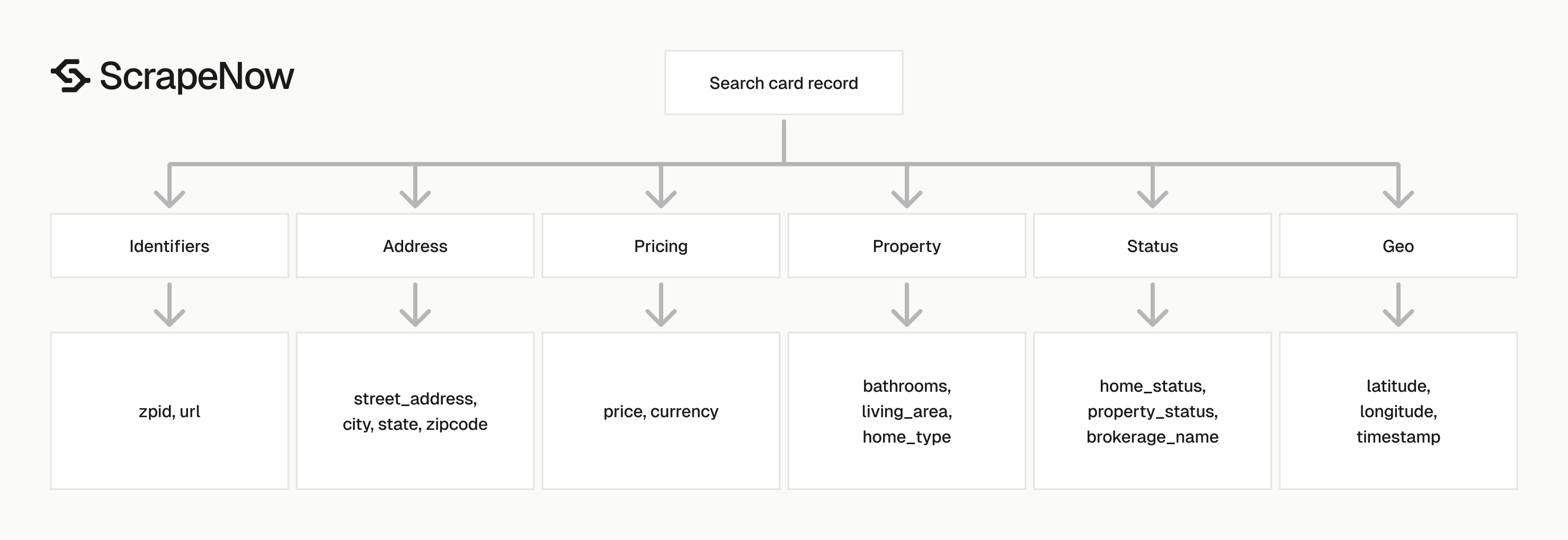
Each result is one listing found on the Zillow search results page. The response includes the original input URL, scrape status, listing identifiers, address fields, coordinates, price, property attributes, and error fields.
| Field | Type | How to use it |
|---|---|---|
scrape_status |
string | Check whether the row succeeded before loading it into your database. |
url |
string | Canonical Zillow listing URL. Use it as a stable record link. |
zpid |
integer | Zillow property ID. Use it as the primary dedupe key. |
price |
integer | Listing price in the returned currency. |
currency |
string | Usually USD for US Zillow searches. |
address.street_address |
string | Street address for display, matching, or geocoding. |
city, state, zipcode |
string | Normalized location fields. |
latitude, longitude |
number | Map coordinates for spatial joins and radius searches. |
bathrooms |
number | Bathroom count when present on the card. |
living_area |
number | Size value returned by Zillow. Validate units before analytics. |
living_area_units |
string | Unit label for living_area. |
home_status |
string | Zillow status such as FOR_SALE. |
property_status |
string | Human-readable status such as Apartment for sale. |
home_type |
string | Property type such as APARTMENT. |
brokerage_name |
string | Listing brokerage when Zillow exposes it. |
description |
string | Card text such as 20 hours ago or 2 days on Zillow. |
timestamp |
string | Scrape timestamp in ISO format. |
scrape_error |
string or null | Error message for failed rows. |
scrape_error_code |
string or null | Machine-readable error code for failed rows. |
Use zpid as your first dedupe key. If a listing lacks zpid, fall back to the normalized url.
The search scraper returns data visible from the results page. For more property fields, run the listing URL through the Zillow property details extract by URL scraper.
If you want to pull details from listings found on a search page in one pass, use the Zillow property details extract from search page scraper. That scraper fits enrichment jobs where the search page starts the pipeline.
Expect nulls in optional fields. Brokerage, bathroom count, unit count, and area values vary across Zillow cards.
Production tips
Treat Zillow search output like an ingest feed. Validate rows, dedupe on stable identifiers, keep the raw payload, and handle row failures without dropping the whole job.
Zillow pages change. Field names, card content, and listing grouping shift between property types and locations.
A production loader should accept missing fields. It should also reject rows that fail your minimum record requirements.
Set those minimum requirements in code. For most listing feeds, scrape_status, url, price, and one usable location field are enough to stage the row.
Validate the input URL before sending it
Invalid inputs waste credits and create noisy jobs. Reject anything that does not start with https://www.zillow.com/.
The stricter check below also rejects non-HTTPS URLs and non-Zillow hosts. Keep this validation near the API call so upstream systems cannot bypass it.
from urllib.parse import urlparse

def validate_zillow_url(url: str) -> None:
    parsed = urlparse(url)

    if parsed.scheme != "https":
        raise ValueError("Zillow URL must use https")

    if parsed.netloc not in {"www.zillow.com", "zillow.com"}:
        raise ValueError("URL must be a Zillow URL")

    if not url.startswith("https://www.zillow.com/"):
        raise ValueError("URL must start with https://www.zillow.com/")

validate_zillow_url(
    "https://www.zillow.com/homes/for_sale/?searchQueryState=..."
)
Store the exact input URL with every run. Zillow search URLs encode filter state, map bounds, sort order, and pagination state.
That URL is the job configuration. If a user asks why a row appeared in a run, the stored URL gives you the filter state that produced it.
Also store the run timestamp and your internal source ID. Those two fields help you compare repeated runs against the same saved search.
Dedupe by ZPID and URL
Search pages overlap. A listing can show up in multiple searches when map bounds overlap or when you run nearby ZIP codes.
ZPID works as the primary dedupe key when Zillow returns it. The normalized listing URL works as the next key because it stays stable across repeated scrapes.
import json
from pathlib import Path

def listing_key(row: dict) -> str:
    zpid = row.get("zpid")
    if zpid:
        return f"zpid:{zpid}"

    url = row.get("url")
    if url:
        return f"url:{url.rstrip('/')}"

    address = row.get("address") or {}
    fallback = "|".join([
        address.get("street_address", "").lower().strip(),
        address.get("zipcode", "").strip(),
        str(row.get("price") or "")
    ])
    return f"fallback:{fallback}"

rows = json.loads(Path("output/zillow-search-results-extract-by-url.json").read_text())

deduped = {}
for row in rows:
    if row.get("scrape_status") != "success":
        continue

    deduped[listing_key(row)] = row

print(f"input_rows={len(rows)} deduped_rows={len(deduped)}")
Use the fallback key only for temporary staging. For your warehouse table, require zpid or url.
Fallback keys based on address and price create incorrect merges during price changes, unit splits, and multi-unit listings. They help with debugging, then they should leave the main load path.
Keep the original source rows even after dedupe. Search overlap tells you which saved searches or ZIP-based jobs produce the same property.
Use a stable database schema
Keep numeric fields numeric. Store raw JSON beside typed columns so schema changes do not break ingestion.
A practical Postgres-style schema looks like this:
CREATE TABLE zillow_search_listings (
    zpid BIGINT,
    url TEXT NOT NULL,
    scrape_status TEXT NOT NULL,
    price BIGINT,
    currency TEXT,
    street_address TEXT,
    city TEXT,
    state TEXT,
    zipcode TEXT,
    latitude DOUBLE PRECISION,
    longitude DOUBLE PRECISION,
    bathrooms NUMERIC,
    living_area NUMERIC,
    living_area_units TEXT,
    home_status TEXT,
    property_status TEXT,
    home_type TEXT,
    brokerage_name TEXT,
    description TEXT,
    scraped_at TIMESTAMPTZ,
    input_url TEXT NOT NULL,
    raw_json JSONB NOT NULL,
    PRIMARY KEY (url)
);
I prefer url as the primary key for this table. Add a separate unique index on zpid when it is present.
Zillow exposes related units, multi-property cards, and alternate listing URLs. Keeping both fields prevents incorrect merges while preserving a fast lookup path.
For analytics tables, copy clean fields out of raw_json after validation. Keep the ingestion table close to the API response.
If you update this schema later, add columns without rewriting the raw table. Backfills should read old raw_json rows and populate the new typed fields.
Separate row errors from job errors
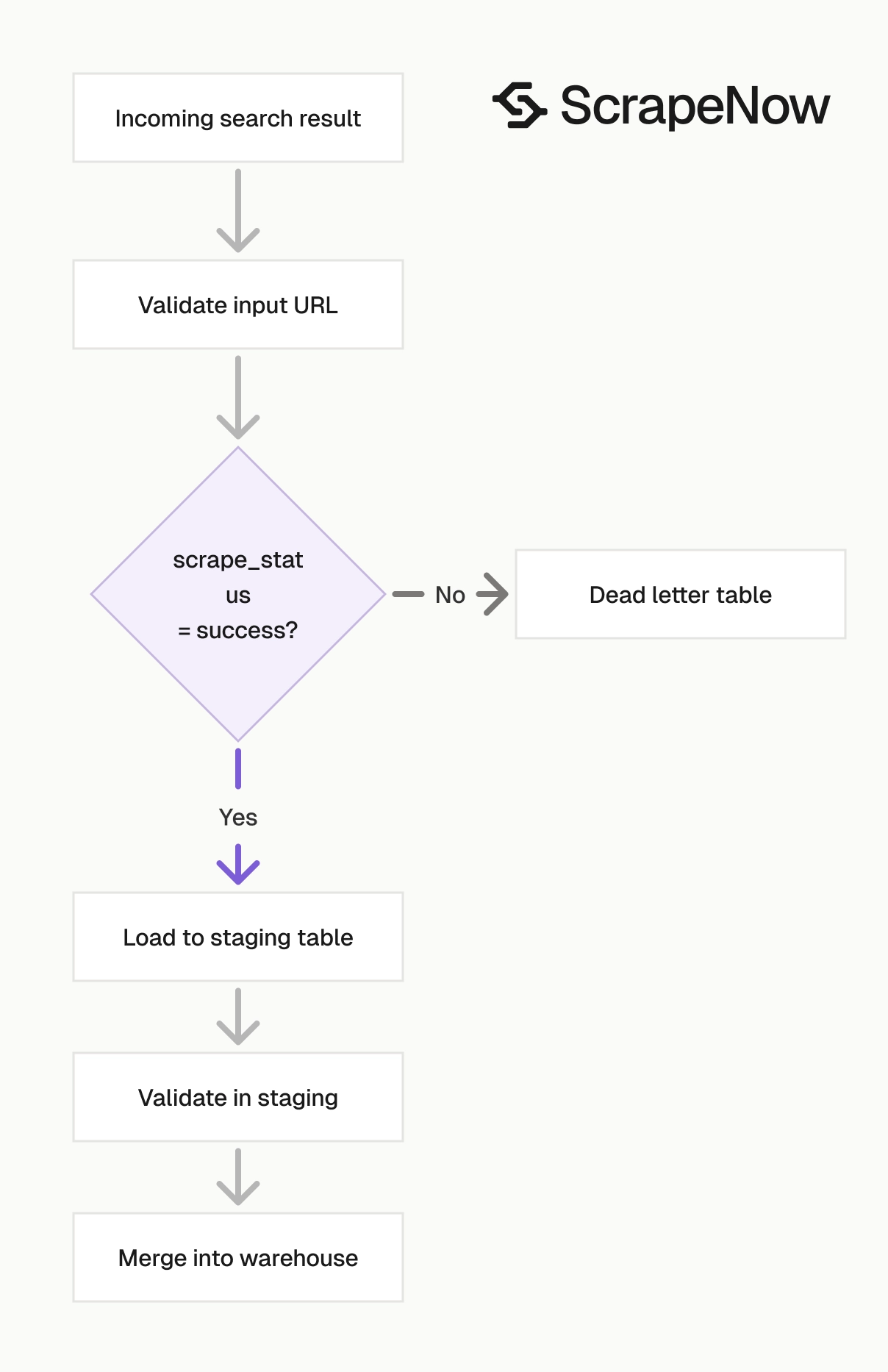
The API job can complete while individual rows carry scrape_status values and error fields. Your loader should count successes and failures.
A completed job covers request processing. Row-level status still controls loading.
def split_rows(rows: list[dict]) -> tuple[list[dict], list[dict]]:
    successful = []
    failed = []

    for row in rows:
        if row.get("scrape_status") == "success" and row.get("url"):
            successful.append(row)
        else:
            failed.append({
                "input": row.get("input") or row.get("inputs"),
                "scrape_error": row.get("scrape_error"),
                "scrape_error_code": row.get("scrape_error_code"),
                "row": row
            })

    return successful, failed
Write failed rows to a dead-letter file or table. Re-run failed inputs after you inspect the error code.
Track row counts on every run. Store input_rows, success_rows, failed_rows, and loaded_rows with the job ID.
Those counters make pipeline failures visible. They also catch schema mistakes before they reach downstream reports.
Add alerts on sharp count changes. A saved search that returns 400 rows yesterday and 12 rows today deserves inspection before your CRM sync runs.
Normalize units before analytics
The sample response includes this pair:
{
  "living_area": 7109,
  "living_area_units": "acres"
}
That pairing needs validation before you calculate price per square foot. Zillow cards expose fields differently across home types, property categories, and grouped listings.
Use this pattern:
def safe_price_per_area(row: dict) -> float | None:
    price = row.get("price")
    area = row.get("living_area")
    units = row.get("living_area_units")

    if not price or not area:
        return None

    if units not in {"sqft", "square feet"}:
        return None

    return round(price / area, 2)
Do not assume every returned listing has bedrooms, bathrooms, square footage, or brokerage name. Load nullable fields as nullable.
Keep unit normalization separate from scraping. Scraping gets the source value, and analytics decides whether that value is usable for a metric.
Store the original unit label along with the normalized value. That keeps audit trails intact when a metric looks wrong later.
Preserve the raw payload
Typed columns make querying fast. Raw JSON makes reprocessing possible when your schema changes.
Store the full row in a raw_json column or object storage path. Add a versioned loader that maps raw fields into typed columns.
This pattern saves time when Zillow adds a field or changes a label. You can backfill from raw data without running the same scrape again.
A practical row model has three layers. The raw row stores the API response, the typed table stores common fields, and the analytics table stores validated metrics.
Use a loader version column if several services read the same data. That gives you a clean way to compare old mappings with new mappings.
Run detail extraction as a second stage
Search results are card-level data. They work well for discovery, dedupe, map views, and listing feeds.
Detail extraction belongs in a second stage when you need fields beyond the search card. That includes tax history, price history, full description, school data, and property facts.
Start with search results to find listing URLs. Then send selected URLs into the details scraper based on your business rules.
For example, enrich only listings under a target price, inside a target ZIP code, or added during the last scrape. This keeps credit usage tied to the rows you care about.
A second-stage design also gives you better retry control. You can re-run failed detail URLs without repeating the broader search extraction.
Ready to get this data? Try the Zillow search scraper with your own URLs.
When to use URL search, filter search, and details extraction
flowchart TD
  A[Inbound Zillow URL] --> B{Starts with https://www.zillow.com/?}
  B -->|No| C[Reject input]
  B -->|Yes| D[Run URL search scraper]
  D --> E[Need more fields?]
  E -->|Yes| F[Run property details scraper]
  E -->|No| G[Load search results only]
  F --> H[Enrich selected listings]
  H --> I[Store final warehouse rows]
  G --> I
Use the URL-based search scraper when a human or upstream system already builds the Zillow search URL. Use the filter-based scraper when your app controls location, price, and property filters directly.
| Task | ScrapeNow scraper |
|---|---|
| Extract listings from a copied Zillow search URL | Zillow listings search by URL |
| Search Zillow from structured filter inputs | Zillow listings search by filters |
| Extract listing data from known Zillow listing URLs | Zillow listings extract by URL |
| Pull more property details from a listing URL | Zillow property details extract by URL |
| Pull property details from a search page | Zillow property details extract from search page |
The broader ScrapeNow scraper catalog includes Zillow plus Amazon, Google, LinkedIn, TikTok, Instagram, Facebook, YouTube, Indeed, Glassdoor, Flipkart, Crunchbase, Yelp, and X scrapers.
Choose the scraper based on the source of your input. If your system stores search URLs, use URL search.
If your system stores filters, use filter search. If your system stores listing URLs, use URL detail extraction.
For scheduled monitoring, URL search usually maps cleanly to saved searches. For product flows where users set filters inside your app, filter search gives you a cleaner input contract.
Pricing
ScrapeNow charges per returned row. One row costs one credit, starting at $0.04 per credit for small runs and dropping with volume. No monthly contracts, no proxy fees, no charges for failed rows. See the pricing page for current rates.


