One Zillow output row costs one credit, starting at $0.04 and dropping to $0.012 at volume.
This Zillow listings scraper extracts price, beds, baths, address, ZPID, coordinates, Zestimate, rent Zestimate, lot size, listing status, and description. Use it to pull one property by URL or run filtered Zillow searches through the API.
ScrapeNow handles Zillow selectors, browser sessions, retries, and response parsing. Your application sends a property URL or search filters, then stores structured JSON.
How to use this scraper
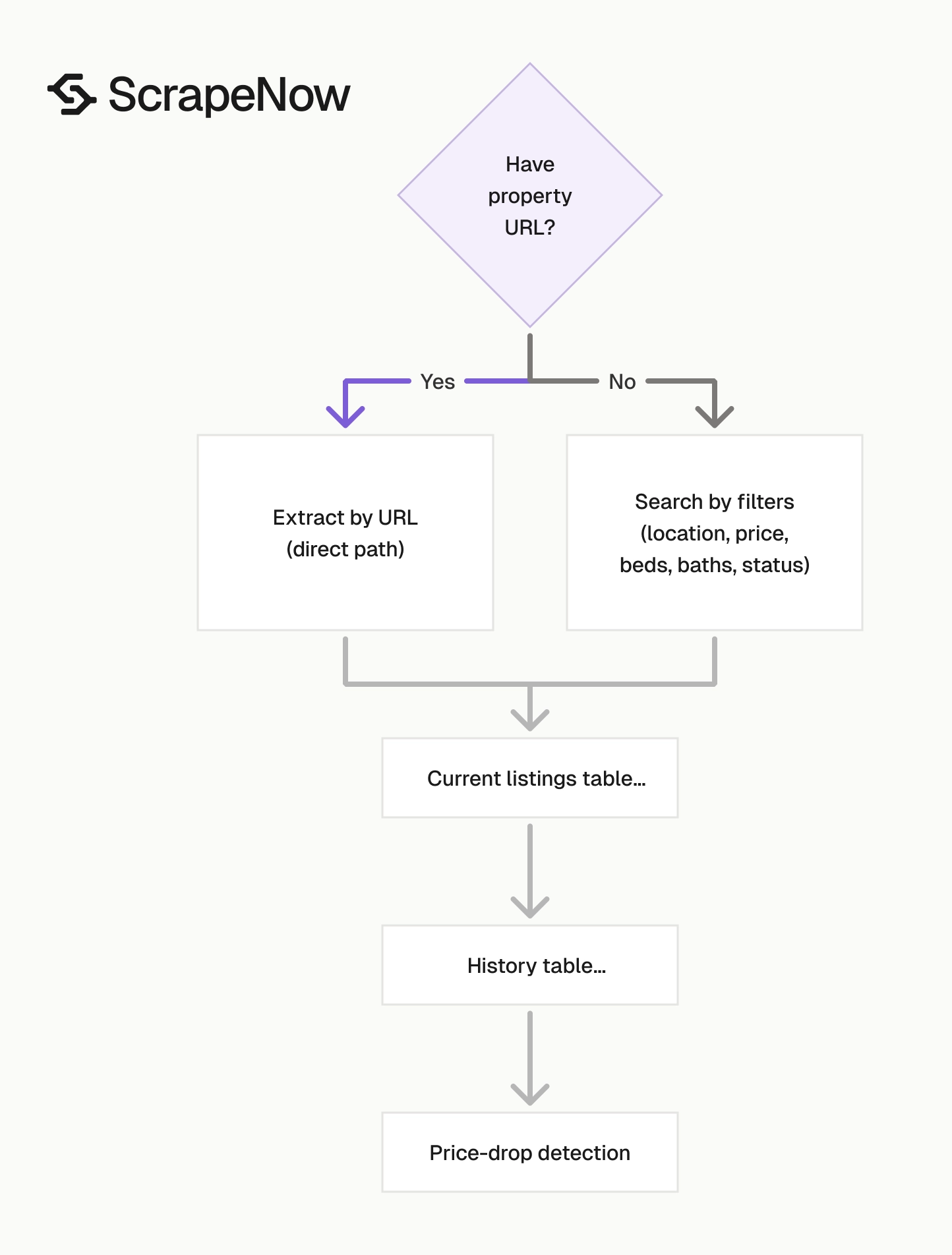
Use Extract Zillow listing data when you already have a property URL. Use Zillow Listings Search by Filters when your application stores search criteria as fields.
The filters endpoint accepts location, listing category, home type, price range, beds, baths, and days-on-Zillow values. That makes it a better fit for scheduled jobs, saved searches, and lead generation queues.
Use the URL extractor for known properties. Use filtered search for lead lists, market scans, rental tracking, and monitoring jobs that run daily or weekly.
Pick the right Zillow listings scraper
| Scraper | Input type | Use it for | Credit math |
|---|---|---|---|
| Extract Zillow listing data | Property URL | Pull one known listing | 1 row costs 1 credit |
| Zillow Listings Search by Filters | Structured filters | Search Zillow without building URLs | Each returned listing costs 1 credit |
| Zillow Listings Search by URL | Search results URL | Re-run a Zillow search URL copied from the browser | Each returned listing costs 1 credit |
| Get Zillow property details | Property URL | Pull deeper property detail fields | 1 row costs 1 credit |
ScrapeNow pre-built scrapers return 1 row per credit. Pricing starts at $0.04 per credit for 1 to 250 credits and drops to $0.012 per credit at 100K+ credits.
The listing endpoints cover fields needed for search results, comparisons, maps, and monitoring. The property details endpoint goes deeper on one property when your pipeline needs more than listing-level data.
A 5,000-row search export costs 5,000 credits. At the entry tier, that is $200. At the 100K+ tier, the same row count uses $60 of credit balance.
Get the property URL input
The url input is the Zillow property listing URL. It must start with https://www.zillow.com/.
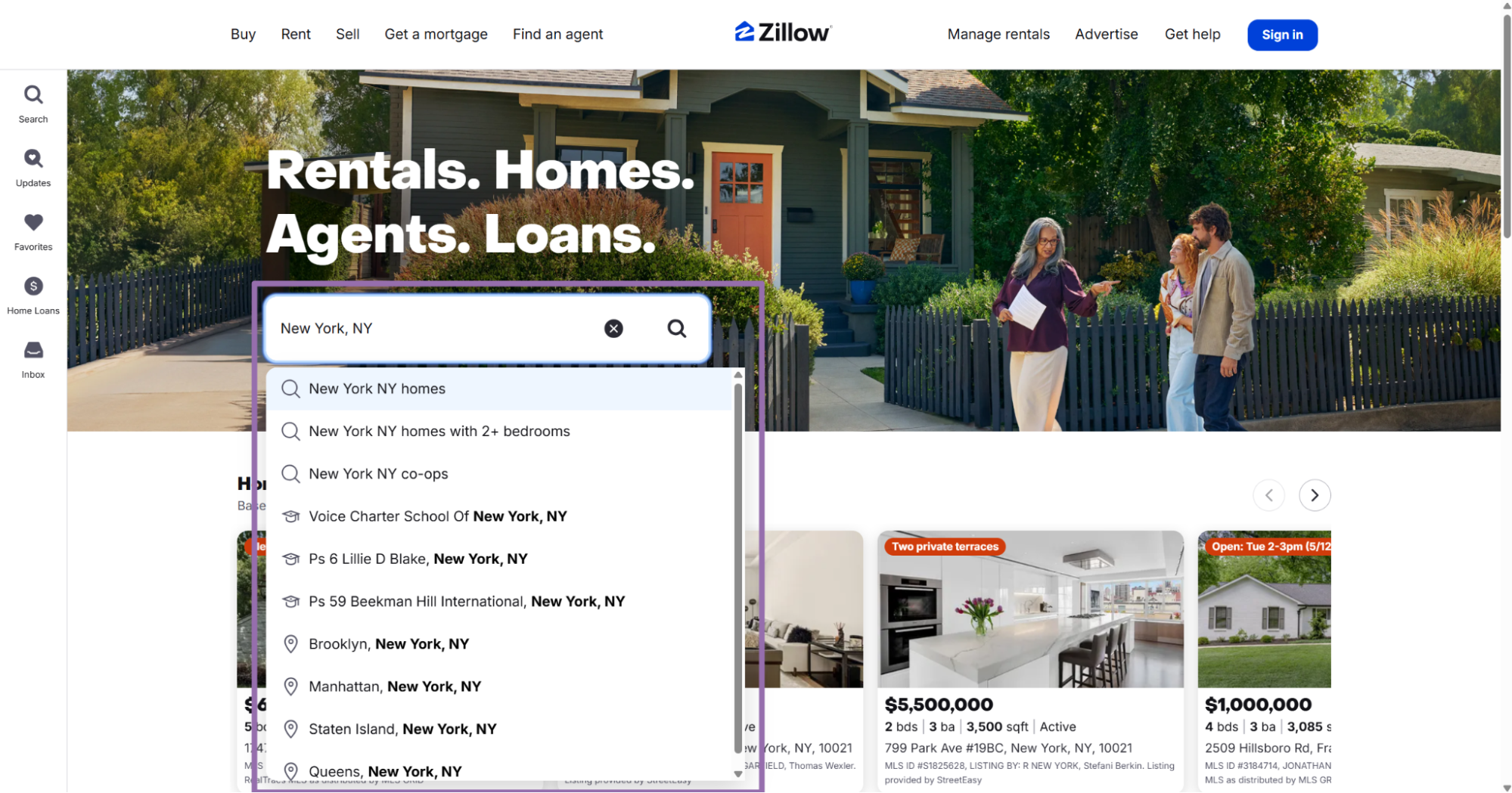
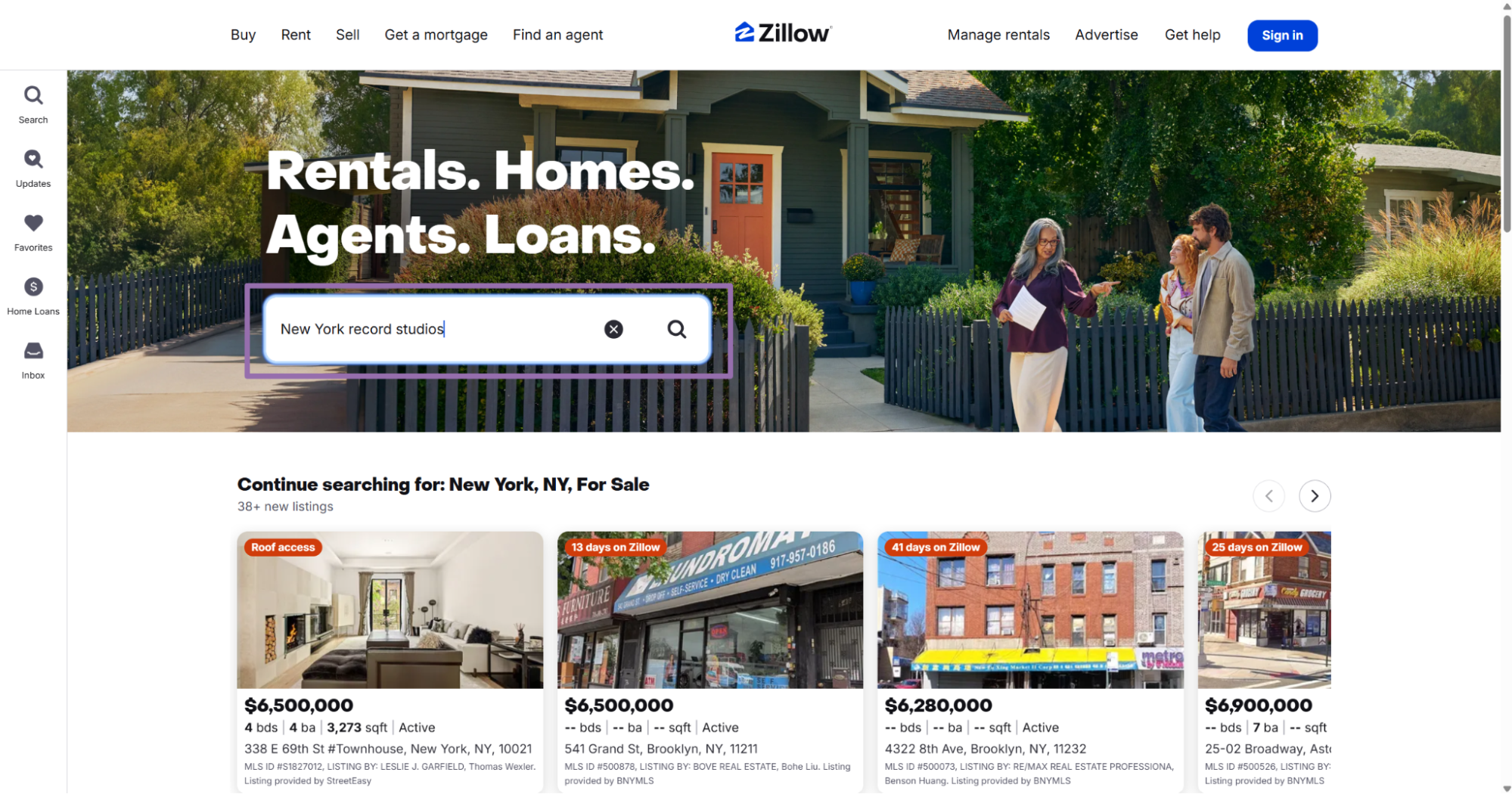
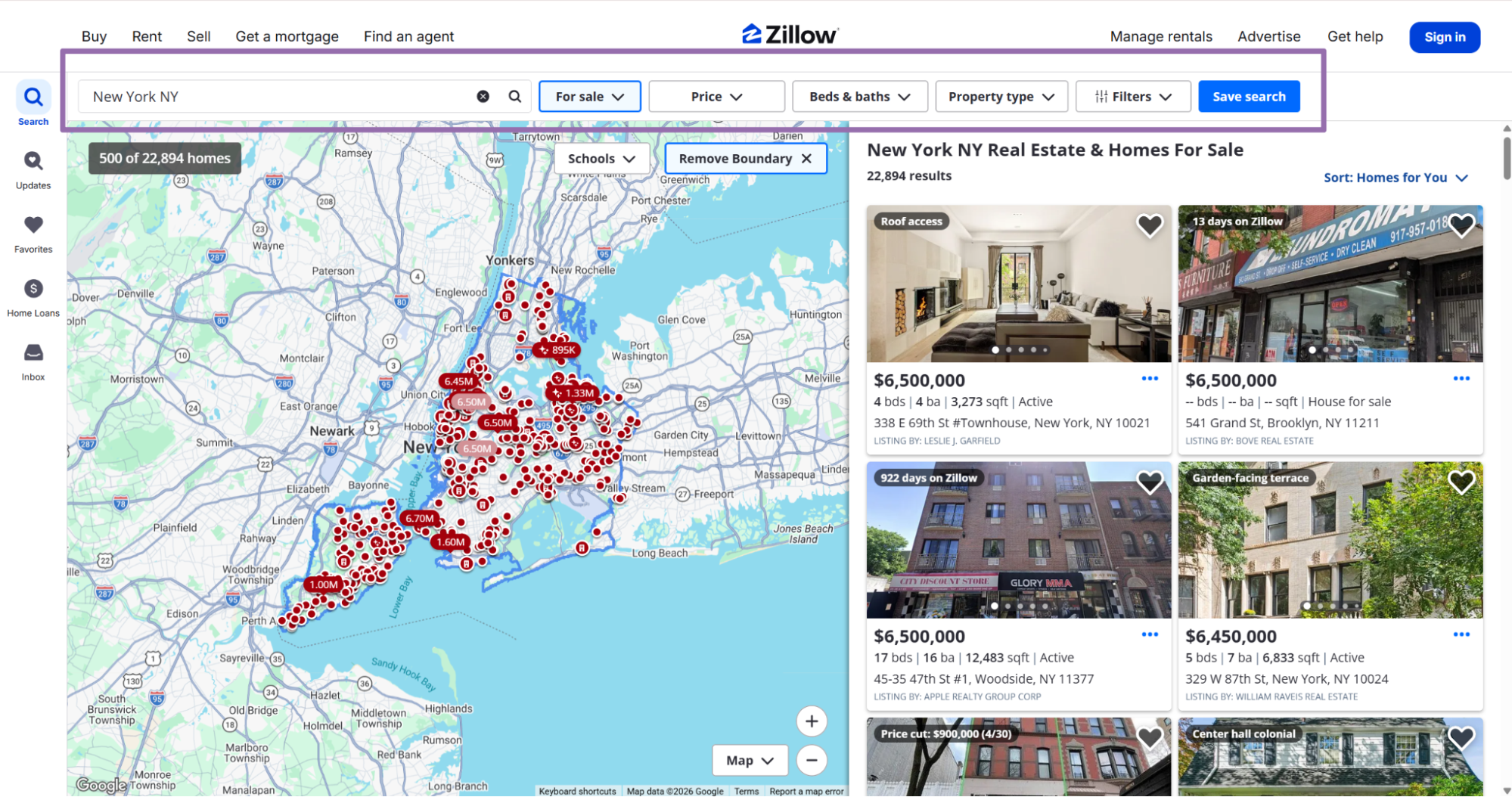
In the search bar, type a location or keyword like New York, NY homes.
Choose a listing from the card table on the right and click it.
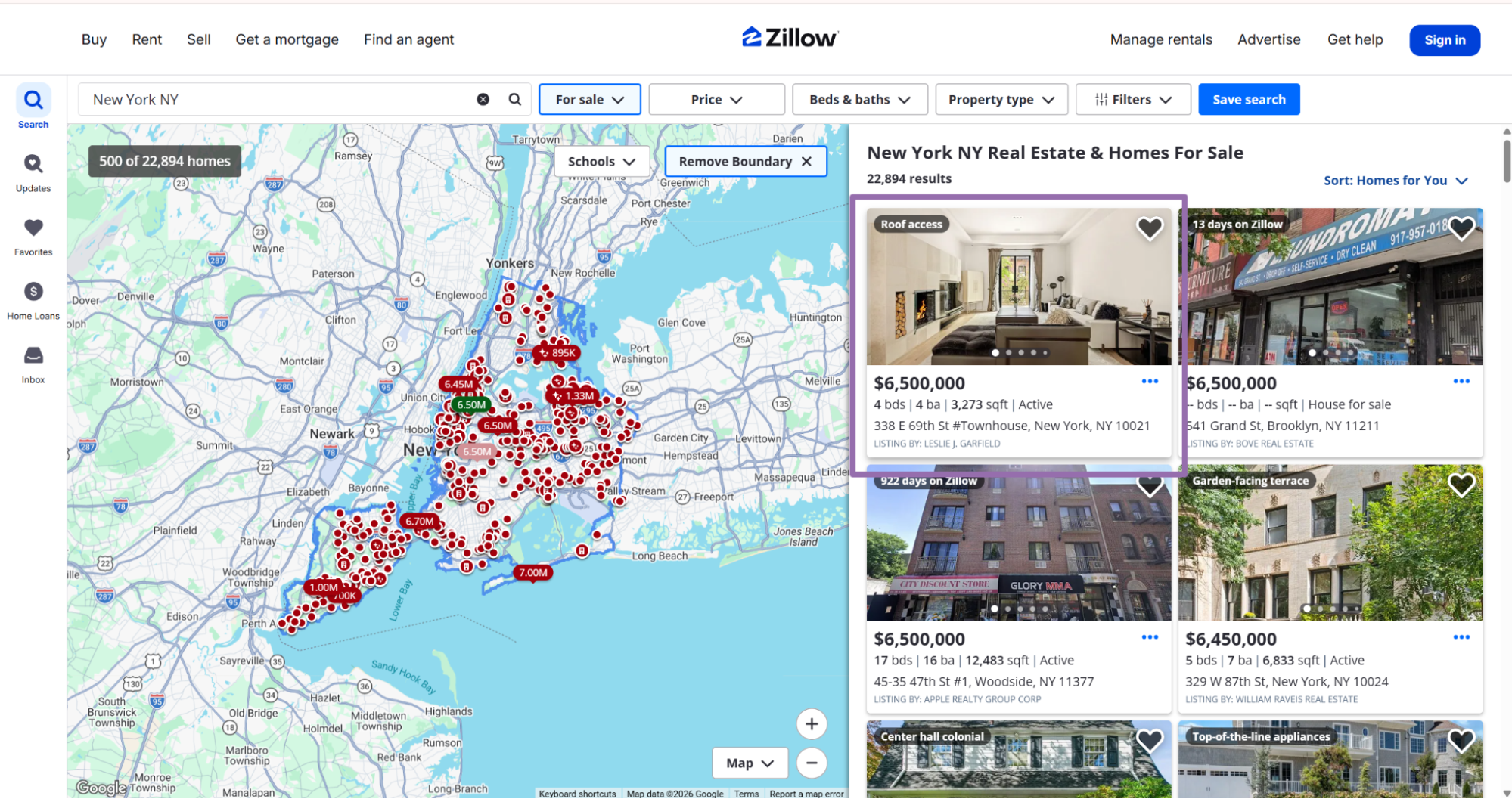
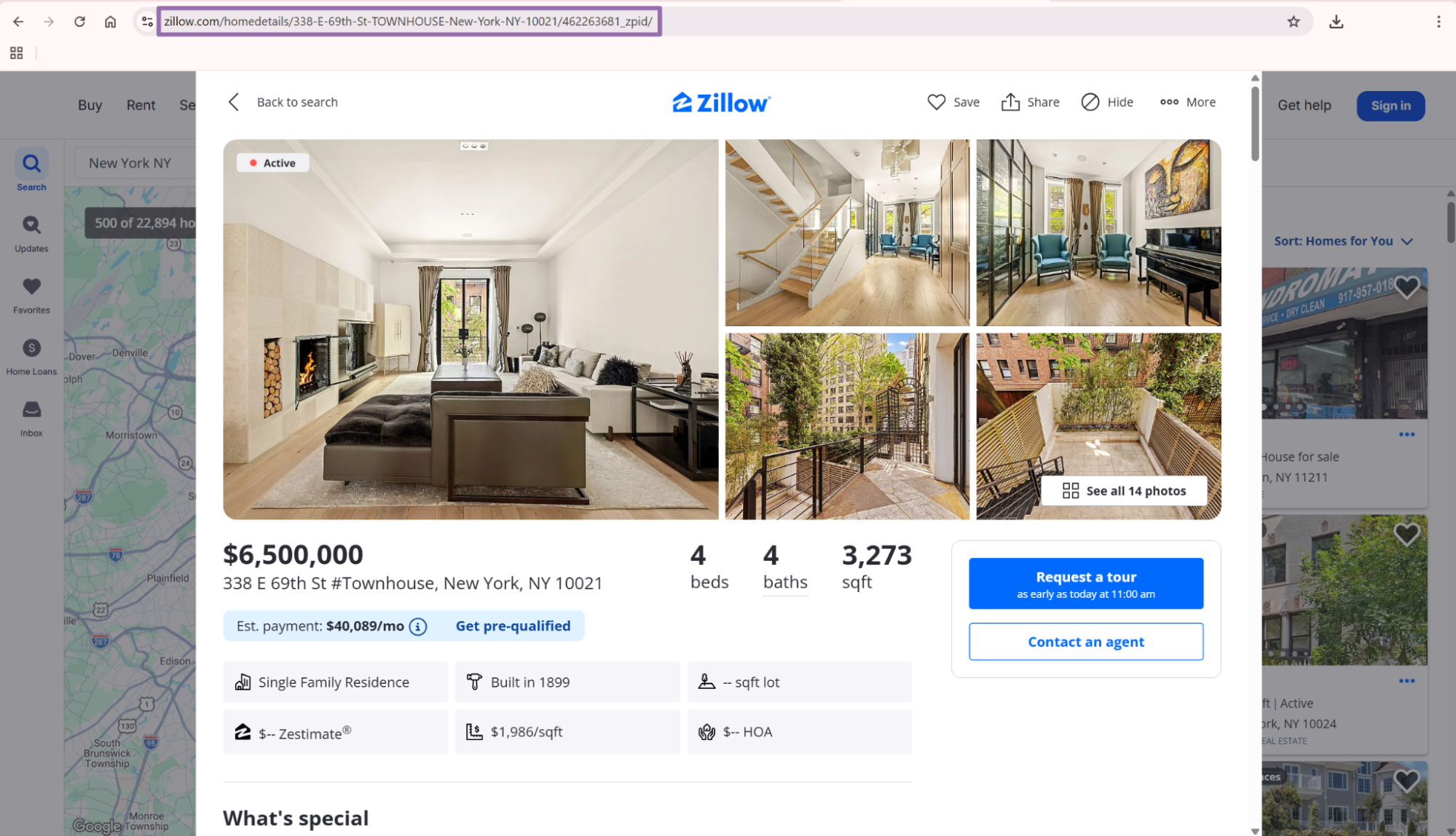
Use the canonical property page URL when the browser gives you one. A URL under /homedetails/ gives the scraper a clean input and avoids search-map state parameters.
Search result URLs often contain viewport, map zoom, pagination, and filter state. Property URLs give your pipeline a stable target for one listing.
Run the API request
Install requests if your environment does not already have it.
pip install requests
Use this API script as the starting point.
"""
Configuration:
    - Set SCRAPER_SLUG to the scraper you want to run.
    - Set SCRAPER_INPUTS to the list of input dicts matching that scraper's schema.
    - Set API_KEY to your scraper API key.
"""

import sys
import time
import json
import requests
import os

API_KEY = "YOUR_API_KEY"

SCRAPER_SLUG = "zillow-listings-extract-by-url"

SCRAPER_INPUTS = [
    {
        "url": "https://www.zillow.com/homedetails/1420-Moraga-Dr-Los-Angeles-CA-90049/20530504_zpid/"
    }
]

BASE_URL = "https://api.scrapenow.io/api/v1/scraping"
TIMEOUT_SECONDS = 3600
POLL_INTERVAL = 5
SPINNER = "|/-\\"


def build_headers(api_key: str, content_type: str | None = None) -> dict:
    """Build headers using your API key."""
    headers = {"Authorization": f"Bearer {api_key}"}
    if content_type:
        headers["Content-Type"] = content_type
    return headers


def trigger_scrape(slug: str, inputs: list[dict]) -> str:
    """POST to the scrape endpoint and return the job_id."""
    url = f"{BASE_URL}/scrape?scraper={slug}"

    response = requests.post(
        url,
        headers=build_headers(API_KEY, "application/json"),
        json={"inputs": inputs},
    )
    response.raise_for_status()
    return response.json()["data"]["job_id"]


def poll_until_done(job_id: str) -> str:
    """Poll the job status until it reaches a terminal state."""
    start = time.time()
    i = 0

    while True:
        elapsed = time.time() - start
        if elapsed > TIMEOUT_SECONDS:
            print(f"\nTimeout after {TIMEOUT_SECONDS}s")
            sys.exit(1)

        response = requests.get(
            f"{BASE_URL}/jobs/{job_id}",
            headers=build_headers(API_KEY),
        )
        response.raise_for_status()

        data = response.json()
        status = data["data"]["status"]

        mins, secs = divmod(int(elapsed), 60)
        sys.stdout.write(f"\r[{SPINNER[i % 4]}] Waiting... {status} ({mins}m {secs:02d}s)  ")
        sys.stdout.flush()

        if status in ("completed", "failed"):
            print()
            return status

        time.sleep(POLL_INTERVAL)
        i += 1


def fetch_results(job_id: str) -> dict:
    """Download the completed job results as JSON."""
    response = requests.get(
        f"{BASE_URL}/jobs/{job_id}/results?format=json",
        headers=build_headers(API_KEY),
    )
    response.raise_for_status()
    return response.json()


def save_results(data: dict, filename: str) -> str:
    """Write results to a JSON file and return the filename."""
    os.makedirs(os.path.dirname(filename) or ".", exist_ok=True)

    with open(filename, "w", encoding="utf-8") as f:
        json.dump(data, f, indent=2)

    return filename


def main() -> None:
    print(f"Triggering scraper: {SCRAPER_SLUG}")
    job_id = trigger_scrape(SCRAPER_SLUG, SCRAPER_INPUTS)
    print(f"Job started: {job_id}")

    final_status = poll_until_done(job_id)

    if final_status != "completed":
        print(f"Job failed with status: {final_status}")
        sys.exit(1)

    print("Fetching results...")
    results = fetch_results(job_id)

    output_path = os.path.join("output", f"{SCRAPER_SLUG}.json")
    output_file = save_results(results, output_path)
    print(f"Results saved to: {output_file}")


if __name__ == "__main__":
    main()
The same API pattern works for the other scrapers in this group. That includes zillow-listings-search-by-filters and zillow-listings-search-by-url.
Change the SCRAPER_SLUG and SCRAPER_INPUTS values for each scraper. Keep the polling and result-download code unchanged unless your pipeline needs different timeout rules.
For batch jobs, send multiple input objects in SCRAPER_INPUTS. Each input produces one or more result rows, based on the scraper and Zillow results.
For URL extraction, one input usually produces one row. For search scrapers, one input can produce many listing rows.
Run a search by filters
Use zillow-listings-search-by-filters when your input comes from a form, database row, or scheduled job. The scraper searches Zillow directly with your criteria and returns matching listings.
The input variables are:
location, location to search Zillow in, such asNew York, NYorSan Francisco, CAlistingCategory, listing type to search for, with options such asHouse for sale,House for rent, andSoldHomeType, home type filter, such asApartments,Houses,Condos, andTownhomesdays_on_zillow, recency filter, with options such as1 day,7 days,14 days,30 days,90 days,6 months,12 months,24 months, and36 monthsminPrice, optional minimum listing price as an integermaxPrice, optional maximum listing price as an integerbeds_min, optional minimum bedrooms as an integerbaths_min, optional minimum bathrooms as an integer
For API usage, pass the exact dropdown text as a string for listingCategory, HomeType, and days_on_zillow. Treat those fields as enums in your application.
To confirm available filter values, open zillow.com, use the search and filter controls, and copy the exact text shown in each dropdown. Small text differences can make a request fail validation.
A typical payload looks like this.
[
  {
    "location": "New York, NY",
    "listingCategory": "House for sale",
    "HomeType": "Condos",
    "days_on_zillow": "7 days",
    "minPrice": 500000,
    "maxPrice": 1500000,
    "beds_min": 2,
    "baths_min": 2
  }
]
This scraper fits scheduled searches. For example, run it every morning for House for sale, Condos, 7 days, and your target ZIP codes.
Use the filters endpoint when your application controls the query. It keeps search inputs typed, reviewable, and easy to diff in code reviews.
The filters endpoint also avoids storing long Zillow URLs full of browser state. Your job record stores clear fields like location, maxPrice, and beds_min.
Run a search by URL
Use zillow-listings-search-by-url when someone already built the Zillow search in the browser. Copy the full Zillow search results URL and pass it as the scraper input.
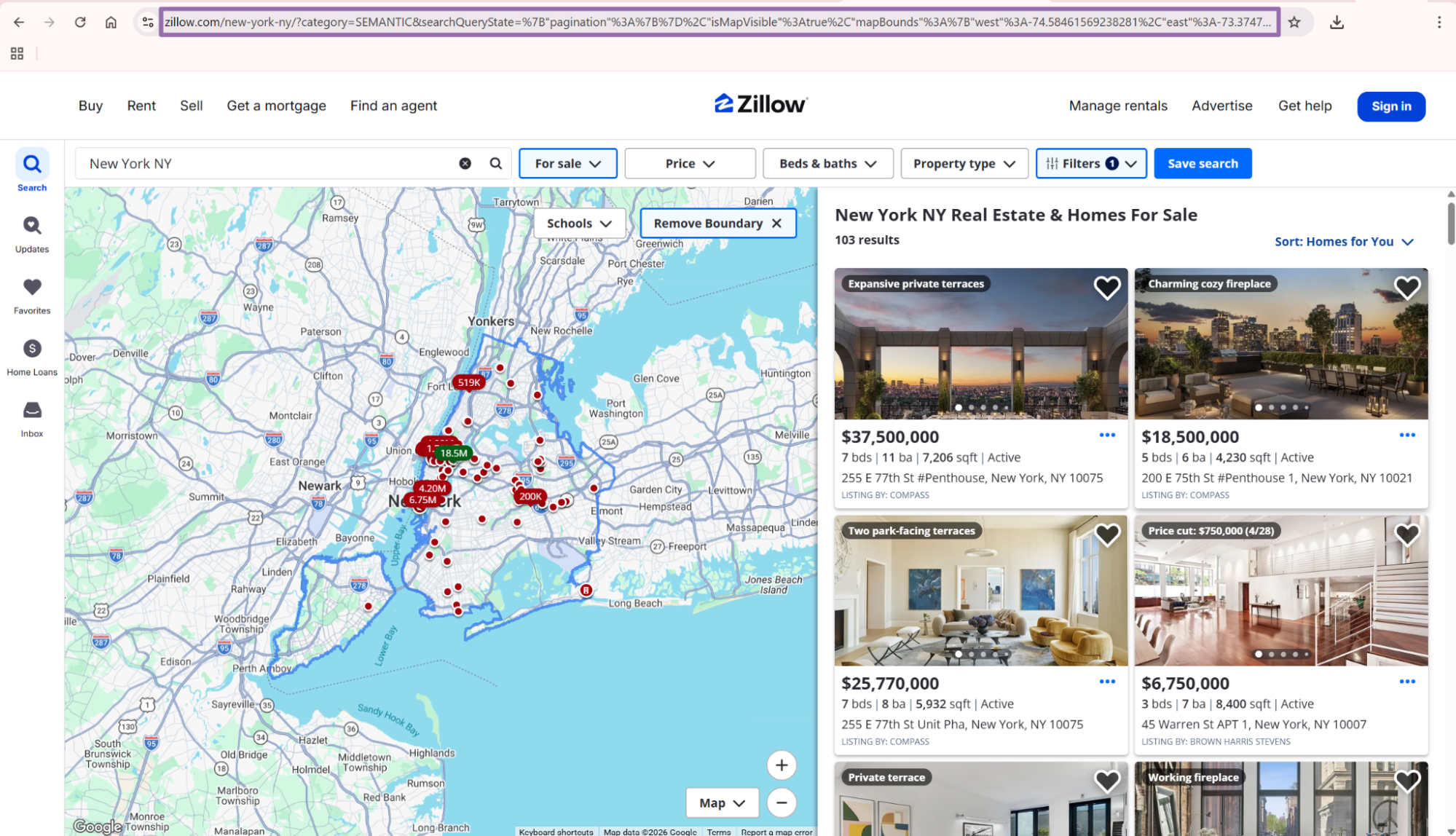
Save the exact URL alongside the job ID. That gives you a reproducible input when a requester asks why a result set changed.
Search-by-URL is faster to adopt for internal teams. Search-by-filters is easier to validate, test, and schedule from application code.
What data you get back
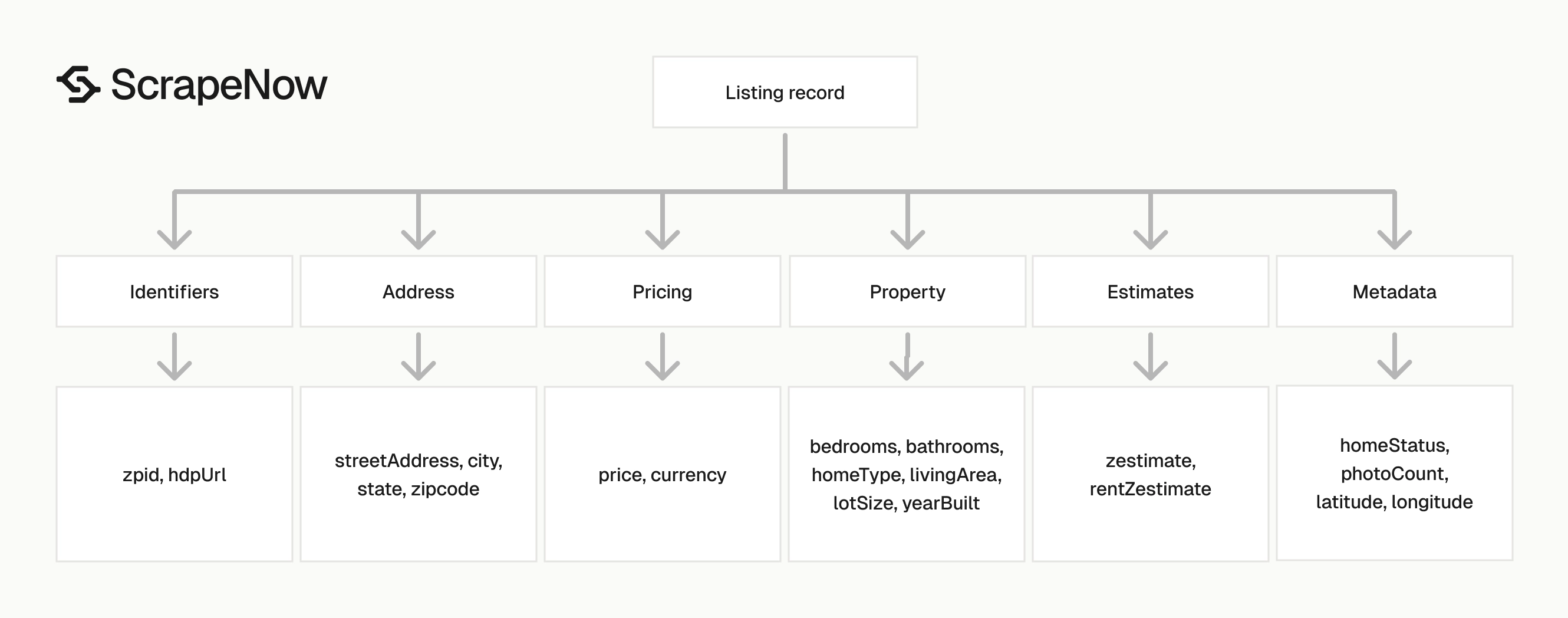
The response is JSON. Each result contains the original input, scrape status, listing identifiers, address fields, pricing fields, property attributes, coordinates, estimates, tax fields, and listing metadata.
A trimmed response looks like this.
[
  {
    "inputs": {
      "url": "https://www.zillow.com/homedetails/1420-Moraga-Dr-Los-Angeles-CA-90049/20530504_zpid/"
    },
    "scrape_status": "success",
    "zpid": 20530504,
    "city": "Los Angeles",
    "state": "CA",
    "homeStatus": "FOR_SALE",
    "address": {
      "city": "Los Angeles",
      "streetAddress": "1420 Moraga Dr",
      "zipcode": "90049",
      "state": "CA"
    },
    "bedrooms": 6,
    "bathrooms": 8,
    "price": 12495000,
    "yearBuilt": 1982,
    "streetAddress": "1420 Moraga Dr",
    "zipcode": "90049",
    "isVerifiedClaimedByCurrentSignedInUser": "No",
    "listingDataSource": "Phoenix",
    "longitude": -118.46802,
    "latitude": 34.092167,
    "livingArea": 8938,
    "homeType": "SINGLE_FAMILY",
    "lotSize": 261442,
    "lotAreaValue": 6.0019,
    "lotAreaUnits": "Acres",
    "livingAreaValue": 8938,
    "isUndisclosedAddress": "false",
    "zestimate": 11290800,
    "rentZestimate": 40229,
    "currency": "USD",
    "dateSoldString": "2016-06-21",
    "taxAssessedValue": 8159593,
    "taxAssessedYear": 2025,
    "country": "USA",
    "propertyTaxRate": 1.18,
    "photoCount": 29,
    "isPremierBuilder": "false",
    "ssid": 17327,
    "hdpUrl": "https://www.zillow.com/homedetails/1420-Moraga-Dr-Los-Angeles-CA-90049/20530504_zpid/",
    "tourViewCount": 0,
    "lastSoldPrice": 7600000,
    "hasApprovedThirdPartyVirtualTourUrl": false,
    "zestimateLowPercent": "5",
    "zestimateHighPercent": "6",
    "description": "One of the largest homes within the exclusive gates of Moraga Estates... (truncated)"
  }
]
Fields that usually become database columns
Use zpid as the stable listing identifier. Zillow URLs change format, while zpid gives you a clean key for dedupe and updates.
Use price, bedrooms, bathrooms, livingArea, lotAreaValue, lotAreaUnits, and homeType for property comparison. Keep currency with price because downstream systems should read the currency from the row.
Use latitude and longitude for map views, clustering, and distance calculations. Store both as numeric fields.
Use zestimate, rentZestimate, taxAssessedValue, taxAssessedYear, propertyTaxRate, lastSoldPrice, and dateSoldString as optional fields. These fields are missing on some listings, so treat them as nullable.
Store scrape_status with every row. This lets your loader separate successful records from failed inputs before writing to production tables.
Keep inputs in your raw table. When a listing changes or disappears, the original input shows which URL or filter produced the row.
Keep hdpUrl as a secondary reference. It helps analysts open the same Zillow page from internal tools.
Field coverage by endpoint
The three listing scrapers return the same listing-level shape once they reach a property result. Their main difference is input control.
| Endpoint | Best input source | Typical output shape |
|---|---|---|
| Extract by URL | Known property URL | One listing record with price, address, attributes, estimates, and metadata |
| Search by Filters | App-owned filters | Multiple listing records from a typed Zillow search |
| Search by URL | Browser-created search URL | Multiple listing records from a copied Zillow search page |
Ready to get this data? Try the Zillow scraper with your own URLs.
Use property details extraction when a downstream workflow needs deeper fields for one known property. Use listing extraction when the job needs search coverage, monitoring, or a row-per-listing feed.
This split matters in production. Search jobs create candidate lists, and detail jobs enrich selected records after dedupe.
Production tips
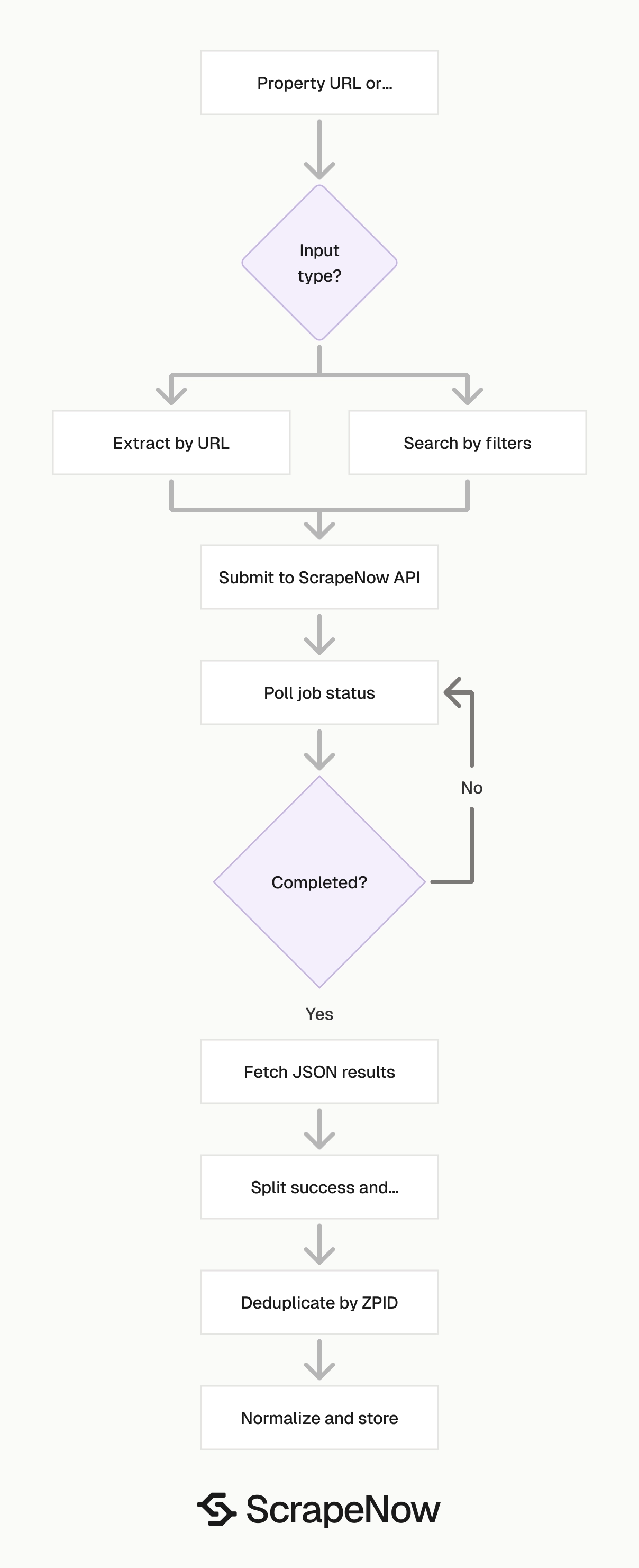
Validate inputs before creating jobs
Reject URLs that do not start with https://www.zillow.com/. This catches invalid rows before they spend credits.
def validate_zillow_url(url: str) -> None:
    if not isinstance(url, str):
        raise TypeError("url must be a string")

    if not url.startswith("https://www.zillow.com/"):
        raise ValueError("url must start with https://www.zillow.com/")

    if "/homedetails/" not in url:
        raise ValueError("url must be a Zillow property details URL")


validate_zillow_url(
    "https://www.zillow.com/homedetails/1420-Moraga-Dr-Los-Angeles-CA-90049/20530504_zpid/"
)
For filtered search jobs, validate enums before sending the request. Keep the accepted values in code so invalid UI values fail before the API call.
VALID_LISTING_CATEGORIES = {"House for sale", "House for rent", "Sold"}
VALID_HOME_TYPES = {"Apartments", "Houses", "Condos", "Townhomes"}
VALID_DAYS_ON_ZILLOW = {
    "1 day",
    "7 days",
    "14 days",
    "30 days",
    "90 days",
    "6 months",
    "12 months",
    "24 months",
    "36 months",
}


def validate_filter_inputs(payload: dict) -> None:
    if payload["listingCategory"] not in VALID_LISTING_CATEGORIES:
        raise ValueError("invalid listingCategory")

    if payload["HomeType"] not in VALID_HOME_TYPES:
        raise ValueError("invalid HomeType")

    if payload["days_on_zillow"] not in VALID_DAYS_ON_ZILLOW:
        raise ValueError("invalid days_on_zillow")

    for key in ("minPrice", "maxPrice", "beds_min", "baths_min"):
        if key in payload and not isinstance(payload[key], int):
            raise TypeError(f"{key} must be an integer")


validate_filter_inputs({
    "location": "New York, NY",
    "listingCategory": "House for sale",
    "HomeType": "Condos",
    "days_on_zillow": "7 days",
    "minPrice": 500000,
    "maxPrice": 1500000,
    "beds_min": 2,
    "baths_min": 2
})
Add range checks for prices and bed counts in your application. A typo such as 50000000 instead of 500000 can produce a valid request with useless results.
Validate location as well. Empty locations and internal test strings waste credits because Zillow receives a search request that your team never intended to run.
Deduplicate on ZPID
Use zpid as the primary dedupe key. Fall back to hdpUrl only when a row has no zpid.
def dedupe_listings(rows: list[dict]) -> list[dict]:
    seen = set()
    deduped = []

    for row in rows:
        key = row.get("zpid") or row.get("hdpUrl")

        if not key:
            continue

        if key in seen:
            continue

        seen.add(key)
        deduped.append(row)

    return deduped
This matters when you combine search jobs. The same listing can appear in nearby city searches, broad county searches, ZIP searches, and price-band searches.
Run dedupe before writes to your main listing table. Store duplicates in a separate audit table if you need source attribution for each search.
Keep the dedupe step after result fetch and before normalization. That keeps the raw row intact while you decide which record becomes the current version.
Normalize the schema before loading
Zillow fields mix integers, floats, strings, booleans, and nested objects. Normalize the fields you query often, then store the full raw JSON for replay and audits.
def normalize_listing(row: dict) -> dict:
    address = row.get("address") or {}

    return {
        "zpid": row.get("zpid"),
        "scrape_status": row.get("scrape_status"),
        "home_status": row.get("homeStatus"),
        "street_address": row.get("streetAddress") or address.get("streetAddress"),
        "city": row.get("city") or address.get("city"),
        "state": row.get("state") or address.get("state"),
        "zipcode": row.get("zipcode") or address.get("zipcode"),
        "price": row.get("price"),
        "currency": row.get("currency"),
        "bedrooms": row.get("bedrooms"),
        "bathrooms": row.get("bathrooms"),
        "living_area": row.get("livingArea"),
        "home_type": row.get("homeType"),
        "latitude": row.get("latitude"),
        "longitude": row.get("longitude"),
        "zestimate": row.get("zestimate"),
        "rent_zestimate": row.get("rentZestimate"),
        "hdp_url": row.get("hdpUrl"),
        "raw": row
    }
Do not cast nullable fields blindly. A missing rentZestimate should stay None, since 0 means a real numeric value in many warehouses.
Use explicit types in your destination schema. Store prices and counts as integers, coordinates as decimal or double fields, and descriptions as text.
Keep raw booleans as booleans when the source returns them that way. Convert string flags only when your warehouse schema requires strict boolean columns.
Handle failed rows separately
Check scrape_status per row. A completed job can still contain rows that failed input validation or were unavailable at scrape time.
def split_success_and_failed(rows: list[dict]) -> tuple[list[dict], list[dict]]:
    success = []
    failed = []

    for row in rows:
        if row.get("scrape_status") == "success":
            success.append(row)
        else:
            failed.append(row)

    return success, failed
Retry failed rows in a separate job. Cap retries at 2 attempts so invalid URLs do not loop forever.
Log the original input with each failed row. That makes cleanup faster when a property was removed, redirected, or entered with the wrong domain.
Add a failure reason column if your loader stores error details. It saves time when support asks whether a failure came from input validation or source availability.
Store job metadata
Store the ScrapeNow job ID, scraper slug, input payload, start time, final status, and output file location. This gives you a clean trail when someone asks why a listing changed.
The sample script polls every 5 seconds and times out after 3600 seconds. For scheduled pipelines, keep those values configurable per job type.
For nightly searches, a longer timeout is fine. For a user-facing workflow, fail sooner and show the job ID so support can inspect it later.
A basic metadata table should include:
job_idscraper_sluginput_hashinput_payloadstarted_atfinished_atfinal_statusresult_countfailed_countoutput_path
Use an input_hash to detect accidental duplicate jobs. Hash the normalized input JSON so key order does not create different hashes for the same request.
import hashlib
import json


def input_hash(payload: dict | list[dict]) -> str:
    normalized = json.dumps(payload, sort_keys=True, separators=(",", ":"))
    return hashlib.sha256(normalized.encode("utf-8")).hexdigest()
Store the hash before you create the job. Then your queue can reject duplicate work before it reaches the scraper API.
Keep raw and normalized data
Store normalized columns for queries and dashboards. Store raw JSON for debugging, reprocessing, and field backfills.
This pattern saves time when you add a new column later. You can backfill from raw records without running the same Zillow jobs again.
For example, you can add photoCount or tourViewCount to your warehouse after the first load. The raw row already contains those values when Zillow returned them.
Keep raw payloads in object storage if your warehouse charges heavily for semi-structured columns. Store the object path in your normalized table.
Treat listings as changing records
Zillow listing data changes over time. Price, status, photos, descriptions, and estimates can change between runs.
Keep a current table and a history table if you track market changes. The current table stores the latest row by zpid, and the history table stores each observed version with a scrape timestamp.
This structure makes price-drop detection straightforward. Compare the latest price with the previous price for the same zpid.
A minimal current table key is zpid. A minimal history table key is (zpid, scraped_at).
select
  current.zpid,
  previous.price as previous_price,
  current.price as current_price,
  previous.price - current.price as price_drop
from zillow_current current
join zillow_history previous
  on previous.zpid = current.zpid
where previous.scraped_at = (
  select max(h.scraped_at)
  from zillow_history h
  where h.zpid = current.zpid
    and h.scraped_at < current.scraped_at
)
and current.price < previous.price;
Run that check after each scheduled load. Send the output to your CRM, alerting system, or analyst queue.
Keep search inputs small enough to review
Large search jobs produce useful coverage, and they also make debugging harder. Split broad regions into ZIP codes, cities, or price bands that your team can inspect.
A search for all homes in a major metro area gives you a large output file. A set of smaller jobs gives you clearer retry behavior and better source attribution.
Smaller jobs also make cost review simpler. Each job record shows how many rows came from one location, filter set, or saved search.
Pricing
ScrapeNow charges per returned row. One row costs one credit, starting at $0.04 per credit for small runs and dropping with volume. No monthly contracts, no proxy fees, no charges for failed rows. See the pricing page for current rates.


