Send one Zillow URL and get one JSON row with MLS attribution and listing flags.
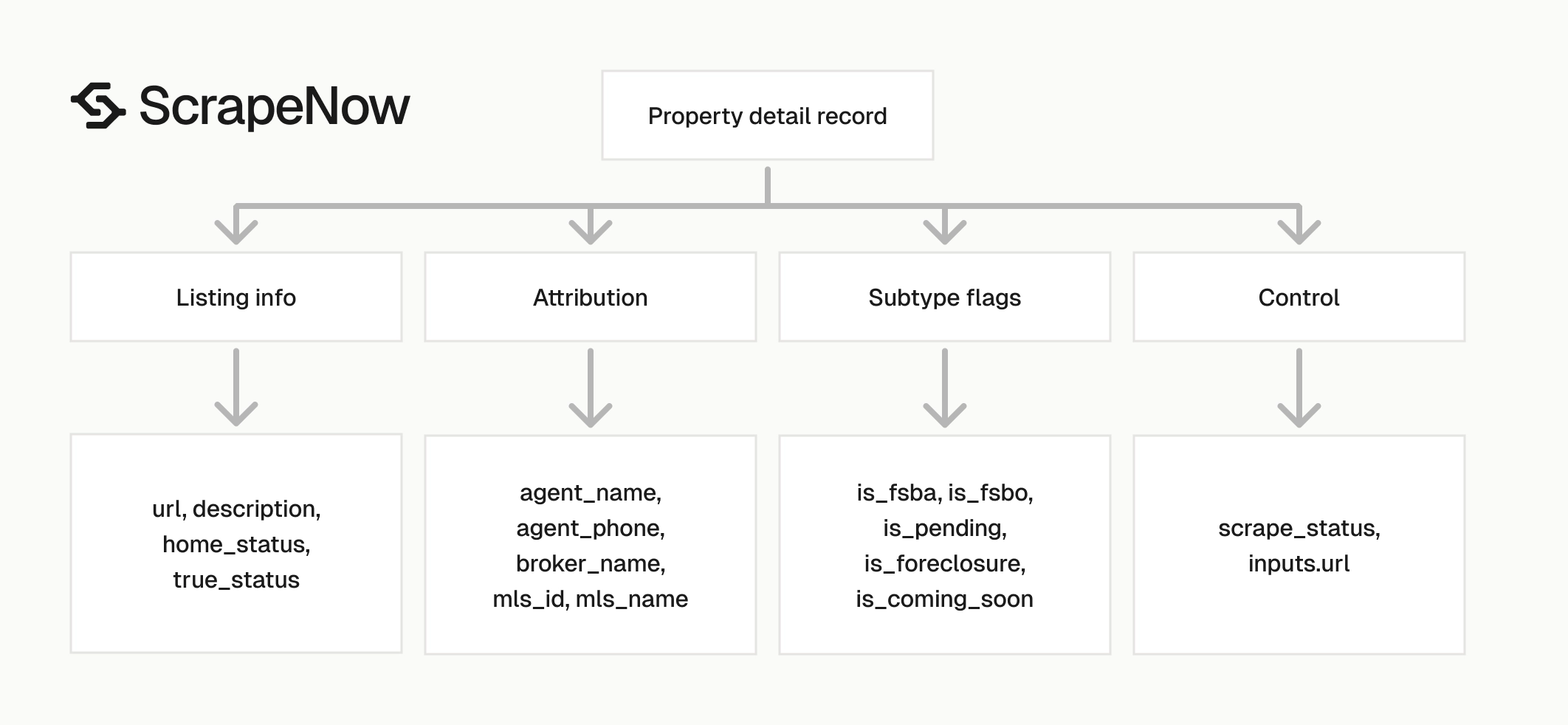
The Zillow Property Details Scraper extracts full property records from Zillow listing URLs. The response includes description text, sale status, agent attribution, MLS data, listing subtype flags, and the original input URL.
Use this scraper when you already have Zillow property URLs and need structured JSON. It replaces browser copying with repeatable API calls that fit into a database load, nightly refresh, or enrichment job.
This scraper handles two common jobs. One job enriches property URLs returned by a Zillow search scraper. The other job refreshes known Zillow URLs that already exist in your database.
ScrapeNow returns one output row for each successful property URL. That one-to-one mapping makes batching, retries, deduplication, and audit logging easier to manage.
Zillow property details scraper workflow
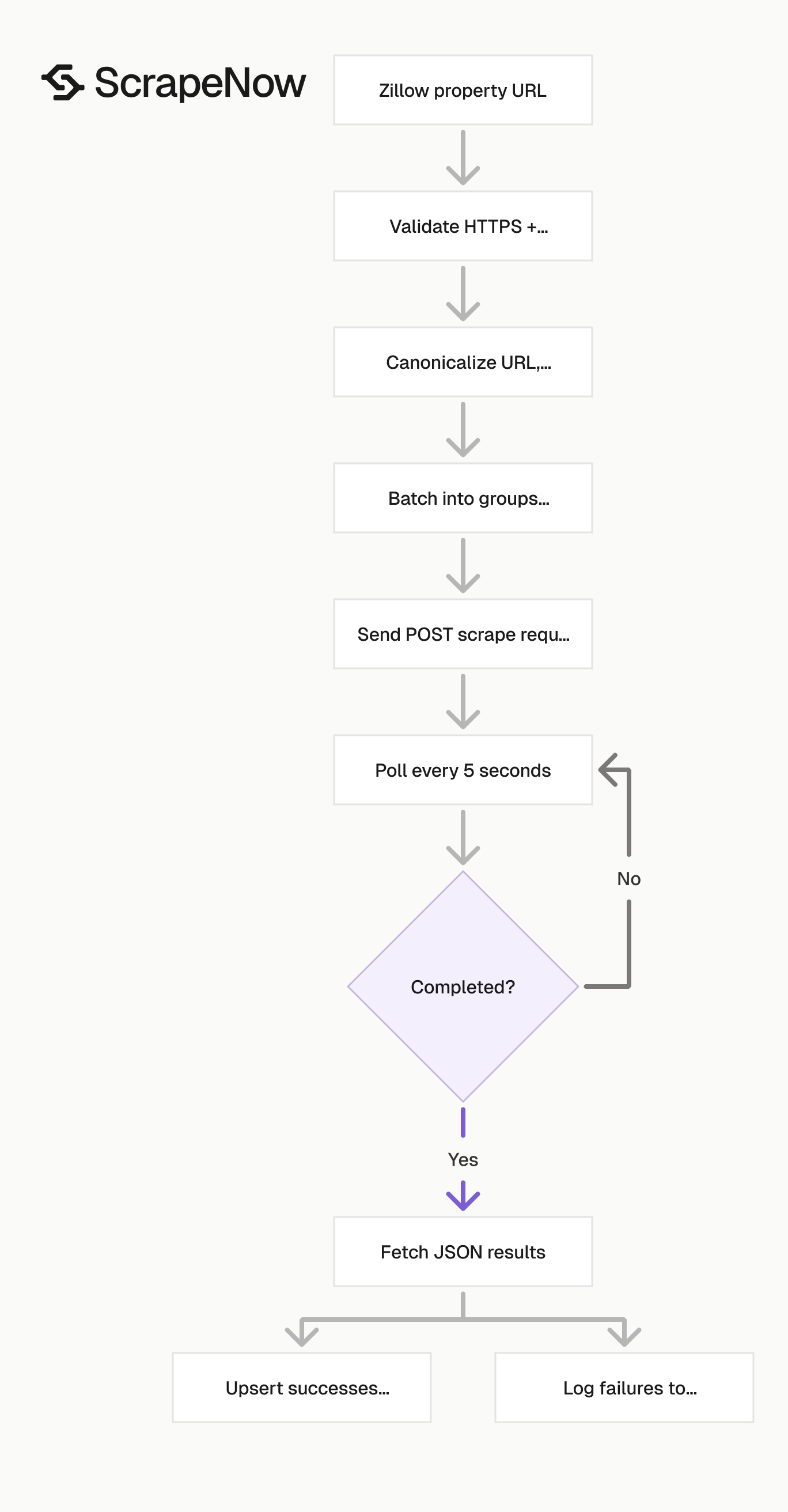
ScrapeNow runs this as a pre-built Zillow scraper. You send property URLs, poll the job, and download the results as JSON.
The Get Zillow property details takes one input field, url. It returns one property detail record for each successful input URL.
Each input URL maps to one output row. Keep that contract in your pipeline, because it gives you a clean join between input batches and returned records.
ScrapeNow also echoes the original input inside each output item. Store that field, because it gives you traceability when a canonical URL changes or a row fails validation downstream.
Step 1. Get the Zillow property URL
Input variable:
url, the URL to the property listing on Zillow- It must start with
https://www.zillow.com/
To get it:
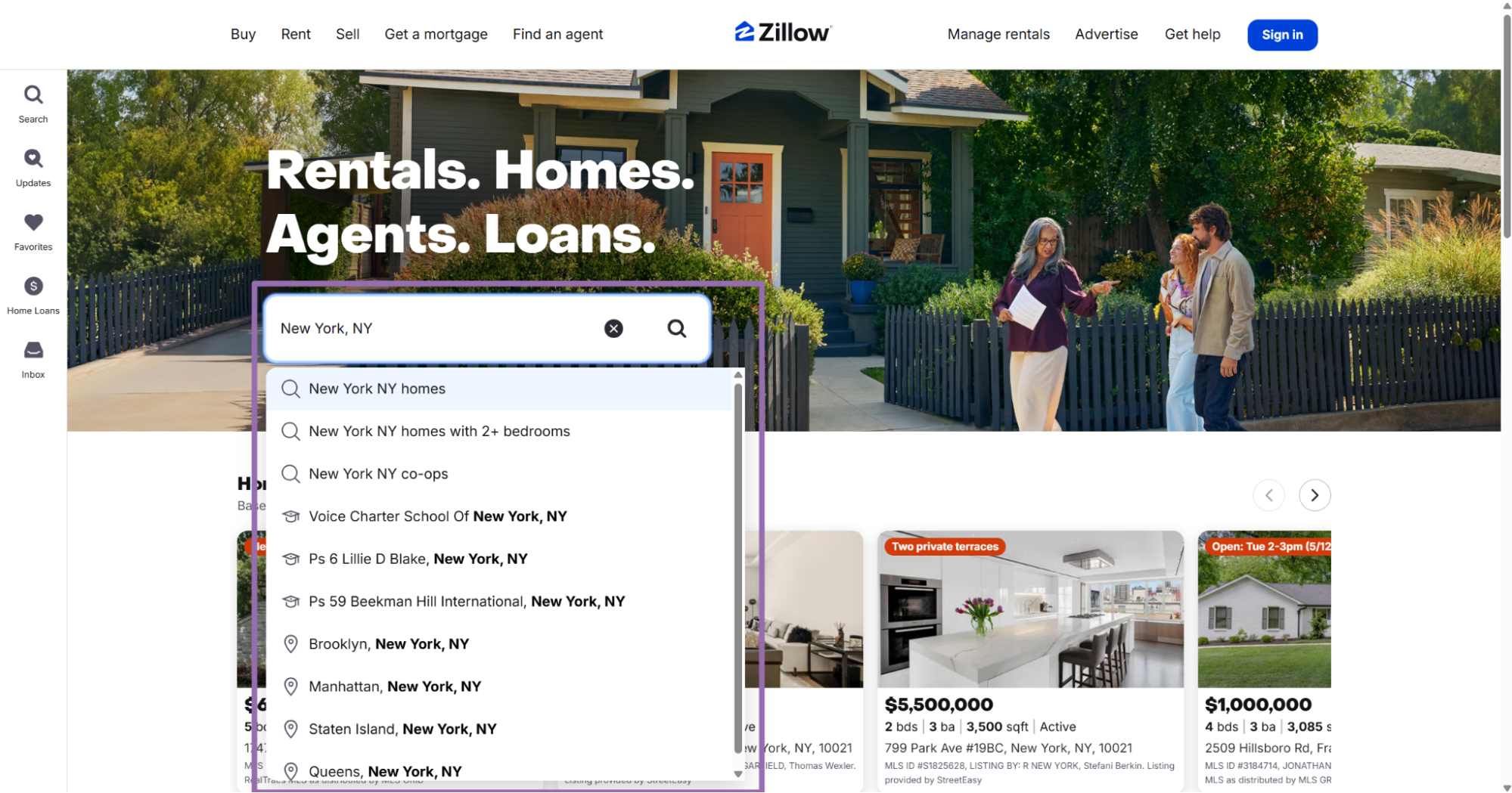
- Open Zillow.com.
- In the search bar, enter a location or keyword, such as
New York, NY homes. - Select a listing from the results panel.
- Copy the URL from the browser address bar.
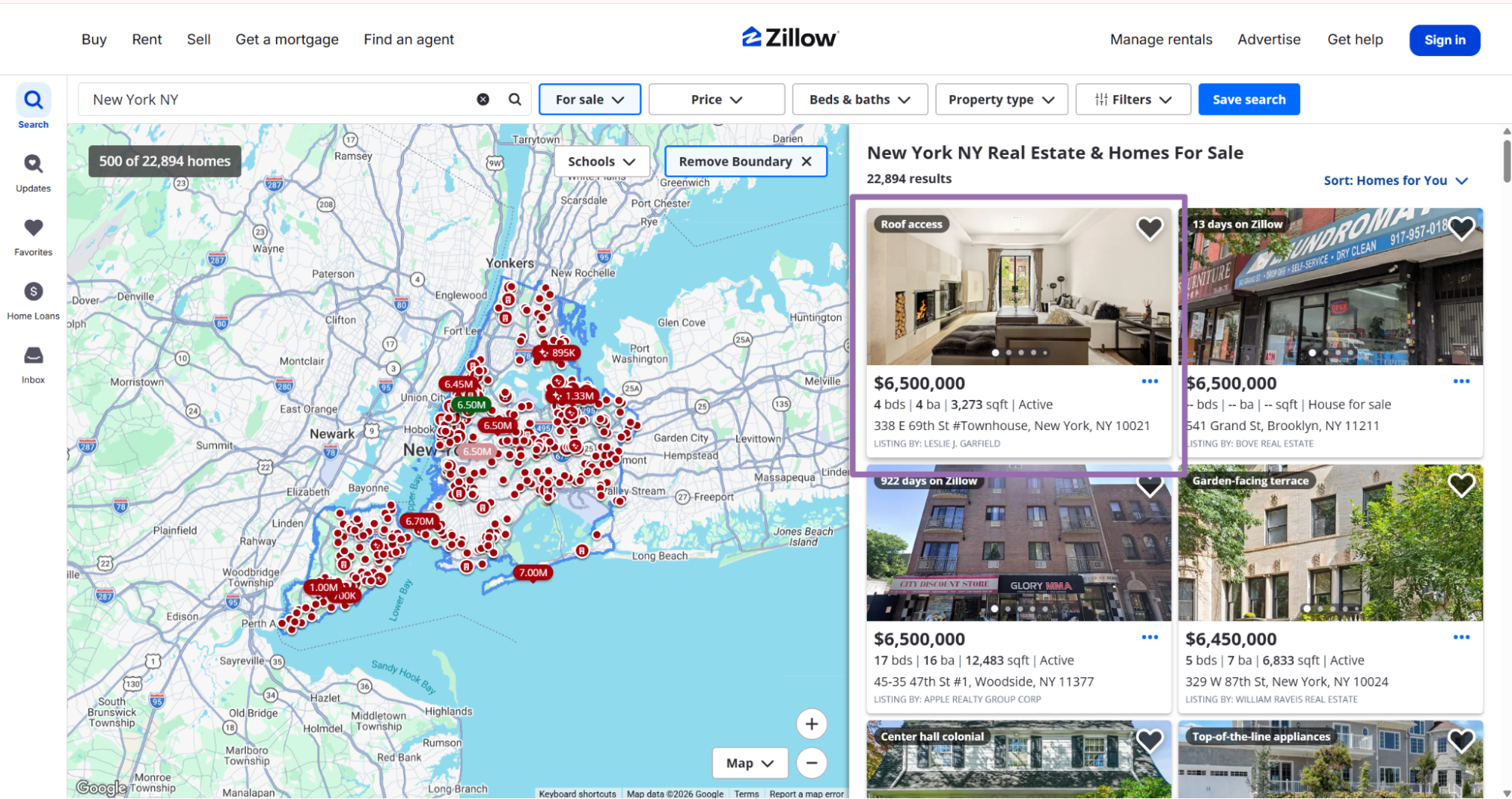
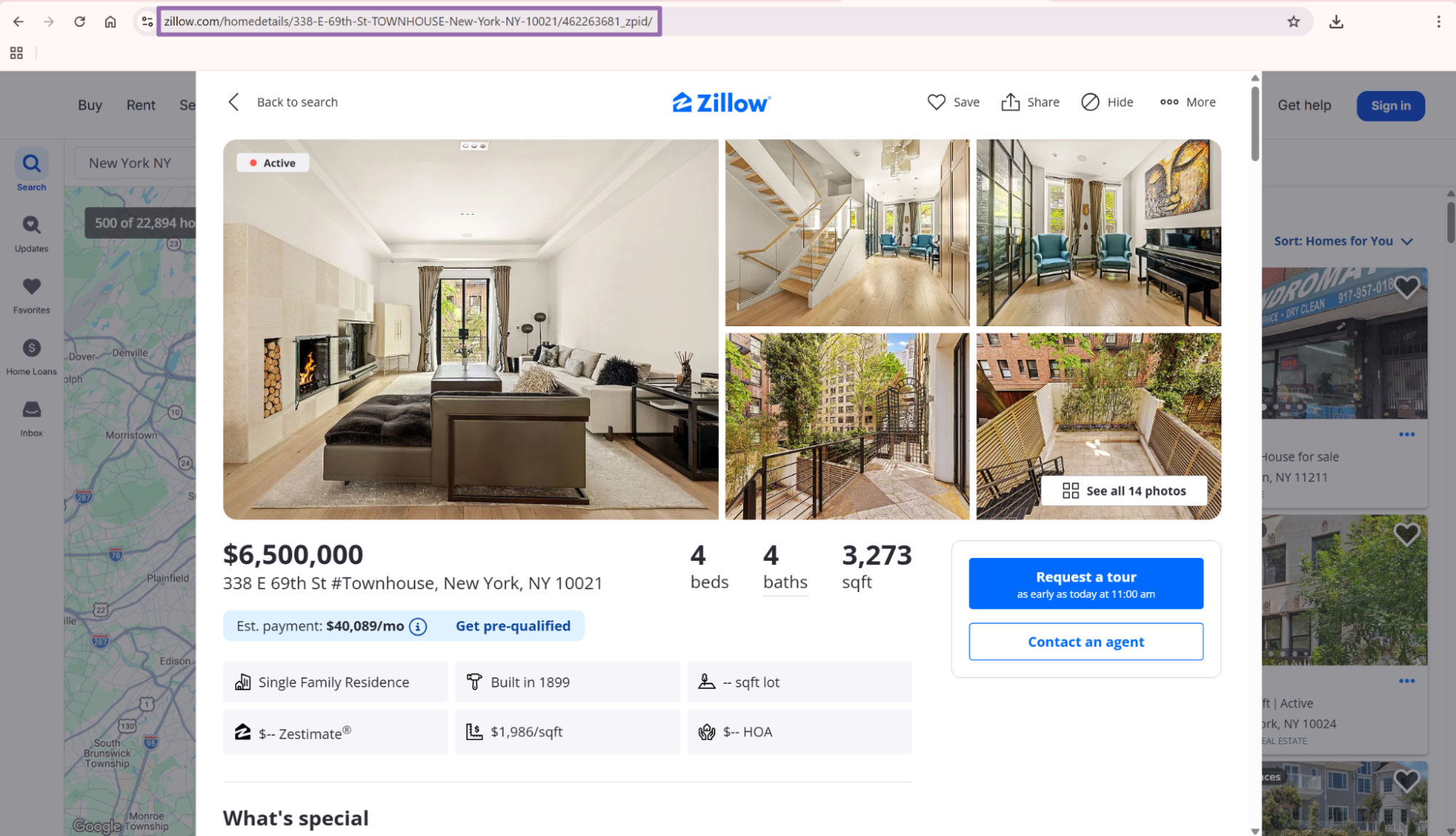
Use the full listing URL. A normal property URL includes /homedetails/ and ends with a Zillow property ID, such as 42621930_zpid.
Tracking parameters are acceptable at input time. Remove them before database storage so duplicate records do not split across URL variants.
Keep the original input URL in your raw payload or audit table. Store a canonical URL beside it for deduplication and joins.
For scheduled jobs, treat the copied URL as raw input. Your ingestion code should validate it, canonicalize it, and store both versions before the scrape job starts.
That small amount of local processing prevents common production issues. Query strings, fragments, and copied search URLs account for many duplicate or failed rows in Zillow pipelines.
Step 2. Run the Zillow scraper API request
Use this Python script without changes. Replace YOUR_API_KEY with your ScrapeNow API key.
"""
Configuration:
    - Set SCRAPER_SLUG to the scraper you want to run.
    - Set SCRAPER_INPUTS to the list of input dicts matching that scraper's schema.
    - Set API_KEY to your scraper API key.
"""

import sys
import time
import json
import requests
import os

API_KEY = "YOUR_API_KEY"

SCRAPER_SLUG = "zillow-property-details-extract-by-url"

SCRAPER_INPUTS = [
    {
        "url": "https://www.zillow.com/homedetails/1747-Old-Natchez-Trce-Franklin-TN-37069/42621930_zpid/"
    }
]

BASE_URL = "https://api.scrapenow.io/api/v1/scraping"
TIMEOUT_SECONDS = 3600
REQUEST_TIMEOUT_SECONDS = 60
POLL_INTERVAL = 5
SPINNER = "|/-\\"


def build_headers(api_key: str, content_type: str | None = None) -> dict:
    """Build headers with your API key."""
    headers = {"Authorization": f"Bearer {api_key}"}
    if content_type:
        headers["Content-Type"] = content_type
    return headers


def trigger_scrape(slug: str, inputs: list[dict]) -> str:
    """POST to the scrape endpoint and return the job_id."""
    url = f"{BASE_URL}/scrape?scraper={slug}"

    response = requests.post(
        url,
        headers=build_headers(API_KEY, "application/json"),
        json={"inputs": inputs},
        timeout=REQUEST_TIMEOUT_SECONDS,
    )
    response.raise_for_status()
    return response.json()["data"]["job_id"]


def poll_until_done(job_id: str) -> str:
    """Poll the job status until it reaches a terminal state."""
    start = time.time()
    i = 0

    while True:
        elapsed = time.time() - start
        if elapsed > TIMEOUT_SECONDS:
            print(f"\nTimeout after {TIMEOUT_SECONDS}s")
            sys.exit(1)

        response = requests.get(
            f"{BASE_URL}/jobs/{job_id}",
            headers=build_headers(API_KEY),
            timeout=REQUEST_TIMEOUT_SECONDS,
        )
        response.raise_for_status()

        data = response.json()
        status = data["data"]["status"]

        mins, secs = divmod(int(elapsed), 60)
        sys.stdout.write(f"\r[{SPINNER[i % 4]}] Waiting... {status} ({mins}m {secs:02d}s)  ")
        sys.stdout.flush()

        if status in ("completed", "failed"):
            print()
            return status

        time.sleep(POLL_INTERVAL)
        i += 1


def fetch_results(job_id: str) -> dict:
    """Download the completed job results as JSON."""
    response = requests.get(
        f"{BASE_URL}/jobs/{job_id}/results?format=json",
        headers=build_headers(API_KEY),
        timeout=REQUEST_TIMEOUT_SECONDS,
    )
    response.raise_for_status()
    return response.json()


def save_results(data: dict, slug: str) -> str:
    """Write results to output/{slug}.json and return the filename."""
    output_dir = "output"
    os.makedirs(output_dir, exist_ok=True)

    filename = os.path.join(output_dir, f"{slug}.json")
    with open(filename, "w", encoding="utf-8") as f:
        json.dump(data, f, indent=2, ensure_ascii=False)

    return filename


def main() -> None:
    print(f"Triggering scraper: {SCRAPER_SLUG}")
    job_id = trigger_scrape(SCRAPER_SLUG, SCRAPER_INPUTS)
    print(f"Job started: {job_id}")

    final_status = poll_until_done(job_id)

    if final_status != "completed":
        print(f"Job failed with status: {final_status}")
        sys.exit(1)

    print("Fetching results...")
    results = fetch_results(job_id)

    output_file = save_results(results, SCRAPER_SLUG)
    print(f"Results saved to: {output_file}")


if __name__ == "__main__":
    main()
The script does 4 things:
- Starts a scrape job with
POST /scrape?scraper=zillow-property-details-extract-by-url. - Polls job status every 5 seconds.
- Stops after
3600seconds if the job has not finished. - Saves the result as JSON in the
outputdirectory.
The request timeout is separate from the job timeout. REQUEST_TIMEOUT_SECONDS controls one HTTP request. TIMEOUT_SECONDS controls the full scrape wait time.
Keep both timeout values in the script. A short request timeout catches a stalled network call. The job timeout protects the full batch run.
ScrapeNow returns a job_id after the POST request accepts the input. Use that ID in logs, batch filenames, database rows, and support tickets.
The same API pattern works for the other scrapers in this Zillow group. Change SCRAPER_SLUG and SCRAPER_INPUTS for each scraper.
Step 3. Use a Zillow search page for multiple listings
The Zillow Property Details Extract from Search Page scraper takes a Zillow search results URL. It extracts property details from the listings on that page.
Input variable:
url, the URL to the search results page on Zillow- It must start with
https://www.zillow.com/
To reach it:
- Open Zillow.com.
- In the search bar, enter a location or keyword, such as
New York City recording studios. - Apply filters to narrow the result set.
- Copy the URL from the browser address bar.
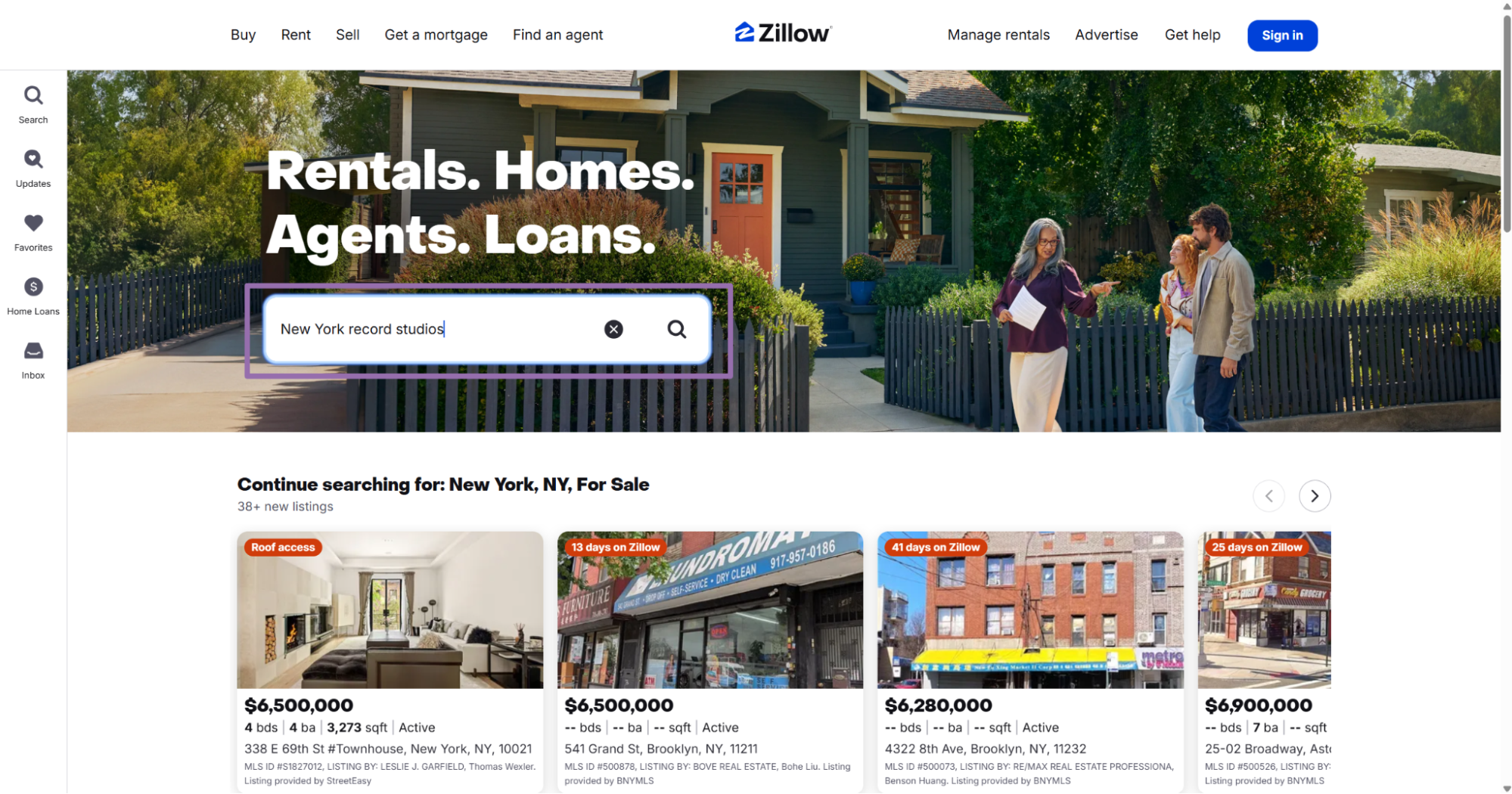
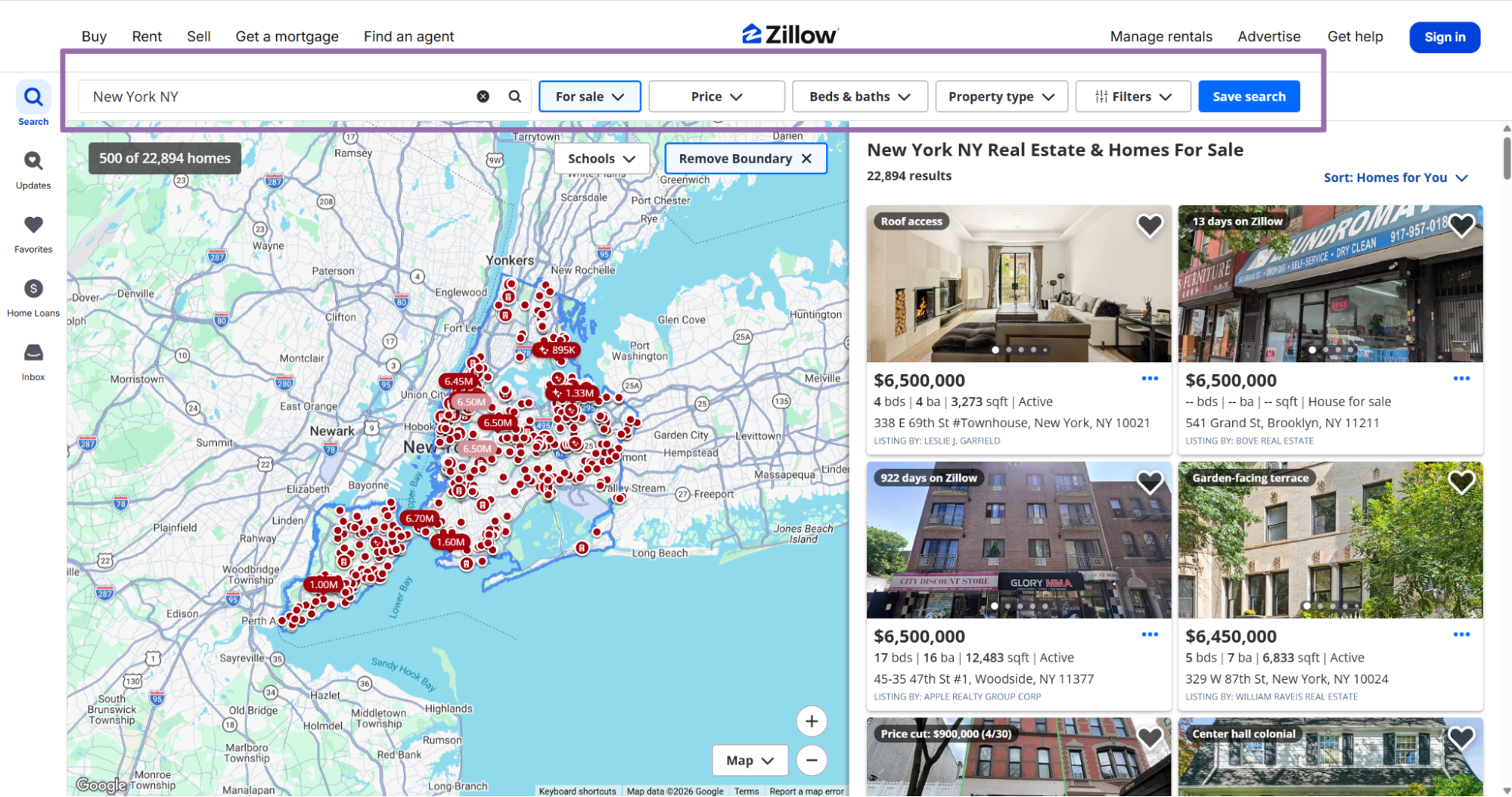
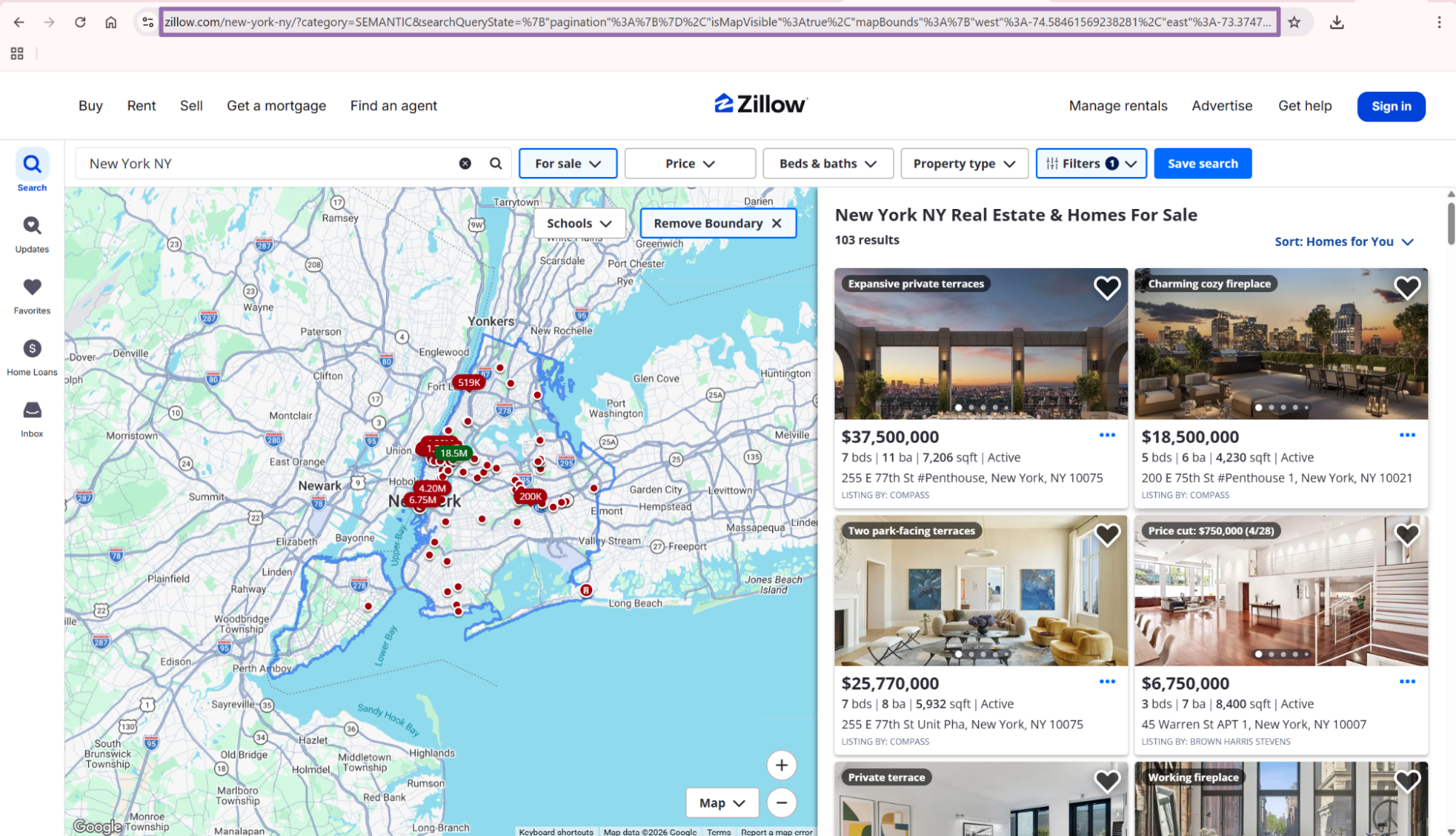
Use the by-URL scraper when you already have property URLs. Use the search-page scraper when your input is a filtered Zillow results page.
For production pipelines, separate discovery from detail extraction. Search scrapers find listings. Detail scrapers add description, attribution, MLS status, and subtype flags.
This split makes retries safer. If detail extraction fails for 12 rows, you retry those 12 property URLs instead of rerunning the search.
The split also gives you better storage boundaries. Store search output in one table, then store detail output in another table keyed by canonical URL, MLS ID, or Zillow property ID.
Step 4. Check the Zillow scraper JSON output
A successful run returns a JSON array. Each item includes the original input, scrape status, listing URL, description, sale status, attribution data, and listing flags.
[
  {
    "inputs": {
      "url": "https://www.zillow.com/homedetails/1747-Old-Natchez-Trce-Franklin-TN-37069/42621930_zpid/"
    },
    "scrape_status": "success",
    "url": "https://www.zillow.com/homedetails/1747-Old-Natchez-Trce-Franklin-TN-37069/42621930_zpid/",
    "description": "Luxury Mini Highland Cow Estate in the heart of historic Franklin, TN. This modern farmhouse is a rare find in one of the most prestigious parts of Williamson County set on nearly 10 acres with breathtaking views, mini highland cows and unmatched privacy. This stunning 6,454 sq ft home offers 5 beds, 5 baths, soaring living spaces, multiple fireplaces, and premium custom finishes throughout.\n\nSome recent additions and updates include: a Fisher & Paykel dual oven with gas range, two Bosch dishwashers, a Fulgor built-in microwave and air fryer, custom blinds, an above-ground pool and spacious deck, screened-in patio, greenhouse, Sonos surround sound system, home generator hook up, zip line, private hiking trails with city views and a two-stall barn, all wrapped within new multi-acre fencing that's perfectly set up for horses or cattle.\n\nOne of the most unique features of this property is the expansive office wing above the garage which offers exceptional separation from the main home, complete with a new custom door, dedicated electrical circuit, hard-line internet, and a professionally built recording studio booth, ideal for remote work, creative use, or private business needs. There's also an additional bonus room located upstairs that works perfectly as a second office, playroom, theater or 6th bedroom for guest to enjoy.\n\nSmart home features include a Brilliant lighting system, smart locks, an EV charger, and a brand-new 12-camera security system. This is a rare opportunity to own a true luxury country estate that has it all, space, privacy, land, and every modern convenience you could ask for.\n\nThis rare estate combines luxury, land, privacy, and infrastructure, perfect for those seeking a refined country lifestyle with modern convenience.\n\nZoned for Williamson County Public Schools. This retreat is a short drive to Westhaven Town Center and Leiper's Fork.",
    "home_status": "FOR_SALE",
    "attribution_info": {
      "agent_name": "Lauren Bonavenia Lauer",
      "agent_phone_number": "845-721-4068",
      "attribution_title": "Listing Provided by:",
      "broker_name": "Maison Beni Real Estate",
      "mls_id": "3135525",
      "mls_name": "RealTracs MLS as distributed by MLS GRID",
      "true_status": "Active"
    },
    "listing_sub_type": {
      "is_fsba": true,
      "is_fsbo": false,
      "is_pending": false,
      "is_new_home": false,
      "is_foreclosure": false,
      "is_bank_owned": false,
      "is_for_auction": false,
      "is_open_house": false,
      "is_coming_soon": false
    },
    "listing_metadata": {
      "must_attribute_office_name_before_agent_name": false,
      "must_display_attribution_list_agent_email": false
    }
  }
]
Save one response before you automate larger batches. Check the fields your downstream job expects, then lock those fields into tests.
For example, write tests for scrape_status, url, home_status, and attribution_info.mls_id. Those fields drive retries, joins, status filters, and deduplication.
Also test nested fields as nested fields. Flattening can hide missing attribution data until a dashboard query fails.
Ready to get this data? Try the Zillow scraper with your own URLs.
Zillow property data fields returned by the API
The response is built for direct database loading. You get scrape metadata, property text, current listing state, and nested attribution fields.
| Field | Type | What to do with it |
|---|---|---|
inputs.url |
string | Store the original input for traceability |
scrape_status |
string | Use this for retry logic and job QA |
url |
string | Use this as the canonical property URL |
description |
string | Store as raw listing copy or send into text processing |
home_status |
string | Filter active, sold, pending, and off-market records |
attribution_info.agent_name |
string | Store listing agent name |
attribution_info.agent_phone_number |
string | Store listing agent phone number |
attribution_info.broker_name |
string | Group records by brokerage |
attribution_info.mls_id |
string | Use as a strong dedupe key when present |
attribution_info.mls_name |
string | Track the MLS source |
attribution_info.true_status |
string | Keep the MLS status separate from Zillow display status |
listing_sub_type.is_fsba |
boolean | Flag agent-listed properties |
listing_sub_type.is_fsbo |
boolean | Flag owner-listed properties |
listing_sub_type.is_pending |
boolean | Filter pending inventory |
listing_sub_type.is_foreclosure |
boolean | Segment foreclosure listings |
listing_sub_type.is_open_house |
boolean | Find listings with open house status |
Keep home_status and attribution_info.true_status as separate fields. Zillow display status and MLS status answer different cleanup questions.
For example, Zillow can show a listing as active while the MLS field carries a more specific status. Keep both values so analysts can compare source state against display state.
Keep listing subtype flags as booleans. They make filters cheaper than parsing status text during every query.
If you need listing search results before property-detail extraction, start with Zillow Listings Search by Filters or Extract Zillow listing data. Then pass the returned property URLs into the details scraper.
Validate Zillow URLs before the API call
Validate inputs before sending URLs to the API. Invalid inputs waste credits, and malformed Zillow URLs slow debugging.
Treat validation as a local gate in your ingestion code. Reject empty strings, wrong domains, missing schemes, and search URLs sent to the property-detail scraper.
This check catches empty strings, non-Zillow URLs, and URL values without a scheme.
from urllib.parse import urlparse

def validate_zillow_url(url: str) -> None:
    parsed = urlparse(url)

    if parsed.scheme != "https":
        raise ValueError(f"URL must use https: {url}")

    if parsed.netloc not in {"www.zillow.com", "zillow.com"}:
        raise ValueError(f"URL must be on zillow.com: {url}")

    if not parsed.path:
        raise ValueError(f"URL path is missing: {url}")


urls = [
    "https://www.zillow.com/homedetails/1747-Old-Natchez-Trce-Franklin-TN-37069/42621930_zpid/"
]

for url in urls:
    validate_zillow_url(url)
Put this before trigger_scrape. If you pass a batch of 100 URLs, reject invalid inputs locally and send the valid list.
For stricter validation, require /homedetails/ in the path for the by-URL scraper. That catches search pages sent to the wrong scraper.
def validate_property_detail_url(url: str) -> None:
    validate_zillow_url(url)

    parsed = urlparse(url)
    if "/homedetails/" not in parsed.path:
        raise ValueError(f"URL must be a Zillow property detail URL: {url}")
Use stricter validation in scheduled jobs. Use basic validation during manual testing when you need to test several Zillow URL formats.
Log rejected URLs with the validation reason. That gives you a direct fix list for upstream data sources.
Deduplicate Zillow listings by URL, MLS ID, and ZPID
Property URLs can vary because of tracking parameters. Strip query strings and fragments before storing the canonical URL.
from urllib.parse import urlparse, urlunparse

def canonicalize_zillow_url(url: str) -> str:
    parsed = urlparse(url)
    return urlunparse((parsed.scheme, parsed.netloc, parsed.path.rstrip("/") + "/", "", "", ""))


raw_url = "https://www.zillow.com/homedetails/1747-Old-Natchez-Trce-Franklin-TN-37069/42621930_zpid/?utm_source=test"
print(canonicalize_zillow_url(raw_url))
Expected output:
https://www.zillow.com/homedetails/1747-Old-Natchez-Trce-Franklin-TN-37069/42621930_zpid/
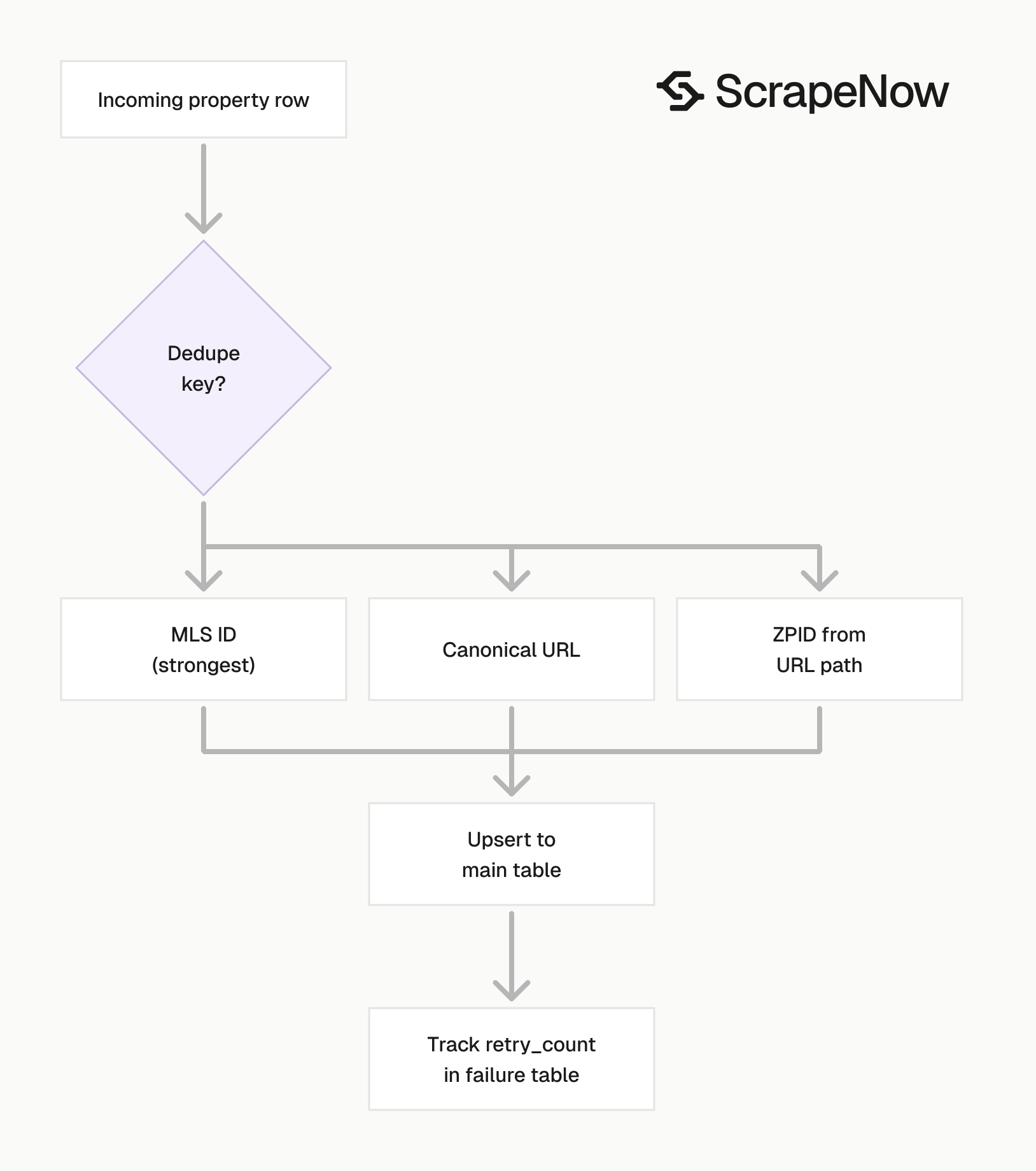
Use this dedupe order in production:
attribution_info.mls_idwhen present.- Canonical Zillow URL.
- Zillow property ID from the URL path, such as
42621930_zpid.
MLS ID is the strongest key in the sample response. URL is the safest fallback.
Extract the Zillow property ID as a separate column when your warehouse supports it. It gives you a stable fallback when the listing slug changes.
import re

def extract_zpid(url: str) -> str | None:
    match = re.search(r"/(\d+)_zpid/?", url)
    if not match:
        return None

    return f"{match.group(1)}_zpid"


print(extract_zpid("https://www.zillow.com/homedetails/example/42621930_zpid/"))
This returns 42621930_zpid. Store it beside canonical_url and mls_id.
Deduplication belongs in the write path. Do not postpone it to a weekly cleanup job.
Add a unique index on canonical_url. Use an upsert keyed by mls_id when your data model supports MLS-level uniqueness.
Store nested Zillow fields without losing the raw payload
Use a table with high-value columns plus a raw JSON column. Analysts get normal columns, and engineers keep the full response when Zillow changes fields.
A practical schema looks like this:
CREATE TABLE zillow_property_details (
    id BIGSERIAL PRIMARY KEY,
    canonical_url TEXT NOT NULL UNIQUE,
    input_url TEXT NOT NULL,
    scrape_status TEXT NOT NULL,
    home_status TEXT,
    true_status TEXT,
    description TEXT,
    agent_name TEXT,
    agent_phone_number TEXT,
    broker_name TEXT,
    mls_id TEXT,
    mls_name TEXT,
    zpid TEXT,
    is_fsba BOOLEAN,
    is_fsbo BOOLEAN,
    is_pending BOOLEAN,
    is_foreclosure BOOLEAN,
    is_open_house BOOLEAN,
    raw_payload JSONB NOT NULL,
    scraped_at TIMESTAMPTZ NOT NULL DEFAULT NOW()
);
Do not flatten every nested field on day 1. Keep the raw payload and promote fields only when downstream jobs use them.
This pattern works during source changes. If Zillow adds, renames, or removes a field, you still have the original payload for backfills and incident review.
Use nullable columns for fields that come from Zillow or MLS attribution. Phone number, MLS ID, and broker name can be missing on specific listing types.
Keep raw_payload required. Empty raw payloads create dead ends during debugging because engineers lose the source response.
For analytics, index the fields you filter often. Start with canonical_url, mls_id, home_status, true_status, and scraped_at.
Add job_id when you move from test runs to scheduled jobs. That column lets you trace one database row back to the ScrapeNow job that produced it.
Handle failed Zillow rows separately from failed jobs
The job can complete while one input row fails. Treat scrape_status as row-level status.
def split_success_and_failed(results: list[dict]) -> tuple[list[dict], list[dict]]:
    success = []
    failed = []

    for item in results:
        if item.get("scrape_status") == "success":
            success.append(item)
        else:
            failed.append(item)

    return success, failed
Retry failed rows with a capped retry count. Store the failed input URL, timestamp, and API response body.
A practical retry policy is 3 attempts per URL. After 3 failures, move the URL to a dead-letter table and review the pattern.
Track the failure rate per batch. If a 100 URL batch returns 3 failed rows, retry those rows.
If a batch returns 80 failed rows, pause the job and inspect the input source. That failure rate usually points to an upstream URL problem, expired listings, or a mismatched scraper.
Keep row failures out of your main table until they pass validation. Store them in a separate table with the raw response and retry metadata.
CREATE TABLE zillow_property_detail_failures (
    id BIGSERIAL PRIMARY KEY,
    input_url TEXT NOT NULL,
    canonical_url TEXT,
    scrape_status TEXT,
    response_body JSONB,
    retry_count INTEGER NOT NULL DEFAULT 0,
    failed_at TIMESTAMPTZ NOT NULL DEFAULT NOW()
);
This table gives you a clear queue for retries. It also gives support staff a direct record when a source URL needs manual review.
Add a unique key on input_url and retry_count if you want a full retry history. Use one row per URL if you only need the latest failure state.
Keep Zillow scraper batch size predictable
Start with 100 property URLs per job. That gives you enough throughput without turning one invalid batch into a large cleanup task.
For nightly jobs, write each completed batch to storage before starting the next one. Do not wait for 10,000 URLs to finish before saving results.
A predictable batch loop is easier to restart. If batch 37 fails, replay batch 37 instead of reprocessing the full run.
def chunks(items: list[str], size: int) -> list[list[str]]:
    return [items[i:i + size] for i in range(0, len(items), size)]


property_urls = [
    "https://www.zillow.com/homedetails/1747-Old-Natchez-Trce-Franklin-TN-37069/42621930_zpid/"
]

for batch_number, batch in enumerate(chunks(property_urls, 100), start=1):
    inputs = [{"url": url} for url in batch]
    job_id = trigger_scrape(SCRAPER_SLUG, inputs)
    print(f"Started batch {batch_number}: {job_id}")
Save each batch with the job ID in the filename. That gives you traceability from local files back to ScrapeNow job history.
For database writes, wrap each batch in a transaction. Commit successes, write failures to the failure table, and store the job ID with both groups.
Use batch filenames that sort by run time. A pattern like zillow_details_2025-01-15_batch_037_job_abc123.json works well in object storage.
Store raw batch files before parsing them into tables. Raw files give you a stable recovery point if a parser bug corrupts a load.
Pick the right Zillow scraper for your input
flowchart TD
  A[Zillow search page or property URL] --> B{Input type}
  B -->|Property detail URL| C[Use by-URL property details scraper]
  B -->|Search results page| D[Use search page scraper]
  B -->|Search filters| E[Use listings search by filters]
  C --> F[Return one row per property URL]
  D --> F
  E --> G[Return listing URLs]
  G --> C
  F --> H[Store canonical URL, MLS ID, and raw payload]
Use this table when wiring the pipeline:
| Input you have | Scraper to use | Output you want |
|---|---|---|
| One or more property detail URLs | Get Zillow property details | Full property detail records |
| A Zillow search results URL | Zillow Property Details Extract from Search Page | Property details for listings on the page |
| Search criteria such as location and filters | Zillow Listings Search by Filters | Listing URLs and summary listing data |
| A Zillow listings page URL | Zillow Listings Search by URL | Search result listings from that URL |
The broader Zillow scraper set lives in ScrapeNow's scraper catalog. It includes listing search and property detail extractors.
For most pipelines, run listing search first and property details second. Store the listing URL from the first step, then send that URL into the details scraper.
Keep the scraper boundary clear in your code. One module should discover URLs, and another module should enrich those URLs with property details.
That boundary also keeps tests smaller. Discovery tests check search filters and returned URLs. Detail tests check fields such as description, MLS ID, agent name, and listing subtype flags.
Build a Zillow hub and guide data pipeline
A clean Zillow pipeline has three layers. Search jobs create the URL inventory, detail jobs enrich each URL, and warehouse jobs merge the result into durable tables.
Use the Zillow search scrapers as hub inputs when your source is a market, location, or filter set. Use the property details scraper as the guide that adds full listing records for each discovered URL.
This structure keeps changes isolated. A filter change affects discovery, while a schema change affects detail extraction.
A common production flow looks like this:
- Run Zillow Listings Search by Filters for a market and filter set.
- Store returned listing URLs in a discovery table.
- Canonicalize URLs and remove duplicates.
- Send new or stale URLs to Get Zillow property details.
- Write successful detail records to
zillow_property_details. - Write failed rows to
zillow_property_detail_failures. - Re-run stale listings on a schedule based on your refresh window.
Use a shorter refresh window for active listings. Use a longer refresh window for sold or off-market records.
For example, refresh FOR_SALE rows daily and refresh off-market rows weekly. Store that policy in code instead of relying on an analyst to rebuild the same filters.
ScrapeNow response behavior to account for in code
ScrapeNow jobs have job-level status and row-level status. Your code should handle both.
Job-level status tells you whether the job reached a terminal state. Row-level scrape_status tells you whether each input produced a usable record.
This distinction matters during partial failure. A completed job can contain failed rows, and your loader should split those rows before writing to the main table.
The results endpoint returns JSON when you request format=json. Keep that format in your loader unless your downstream tool requires another file type.
The output includes inputs.url beside the extracted fields. Use that echo to connect a returned row to the exact input that produced it.
The scraper returns nested fields for attribution and listing subtype data. Preserve those structures in raw_payload even when you promote selected fields into columns.
Pricing
ScrapeNow charges per returned row. One row costs one credit, starting at $0.04 per credit for small runs and dropping with volume. No monthly contracts, no proxy fees, no charges for failed rows. See the pricing page for current rates.


