One TikTok video URL can return 20+ structured fields, including caption, author, hashtags, sound data, view count, like count, comment count, share count, publish time, and video URL.
A TikTok scraper extracts public profile metadata, post captions, engagement counts, hashtags, sound data, and comment threads. Teams use this data for creator research, trend tracking, brand monitoring, campaign reporting, and content analysis.
ScrapeNow turns public TikTok pages into structured rows. Analysts get usernames, profile URLs, captions, views, likes, comments, shares, timestamps, profile fields, and commenter data without copying records by hand.
The input type controls the scraper. Creator URLs, video URLs, keywords, profile feeds, and comment threads need separate extraction paths because TikTok exposes each data set differently.
ScrapeNow splits those paths into dedicated TikTok scrapers. That keeps inputs strict, output schemas predictable, and repeat jobs easier to run from the web interface or REST API.
Use the wrong input type and the job gets noisy fast. Video URLs belong in post extraction, creator URLs belong in profile or profile-post extraction, and search terms belong in keyword search.
Why TikTok scraping fails in production
TikTok changes its web app often. It loads data through client-side requests, changes internal payloads, and rate-limits traffic that repeats the same access pattern.
A basic Python script can fetch a small set of pages. The same script breaks when you add pagination, creator lists, keyword searches, or comment extraction across thousands of videos.
The main failure points are predictable:
| Failure point | What happens | Production fix |
|---|---|---|
| Anti-bot checks | Requests return empty pages, 403s, or redirects | Use maintained extractors with browser-like request handling |
| Login walls | Some pages or comment threads stop loading consistently | Keep extraction focused on public data and supported input types |
| Rate limits | Repeated requests from one IP get throttled | Rotate IPs and back off by target type |
| Client-side rendering | HTML responses miss the data you need | Extract from internal payloads instead of static HTML |
| Layout changes | Selectors fail without warning | Use purpose-built scrapers that get patched when TikTok changes |
Academic work shows the scale of TikTok data collection. The paper Just Another Hour on TikTok describes collecting post metadata, video media, and comments from a near-complete time slice of TikTok.
Open-source projects such as omkarcloud/tiktok-scraper and riyagoelrs/tiktok-scraper work for experiments. Scheduled extraction turns selector failures, blocked sessions, retries, and schema drift into recurring maintenance work.
That maintenance load grows faster than the dataset. Fifty profile URLs take minutes, and large creator lists need job queues, retry policies, IP rotation, and output validation.
TikTok comments add the most operational friction. Comment endpoints paginate deeply, return partial pages, and trigger rate controls faster than basic post metadata requests.
Production scraping also fails through silent partial results. A job can return a CSV, pass a basic status check, and still miss half the expected comments or profile fields.
That failure mode is expensive because dashboards keep updating. Your team sees a number that changed, then spends hours proving whether TikTok changed or the scraper failed.
Why use ScrapeNow for TikTok extraction
ScrapeNow handles the pieces that break production TikTok scrapers. That includes request handling, pagination, retry behavior, schema mapping, and scraper updates after TikTok changes page behavior.
You still control the job. You choose the input type, send URLs or keywords, and receive structured rows for downstream work.
The practical difference shows up during repeat jobs. A one-off script needs fixes when TikTok changes markup. A maintained scraper gets patched as part of the product.
ScrapeNow separates scraping by target type. A profile metadata job follows a different path than a comments job, because each target has different pagination and failure patterns.
That split reduces invalid inputs. It also makes the output easier to join across jobs because each scraper returns a predictable field set.
Use profiles for creator databases. Use post extraction for known video URLs, keyword search for discovery, profile posts for creator history, and comments for audience reaction.
This separation matters when teams move from a spreadsheet test to a scheduled pipeline. The profile run can feed a creator table, the post run can feed a video table, and the comment run can feed a separate reaction table.
ScrapeNow also keeps pricing tied to returned rows. One returned row equals 1 credit, so cost planning maps directly to exported records.
ScrapeNow's TikTok scrapers
ScrapeNow splits TikTok extraction by job type. Profile extraction, post URL extraction, keyword search, creator feed scraping, and comment scraping fail in different ways.
Each scraper returns structured rows and charges credits per result. You can run jobs from the web interface or through the REST API.
This split keeps input formats predictable. It also keeps the output schema stable enough for dashboards, warehouses, notebooks, and enrichment pipelines.
The main product detail is strict typing. Each scraper expects one input shape and returns one output shape.
That design keeps jobs repeatable. It also makes failures easier to locate because each run has one target type.
TikTok Profiles Scraper
The Get TikTok profile data extracts public creator metadata from profile URLs. Returned fields include username, display name, bio, follower count, following count, total likes, profile image, and verification status.
See the TikTok Profiles Scraper guide for code examples and workflow details. Use this scraper when you already have creator URLs and need a normalized creator database.
Common runs include influencer vetting, creator CRM enrichment, weekly follower tracking, and market mapping. A typical workflow starts with handles from a spreadsheet, then enriches each row with public profile metadata.
Profile scraping works well as the first step in creator scoring. You can filter inactive accounts, low-follower accounts, and accounts without useful bios before pulling post history.
This cuts spend on later jobs. There is no reason to collect posts and comments for creators who fail basic audience or category filters.
A practical filter starts with follower count, bio keywords, verification status, and total like count. Then the next run pulls post history only for creators that pass those checks.
TikTok Posts Extract by URL
The Extract TikTok post data extracts metadata from specific TikTok video URLs. Returned fields include caption text, author data, hashtags, sound metadata, likes, comments, shares, and view counts.
See the TikTok Posts Scraper guide for code examples and field notes. Use this scraper when your input is a fixed list of video URLs.
Those URLs usually come from a monitoring system, spreadsheet, social listening workflow, or creator audit. This scraper works well for fixed datasets where every target video is known before the job starts.
Post-by-URL extraction is the right choice for repeat measurement. You can rerun the same video list daily and track view growth, comment growth, and share velocity over time.
This pattern fits campaign reporting. Save the video URLs on launch day, rerun the same list every 24 hours, and calculate growth from the returned metrics.
Treat the video URL as the stable key. Captions, counts, and author fields can change, so store snapshots with the run timestamp.
TikTok Posts Search by Keyword
The Search TikTok posts by keyword returns posts matching a keyword or phrase. Each result includes video metadata and engagement counts.
See the TikTok Posts Scraper guide for search examples and output details. Use this scraper for trend research, brand monitoring, competitor tracking, and product discovery.
If you track terms like "protein coffee", "AI headshots", or a product name, keyword search finds videos before you have creator URLs. It gives you the discovery layer for topics, phrases, campaign names, and emerging hashtags.
Keyword scraping also helps teams find creators outside their existing lists. Search results surface accounts that mention the term, even when the creator never appears in your CRM.
For brand monitoring, store every returned video URL. Then run post extraction later against the saved URLs to measure engagement growth from the same fixed set.
Keep keyword jobs separate by term. Mixing unrelated terms in one export makes reporting harder and increases duplicate handling work later.
TikTok Posts Search by Profile URL
The Pull posts from a TikTok profile extracts public posts from a creator profile URL. Returned fields include captions, video URLs, engagement metrics, hashtags, sounds, and publish data.
See the TikTok Posts Scraper guide for profile-feed examples. Use this scraper when creator history matters more than a single video.
A typical run pulls recent posts from a creator list, then ranks creators by median views, posting frequency, or comment volume. This gives you a better creator profile than follower count alone.
Follower count measures audience size. Post history shows whether that audience still engages with the creator's current content.
This scraper also helps detect inactive creators. If a profile has a large follower count and weak recent posts, the creator is a poor campaign fit.
Store post history in a separate table from profile metadata. Creator fields describe the account, and post fields describe individual pieces of content.
TikTok Comments Scraper
The Extract TikTok comments extracts public comments from TikTok video URLs. Returned fields include comment text, commenter metadata, likes, timestamps, and reply context where available.
See the TikTok Comments Scraper guide for comment extraction examples. Use this scraper for sentiment review, product feedback mining, creator audience checks, and brand safety review.
Comments are slower and more failure-prone than post metadata. TikTok paginates them aggressively and applies tighter rate controls than it applies to basic video metadata.
Run comment extraction after you filter posts. Pulling comments for every video wastes credits and increases processing time.
A better workflow ranks videos by views, shares, or comment count first. Then it extracts comments only from videos that matter to the analysis.
For example, a campaign audit can pull comments from the top 50 videos by share count. That gives analysts audience reaction data without processing every low-reach post.
For product research, comments often carry the highest signal. They show objections, use cases, confusion, price sensitivity, and language customers use without prompting.
API example for a TikTok scraping job
ScrapeNow jobs can run from the web app or REST API. The API path fits scheduled jobs, warehouse loads, and internal dashboards.
The example below shows the shape of an API-triggered TikTok post extraction job. Replace the API key, endpoint path, and payload fields with the values from your ScrapeNow account:
curl -X POST "https://api.scrapenow.io/api/v1/scraping/scrape?scraper=tiktok-posts-extract-by-url" \
  -H "Authorization: Bearer YOUR_API_KEY" \
  -H "Content-Type: application/json" \
  -d '{
    "urls": [
      "https://www.tiktok.com/@creator/video/1234567890123456789",
      "https://www.tiktok.com/@brand/video/9876543210987654321"
    ],
    "format": "json"
  }'
A response should give you a run identifier. Your application can poll the run, fetch completed rows, and load them into a warehouse or queue.
Keep job inputs typed. Send profile URLs to the profile scraper, video URLs to the post scraper, and search terms to the keyword scraper.
That one rule prevents many downstream issues. Mixed input types create empty rows, duplicate records, and mismatched schemas.
For scheduled jobs, store the run ID next to the input batch. That makes it easier to trace a dashboard row back to the exact extraction run.
The polling flow usually looks like this:
curl -X GET "https://api.scrapenow.io/v1/runs/RUN_ID" \
  -H "Authorization: Bearer YOUR_API_KEY"
When the run finishes, fetch the rows and write them to your destination table:
curl -X GET "https://api.scrapenow.io/v1/runs/RUN_ID/results?format=json" \
  -H "Authorization: Bearer YOUR_API_KEY"
Use your account's live endpoint paths when wiring this into production. Keep the example shape, then match the exact scraper path shown in your ScrapeNow dashboard.
Which TikTok scraper to use
Pick the scraper based on the input you already have. Poor scraper selection creates extra work, duplicate rows, and higher costs.
| You have | Use this scraper | Best output |
|---|---|---|
| Creator profile URLs | TikTok Profiles Extract by URL | Creator metadata and audience size |
| Video URLs | TikTok Posts Extract by URL | Video metrics and captions |
| Keywords or brand terms | TikTok Posts Search by Keyword | Matching videos and engagement data |
| Creator URLs and need their videos | TikTok Posts Search by Profile URL | Post history per creator |
| Video URLs and need audience reactions | TikTok Comments Extract by URL | Comment threads and commenter data |
For most creator research pipelines, start with profiles. Then pull posts by profile URL and extract comments only for top-performing videos.
That sequence keeps volume under control. It also avoids paying for comments on videos that never make it into the final analysis.
For brand monitoring, start with keyword search. Save the matching video URLs, then rerun post extraction later to measure engagement growth.
For creator audits, start with profile URLs. Pull profile metadata first, filter the list, then scrape posts for the creators that pass your criteria.
For product research, start with keyword search around pain points, brand names, and category phrases. Then extract comments from videos with active discussion.
A simple rule works well in production. Discover with keywords, qualify with profiles, measure with post extraction, and analyze reaction with comments.
What you can extract from TikTok
TikTok data changes by page type. A profile page exposes different fields than a video page or comment thread.
ScrapeNow's TikTok scrapers cover these common fields:
| Data type | Example fields | Common use |
|---|---|---|
| Profile metadata | Username, display name, bio, followers, likes, verification | Creator discovery and enrichment |
| Post metadata | Caption, video URL, author, publish data, hashtags | Trend tracking and content analysis |
| Engagement metrics | Views, likes, comments, shares | Ranking creators and posts |
| Sound metadata | Sound name, sound author, sound URL | Audio trend analysis |
| Comments | Comment text, commenter username, likes, timestamp | Sentiment and audience review |
A Statista report released in May 2026 says its TikTok study analyzed 92,000 accounts and over 2.31 million posts. That is the right order of magnitude for serious TikTok analysis.
One viral post gives you an anecdote. A large dataset shows repeated patterns across creators, topics, sounds, formats, and posting schedules.
Field availability changes by target. Deleted videos, private accounts, restricted comments, regional availability, and TikTok experiments affect returned data.
Build downstream jobs for partial data. Your warehouse schema should accept nulls for fields like sound metadata, reply context, and some engagement values.
Add run-level checks after every export. Track requested inputs, returned rows, blank required fields, duplicate URLs, and timestamp ranges.
Those checks catch silent data loss early. They also give your team a clear audit trail when a dashboard number changes.
The safest storage model uses one table per entity type. Keep creators, posts, comments, runs, and input batches separate.
That structure makes joins explicit. It also keeps comment volume from bloating profile and post tables.
Pricing
ScrapeNow charges per returned row. One row costs one credit, starting at $0.04 per credit for small runs and dropping with volume. No monthly contracts, no proxy fees, no charges for failed rows. See the pricing page for current rates.
When to build your own TikTok scraper
Build your own scraper if you need a custom field ScrapeNow does not return. Also build your own if the workflow depends on a private browser session or experimental research logic.
Use ScrapeNow if you need profiles, posts, keyword results, creator feeds, or comments in structured rows this week. The saved work comes from maintenance, retries, and schema handling.
A small script works for 50 URLs. A production job with rotating targets and comment pagination needs retries, scheduling, IP rotation, schema checks, and failure alerts.
Custom scrapers also need monitoring. You need to know when TikTok changes a payload, blocks a proxy pattern, or returns partial data.
The usual failure mode is silent data loss. The job still runs, the CSV still exports, and half the fields are empty.
Add validation if you build in-house. Check row counts, required fields, status codes, duplicate URLs, timestamp ranges, and engagement fields after every run.
Also log target-level failures. A single failed creator profile should not poison a full creator research job.
A realistic in-house build needs more than extraction code. You need a run table, input table, retry queue, proxy policy, alerting, and data validation.
Here is the minimum checklist I would require before running an internal TikTok scraper on a schedule:
| Component | Why it matters |
|---|---|
| Input validation | Rejects profile URLs in post jobs and video URLs in profile jobs |
| Retry queue | Separates temporary blocks from permanent target failures |
| Proxy rotation | Reduces repeated access patterns from one network path |
| Schema tests | Catches missing fields before data reaches reporting tables |
| Run logging | Ties every output row back to an input batch and timestamp |
| Failure alerts | Tells the team when row counts or required fields drop |
Most teams underestimate the maintenance cost. The extraction script is the small part of the system.
The hard parts arrive after launch. TikTok changes payloads, comments return partial pages, and scheduled jobs start failing during weekend runs.
A practical TikTok scraping workflow
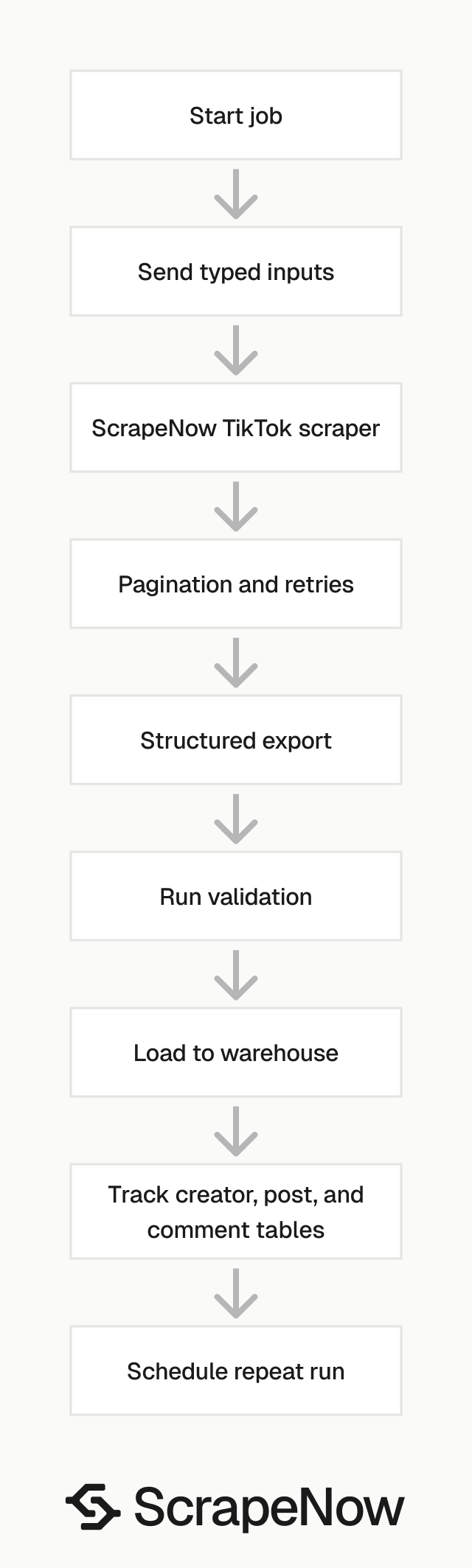
Start with the narrowest input that answers the question. That keeps run size smaller and reduces cleanup work later.
For creator discovery, begin with keyword search. Save the returned creator handles and video URLs, then enrich the creators with profile metadata.
Next, run the profile posts scraper for creators who pass your filters. Score each creator by median views, post frequency, comment rate, and topic fit.
Then extract comments from the strongest videos. This gives you audience language, product objections, sentiment, and brand safety signals.
For campaign reporting, start with known video URLs. Run post extraction on the same set daily, then calculate growth across views, likes, comments, and shares.
For competitor tracking, combine keyword search and profile posts. Track brand terms, competitor names, product names, and creator profiles in separate jobs.
Keep each job small enough to retry safely. Separate discovery, enrichment, post history, and comment extraction into distinct runs.
That structure makes failures easier to debug. If comments fail, your profile database and post metrics remain usable.
A warehouse workflow usually has four tables. Store creators, posts, comments, and scraper runs separately.
The run table should include scraper name, input count, returned row count, start time, end time, and status. That record gives analysts enough context when a metric changes.
Data quality checks to run after export
TikTok scraping should end with validation, not a raw CSV download. The scraper returns rows, and your pipeline should verify that those rows match expectations.
Check the requested input count against returned rows. Large gaps point to private profiles, deleted videos, restricted content, or failed targets.
Check required fields by scraper type. Profiles should include usernames, while post jobs should include video URLs and author fields.
Check duplicate URLs before loading data into a warehouse. Duplicate video rows inflate engagement totals and break campaign reports.
Check timestamp ranges on scheduled jobs. A weekly creator feed job should not return only old videos unless the creator stopped posting.
Check engagement fields for impossible values. Negative counts, empty metrics on active videos, and large drops should trigger review.
These checks do not need a large system. A small validation script after each run prevents most inaccurate reports.
The example below checks a post export before loading it into a warehouse:
import csv
from collections import Counter
from datetime import datetime

required_fields = ["video_url", "author_username", "caption"]
video_urls = []
missing_required = []
bad_counts = []

with open("tiktok_posts.csv", newline="", encoding="utf-8") as f:
    reader = csv.DictReader(f)

    for row_number, row in enumerate(reader, start=2):
        for field in required_fields:
            if not row.get(field):
                missing_required.append((row_number, field))

        video_url = row.get("video_url")
        if video_url:
            video_urls.append(video_url)

        for metric in ["views", "likes", "comments", "shares"]:
            value = row.get(metric)
            if value in (None, ""):
                continue

            if int(value) < 0:
                bad_counts.append((row_number, metric, value))

duplicates = [url for url, count in Counter(video_urls).items() if count > 1]

print({
    "rows": len(video_urls),
    "missing_required": missing_required[:20],
    "duplicate_urls": duplicates[:20],
    "bad_counts": bad_counts[:20],
    "checked_at": datetime.utcnow().isoformat()
})
This script does not replace deeper QA. It catches the failures that break dashboards most often.
Add similar checks for comment exports. Require comment text, video URL, commenter username where available, and a timestamp when TikTok returns one.
Product details that matter in repeat jobs
Strict scraper separation is a practical product detail. It keeps a keyword run from behaving like a profile run and keeps comment pagination isolated from video metadata extraction.
Predictable schemas matter just as much. A data team can map profile fields once, post fields once, and comment fields once.
The REST API matters when scraping becomes a scheduled job. Teams can trigger runs from Airflow, cron, a warehouse task, or an internal dashboard.
The web interface matters during test runs. Analysts can validate output shape before engineering wires the job into a pipeline.
Credit pricing matters because TikTok jobs expand unevenly. A profile run has one row per creator, and a comment run can produce many rows per video.
Scraper maintenance matters because TikTok changes often. Every layout or payload change creates work for a DIY scraper.
ScrapeNow packages those pieces behind separate scrapers. You still decide what to extract, when to run it, and where the rows go.
Common mistakes with TikTok scraping
The most common mistake is starting with comments. Comments are expensive in time and volume, so run them after post filtering.
The second mistake is mixing discovery and measurement. Keyword search finds videos, and post extraction measures a fixed list over time.
The third mistake is treating follower count as creator quality. Recent post performance gives a stronger signal for campaign planning.
The fourth mistake is storing only the latest metrics. Save snapshots so you can calculate growth between runs.
The fifth mistake is ignoring nulls. TikTok does not return every field for every target, so downstream tables need nullable columns.
The sixth mistake is skipping deduplication. The same video can appear through keyword search, profile scraping, and a saved URL list.
Deduplicate on video URL or TikTok video ID before calculating totals. Otherwise, campaign reports overcount views, likes, comments, and shares.
Start with the right TikTok input type
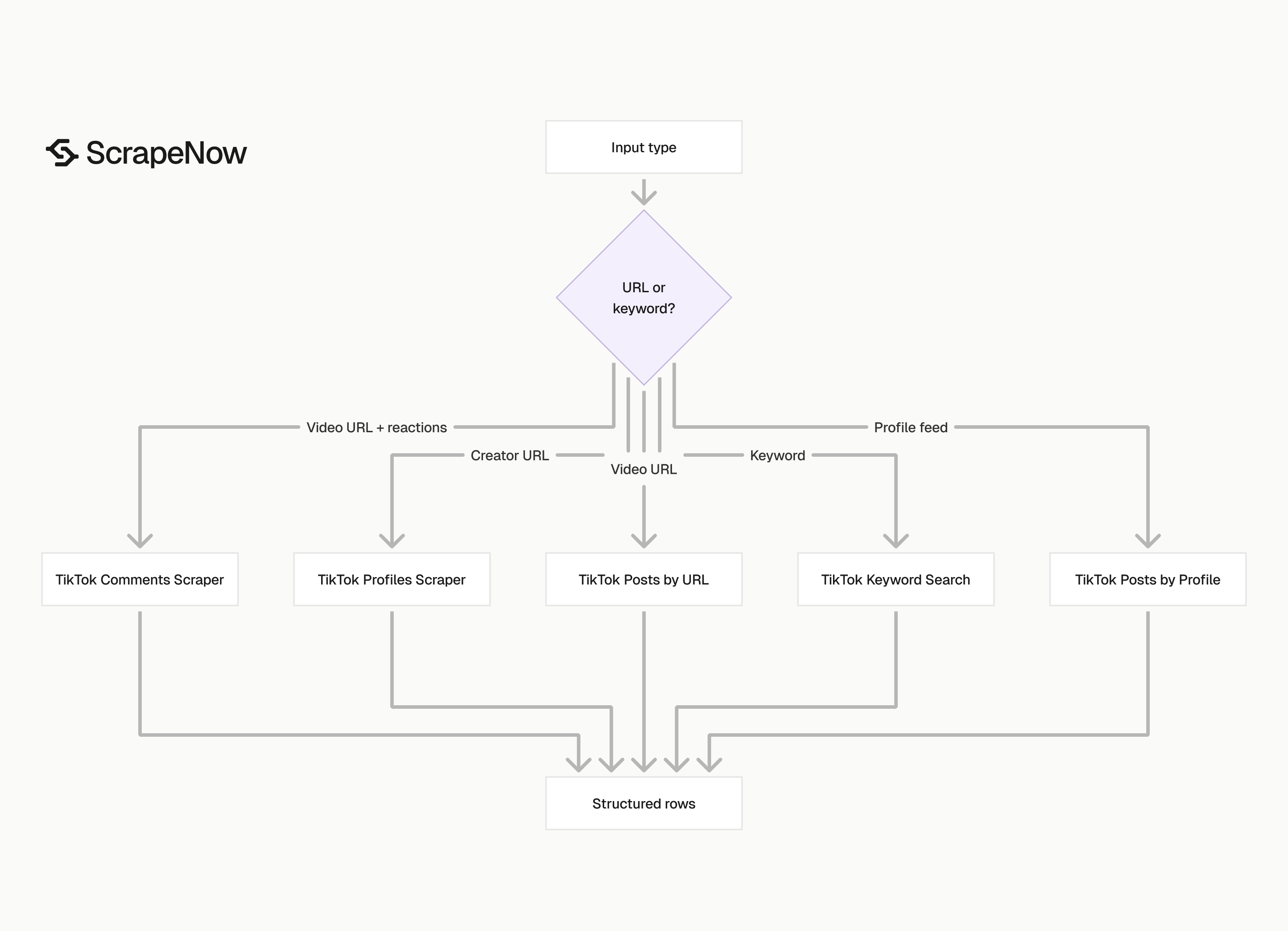
If you have creator URLs, run the Get TikTok profile data first. Then use the Pull posts from a TikTok profile for creator history.
If you have brand terms or campaign hashtags, start with the Search TikTok posts by keyword. Save returned video URLs for repeat measurement and comment extraction.
For a creator research pipeline, keep the order simple. Profiles come first, post history comes second, and comments come last.
For fixed campaign reporting, start with the Extract TikTok post data. Rerun the same video list on a schedule and compare returned metrics.
For audience reaction analysis, start with the Extract TikTok comments only after you identify the videos worth reviewing. Comment extraction is where volume grows fastest.
Start with one narrow run. Send 100 to 250 profile URLs, video URLs, or keyword results, verify the schema, then wire the same scraper into your scheduled job.
If you already have creator URLs, start with the Get TikTok profile data. If you already have video URLs, start with the Extract TikTok post data and save the run ID with your input batch.


