
TikTok profile pages show follower counts, bio text, video counts, and verification status. The ScrapeNow TikTok profiles scraper extracts these fields from any public TikTok profile URL and returns structured JSON.
Use this scraper when your pipeline already has TikTok profile URLs. If your starting point is a keyword query, use the search-page variant to collect profile URLs from TikTok search results first.
How to use this scraper
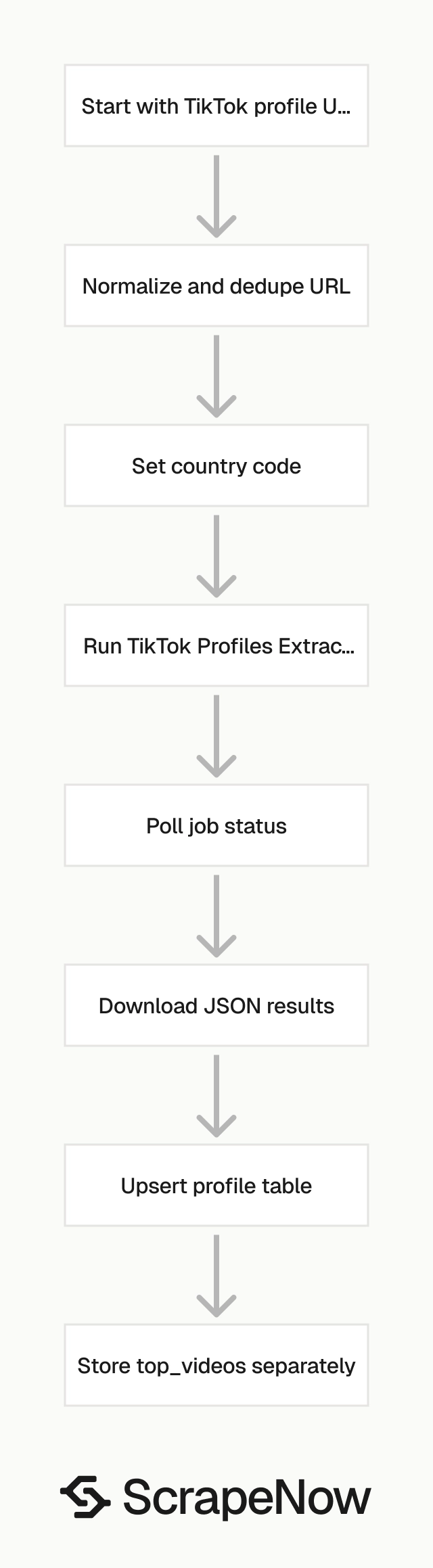
Run the Get TikTok profile data scraper when you already have one or more TikTok profile URLs.
The input payload has two fields:
urlis the TikTok user profile URL. It must start withhttps://www.tiktok.com/.countryis optional. For API usage, send it as a two-letter ISO 3166-1 country code, such asUS.
Get the profile URL
Open
tiktok.com.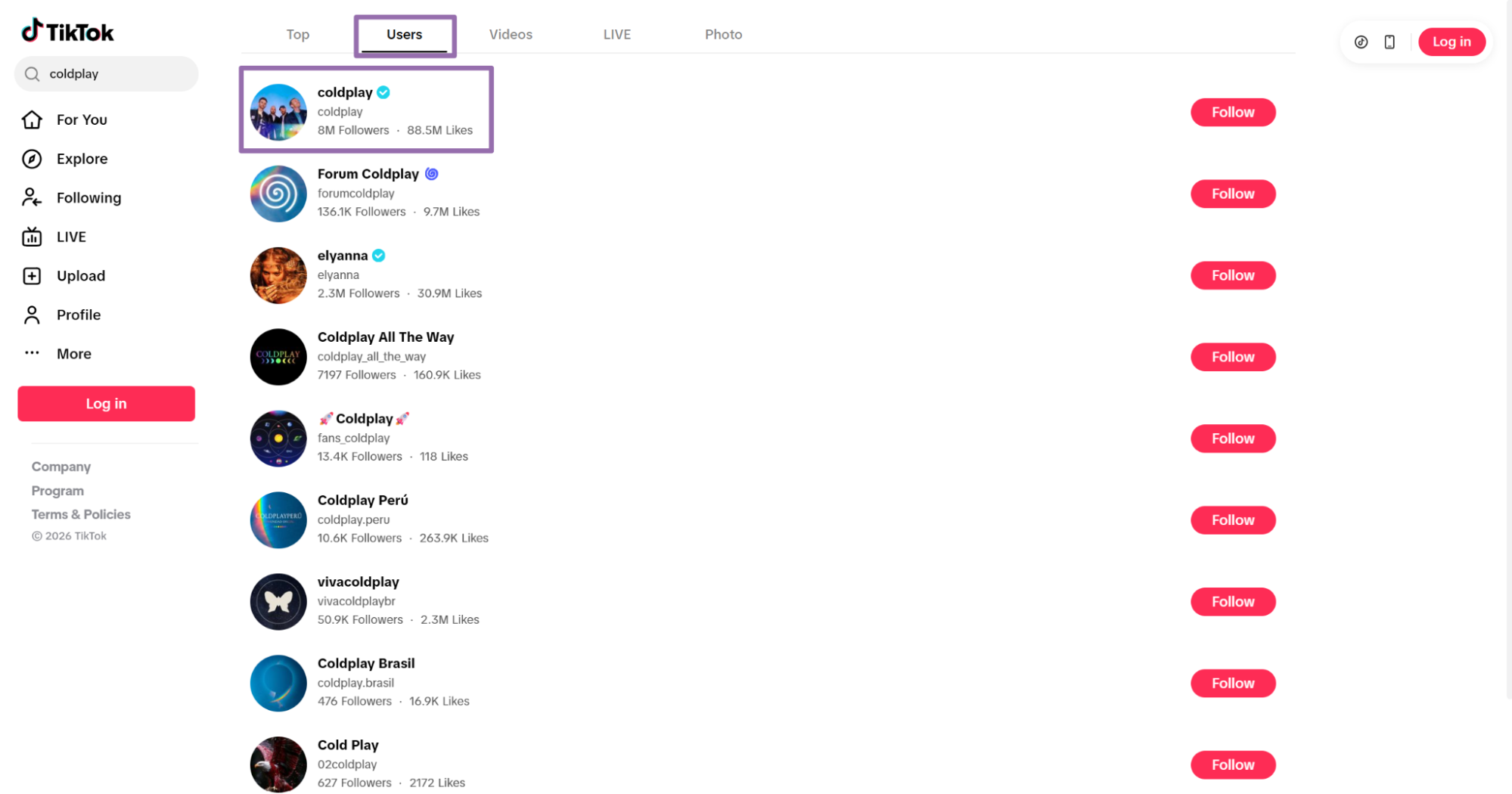
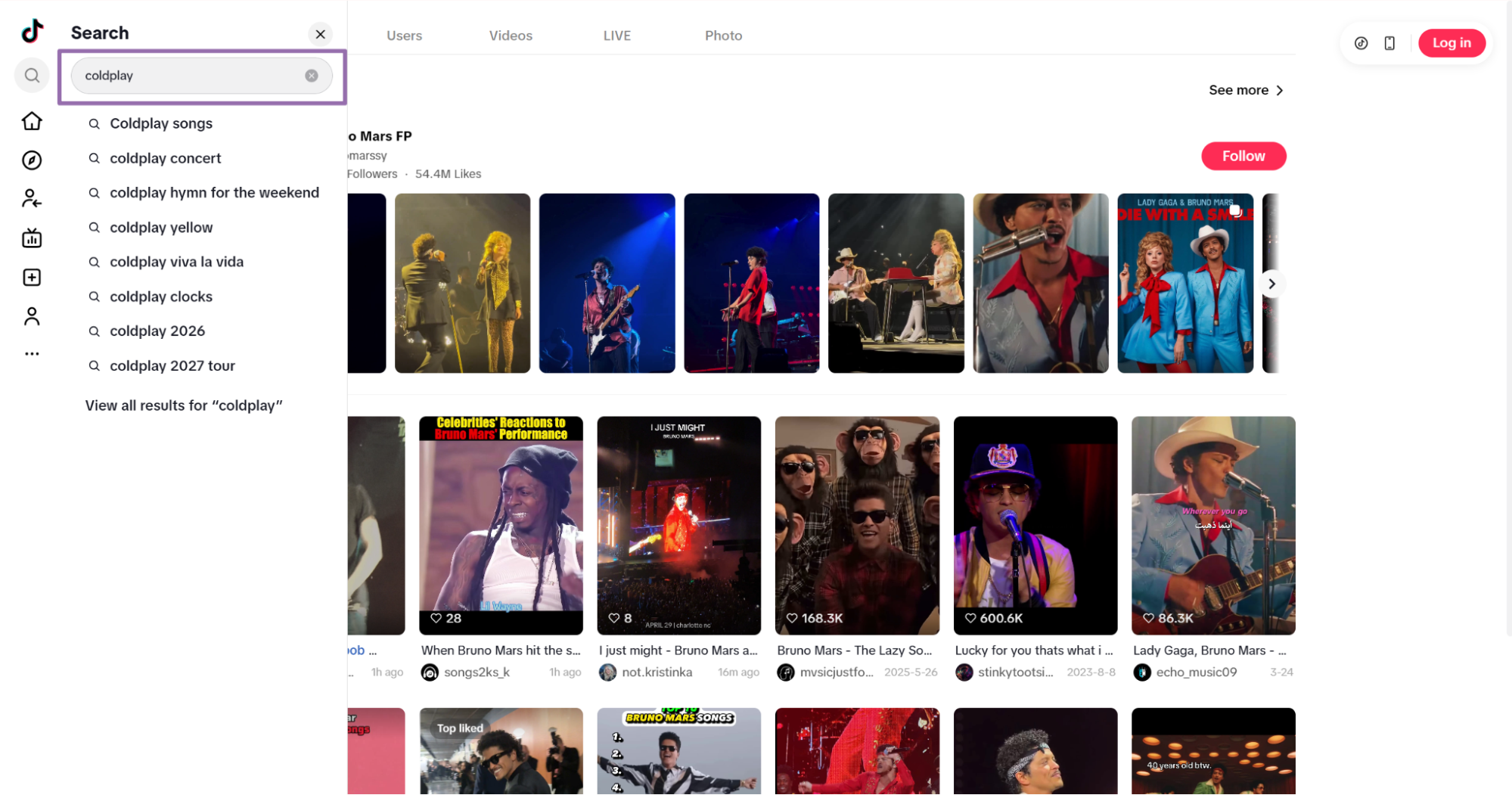
Open the TikTok profile page you want to scrape Use the search bar to find the profile, such as
coldplay.Click
Usersin the navigation bar.Choose the user and open the profile.
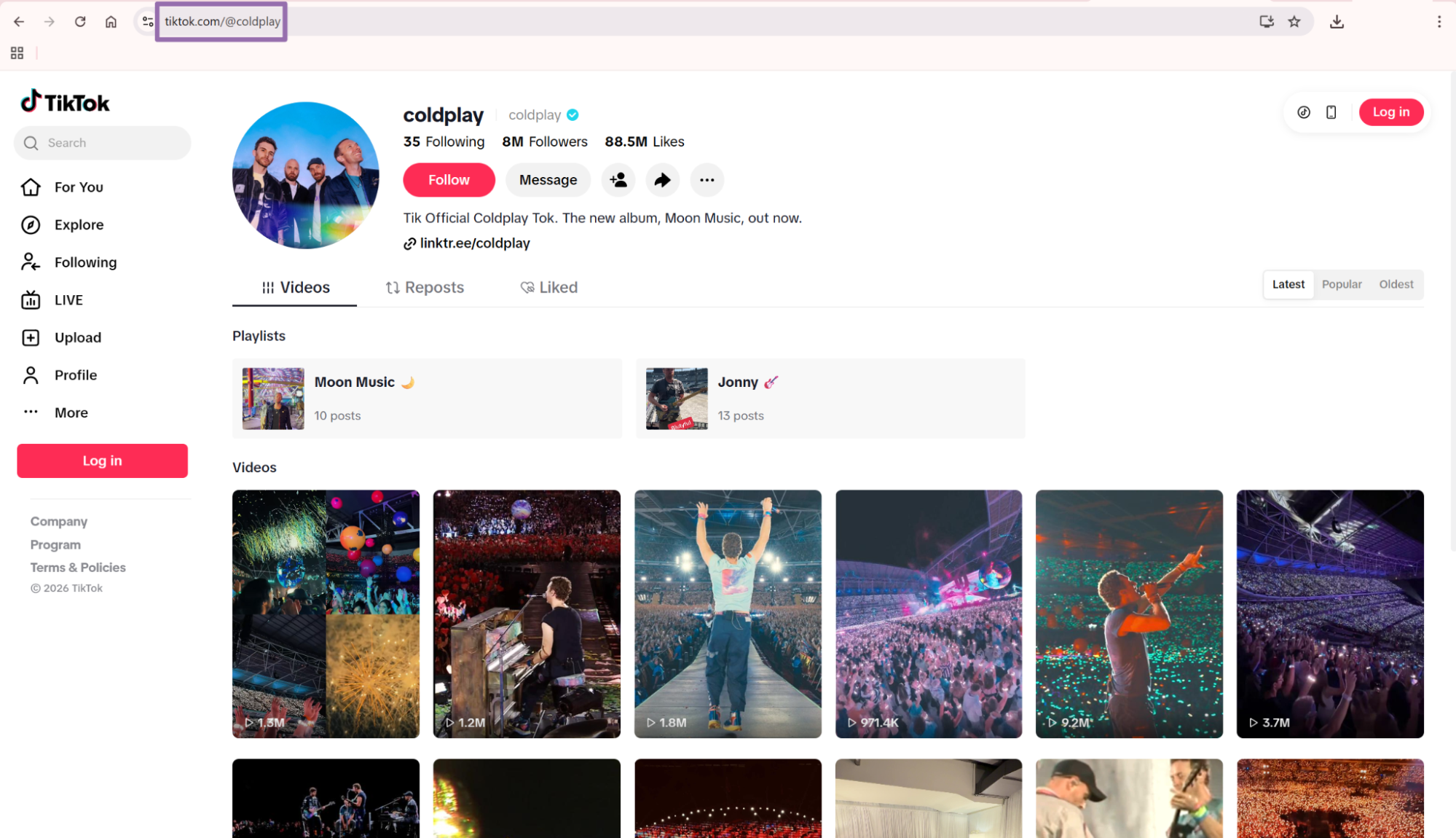
Copy the profile URL from the address bar Copy the URL from the browser address bar.
For the example below, the profile URL is:
https://www.tiktok.com/@coldplay
Strip query strings before storing profile URLs. TikTok appends parameters such as ?lang=en during normal browsing, and those parameters add duplicate rows to weak pipelines.
Run the scraper from Python
Use this API code. Replace YOUR_API_KEY with your ScrapeNow API key.
The script starts a scrape job, polls until completion, downloads the JSON result, and writes it to output/tiktok-profiles-extract-by-url.json.
"""
Configuration:
    - Set SCRAPER_SLUG to the scraper you want to run.
    - Set SCRAPER_INPUTS to the list of input dicts matching that scraper's schema.
    - Set API_KEY to your scraper API key.
"""

import sys
import time
import json
import requests
import os

API_KEY = "YOUR_API_KEY"

SCRAPER_SLUG = "tiktok-profiles-extract-by-url"

SCRAPER_INPUTS = [
    {
        "url": "https://www.tiktok.com/@coldplay",
        "country": "US"
    }
]


BASE_URL = "https://api.scrapenow.io/api/v1/scraping"
TIMEOUT_SECONDS = 3600
POLL_INTERVAL = 5
SPINNER = "|/-\\"


def build_headers(api_key: str, content_type: str | None = None) -> dict:
    headers = {"Authorization": f"Bearer {api_key}"}
    if content_type:
        headers["Content-Type"] = content_type
    return headers


def trigger_scrape(slug: str, inputs: list[dict]) -> str:
    url = f"{BASE_URL}/scrape?scraper={slug}"
    response = requests.post(
        url,
        headers=build_headers(API_KEY, "application/json"),
        json={"inputs": inputs},
    )
    response.raise_for_status()
    return response.json()["data"]["job_id"]


def poll_until_done(job_id: str) -> str:
    start = time.time()
    i = 0
    while True:
        elapsed = time.time() - start
        if elapsed > TIMEOUT_SECONDS:
            print(f"\nTimeout after {TIMEOUT_SECONDS}s")
            sys.exit(1)
        response = requests.get(
            f"{BASE_URL}/jobs/{job_id}",
            headers=build_headers(API_KEY),
        )
        response.raise_for_status()
        data = response.json()
        status = data["data"]["status"]
        mins, secs = divmod(int(elapsed), 60)
        sys.stdout.write(
            f"\r[{SPINNER[i % 4]}] Waiting... {status} ({mins}m {secs:02d}s)  "
        )
        sys.stdout.flush()
        if status in ("completed", "failed"):
            print()
            return status
        time.sleep(POLL_INTERVAL)
        i += 1


def fetch_results(job_id: str) -> dict:
    response = requests.get(
        f"{BASE_URL}/jobs/{job_id}/results?format=json",
        headers=build_headers(API_KEY),
    )
    response.raise_for_status()
    return response.json()


def save_results(data: dict, slug: str) -> str:
    os.makedirs("output", exist_ok=True)
    filename = os.path.join("output", f"{slug}.json")
    with open(filename, "w", encoding="utf-8") as f:
        json.dump(data, f, indent=2, ensure_ascii=False)
    return filename


def main() -> None:
    print(f"Triggering scraper: {SCRAPER_SLUG}")
    job_id = trigger_scrape(SCRAPER_SLUG, SCRAPER_INPUTS)
    print(f"Job started: {job_id}")
    final_status = poll_until_done(job_id)
    if final_status != "completed":
        print(f"Job failed with status: {final_status}")
        sys.exit(1)
    print("Fetching results...")
    results = fetch_results(job_id)
    output_file = save_results(results, SCRAPER_SLUG)
    print(f"Results saved to: {output_file}")


if __name__ == "__main__":
    main()
The same API pattern works for other TikTok profile scrapers in this group, including Search TikTok profiles. Change the scraper slug and input values in the code for each scraper.
For batch jobs, send multiple input objects in SCRAPER_INPUTS. Keep batches small enough for your downstream storage step. A batch of 100 profile URLs is easier to retry than a batch of 50,000 URLs.
Use a TikTok search results page as input
If your starting point is a TikTok search page, use the profile search variant.
The input payload has two fields:
urlis the TikTok search results URL. It must start withhttps://www.tiktok.com/.countryis optional. For API usage, send it as a two-letter ISO 3166-1 country code, such asUS.
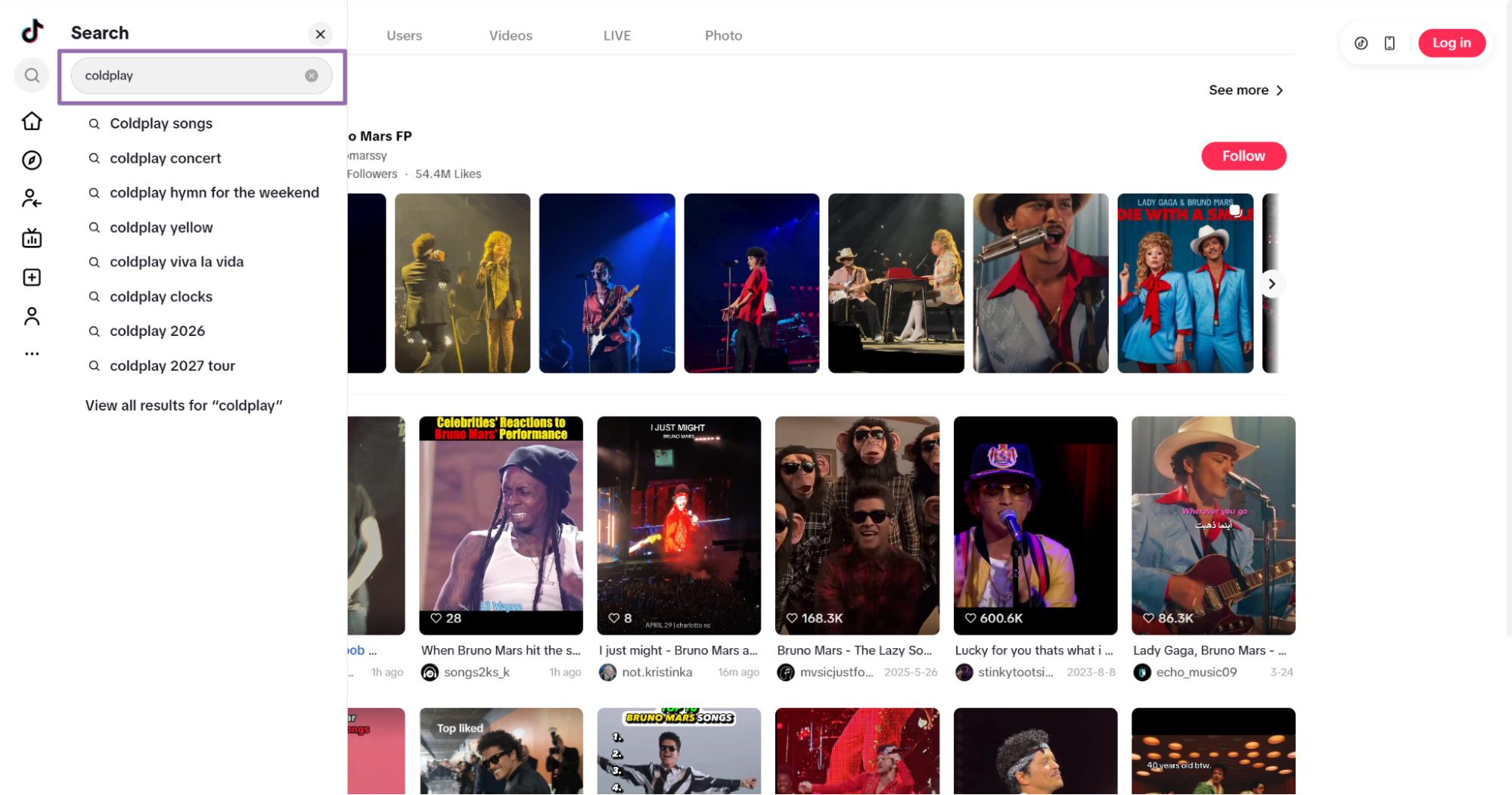
Open
tiktok.com.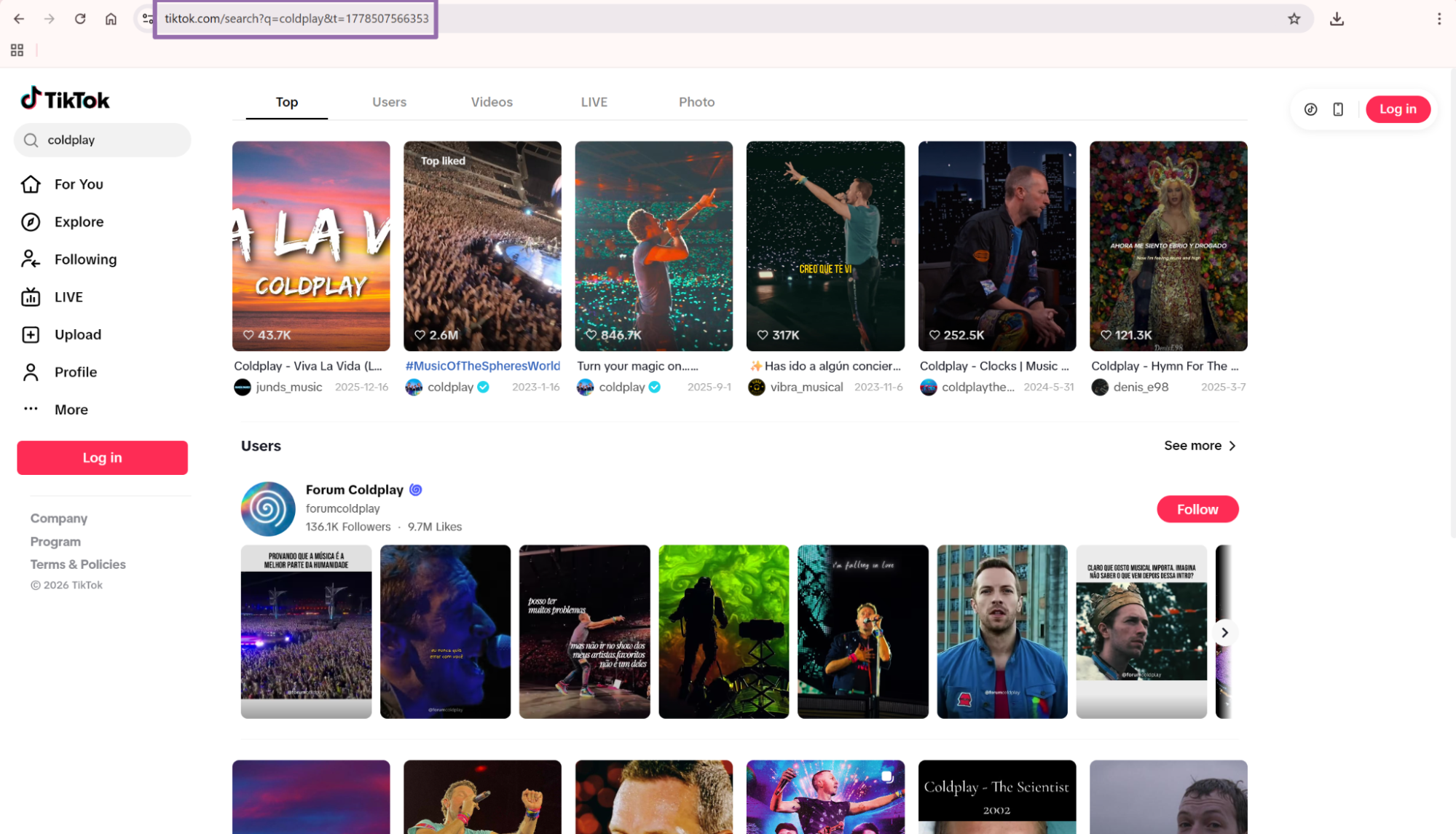
TikTok search results page showing matching user profiles Search for a keyword or user, such as
coldplay.Copy the URL from the address bar.
Use URL extraction when your input list is already built. Use search-page extraction when you collect profiles from a keyword query.
Search-page extraction works well for discovery jobs. Profile URL extraction works better for refresh jobs, because you control the exact accounts in each run.
Example API response
A completed job returns an array of result objects. This trimmed response uses the Coldplay profile example.
[
  {
    "inputs": {
      "url": "https://www.tiktok.com/@coldplay",
      "country": "US"
    },
    "scrape_status": "success",
    "account_id": "coldplay",
    "nickname": "coldplay",
    "biography": "Tik Official Coldplay Tok. The new album, Moon Music, out now.",
    "awg_engagement_rate": 0.03086696785714286,
    "comment_engagement_rate": 0.00028181785714285714,
    "like_engagement_rate": 0.030585149999999995,
    "bio_link": "https://linktr.ee/coldplay",
    "predicted_lang": "en",
    "is_verified": true,
    "followers": 8000000,
    "following": 35,
    "likes": 88700000,
    "videos_count": 393,
    "create_time": "2019-10-21T17:48:01.000Z",
    "id": "6667617084942204934",
    "url": "https://www.tiktok.com/@coldplay",
    "profile_pic_url": "https://p16-common-sign.tiktokcdn-us.com/tos-useast5-avt-0068-tx/c3e5c9bc4036f6d6466f8b6fa252ecf6~tplv-tiktokx-cropcenter:720:720.jpeg?dr=9640&refresh_token=b932e394&x-expires=1778932800&x-signature=XH9JYSdebW2xzBeCRrDWLg%2BSAM8%3D&t=4d5b0474&ps=13740610&shp=a5d48078&shcp=81f88b70&idc=useast8",
    "like_count": 88700000,
    "digg_count": 0,
    "is_private": false,
    "profile_pic_url_hd": "https://p16-common-sign.tiktokcdn-us.com/tos-useast5-avt-0068-tx/c3e5c9bc4036f6d6466f8b6fa252ecf6~tplv-tiktokx-cropcenter:1080:1080.jpeg?dr=9640&refresh_token=4ddca6c5&x-expires=1778932800&x-signature=hz1jN23mKJHU%2FzCjKwffc2aPS00%3D&t=4d5b0474&ps=13740610&shp=a5d48078&shcp=81f88b70&idc=useast8",
    "secu_id": "MS4wLjABAAAAzkNCR0NUtdf-Lrbbl37gWMrEYxcObUPZgP9P1C21f4Kbd7Z3MLs10_vrdS9QKmBL",
    "open_favorite": false,
    "is_ad_virtual": false,
    "top_videos": [
      {
        "video_id": "7639595709137784077",
        "share_count": 26000,
        "playcount": 1000000,
        "diggcount": 280600,
        "commentcount": 4025,
        "create_date": "2026-05-14T04:13:46.000Z",
        "video_url": "https://www.tiktok.com/@coldplay/video/7639595709137784077",
        "cover_image": "https://p16-common-sign.tiktokcdn-us.com/tos-useast5-p-0068-tx/owIoFq8EPBUGigRh9eIAIFEDvTDVDBBkpfkkCS~tplv-tiktokx-origin.image?dr=9636&x-expires=1778932800&x-signature=LmDD5FP%2FTVbU7nSK1XptsTA4dKE%3D&t=4d5b0474&ps=13740610&shp=81f88b70&shcp=43f4a2f9&idc=useast8",
        "favorites_count": 19500
      },
      {
        "video_id": "7590076081990896951",
        "share_count": 5358,
        "playcount": 1300000,
        "diggcount": 130400,
        "commentcount": 1783,
        "create_date": "2025-12-31T17:32:09.000Z",
        "video_url": "https://www.tiktok.com/@coldplay/video/7590076081990896951",
        "cover_image": "https://p19-common-sign.tiktokcdn-us.com/tos-useast5-p-0068-tx/oQjAyBfiVwqh0tqpsIA7IzAPo3IvikCRB2hqXV~tplv-tiktokx-origin.image?dr=9636&x-expires=1778932800&x-signature=aO8Zqi3ngIVSgpiL6isvi5XmlFo%3D&t=4d5b0474&ps=13740610&shp=81f88b70&shcp=43f4a2f9&idc=useast8",
        "favorites_count": 7858
      },
      {
        "video_id": "7549648212324404493",
        "share_count": 4405,
        "playco
... (truncated)
What data you get back, key fields in the API response
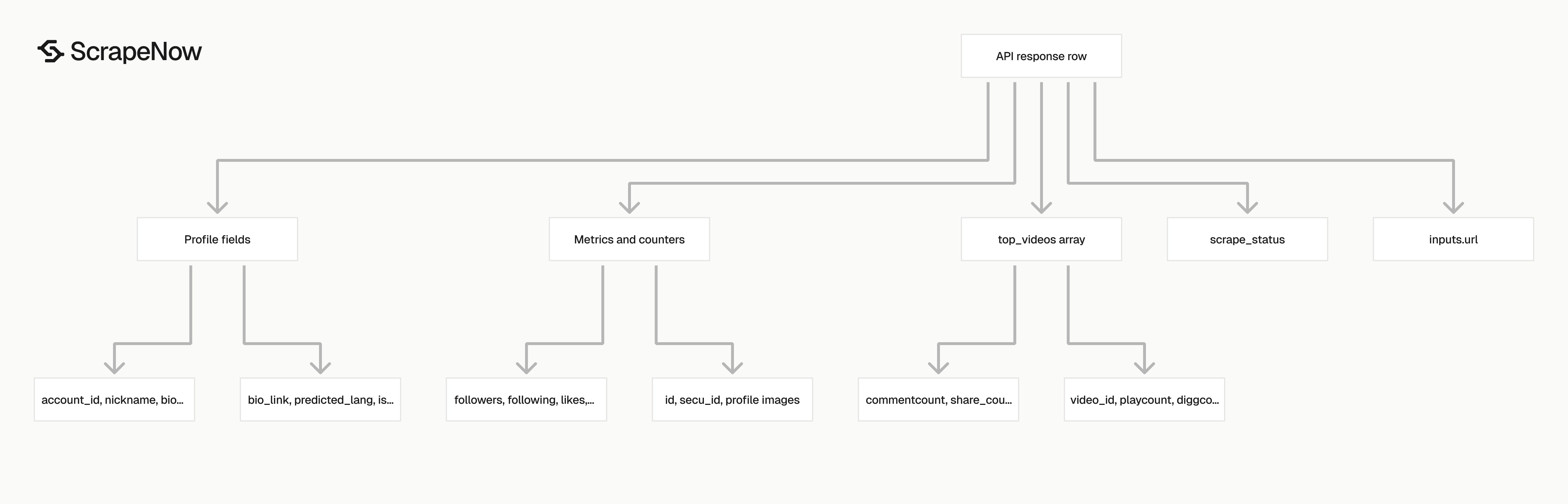
The profile scraper returns one record per input profile URL. Each record includes the original input, a scrape status, profile metadata, engagement rates, counters, IDs, image URLs, and a top_videos array.
| Field | Type | What to store |
|---|---|---|
inputs.url |
string | Original profile URL submitted to the scraper |
scrape_status |
string | success or failure status for the input row |
account_id |
string | TikTok handle without the @ symbol |
nickname |
string | Display name shown on the profile |
biography |
string | Profile bio text |
bio_link |
string or null | External profile link, when present |
predicted_lang |
string | Detected profile language, such as en |
is_verified |
boolean | Verification badge status |
followers |
integer | Follower count, such as 8000000 |
following |
integer | Following count |
likes |
integer | Total likes shown on the profile |
videos_count |
integer | Number of videos on the profile |
create_time |
string | Account creation timestamp when available |
id |
string | TikTok internal user ID |
secu_id |
string | TikTok secure user ID |
is_private |
boolean | Private account flag |
profile_pic_url |
string | Standard profile image URL |
profile_pic_url_hd |
string | HD profile image URL |
awg_engagement_rate |
number | Average engagement rate across available top videos |
comment_engagement_rate |
number | Comment engagement rate |
like_engagement_rate |
number | Like engagement rate |
top_videos |
array | Top video objects with counts and URLs |
Store TikTok IDs as strings. TikTok IDs can exceed JavaScript safe integer limits, and converting them to numbers corrupts joins.
Treat profile image URLs as short-lived media links. Store them for enrichment, and refresh them during scheduled profile runs if your product displays profile images.
Ready to get this data? Get TikTok profile data.
How to use top_videos
The top_videos array gives you a profile sample without running a full post extraction job. Each object includes video_id, video_url, playcount, diggcount, commentcount, share_count, favorites_count, create_date, and cover_image.
Use top_videos for profile scoring and light enrichment. For full post history from a profile, run Pull posts from a TikTok profile with the same profile URL.
Top video metrics also help with sanity checks. If a profile shows millions of followers and every sampled video has almost no engagement, flag the account for manual review.
Production tips, validation, deduplication, schema, and error handling
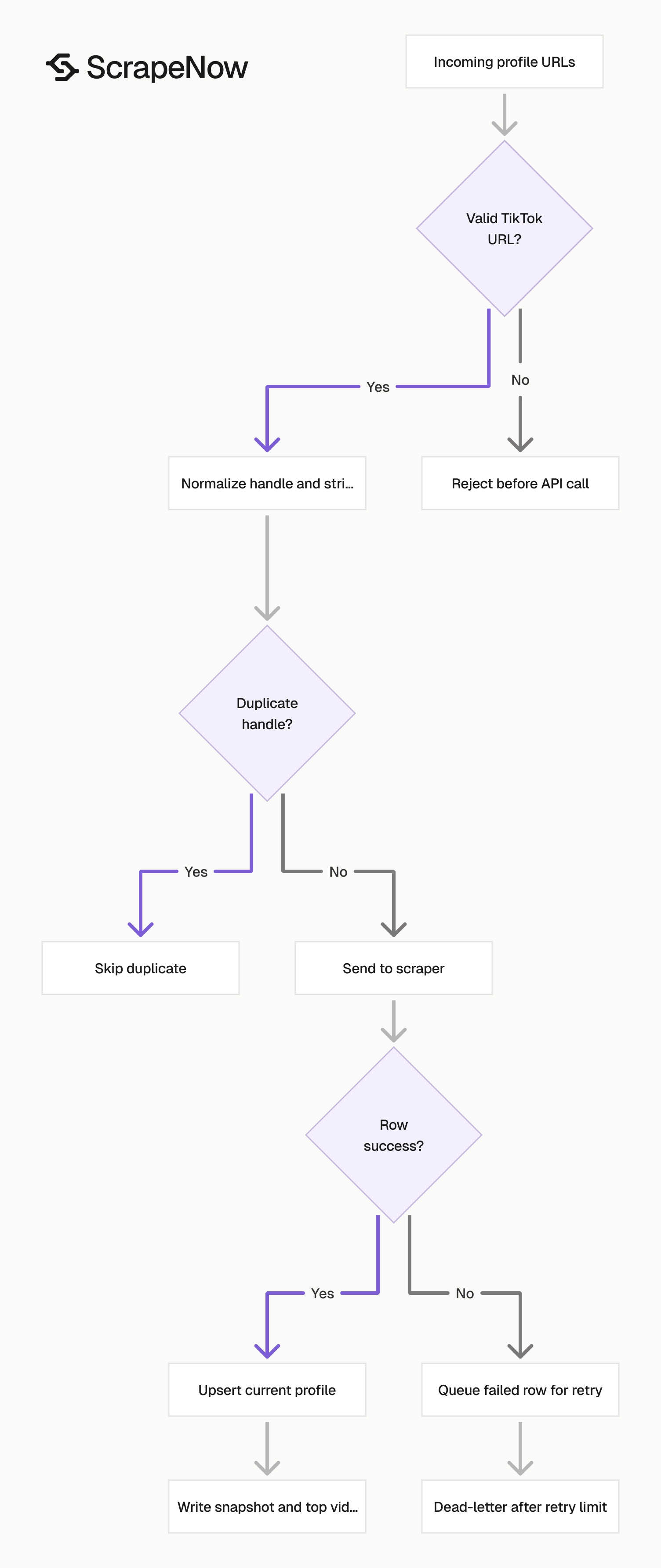
Send clean inputs, store stable identifiers, and avoid losing successful rows when one profile fails.
Validate and normalize inputs
TikTok profile URLs should start with https://www.tiktok.com/ and include an @handle.
This helper turns a mixed list of URLs into clean ScrapeNow inputs:
from urllib.parse import urlparse

def normalize_tiktok_profile_url(raw_url: str) -> str:
    raw_url = raw_url.strip()

    if not raw_url.startswith("https://www.tiktok.com/"):
        raise ValueError(f"Invalid TikTok URL: {raw_url}")

    parsed = urlparse(raw_url)
    path_parts = [part for part in parsed.path.split("/") if part]

    if not path_parts or not path_parts[0].startswith("@"):
        raise ValueError(f"Missing TikTok handle: {raw_url}")

    handle = path_parts[0]
    return f"https://www.tiktok.com/{handle}"


def build_profile_inputs(urls: list[str], country: str = "US") -> list[dict]:
    seen = set()
    inputs = []

    for url in urls:
        normalized = normalize_tiktok_profile_url(url)
        handle = normalized.rsplit("/", 1)[-1].lower()

        if handle in seen:
            continue

        seen.add(handle)
        inputs.append({
            "url": normalized,
            "country": country
        })

    return inputs


urls = [
    "https://www.tiktok.com/@coldplay",
    "https://www.tiktok.com/@coldplay?lang=en",
    "https://www.tiktok.com/@nba"
]

print(build_profile_inputs(urls))
Expected output:
[
  {
    "url": "https://www.tiktok.com/@coldplay",
    "country": "US"
  },
  {
    "url": "https://www.tiktok.com/@nba",
    "country": "US"
  }
]
Normalize before dedupe. Query parameters, trailing slashes, and mixed casing can create duplicate work in scheduled jobs.
Use a stable storage schema
A flat profile table works better than storing the full response blob as your primary record.
Use this as a starting schema:
CREATE TABLE tiktok_profiles (
    account_id TEXT PRIMARY KEY,
    nickname TEXT,
    biography TEXT,
    bio_link TEXT,
    predicted_lang TEXT,
    is_verified BOOLEAN,
    followers BIGINT,
    following BIGINT,
    likes BIGINT,
    videos_count BIGINT,
    create_time TIMESTAMP,
    tiktok_user_id TEXT,
    secu_id TEXT,
    profile_url TEXT,
    profile_pic_url TEXT,
    profile_pic_url_hd TEXT,
    is_private BOOLEAN,
    awg_engagement_rate DOUBLE PRECISION,
    comment_engagement_rate DOUBLE PRECISION,
    like_engagement_rate DOUBLE PRECISION,
    scraped_at TIMESTAMP DEFAULT CURRENT_TIMESTAMP
);

CREATE TABLE tiktok_profile_top_videos (
    account_id TEXT,
    video_id TEXT,
    video_url TEXT,
    playcount BIGINT,
    diggcount BIGINT,
    commentcount BIGINT,
    share_count BIGINT,
    favorites_count BIGINT,
    create_date TIMESTAMP,
    cover_image TEXT,
    scraped_at TIMESTAMP DEFAULT CURRENT_TIMESTAMP,
    PRIMARY KEY (account_id, video_id)
);
Keep account_id as the profile-level primary key if your pipeline treats handles as canonical. Store id as tiktok_user_id as well, because handles can change.
Upsert profiles instead of appending duplicates
Profile scraping is usually a refresh workflow. Use a current-state table for lookups and an append-only snapshot table if your team tracks follower growth.
Handle failed rows without losing the batch
Process each result independently. Move a failed profile into a retry queue and continue writing successful records to storage.
def split_results(results: list[dict]) -> tuple[list[dict], list[dict]]:
    successful = []
    failed = []

    for row in results:
        if row.get("scrape_status") == "success":
            successful.append(row)
        else:
            failed.append({
                "inputs": row.get("inputs"),
                "status": row.get("scrape_status"),
                "raw": row
            })

    return successful, failed


def profile_upsert_payload(row: dict) -> dict:
    return {
        "account_id": row.get("account_id"),
        "nickname": row.get("nickname"),
        "biography": row.get("biography"),
        "bio_link": row.get("bio_link"),
        "predicted_lang": row.get("predicted_lang"),
        "is_verified": row.get("is_verified"),
        "followers": row.get("followers"),
        "following": row.get("following"),
        "likes": row.get("likes"),
        "videos_count": row.get("videos_count"),
        "create_time": row.get("create_time"),
        "tiktok_user_id": row.get("id"),
        "secu_id": row.get("secu_id"),
        "profile_url": row.get("url"),
        "profile_pic_url": row.get("profile_pic_url"),
        "profile_pic_url_hd": row.get("profile_pic_url_hd"),
        "is_private": row.get("is_private"),
        "awg_engagement_rate": row.get("awg_engagement_rate"),
        "comment_engagement_rate": row.get("comment_engagement_rate"),
        "like_engagement_rate": row.get("like_engagement_rate")
    }
Retry failed rows separately with the original inputs object. Cap retries at 3 attempts per URL.
Refresh profiles by cadence
| Profile type | Refresh cadence | Reason |
|---|---|---|
| Active creator with daily posts | 6-24 hours | Follower, likes, and top video counts move fast |
| Brand account with weekly posts | 1-3 days | Profile metadata changes less often |
| Static creator directory | 7-30 days | Good enough for enrichment and dedupe checks |
| Private or failed profile | Retry after 24 hours | Avoid spending credits on repeated invalid inputs |
Store scraped_at on every run so follower counts and engagement rates stay comparable over time.
Pair profile data with posts and comments
Profile extraction gives you account-level data. Post extraction gives you content-level data.
For a profile-driven pipeline, run profiles first. Then pass the profile URL into Pull posts from a TikTok profile. That returns videos from the same account with post URLs, captions, timestamps, and engagement counters.
If you already have specific video URLs, use Extract TikTok post data. If you need comment threads for a video, use Extract TikTok comments or the walkthrough in the TikTok Comments Scraper guide.
A common production flow has three stages:
- Collect profile URLs from search pages or an internal creator list.
- Extract profile records and write the latest counters to storage.
- Extract posts and comments only for profiles that pass your scoring rules.
That order saves credits. You avoid full post extraction for profiles that fail basic filters, such as low follower count, private status, wrong language, or weak engagement.
The broader scraper catalog is available under Browse all 86+ scrapers, including TikTok, LinkedIn, Google, Amazon, YouTube, Instagram, Facebook, Zillow, Indeed, Glassdoor, Flipkart, Crunchbase, Yelp, and X.
Pricing
ScrapeNow charges per returned row. One row costs one credit, starting at $0.04 per credit for small runs and dropping with volume. No monthly contracts, no proxy fees, no charges for failed rows. See the pricing page for current rates.
Run the Get TikTok profile data scraper with the Coldplay input from the Python script above. After the JSON file is written, load account_id, followers, likes, videos_count, and top_videos into your profile table.
Add post extraction when you need video-level records. Add comment extraction when you need audience language, sentiment, repeated commenters, or campaign-level discussion data.


