
Glassdoor spans 1.2M company profiles.
A Glassdoor scraper turns public job posts, company ratings, salary ranges, interview data, employer profile fields, and review signals into rows. Those rows support hiring research, compensation benchmarking, lead scoring, employer tracking, and labor market analysis.
The output should look like a dataset from the start. Each row needs job titles, company names, locations, ratings, salary fields, profile URLs, source URLs, scrape timestamps, and run identifiers. That structure matters when the data feeds a warehouse, CRM, recruiting dashboard, compensation model, or weekly report.
A production scraper also needs a clear failure model. Your pipeline should record whether a row failed because the page disappeared, the input URL was invalid, the request timed out, or Glassdoor returned a temporary block. That difference controls reruns, deduplication, backfills, and downstream explanations.
ScrapeNow keeps Glassdoor extraction split by input type. You pick the scraper based on the input you already have, such as a keyword, a job URL, a company URL, or a filtered search page. The full list of Glassdoor scrapers is available in the scrapers catalog.
Why Glassdoor scraping fails in production
Glassdoor pages are built for interactive browsing. That creates friction for exports, scheduled crawls, and repeatable data pipelines.
Search pages paginate. Company pages change layout. Job listings disappear when roles close, expire, or move to another posting URL.
The anti-bot layer blocks most in-house scrapers. Basic requests scripts receive 403 responses, headless browsers get fingerprinted, and repeated searches from one IP hit rate limits quickly. Once that happens, higher retry counts increase block rates and waste proxy bandwidth.
Account prompts also interrupt runs. Some salary and review data sits behind sign-in flows. Job and company pages expose different public fields based on region, session state, and device fingerprint.
Selector drift creates the long-term maintenance cost. A scraper that works on Monday can return empty fields on Thursday after a frontend deployment. The HTTP response still returns status 200, which makes the failure harder to catch with simple monitoring.
Pagination adds another failure point. Glassdoor search pages load results in batches, so a scraper needs page-state handling. It also needs duplicate detection, missing-result handling, and consistent ordering across reruns.
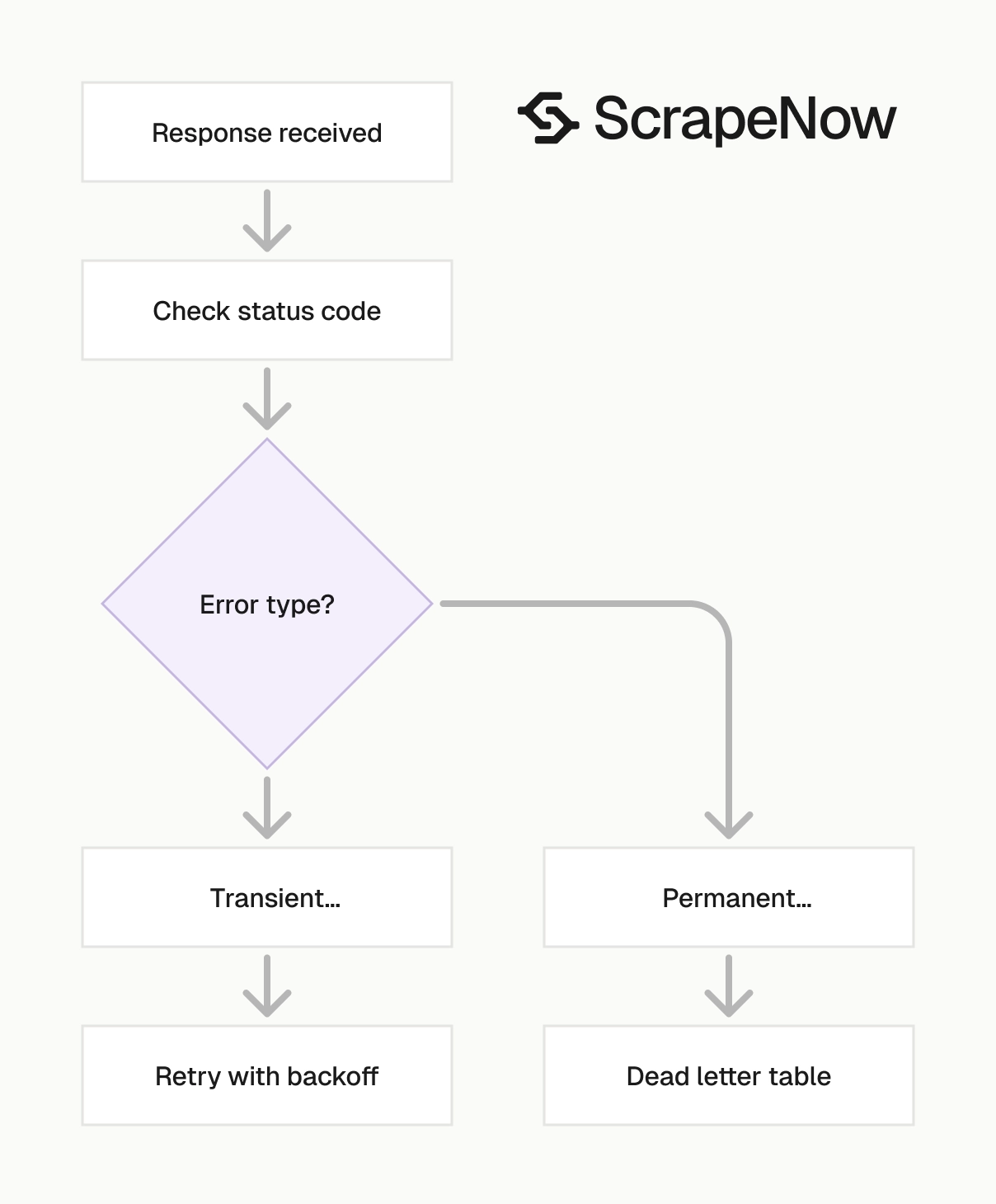
Retries need rules. A failed request should retry on temporary blocks, back off on rate limits, and stop on permanent errors like removed pages. Blind retries burn credits, proxy traffic, and wall-clock time.
Data quality also fails when teams skip source metadata. Store the source URL, scraper name, input keyword, input location, run ID, and scrape timestamp with every row. Those fields turn an audit failure into a normal backfill.
You also need to separate empty results from failed extraction. A keyword search can return zero matching jobs because the market has no visible postings. A failed browser session can also return zero rows, and your pipeline needs to tell those states apart.
ScrapeNow's Glassdoor scrapers
ScrapeNow has purpose-built Glassdoor scrapers for jobs and company data. Each scraper maps to a specific input type. You can search by keyword, extract from a URL, or process an existing Glassdoor search page.
That split keeps pipelines predictable. Discovery runs use keywords. Enrichment runs use URLs. Filtered exports use search result pages that already contain the criteria selected in Glassdoor.
The Glassdoor scraper hub lists the available extractors in one place. Use it when you need to compare job, company, keyword, URL, and search-page workflows before wiring a pipeline.
For implementation details on job postings, use the Glassdoor jobs scraper guide. For employer profile extraction, use the Glassdoor companies scraper guide. Those guides cover field mapping, input setup, and common pipeline patterns.
The clean pattern is simple. Use search scrapers to discover records, then use URL extractors to enrich the records you decide to keep. Store both outputs because each one answers a different data question.
Glassdoor Jobs Search by Keyword
The Search Glassdoor jobs by keyword takes a search term and returns matching job listings. Typical fields include job title, company, location, posting URL, job ID, and visible posting metadata.
Use it when you need to monitor hiring demand for roles like “data engineer” across cities. It also works for tracking companies that hire for a specific skill, tool, certification, or seniority level.
A recruiting analytics team can run searches for “machine learning engineer,” “platform engineer,” and “security analyst” each morning. The returned rows show which employers added postings, which locations changed, and which job URLs need deeper extraction.
Store the keyword and location with each row. The same job can appear in multiple searches. That search context explains why the record exists in your dataset.
Treat the search result as a discovery event. The job title and URL matter, and the query that found the record matters too. Analysts need both when they measure demand by term, city, and date.
The related Glassdoor jobs scraper guide has code examples, input setup, and field-level notes for job search extraction.
Glassdoor Jobs Extract by URL
The Pull structured Glassdoor job listings takes known Glassdoor job URLs and pulls structured details from each posting. Use it when you already have job links from a crawl, ATS export, spreadsheet, or previous search run.
This scraper fits enrichment jobs where discovery already happened. Feed it URLs, then store the returned job details with your internal posting ID, keyword, run date, and source.
URL extraction reduces duplicate work. If the same posting appears in multiple keyword searches, extract the job page once. Then attach that detail record to each matched search term.
This pattern also makes refresh jobs cleaner. Keep a table of unique job URLs, rerun active URLs daily, and mark missing pages as closed after repeated failures. That gives recruiters a current view without reprocessing the full search space.
Use URL extraction when accuracy matters more than search coverage. A known URL points at one posting, which makes the request easier to audit. It also gives your data team a stable join key for downstream tables.
The Glassdoor jobs scraper guide covers URL-based job extraction, including when to use it instead of keyword search.
Glassdoor Companies Search by Keyword
The Search Glassdoor Companies by keyword finds company profiles from a keyword like “Stripe,” “fintech,” or “warehouse logistics.” It returns company names, profile URLs, locations, ratings, and public metadata available from search results.
Use this scraper for company discovery. It works when you have a market category, brand name, industry term, or account list that needs matching against Glassdoor profiles.
For example, a sales operations team can search for “cybersecurity,” export matching companies, and merge the results with CRM accounts. The profile URL becomes the stable key for a deeper company extraction run.
This workflow also works for market mapping. Run category searches, normalize company names, then compare discovered employers against your CRM coverage. The missing matches become account research targets.
Search results need review when company names are ambiguous. A short keyword can match subsidiaries, similarly named employers, and unrelated companies. Keep the search term beside the result so reviewers can trace each match.
The Glassdoor companies scraper guide explains how to turn company search results into an employer research dataset.
Glassdoor Companies Extract from Search Page
The Glassdoor Companies Extract from Search Page scraper takes a Glassdoor search results URL and extracts listed companies. Use it when you already applied filters in Glassdoor and want to export visible results.
This is the right path when a human refined the query in the browser. Copy the filtered search URL, send it to the scraper, and store the returned company rows.
It also helps when filters take too long to rebuild through a keyword-only input. Location, industry, rating ranges, and page state are easier to preserve in the original search URL.
Use this workflow for one-off research exports and repeatable filtered lists. Keep the original search URL in your dataset so another teammate can reproduce the filter set.
This input type works well for analyst-led research. The analyst can use the Glassdoor interface to refine the list, then send the final URL through the scraper. Engineering gets a clean export without rebuilding every filter in code.
The Glassdoor companies scraper guide covers this workflow for teams that build company lists from filtered Glassdoor searches.
Glassdoor Companies Extract by URL
The Extract Glassdoor company data takes company profile URLs and extracts structured company data. Typical fields include company name, rating, industry, headquarters, size, website, and public profile metadata.
Use it after company discovery, CRM matching, or account selection. The input is a known profile URL, so the scraper targets a specific employer record.
This pattern works well for enrichment jobs. Start with a target account list, match each account to a Glassdoor profile, then extract ratings and metadata for analysis.
Run this scraper on a schedule when employer profile data matters. Weekly refreshes work for most company fields because headquarters, size, industry, and profile metadata change less often than job posts.
Use the profile URL as the entity key. Company display names vary across CRM systems, websites, and public datasets. The profile URL gives your matching process a cleaner anchor.
The Glassdoor companies scraper guide shows how URL-based extraction fits enrichment workflows where you already have target employers.
Which Glassdoor scraper to use
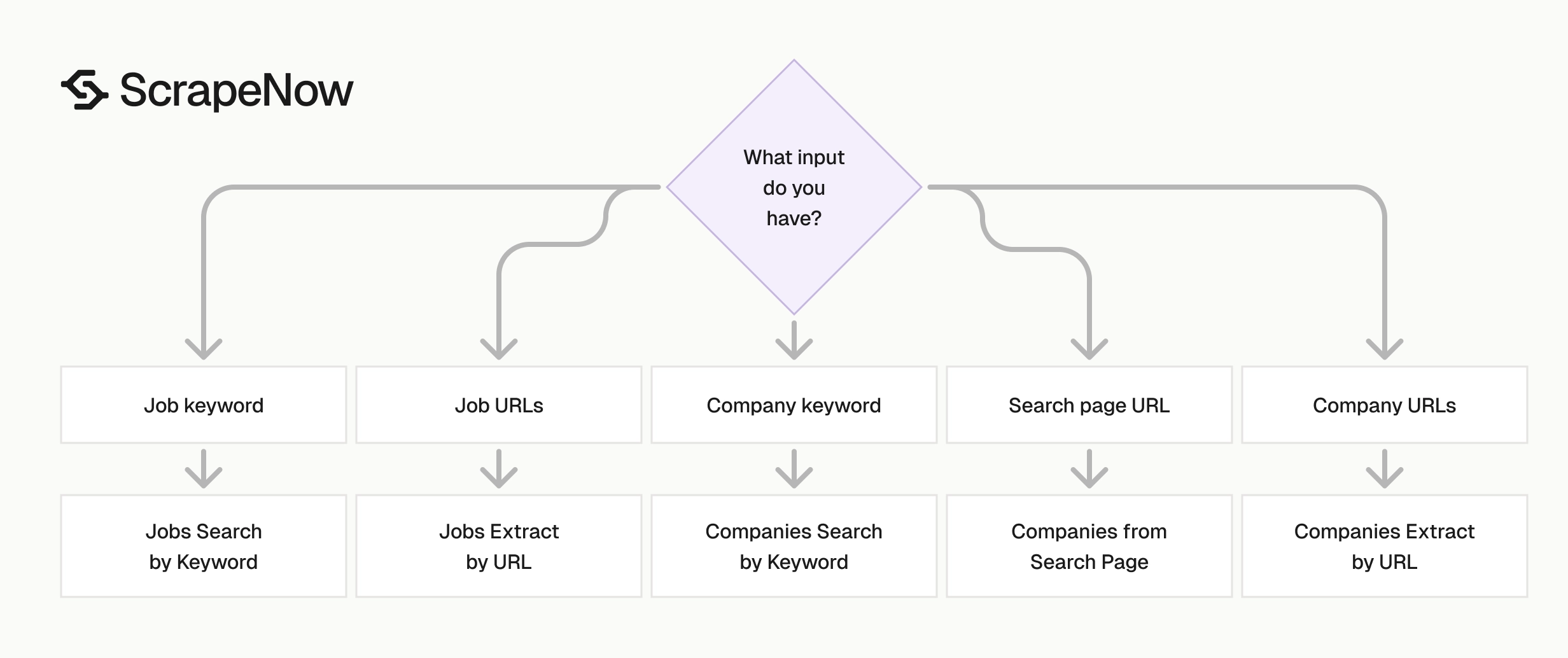
Pick the scraper based on the input you already have. Keyword search is for discovery. URL extraction is for enrichment. Search-page extraction is for exporting a filtered view.
| Input you have | Data you want | Scraper to use | Best fit |
|---|---|---|---|
| Job keyword | Matching job listings | Glassdoor Jobs Search by Keyword | Track hiring demand across roles and locations |
| Job URLs | Specific job details | Glassdoor Jobs Extract by URL | Enrich a known list of postings |
| Company keyword | Matching company profiles | Glassdoor Companies Search by Keyword | Build employer lists by name, category, or market |
| Glassdoor company search URL | Companies from a filtered search page | Glassdoor Companies Extract from Search Page | Export search results after applying filters |
| Company profile URLs | Company profile metadata | Glassdoor Companies Extract by URL | Enrich company lists with ratings and profile data |
A recruiting analytics pipeline usually starts with keyword job searches. It then extracts each job URL for detail pages. Store both records because search rows capture discovery context, and detail rows capture richer posting data.
A sales or market research workflow usually starts with company keyword search. It then extracts each company profile URL for stronger company records. The profile URL becomes the join key across CRM records, firmographic datasets, and Glassdoor exports.
If you already have URLs, start with URL extraction. Discovery steps add cost and duplicate records when the source list already identifies the target pages.
For mixed workflows, separate discovery tables from enrichment tables. The discovery table stores inputs, keywords, locations, and result URLs. The enrichment table stores normalized fields from each unique URL.
That model gives you cleaner joins. It also lets you refresh enrichment data without rerunning the same discovery searches every day.
A common mistake is merging discovery and enrichment too early. That creates duplicate rows when one job appears in several keyword searches. Keep the many-to-one relationship visible until the reporting layer.
Implementation example
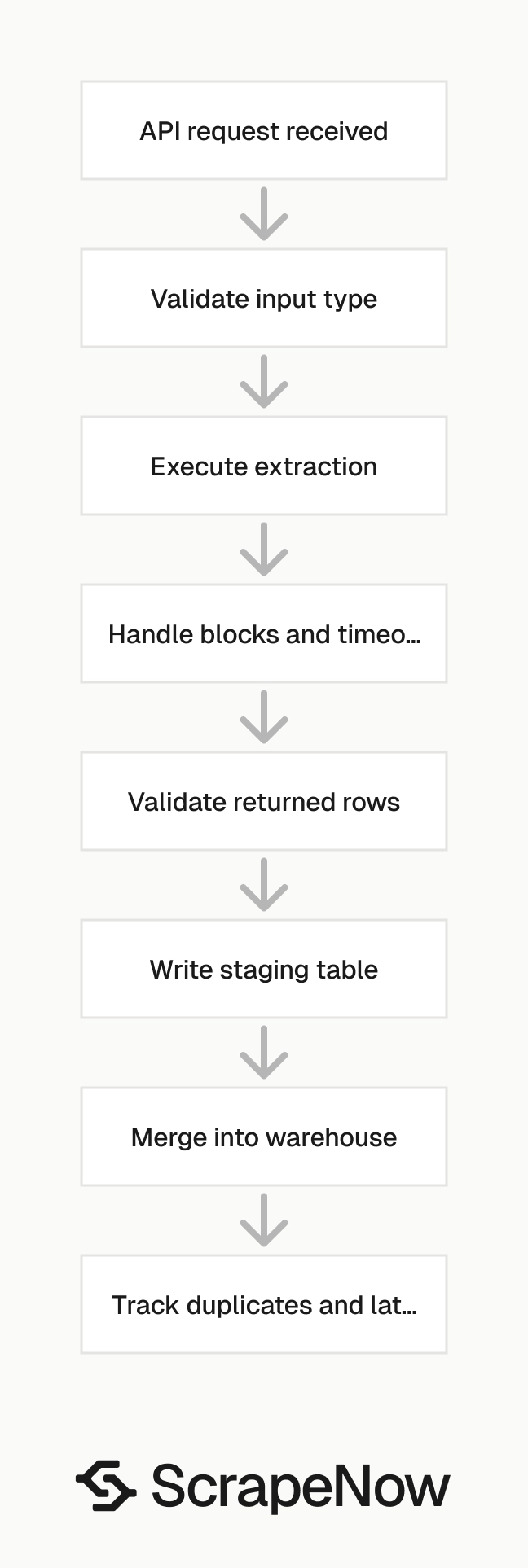
The scraper page gives you the exact input schema for each Glassdoor extractor. The pattern below shows a typical Python job that sends a keyword search, stores source metadata, and writes returned rows.
import os
import csv
import requests
from datetime import datetime, timezone

API_KEY = os.environ["SCRAPENOW_API_KEY"]
SCRAPER_ID = "glassdoor-jobs-search-by-keyword"

endpoint = f"https://api.scrapenow.io/api/v1/scraping/scrape?scraper={scraper_slug}"

payload = {
    "keyword": "data engineer",
    "location": "Austin, TX",
    "limit": 100
}

headers = {
    "Authorization": f"Bearer {API_KEY}",
    "Content-Type": "application/json"
}

response = requests.post(
    endpoint,
    json=payload,
    headers=headers,
    timeout=120
)

response.raise_for_status()
result = response.json()

run_time = datetime.now(timezone.utc).isoformat()
rows = result.get("data", [])

with open("glassdoor_jobs_data_engineer_austin.csv", "w", newline="") as f:
    fieldnames = [
        "job_title",
        "company_name",
        "location",
        "job_url",
        "job_id",
        "source_keyword",
        "source_location",
        "source_scraper",
        "scraped_at"
    ]

    writer = csv.DictWriter(f, fieldnames=fieldnames)
    writer.writeheader()

    for row in rows:
        writer.writerow({
            "job_title": row.get("job_title"),
            "company_name": row.get("company_name"),
            "location": row.get("location"),
            "job_url": row.get("job_url"),
            "job_id": row.get("job_id"),
            "source_keyword": payload["keyword"],
            "source_location": payload["location"],
            "source_scraper": SCRAPER_ID,
            "scraped_at": run_time
        })
Keep the API call thin. Put deduplication, joins, and downstream rules in your data layer. That makes scraper upgrades safer because extraction and business logic stay separate.
For a production job, write results to a staging table before merging into your main dataset. Use job_url or job_id as the natural key when available. Fall back to a hash of title, company, location, and source URL when a listing lacks a stable ID.
Add retry rules around the API call. Retry 429 and 5xx responses with backoff. Treat 400-level input errors as permanent failures and write them to a dead-letter table.
Add response validation before you write to storage. Check that every row has at least one identifier, such as job_url, job_id, or a profile URL. Send rows with missing identifiers to quarantine so they do not pollute your main tables.
Use a run ID for every API call. Write that ID to the staging table, merge table, and error table. That gives you one handle for debugging row counts, failed inputs, and downstream mismatches.
What Glassdoor data is useful for
Glassdoor job data gives you a current view of hiring demand. If 200 companies start posting “AI infrastructure engineer” roles in the same month, that signal supports recruiting, sales, labor market research, and product planning.
Recruiting teams use job data to watch competitor hiring. They can track which employers are hiring for the same roles, which locations see demand, and which titles appear across multiple companies.
Sales teams use hiring signals for account timing. A company adding dozens of data platform roles often needs tools, vendors, contractors, or infrastructure support around that hiring plan.
Company profile data enriches employer datasets. Ratings, industries, headquarters, company size, and profile URLs give you a better company record than a domain name alone.
Public review and rating signals support employer brand tracking. Ratings show how employees describe the company experience over time. Those fields work best when joined with role, location, and company size.
Glassdoor data works best when you refresh it on a schedule. Weekly runs fit company profile changes. Job listings need daily refreshes because postings open and close quickly.
Keep the raw URL, scrape timestamp, keyword, and source scraper name with every row. Those fields make deduplication, audits, and backfills easier when a posting changes or disappears.
For compensation research, treat salary fields as point-in-time observations. Store range minimums, range maximums, currency, location, role title, and scrape date. That gives analysts enough context to compare pay bands across markets.
For employer research, keep profile URLs as stable identifiers. Company names change, abbreviations vary, and CRM records contain duplicates. The Glassdoor profile URL gives your matching job a cleaner key.
For sales operations, combine hiring signals with account ownership and territory data. New job postings can trigger account research, outbound prioritization, or partner analysis. The value comes from joining Glassdoor rows to the systems your team already uses.
For workforce planning, compare title demand across locations. A rising count of postings in one city can show where competitors are staffing. A falling count can show where hiring demand has cooled.
Pricing
ScrapeNow charges per returned row. One row costs one credit, starting at $0.04 per credit for small runs and dropping with volume. No monthly contracts, no proxy fees, no charges for failed rows. See the pricing page for current rates.
What you avoid by using a pre-built Glassdoor scraper
You avoid managing proxy rotation, browser fingerprints, retries, pagination, and selector updates. Those parts create production alerts and consume engineering hours.
You also avoid turning a data task into a maintenance project. Glassdoor layouts change, anti-bot rules change, and public fields shift between page types.
A pre-built scraper gives you a cleaner failure model. Your pipeline sends inputs, receives rows, and handles empty or failed results without owning the browser layer.
That boundary matters for small teams. Engineers should spend time modeling hiring demand, matching company records, and building dashboards. Selector repairs after a UI release do not move the data product forward.
ScrapeNow maintains 86+ pre-built scrapers across 14 platforms. If your team also extracts data from LinkedIn, Amazon, Zillow, Google, TikTok, Instagram, Facebook, YouTube, Indeed, Crunchbase, Yelp, Flipkart, or X, the same credit model applies.
The Glassdoor scrapers fit that catalog pattern. You use the input type you already have, receive structured rows, and keep scraper maintenance outside your application code.
This also reduces operational noise. Your data pipeline can track inputs, outputs, row counts, and failures at the API boundary. The proxy layer, browser layer, and selector layer stay outside your backlog.
You still own data modeling and validation. ScrapeNow returns rows, and your system decides how to join, dedupe, refresh, and report them. Keep that boundary clean and the pipeline stays easier to change.
Data modeling rules for Glassdoor exports
Treat every Glassdoor export as an append-only event stream before building current-state tables. That gives you history when a posting disappears, a rating changes, or a company profile field updates.
Use separate tables for raw rows and normalized entities. Raw rows preserve the scraper output. Normalized tables give analysts clean job, company, location, and run records.
For job data, create a unique key from job_id when the field exists. If the response lacks a job ID, use the job URL. If both are missing, create a hash from company, title, location, and source URL.
For company data, use the Glassdoor profile URL as the main key. Store the display name as an attribute because names change more often than profile URLs.
Keep run metadata in its own table. Include scraper ID, input payload, requested limit, returned row count, start time, end time, and status. That table helps you debug missing data without searching logs.
Track closed postings with repeated refreshes. If a known job URL fails across multiple scheduled runs, mark the posting inactive. Keep the last successful scrape date so analysts know when the record became stale.
Store raw text fields before normalizing them. Job titles, locations, company names, and salary strings can carry meaning that a parser loses. Keep the raw value, then add normalized columns beside it.
Use separate timestamps for scrape time and source time. The scrape timestamp records when your system saw the row. The posting date or review date records when Glassdoor says the event happened.
Deduplication needs a written rule. For jobs, prefer job_id, then URL, then a hash of company, title, location, and source URL. For companies, prefer the profile URL and treat display names as mutable attributes.
Build current-state tables from the append-only history. A current jobs table can show active postings, latest salary fields, and latest location fields. The event table still preserves older observations for audits and trend analysis.
Operational checks for scheduled Glassdoor jobs
A scheduled Glassdoor pipeline needs row-count checks. Compare each run against the previous run for the same input. Alert when returned rows drop to zero or spike far above the normal range.
Schema checks catch frontend changes and parser issues. Validate required fields such as URL, title, company name, and scrape timestamp before loading rows into production tables. Send failed rows to quarantine with the run ID attached.
Latency checks also matter. A job that usually finishes in 3 minutes and starts taking 30 minutes has a problem worth investigating. Long runs can delay dashboards and downstream automation.
Track duplicate rate by input. A keyword that returns 80 percent duplicate rows across nearby locations needs tighter filters or lower refresh frequency. That single metric can cut cost without reducing useful coverage.
Keep manual review in the loop for entity matching. Company names can be ambiguous, especially for subsidiaries and regional offices. Review low-confidence matches before attaching ratings or review signals to CRM accounts.
Write audit queries before the first scheduled run. You need counts by scraper, input, run date, status, and destination table. Those queries save time when a stakeholder asks why a number changed.
Start with the input you already have
If you have keywords, start with the Glassdoor jobs or company keyword scrapers. If you have URLs, use the URL extractors and skip discovery.
For a hiring dataset, run Search Glassdoor jobs by keyword first. Then enrich selected postings with Pull structured Glassdoor job listings. Keep the keyword search output so you can measure demand by term, city, and date.
For employer research, start with Glassdoor Companies Search by Keyword. Then process profile URLs with Extract Glassdoor company data. Store the company profile URL as the stable identifier in your dataset.
If a teammate already built a filtered Glassdoor search in the browser, use Glassdoor Companies Extract from Search Page. That keeps the export tied to the visible result set and avoids rebuilding filter logic in code.
For the fastest test, run Search Glassdoor jobs by keyword with one role, one location, and a small row limit. Inspect the returned fields, store the source metadata, and then schedule the same scraper for daily refreshes.
Start small and keep the first run boring. One keyword, one location, one output table, and one validation query are enough. Add more inputs after the schema, dedupe rule, and refresh cadence work end to end.


