
A Facebook scraper turns public Facebook pages into structured data.
Use it for public pages, posts, events, venue calendars, and Marketplace listings. Teams run Facebook scrapers for pricing research, event discovery, local inventory tracking, and brand monitoring. The scraper returns rows, so nobody copies listings, events, or posts into spreadsheets by hand.
Consistency creates the hard work. Facebook changes markup, gates public content behind login prompts, and serves different results by region. A production scraper needs parsing logic, retries, proxy routing, session handling, and field validation for each Facebook surface.
What Facebook data is worth scraping
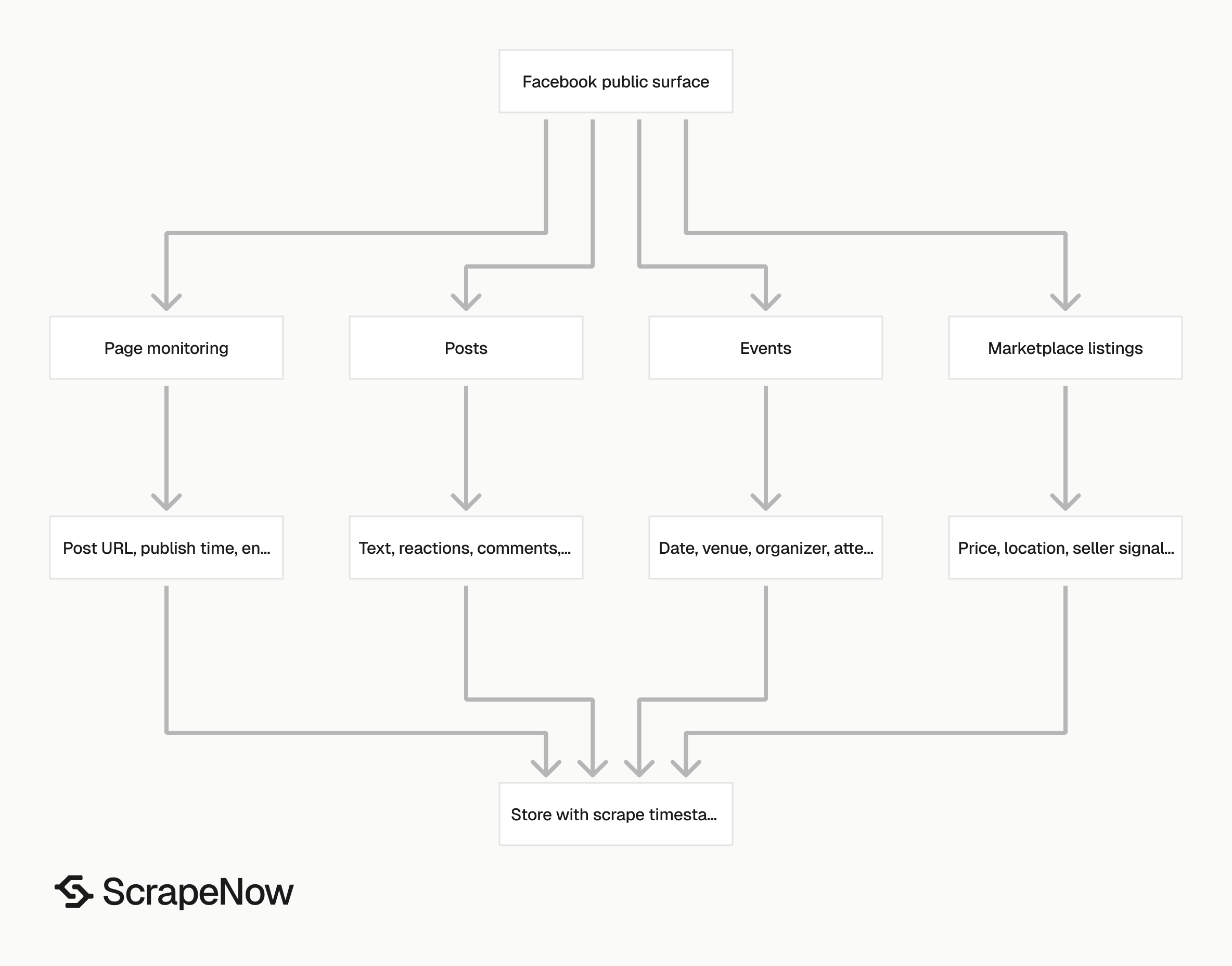
Facebook stores useful public data across separate surfaces. Each surface has its own page structure, load pattern, and failure mode. Treat posts, events, pages, and Marketplace listings as separate extraction jobs.
A page post includes text, reactions, timestamps, media, comments, shares, and the canonical post URL. An event listing includes venue, date, organizer, location, cover image, description, and attendance signals. A Marketplace listing includes title, price, seller location, photos, description, category, and availability.
Those records matter when collection repeats at scale. Tracking 500 local business pages every week breaks down fast in a browser. Pulling 10,000 Marketplace listings by keyword needs search pagination, duplicate detection, location controls, and refresh logic.
Event monitoring has the same workload. A team tracking public calendars across 50 venues needs the same fields every run. Manual collection creates missing rows, inconsistent timestamps, and duplicate records.
Facebook also changes markup often. Selector updates, login checks, lazy-loaded fields, and inconsistent page structures create recurring maintenance. The workload grows when one pipeline targets posts, events, and Marketplace at the same time.
Use ScrapeNow's Facebook-specific scrapers when you want structured output without maintaining browser automation. Start from the Browse all 86+ scrapers to compare Facebook, Amazon, Google, LinkedIn, TikTok, Instagram, YouTube, Zillow, Indeed, Glassdoor, Flipkart, Crunchbase, Yelp, and X scrapers in one place.
Why scraping Facebook breaks more often than standard websites
Facebook protects public pages harder than most content sites. Expect browser fingerprinting, login prompts, rate limits, regional content differences, and markup changes. A scraper that works against a small publisher site fails faster on Facebook.
The first failure mode is the login wall. A page that loads in your browser can return partial HTML, a redirect, or a generic shell from a server IP. That response still returns HTTP 200, so weak scrapers record a successful scrape.
The second failure mode is request reputation. Datacenter IPs get flagged quickly on social platforms, especially when requests hit page URLs, post URLs, and event URLs at fixed intervals. Residential routing performs better because the traffic looks closer to normal household browsing.
The third failure mode is data shape drift. Facebook can move a field from HTML to a script blob, rename a key, or lazy-load content after scroll. Scrapers that worked yesterday can return empty text today.
The fourth failure mode is regional variance. A public event can show different location text, currency, language, or availability based on request country. Marketplace results change faster because location drives the search experience.
Production monitoring has to catch these failures. Check for empty fields, partial pages, redirects, repeated duplicates, missing timestamps, and sudden drops in row count. Treat a 200 response as transport success only, then validate the extracted fields.
A useful Facebook scraper reports failed URLs separately from empty results. Empty output from a deleted listing means something different from empty output caused by a login wall. Your retry logic should handle those cases differently.
The best signal is field-level validation. A Marketplace row with a URL and no title should go to debug storage. An event row with no date needs a different status than an event with a confirmed cancellation.
ScrapeNow's Facebook Scrapers
ScrapeNow ships purpose-built Facebook extractors instead of one generic crawler. Each scraper targets a specific Facebook data type. The input, fields, retries, and parsing logic match the job.
ScrapeNow has 86+ pre-built scrapers across 14 platforms. Browse all 86+ scrapers. Facebook coverage includes events, venue event search, Marketplace listings, Marketplace search, and page posts. Use the scraper that matches the input you already have.
A URL extraction job starts with known Facebook URLs. A search job starts with a keyword, venue, or query target. That split keeps jobs predictable because discovery and refresh workflows need different controls.
Search jobs produce candidates. URL jobs refresh known records. Keeping those workflows separate makes row counts, error rates, and spend easier to explain.
Facebook Events Extract by URL
Use this when you already have one or more Facebook event URLs and need clean event records. It extracts fields like event title, date, time, location, organizer, description, image, and public engagement signals where available. The output works well for databases that need one row per event.
This scraper fits event refresh queues. Save event URLs from a search run, partner feed, or internal list, then refresh those URLs on a schedule. The output gives your database a stable event record with a fresh scrape timestamp.
Use this scraper when your application already knows which events to track. A city calendar can refresh saved event URLs daily. A ticketing team can monitor public event pages for date, venue, and description changes.
This workflow also supports change detection. Store the last observed date, venue, and description hash. Alert when a public event changes after your previous scrape.
The detailed guide with code examples is the Facebook Events Scraper. The Extract Facebook event data is the product to use when your input is a list of event URLs.
Facebook Events Search by Venue
Use venue search when the target is a place, club, stadium, school, restaurant, or community space that posts recurring events. This scraper finds events tied to a venue and returns structured event records. Your team does not need to maintain venue-page crawling logic.
This scraper fits local event discovery, calendar enrichment, and weekly venue monitoring. A city guide can track music venues. A tourism team can collect public events from parks, museums, and community centers.
Venue search works best when the venue list is stable. Store venue identifiers, schedule weekly runs, and compare the returned event URLs against your existing records. New URLs enter your event table, while known URLs move into a refresh queue.
Run venue searches on a fixed cadence. Weekly works for most city calendars. Daily works when events sell out fast or the venue changes schedules often.
The detailed guide with code examples is the Facebook Events Scraper. The Find Facebook events by venue works when the venue is the main input.
Facebook Marketplace Extract by URL
Use this when you have Marketplace listing URLs and need listing-level fields. It extracts title, price, location, description, images, seller signals, category data, and availability where the public page exposes it. This is the right workflow for monitoring known listings.
This scraper fits refresh jobs where the target set is already known. For example, a pricing team can refresh saved car listings every six hours. A resale business can track whether competing listings change price or disappear.
URL extraction also helps with audit trails. Store the original listing URL, the last observed price, the scrape timestamp, and the current availability. That history lets you separate price movement from inventory churn.
Refresh frequency should match the market. Used phones and cars change quickly, so run them several times per day. Furniture and local collectibles often work on a daily schedule.
The detailed guide with code examples is the Facebook Marketplace Scraper. The Get Marketplace listing data is built for saved URLs, monitoring queues, and listing refresh jobs.
Facebook Marketplace Search by Keyword
Use keyword search when you need listings for terms like "used iPhone 14", "Toyota Tacoma", "standing desk", or "studio apartment". This scraper searches Marketplace by keyword and returns matching listings as rows. You can filter, store, or send the rows into a pricing model.
Discovery jobs need different logic from URL refresh jobs. Search runs need query controls, pagination, duplicate detection, and location handling. The output should give your downstream system new listings instead of repeated copies of old records.
Keyword search works best with a controlled query list. Start with the highest-value terms, set a location, and cap volume per run. Expand the keyword list after you review duplicate rates and field completeness.
A good query list uses product names, model names, and common seller wording. For cars, include trim names and model years. For electronics, include storage size, carrier text, and condition terms.
The detailed guide with code examples is the Facebook Marketplace Scraper. The Search Marketplace listings is the scraper for Marketplace discovery jobs.
Facebook Page Posts Extract by URL
Use this for public page post collection. It extracts post text, post URL, publish time, media, reaction counts, comment counts, share counts, and other public fields available on the post. The output supports page monitoring and public archives.
This scraper fits brand monitoring, competitor tracking, and public page archives. A retail team can monitor franchise pages. A research team can archive posts from public organizations with consistent timestamps and URLs.
Page monitoring needs stable identifiers. Store both the page URL and post URL, then keep each scrape timestamp. That lets you rebuild a post history even when engagement counts change after publication.
Post archives need more than current values. Store each observed engagement count with its scrape time. That history separates a popular post from a post that gained attention later.
The detailed guide with code examples is the Facebook Page Post Scraper. The Extract Facebook page posts works for page monitoring jobs and known post URL queues.
Which Facebook scraper to use
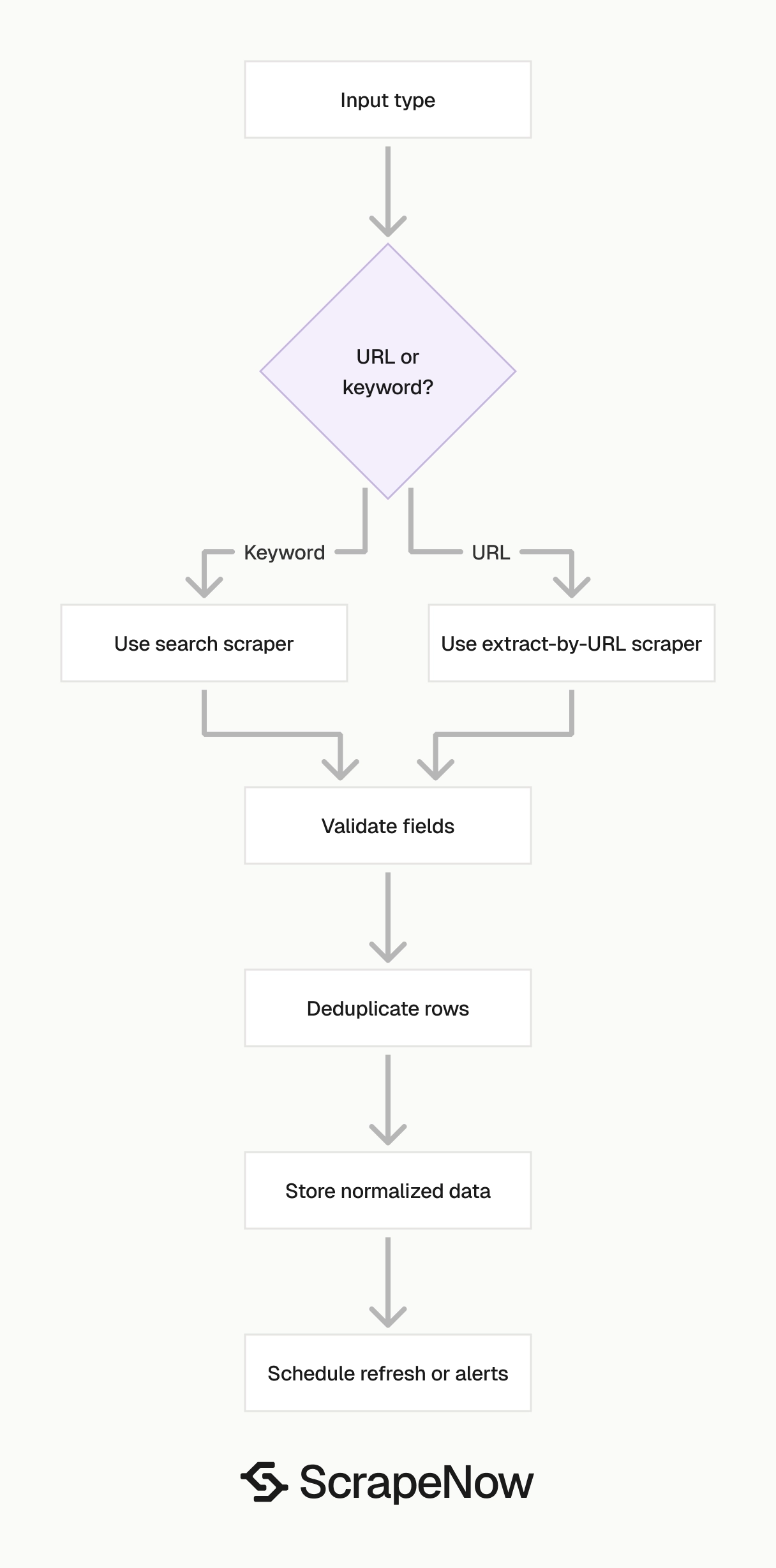
Pick the scraper based on your input. Use URL-based scrapers for refresh jobs. Use search-based scrapers for discovery.
| Job | Input you have | Scraper to use | Typical volume |
|---|---|---|---|
| Refresh known event records | Event URLs | Facebook Events Extract by URL | 100 to 50,000 URLs |
| Find events at a venue | Venue name or venue page | Facebook Events Search by Venue | 10 to 5,000 venues |
| Refresh known Marketplace listings | Listing URLs | Facebook Marketplace Extract by URL | 500 to 100,000 URLs |
| Discover Marketplace listings | Keyword | Facebook Marketplace Search by Keyword | 100 to 10,000 keywords |
| Monitor public page posts | Page or post URLs | Facebook Page Posts Extract by URL | 50 to 20,000 pages |
If your input is a keyword, use a search scraper. If your input is a URL, use an extract-by-URL scraper. Mixing the two creates noisy jobs and makes failures harder to diagnose.
That split matters in production. Discovery jobs need pagination, duplicate detection, query controls, and location settings. URL jobs need retry logic, status tracking, freshness checks, and change detection.
A clean workflow often uses both types. Run Marketplace Search by Keyword to find listings, store listing URLs, then refresh those URLs with Marketplace Extract by URL. The same pattern works for event discovery and event refresh.
Here is the workflow I use for Marketplace discovery and refresh:
- Run keyword search for each tracked term and location.
- Store listing URLs, listing IDs, titles, prices, and scrape timestamps.
- Deduplicate listings by canonical URL or listing ID.
- Send known listing URLs into the URL extractor on a schedule.
- Mark missing listings as unavailable after a confirmed refresh failure.
- Keep historical price rows for trend analysis.
The same pattern works for events. Search venues weekly, store new event URLs, and refresh known events daily. That keeps discovery separate from monitoring.
A second table helps during refresh. Store one row per target URL with status, last scrape time, last successful scrape time, and failure reason. Your scheduler can then pick stale records without touching fresh ones.
API workflow example
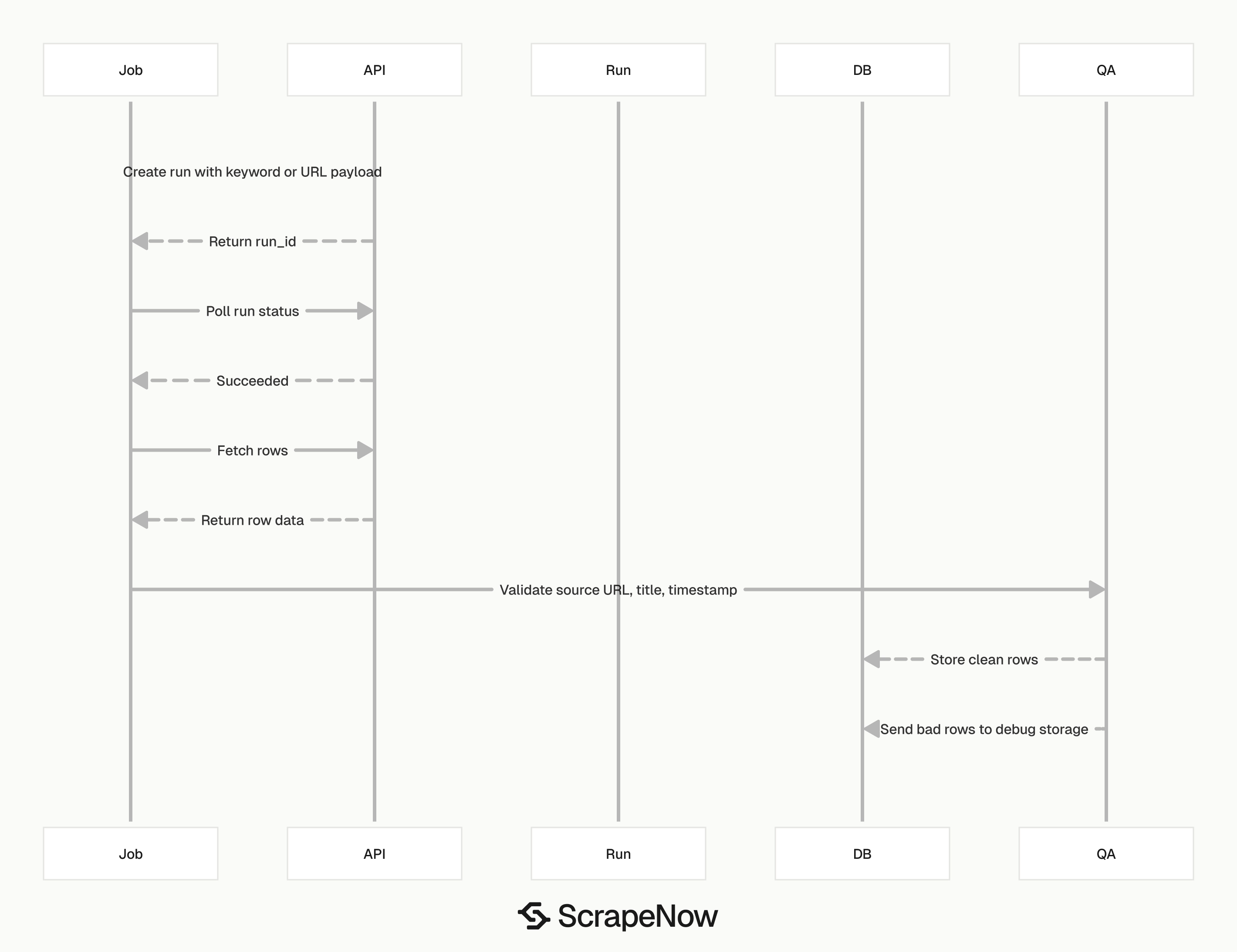
A production job should treat scraper runs like any other queued data job. Create the run, poll for completion, write rows into storage, and log failed inputs. The exact endpoint and payload live on each ScrapeNow product page.
The example below shows the control flow for a Marketplace keyword search. Use the scraper slug and input fields from the product page you run. Keep API keys in environment variables rather than source code.
import os
import time
import requests

API_KEY = os.environ["SCRAPENOW_API_KEY"]
BASE_URL = "https://api.scrapenow.io/api/v1/scraping"
SCRAPER = "facebook-marketplace-search-by-keyword"

headers = {
    "Authorization": f"Bearer {API_KEY}",
    "Content-Type": "application/json",
}

payload = {
    "inputs": [
        {
            "keyword": "used iPhone 14",
            "location": "Austin, TX",
        }
    ]
}

run_response = requests.post(
    f"{BASE_URL}/scrape?scraper={SCRAPER}",
    headers=headers,
    json=payload,
    timeout=60,
)
run_response.raise_for_status()
job_id = run_response.json()["data"]["job_id"]

while True:
    status_response = requests.get(
        f"{BASE_URL}/jobs/{job_id}",
        headers=headers,
        timeout=30,
    )
    status_response.raise_for_status()
    job = status_response.json()

    if job["data"]["status"] in {"completed", "failed"}:
        break

    time.sleep(10)

if job["data"]["status"] != "completed":
    raise RuntimeError(f"ScrapeNow job ended with status {job['data']['status']}")

rows_response = requests.get(
    f"{BASE_URL}/jobs/{job_id}/results?format=json",
    headers=headers,
    timeout=60,
)
rows_response.raise_for_status()
rows = rows_response.json()

seen = set()
clean_rows = []

for row in rows:
    listing_url = row.get("listingUrl")
    if not listing_url or listing_url in seen:
        continue

    seen.add(listing_url)
    clean_rows.append(
        {
            "listing_url": listing_url,
            "title": row.get("title"),
            "price": row.get("price"),
            "currency": row.get("currency"),
            "location": row.get("location"),
            "scraped_at": row.get("scrapedAt"),
        }
    )

print(f"stored {len(clean_rows)} unique listings")
Keep validation close to ingestion. Reject rows without a source URL, timestamp, or primary title field. Send those rows to debug storage so parser failures do not contaminate production tables.
For URL refresh jobs, add an input status table. Track queued, running, succeeded, empty, blocked, and failed states. That state machine turns a batch scrape into an auditable pipeline.
Use separate logs for run status and row quality. A run can finish successfully and still return rows with missing fields. Treat those as data quality failures, not transport failures.
A simple ingestion table needs these columns:
| Column | Purpose |
|---|---|
source_url |
Canonical Facebook URL for the record |
scraped_at |
Time your system observed the record |
run_id |
ScrapeNow run that produced the row |
status |
Row-level state after validation |
failure_reason |
Parser, block, empty page, timeout, or deleted record |
raw_row |
Original JSON payload for debugging |
Store raw rows for a limited period. Thirty days is enough for most parser debugging. Keep normalized records longer when your application needs trend history.
Output fields to expect
Treat Facebook scraping as structured extraction. A useful run returns rows with stable identifiers, source URLs, timestamps, and normalized fields. Store raw HTML in debug storage when you need it for troubleshooting.
For events, store the event URL, title, start date, start time, venue name, address, organizer, description, image URL, and engagement signals. Keep the scrape timestamp as a separate field. That timestamp tells you when the record was observed.
For Marketplace, store the listing URL, title, price, currency, location, seller signal, category, description, image URLs, and availability. Normalize price into a numeric field when you send data into a pricing model. Keep the original text price for auditing.
For page posts, store the post URL, page URL, publish time, text, media URLs, reaction count, comment count, and share count. Public engagement counts change over time. Preserve historical snapshots if trend analysis matters.
Stable keys matter more than wide tables. Use canonical URLs, listing IDs, event IDs, or post IDs where available. If a public page hides an ID, derive a deterministic key from the canonical URL.
Timestamps need two meanings. Store the publish time from Facebook as one field and the scrape time as another field. Mixing those values breaks refresh logic and trend charts.
Field names should stay consistent across runs. Rename incoming fields during ingestion instead of changing dashboard queries later. A stable schema makes parser changes less disruptive.
Normalize money fields before analysis. Store price_text for audit and price_amount for math. Add currency as its own field because Marketplace results vary by location.
Build versus buy for Facebook scraping
Building a Facebook scraper yourself is possible. A small internal script can use browser automation, proxy support, retries, export formats, and parsing code. That works for a one-time pull under a few hundred rows.
The maintenance cost creates the workload. Facebook changes layout, session behavior, and request patterns often enough that a scraper needs active fixes. Every selector change creates engineering work before the next scheduled run succeeds.
For a one-off job under a few hundred rows, an internal script can work. A developer can write a small browser automation script, export CSV, and move on. That approach stops making sense when the job runs every week or feeds a production database.
Weekly collection, Marketplace monitoring, and public page tracking across thousands of targets need a managed scraper. Failed runs need alerts. Partial output needs detection.
Duplicate records need stable keys. Missing fields need validation rules. Regional search jobs need controlled request locations.
ScrapeNow also runs the proxy layer behind the scraper. Residential coverage includes 10M+ IPs across 186 countries, and datacenter coverage includes 50,000+ IPs. That matters when Facebook returns different content by region or request reputation.
The proxy layer is one part of the job. The scraper also needs browser settings, session handling, retry policy, parser updates, and output validation. Those parts consume engineering time even when the proxy pool works.
A simple cost model makes the tradeoff clear. Four engineering hours per month at $100 per hour costs $400 before infrastructure. A larger internal scraper can exceed that with one Facebook layout change.
Use the internal build path when you need a one-time export, can tolerate broken runs, and have a developer available. Use a managed scraper when the data feeds dashboards, pricing models, inventory systems, alerts, or customer-facing pages.
The build path also needs monitoring. You need screenshots, response samples, failed URL queues, and parser regression tests. Without those pieces, a scraper fails silently until somebody notices missing data.
Managed scraping removes a large maintenance queue from your team. Your developers still own storage, validation, and business rules. They stop spending sprint time on selector repairs and blocked sessions.
Data access and compliance
Scrape public Facebook data only. Do not scrape private profiles, logged-in-only content, personal messages, private groups, or data protected by user privacy settings. Keep your use case tied to public business, event, listing, or page data.
Store only the fields your application needs. A pricing model for used phones needs title, price, location, condition text, and listing URL. It does not need unrelated personal data.
Respect deletion and refresh behavior in your own system. If a listing disappears, mark it unavailable after a confirmed refresh. If an event changes date, store the new value with a fresh scrape timestamp.
Separate collection rules from business rules. The scraper should return the public fields it can observe. Your application should decide retention, access control, and deletion handling.
Add compliance checks before data reaches downstream systems. Block private URLs at ingestion, reject rows without public source URLs, and remove fields your application does not use. Those checks keep your database smaller and easier to audit.
Add a domain and path allowlist before scheduling jobs. Accept public page, event, post, and Marketplace URLs that match your use case. Reject account settings pages, private group URLs, inbox paths, and any URL that requires private access.
Document retention rules before you increase volume. Decide how long to keep raw rows, normalized rows, screenshots, and debug payloads. Short retention for debug data reduces audit scope.
Pricing
ScrapeNow charges per returned row. One row costs one credit, starting at $0.04 per credit for small runs and dropping with volume. No monthly contracts, no proxy fees, no charges for failed rows. See the pricing page for current rates.
Common production mistakes
The first mistake is treating search results as permanent inventory. Marketplace search results change by location, query, time, and availability. Store the listing URL, then refresh the listing directly.
The second mistake is ignoring partial pages. A login wall, blocked response, or placeholder shell can still return a 200 status code. Validate fields before writing rows into your main table.
The third mistake is using one retry rule for every failure. A timeout deserves a retry. A deleted listing should move to an unavailable state after confirmation.
The fourth mistake is mixing discovery and refresh in one job. Search scrapers and URL extractors answer different questions. Keeping them separate makes volume, errors, and spend easier to understand.
The fifth mistake is discarding scrape timestamps. Facebook data changes after publication, especially engagement counts and listing availability. Without scrape timestamps, your database cannot explain when a value was true.
The sixth mistake is deduplicating only by title. Marketplace sellers reuse titles, and event organizers reuse names across dates. Use canonical URLs or platform IDs before falling back to text matching.
The seventh mistake is refreshing everything at the same interval. High-value listings need faster refresh than old or inactive records. Use status, age, and business value to set schedule priority.
The eighth mistake is storing only the latest row. Latest-only storage hides price changes, event edits, and engagement growth. Keep a history table when trends matter to your product.
Operational checklist for production runs
Before you schedule a large run, define the input type. Choose keywords, venue identifiers, event URLs, listing URLs, page URLs, or post URLs. Each input type needs a different validation rule.
Set a maximum row count per job. Caps protect your budget when a broad keyword returns too many results. They also keep queues predictable during peak collection windows.
Record the request location for every search job. Marketplace and events both depend on geography. Without a stored location, you cannot reproduce the same search later.
Deduplicate before storage and after storage. In-run deduplication removes repeated rows from one scrape. Database-level deduplication protects you when separate runs find the same URL.
Add alerts for sudden row count drops. A drop from normal output to near zero usually means a block, markup change, or bad input list. Alert on field completeness as well as run failure.
Keep failed inputs for replay. Store URL, run ID, failure reason, response status when available, and validation errors. Replay queues save time when a parser update fixes a failed batch.
What to do next
Choose the Facebook scraper based on your input. Start with the data you already have. Then pick the product page that matches that input.
If you have event URLs, use Extract Facebook event data. If you need Marketplace discovery, use Search Marketplace listings. If you need public page monitoring, use Extract Facebook page posts.
For venue-based event discovery, use Find Facebook events by venue. For saved Marketplace listings, use Get Marketplace listing data.
Start with one scraper and one small run. For Marketplace discovery, run Search Marketplace listings with 10 keywords and one location. Review returned fields, duplicate rate, and usable row count before scheduling the next batch.
For events, start with a short venue list. Confirm the scraper returns venue, date, event URL, and organizer fields in the shape your database expects. Then add the URL extractor for daily refresh.
For page posts, start with a known public page list. Store post URLs and scrape timestamps from the first run. Then refresh the pages on a schedule that matches your monitoring needs.
For the full list of pre-built extractors, start with the Browse all 86+ scrapers.


