
Facebook Marketplace listings contain title, price, condition, seller, location, and category data, but Facebook's login walls and anti-bot measures make extraction difficult without browser automation.
The Facebook Marketplace scraper turns item URLs into structured records. It returns title, price, currency, category breadcrumbs, condition, description, location, image URLs, seller profile ID, listing date, product ID, and scrape status fields.
Teams use this scraper to track local inventory, monitor resale pricing, and match internal catalogs against public Facebook listings. It fits pricing tools, retail intelligence systems, marketplace monitoring jobs, and lead queues that already store Marketplace URLs.
Use the URL extractor when you already have item links. Use keyword search when ScrapeNow needs to find listings by keyword, city, radius, and listing age before extraction.
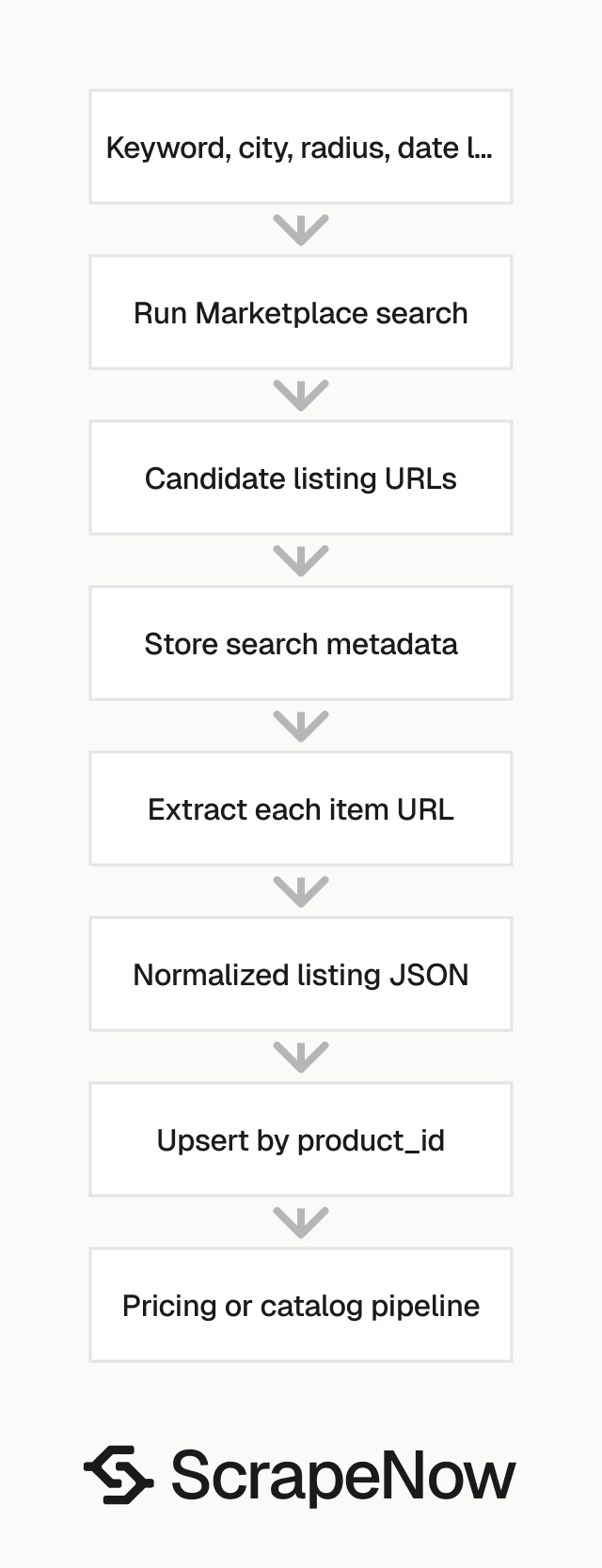
A production pipeline runs cleaner in two stages. Search collects candidate listings, then the URL extractor converts each item page into normalized JSON.
How to use this scraper
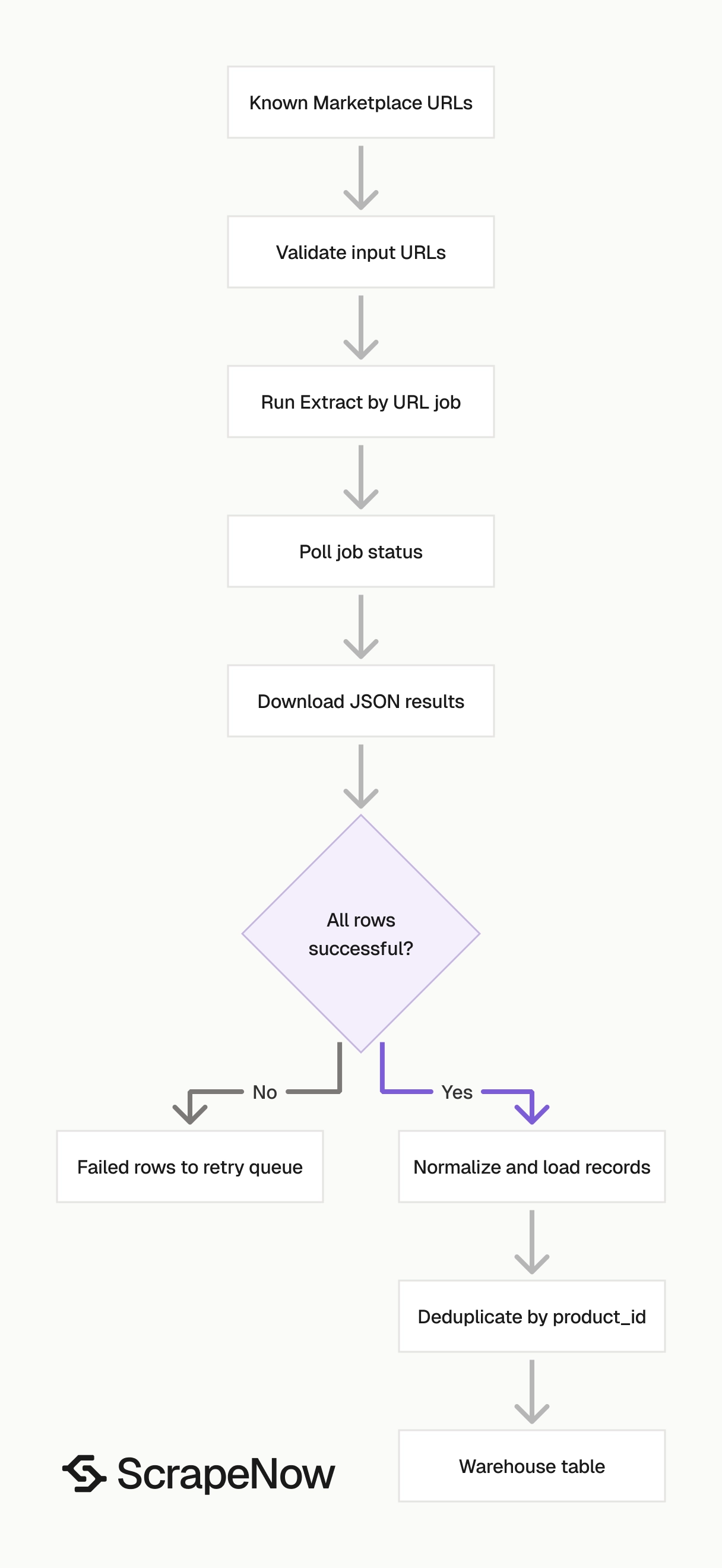
Use Get Marketplace listing data when your system already has listing URLs. Use Search Marketplace listings when ScrapeNow needs to search Marketplace by keyword, city, radius, and listing age.
The URL extractor returns full listing records. The keyword scraper handles listing discovery, and those URLs feed the extractor.
This two-step flow keeps discovery separate from extraction. That separation gives you tighter control over retries, deduplication, queueing, and warehouse loading.
In practice, the search job becomes your URL source. The extraction job becomes your record normalizer.
Step 1. Get the Marketplace item URL
Input variable for the URL extractor:
{
  "url": "https://www.facebook.com/marketplace/item/1594034635223471/"
}
The url value must start with https://www.facebook.com/. The scraper expects a Marketplace item path, so use a URL that contains /marketplace/item/.
Open facebook.com.
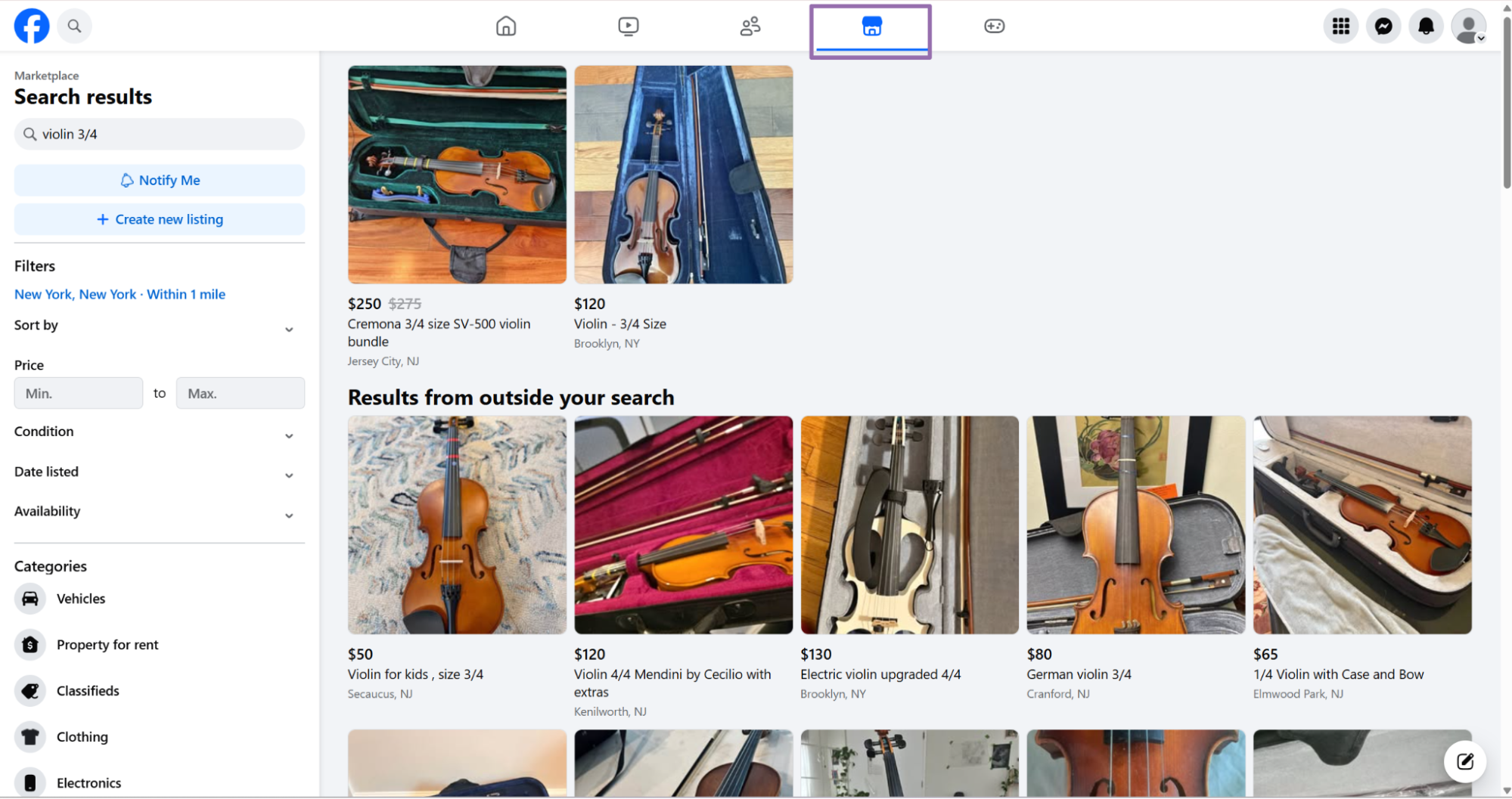
Click the Marketplace tab in the top navigation bar.
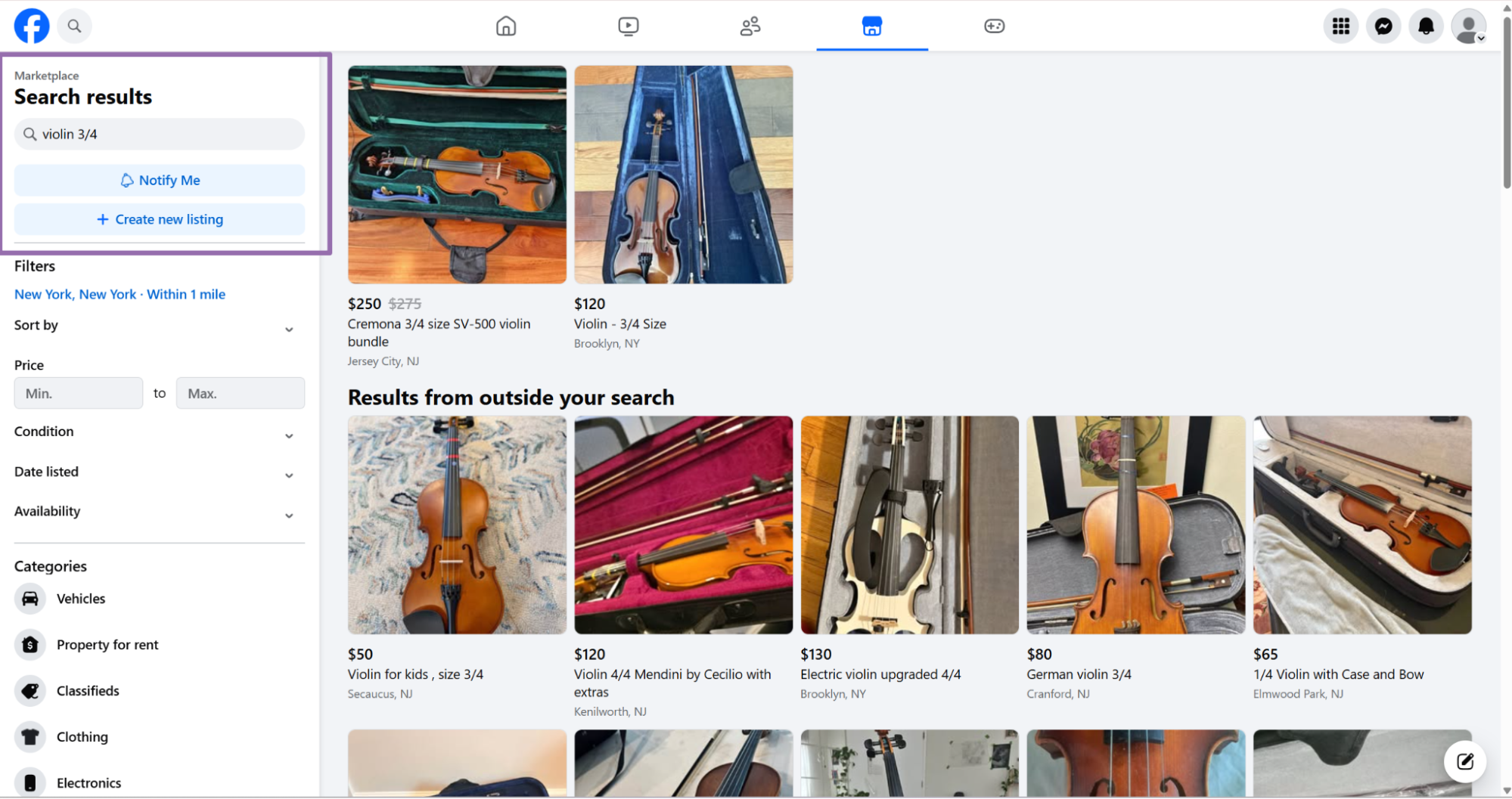
Type the product keyword into the search bar. Use the same keyword your users, analysts, or pricing team would search manually.
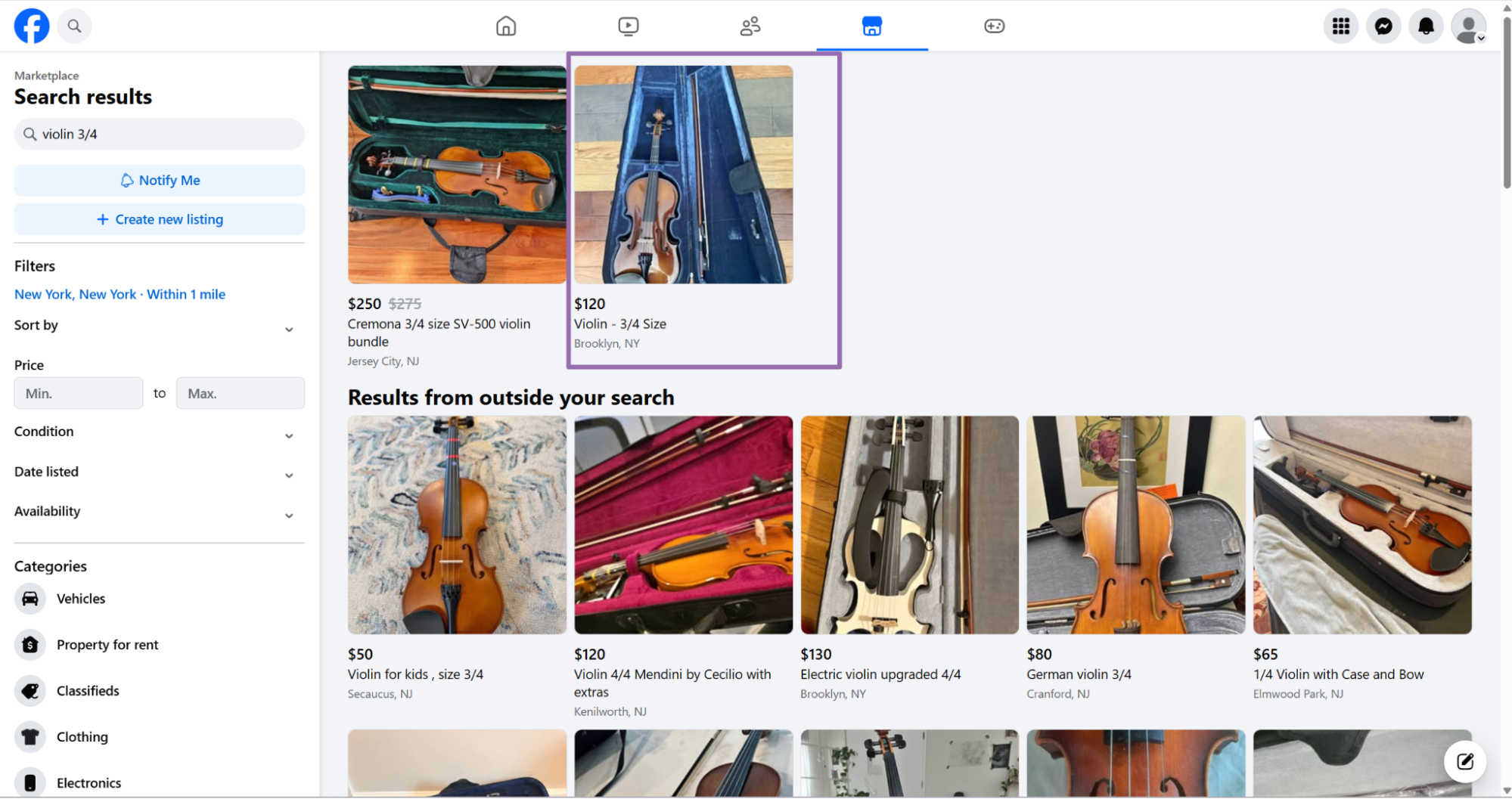
Click the product you want from the results page. Copy the URL from the browser address bar after the item page loads.
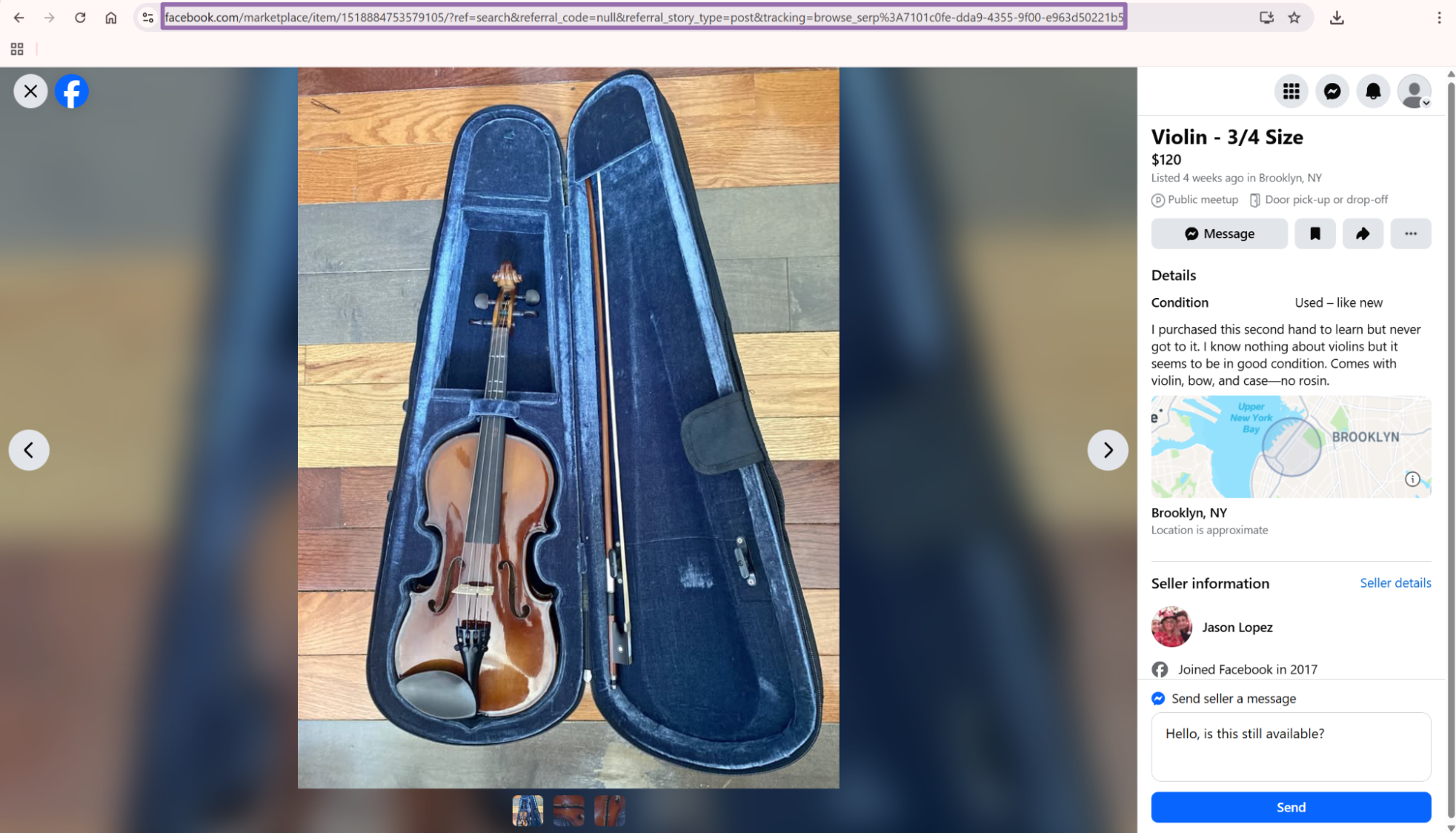
Save the full URL, including the numeric item ID. That ID becomes the product_id field in the extracted output.
Store the original URL with the extracted record. It gives analysts a direct review path when a price, title, image, or seller field needs manual checking.
Keep the raw input URL even after you create a canonical URL. Marketplace pages change, and the original input helps you debug redirects, removed listings, and duplicate queue entries.
Step 2. Run the API job
This is working ScrapeNow API code for the Facebook Marketplace Extract by URL scraper. Replace YOUR_API_KEY with your API key and keep the input schema unchanged.
"""
Configuration
    Set SCRAPER_SLUG to the scraper you want to run.
    Set SCRAPER_INPUTS to the list of input dicts matching that scraper's schema.
    Set API_KEY to your scraper API key.
"""

import sys
import time
import json
import requests
import os

API_KEY = "YOUR_API_KEY"

SCRAPER_SLUG = "facebook-marketplace-extract-by-url"

SCRAPER_INPUTS = [
    {
        "url": "https://www.facebook.com/marketplace/item/1594034635223471/"
    }
]


BASE_URL = "https://api.scrapenow.io/api/v1/scraping"
TIMEOUT_SECONDS = 3600
POLL_INTERVAL = 5
SPINNER = "|/-\\"


def build_headers(api_key: str, content_type: str | None = None) -> dict:
    headers = {"Authorization": f"Bearer {api_key}"}
    if content_type:
        headers["Content-Type"] = content_type
    return headers


def trigger_scrape(slug: str, inputs: list[dict]) -> str:
    url = f"{BASE_URL}/scrape?scraper={slug}"
    response = requests.post(
        url,
        headers=build_headers(API_KEY, "application/json"),
        json={"inputs": inputs},
    )
    response.raise_for_status()
    return response.json()["data"]["job_id"]


def poll_until_done(job_id: str) -> str:
    start = time.time()
    i = 0
    while True:
        elapsed = time.time() - start
        if elapsed > TIMEOUT_SECONDS:
            print(f"\nTimeout after {TIMEOUT_SECONDS}s")
            sys.exit(1)
        response = requests.get(
            f"{BASE_URL}/jobs/{job_id}",
            headers=build_headers(API_KEY),
        )
        response.raise_for_status()
        data = response.json()
        status = data["data"]["status"]
        mins, secs = divmod(int(elapsed), 60)
        sys.stdout.write(
            f"\r[{SPINNER[i % 4]}] Waiting... {status} ({mins}m {secs:02d}s)  "
        )
        sys.stdout.flush()
        if status in ("completed", "failed"):
            print()
            return status
        time.sleep(POLL_INTERVAL)
        i += 1


def fetch_results(job_id: str) -> dict:
    response = requests.get(
        f"{BASE_URL}/jobs/{job_id}/results?format=json",
        headers=build_headers(API_KEY),
    )
    response.raise_for_status()
    return response.json()


def save_results(data: dict, slug: str) -> str:
    os.makedirs("output", exist_ok=True)
    filename = os.path.join("output", f"{slug}.json")
    with open(filename, "w", encoding="utf-8") as f:
        json.dump(data, f, indent=2, ensure_ascii=False)
    return filename


def main() -> None:
    print(f"Triggering scraper: {SCRAPER_SLUG}")
    job_id = trigger_scrape(SCRAPER_SLUG, SCRAPER_INPUTS)
    print(f"Job started: {job_id}")
    final_status = poll_until_done(job_id)
    if final_status != "completed":
        print(f"Job failed with status: {final_status}")
        sys.exit(1)
    print("Fetching results...")
    results = fetch_results(job_id)
    output_file = save_results(results, SCRAPER_SLUG)
    print(f"Results saved to: {output_file}")


if __name__ == "__main__":
    main()
Create the output directory before running the script. Then install requests and run the file.
mkdir -p output
pip install requests
python marketplace.py
The same API pattern works for other scrapers in this group. That includes Search Marketplace listings.
Change the scraper slug and input values in the code for each scraper. Keep the request, polling, result download, and file writing code unchanged.
Keep each scraper input as a list of dictionaries. That lets you run one URL during testing, then send larger batches through the same script.
For local testing, start with one known live listing. After the JSON matches your target schema, send a batch from your URL queue.
Use the same script in CI or a scheduled worker. Pass SCRAPER_INPUTS from your queue layer instead of editing the Python file for each run.
Step 3. Read the job flow
The script does 4 things:
- Sends
SCRAPER_INPUTSto the scrape endpoint. - Receives a
job_id. - Polls every
5seconds until the job iscompletedorfailed. - Downloads JSON results and writes them to
output/facebook-marketplace-extract-by-url.json.
The timeout is set to 3600 seconds. Keep that value for bulk jobs because Marketplace pages load slower than plain HTML product pages.
The poll interval is set to 5 seconds. That interval gives you current job status without overloading the job endpoint.
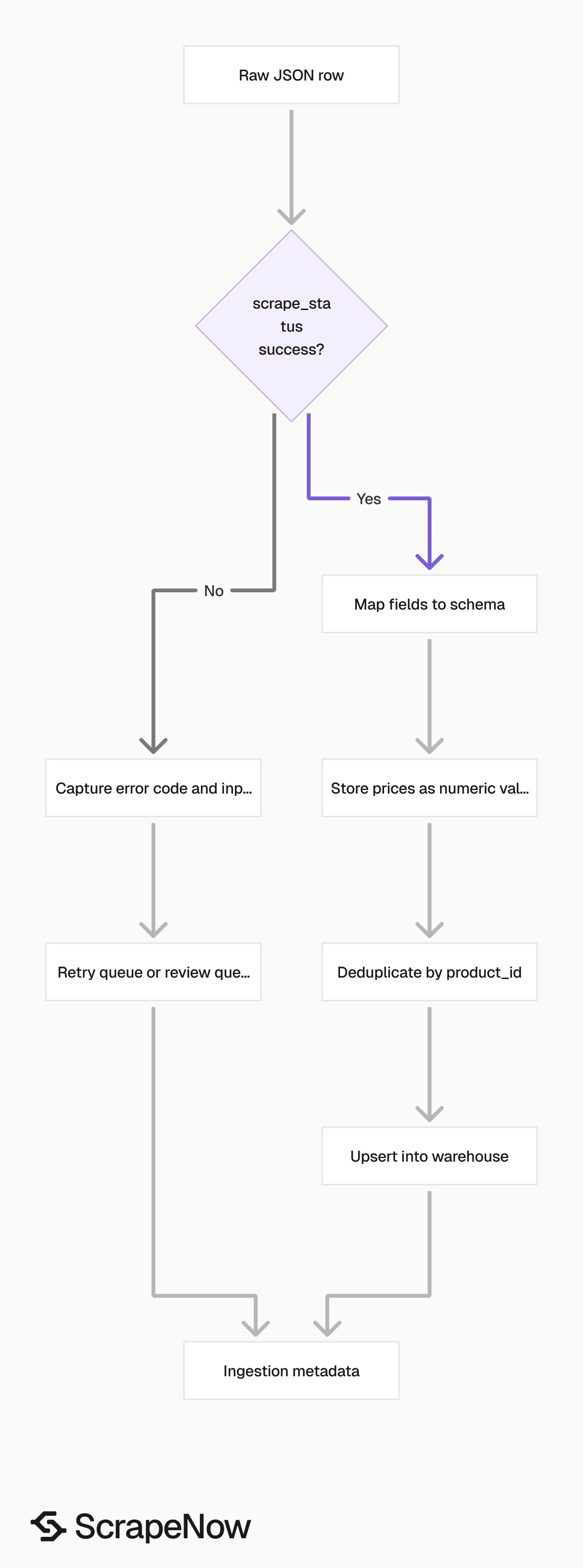
Treat the job status and row status as separate checks. A completed job can contain failed rows when individual listings are removed, hidden, expired, or unavailable.
Row-level checks matter for Marketplace because sellers remove listings without warning. Your pipeline should accept successful rows and route failed rows to a retry or review queue.
Add the job_id to your internal logs. When a batch produces an unexpected failure rate, that ID gives support and engineering teams the exact run to inspect.
Step 4. Check the JSON output
This is a trimmed real response from the URL extractor.
[
  {
    "inputs": {
      "url": "https://www.facebook.com/marketplace/item/1594034635223471/"
    },
    "scrape_status": "success",
    "url": "https://www.facebook.com/marketplace/item/1594034635223471/",
    "title": "3/4 size Cecilia acoustic electric violin",
    "initial_price": 60,
    "final_price": 60,
    "currency": "USD",
    "product_id": "1594034635223471",
    "breadcrumbs": [
      {
        "breadcrumbs_name": "Musical Instruments",
        "breadcrumbs_url": "https://www.facebook.com/marketplace/category/instruments"
      },
      {
        "breadcrumbs_name": "Stringed Instruments",
        "breadcrumbs_url": "https://www.facebook.com/marketplace/category/string-instruments"
      }
    ],
    "condition": "Used - like new",
    "description": "Cecilio acoustic electric violin 3/4 size. In great shape. Hardly used. Plays well. Local pickup preferred ",
    "location": "Elkton, MD",
    "country_code": "US",
    "root_category": "Musical Instruments",
    "images": [
      "https://scontent-iad3-1.xx.fbcdn.net/v/t39.84726-6/653512043_1253636462902547_1616377744766500078_n.jpg?stp=dst-jpg_p720x720_tt6&_nc_cat=110&ccb=1-7&_nc_sid=92e707&_nc_ohc=7XVsHt6AY30Q7kNvwGwiH5r&_nc_oc=AdrxgJHjsbZmguIvrl_npxunSjp6BJSZHzFbePUp8wYBeTcs4cEN4R0RVN_ne8wLCCY&_nc_zt=14&_nc_ht=scontent-iad3-1.xx&_nc_gid=0woF6ZDtHWvx7kVIMPqoTQ&_nc_ss=79289&oh=00_Af63N9J6lS3i7XoI26sCqropEgQX_zQK6-3Ml4ku0ZZxDA&oe=6A090494",
      "https://scontent-iad3-2.xx.fbcdn.net/v/t45.5328-4/653658352_1164396505648249_5627632193681237813_n.jpg?stp=dst-jpg_p720x720_tt6&_nc_cat=103&ccb=1-7&_nc_sid=247b10&_nc_ohc=hfNpWD3OY0YQ7kNvwGjbyV9&_nc_oc=AdpM958WwntkDuKknZpJLNb5y8Pip8f0H3ydoOPjQgXp4Wxqani12xKh_qzn89brWU0&_nc_zt=23&_nc_ht=scontent-iad3-2.xx&_nc_gid=0woF6ZDtHWvx7kVIMPqoTQ&_nc_ss=79289&oh=00_Af5IOFvOpoGPwq5c9PUTemLL-eQOPziJBXOB1gMkRYo2zQ&oe=6A092765"
    ],
    "seller_description": "Cecilio acoustic electric violin 3/4 size. In great shape. Hardly used. Plays well. Local pickup preferred ",
    "color": null,
    "brand": null,
    "videos": null,
    "profile_id": "34926633680268195",
    "listing_date": "2026-03-17T17:51:50.000Z",
    "car_miles": null,
    "scrape_error": null,
    "scrape_error_code": null
  }
]
The response returns an array because the API accepts multiple inputs. With one URL, you receive one record inside that array.
Null values are expected when Facebook does not expose a field on the listing page. Keep those fields in your schema so downstream code stays stable when a future listing includes them.
Do not infer missing values from the title unless your matching logic records that source. For example, a title can mention a brand while the brand field stays null.
The inputs object gives you the exact payload used for that row. Store it with the result when you need full traceability from queue entry to extracted record.
Run Marketplace search by keyword
Use keyword search when you want to discover listings before extracting full item pages. The search scraper takes keyword, city, optional radius, and optional date_listed.
Input variables:
{
  "keyword": "violin ¾",
  "city": "New York",
  "radius": "1",
  "date_listed": "Last 24 hours"
}
keyword is the same phrase you would type into Facebook Marketplace. Use specific product terms when you need cleaner results.
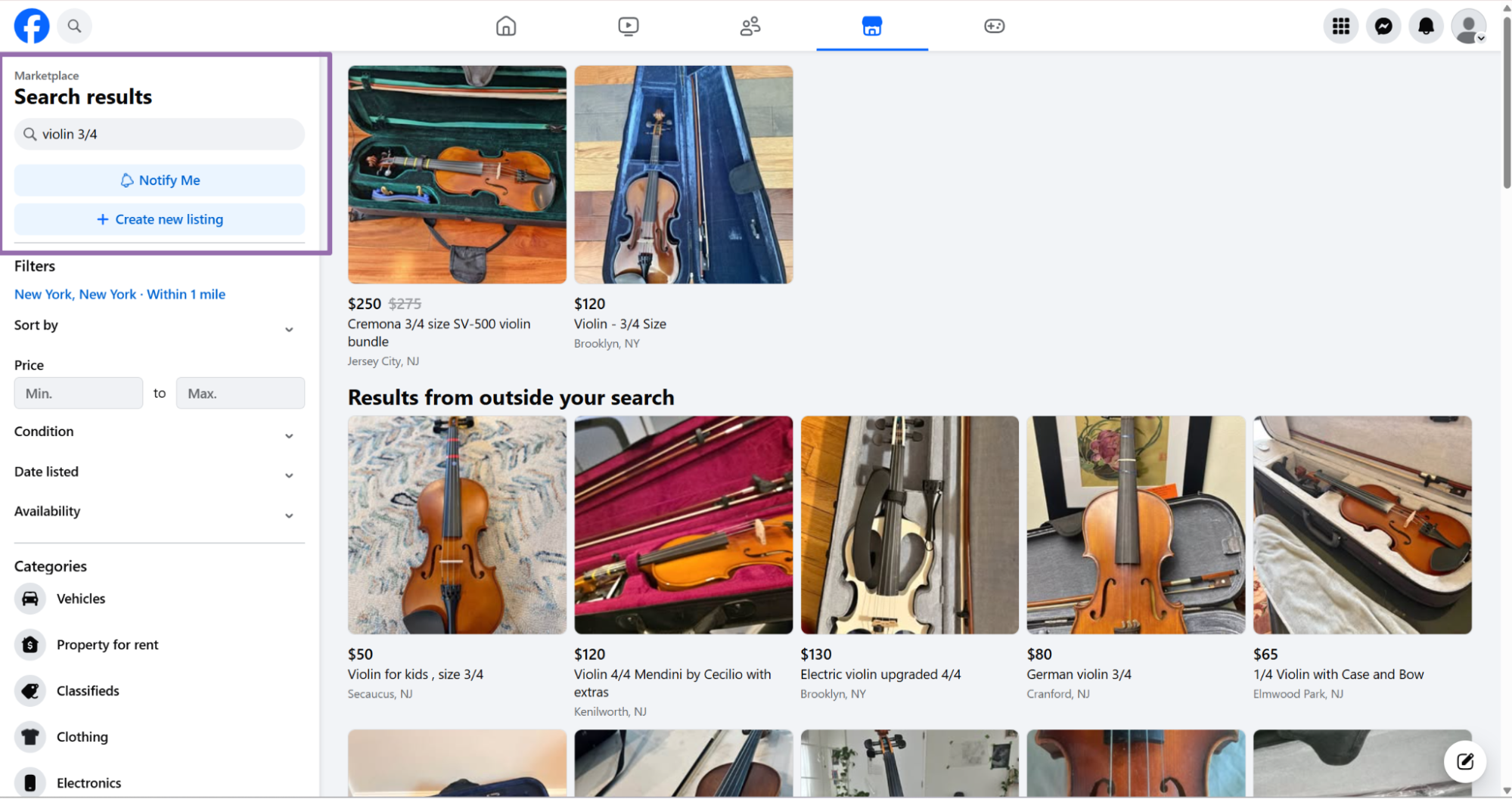
city controls the Marketplace location. Use the city name that matches Facebook's location selector.
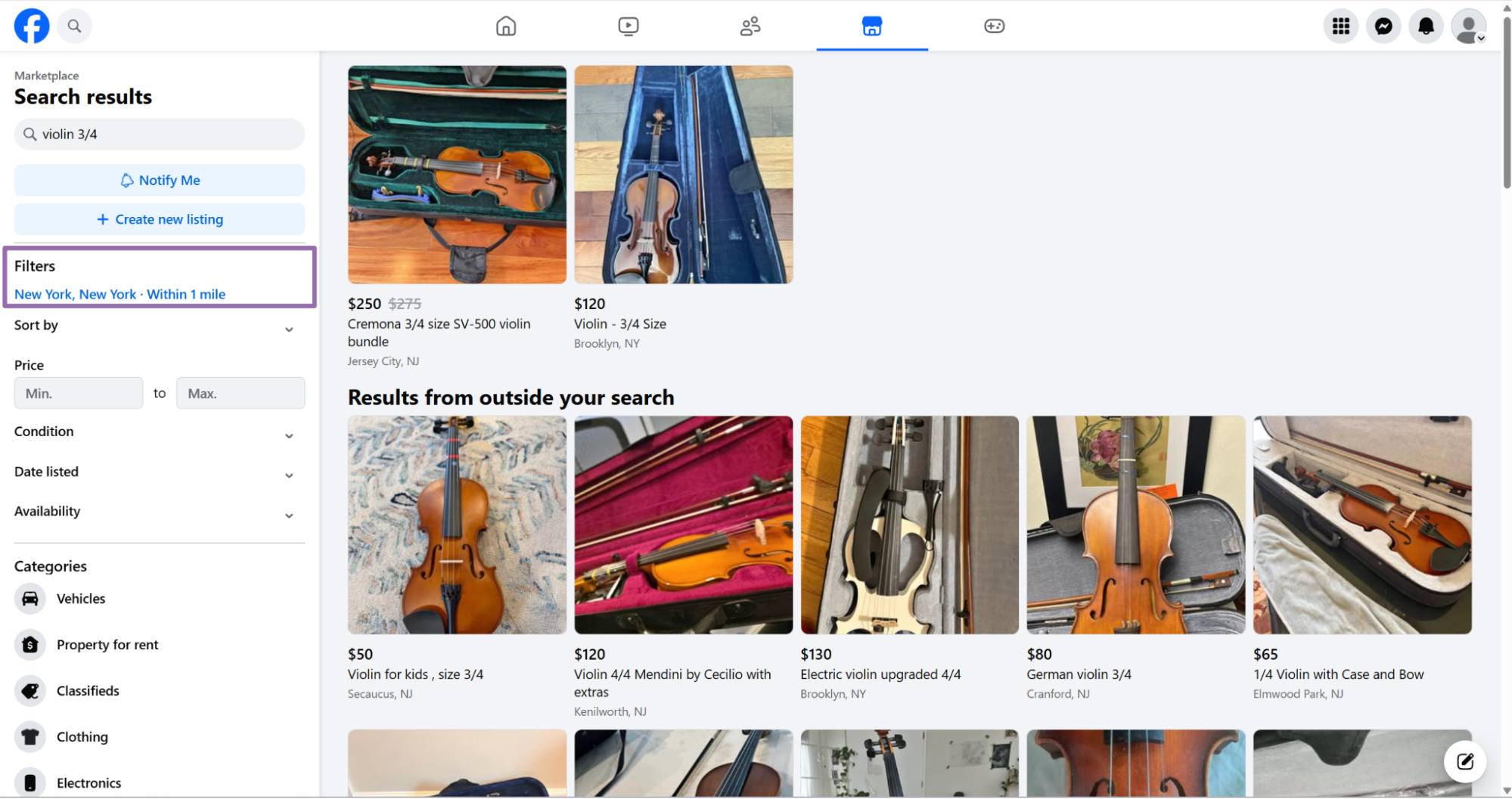
radius is optional and uses miles around the selected city center. Send "1" for a 1 mile radius.
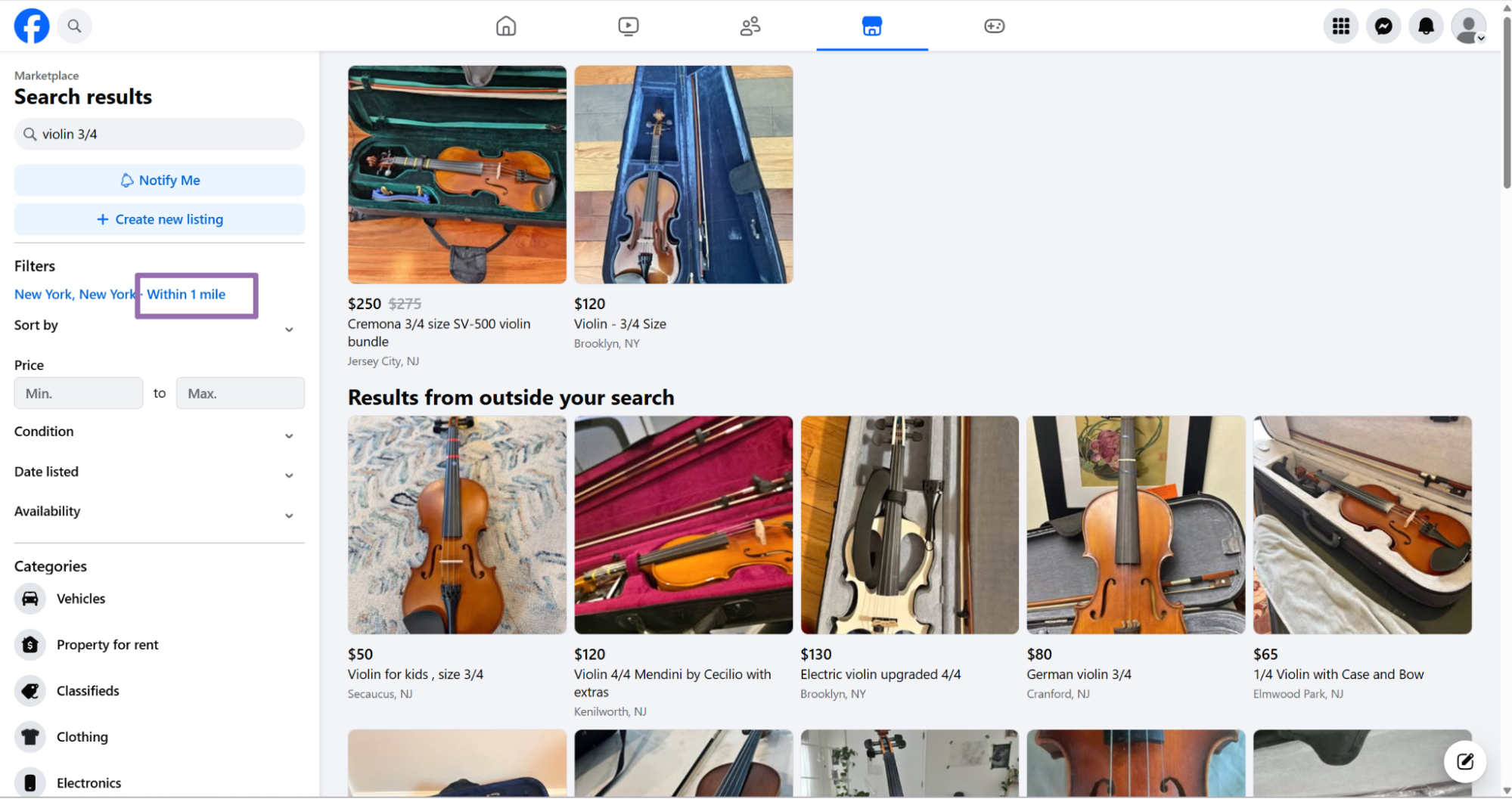
date_listed is optional and filters by listing age. Send the exact label value, such as "Last 24 hours".
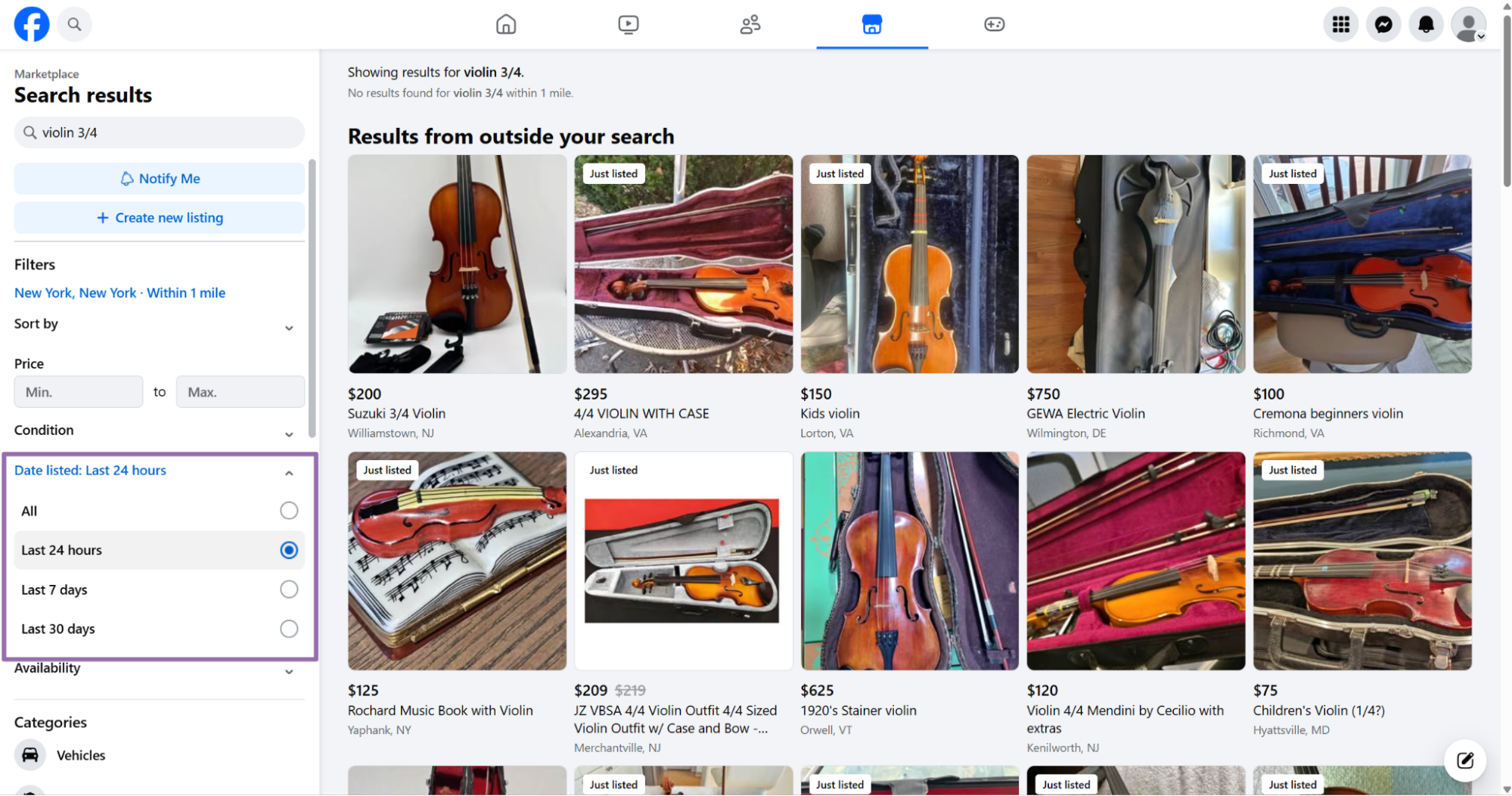
A common production pattern runs search first, then extracts each returned item URL with Get Marketplace listing data. That gives you discovery plus a normalized listing record for each product.
For price monitoring, run keyword search on a schedule and store every returned URL. Then extract new URLs and update existing records by product_id.
For catalog matching, keep the original keyword with each search result. That gives your matching pipeline context when a listing title uses shorthand or seller-specific phrasing.
Keyword search also gives you a clean way to separate local markets. Run the same keyword across several cities, then compare median price, listing volume, and listing age.
Use a narrow radius for dense markets. A 1 mile search in New York returns a different inventory set than a 40 mile search around the same city.
For sparse markets, widen the radius and store it as part of the search metadata. A price comparison loses context when a 1 mile Manhattan query sits beside a 60 mile rural query.
Keep search inputs immutable after submission. If a stakeholder changes the target city or radius later, create a new batch instead of rewriting the original run.
What data you get back
The extractor returns one JSON object per input URL. Every record includes the original input, scrape status, normalized listing fields, and error fields.
Use product_id as the stable Marketplace listing identifier. In the sample above, the product ID is 1594034635223471, which also appears in the item URL.
Use title, description, and seller_description for text matching. Facebook sellers often repeat the same copy in the listing body and seller field.
Keep both text fields for audit trails. That helps when a classifier flags a listing and an analyst needs to review the original text.
Use initial_price, final_price, and currency for price tracking. In normal listings, initial_price and final_price match, as shown with 60 and USD.
Use breadcrumbs and root_category for category mapping. In the sample, the listing maps to Musical Instruments and then Stringed Instruments.
Use location and country_code for geo filtering. The sample returns Elkton, MD and US.
Use images as an array, never as a single string. Marketplace listings can return multiple image URLs, and image count is a useful listing quality signal.
Use profile_id when you need seller-level grouping. Store it separately from product_id because one seller can publish many listings.
Use listing_date as a timestamp, then convert it to your warehouse timezone. Keep the original UTC value if you compare records across regions.
Use scrape_status, scrape_error, and scrape_error_code for job monitoring. A successful row returns "scrape_status": "success" and null error fields.
Map each field before loading it into your warehouse. A typed table catches data shape issues earlier than a schemaless data export.
Treat breadcrumbs as source category data from Facebook. If your product uses its own category tree, map Facebook categories into your internal taxonomy in a separate step.
Treat profile_id as a grouping key, not as seller identity verification. Marketplace seller displays change, and public profile data varies by region and visibility settings.
Ready to get this data? Get Marketplace listing data.
Production tips for validation, deduplication, schema, and error handling
Validate inputs before submitting jobs. Invalid Marketplace URLs burn credits and create noisy job output.
from urllib.parse import urlparse

def validate_marketplace_url(url: str) -> None:
    parsed = urlparse(url)

    if parsed.scheme != "https":
        raise ValueError("Marketplace URL must use https")

    if parsed.netloc != "www.facebook.com":
        raise ValueError("Marketplace URL must use www.facebook.com")

    if not parsed.path.startswith("/marketplace/item/"):
        raise ValueError("Marketplace URL must start with /marketplace/item/")

urls = [
    "https://www.facebook.com/marketplace/item/1594034635223471/"
]

for url in urls:
    validate_marketplace_url(url)
Run validation before you build the API payload. That catches malformed URLs in your system before a job runs.
Deduplicate by product_id, then fall back to canonical URL. Sellers can relist the same item, so keep listing_date in your downstream table.
import json

with open("output/facebook-marketplace-extract-by-url.json", "r", encoding="utf-8") as f:
    rows = json.load(f)

seen = set()
clean_rows = []

for row in rows:
    product_id = row.get("product_id")
    url = row.get("url")
    dedupe_key = product_id or url

    if dedupe_key in seen:
        continue

    seen.add(dedupe_key)
    clean_rows.append(row)

print(f"Input rows: {len(rows)}")
print(f"Unique rows: {len(clean_rows)}")
Store prices as numeric fields and currency as a string. Avoid formatted values like $60 because currency conversion and price history become harder later.
Keep initial_price and final_price as separate columns. That leaves room for discounts, edits, and future price changes without rewriting your schema.
Use a fixed schema in your warehouse. This schema covers the fields returned by the extractor without guessing types.
{
  "product_id": "string",
  "url": "string",
  "title": "string",
  "initial_price": "number",
  "final_price": "number",
  "currency": "string",
  "condition": "string",
  "description": "string",
  "seller_description": "string",
  "location": "string",
  "country_code": "string",
  "root_category": "string",
  "breadcrumbs": "array<object>",
  "images": "array<string>",
  "profile_id": "string",
  "listing_date": "timestamp",
  "scrape_status": "string",
  "scrape_error": "string",
  "scrape_error_code": "string"
}
Add ingestion metadata outside the scraper payload. Useful fields include job_id, scraper_slug, ingested_at, and your internal batch ID.
Handle failed rows at row level. One unavailable listing should never block 500 valid listings from reaching your database.
def split_success_and_failures(rows: list[dict]) -> tuple[list[dict], list[dict]]:
    successes = []
    failures = []

    for row in rows:
        if row.get("scrape_status") == "success":
            successes.append(row)
        else:
            failures.append({
                "input": row.get("inputs"),
                "url": row.get("url"),
                "error": row.get("scrape_error"),
                "error_code": row.get("scrape_error_code")
            })

    return successes, failures
Send failed rows to a retry queue with the original input and error code. Cap retries at three attempts per input, then move persistent failures to a review queue.
Batch inputs into chunks of 100 URLs per job and track submitted, successful, and failed row counts per batch. Alert on failure rate, not individual failures, because Marketplace listings disappear often.
Store raw results before transformation so you have a recovery path when downstream mapping code drops a field.
Add idempotency to your loader. Use product_id plus scraper_slug as the upsert key when the same listing appears in multiple search batches.
Product-specific workflow
ScrapeNow gives you two Marketplace entry points. The URL extractor works from known item pages, and the keyword scraper creates item candidates from Marketplace search.
That split matters in production because search failures and extraction failures need different handling. A search failure affects discovery coverage, while an extraction failure affects one listing row.
For a pricing pipeline, schedule keyword searches hourly or daily. Extract new URLs first, then refresh existing URLs on a slower schedule.
For a lead pipeline, extract every discovered URL before scoring. Lead scoring needs title, description, location, price, images, and seller grouping data in one record.
For catalog matching, store the query that found the listing. A listing for “Cecilio violin” found by a “student violin” query gives your matcher useful context.
For market reports, keep city and radius on the search batch. Median price comparisons need the search boundary that produced each listing set.
Pricing
ScrapeNow charges per returned row. One row costs one credit, starting at $0.04 per credit for small runs and dropping with volume. No monthly contracts, no proxy fees, no charges for failed rows. See the pricing page for current rates.


