Pull Facebook Page posts as JSON without maintaining selectors, browser sessions, or proxy routing.
This scraper returns one JSON row per Facebook Page post. Each row includes the post URL, post ID, author Page, publish date, comments, shares, reactions, attachments, and optional Page profile fields.
Use the Extract Facebook page posts scraper when you already have Page URLs and need post-level records for monitoring, reporting, enrichment, or historical backfills. The product page has the live schema, pricing, and API entry point.
If your Facebook input is an event, Marketplace listing, or keyword search, Browse all 86+ scrapers to find the right extractor.
How to use this scraper
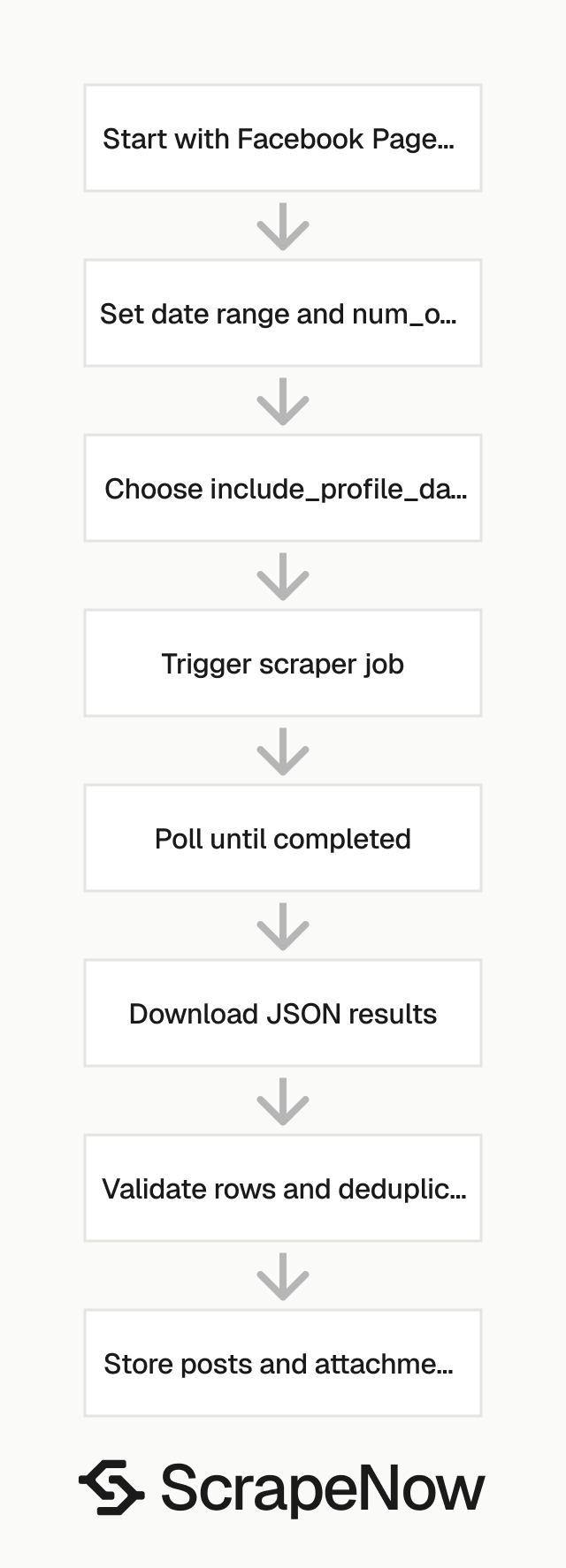
Send a Facebook Page URL, an optional date range, the maximum number of posts, and the profile-data flag.
The scraper returns one row per post. In ScrapeNow pricing, 1 returned row costs 1 credit. Credits start at $0.04 for 1 to 250 rows and drop to $0.012 at 100K+ rows.
Use a small num_of_posts value for test runs. Increase it after validation, deduplication, and storage work end to end.
For a first run, use one Page URL and request one post. That gives you enough data to test the full path without loading duplicate records into your warehouse.
Keep the first run small even when the Page has years of history. A single row tests authentication, job polling, result download, JSON parsing, and destination writes.
Inputs
| Input | Required | Format | Example |
|---|---|---|---|
url |
Yes | Must start with https://www.facebook.com |
https://www.facebook.com/Beyonce/ |
num_of_posts |
No | String or number | "1" |
start_date |
No | YYYY-MM-DD |
"2026-05-05" |
end_date |
No | YYYY-MM-DD |
"2026-05-13" |
include_profile_data |
Yes | String boolean for API usage | "true" |
Step 1, open Facebook
Open facebook.com.
Use a desktop browser for URL collection. Mobile URLs add redirects and path variants that create avoidable cleanup work.
Step 2, search for the Page
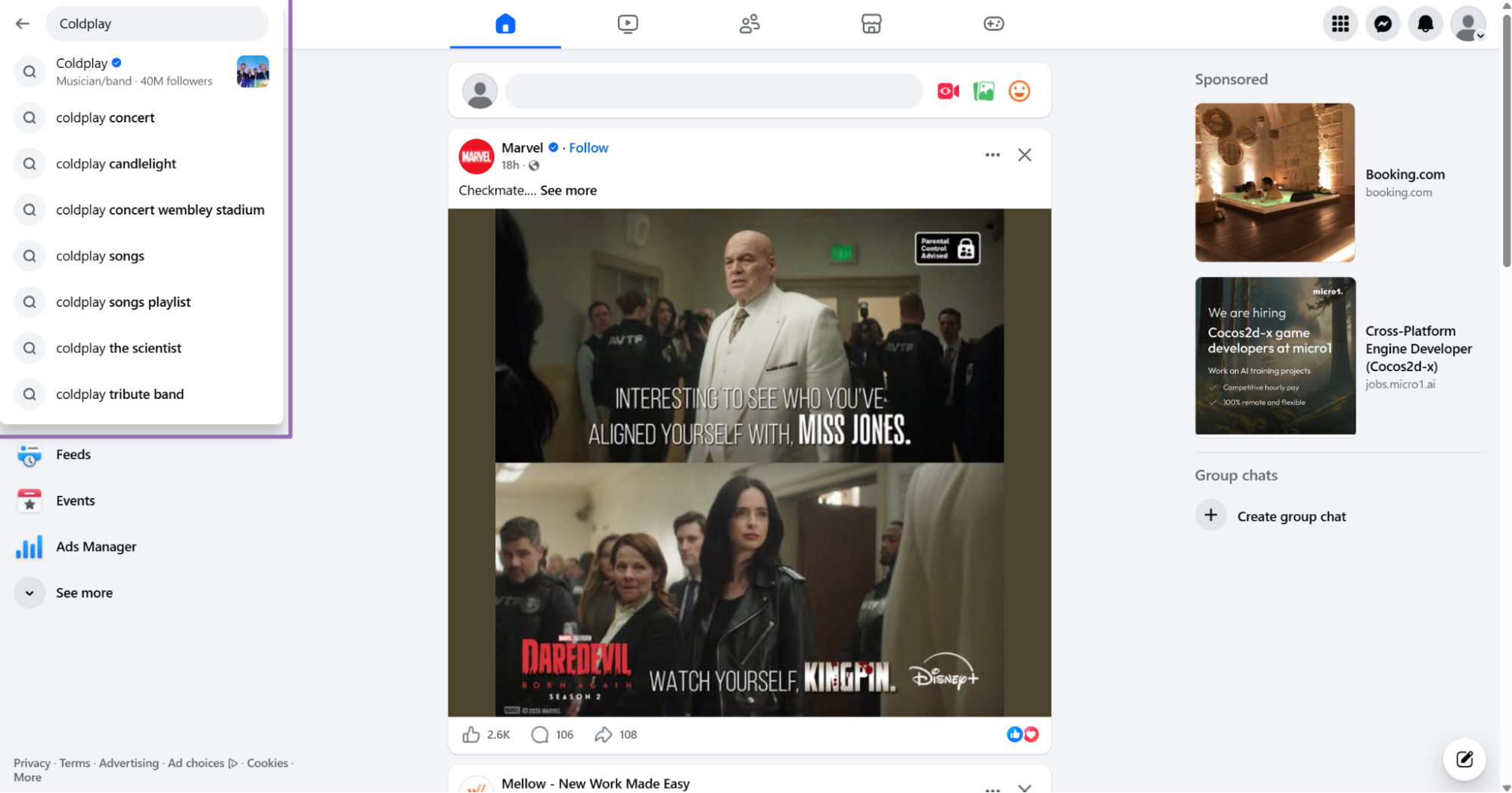
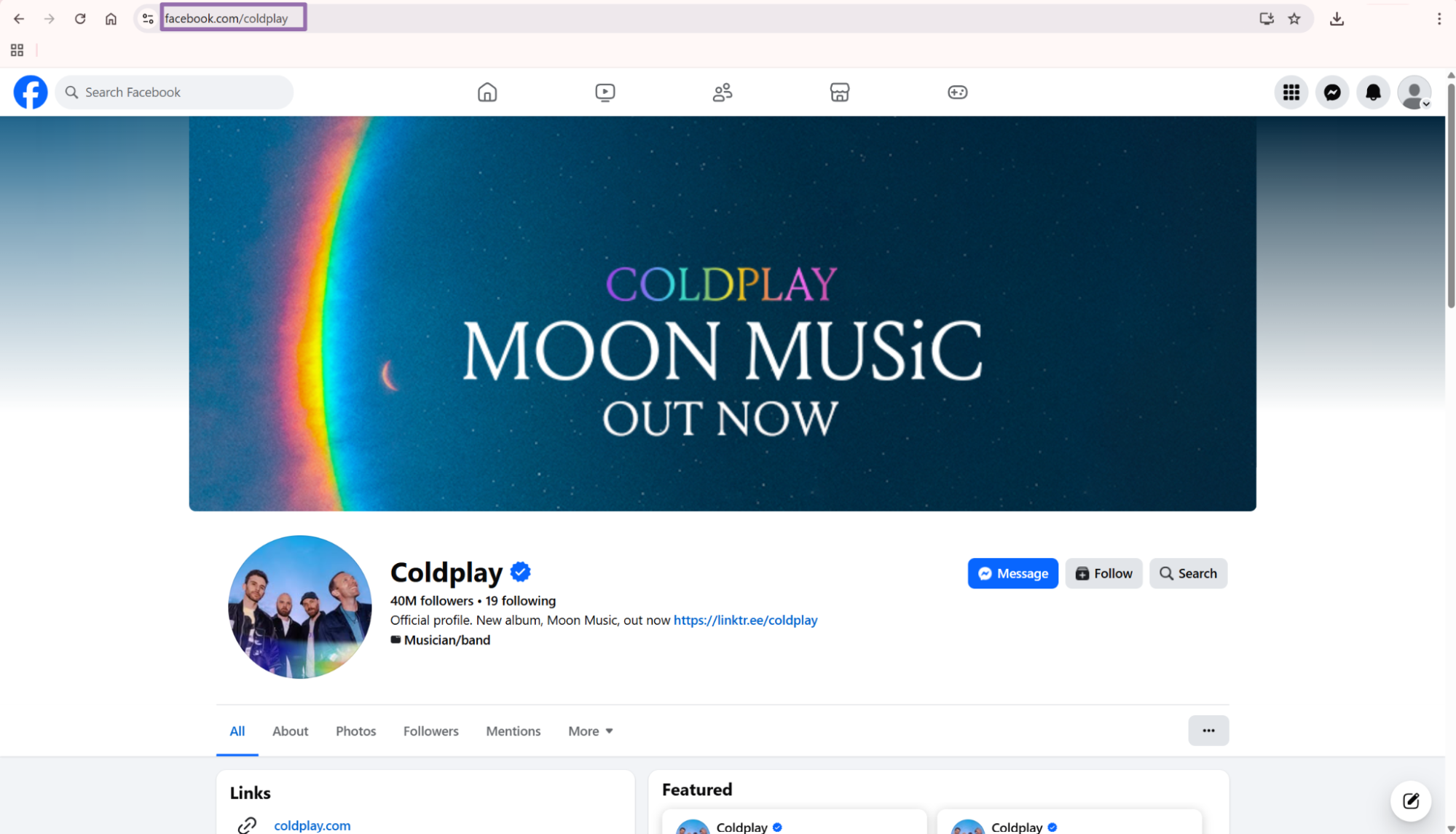
Type the Page keyword in the search bar. For example, search for Coldplay.
Use the official Page when Facebook shows multiple results. Fan pages, groups, and duplicate Pages return different post histories.
Check the verification badge, follower count, and Page category before copying the URL. Those checks prevent obvious input mistakes before you spend credits.
Step 3, open the Page and copy the URL
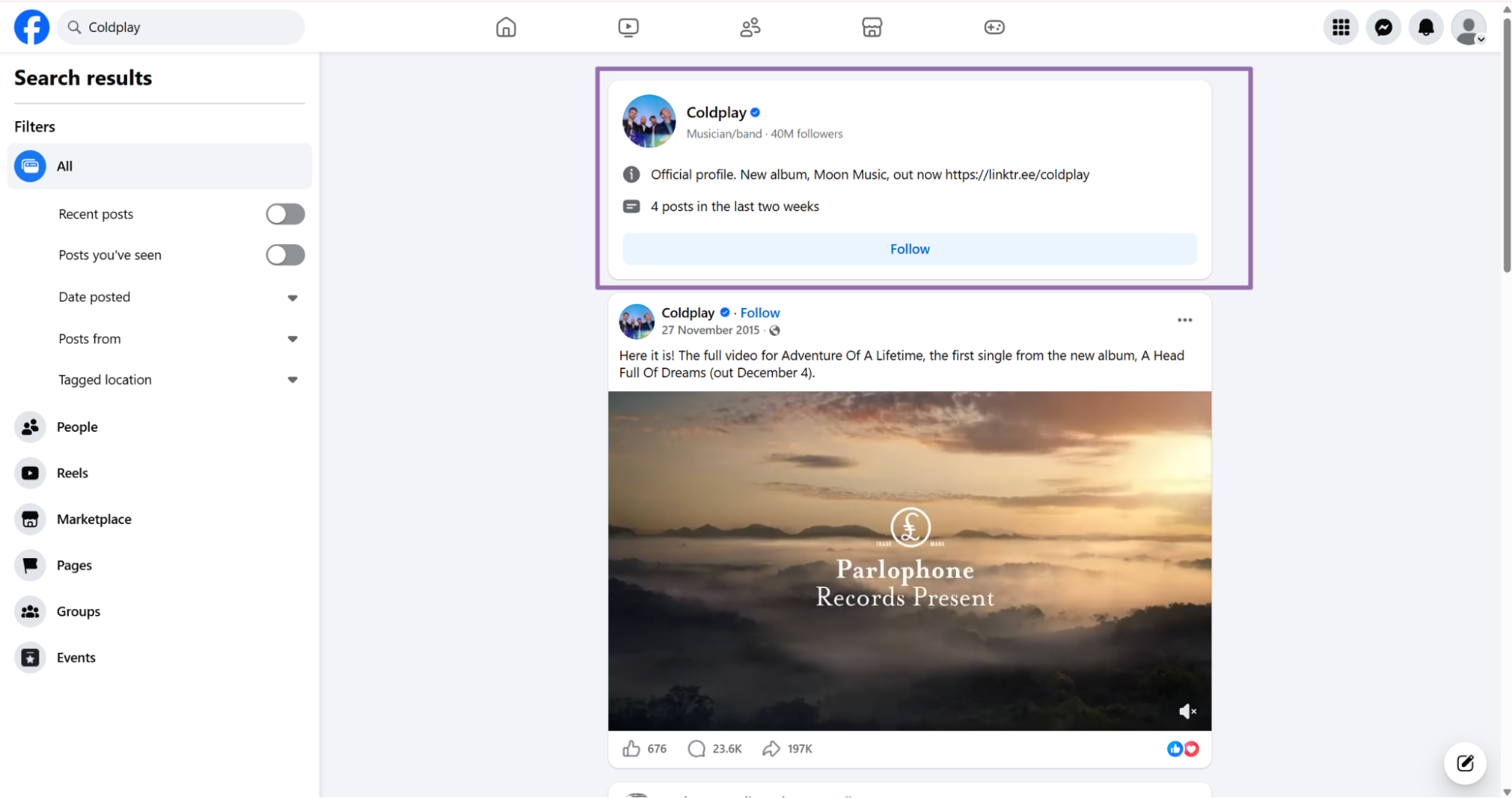
Click the target profile or Page on the results page.
Copy the URL from the browser address bar. The value must start with https://www.facebook.com.
Remove tracking parameters before sending the URL. A short Page URL is easier to log, compare, and debug.
Keep the canonical Page URL in your input table. Avoid mixing mobile URLs, tracking links, and redirected URLs in the same batch.
Use one canonical URL format across your whole input list. That makes deduplication easier when multiple teams collect Page URLs.
Step 4, set the date range and post count
Use start_date and end_date to limit the crawl window. For API usage, both dates must use YYYY-MM-DD.
Set num_of_posts to cap the returned post count. Set include_profile_data to "true" when you need page-level fields.
Page-level fields include followers, category, logo, external website, and verification status. Turn the flag off when your pipeline only needs post rows.
For recurring jobs, keep your date windows small. Daily or weekly windows reduce duplicate rows and make retries easier to isolate.
For historical backfills, split large ranges by week or month. Smaller windows give you cleaner retry boundaries when one Page fails.
Step 5, run the API request
Use this Python script.
"""
Configuration:
    - Set SCRAPER_SLUG to the scraper you want to run.
    - Set SCRAPER_INPUTS to the list of input dicts matching that scraper's schema.
    - Set API_KEY to your scraper API key.
"""

import sys
import time
import json
import requests
import os

API_KEY = "YOUR_API_KEY"

SCRAPER_SLUG = "facebook-page-posts-extract-by-url"

SCRAPER_INPUTS = [
    {
        "url": "https://www.facebook.com/Beyonce/",
        "end_date": "2026-05-13",
        "start_date": "2026-05-05",
        "num_of_posts": "1",
        "include_profile_data": "true"
    }
]


BASE_URL = "https://api.scrapenow.io/api/v1/scraping"
TIMEOUT_SECONDS = 3600
POLL_INTERVAL = 5
SPINNER = "|/-\\"


def build_headers(api_key: str, content_type: str | None = None) -> dict:
    headers = {"Authorization": f"Bearer {api_key}"}
    if content_type:
        headers["Content-Type"] = content_type
    return headers


def trigger_scrape(slug: str, inputs: list[dict]) -> str:
    url = f"{BASE_URL}/scrape?scraper={slug}"
    response = requests.post(
        url,
        headers=build_headers(API_KEY, "application/json"),
        json={"inputs": inputs},
    )
    response.raise_for_status()
    return response.json()["data"]["job_id"]


def poll_until_done(job_id: str) -> str:
    start = time.time()
    i = 0
    while True:
        elapsed = time.time() - start
        if elapsed > TIMEOUT_SECONDS:
            print(f"\nTimeout after {TIMEOUT_SECONDS}s")
            sys.exit(1)
        response = requests.get(
            f"{BASE_URL}/jobs/{job_id}",
            headers=build_headers(API_KEY),
        )
        response.raise_for_status()
        data = response.json()
        status = data["data"]["status"]
        mins, secs = divmod(int(elapsed), 60)
        sys.stdout.write(
            f"\r[{SPINNER[i % 4]}] Waiting... {status} ({mins}m {secs:02d}s)  "
        )
        sys.stdout.flush()
        if status in ("completed", "failed"):
            print()
            return status
        time.sleep(POLL_INTERVAL)
        i += 1


def fetch_results(job_id: str) -> dict:
    response = requests.get(
        f"{BASE_URL}/jobs/{job_id}/results?format=json",
        headers=build_headers(API_KEY),
    )
    response.raise_for_status()
    return response.json()


def save_results(data: dict, slug: str) -> str:
    os.makedirs("output", exist_ok=True)
    filename = os.path.join("output", f"{slug}.json")
    with open(filename, "w", encoding="utf-8") as f:
        json.dump(data, f, indent=2, ensure_ascii=False)
    return filename


def main() -> None:
    print(f"Triggering scraper: {SCRAPER_SLUG}")
    job_id = trigger_scrape(SCRAPER_SLUG, SCRAPER_INPUTS)
    print(f"Job started: {job_id}")
    final_status = poll_until_done(job_id)
    if final_status != "completed":
        print(f"Job failed with status: {final_status}")
        sys.exit(1)
    print("Fetching results...")
    results = fetch_results(job_id)
    output_file = save_results(results, SCRAPER_SLUG)
    print(f"Results saved to: {output_file}")


if __name__ == "__main__":
    main()
The script does 4 things:
- Starts a scrape job with the Facebook Page Posts Extract by URL scraper
- Polls the job every 5 seconds
- Downloads the result as JSON
- Saves the file under
output/facebook-page-posts-extract-by-url.json
For batch jobs, send multiple input objects in SCRAPER_INPUTS. Keep limit_per_input aligned with your test plan.
That setting prevents one request from returning more rows than expected. It also keeps test costs predictable while you validate storage and parsing.
Set limit_per_input low while you build the pipeline. Raise it only after the destination schema and duplicate handling pass a real test.
Example JSON output
This is a trimmed API response from the Page posts scraper.
[
  {
    "inputs": {
      "url": "https://www.facebook.com/Beyonce/",
      "end_date": "2026-05-13",
      "start_date": "2026-05-05",
      "num_of_posts": "1",
      "include_profile_data": "true"
    },
    "scrape_status": "success",
    "url": "https://www.facebook.com/beyonce/posts/pfbid0JNMeKpFe4jtmzJFsbpsZUfuVAK7KmszmsnGbGCTm21FVX3pNJN23m94X54z27rXMl",
    "post_id": "1567622508057376",
    "user_url": "https://www.facebook.com/beyonce",
    "user_username_raw": "Beyoncé",
    "date_posted": "2026-05-05T01:10:44.000Z",
    "num_comments": 4646,
    "num_shares": 11665,
    "num_likes_type": {
      "type": "Like",
      "num": 105598
    },
    "page_name": "Beyoncé",
    "profile_id": "100044289256798",
    "page_intro": "⠀",
    "page_category": "Musician/band",
    "page_logo": "https://scontent.fvga2-6.fna.fbcdn.net/v/t39.30808-1/476181735_1202758777877086_4311767465452032132_n.jpg?stp=cp6_dst-jpg_s200x200_tt6&_nc_cat=104&ccb=1-7&_nc_sid=2d3e12&_nc_ohc=m3u00rOGzMIQ7kNvwHX9ERe&_nc_oc=Adrv2NxB40zO35h0UB-hRxSluqGH8BibaqK6Tzt2zs2Ur0Fh6-q4vXh8khZNayoqApo&_nc_zt=24&_nc_ht=scontent.fvga2-6.fna&_nc_gid=ApwmWYSGR_DTRi3SVepsUQ&_nc_ss=79289&oh=00_Af7TgNPepzoTzWBKqgzO3msRdbH3Gyezo7S3wXxOD4cVKA&oe=6A0A037C",
    "page_external_website": "beyonce.com",
    "page_followers": 55000000,
    "page_is_verified": true,
    "attachments": [
      {
        "id": "1567622471390713",
        "type": "Photo",
        "url": "https://scontent.fvga2-5.fna.fbcdn.net/v/t51.82787-15/686510170_18636374017008035_4701759044736133075_n.jpg?_nc_cat=1&ccb=1-7&_nc_sid=127cfc&_nc_ohc=2DQDpSuQOxgQ7kNvwGyq43E&_nc_oc=AdrINbSI9K7H0mUUVbABUOBOB3IdK0n4A1v5H2RW1fksX6oyZlcci3WfjEieQ5V3gzs&_nc_zt=23&_nc_ht=scontent.fvga2-5.fna&_nc_gid=iB51MnvaouT_OJ0rCsASHg&_nc_ss=79289&oh=00_Af63LeDRCPLvgWqSQjq4JE4es7GbCJP4M-LCXU9DZ-e-ig&oe=6A0A1E3B",
        "attachment_url": "https://www.facebook.com/photo.php?fbid=1567622471390713&set=a.287183736101266&type=3",
        "video_url": null,
        "thumbnail_url": null
      },
      {
        "id": "1567622481390712",
        "type": "Photo",
        "url": "https://scontent.fvga2-3.fna.fbcdn.net/v/t51.82787-15/684961468_18636374026008035_4971504822502366252_n.jpg?_nc_cat=108&ccb=1-7&_nc_sid=127cfc&_nc_ohc=6sQsDqAZheEQ7kNvwG7GQZw&_nc_oc=Adohw1I1QD4eECu0VuiQ478huUn5qiOpBpz0JITWh30jcLmDgDT5jwdwvT0VfeRtRvE&_nc_zt=23&_nc_ht=scontent.fvga2-3.fna&_nc_gid=iB51MnvaouT_OJ0rCsASHg&_nc_ss=79289&oh=00_Af5aTmiZB1utQNGQh3YHQ2ap62o8SWMZtMlC-sQNizF_SA&oe=6A0A0B94",
        "attachment_url": "https://www.facebook.com/photo.php?fbid=1567622481390712&set=a.287183736101266&type=3",
        "video_url": null,
        "thumbnail_url": null
      },
      {
        "id": "1567622478057379",
        "type": "Photo",
        "url": "https://scontent.fvga2-2.fna.fbcdn.net/v/t51.82787-15/689221710_18636374038008035_9039654601268904565_n.jpg?...truncated",
        "attachment_url": "https://www.facebook.com/photo.php?fbid=1567622478057379&set=a.287183736101266&type=3",
        "video_url": null,
        "thumbnail_url": null
      }
    ]
  }
]
Pick the right Facebook scraper
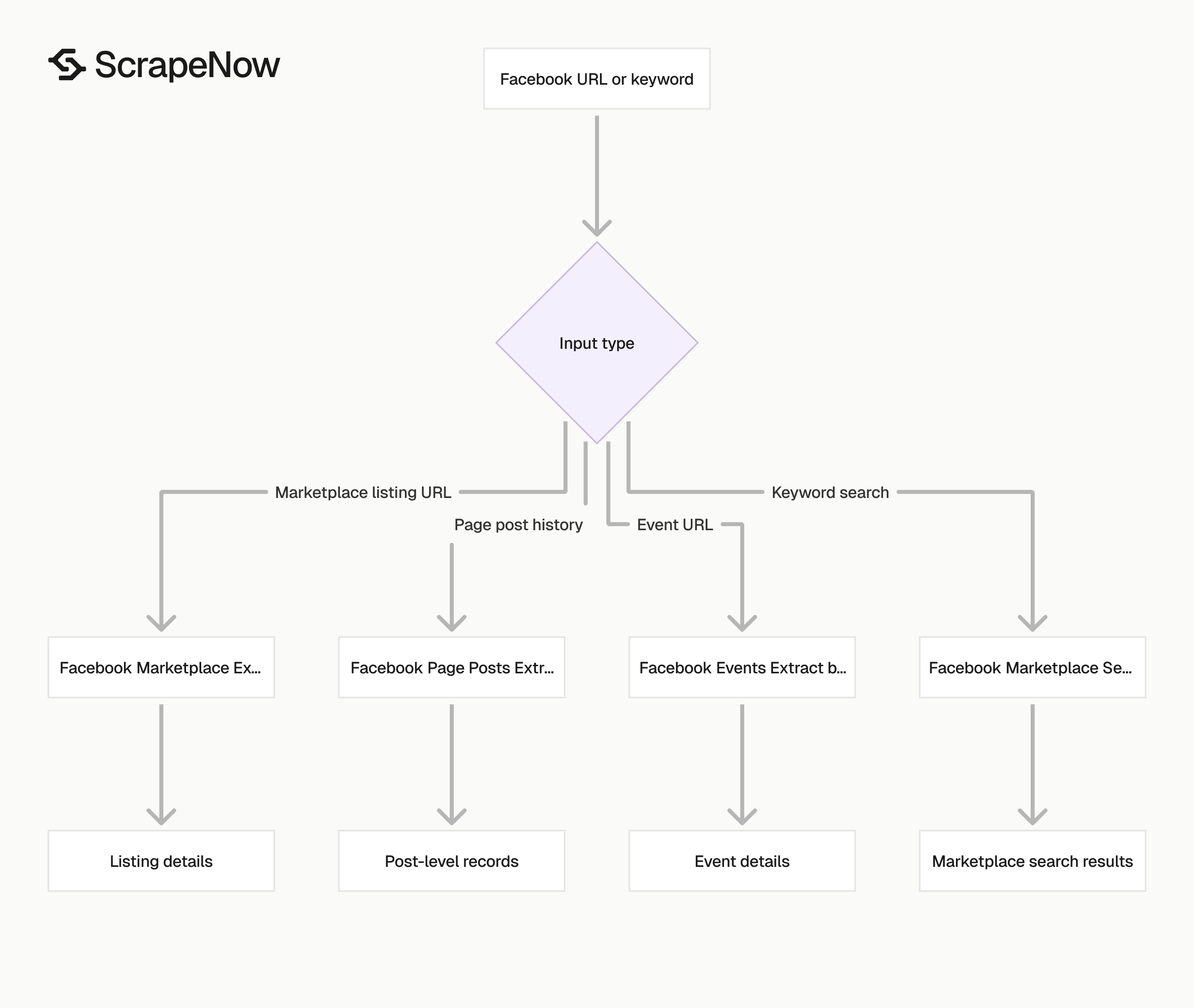
Use the Page posts scraper when your input is a Page URL and your output target is post-level data.
Use Extract Facebook event data for event URLs. Use Get Marketplace listing data for Marketplace listing URLs.
Use Search Marketplace listings for keyword search across Facebook Marketplace. Each scraper expects a different input shape.
| Scraper | Input | Output target |
|---|---|---|
| Extract Facebook page posts | Page URL | Posts, reactions, shares, attachments, page profile fields |
| Extract Facebook event data | Event URL | Event title, date, venue, description |
| Search Marketplace listings | Keyword | Listings, prices, locations, sellers |
Browse all 86+ scrapers across Facebook, Instagram, TikTok, LinkedIn, Amazon, and Google.
Choose the narrowest scraper that matches your input type. Narrow extractors return cleaner records because each schema maps to one Facebook object type.
This choice reduces downstream branching. Your parser can expect one object model instead of handling events, listings, and posts in one table.
A narrow scraper also gives support teams clearer reproduction steps. One URL, one schema, and one output target shorten incident review.
What data you get back
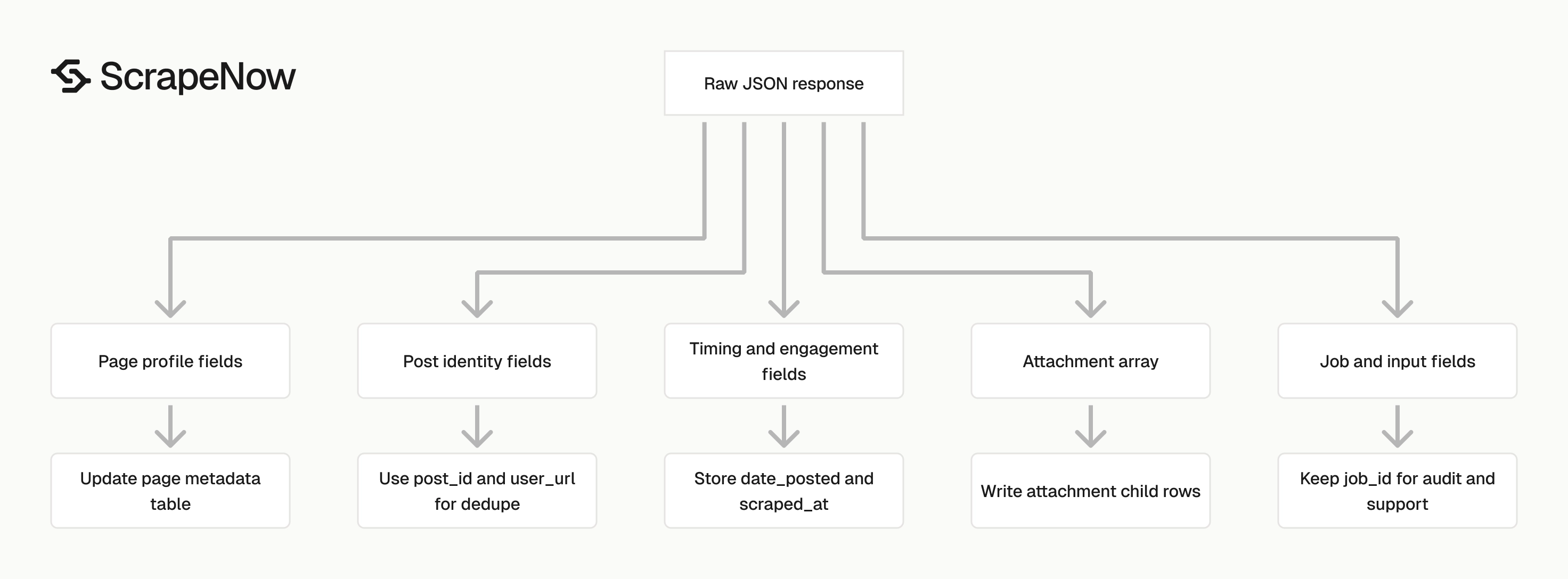
The response gives you the original input, scrape status, post fields, engagement counts, page profile fields, and attachments.
Treat the response as source data. Save the raw JSON before parsing it into typed tables.
Job and input fields
inputs echoes the URL, dates, post count, and profile-data flag you sent. Store this object with the result row.
The echoed input gives you an audit trail when you run 100 or 10,000 Page URLs. It also lets you replay one failed record without rebuilding the batch.
scrape_status tells you whether the row succeeded. Treat any status other than success as a failed row in your pipeline.
Log inputs and scrape_status together. That pairing gives support, QA, and data engineering teams enough context to replay failed records.
Store the job ID beside these fields. A job ID gives ScrapeNow support a direct lookup when you need help with a failed run.
Post identity fields
url is the canonical post URL returned by the scraper. Use it as the human-readable source link in exports and dashboards.
post_id is the stable post identifier. Use post_id plus user_url as your dedupe key.
user_url and user_username_raw identify the Page that published the post. In the sample, the Page URL is https://www.facebook.com/beyonce.
The display name in the sample is Beyoncé. Keep both identifiers because display names change.
URLs and IDs give your joins a stable base. They also make cross-run comparisons safer when a Page changes its public name.
Keep the raw post URL even when you store a normalized ID. Analysts still need a clickable source during QA and reporting reviews.
Timing fields
date_posted uses an ISO timestamp. The sample value is 2026-05-05T01:10:44.000Z.
Store it as a timestamp in your database. Then derive date, hour, week, or month fields downstream.
Store more than the date when you compare post timing. Hour-level timing matters for campaign reports, news monitoring, and posting cadence analysis.
Normalize timestamps to UTC in storage. Convert them to a local timezone only in reporting layers.
Add a separate scraped_at timestamp during ingestion. date_posted describes the post, and scraped_at describes your collection time.
Engagement fields
num_comments returns the comment count. In the sample, that value is 4646.
num_shares returns the share count. In the sample, that value is 11665.
num_likes_type returns the reaction type and count. The sample returns 105598 likes.
Engagement counts change after the scrape runs. Store the scrape time with each row if you compare counts across collection windows.
A row scraped on Monday and a row scraped on Friday describe different points in time. Keep that difference visible in your schema.
Use the latest row for current dashboards. Use historical rows when you need growth curves or post-performance snapshots.
Page profile fields
When include_profile_data is "true", the scraper returns page-level fields with the post when those fields are available.
Useful fields include:
page_nameprofile_idpage_intropage_categorypage_logopage_external_websitepage_followerspage_is_verified
The sample page has 55000000 followers and page_is_verified set to true.
Profile fields describe the Page at scrape time. Store them separately if you track Page metadata changes over weeks or months.
For example, a Page can change its category, website, or logo while old posts stay the same. A separate Page table keeps that history readable.
Use profile_id as the Page table key when available. Keep user_url as a secondary key for joins and manual lookup.
Attachment fields
attachments is an array. A single post can have 0, 1, or many attachments.
Each attachment can include:
idtypeurlattachment_urlvideo_urlthumbnail_url
For photo posts, type is usually Photo. The url field points to the media asset.
The attachment_url field points to the Facebook photo page. Store both when analysts need source links and media URLs.
For video posts, check video_url and thumbnail_url. Keep null handling explicit because Facebook posts mix text, photo, video, link, and album formats.
Do not assume a media field exists because a post has attachments. Some link previews and shared content return partial media metadata.
Store attachment records in the same ingestion run as the parent post. That keeps post counts and media counts aligned during backfills.
Ready to get this data? Extract Facebook page posts.
Production tips
Run one Page through the full path before scaling a batch.
Validate inputs before you spend credits
Check the URL prefix, date format, and post count before calling the API.
from datetime import datetime
from urllib.parse import urlparse

def validate_facebook_page_input(item: dict) -> list[str]:
    errors = []

    url = item.get("url", "")
    parsed = urlparse(url)

    if parsed.scheme != "https" or parsed.netloc != "www.facebook.com":
        errors.append("url must start with https://www.facebook.com")

    for field in ("start_date", "end_date"):
        value = item.get(field)
        if value:
            try:
                datetime.strptime(value, "%Y-%m-%d")
            except ValueError:
                errors.append(f"{field} must use YYYY-MM-DD")

    num_of_posts = item.get("num_of_posts")
    if num_of_posts:
        try:
            if int(num_of_posts) < 1:
                errors.append("num_of_posts must be at least 1")
        except ValueError:
            errors.append("num_of_posts must be numeric")

    include_profile_data = item.get("include_profile_data")
    if include_profile_data not in ("true", "false", True, False):
        errors.append("include_profile_data must be true or false")

    return errors


payload = {
    "url": "https://www.facebook.com/Beyonce/",
    "start_date": "2026-05-05",
    "end_date": "2026-05-13",
    "num_of_posts": "1",
    "include_profile_data": "true"
}

errors = validate_facebook_page_input(payload)
if errors:
    raise ValueError(errors)
Add this validation before your job runner submits inputs.
Deduplicate on post_id and user_url
Use post_id as the main key. Add user_url if you want a compound key that is easier to inspect.
import json

with open("output/facebook-page-posts-extract-by-url.json", "r", encoding="utf-8") as f:
    rows = json.load(f)

seen = set()
deduped = []

for row in rows:
    post_id = row.get("post_id")
    user_url = row.get("user_url")
    key = (user_url, post_id)

    if not post_id:
        continue

    if key in seen:
        continue

    seen.add(key)
    deduped.append(row)

print(f"Input rows: {len(rows)}")
print(f"Unique rows: {len(deduped)}")
Deduplication matters when date ranges overlap or when you rerun failed batches.
Store attachments in a child table
Avoid flattening attachment arrays into attachment_1_url, attachment_2_url, and attachment_3_url. That structure fails as soon as a post has 4 images.
Use one table for posts and one table for attachments.
| Table | Primary key | Fields |
|---|---|---|
facebook_posts |
user_url, post_id |
URL, date, comments, shares, likes, page fields |
facebook_post_attachments |
post_id, attachment_id |
Type, media URL, attachment URL, video URL, thumbnail URL |
This schema keeps your post table stable while media counts change per post.
It also lets analysts count photos, videos, and thumbnails without parsing JSON arrays in every query.
Add an attachment_index column if ordering matters. Albums and carousels often need position data for downstream review.
Keep attachment_id nullable only if your ingestion process creates a fallback key. A safe fallback is (post_id, attachment_index).
Treat failed jobs as retryable
Cap retries at 2 or 3 attempts so one invalid Page URL does not block the batch.
def should_retry(status: str, attempts: int) -> bool:
    if status == "completed":
        return False

    if attempts >= 3:
        return False

    return True
Keep raw JSON
Save raw results before transforming them. Raw JSON gives you a replay path when you add a new column later. Add a scraped_at timestamp to every raw file or row.
Pricing
ScrapeNow charges per returned row. One row costs one credit, starting at $0.04 per credit for small runs and dropping with volume. No monthly contracts, no proxy fees, no charges for failed rows. See the pricing page for current rates.


