
Amazon blocks plain Python requests before most product pages load.
An Amazon scraper turns product titles, ASINs, prices, ratings, reviews, sellers, availability, and category ranks into rows your pipeline can store. That sounds simple until Amazon changes markup, hides a price block, returns a regional redirect, or sends a soft block that still returns HTTP 200.
Production Amazon scraping needs browser-grade requests, page-specific parsers, retries, and validation around every run. The data has value only when your job can tell the difference between a real empty result, a blocked page, and a product with no current offer.
Why teams scrape Amazon
Amazon data changes fast. Prices move daily, reviews arrive hourly on high-volume products, and sellers rotate through Buy Box positions throughout the day.
Most Amazon scraping jobs fall into five data groups:
| Data type | Common use case | Typical input |
|---|---|---|
| Product search results | Track rankings, discover SKUs, monitor keyword coverage | Keyword or search URL |
| Product detail pages | Extract price, ASIN, title, rating, images, availability | Product URL |
| Reviews | Run sentiment analysis, track defects, measure launch feedback | Product URL |
| Sellers | Monitor marketplace competition and seller coverage | Product URL |
| Global search pages | Compare listings across Amazon marketplaces | Amazon search URL |
Manual scraping with Python works for small tests. A script that pulls 50 pages from one marketplace can give you a quick sample.
Production traffic hits a different failure pattern. A 2026 Amazon scraping field report found that vanilla Python requests returned about 2% success on Amazon. Chrome-like TLS impersonation reached about 94% on the same workload.
That gap explains why teams stop maintaining raw HTML scrapers. Request fingerprints, retries, parsing changes, and marketplace behavior take more time than the extraction code.
What makes Amazon hard to scrape
Amazon fails in several ways. You get soft blocks, CAPTCHAs, empty result pages, regional redirects, hidden prices, and markup changes.
The blockers are predictable:
| Challenge | What happens in production | What breaks |
|---|---|---|
| TLS fingerprinting | Amazon flags non-browser clients before page content loads | Python requests, basic HTTP clients |
| IP reputation | Repeated search traffic burns datacenter IPs faster | High-volume crawlers |
| Rate limits | Pages return incomplete or repeated data after bursts | Rank tracking jobs |
| Login walls | Reviews and seller views require browser-like behavior | Review extraction |
| Marketplace redirects | .com, .co.uk, .de, and other sites behave differently |
Global product monitoring |
| DOM changes | Price, rating, and offer blocks move often | CSS selector scrapers |
| Localization | Currency, delivery promises, and availability depend on region | Price comparison jobs |
| Offer volatility | Sellers appear and disappear as inventory changes | Buy Box monitoring |
The review layer tightened on 2024-11-05. Amazon reviews started moving behind login gates in more workflows, based on the same field report.
AWS WAF added native JA4 TLS fingerprinting on 2025-03-06. That change made low-level client fingerprints harder to fake across high-volume jobs.
These failures hit page types in different ways. Search pages, product pages, reviews, and seller pages need separate parsers, retry rules, and validation checks.
A search result parser cares about rank position, sponsored slots, pagination, and category filters. A product detail parser cares about title, price, availability, offer state, images, and variation metadata.
A review parser cares about sort order, pagination, reviewer fields, review dates, and verified purchase status. A seller parser cares about offer price, shipping terms, seller name, inventory state, and timestamp.
ScrapeNow splits Amazon extraction into separate scrapers for that reason. You send the input that matches the data you need, and the scraper runs the matching extraction path.
Raw Amazon scraping breaks fast
A basic Amazon scraper usually starts like this:
import requests
from bs4 import BeautifulSoup

url = "https://www.amazon.com/s?k=wireless+earbuds"

html = requests.get(
    url,
    headers={
        "User-Agent": "Mozilla/5.0"
    },
    timeout=30
).text

soup = BeautifulSoup(html, "html.parser")

for item in soup.select("[data-component-type='s-search-result']"):
    title = item.select_one("h2 span")
    asin = item.get("data-asin")
    price = item.select_one(".a-price .a-offscreen")

    print({
        "asin": asin,
        "title": title.get_text(strip=True) if title else None,
        "price": price.get_text(strip=True) if price else None
    })
This works until Amazon returns a different page shape. It also breaks when the request fingerprint fails before the parser runs.
The parser has no context for a CAPTCHA page, an empty search page, or a regional redirect. All three can produce an empty result set.
That creates silent data loss. Your pipeline sees zero rows and treats the keyword as empty.
A production job needs page classification before extraction. It should label responses as valid page, blocked page, redirect, unavailable product, empty search, or parser miss.
Here is the minimum behavior your job needs:
| Step | Check | Why it matters |
|---|---|---|
| Fetch | Browser-like request fingerprint | Amazon blocks basic HTTP clients early |
| Classify | Detect block, redirect, empty page, valid page | Empty rows need a reason |
| Parse | Use page-specific extractors | Search, product, review, and seller pages differ |
| Validate | Check required fields and row counts | Missing price and missing product are different states |
| Retry | Retry only recoverable failures | Blind retries waste credits and IP reputation |
| Store | Save input, output, timestamp, marketplace | You need history for debugging and reports |
ScrapeNow handles that path inside each Amazon scraper. Your application sends inputs and stores returned rows.
ScrapeNow's Amazon scrapers
ScrapeNow has Amazon scrapers for keyword search, product URLs, review URLs, seller data, and search URLs. Each scraper targets one Amazon page type.
That split keeps routing logic out of your application code. Your job sends a keyword, product URL, or search URL, then receives structured rows for that page type.
This also keeps validation simpler. A keyword job expects many product rows, while a product URL job usually expects one row per input.
Amazon Products Search by Keyword
The Search Amazon products by keyword takes a keyword like wireless earbuds or standing desk. It returns products from Amazon search results.
Typical output includes product title, ASIN, price, rating, review count, image URL, product URL, and search position. That data works for rank tracking, keyword monitoring, catalog discovery, and share-of-search reporting.
Use keyword search when the exact search term matters. standing desk and adjustable desk can return overlapping products with different rank positions.
A normal rank tracking pipeline stores these fields:
| Field | Why you store it |
|---|---|
| Keyword | Keeps the ranking tied to the query |
| Marketplace | Separates .com, .de, .co.uk, and other sites |
| ASIN | Lets you join search rows to product detail rows |
| Position | Tracks organic movement over time |
| Price | Captures search-visible pricing |
| Timestamp | Makes rank changes measurable |
Run keyword extraction first when you need discovery. Store ASINs from search results, then send selected product URLs to the product detail scraper.
The detailed Amazon products scraper guide with code examples covers keyword-based extraction, pagination behavior, and rank tracking output. It also shows how to store ASINs from search results for later product detail runs.
Amazon Products Extract by URL
The Extract Amazon product data takes direct product URLs. It returns structured product detail data for each listing.
Use it when you already have ASINs or product URLs. Common fields include current price, title, availability, rating, images, product metadata, and listing identifiers.
This scraper fits price tracking and catalog monitoring jobs. Feed it a list of known products, run it on a schedule, and compare snapshots.
A product detail job has tighter cost control than keyword search. Each input normally maps to one product row.
Direct URL extraction also gives cleaner history. You compare the same product across runs without adding search rank noise.
Use product URL extraction for workflows like these:
| Workflow | Input | Output you care about |
|---|---|---|
| Price tracking | Known product URLs | Current price and availability |
| Catalog monitoring | ASIN list | Title, images, attributes, listing state |
| Competitor tracking | Competitor product URLs | Price, rating, reviews, offer state |
| Retail audit | Brand product list | Missing listings, unavailable products, stale content |
The Amazon products scraper guide also covers product URL extraction. It explains when direct URLs give lower cost and cleaner data than keyword searches.
Amazon Reviews Extract by URL
The Extract Amazon reviews takes a product URL. It extracts review data tied to that listing.
Typical fields include review text, rating, reviewer name, review date, verified purchase status, and review title. Those fields support sentiment analysis, product defect tracking, launch monitoring, and competitor review mining.
Treat reviews as their own workload. Review pagination, login gates, sort order, and volume behave differently from product pages.
A product detail run returns one row per product URL. A review run can return hundreds or thousands of rows for one popular product.
Review jobs also need stronger deduplication. Store review ID when available, plus product URL, reviewer name, rating, date, title, and text hash.
That structure lets you detect new reviews without reprocessing the full history. It also lets you track edited reviews when the text hash changes.
Use reviews extraction when the row is the review itself. Use product extraction when you need only review count and rating summary.
Amazon Sellers Extract by URL
The Get Amazon seller data extracts seller data from product pages and offer views. It returns seller names, prices, shipping details, availability, and marketplace offer signals where Amazon exposes them.
Use this scraper when marketplace competition matters. It works for Buy Box monitoring, reseller tracking, unauthorized seller checks, and offer coverage analysis.
Seller pages change often because offers depend on inventory, shipping promises, location, and account-specific display logic. A seller extraction job needs repeat runs and consistent timestamps.
Store seller rows as event data. Each row should include product URL, ASIN, seller name, offer price, shipping cost, availability, marketplace, and observed time.
That schema makes offer movement queryable. You can see when a seller entered the listing, changed price, disappeared, or lost offer visibility.
The detailed Amazon sellers scraper guide with code examples covers seller extraction and offer monitoring. It also shows how to track marketplace competition across repeated runs.
Amazon Products Search by URL
The Search Amazon products by URL takes an Amazon search URL instead of a raw keyword. Use it when filters, category paths, sort order, or query parameters need to stay intact.
This matters for category-specific monitoring. A keyword alone cannot preserve every filter Amazon puts into a search URL.
Search URLs also help with marketplace-specific work. A .de search URL, a .co.uk search URL, and a .com search URL can produce different products, prices, and availability.
URL-based search is the right choice for filtered pages. Examples include category paths, brand filters, price ranges, Prime filters, sort orders, and department-specific searches.
Keep the full URL as the input key. Do not reduce it to the visible keyword, because Amazon often stores ranking context in query parameters.
The Amazon global product scraper guide covers URL-based search extraction across Amazon marketplaces. It explains how to keep marketplace context inside your input URLs.
Which Amazon scraper to use
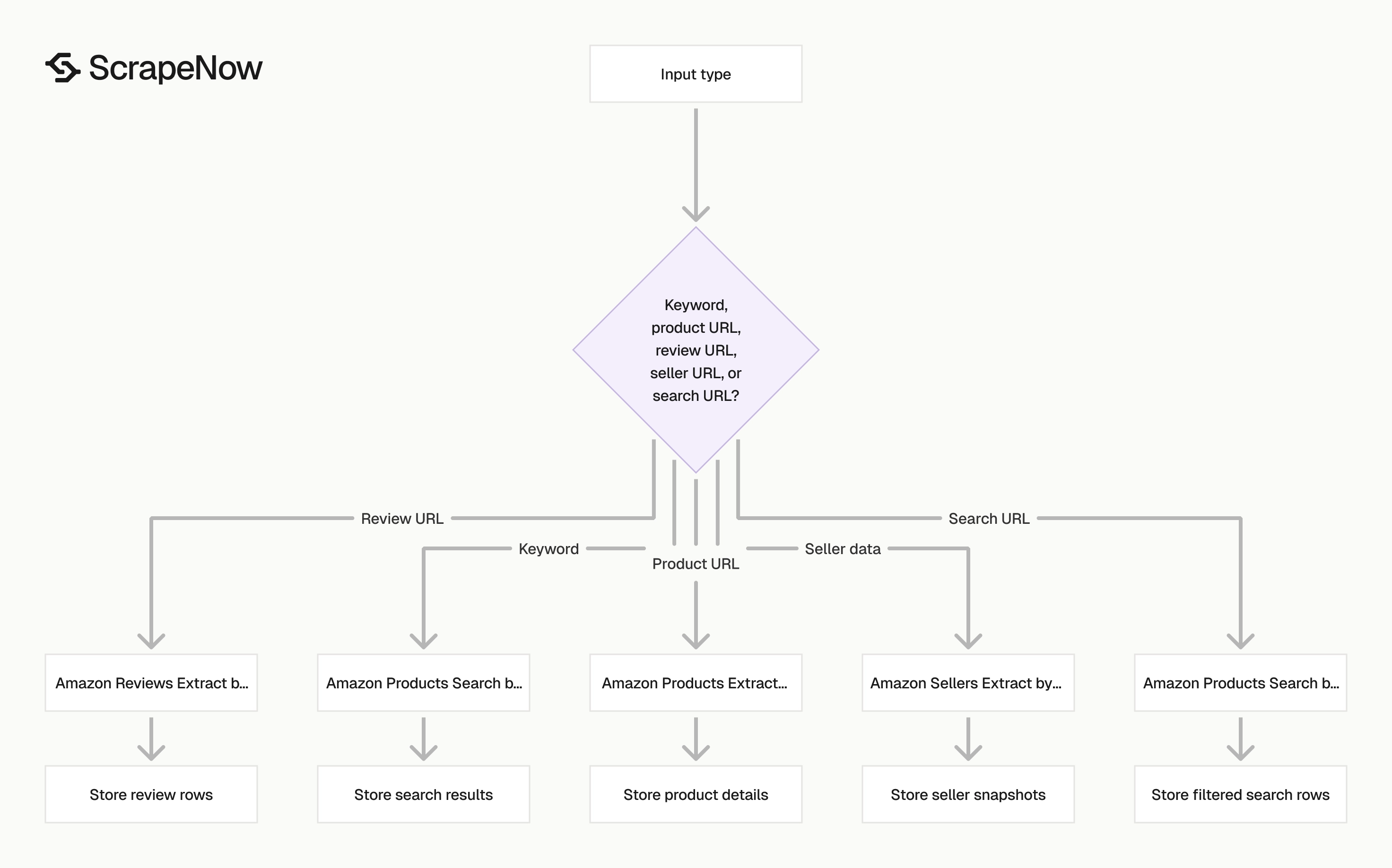
Pick the scraper by input type. That keeps your pipeline simple and avoids converting URLs into keywords or keywords into URLs.
| You have | You want | Use this scraper |
|---|---|---|
| A keyword | Search result products and rank positions | Amazon Products Search by Keyword |
| A product URL | Product details for one listing | Amazon Products Extract by URL |
| A product URL | Customer reviews for that listing | Amazon Reviews Extract by URL |
| A product URL | Marketplace sellers and offers | Amazon Sellers Extract by URL |
| A filtered search URL | Search results with Amazon filters preserved | Amazon Products Search by URL |
For 10,000 keyword searches per day, start with keyword search extraction and store ASINs. Run product URL extraction as a second step for ASINs that matter.
For 50,000 product URLs, feed the product URLs directly. That avoids paying for search result rows you will discard.
For review mining, run reviews as a separate job. Review pages have different block patterns, pagination rules, and row volume.
For seller monitoring, store product URL, seller name, offer price, shipping terms, and timestamp on every run. That gives you a clean history of offer movement.
For global monitoring, keep marketplace in the input. Do not collapse amazon.com, amazon.de, and amazon.co.uk into a single normalized URL list.
Example Amazon scraping workflow
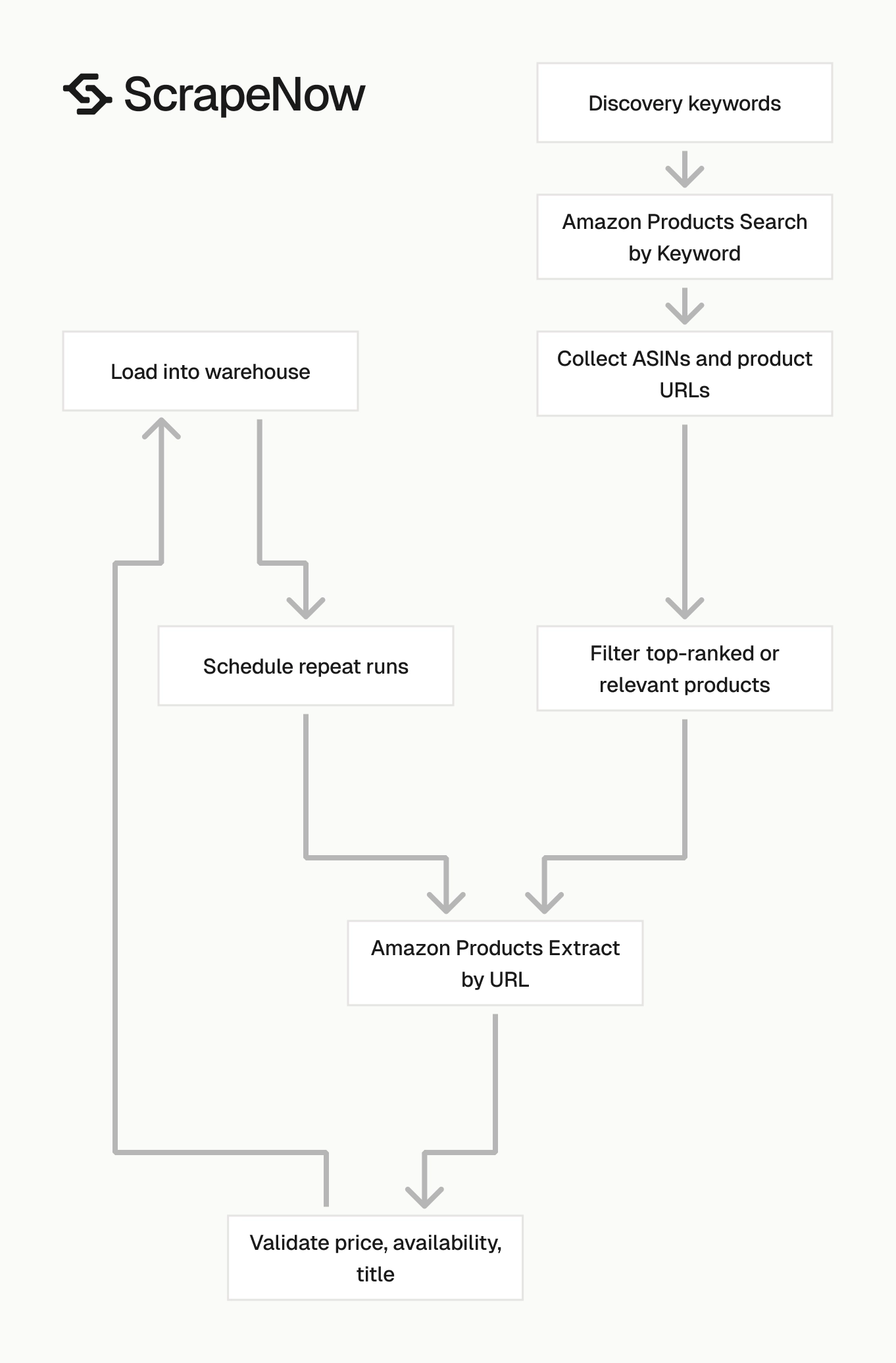
A practical Amazon pipeline usually runs in two phases. Search extraction discovers products, then product URL extraction tracks the products that matter.
The job can look like this:
import requests

SCRAPENOW_API_KEY = "YOUR_API_KEY"

def run_scrapenow_scraper(scraper_slug, payload):
    response = requests.post(
        f"https://api.scrapenow.io/api/v1/scraping/scrape?scraper={scraper_slug}",
        headers={
            "Authorization": f"Bearer {SCRAPENOW_API_KEY}",
            "Content-Type": "application/json"
        },
        json=payload,
        timeout=120
    )
    response.raise_for_status()
    return response.json()

search_rows = run_scrapenow_scraper(
    "amazon-products-search-by-keyword",
    {
        "keywords": ["wireless earbuds", "standing desk"],
        "marketplace": "amazon.com"
    }
)

asin_urls = [
    row["product_url"]
    for row in search_rows["data"]
    if row.get("asin") and row.get("position", 999) <= 20
]

product_rows = run_scrapenow_scraper(
    "amazon-products-extract-by-url",
    {
        "urls": asin_urls
    }
)

for row in product_rows["data"]:
    print(row["asin"], row.get("price"), row.get("availability"))
Use this pattern when you need both discovery and monitoring. Search rows tell you which products rank, and product rows tell you what changed on each listing.
For scheduled jobs, store the raw input with every output row. Save the scraper slug, marketplace, timestamp, and run ID as separate columns.
That metadata pays for itself during debugging. When a report looks wrong, you can trace the exact input and scraper path that produced the row.
Pricing
ScrapeNow charges per returned row. One row costs one credit, starting at $0.04 per credit for small runs and dropping with volume. No monthly contracts, no proxy fees, no charges for failed rows. See the pricing page for current rates.
Build versus buy for Amazon scraping
DIY scraping makes sense for one-off checks, internal experiments, and low-volume research. A script that pulls 100 product pages once is fine.
Production Amazon scraping becomes a maintenance job. You deal with TLS fingerprints, rotating IPs, blocked sessions, parser changes, retries, marketplace redirects, and data validation.
Use this decision matrix:
| Scenario | Better choice | Reason |
|---|---|---|
| One-time pull of 100 public product pages | DIY script | Low risk and low repeat cost |
| Daily price tracking for 5,000 ASINs | Product URL scraper | Direct inputs and predictable row counts |
| Keyword rank tracking across 200 search terms | Keyword search scraper | Position data belongs to search pages |
| Review mining for 1,000 products | Reviews scraper | Review pagination needs a separate path |
| Seller monitoring across marketplace offers | Sellers scraper | Offer rows change faster than product rows |
| Filtered category monitoring | Search URL scraper | URL filters must stay intact |
| Custom fields across multiple Amazon page types | Managed custom pipeline | Shared fields need cross-page joins |
A DEV benchmark of large-scale Amazon scraping reported self-built scrapers at 71.4% product page success. The same benchmark reported about 60% of engineering time spent on anti-bot maintenance.
That matches what we see in production. Parser code is one part of the job, and anti-bot maintenance consumes the calendar.
The build path works when the data volume stays low and the field list stays stable. It also works when missed rows do not break downstream reports.
The buy path works when the job runs daily, feeds paid dashboards, or supports pricing decisions. At that point, failed runs cost more than scraper credits.
Use a simple test. If a blocked run creates an engineer ticket, treat Amazon scraping as production infrastructure.
Operational checks before you scale
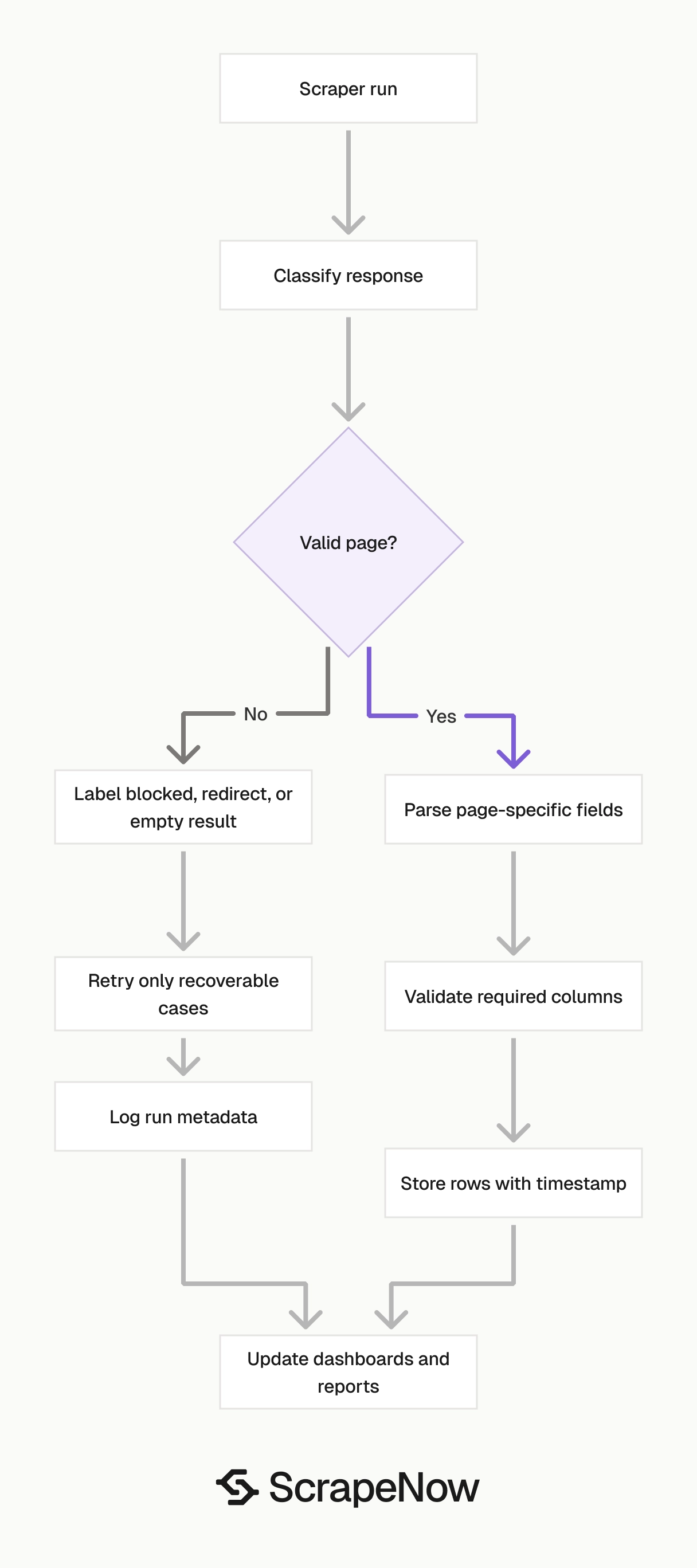
Start every Amazon scraping workflow with a small batch. Run 50 to 100 inputs, inspect the rows, and verify the fields your pipeline expects.
Check row counts before you schedule a full run. A search scraper returns many rows per keyword, while a product scraper usually returns one row per URL.
Store the raw input beside every returned row. That makes debugging easier when Amazon redirects a URL, removes a product, or changes availability.
Add timestamps to every run. Price, seller, and availability data lose value when you cannot tell when the scraper observed them.
Keep marketplace as a first-class field. A product can have the same ASIN across regions and different prices, sellers, delivery terms, and review counts.
Validate empty results separately from blocked results. An empty category page, unavailable product, and failed request require different handling.
Track parser health with field-level checks. For product pages, alert on missing ASIN, missing title, or a sudden drop in price coverage.
Track search health with row-count checks. If a keyword usually returns 200 rows and suddenly returns 12, classify the run before updating reports.
For review jobs, deduplicate rows before loading them into analysis tables. Review pages often overlap across pagination and sort modes.
For seller jobs, treat every run as a snapshot. Offer data changes often enough that overwriting old rows removes useful history.
Data model for Amazon scraper results
Store Amazon scraper output in separate tables by page type. Search rows, product rows, review rows, and seller rows have different grain.
A search result row represents one product at one position for one query. The natural key is keyword or search URL, marketplace, ASIN, position, and timestamp.
A product detail row represents one product observation. The natural key is product URL or ASIN, marketplace, and timestamp.
A review row represents one customer review. The natural key is review ID when available, or a hash of reviewer, date, title, rating, and text.
A seller row represents one offer observation. The natural key is ASIN, seller name, marketplace, offer price, shipping terms, and timestamp.
This separation keeps joins clean. It also prevents review volume from bloating product tables and seller volatility from overwriting product history.
A simple warehouse layout works well:
| Table | Grain | Common fields |
|---|---|---|
amazon_search_results |
One product per query position | keyword, marketplace, asin, position, price, timestamp |
amazon_products |
One product per run | asin, url, title, price, rating, availability, timestamp |
amazon_reviews |
One review per row | asin, rating, title, text, reviewer, review_date |
amazon_sellers |
One offer per seller snapshot | asin, seller, offer_price, shipping, availability, timestamp |
Keep the run ID in every table. It gives you one handle for retries, audits, and failed batch cleanup.
Next step
Choose the scraper that matches your input and run a small batch of 50 to 100 records. Use keyword search for discovery, product URL extraction for known ASINs, reviews extraction for review rows, sellers extraction for offers, and search URL extraction for filtered pages.
Check returned fields, row counts, marketplace behavior, and timestamps before you schedule larger jobs. Store the input, scraper type, run ID, and observed time with every row.
Start with the Amazon scraper page that matches your job: Search Amazon products by keyword, Extract Amazon product data, Extract Amazon reviews, Get Amazon seller data, or Search Amazon products by URL.


