Amazon seller pages contain business name, address, rating, feedback count, and response metrics, but extracting that data means handling JavaScript rendering, proxy rotation, and Amazon's bot detection.
This Amazon sellers scraper extracts seller profile data from an Amazon seller page. It returns the seller ID, seller name, business details, star rating, and recent feedback as structured JSON.
Use it when you need seller data without building Amazon page handling, proxy rotation, browser retries, and parsing logic yourself. ScrapeNow runs the extraction as a pre-built API job, so your pipeline sends seller URLs and receives rows keyed back to each input.
Teams use this scraper to audit marketplace sellers, map product catalogs to sellers, and monitor feedback quality over time. It also fits seller compliance checks, marketplace research, vendor enrichment, and product-to-company mapping.
The practical outcome is simple. Start with a product page, follow the seller link, run the seller URL through ScrapeNow, and attach company, address, rating, and feedback fields to your product record.
Amazon seller pages are smaller than product pages, so the extraction path is direct. The work starts after extraction, when you deduplicate sellers, normalize ratings, and store feedback without losing history.
The Get Amazon seller data scraper is the product page for this scraper. Use that page to run a test job, review the input schema, and confirm the current output fields before wiring it into production.
How to use this scraper
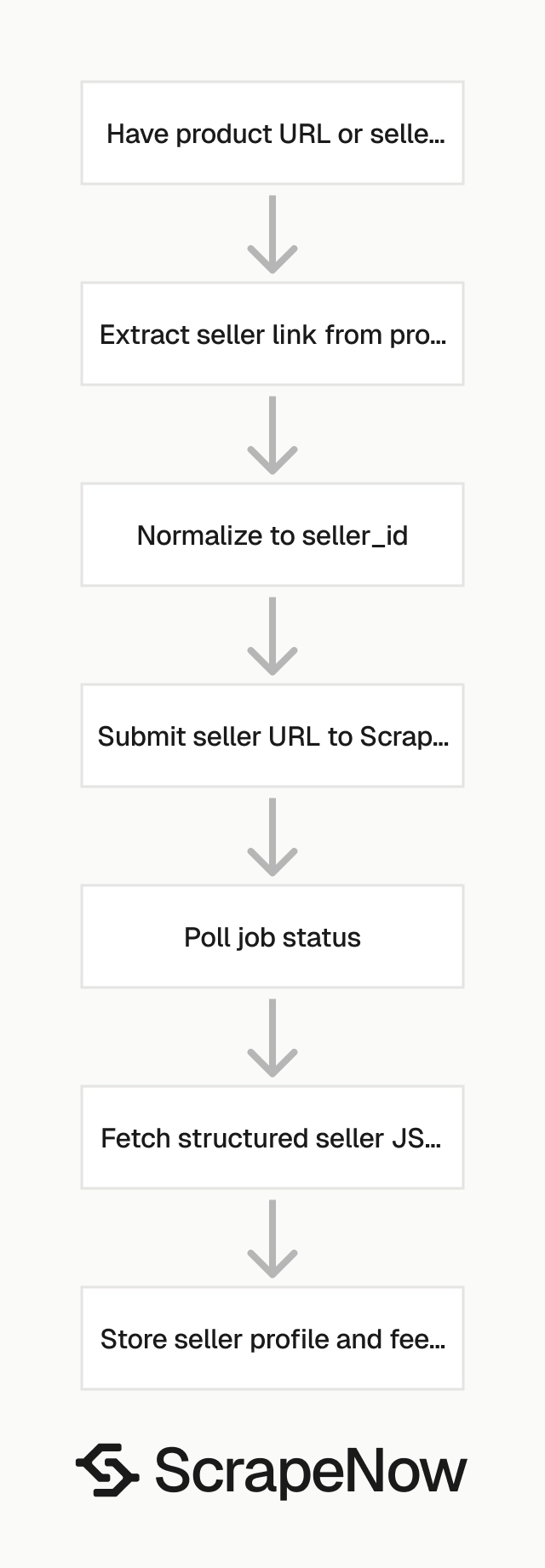
The Get Amazon seller data scraper takes one input field, url, and returns structured seller data. The input URL must start with https://www.amazon.com/.
Use this scraper when you already have a seller profile URL or a seller ID. If your pipeline starts with keywords, collect product URLs first, then extract seller links from those product pages.
If you need product data before seller data, run the Search Amazon products by keyword scraper first. Then follow the seller link from each product page and send the seller URL into this scraper.
This separation keeps product discovery and seller enrichment in different jobs. That makes queueing, retries, and field validation easier to manage.
Find the seller URL
Open
amazon.com.
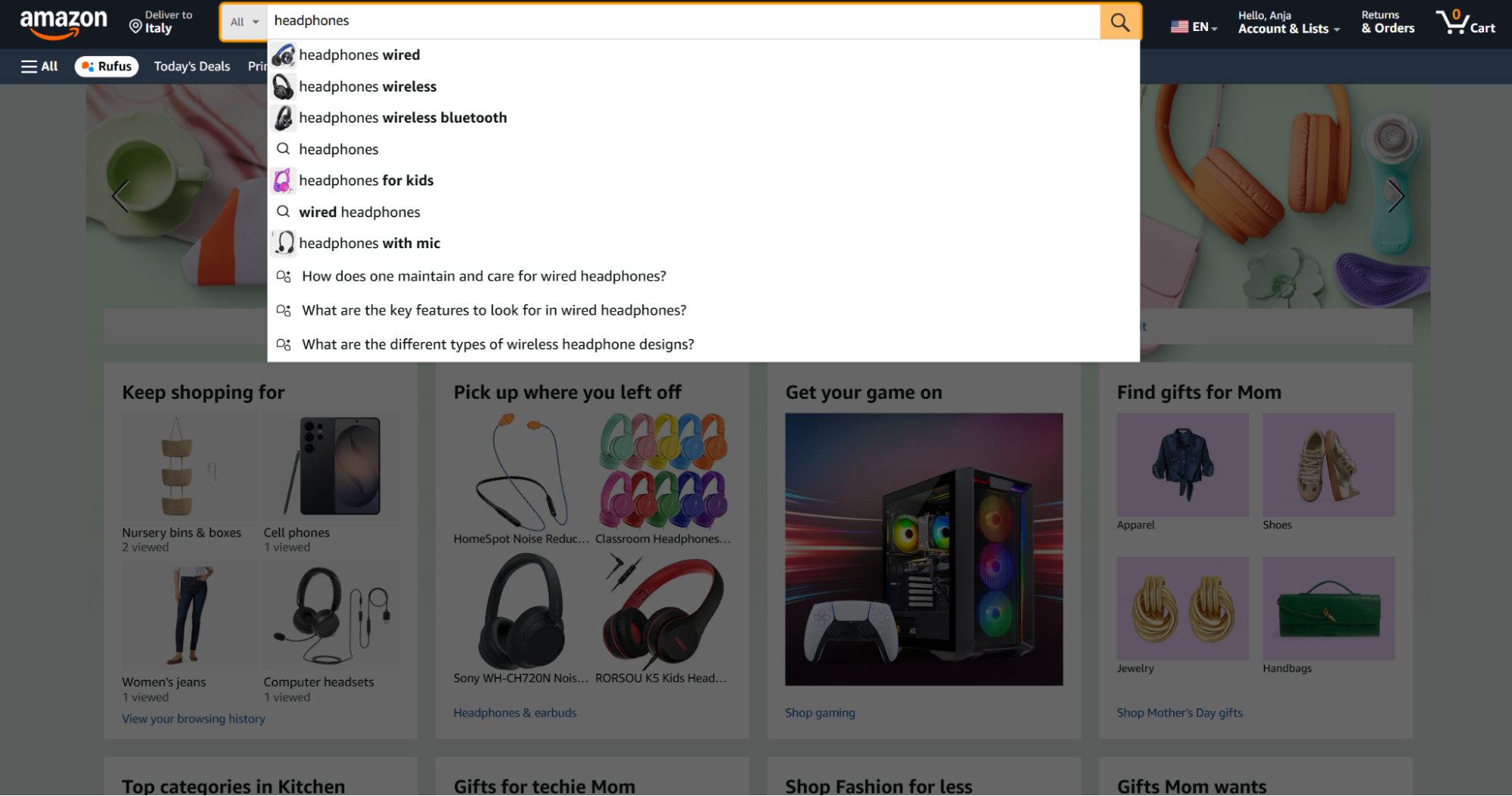
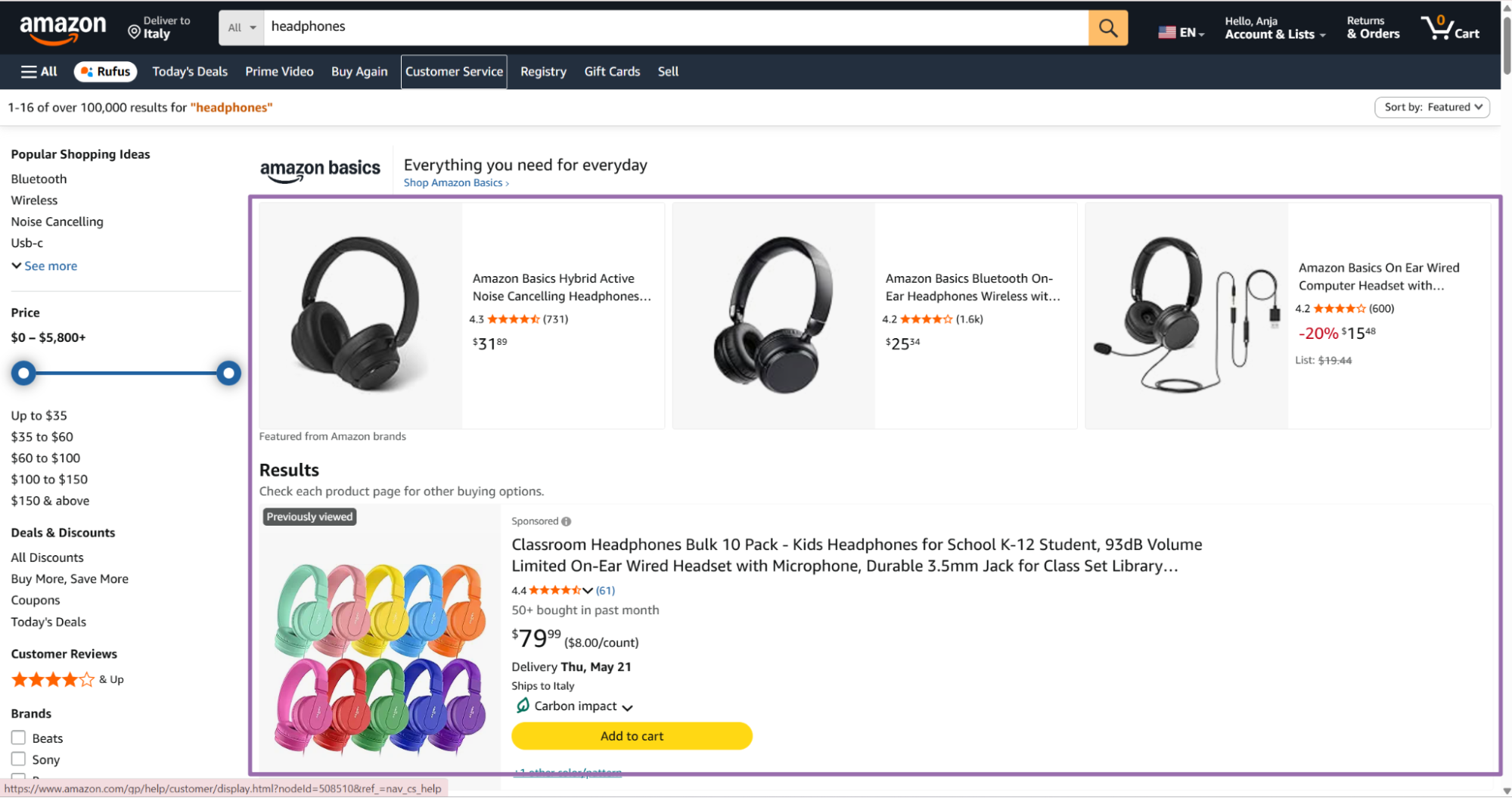
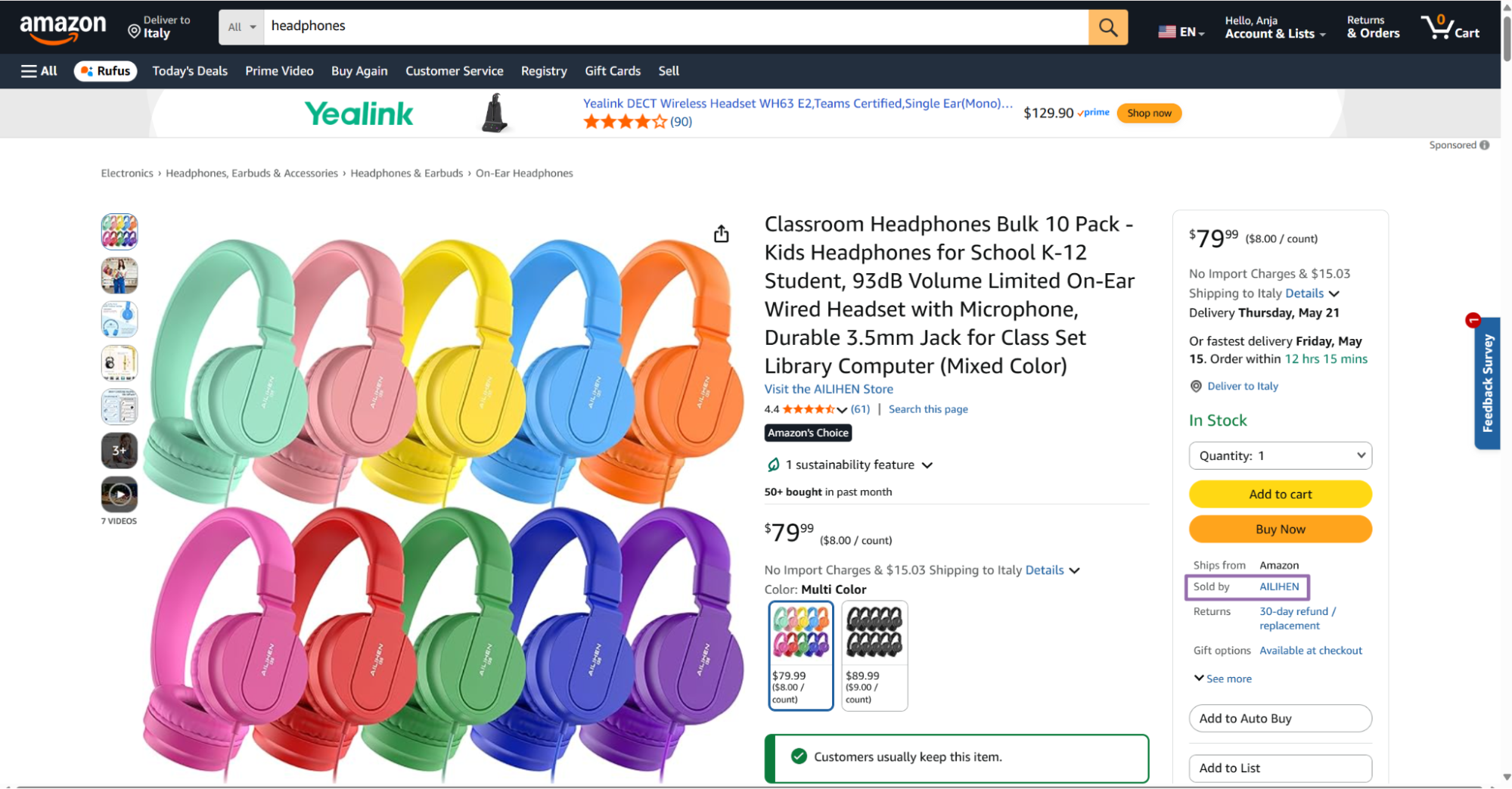
- Amazon opens the seller page. The Seller ID appears in the address bar after the
seller=parameter.
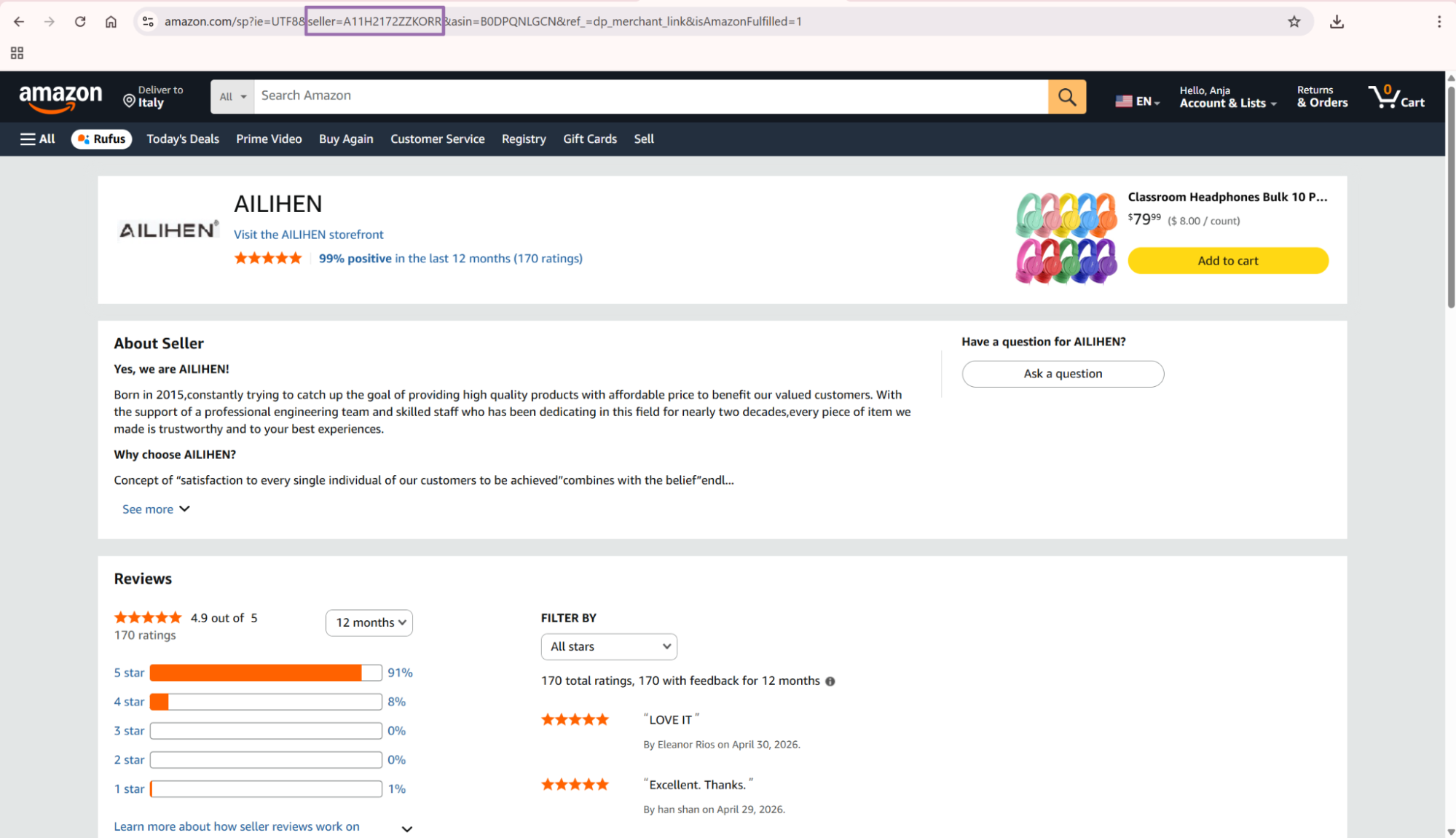
- Create a link with this format.
https://www.amazon.com/s?me=SellerID
Example input URL:
https://www.amazon.com/s?me=A11H2172ZZKORR
The API example below uses https://www.amazon.com/sp?seller=A11H2172ZZKORR. That URL points to the same seller profile.
Amazon uses both URL patterns across product pages and seller profile pages. Store the seller ID separately from the full URL so both patterns map to one seller record.
For production storage, treat the seller ID as the stable identifier. Treat the URL as a trace field that explains where the scrape started.
Run the scraper with Python
Use this script to start a job, poll until completion, fetch results, and save the response as JSON. Replace YOUR_API_KEY with your ScrapeNow API key before running it.
The script writes output to output/amazon-sellers-extract-by-url.json. It also creates the output directory if it does not exist.
"""
Configuration:
    - Set SCRAPER_SLUG to the scraper you want to run.
    - Set SCRAPER_INPUTS to the list of input dicts matching that scraper's schema.
    - Set API_KEY to your scraper API key.
"""

import sys
import time
import json
import requests
import os

API_KEY = "YOUR_API_KEY"

SCRAPER_SLUG = "amazon-sellers-extract-by-url"

SCRAPER_INPUTS = [
    {
        "url": "https://www.amazon.com/sp?seller=A11H2172ZZKORR"
    }
]


BASE_URL = "https://api.scrapenow.io/api/v1/scraping"
TIMEOUT_SECONDS = 3600
POLL_INTERVAL = 5
SPINNER = "|/-\\"


def build_headers(api_key: str, content_type: str | None = None) -> dict:
    headers = {"Authorization": f"Bearer {api_key}"}
    if content_type:
        headers["Content-Type"] = content_type
    return headers


def trigger_scrape(slug: str, inputs: list[dict]) -> str:
    url = f"{BASE_URL}/scrape?scraper={slug}"
    response = requests.post(
        url,
        headers=build_headers(API_KEY, "application/json"),
        json={"inputs": inputs},
    )
    response.raise_for_status()
    return response.json()["data"]["job_id"]


def poll_until_done(job_id: str) -> str:
    start = time.time()
    i = 0
    while True:
        elapsed = time.time() - start
        if elapsed > TIMEOUT_SECONDS:
            print(f"\nTimeout after {TIMEOUT_SECONDS}s")
            sys.exit(1)
        response = requests.get(
            f"{BASE_URL}/jobs/{job_id}",
            headers=build_headers(API_KEY),
        )
        response.raise_for_status()
        data = response.json()
        status = data["data"]["status"]
        mins, secs = divmod(int(elapsed), 60)
        sys.stdout.write(
            f"\r[{SPINNER[i % 4]}] Waiting... {status} ({mins}m {secs:02d}s)  "
        )
        sys.stdout.flush()
        if status in ("completed", "failed"):
            print()
            return status
        time.sleep(POLL_INTERVAL)
        i += 1


def fetch_results(job_id: str) -> dict:
    response = requests.get(
        f"{BASE_URL}/jobs/{job_id}/results?format=json",
        headers=build_headers(API_KEY),
    )
    response.raise_for_status()
    return response.json()


def save_results(data: dict, slug: str) -> str:
    os.makedirs("output", exist_ok=True)
    filename = os.path.join("output", f"{slug}.json")
    with open(filename, "w", encoding="utf-8") as f:
        json.dump(data, f, indent=2, ensure_ascii=False)
    return filename


def main() -> None:
    print(f"Triggering scraper: {SCRAPER_SLUG}")
    job_id = trigger_scrape(SCRAPER_SLUG, SCRAPER_INPUTS)
    print(f"Job started: {job_id}")
    final_status = poll_until_done(job_id)
    if final_status != "completed":
        print(f"Job failed with status: {final_status}")
        sys.exit(1)
    print("Fetching results...")
    results = fetch_results(job_id)
    output_file = save_results(results, SCRAPER_SLUG)
    print(f"Results saved to: {output_file}")


if __name__ == "__main__":
    main()
The script polls every 5 seconds and exits after 3600 seconds if the job has not completed. That timeout covers small seller batches.
For large batches, keep the same polling pattern and increase the timeout. A job with hundreds of seller URLs needs more time than a single seller profile.
If you run this from a scheduler, store the job_id before polling. That gives you a recovery point if your worker restarts.
Example API response
Here is a trimmed response from the seller URL in the code sample.
[
  {
    "inputs": {
      "url": "https://www.amazon.com/sp?seller=A11H2172ZZKORR"
    },
    "scrape_status": "success",
    "seller_id": "A11H2172ZZKORR",
    "url": "https://www.amazon.com/sp?seller=A11H2172ZZKORR",
    "seller_name": "AILIHEN",
    "description": "Yes, we are AILIHEN!\r. \r. Born in 2015,constantly trying to catch up the goal of providing high quality products with affordable price to benefit our valued customers. With the support of a professional engineering team and skilled staff who has been dedicating in this field for nearly two decades,every piece of item we made is trustworthy and to your best experiences.\r. \r. Why choose AILIHEN?\r. \r. Concept of “satisfaction to every single individual of our customers to be achieved”combines with the belief”endless progressive pursuit for the better and better”has been our only motivation all along!To show prime respect to our customers is to give what they expect with utmost benefits.\r.",
    "detailed_info": [
      {
        "title": "Business Name",
        "value": "SHENZHENSHIKESIWANGLUOKEJIYOUXIANGONGSI"
      },
      {
        "title": "Business Address",
        "value": "龙岗区坂田街道象角塘社区, 荣德昌科技大厦荣丰中心B栋十三层1320, 深圳市, 广东, 518000, CN"
      }
    ],
    "stars": "5 out of 5 stars",
    "feedbacks": [
      {
        "date": "By Therral Jackson on May 8, 2026.",
        "stars": "5 out of 5 stars",
        "text": "Very prompt service"
      },
      {
        "date": "By Eleanor Rios on April 30, 2026.",
        "stars": "5 out of 5 stars",
        "text": "LOVE IT"
      },
      {
        "date": "By han shan on April 29, 2026.",
        "stars": "5 out of 5 stars",
        "text": "Excellent. Thanks."
      },
      {
        "date": "By Customer on April 28, 2026.",
        "stars": "5 out of 5 stars",
        "text": "Great service"
      },
      {
        "date": "By Customer on April 28, 2026.",
        "stars": "5 out of 5 stars",
        "text": "Great service"
      },
      {
        "date": "April 13, 2026",
        "stars": "2 out of 5 stars",
        "text": "We were impressed that they were cute for our son... now it has not been a full month and they don't worry at all anymore! Do you offer a replacement?"
      },
      {
        "date": "April 11, 2026",
        "stars": "5 out of 5 stars",
        "text": "Was good"
      },
      {
        "date": "April 11, 2026",
        "stars": "5 out of 5 stars",
        "text": "All was good"
      },
      {
        "date": "April 7, 2026",
        "stars": "5 out of 5 stars",
        "text": "These are just like as described. Very happy with them. Thank you very much."
      },
      {
        "date": "March 29, 2026",
        "stars": "5 out of 5 stars",
        "text": "Gift for grandson he loved it."
      },
      {
        "date": "April 23, 2026",
        "stars": "5 out of 5 stars",
        "text": "All good"
      },
      {
        "date": "April 21, 2026",
        "stars": "5 out of 5 stars"
      }
    ]
  }
]
The sample shows the main data shape. One submitted seller URL returns one result object with trace data, seller identity fields, business metadata, rating text, and recent feedback records.
Notice the duplicate feedback text on the same date. Plan your feedback key before loading this data into a warehouse.
What data you get back
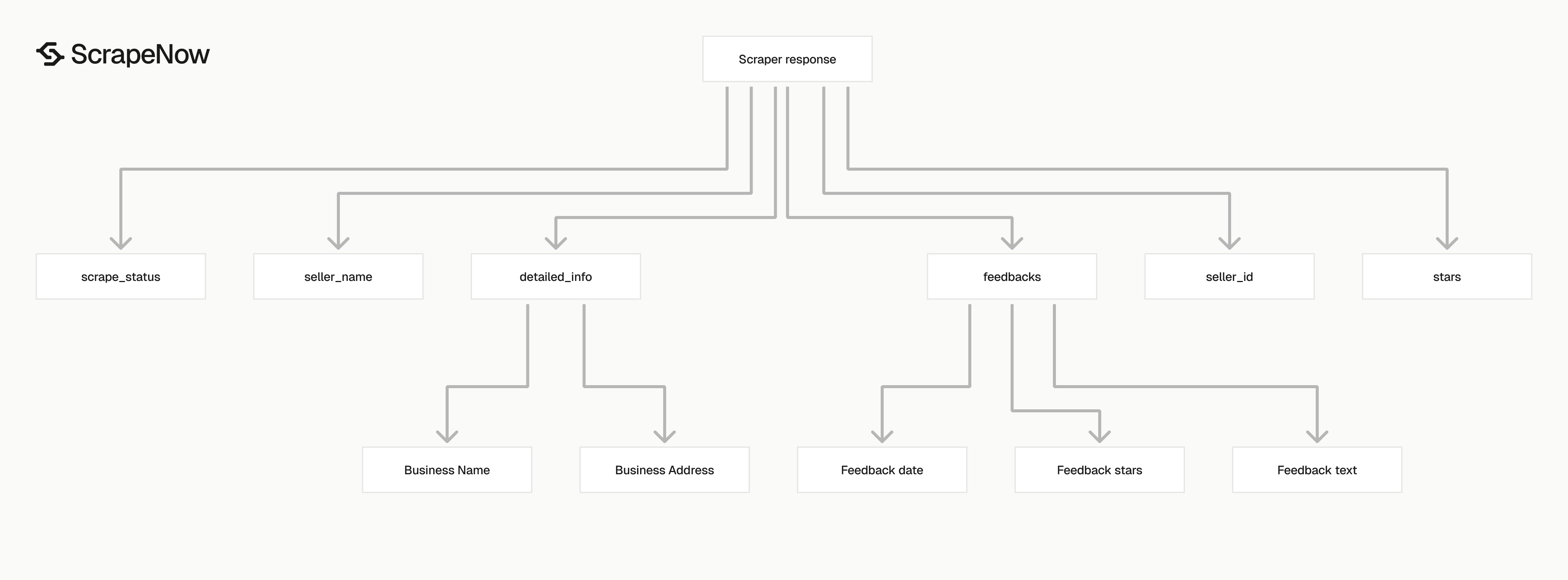
The response is an array because the scraper accepts multiple inputs in one job. Each item maps back to one input URL.
Use inputs.url to trace each output row back to the submitted request. Use seller_id as the stable key for storage and deduplication.
| Field | Type | Use it for |
|---|---|---|
inputs.url |
string | Trace the result back to the submitted seller URL |
scrape_status |
string | Filter successful and failed records |
seller_id |
string | Store seller-level records under a stable key |
url |
string | Store the canonical seller page URL returned by the scraper |
seller_name |
string | Store the display name shown on Amazon |
description |
string | Capture seller profile description text |
detailed_info |
array | Store business name, business address, and other seller metadata |
stars |
string | Store seller rating text, for example 5 out of 5 stars |
feedbacks |
array | Store recent buyer feedback records |
Ready to get this data? Get Amazon seller data.
Seller identity fields
Use seller_id as your stable key. Amazon seller names change, and descriptions change often.
The URL gives you a fallback for traceability. Store both seller_id and url.
Keep seller_name as a display field. Avoid using it as a primary key, because two sellers can use similar names.
A good storage model keeps the current seller profile in one table. Product mappings and feedback history belong in separate tables.
This layout prevents one product scrape from overwriting seller-level data collected by another job. It also keeps seller enrichment reusable across multiple catalog runs.
Business details
The detailed_info array stores key-value pairs from the seller profile. In the sample above, it returns Business Name and Business Address.
Avoid hardcoding array positions. Amazon pages vary by seller, so map title to value.
def detailed_info_to_dict(detailed_info):
    return {
        item.get("title", "").strip(): item.get("value", "").strip()
        for item in detailed_info or []
        if item.get("title")
    }


seller = {
    "detailed_info": [
        {
            "title": "Business Name",
            "value": "SHENZHENSHIKESIWANGLUOKEJIYOUXIANGONGSI"
        },
        {
            "title": "Business Address",
            "value": "龙岗区坂田街道象角塘社区, 荣德昌科技大厦荣丰中心B栋十三层1320, 深圳市, 广东, 518000, CN"
        }
    ]
}

info = detailed_info_to_dict(seller["detailed_info"])
print(info["Business Name"])
Expected output:
SHENZHENSHIKESIWANGLUOKEJIYOUXIANGONGSI
Business address values often contain non-Latin characters, commas, and regional formatting. Store the raw string before running address parsing.
If you need country-level grouping, extract the trailing country code into a separate field. Keep the original address for audit work and manual review.
For example, the sample address ends with CN. Store that as business_country_code while preserving the full address text.
Feedback records
Each feedback item contains date, stars, and text. The date format can include reviewer text, such as By Therral Jackson on May 8, 2026..
The same field can also return a plain date, such as April 13, 2026. Store the raw date string first.
Parse dates into a second field if your downstream database needs a typed date. Keep date_raw as the source value, because Amazon formatting changes across feedback rows.
Some feedback records have no text value. Treat missing feedback text as an empty field instead of dropping the whole record.
If you also need product reviews, use the Extract Amazon reviews scraper. Seller feedback and product reviews are separate data types.
Seller feedback measures the buyer's experience with the seller. Product reviews measure the buyer's experience with the item.
This distinction matters for monitoring. A seller can have a high product rating and weak fulfillment feedback, or the reverse.
Production tips
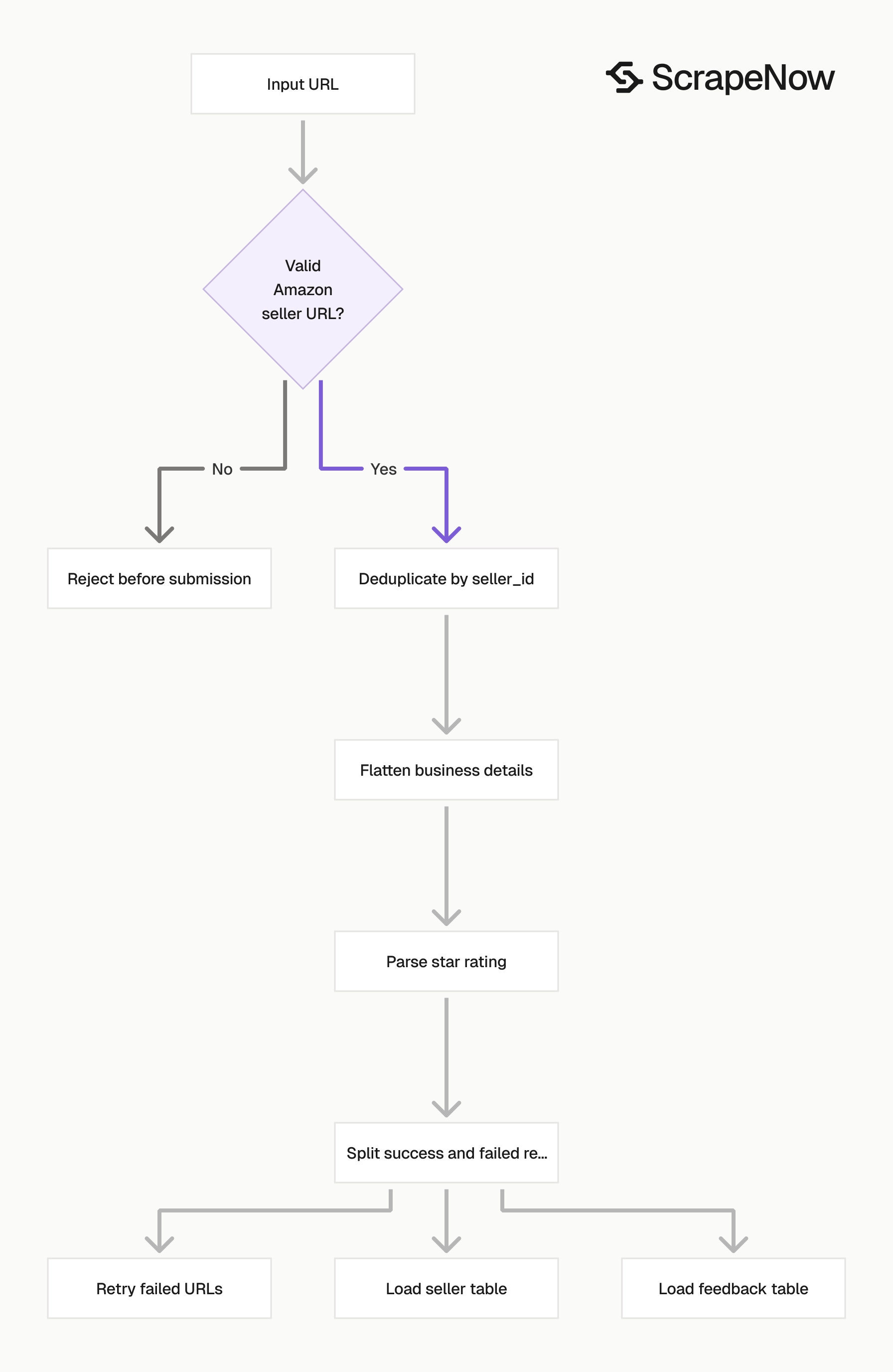
Validate inputs, deduplicate by seller ID, flatten business info, and keep failed records for retry.
Validate Amazon seller URLs before submission
Invalid inputs waste credits and produce noisy job logs. Reject non-Amazon URLs before you call the API.
This validator accepts both seller URL patterns used earlier in the guide. It requires HTTPS and the www.amazon.com host.
from urllib.parse import urlparse, parse_qs


def validate_seller_url(url: str) -> tuple[bool, str | None]:
    parsed = urlparse(url)

    if parsed.scheme != "https":
        return False, "URL must use https"

    if parsed.netloc != "www.amazon.com":
        return False, "URL must start with https://www.amazon.com/"

    query = parse_qs(parsed.query)

    if "seller" in query and query["seller"][0]:
        return True, None

    if "me" in query and query["me"][0]:
        return True, None

    return False, "URL must include seller= or me= seller ID"


urls = [
    "https://www.amazon.com/sp?seller=A11H2172ZZKORR",
    "https://www.amazon.com/s?me=A11H2172ZZKORR",
    "https://amazon.com/sp?seller=A11H2172ZZKORR"
]

for url in urls:
    valid, error = validate_seller_url(url)
    print(url, valid, error)
Expected output:
https://www.amazon.com/sp?seller=A11H2172ZZKORR True None
https://www.amazon.com/s?me=A11H2172ZZKORR True None
https://amazon.com/sp?seller=A11H2172ZZKORR False URL must start with https://www.amazon.com/
Add this validation before job creation to catch malformed records before they enter your scrape queue.
Extract seller IDs from URLs
Many pipelines store seller URLs first and normalize identifiers later. Add a small parser so every accepted URL produces the same seller_id field before submission.
from urllib.parse import urlparse, parse_qs


def extract_seller_id(url: str) -> str | None:
    query = parse_qs(urlparse(url).query)

    for key in ("seller", "me"):
        values = query.get(key)
        if values and values[0]:
            return values[0].strip()

    return None


print(extract_seller_id("https://www.amazon.com/sp?seller=A11H2172ZZKORR"))
print(extract_seller_id("https://www.amazon.com/s?me=A11H2172ZZKORR"))
Expected output:
A11H2172ZZKORR
A11H2172ZZKORR
Run this before deduplication. Two different URL patterns should collapse into one scrape request when they reference the same seller.
Keep the original URL in a separate field. If Amazon changes a link pattern, you still have the submitted source value for debugging.
Deduplicate by seller ID
You will hit the same seller more than once if you collect seller URLs from product pages. Use seller_id as the dedupe key.
The function below keeps the last record seen for each seller. That behavior works for current-state seller tables.
def dedupe_sellers(records: list[dict]) -> list[dict]:
    seen = {}

    for record in records:
        seller_id = record.get("seller_id")
        if not seller_id:
            continue

        seen[seller_id] = record

    return list(seen.values())
For product-to-seller mapping, keep a separate table with asin, seller_id, and scrape timestamp. The seller profile table should contain one current record per seller.
This avoids duplicating the same business address across every product row. It also lets you update seller metadata without rewriting product records.
If you need history, add valid_from and valid_to fields to the seller table. That model captures name changes, address changes, and rating changes over time.
You can also add a hash of the normalized seller profile. When the hash changes, insert a new history row and close the previous version.
Handle failed records without losing the batch
The API response includes scrape_status. Treat each result independently.
Avoid failing the entire pipeline because one seller URL failed. Split successful records from failed records and retry the failed URLs in a new job.
def split_results(records: list[dict]) -> tuple[list[dict], list[dict]]:
    successful = []
    failed = []

    for record in records:
        if record.get("scrape_status") == "success":
            successful.append(record)
        else:
            failed.append(record)

    return successful, failed
Retry failed seller URLs in a new job. Cap attempts at three per URL, then move to a dead-letter table.
Normalize star ratings into numbers
The stars field is text. Convert it to a float for sorting, filtering, and alerts.
import re


def parse_star_rating(value: str | None) -> float | None:
    if not value:
        return None

    match = re.search(r"(\d+(?:\.\d+)?)\s+out of\s+5", value)
    if not match:
        return None

    return float(match.group(1))


print(parse_star_rating("5 out of 5 stars"))
print(parse_star_rating("4.5 out of 5 stars"))
Expected output:
5.0
4.5
Store both the raw rating string and the parsed numeric value. The raw field preserves source text, and the numeric field supports filters and thresholds.
For alerts, avoid firing on one low feedback item alone. Track changes across scrape runs and compare the latest rating against the previous value.
A practical alert checks the seller-level rating and recent feedback count together. For example, alert when rating drops by 0.3 or more and at least 5 new feedback records appeared.
Flatten business info before loading analytics tables
Analytics tools work better with fixed columns than nested arrays. Flatten detailed_info before writing to a warehouse table.
def flatten_seller(record: dict) -> dict:
    info = detailed_info_to_dict(record.get("detailed_info"))

    return {
        "seller_id": record.get("seller_id"),
        "seller_name": record.get("seller_name"),
        "url": record.get("url"),
        "description": record.get("description"),
        "stars": record.get("stars"),
        "business_name": info.get("Business Name"),
        "business_address": info.get("Business Address"),
    }
Keep the full detailed_info array in raw storage if you have a data lake. New Amazon fields can appear later, and raw storage protects that data.
For warehouse tables, promote only the fields your team queries. Common fields include business name, business address, seller rating, and scrape time.
Add scraped_at to every flattened row. Without that timestamp, you cannot compare seller changes across runs.
Preserve raw data before cleaning
Store the original scraper response before transformations so you can replay parsing logic after schema changes.
raw/amazon_sellers/scrape_date=2026-05-08/job_id=abc123/results.json
clean/amazon_sellers/scrape_date=2026-05-08/sellers.parquet
clean/amazon_seller_feedback/scrape_date=2026-05-08/feedback.parquet
When to pair this with other Amazon scrapers
Seller extraction works well after you already have product URLs or ASINs. A common workflow starts with the Search Amazon products by URL scraper.
That scraper extracts product pages from a category or search URL. You can then collect seller links from the product records.
If you already have product URLs, use the Extract Amazon product data scraper first. It returns product-level fields before you enrich each record with seller data.
Seller extraction then adds the company, address, profile description, and feedback data behind the seller link. This turns a product list into a seller-level dataset.
For marketplace monitoring, run product discovery on a schedule and store new seller IDs. Then run this seller scraper only for new sellers or sellers due for refresh.
A daily seller refresh fits active monitoring. A weekly refresh fits slower catalog audits.
For the full list of Amazon and marketplace extractors, use the scraper catalog at Browse all 86+ scrapers. It groups the Amazon scraping tools in one place.
Product-to-seller workflow
A clean production workflow uses 3 stages. Each stage writes its own output, so failures stay isolated.
- Run product discovery from a keyword, category URL, or saved product URL list.
- Extract seller URLs and seller IDs from the product output.
- Run the Amazon Sellers Extract by URL scraper for new sellers and sellers due for refresh.
This pattern reduces duplicate seller scrapes. It also gives you a clear join path from asin to seller_id.
For enrichment jobs, store asin, seller_id, product_url, seller_url, and scraped_at. Then keep seller profile fields in the seller table.
That split makes downstream queries cleaner. Analysts can join product records to the latest seller profile without carrying duplicate seller text on every product row.
Compliance workflow
Compliance teams usually care about identity, address, and change history. This scraper returns the fields needed for that workflow.
Store Business Name and Business Address exactly as returned. Then add normalized fields such as country_code, address_contains_cn, or business_name_hash in your own pipeline.
Run a daily or weekly refresh depending on review volume. Compare each run against the previous profile row for the same seller ID.
Flag changes in business name, address, and star rating. Send those flagged records to manual review rather than reviewing every seller every time.
Feedback monitoring workflow
Feedback monitoring starts with a stable seller list. Each scheduled run pulls recent feedback and compares it with stored records.
Use the composite key from earlier to find new comments. Then calculate the count of new records, the average parsed rating, and the share of low-star feedback.
A useful rule is straightforward. Flag sellers with at least 3 new feedback records under 3 stars during the latest run.
Tune that threshold to your catalog size and risk model. High-volume marketplaces need stricter thresholds than small vendor lists.
Pricing
ScrapeNow charges per returned row. One row costs one credit, starting at $0.04 per credit for small runs and dropping with volume. No monthly contracts, no proxy fees, no charges for failed rows. See the pricing page for current rates.
Run the Get Amazon seller data scraper with this test input first:
{
  "url": "https://www.amazon.com/sp?seller=A11H2172ZZKORR"
}
Confirm that your job returns scrape_status, seller_id, seller_name, detailed_info, stars, and feedbacks. Then add validation, deduplication, and rating parsing before loading production data.
If your pipeline starts from product discovery, start from the Amazon scraper hub at Browse all 86+ scrapers. Collect product URLs first, then pass each seller URL into the Amazon Sellers Extract by URL scraper.
The concrete next step is to copy the Python script above and replace YOUR_API_KEY. Run one seller URL, inspect the saved JSON file, then add your seller ID dedupe step before submitting a larger batch.


