10,000 YouTube API units cover about 100 search requests.
A YouTube scraper pulls public video, channel, search, and hashtag data without selector maintenance, browser session code, retry queues, or proxy rotation. Teams use YouTube scraping to track creators, watch competitors, build content datasets, and collect engagement metrics across millions of public videos.
YouTube extraction looks simple during a 50-row test. Production jobs fail when requests hit JavaScript rendering, quota ceilings, changing payloads, throttling, duplicate results, and partial responses. A maintained scraper removes that work and returns structured rows you can load into a database, warehouse, or enrichment pipeline.
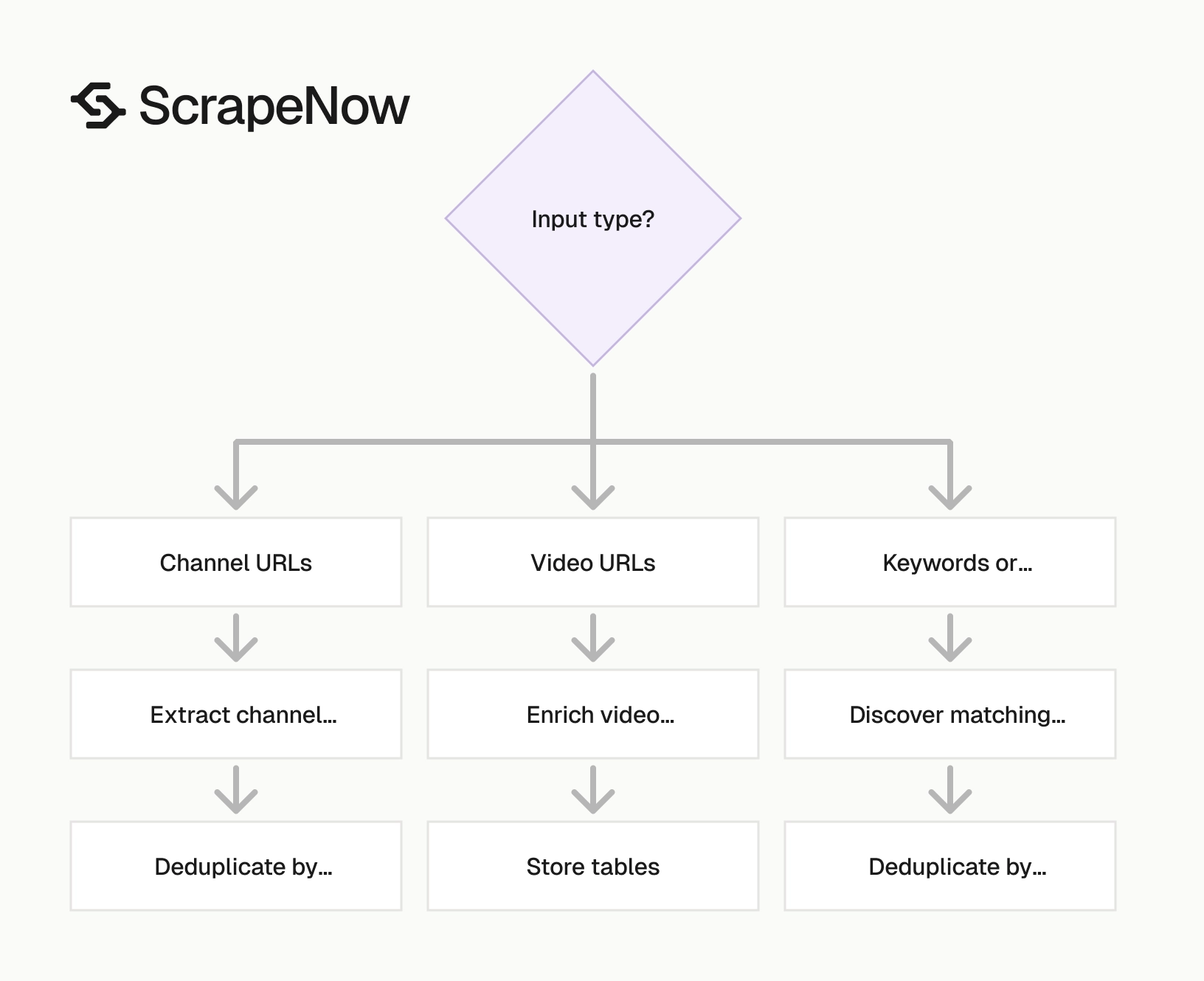
ScrapeNow’s YouTube scrapers are built around input type. Send channel URLs when you already know the creators. Send video URLs when you need enrichment. Send keywords, filters, or hashtags when discovery is part of the job.
That input split matters because each job has a different failure mode. Known URLs fail on unavailable pages, deleted videos, region limits, or missing fields. Search and hashtag jobs fail on noisy results, overlap, pagination gaps, and result ranking changes between runs.
Why YouTube data is worth extracting
YouTube exposes public data that maps directly to content performance. A channel page gives you subscriber count, handle, description, country, joined date, external links, and video inventory. A video page gives you title, description, duration, views, likes, publish date, channel details, tags, thumbnails, and transcripts or comments when YouTube exposes those fields publicly.
That data supports creator research, ad tracking, trend tracking, SEO analysis, and AI training datasets. A brand team can track every product review published in the last 30 days. A search team can collect titles, descriptions, and tags across ranking videos for a keyword set.
The useful part is the structure. Views, publish dates, channel IDs, video IDs, and engagement fields can be compared across creators, topics, and time windows. A single row becomes useful when it has stable identifiers, collection timestamps, and enough metadata to explain why it entered the dataset.
Manual collection fails fast. Copying 500 video URLs into a spreadsheet wastes time and introduces errors. Collecting 50,000 video records across search terms, hashtags, and channels requires stable output, retry logic, and duplicate handling.
The same problem appears in creator tracking. A spreadsheet of channel names breaks when creators rename channels or change handles. Store channel IDs and video IDs from the start, then use names and handles as display fields.
Public YouTube data also helps teams compare channels that publish at different rates. One creator can publish daily Shorts, while another publishes one long-form review per week. Normalized rows let you compare views per video, growth by publish window, and engagement by format.
Time context matters for every metric. A video with 50,000 views after two hours behaves differently from a video with 50,000 views after six months. Store the collection time with every row so analysts can calculate velocity, decay, and ranking movement.
Why YouTube scraping fails in production
YouTube is JavaScript-heavy. The HTML from a basic HTTP request often misses data rendered in the browser. Fields visible in DevTools do not always exist in the first response body.
The platform changes internal payloads, markup, and client behavior. A selector that works today can return empty fields next week. Hard-coded CSS paths are a short-term patch for a long-running data job.
The official YouTube Data API works for many projects. The default quota is 10,000 units per day. Search requests cost 100 units each, which gives you about 100 search calls before the default quota runs out.
That limit matters when discovery is part of the job. A keyword list with 500 terms exceeds the default quota if every term needs one search call. Pagination, channel lookups, comments, and repeated refreshes consume more units.
Scraping has its own production problems:
| Problem | What happens in production | Practical fix |
|---|---|---|
| JavaScript rendering | Basic requests miss fields loaded after page render | Use a scraper built for YouTube payloads |
| Rate limits | Repeated requests from one IP get throttled | Rotate sessions and control request rate |
| Anti-bot checks | Datacenter traffic gets flagged faster on heavy runs | Use clean proxy pools and browser-like requests |
| Login walls | Age-restricted, private, or region-gated content blocks access | Stay with public data unless you have permission |
| Layout changes | CSS selectors fail without warning | Use maintained extractors instead of one-off scripts |
| Duplicate discovery | The same video appears across keywords and hashtags | Deduplicate by video ID before reporting |
| Partial rows | Some fields return null when YouTube omits public data | Store raw output and track null rates by field |
Small open-source scripts work for local jobs. They are useful for experiments, small lists, and learning how YouTube pages expose data. They become expensive when a workflow requires retries, proxy handling, schema stability, queueing, logging, and recovery after source changes.
For production runs, maintenance becomes the cost center. You need a failure policy for partial runs, because a 100,000-row job will include timeouts, empty responses, duplicates, and fields that change shape. You also need run-level reporting, so your team knows whether a dataset is complete enough to use.
Production scraping also needs repeatability. The same input file should produce rows with the same schema, the same key fields, and traceable run metadata. Without that discipline, every downstream report becomes a one-off cleanup task.
YouTube search results also move while a job runs. A keyword collected at 09:00 can return a different order at 11:00 after new uploads, removals, or ranking changes. Store result position and collection time, because those fields explain why two runs disagree.
ScrapeNow’s YouTube scrapers
ScrapeNow has purpose-built YouTube scrapers for the common collection paths. Each scraper returns structured rows, so you choose the input type and pay for returned results. That keeps the job model clear and removes custom browser code from your pipeline.
The main decision is the starting point. Use URL extractors when you already have YouTube URLs. Use search scrapers when you need discovery across keywords, filters, or hashtags.
This split matters in production. URL extraction works for refreshing known entities. Search scraping works for finding new entities. Keep those jobs separate, then join the output by video ID or channel ID.
Separate jobs also make cost tracking cleaner. A discovery run tells you how many new videos or channels you found. A refresh run tells you how many known records received updated metrics.
YouTube Channels Extract by URL
Use this scraper when you already have channel URLs and need channel-level metadata. The Extract YouTube channel data pulls public channel fields such as name, handle, description, subscriber count, video count, thumbnails, external links, and related channel metadata.
This path fits creator databases, influencer tracking, partner research, and weekly channel refresh jobs. Store the channel ID with every row, because names and handles can change. The channel ID gives your warehouse a stable key for joins and history tables.
For implementation details, the YouTube Channels Scraper guide covers channel extraction patterns and code examples. Use it when you need to connect channel rows to your own database or run repeat jobs.
A common channel refresh job starts with a known creator list. Run the extractor every week, write the latest profile fields to a channels table, and write subscriber count snapshots to a metric history table. That gives you current profile data and time-series growth data without overwriting history.
Channel URL extraction also helps clean creator lists collected from CRM records or influencer platforms. Those systems often store display names, vanity URLs, and outdated handles. Refreshing the canonical channel data gives you stable IDs before you run joins or deduplication.
Store the source of each channel URL as well. A channel found through search, an agency list, and a sales handoff should keep that provenance. Source fields help analysts separate organic discovery from imported accounts.
YouTube Channels Search by Keyword
Use keyword search when you need to discover channels in a niche, geography, industry, or creator category. The Search YouTube channels by keyword takes search terms and returns matching public channels with structured profile data.
This scraper fits lead generation, creator mapping, category research, and market tracking. Input terms can describe a niche, such as fitness coach, AI tools, Spanish cooking, or B2B SaaS. The output gives you a starting list that can be refreshed or expanded later.
The YouTube Channels Scraper guide covers the channel workflow. It also shows how keyword discovery fits into larger creator datasets. A common pattern discovers channels by keyword, then refreshes known channel URLs on a schedule.
Keyword discovery needs careful input design. Broad terms return mixed creators, media outlets, and brand accounts. Specific terms produce fewer rows, with less cleanup after collection.
Start with terms that match how creators describe themselves. strength coach for runners returns a different list from fitness. Location terms also change the result set, so store the exact keyword with every returned channel.
Run small samples before a large channel discovery job. Review the first few hundred rows for category fit, language, country coverage, and duplicate rate. Fix the keyword list before the scraper returns thousands of rows you need to filter later.
YouTube Videos Extract by URL
Use URL extraction when your input is a list of video links from another source. That source can be a playlist export, search result set, CRM list, partner database, or internal dataset. The Extract YouTube video data returns public video metadata like title, description, publish date, view count, engagement fields, channel name, channel URL, duration, and thumbnails.
This is the right path for enrichment. You already know which videos matter, and you need normalized fields for analysis. It also works well for refreshing metrics, because you can submit the same video IDs daily and track changes over time.
The YouTube Videos Scraper guide includes code examples for collecting video records from known URLs. Use it to design the input file, handle returned fields, and map video IDs into your storage layer.
For metric tracking, treat the video row and metric row as separate records. Title, description, duration, and channel ID belong in a videos table. Views, likes, comments, and collection time belong in a metric history table.
URL extraction is also useful after discovery. Search and hashtag scrapers find candidate videos, then URL extraction refreshes the records you care about. That second pass gives you a consistent enrichment job for the final dataset.
Validate URLs before submitting a large list. Remove duplicates, normalize watch URLs and Shorts URLs, and reject rows that are missing video IDs. Input cleanup saves credits and keeps failure reports readable.
YouTube Videos Search by Filters
Use filtered search when you need videos matching a query, sort mode, upload date, duration, or other search constraints. The Search YouTube videos by filters is built for discovery jobs like tracking product reviews, watching competitor content, or collecting videos about a topic.
This scraper fits keyword tracking and content research. You can collect recent videos for running shoes review, filter by upload date, and compare creators by views and engagement. You can also repeat the same query daily to detect new videos.
The YouTube Videos Scraper guide covers video search workflows and input structure for repeatable collection. Keep the query, filter settings, and collection timestamp with every row. Those fields explain why a video entered the dataset.
Filtered search works best when each run has a narrow job definition. Separate running shoes review from trail running shoes review instead of mixing both into one report. That makes duplicate rates, ranking drift, and topic coverage easier to measure.
For competitor tracking, store competitor names as query metadata. A query like brand name review should carry the brand, product line, market, and language. Those labels make reporting easier after deduplication.
For SEO research, store the result position. Ranking position gives analysts context for traffic opportunity and visibility. A video in position 3 and a video in position 83 belong in different buckets.
YouTube Videos Search by Hashtag
Use hashtag search when you track campaigns, creator trends, Shorts topics, or branded hashtags. The Search YouTube videos by hashtag returns public videos tied to a hashtag, with metadata ready for analysis.
Hashtag scraping works well for campaign reporting because the input is explicit. A branded hashtag, product tag, or event tag gives you a defined collection target. For Shorts and trend tracking, refresh intervals matter because engagement can move within hours.
The YouTube Videos Scraper guide covers video extraction patterns that also apply to hashtag-based collection. Treat hashtag output as discovery data first, then enrich key videos by URL when you need a stable historical record.
Hashtags need duplicate handling. The same video can appear under a branded hashtag, a category hashtag, and a campaign hashtag. Deduplicate by video ID before reporting reach, video count, or creator count.
Hashtag jobs also need consistent casing and formatting. Store #skincare, skincare, and URL-encoded versions as one normalized tag. Keep the original submitted input in a separate field for auditability.
Campaign teams should store start date and end date with every hashtag run. A campaign report should count videos collected during the campaign window, and it should separate older videos that already used the same tag.
Example ScrapeNow output
ScrapeNow returns structured rows instead of raw page HTML. That saves the step where your team writes brittle selectors and then repairs them after a markup change. Your pipeline reads fields, validates them, and writes them to storage.
The exact fields depend on the scraper and the public data available on YouTube. A video URL extraction row follows this shape:
{
  "video_id": "dQw4w9WgXcQ",
  "video_url": "https://www.youtube.com/watch?v=dQw4w9WgXcQ",
  "title": "Example product review",
  "description": "Public description text from the video page",
  "channel_id": "UCexampleChannelId",
  "channel_name": "Example Creator",
  "channel_url": "https://www.youtube.com/@examplecreator",
  "published_at": "2026-01-18T14:22:00Z",
  "duration_seconds": 612,
  "view_count": 184203,
  "like_count": 9210,
  "comment_count": 438,
  "thumbnail_url": "https://i.ytimg.com/vi/dQw4w9WgXcQ/hqdefault.jpg",
  "tags": ["review", "running shoes", "gear"],
  "collection_time": "2026-01-19T09:00:00Z",
  "input_url": "https://www.youtube.com/watch?v=dQw4w9WgXcQ"
}
Store video_id and channel_id as keys. Store collection_time with every metric snapshot. Store input_url so you can trace each row back to the submitted list.
For search jobs, keep the discovery fields as well. That includes the query, hashtag, filter settings, result position, and run ID. Those fields help you explain why two different jobs found the same video.
A simple normalized model uses three tables:
| Table | What it stores | Primary key |
|---|---|---|
youtube_videos |
Stable video metadata, channel ID, title, publish date, duration | video_id |
youtube_channels |
Stable channel metadata, handle, channel URL, profile fields | channel_id |
youtube_video_metrics |
Views, likes, comments, collection time, run ID | video_id, collection_time |
Ready to get this data? Try the Youtube scraper with your own URLs.
Keep raw scraper output in object storage or a raw table. Raw rows help you debug null fields, compare schema changes, and rebuild normalized tables without rerunning a scraper. They also give analysts an audit trail when a report changes after a refresh.
Add a run table for production jobs. Store the scraper name, input file location, submitted row count, returned row count, started time, finished time, and failure count. That table turns scraper runs into auditable data operations instead of disconnected exports.
For metrics, append rows instead of updating existing records. A row collected at 09:00 and a row collected at 18:00 describe different states of the same video. Updating in place destroys the history you need for growth calculations.
Which YouTube scraper to use
Pick the scraper by input. That keeps jobs simple and reduces post-processing cleanup. It also makes failures easier to debug, because every run has one input type and one expected output schema.
| Your input | Best scraper | Typical use case |
|---|---|---|
| A list of channel URLs | YouTube Channels Extract by URL | Track known creators every week |
Keywords like fitness coach or AI tools |
YouTube Channels Search by Keyword | Build creator lead lists |
| A list of video URLs | YouTube Videos Extract by URL | Enrich existing video datasets |
| Search query plus filters | YouTube Videos Search by Filters | Collect videos by topic, recency, or format |
Hashtags like #skincare or #gaming |
YouTube Videos Search by Hashtag | Track campaigns and trend velocity |
For a 10,000-video job, URL extraction gives the least rework if you already have the URLs. Search-based scraping works better when discovery is part of the job. Mixing both paths gives the cleanest tracking workflow.
For ongoing tracking, split the workflow into two jobs. Run search scrapers to discover new videos or channels. Then run URL extractors on a schedule to refresh metrics for known records.
A practical setup uses three storage layers. Store raw scraper output, normalized entities, and metric history separately. That structure protects you when field names change, and it keeps time-series metrics clean.
Also separate test runs from production runs. Test jobs should use separate run IDs, separate output paths, and smaller input lists. That prevents sample data from mixing with records used in reporting.
The scraper choice also affects deduplication. URL extraction deduplicates best before submission, because each URL should map to one video or channel. Search and hashtag jobs deduplicate best after collection, because overlap is part of discovery.
Pricing
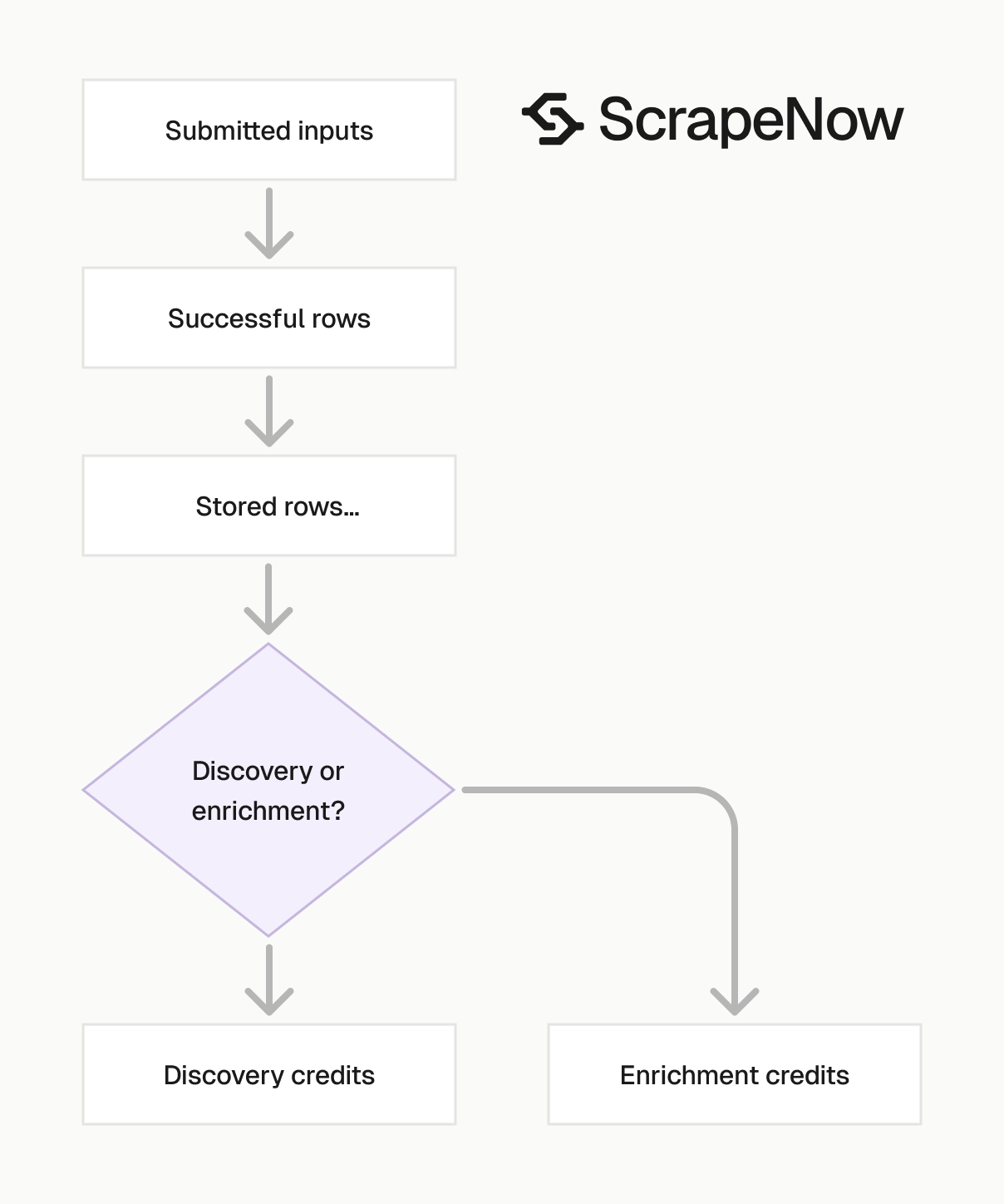
ScrapeNow charges per returned row. One row costs one credit, starting at $0.04 per credit for small runs and dropping with volume. No monthly contracts, no proxy fees, no charges for failed rows. See the pricing page for current rates.
Data handling and practical limits
Scrape public data. Avoid private videos, account-only pages, paywalled content, and content protected by access controls. If access requires login permissions you do not have, leave it out of the job.
YouTube metrics move constantly. View counts, likes, comments, rankings, and search positions change throughout the day. Store collection timestamps with every row so every metric has a time context.
For tracking jobs, daily refresh works for most creator and SEO use cases. High-volume trend tracking needs shorter intervals, especially for Shorts and hashtags. A video can spike and lose ranking position before the next daily run.
Use stable identifiers. Store video IDs and channel IDs rather than only URLs. URLs can change format, while IDs remain the reliable join key.
Keep raw output for debugging. If a parser changes or a field returns null, raw rows help you compare old and new responses. They also let you rebuild normalized tables without rerunning the scraper.
Plan for duplicates. Search results overlap across keywords, hashtags, and filters. Deduplicate by video ID or channel ID before reporting counts.
Separate discovery from refresh. Discovery jobs find new entities, while refresh jobs update metrics for known entities. That split makes costs easier to control and keeps each job predictable.
Track null rates by field. A sudden jump in missing publish dates, channel IDs, or view counts usually means the source payload changed. Alert on those changes before downstream dashboards publish incorrect totals.
Set retention rules before the first large run. Raw output can grow quickly when you collect comments, transcripts, thumbnails, and repeated metric snapshots. Keep raw rows long enough for audits and parser debugging, then archive older batches if storage cost matters.
Treat deleted and unavailable videos as valid states. A missing video after a refresh can mean removal, privacy change, region restriction, or temporary access failure. Store the status and collection time instead of deleting the historical record.
Example production workflow
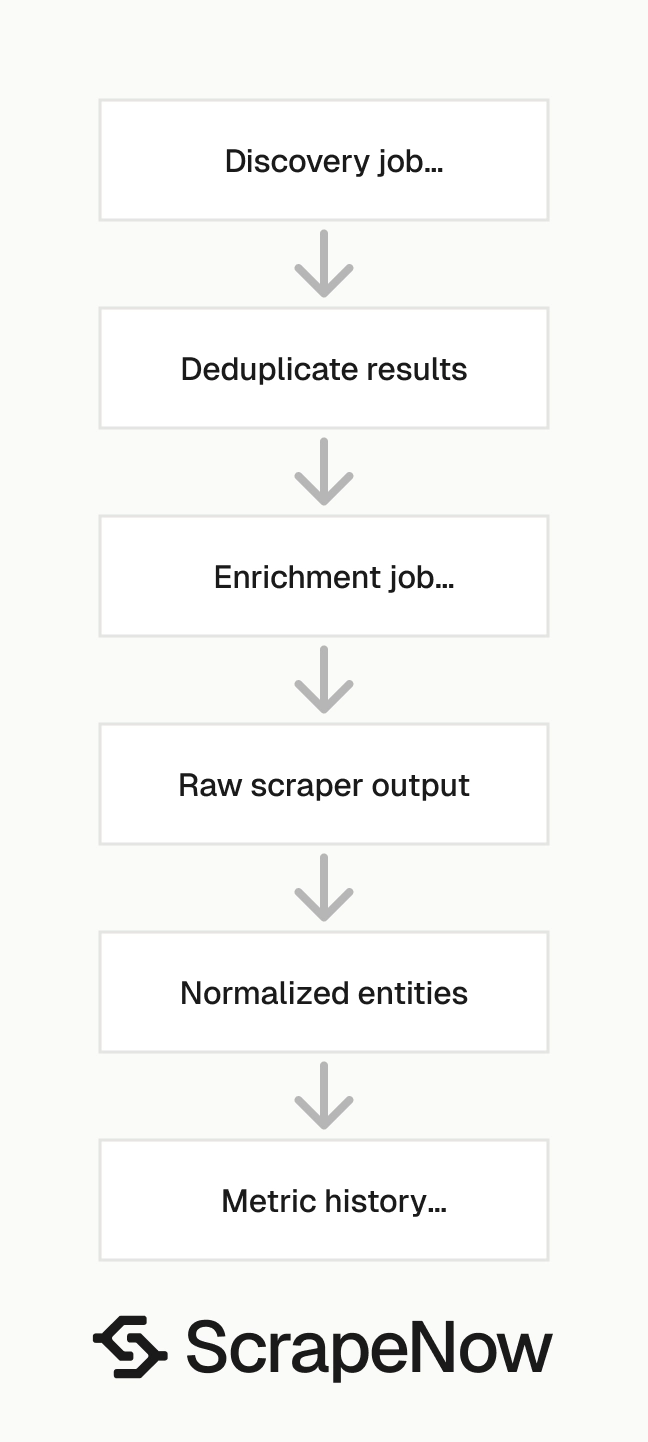
Start with discovery. Run the YouTube Videos Search by Filters scraper for your keyword list, then store each returned video ID, channel ID, query, filters, result position, and collection time. Deduplicate the result set before sending videos into enrichment.
Next, run YouTube Videos Extract by URL for the deduplicated video list. Store the returned metadata in a normalized videos table. Store views, likes, comments, and collection time in a metric history table.
Then schedule refresh runs. A weekly refresh works for evergreen SEO research. A daily or hourly refresh fits campaign tracking, Shorts tracking, and fast-moving product launches.
Add alerting after the data model is stable. Track failed rows, empty fields, duplicate rate, unexpected schema changes, and row count shifts. Those checks catch source changes before they corrupt reports.
A production workflow also needs run IDs. Add a unique run ID to every discovery job, enrichment job, and refresh job. Run IDs make retries safer because you can separate a failed batch from a successful batch.
Keep input files immutable. If a job runs from a CSV of video URLs, store that CSV with the run ID. When a report looks wrong, you can compare the submitted input, raw output, normalized rows, and final metrics.
Build retry rules around failure type. Retry timeouts and temporary empty responses. Flag unavailable videos, private pages, and malformed URLs so they do not loop through the same job repeatedly.
Set a maximum age for refreshed metrics. If a dashboard claims to show current YouTube performance, define what current means. For a campaign dashboard, that can be 24 hours; for an SEO research dataset, seven days can be enough.
Common mistakes to avoid
Do not build a YouTube scraper around CSS selectors alone. YouTube changes markup often enough to make selector-only extraction weak. Use payload-aware extraction and keep raw responses for debugging.
Do not mix discovery and refresh in the same table. Discovery explains how a video entered the dataset. Refresh explains how its metrics changed over time.
Do not report video counts before deduplication. Search queries, hashtags, and filters overlap. Count unique video IDs when reporting coverage.
Do not overwrite metric snapshots. Views and likes are time-series data. Append metric rows with collection timestamps so you can calculate growth rates later.
Do not rely on channel names as keys. Creators rename channels, update handles, and change branding. Channel IDs remain stable enough for joins and history.
Do not ignore null fields. A few nulls are normal when YouTube does not expose a field publicly. A sharp increase in nulls after a source change deserves investigation before the dataset reaches reporting.
Do not treat search ranking as permanent. Result position is a point-in-time observation. Store it with the query and run ID, then compare movement across runs.
Do not submit broad keywords without a sample. Broad inputs create high duplicate rates and mixed categories. A small test run gives you the cleanup cost before the full batch starts.
Next step
Start with a 100-row discovery test on the Search YouTube videos by filters. Review null fields, duplicate rate, timestamp handling, and whether the returned rows answer the business question before you scale the run.
Then run a URL extraction test on the best records from that sample. Compare the discovery row against the enriched row, and check which fields belong in your final tables. After that, schedule the full run with run IDs, raw output storage, and metric snapshots already in place.


