
One channel URL returns 24 structured fields.
ScrapeNow’s YouTube channels scraper extracts one structured YouTube channel record from a channel URL. It returns the handle, name, subscribers, video count, total views, profile image, banner image, external links, channel ID, creation date, podcast flag, featured video, scrape status, and error fields.
Use it when you already have channel URLs from search results, CRM records, influencer tools, partner lists, affiliate databases, or previous crawls. Each submitted URL returns one channel record, and each output row keeps the original input for debugging.
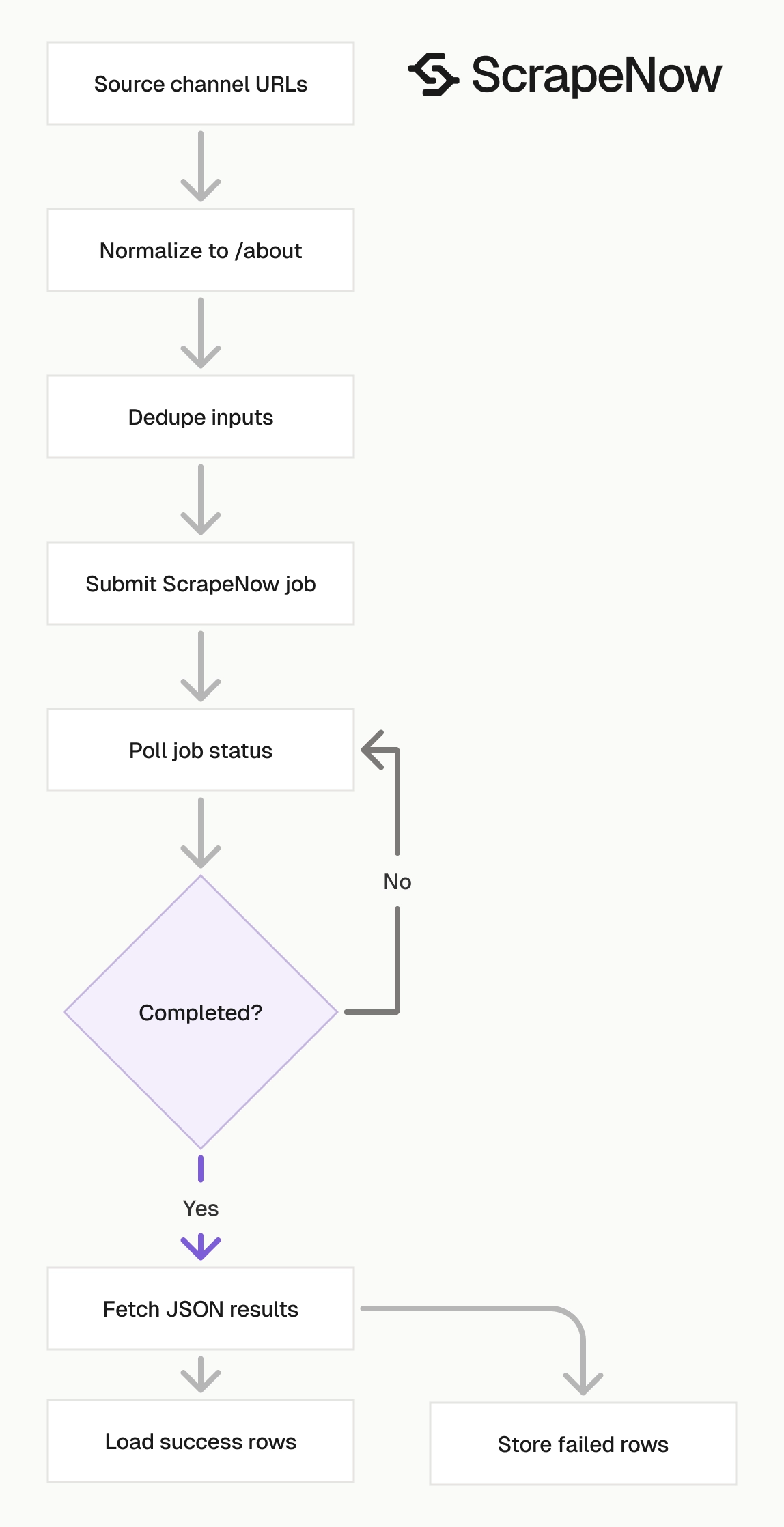
ScrapeNow runs the scraper as an API job. Your code submits inputs, polls the job, then fetches JSON results. That same job pattern works across the YouTube channel and video scrapers, so your runner code stays small.
A self-hosted YouTube scraper needs browser sessions, proxy rotation, consent handling, markup parsing, retries, and schema repair. ScrapeNow gives you typed JSON and row-level errors from one endpoint. You spend your time loading channel records, not maintaining selectors against YouTube’s changing frontend.
How to use this scraper
The URL-based scraper takes one input named url. The Extract YouTube channel data expects a YouTube profile URL that starts with https://www.youtube.com/.
Submit the channel About URL when you can. The About page exposes channel metadata used for enrichment, including external links, description text, creation date, channel-level counts, and the featured video.
A clean input looks like this:
https://www.youtube.com/@TaylorSwift/about
The scraper also accepts channel URLs that use /channel/UC..., /c/..., and older /user/... paths. The response normalizes the channel URL and returns the canonical channel ID in id and identifier.
Use one URL per input object. For a batch of 1,000 channels, submit 1,000 input objects. That gives you one output row per submitted channel and keeps failures isolated to individual rows.
Step 1. Get the channel URL
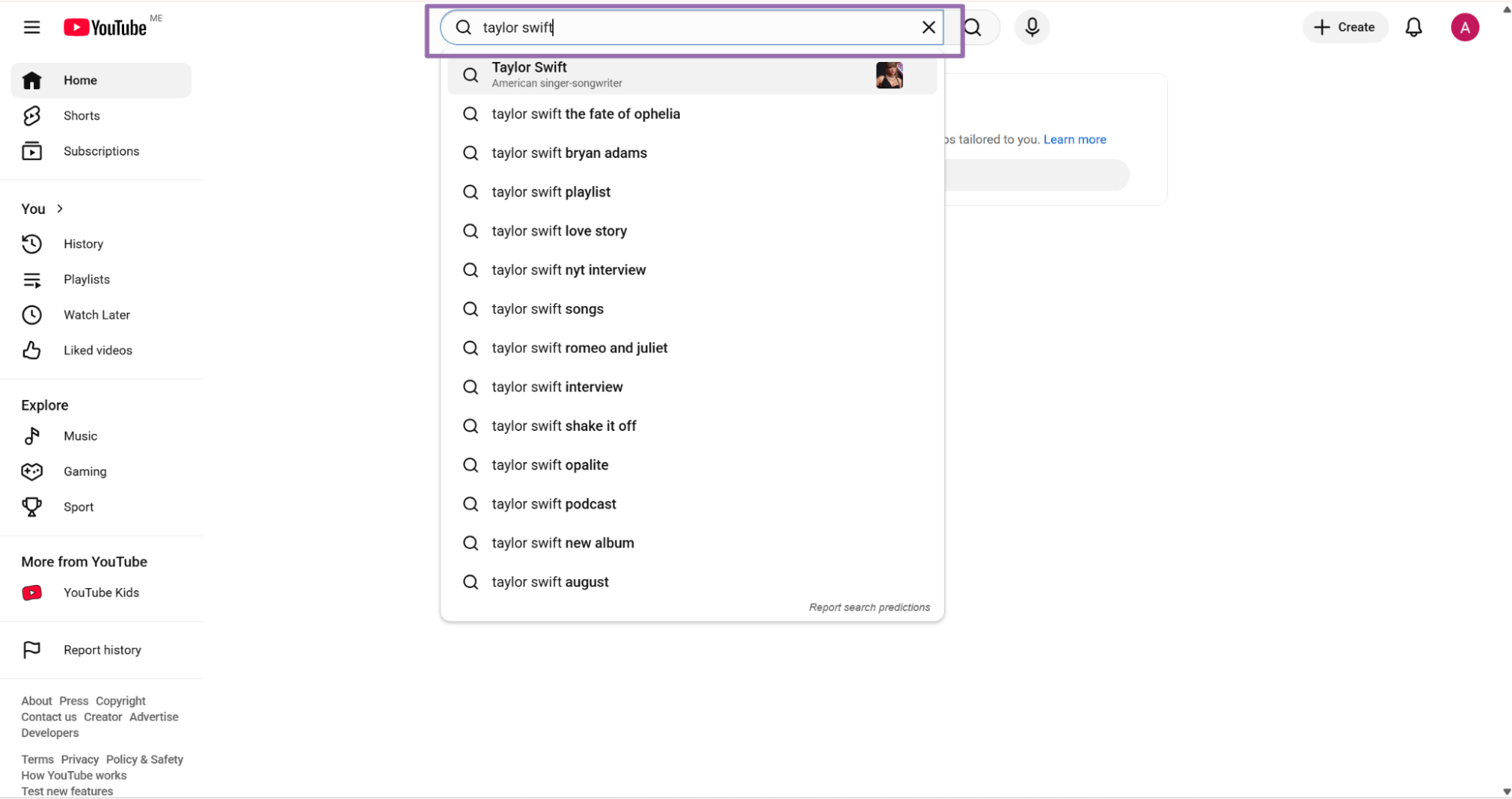
Open youtube.com.
Use the search bar to find the profile. For example, type taylor swift.
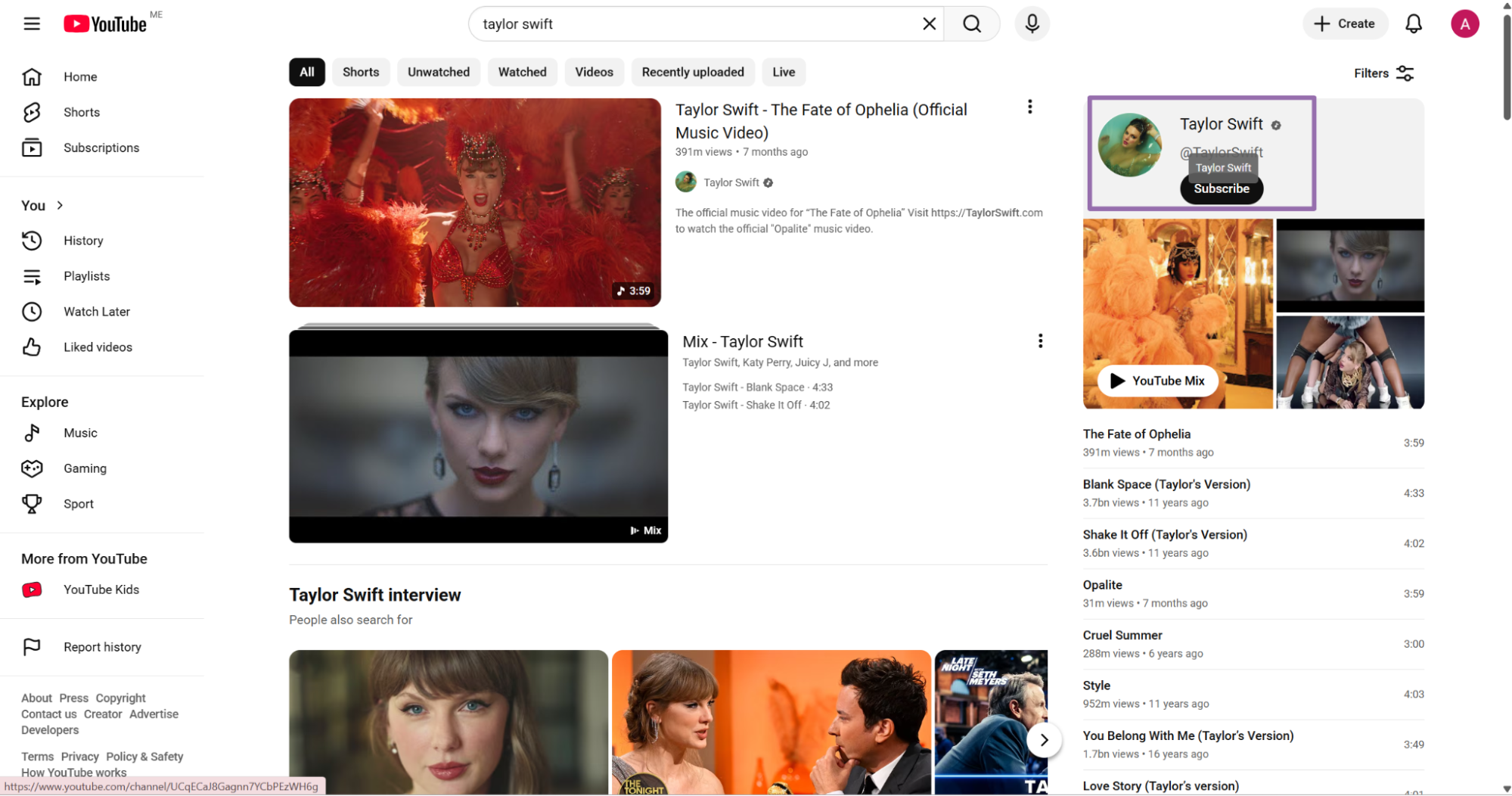
Click the profile link from the search results.
Copy the URL from the address bar.
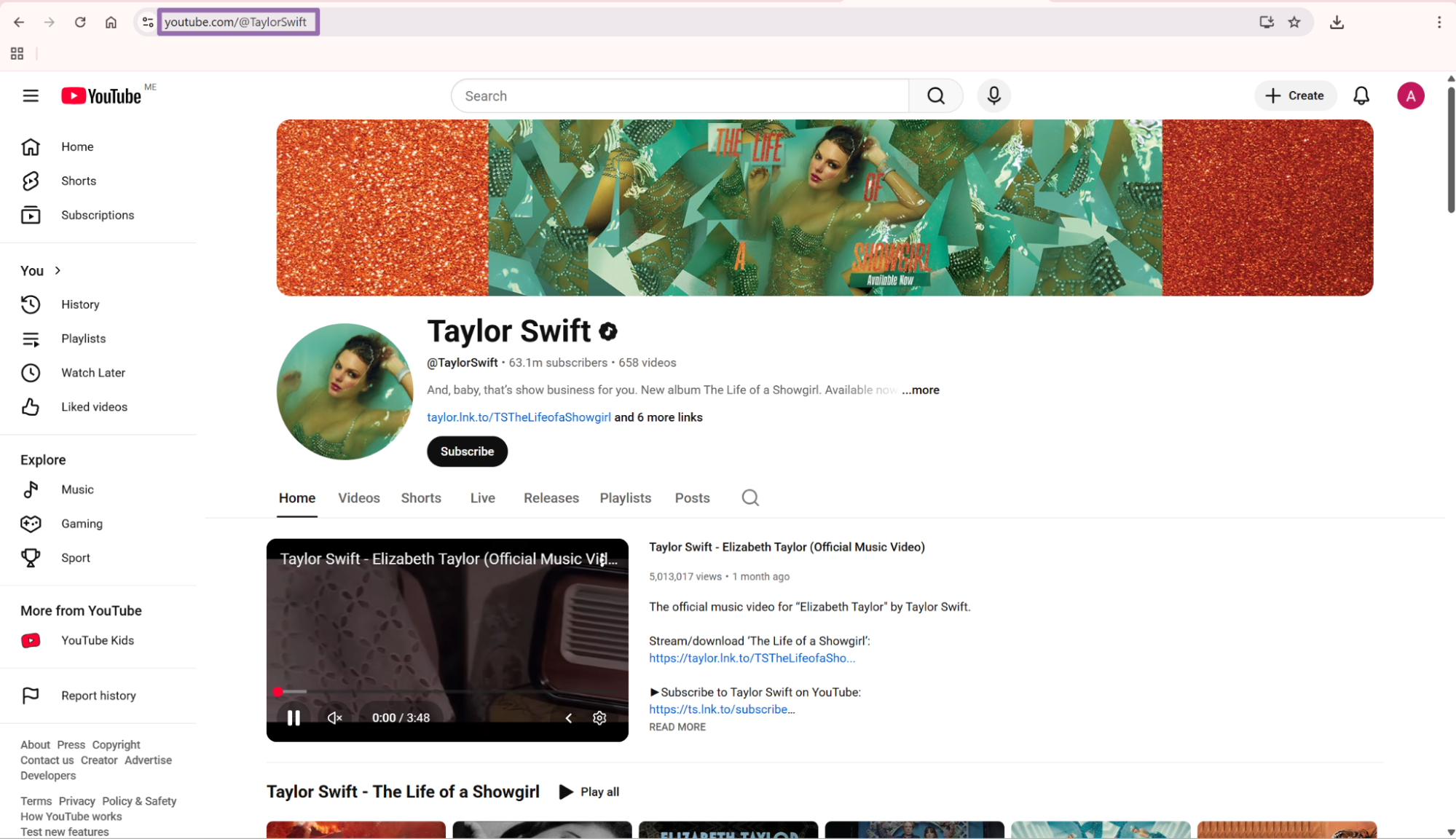
Add /about to the channel URL before you send it to the scraper.
For example:
https://www.youtube.com/@TaylorSwift/about
If your input already ends in /about, send it as-is. If your source list contains mixed YouTube URL formats, normalize them before batching.
Do this normalization in code, not by hand in a spreadsheet. Manual edits create duplicate rows, malformed URLs, and inconsistent audit logs once the list passes a few hundred channels.
Step 2. Run the API request
Use this Python script to start a scrape job, poll for completion, and save the returned JSON.
"""
Configuration:
    - Set SCRAPER_SLUG to the scraper you want to run.
    - Set SCRAPER_INPUTS to the list of input dicts matching that scraper's schema.
    - Set API_KEY to your scraper API key.
"""

import sys
import time
import json
import requests
import os

API_KEY = "YOUR_API_KEY"

SCRAPER_SLUG = "youtube-channels-extract-by-url"

SCRAPER_INPUTS = [
    {
        "url": "https://www.youtube.com/@TaylorSwift/about"
    }
]

BASE_URL = "https://api.scrapenow.io/api/v1/scraping"
TIMEOUT_SECONDS = 3600
POLL_INTERVAL = 5
SPINNER = "|/-\\"


def build_headers(api_key: str, content_type: str | None = None) -> dict:
    """Build headers using your API key"""
    headers = {"Authorization": f"Bearer {api_key}"}
    if content_type:
        headers["Content-Type"] = content_type
    return headers


def trigger_scrape(slug: str, inputs: list[dict]) -> str:
    """POST to the scrape endpoint and return the job_id."""
    url = f"{BASE_URL}/scrape?scraper={slug}"

    response = requests.post(
        url,
        headers=build_headers(API_KEY, "application/json"),
        json={"inputs": inputs},
    )
    response.raise_for_status()
    return response.json()["data"]["job_id"]


def poll_until_done(job_id: str) -> str:
    """Poll the job status until it reaches a terminal state. Returns final status."""
    start = time.time()
    i = 0
    while True:
        elapsed = time.time() - start
        if elapsed > TIMEOUT_SECONDS:
            print(f"\nTimeout after {TIMEOUT_SECONDS}s")
            sys.exit(1)

        data = requests.get(
            f"{BASE_URL}/jobs/{job_id}",
            headers=build_headers(API_KEY),
        ).json()
        status = data["data"]["status"]

        mins, secs = divmod(int(elapsed), 60)
        sys.stdout.write(f"\r[{SPINNER[i % 4]}] Waiting... {status} ({mins}m {secs:02d}s)  ")
        sys.stdout.flush()

        if status in ("completed", "failed"):
            print()
            return status

        time.sleep(POLL_INTERVAL)
        i += 1


def fetch_results(job_id: str) -> dict:
    """Download the completed job results as JSON."""
    response = requests.get(
        f"{BASE_URL}/jobs/{job_id}/results?format=json",
        headers=build_headers(API_KEY),
    )
    response.raise_for_status()
    return response.json()


def save_results(data: dict, slug: str) -> str:
    """Write results to {slug}-output.json and return the filename."""
    filename = f"{slug}.json"
    with open(filename, "w", encoding="utf-8") as f:
        json.dump(data, f, indent=2, ensure_ascii=False)
    return filename


def main() -> None:
    print(f"Triggering scraper: {SCRAPER_SLUG}")
    job_id = trigger_scrape(SCRAPER_SLUG, SCRAPER_INPUTS)
    print(f"Job started: {job_id}")

    final_status = poll_until_done(job_id)

    if final_status != "completed":
        print(f"Job failed with status: {final_status}")
        sys.exit(1)

    print("Fetching results...")
    results = fetch_results(job_id)

    os.makedirs("output", exist_ok=True)
    output_file = save_results(results, os.path.join("output", SCRAPER_SLUG))
    print(f"Results saved to: {output_file}")


if __name__ == "__main__":
    main()
The same API pattern works for the other YouTube scrapers in this group. Change SCRAPER_SLUG and SCRAPER_INPUTS for the scraper you want to run.
For production, move API_KEY into an environment variable or secrets manager. Keep the polling interval at 5 seconds unless your batch runner already has queue-level backoff.
A typical environment-variable version looks like this:
API_KEY = os.environ["SCRAPENOW_API_KEY"]
Keep job IDs in durable storage after submission. If your worker restarts, you can resume polling and fetch finished results without submitting the same inputs again.
Store the submitted input batch with the job ID. That gives you an audit trail from source URL to ScrapeNow job to warehouse row.
Step 3. Search channels by keyword
Use keyword search when you need channel discovery before profile enrichment.
The Search YouTube channels by keyword takes a keyword input. Example keywords include popular songs 2026, python tutorials, and fitness coach.
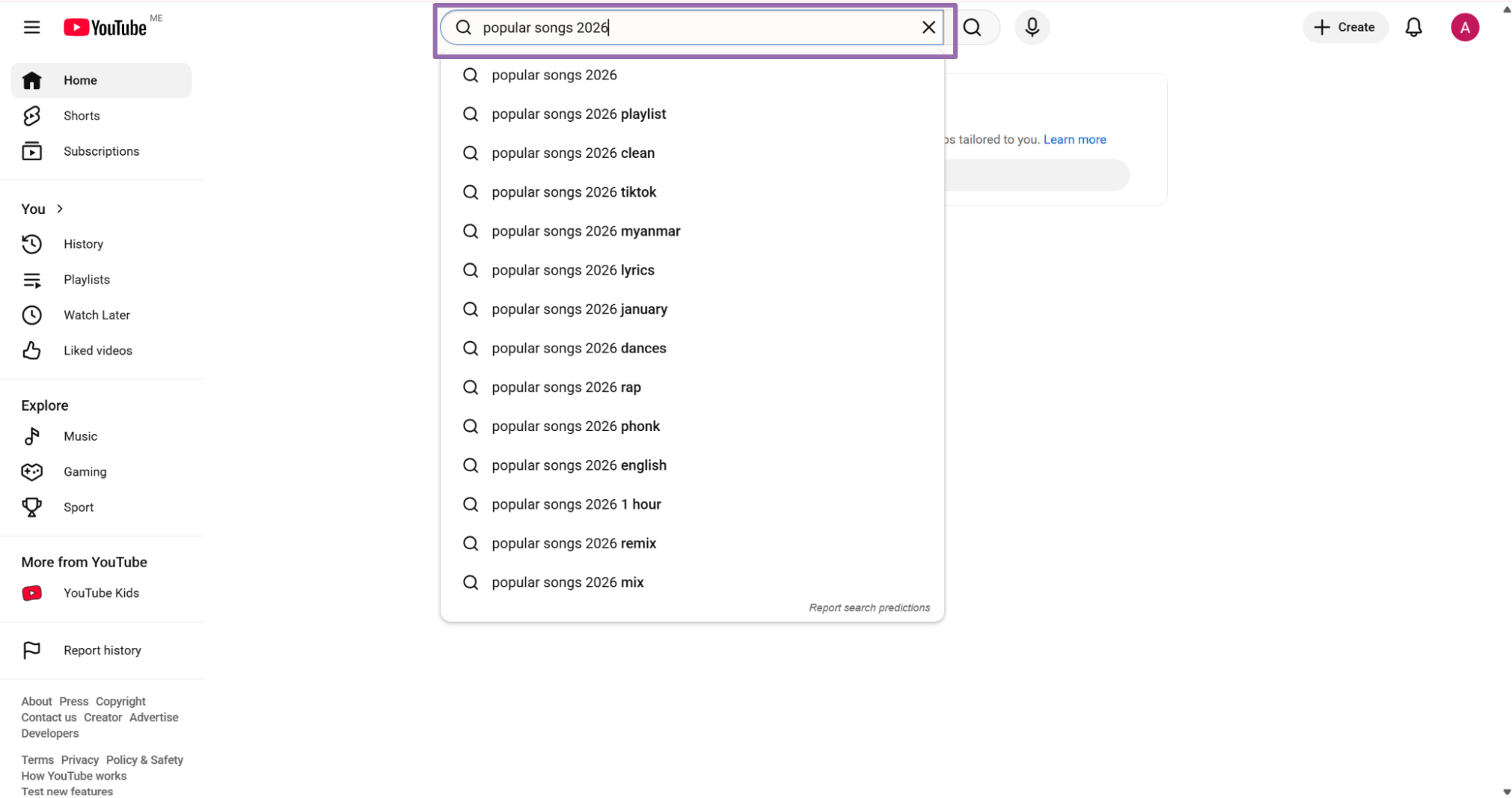
Input format:
[
  {
    "keyword": "popular songs 2026"
  }
]
Run URL extraction when you already know the channels. Run keyword search when you need candidate channels for a topic, category, niche, or campaign.
The standard production flow has two stages. Search by topic, collect channel URLs, then enrich each profile with channel counts, external links, and stable IDs.
For creator prospecting, that gives you clean filters. You can keep channels above a subscriber threshold, require an external website, exclude new channels, or rank by total views.
For market mapping, use the search scraper as the discovery stage. Use the URL scraper as the enrichment stage. Keep those two stages separate so you can rerun enrichment without repeating discovery.
API response sample
A completed job returns JSON. This trimmed response comes from youtube-channels-extract-by-url.
[
{
"inputs": {
"url": "https://www.youtube.com/@TaylorSwift/about"
},
"scrape_status": "success",
"url": "https://www.youtube.com/@taylorswift",
"handle": "@TaylorSwift",
"handle_md5": "c0ba0a16acd7890d9eebcf7c462a1773",
"banner_img": "https://yt3.googleusercontent.com/ZzqXdJOrwxJYqrI_4vQbD4aS6p-WhFpwYq3fJfE9KB60lUzc_UEzpyNBAX_hC3Uc7PsUmZ8D=w2560-fcrop64=1,00005a57ffffa5a8-k-c0xffffffff-no-nd-rj",
"profile_image": "https://yt3.googleusercontent.com/HFEgZENJw23LuRb0ldBpDrQKscFUWSf4n2jqrNh-1EqpE3Uiy_IYwacuUXCjCruNUP3Ttq9N=s160-c-k-c0x00ffffff-no-rj",
"name": "Taylor Swift",
"subscribers": 63200000,
"Description": "And, baby, that’s show business for you. New album The Life of a Showgirl. Available now ❤️🔥\n",
"videos_count": 658,
"created_date": "2006-09-20T00:00:00.000Z",
"views": 45009104370,
"Links": [
"taylor.lnk.to/TSTheLifeofaShowgirl",
"taylorswift.com",
"instagram.com/taylorswift",
"facebook.com/TaylorSwift",
"x.com/taylorswift13",
"tiktok.com/@taylorswift",
"taylorswift.tumblr.com"
],
"identifier": "UCqECaJ8Gagnn7YCbPEzWH6g",
"id": "UCqECaJ8Gagnn7YCbPEzWH6g",
"has_podcast": false,
"top_videos": [],
"featured_video": "https://www.youtube.com/watch?v=WqbJT_vC0rs&pp=0gcJCTcbAYcqIYzv",
"featured_channels": null,
"collaborations": null,
"scrape_error": null,
"scrape_error_code": null
}
]
The response keeps the submitted input under inputs. That makes batch debugging direct because each output row carries the original URL.
The scraper also returns normalized channel values. Store the canonical id for joins, and keep the normalized url for review tools and operator workflows.
Treat scrape_status as a required field in your loader. It gives your pipeline a clean branch for successful rows and failed rows.
The row also includes scrape_error and scrape_error_code. Store those fields even when they are null, because they become useful the first time a batch contains private, removed, or malformed channels.
What data you get back
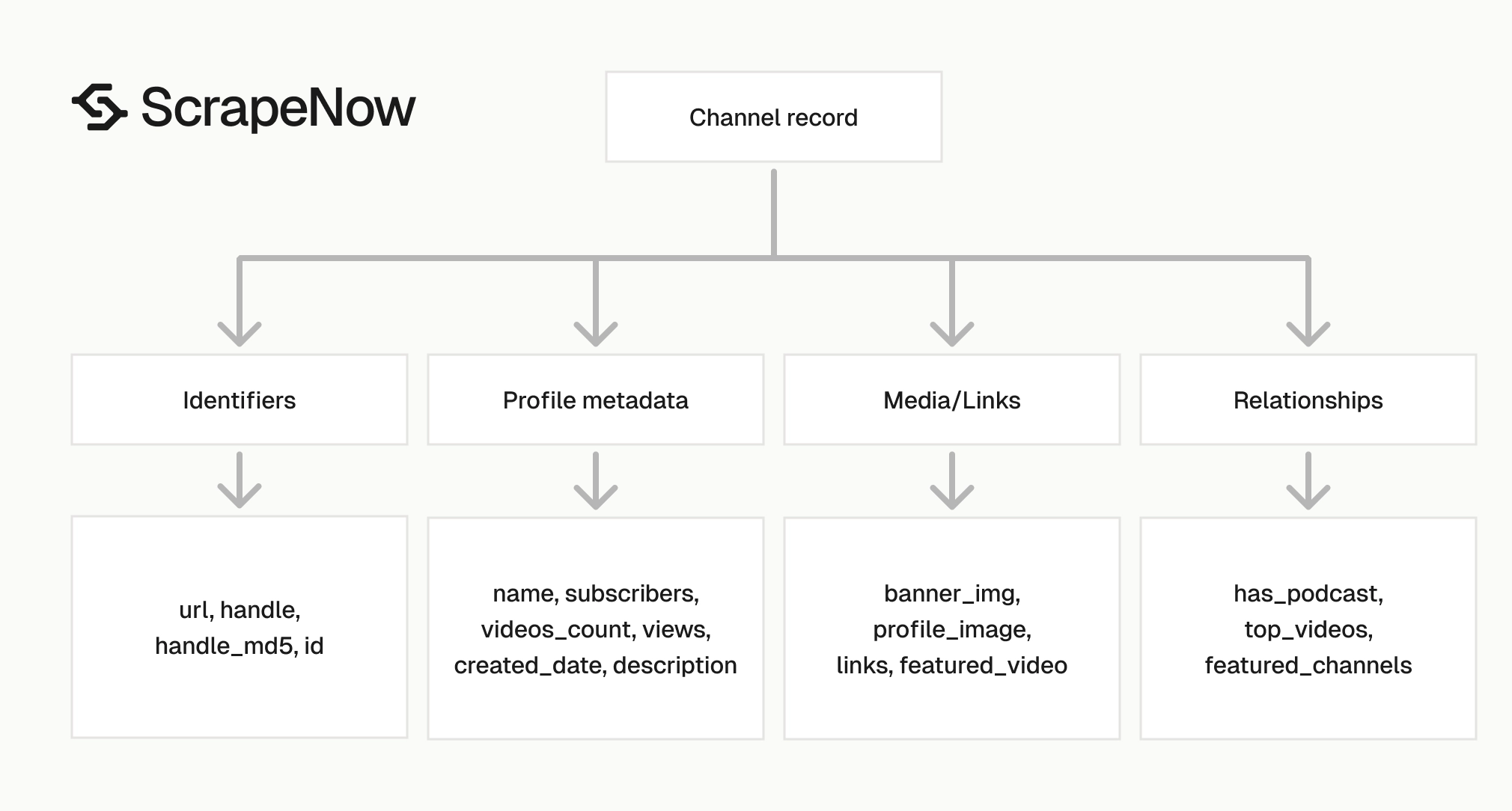
The response has three field groups.
The first group records the submitted URL and scrape status. The second group contains profile metadata. The third group contains links, IDs, media URLs, and relationship fields.
| Field | Type | Use it for |
|---|---|---|
inputs.url |
string | Trace the output row back to the submitted URL |
scrape_status |
string | Filter successful and failed records |
url |
string | Store the normalized channel URL |
handle |
string | Match channels by public handle |
handle_md5 |
string | Deduplicate handles with a fixed-length key |
name |
string | Display channel name in your app or dataset |
subscribers |
integer | Rank channels by audience size |
videos_count |
integer | Track publishing volume |
views |
integer | Track total channel reach |
created_date |
ISO date string | Build age-based filters |
Description |
string | Extract profile text and positioning |
Links |
array | Pull websites and social profiles |
identifier |
string | Store the canonical YouTube channel ID |
id |
string | Same channel ID value for joins |
banner_img |
string | Store the channel banner image URL |
profile_image |
string | Store the avatar URL |
featured_video |
string or null | Capture the channel’s featured video |
has_podcast |
boolean | Flag channels with podcast content |
scrape_error |
string or null | Store failure details |
scrape_error_code |
string or null | Group failures by error type |
For most pipelines, use id as the primary key. Handles can change after a rebrand, acquisition, or creator rename. Channel IDs stay stable.
Use handle_md5 when your warehouse, queue, or cache prefers short fixed-length keys. Use url for human review, audit logs, and support tickets.
Keep identifier and id mapped to the same internal column unless your existing schema separates source IDs from primary keys. Duplicate source fields are common in scraper outputs because downstream systems expect different naming conventions.
Field names preserve the API output. If your warehouse prefers lowercase names, map Description to description and Links to links during load.
Do the field mapping in your ingestion code. Keep the raw API payload untouched so you can compare transformed rows against source responses during incident reviews.
Choose the right YouTube scraper
ScrapeNow splits YouTube scraping into focused scrapers. Use the channel scraper for channel profiles, and use the video scrapers for video-level records.
| Job | Scraper | Input | Output pattern |
|---|---|---|---|
| Enrich a known channel list | Extract YouTube channel data | Channel About URL | One detailed record per URL |
| Find channels from a topic | Search YouTube channels by keyword | Search keyword | Channel results from search |
| Enrich video URLs from channels | Extract YouTube video data | Video URL | One detailed video record per URL |
| Build a video dataset from filters | Search YouTube videos by filters | Search filters | Video records matching filters |
| Build a video dataset from tags | Search YouTube videos by hashtag | Hashtag | Video records matching a tag |
A common production flow starts with Search YouTube channels by keyword. Then it passes each returned channel URL into Extract YouTube channel data.
If the next step is video analysis, send known video URLs into Extract YouTube video data. For broader video discovery, use Search YouTube videos by filters or Search YouTube videos by hashtag.
For example, a music analytics pipeline can search indie pop and collect channel URLs. It can enrich each channel, filter for accounts above a subscriber threshold, then pull recent videos.
Join the channel and video datasets by channel ID. That gives you creator-level metrics and video-level performance in the same warehouse.
For sales intelligence, start with keyword search by product category. Enrich channels, extract external links, then route domains into your CRM enrichment stack.
For sponsorship analysis, enrich a known creator list first. Then pull video records and compare recent video performance against channel-level subscriber counts.
Why use ScrapeNow for channel enrichment
ScrapeNow returns typed channel records from the API. Raw browser scraping returns HTML, JSON fragments, blocked sessions, consent pages, and frontend structures that change without warning.
The main difference is operational. ScrapeNow handles the scraping layer and returns row-level output. Your system handles job submission, storage, joins, and business rules.
Three behaviors matter in production:
| Behavior | Why it matters |
|---|---|
| Input preservation | Every output row carries the original submitted URL |
| Channel ID normalization | Different URL shapes resolve to the same stable YouTube ID |
| Row-level error fields | Failed rows can be retried, grouped, and audited |
Those details reduce manual recovery work. A failed batch no longer means searching logs for the original URL or guessing which channel created a duplicate.
The shared API pattern also keeps your runner code reusable. The same polling and result-fetching code can run channel URL extraction, channel keyword search, video URL extraction, video filter search, and hashtag search.
That saves maintenance time when you add another YouTube dataset. You change the slug and input schema, then keep the surrounding queue, loader, and monitoring code.
Production tips for channel scraping
Validate inputs before sending jobs
Reject invalid URLs before they hit the API. This saves credits and keeps job logs readable.
from urllib.parse import urlparse

def normalize_youtube_about_url(url: str) -> str:
    parsed = urlparse(url.strip())

    if parsed.scheme != "https":
        raise ValueError("YouTube channel URL must start with https")

    if parsed.netloc != "www.youtube.com":
        raise ValueError("YouTube channel URL must start with https://www.youtube.com/")

    clean = url.strip().rstrip("/")

    if not clean.endswith("/about"):
        clean = f"{clean}/about"

    return clean


urls = [
    "https://www.youtube.com/@TaylorSwift",
    "https://www.youtube.com/@TaylorSwift/about"
]

inputs = [{"url": normalize_youtube_about_url(url)} for url in urls]
print(inputs)
Expected output:
[
  {
    "url": "https://www.youtube.com/@TaylorSwift/about"
  },
  {
    "url": "https://www.youtube.com/@TaylorSwift/about"
  }
]
Run input validation before batching. A failed preflight check costs less than submitting invalid rows and sorting through failed job output later.
If your source data includes mixed YouTube formats, normalize them in one place. Keep the normalizer versioned because URL handling bugs create duplicate jobs at scale.
Add tests for the URL shapes you accept. Cover handles, /channel/UC... URLs, /user/... URLs, trailing slashes, and URLs that already end in /about.
Add negative tests too. Reject non-YouTube domains, HTTP URLs, shortened links, empty strings, and URLs with whitespace-only input.
A small validation suite catches errors before they spend credits. It also gives your data team a clear contract for what the ingestion step accepts.
Deduplicate by channel ID
Use normalized URL before scraping. Use id after scraping.
For large batches, dedupe twice. First dedupe your input URLs so you do not submit the same channel repeatedly.
Then dedupe results by id. YouTube URLs can point to the same channel through different paths.
def dedupe_inputs(inputs: list[dict]) -> list[dict]:
    seen = set()
    deduped = []

    for item in inputs:
        key = item["url"].strip().lower().rstrip("/")
        if key in seen:
            continue

        seen.add(key)
        deduped.append(item)

    return deduped


def dedupe_results_by_channel_id(records: list[dict]) -> list[dict]:
    seen = set()
    deduped = []

    for record in records:
        channel_id = record.get("id")
        if not channel_id:
            continue

        if channel_id in seen:
            continue

        seen.add(channel_id)
        deduped.append(record)

    return deduped
This matters when your input list comes from multiple sources. Search exports, influencer lists, and old CRM records often contain different URLs for the same channel.
Deduping by URL alone misses those collisions. Deduping by channel ID catches them after extraction.
Log both counts. Track the number of submitted URLs, unique normalized URLs, successful rows, failed rows, and unique channel IDs.
Use those counts as quality checks. A sudden rise in duplicate channel IDs usually means a source list changed format or a partner export added redirect URLs.
Store numbers as integers
subscribers, videos_count, and views come back as integers. Keep them that way.
Avoid storing display strings such as 63.2M in your database. Store 63200000.
A clean table schema looks like this:
CREATE TABLE youtube_channels (
    channel_id TEXT PRIMARY KEY,
    handle TEXT,
    handle_md5 TEXT,
    name TEXT,
    url TEXT,
    subscribers BIGINT,
    videos_count INTEGER,
    views BIGINT,
    created_date TIMESTAMP,
    description TEXT,
    profile_image TEXT,
    banner_img TEXT,
    featured_video TEXT,
    has_podcast BOOLEAN,
    links JSONB,
    scrape_status TEXT,
    scrape_error TEXT,
    scrape_error_code TEXT,
    scraped_at TIMESTAMP DEFAULT CURRENT_TIMESTAMP
);
Use BIGINT for views and subscribers. Large channels can pass 10 billion views.
Typed numbers make ranking, filtering, and time-series comparisons direct. String counts force every downstream query to parse display formats before doing useful work.
Store created_date as a timestamp if your warehouse supports it. If your pipeline keeps raw JSON alongside typed columns, preserve the original ISO string too.
Add indexes based on query patterns. Most teams index channel_id, handle, scraped_at, and one metric column such as subscribers.
If your analysts filter by audience size every day, index subscribers. If they compare scrape runs, index scraped_at and channel_id together.
Treat failed rows as data
Keep failed rows. Store scrape_error and scrape_error_code.
Failed rows tell you which inputs were invalid, private, unavailable, or affected by a platform change. They also make retries deterministic.
def split_success_and_failed(records: list[dict]) -> tuple[list[dict], list[dict]]:
    success = []
    failed = []

    for record in records:
        if record.get("scrape_status") == "success":
            success.append(record)
        else:
            failed.append({
                "input": record.get("inputs"),
                "error": record.get("scrape_error"),
                "error_code": record.get("scrape_error_code"),
            })

    return success, failed
Treat failure records as part of the dataset. They help you separate invalid inputs from temporary scrape failures.
A retry worker should use the stored input URL, error code, and timestamp. That gives you repeatable retry behavior without manual reruns based on partial logs.
Set a retry ceiling. For example, retry transient failures twice, then send the row to a dead-letter table for review.
Do not delete failed rows after a successful retry. Mark the new attempt as successful and keep the old attempt for audit history.
That history helps when a channel alternates between available and unavailable states. It also helps when a source system keeps sending the same invalid URL.
Keep raw JSON for reprocessing
Store the full response payload in object storage or a raw table. Schemas change, and new fields can become useful later.
I usually store both:
| Storage | Purpose |
|---|---|
| Raw JSON | Debugging, replay, backfills |
| Typed table | Queries, joins, dashboards |
This costs little and saves hours when you need to reprocess 50,000 channel records after adding a new column.
Raw storage also protects you from early schema decisions. If you later split Links into website, instagram, tiktok, and x, you can backfill from raw responses.
A simple pattern works well. Write the raw job result to object storage, then transform it into a typed warehouse table in a separate step.
Name raw files with the scraper slug, job ID, and timestamp. That makes audits faster when a downstream row points back to a specific scrape run.
A practical path looks like this:
s3://data-lake/raw/scrapenow/youtube-channels-extract-by-url/2026-01-15/job_123456.json
Use the same path structure across scrapers. Operators should find raw channel jobs and raw video jobs without reading loader code.
Add timestamps to every run
Add a scraped_at timestamp when you load records. YouTube metrics change constantly, so a count without collection time has limited use.
For enrichment jobs, keep the latest row per channel in your main table. For trend analysis, append each run to a history table keyed by channel_id and scraped_at.
This layout supports both current lookups and metric history. Product teams can query the latest subscriber count, while analysts can track growth by day or week.
Keep scrape time separate from channel creation time. created_date describes the YouTube channel, and scraped_at describes your collection run.
Use UTC for scrape timestamps. Local time zones create avoidable confusion when teams compare growth across regions or reload historical runs.
For daily jobs, store the scheduled run date too. That separates the intended reporting period from the exact time the scraper finished.
Rate-limit your own batch runner
The API handles scraping, polling, and result retrieval. Your job runner still needs controlled concurrency.
Submit batches in fixed chunks, especially when your input list has tens of thousands of channels. Track job IDs, persist them, and resume from the last known state after a worker restart.
A queue with job status persistence is safer than an in-memory loop for production. If the process dies, keep the submitted job IDs and fetch results after recovery.
Use idempotency in your loader. Loading the same completed job twice should update or skip existing rows instead of creating duplicates.
A basic runner state table needs five columns:
| Column | Purpose |
|---|---|
job_id |
ScrapeNow job ID |
scraper_slug |
Scraper used for the run |
input_hash |
Fixed key for the submitted input batch |
status |
Submitted, completed, failed, or loaded |
created_at |
Time the job was submitted |
This table gives operators a reliable recovery path. They can find unfinished jobs, fetch completed results, and avoid submitting the same work twice.
Add loaded_at if your loader runs as a separate process. That gives you a clear split between scrape completion and warehouse load completion.
Monitor row-level quality
Track row quality after every job. Job status alone is too coarse for production data pipelines.
At minimum, record these counters per job:
| Metric | Why it matters |
|---|---|
| Submitted inputs | Confirms batch size |
| Successful rows | Measures usable output |
| Failed rows | Shows invalid or unavailable inputs |
| Unique channel IDs | Detects duplicates after normalization |
| Rows with external links | Helps prospecting and CRM workflows |
| Rows with null subscriber counts | Flags incomplete profile records |
Alert on large changes from the previous run. A failure rate jump from 2 percent to 25 percent deserves investigation before the data reaches dashboards.
Keep metric checks separate from scraper execution. The scraper should return records, and your pipeline should decide whether the batch passes your quality bar.
ScrapeNow-specific notes
ScrapeNow uses one API pattern across the scraper catalog. The channel URL scraper, channel keyword scraper, and YouTube video scrapers all submit jobs through the same endpoint style.
That matters in production because your runner code stays small. You swap SCRAPER_SLUG, change the input schema, and keep the same polling and result-fetching code.
The scraper catalog includes 86+ pre-built scrapers across 14 platforms. For YouTube, keep your internal links and runbooks tied to the exact scraper pages:
| Scraper page | Use case |
|---|---|
| Extract YouTube channel data | Enrich known channel URLs |
| Search YouTube channels by keyword | Discover channel URLs from search terms |
| Extract YouTube video data | Enrich known video URLs |
| Search YouTube videos by filters | Build video datasets from search filters |
| Search YouTube videos by hashtag | Build video datasets from hashtags |
| ScrapeNow scraper list | Browse the full scraper catalog |
Credits map directly to output rows. One row costs one credit, so a 10,000-channel enrichment run costs 10,000 credits before any downstream storage or processing.
Pricing starts at $0.04 per credit for 1 to 250 credits and reaches $0.012 per credit at 100K+ credits. Use the product page for current pricing and scraper-specific input details.
That credit model makes cost estimation straightforward. Multiply the number of channel URLs by the credit rate for your volume, then add your storage and warehouse costs.
Hub and guide workflow
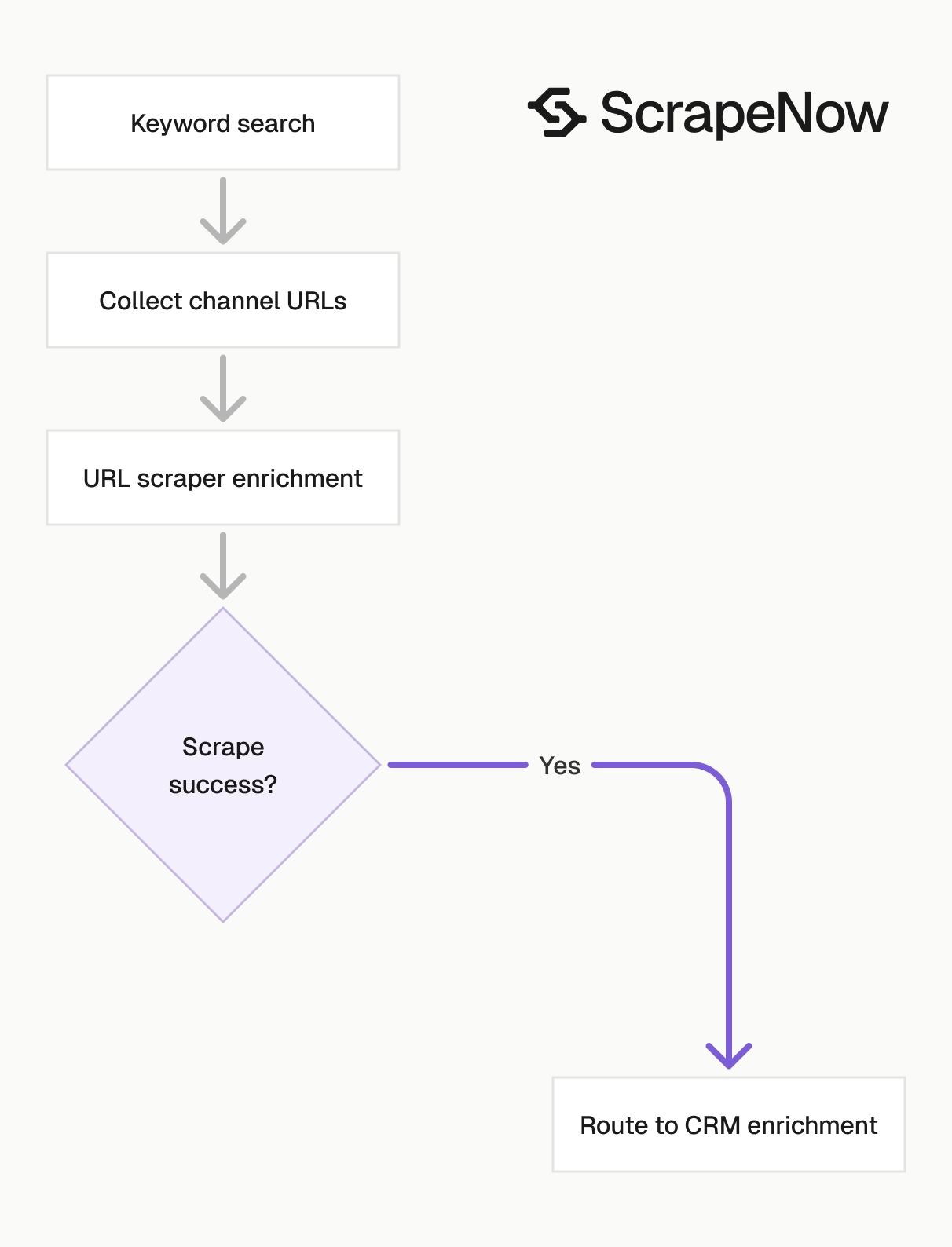
The channel URL scraper handles enrichment for known channels.
Discovery starts with Search YouTube channels by keyword. It produces channel URLs from terms such as fitness coach, indie pop, or python tutorials.
Profile enrichment runs through Extract YouTube channel data. It turns those URLs into stable IDs, counts, links, media URLs, and channel metadata.
Video enrichment runs through Extract YouTube video data. It works when you already have video URLs from a channel page, search result, playlist, or external source.
Video discovery runs through Search YouTube videos by filters and Search YouTube videos by hashtag. Use those scrapers when the dataset starts with topics, tags, or search constraints.
The join key is the channel ID. Keep that ID in every table that contains creator or video data.
A clean warehouse model usually has four tables:
| Table | Grain |
|---|---|
youtube_channels_current |
One row per channel |
youtube_channels_history |
One row per channel per scrape run |
youtube_videos_current |
One row per video |
scrapenow_jobs |
One row per submitted job |
This structure keeps enrichment, history, and job recovery separate. It also makes joins predictable when product teams ask for creator and video metrics in one query.
Implementation checklist
Use this checklist before you run a production batch:
- Normalize channel URLs to
https://www.youtube.com/.../about - Dedupe input URLs before submission
- Store submitted inputs with the ScrapeNow job ID
- Poll jobs with a fixed interval and timeout
- Save raw JSON before transforming records
- Load successful rows into a typed table
- Store failed rows with
scrape_error_code - Use
idas the channel primary key - Store metrics as integers
- Add
scraped_aton load - Keep a history table for metric changes
- Track submitted, successful, failed, and deduped row counts
- Test URL normalization against every accepted YouTube URL shape
- Keep retry ceilings for failed rows
- Make warehouse loads idempotent
That setup gives you repeatable channel enrichment. It also keeps recovery simple when a worker restarts, an input batch contains invalid URLs, or a downstream schema changes.
Run the checklist on a small batch before you send thousands of rows. Ten known channels are enough to verify URL normalization, API credentials, polling, raw storage, typed loading, and deduplication.
Next step
Open the Extract YouTube channel data, copy your API key, and run the Python script with one channel About URL.
After the first successful run, replace the single input with a deduped batch from your source list. Store id as the primary key, save the raw JSON, and load the typed fields into your warehouse.
If you need channel discovery, run Search YouTube channels by keyword first. Feed the returned channel URLs into the URL scraper, then join channel and video data by channel ID.
Start with one practical test. Run the normalization function against 20 URLs from your real source data, submit the deduped output, and verify the resulting channel IDs in your warehouse.
Pricing
ScrapeNow charges per returned row. One row costs one credit, starting at $0.04 per credit for small runs and dropping with volume. No monthly contracts, no proxy fees, no charges for failed rows. See the pricing page for current rates.


