
X (formerly Twitter) serves post text, engagement counts, author metadata, and media URLs through a JavaScript-heavy frontend that blocks simple HTTP scrapers.
An X scraper collects public X.com posts, profile metadata, engagement counts, bios, usernames, follower counts, and timestamped conversation data. Teams use that data for sentiment tracking, market research, creator analysis, account monitoring, public-company monitoring, and lead discovery.
A production Twitter scraper removes manual profile checks from the workflow. It also removes one-off API rebuilds when you need a historical backfill, a profile refresh, or a single dataset.
The useful output is structured data. Your pipeline should receive fields like post_text, author_username, reply_count, profile_bio, source_input, status, and extracted_at.
ScrapeNow splits X extraction into three narrow products. Use the Extract X post data for post URLs, the Get X profile data for profile URLs, and the Look up X profiles by username for handles.
This split matters in production. Post URLs, profile URLs, and handles fail in different ways, so they need separate validation, status handling, and tables.
ScrapeNow returns structured records for each submitted input. Successful rows carry extracted public fields, while failed rows still carry source_input, status, and timing data for audit and retry.
Why X scraper jobs fail at scale
X data changes fast. A post can gain thousands of reposts and replies in minutes. Profiles change bios, verification status, display names, locations, and follower counts without warning.
Deleted, restricted, suspended, or region-limited content creates gaps in older datasets. A URL that returned a full post last week can return an unavailable status today.
The official X API works for approved use cases. It also comes with billing limits, plan rules, and usage caps. X says API v2 uses pay-per-usage pricing and caps some plans at 2 million Post reads per month.
Scraping the public web version has separate failure points. X uses login walls, request throttling, browser fingerprinting, GraphQL endpoint changes, and session-based controls. Fragile scripts fail after a few hundred requests because each layer adds a new failure path.
AIMultiple’s 2026 benchmark ran 75,000+ social media scraping requests across X, Instagram, LinkedIn, and Facebook. Their top reported success rate was 91.2%, with an average response time of 24 seconds. That benchmark shows the operating cost of social scraping.
The production load comes from queue control, retries, session handling, parser monitoring, proxy routing, and output contracts. A one-file scraper fails when those pieces run without monitoring.
ScrapeNow’s X scraper products move that operational work out of your application code. Your job sends the input list to a dedicated scraper page, then stores the returned rows in your warehouse or application database.
Use the Browse all 86+ scrapers when your workflow covers more than X. The hub lists the available scrapers by platform. Keep X jobs separate from LinkedIn, Instagram, TikTok, Google, Amazon, and other public-data jobs.
A scraper that returns raw HTML still leaves you with parser work. A scraper that returns stable fields gives your pipeline a cleaner contract. That contract matters more than the browser automation behind it.
What a production X scraper must return
The output contract matters more than the extraction method. Analysts need stable fields, status codes, and timestamps. Engineers need predictable rows that load cleanly into a table.
A post extraction row should include the submitted URL, canonical URL, post ID, text, author username, author display name, publish timestamp, engagement counts, media fields, status, and extraction timestamp. Store the submitted input even when extraction fails.
A profile extraction row should include the submitted URL or username, canonical profile URL, username, display name, bio, location, follower count, following count, profile image, verification status, status, and extraction timestamp. Store each profile run as a snapshot.
A username lookup row should include the submitted handle and the matched profile record. It also needs a status when the account is missing, suspended, restricted, renamed, or malformed.
Use explicit status values. A row with status=deleted should never look like a successful extraction with empty text. Use states such as success, unavailable, restricted, deleted, malformed_input, and failed_extraction.
A useful row has enough data for audit and retry. Keep source_input, normalized_input, status, error_type, extracted_at, and job_id in every table.
Here is a clean table shape for post extraction:
create table x_posts (
  job_id text,
  source_input text,
  canonical_url text,
  post_id text,
  author_username text,
  author_display_name text,
  post_text text,
  published_at timestamp,
  reply_count integer,
  repost_count integer,
  like_count integer,
  quote_count integer,
  media_urls jsonb,
  status text,
  error_type text,
  extracted_at timestamp
);
Here is a clean table shape for profile extraction:
create table x_profiles (
  job_id text,
  source_input text,
  canonical_profile_url text,
  username text,
  display_name text,
  bio text,
  location text,
  follower_count integer,
  following_count integer,
  profile_image_url text,
  verified boolean,
  status text,
  error_type text,
  extracted_at timestamp
);
ScrapeNow’s X scrapers return structured records, so your pipeline does not need to parse raw HTML. Your code should validate rows, store them, and handle downstream analysis.
Keep posts and profiles in separate tables. Post data and profile data change on different schedules. Separate schemas reduce mapping errors and make retries easier to reason about.
Do the same for failed inputs. A failed post URL belongs in the post input table, and a failed profile URL belongs in the profile input table. Mixing failure queues makes retry rules harder to audit.
Add a unique key that matches your use case. For posts, post_id usually works as the stable public identifier. For profile snapshots, use a composite key such as username, job_id, and extracted_at.
Avoid treating public counts as permanent facts. Follower counts, like counts, and repost counts are observed values at one extraction time. Store the time next to every count.
What breaks in a DIY X scraper
The first version of a DIY X scraper can pass a 10-URL test. Problems start when the same script receives 10,000 URLs, mixed regions, expired sessions, and repeated retries.
X changes internal endpoints and page data structures. The work includes session handling, guest tokens, endpoint changes, parser updates, and response validation.
The difficult parts are predictable:
| Problem | What happens in production | What you need |
|---|---|---|
| Login walls | Public pages stop returning usable data | Session handling and retry logic |
| Rate limits | Requests fail in batches | Queue control and backoff |
| Fingerprinting | Browser sessions get flagged | Real browser context or managed extraction |
| Markup changes | Selectors return empty fields | Parser monitoring and fixes |
| Geo variance | Some content differs by region | Country-level routing |
| Deleted content | Old URLs return partial or empty data | Status fields and explicit failure handling |
For one-off research, a local script can work. For daily extraction, you need repeatable operations. That means monitored retries, session reuse, proxy routing, parser fixes, and stable schemas.
You also need failure data. A production job should tell you whether a URL was unavailable, deleted, restricted, malformed, or blocked during extraction. Treating every empty response as the same error destroys auditability.
Backfills create another problem. A scraper that handles fresh posts can fail on older URLs because the page state changes over time. Store the extraction timestamp with every row, then keep the raw status for later review.
The maintenance cost grows with every new input source. Alerts produce post URLs. CRMs store profile URLs. Creator lists store handles. Each format needs its own validation path.
ScrapeNow’s product split matches those input types. Send post URLs to the Extract X post data, profile URLs to the Get X profile data, and handles to the Look up X profiles by username.
That split keeps your pipeline code small. Validation happens before extraction, and each job writes to the matching table.
A generic scraper path also hides input-quality problems. If a profile URL enters a post scraper, you want a clear malformed_input row. You do not want an empty record that reaches an analyst dashboard.
Retries need the same discipline. A temporary extraction failure deserves a retry window. A deleted post or malformed handle should move to review or stay closed.
ScrapeNow X scraper options
ScrapeNow has purpose-built X scrapers for posts and profiles. Each scraper returns structured rows, so your pipeline receives fields instead of raw page responses.
Browse all 86+ scrapers to see products grouped by platform and use case. Use it when you need X.com extraction alongside other public web data sources.
The workflow is direct. Send a list of inputs, receive structured records, and keep your internal code focused on storage, analysis, and product work.
ScrapeNow scraper pricing is result-based. Each X product page shows the current pricing unit, run details, and input format for that scraper. Check pricing on the exact product page before you estimate monthly volume.
The product split also gives you a cleaner runbook. Post jobs, profile URL jobs, and username jobs can have separate schedules, retry limits, and destination tables. That makes failures easier to isolate.
X posts extractor by URL
The Extract X post data takes post URLs and returns post-level data. Typical fields include text, author, timestamp, engagement counts, media fields, canonical URL, post ID, status, and public metadata.
This X scraper fits jobs where you already have post URLs. Those URLs can come from monitoring systems, search exports, alerts, spreadsheets, social listening tools, or internal review queues.
The X posts scraper guide covers setup patterns and field handling. Use the product page when your input list contains known X post URLs.
Use this scraper for:
- Tracking engagement on campaign posts
- Archiving posts from known accounts
- Measuring public reaction to product launches
- Building datasets from curated post URL lists
- Checking which posts stayed public after a campaign ended
- Joining post performance data with internal campaign IDs
- Refreshing public engagement counts for watched posts
Posts need their own schema. A post row should track text, author, timestamps, media, counts, URL, post ID, extraction time, and status. Mixing those fields with profile data creates unnecessary joins later.
For recurring jobs, keep post URLs in a durable table. Mark each URL as pending, extracted, failed, restricted, or deleted. That status history gives your team a clear retry path.
A post URL should contain a username path and a status ID. Normalize both x.com and twitter.com inputs before submission if your source systems store mixed domains. Keep the original URL for audit.
Example input payload:
{
  "inputs": [
    {
      "url": "https://x.com/username/status/1234567890123456789"
    },
    {
      "url": "https://x.com/another_user/status/1234567890123456790"
    }
  ]
}
Example output shape:
{
  "source_input": "https://x.com/username/status/1234567890123456789",
  "canonical_url": "https://x.com/username/status/1234567890123456789",
  "post_id": "1234567890123456789",
  "author_username": "username",
  "post_text": "Example post text",
  "reply_count": 42,
  "repost_count": 18,
  "like_count": 310,
  "status": "success",
  "extracted_at": "2026-05-30T12:00:00Z"
}
A failed output should keep the same source_input. It should also return a status that tells your pipeline what happened. That status becomes the difference between retrying, reviewing, and closing the input.
X profiles extractor by URL
The Get X profile data takes profile URLs and returns public profile fields. Common fields include display name, username, bio, location, follower count, following count, profile image, verification status, status, and extraction timestamp.
This scraper fits account audits, creator tracking, investor lists, public-company monitoring, and social graph enrichment. It also works when a CRM or research database already stores full profile links.
The X profiles scraper guide walks through the profile extraction flow. Use the URL-based product page when your source table already contains profile links.
Use this scraper for:
- Enriching CRM records with public X profile data
- Monitoring executive and creator profile changes
- Building account directories from known profile URLs
- Checking follower count changes over time
- Refreshing public profile metadata before outreach
- Tracking verification changes for watched accounts
- Auditing profile fields for a fixed account list
Profile extraction works best with snapshots. Store each run as a new record with profile_url, username, follower_count, bio, verified, status, and extracted_at. Avoid overwriting yesterday’s row when the business question depends on change over time.
Follower counts deserve special handling. Counts can move throughout the day, and rounded public counts can hide smaller changes. Store the public value you receive and compare it by extraction window.
Profile URLs also need normalization. Strip trailing slashes, remove query strings that do not affect the profile, and preserve the original submitted value. That keeps deduplication clean without losing audit history.
Example input payload:
{
  "inputs": [
    {
      "url": "https://x.com/scrapenow"
    },
    {
      "url": "https://x.com/example_account"
    }
  ]
}
Example output shape:
{
  "source_input": "https://x.com/example_account",
  "canonical_profile_url": "https://x.com/example_account",
  "username": "example_account",
  "display_name": "Example Account",
  "bio": "Public profile bio",
  "location": "London",
  "follower_count": 12500,
  "following_count": 840,
  "verified": false,
  "status": "success",
  "extracted_at": "2026-05-30T12:00:00Z"
}
Use this output as a snapshot record. If your application needs current profile state, build a latest_x_profiles view on top of the snapshot table. That gives product code fast reads while analytics keeps history.
X profiles search by username
The Look up X profiles by username takes X usernames and returns matching public profile records. It fits source data that stores handles without full profile URLs.
The X profiles scraper guide also covers this workflow. The returned profile fields match the URL-based extractor, which keeps your downstream profile table consistent.
This scraper removes URL normalization from your pipeline. Your input can stay as a handle list, and the output can feed the same profile table used by URL extraction.
Use this scraper for:
- Cleaning user handle lists
- Matching creator usernames to full public profile records
- Enriching social datasets that store handles only
- Validating whether an account still exists
- Normalizing handles collected from forms or CSV files
- Refreshing public metadata for known creator lists
- Resolving profile URLs from stored handles
Username inputs need validation before submission. Strip leading @ characters, trim whitespace, lowercase comparison keys, and keep the original submitted value. That makes debugging easier when a handle changes or an account disappears.
A username search job should return status fields for missing accounts. Without those fields, your pipeline cannot separate deleted accounts from input mistakes.
Handle casing deserves separate treatment. X usernames are usually compared case-insensitively in source systems, while your UI may display the returned casing. Store both the submitted value and the returned username.
Example normalization code:
def normalize_x_username(value: str) -> dict:
    original = value
    normalized = value.strip().lstrip("@")
    comparison_key = normalized.lower()

    return {
        "source_input": original,
        "username": normalized,
        "comparison_key": comparison_key
    }

inputs = [
    normalize_x_username("@Example_Account "),
    normalize_x_username("another_user")
]
Example job payload:
{
  "inputs": [
    {
      "username": "Example_Account"
    },
    {
      "username": "another_user"
    }
  ]
}
A username job should never write directly over a profile URL job without a common key. Use the returned canonical profile URL or username to merge records. Keep the original handle submission in the job input table.
Which X scraper to use
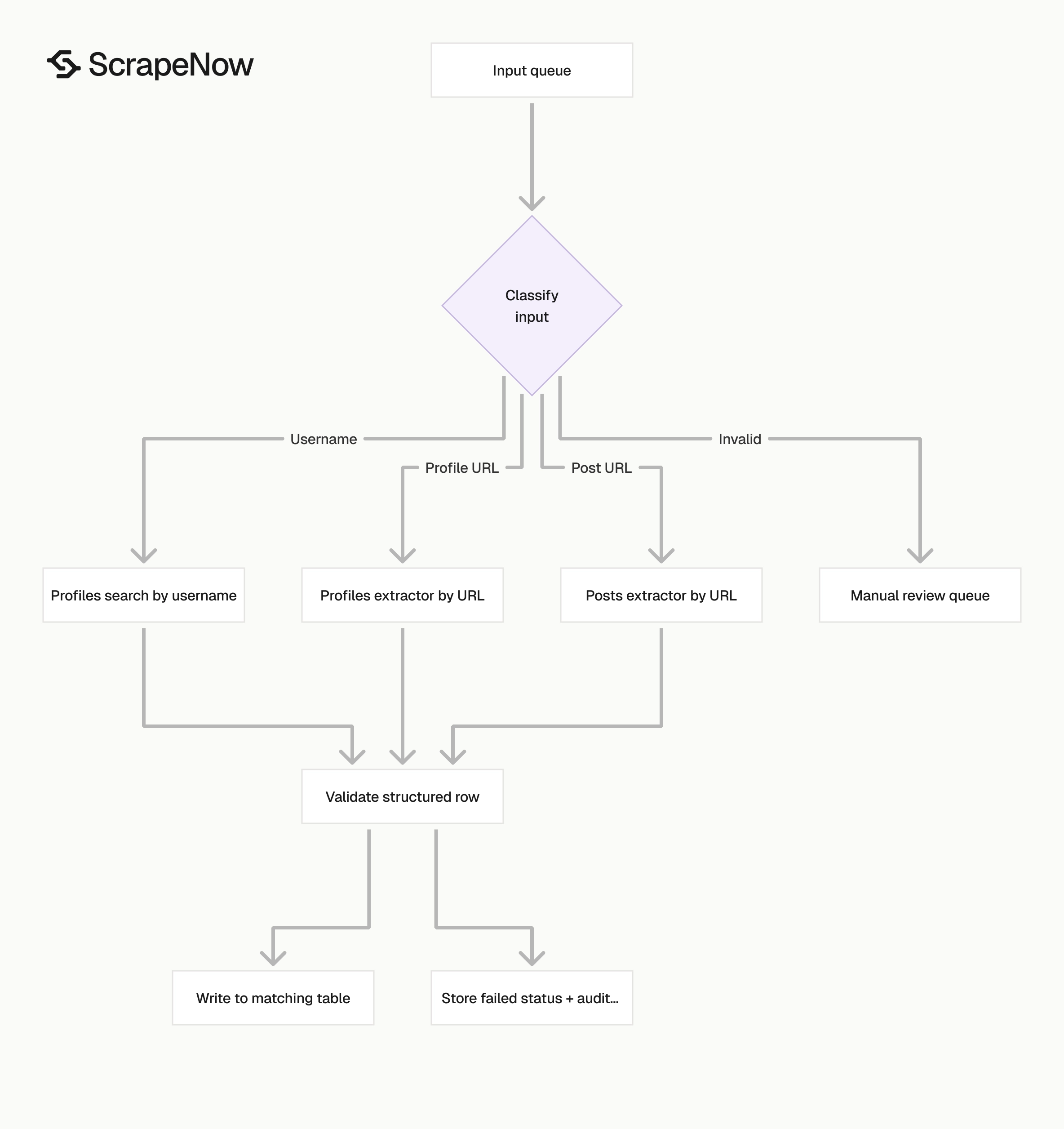
Pick the X scraper based on your input data before writing pipeline code. URL-based jobs and username-based jobs have different failure modes.
| Your input | ScrapeNow scraper | Output focus |
|---|---|---|
| X post URLs | X posts extractor by URL | Post text, author, timestamp, engagement, media |
| X profile URLs | X profiles extractor by URL | Bio, username, follower counts, verification |
| X usernames | X profiles search by username | Profile lookup and public account metadata |
| Mixed posts and profiles | Run separate jobs | Cleaner schemas and fewer mapping errors |
A common production setup uses two jobs. One job extracts profiles for a watchlist of accounts. Another job extracts posts for URLs collected from alerts, search tools, or internal systems.
Keep the schemas separate. Post data and profile data change on different schedules. Combining them early creates fragmented tables and avoidable mapping errors.
The best input contract is plain. A posts job gets post URLs. A profile URL job gets profile URLs. A username job gets handles.
If you receive mixed input, classify it before extraction. Separate post URLs, profile URLs, and usernames into three queues. Then send each queue to the matching scraper.
Here is a simple classifier for routing inputs:
from urllib.parse import urlparse

def classify_x_input(value: str) -> str:
    item = value.strip()

    if item.startswith("@"):
        return "username"

    parsed = urlparse(item)

    if parsed.netloc in {"x.com", "twitter.com", "www.x.com", "www.twitter.com"}:
        parts = [part for part in parsed.path.split("/") if part]

        if len(parts) >= 3 and parts[1] == "status":
            return "post_url"

        if len(parts) == 1:
            return "profile_url"

    if "/" not in item and " " not in item:
        return "username"

    return "invalid"
Use the classifier before you submit jobs. Invalid inputs should go to a review table with the original value and a reason.
Avoid sending mixed inputs to one generic scraper path. Mixed jobs make status handling vague and create more cleanup work after extraction.
Store the classifier result next to each input. That gives you a record of why a URL went to a specific ScrapeNow product. It also helps when upstream systems change formats.
Add test cases for common input variants. Include twitter.com URLs, x.com URLs, handles with @, handles with spaces, and malformed URLs. A small test suite prevents routing regressions.
Pricing
ScrapeNow charges per returned row. One row costs one credit, starting at $0.04 per credit for small runs and dropping with volume. No monthly contracts, no proxy fees, no charges for failed rows. See the pricing page for current rates.
Run X scraper jobs from your pipeline
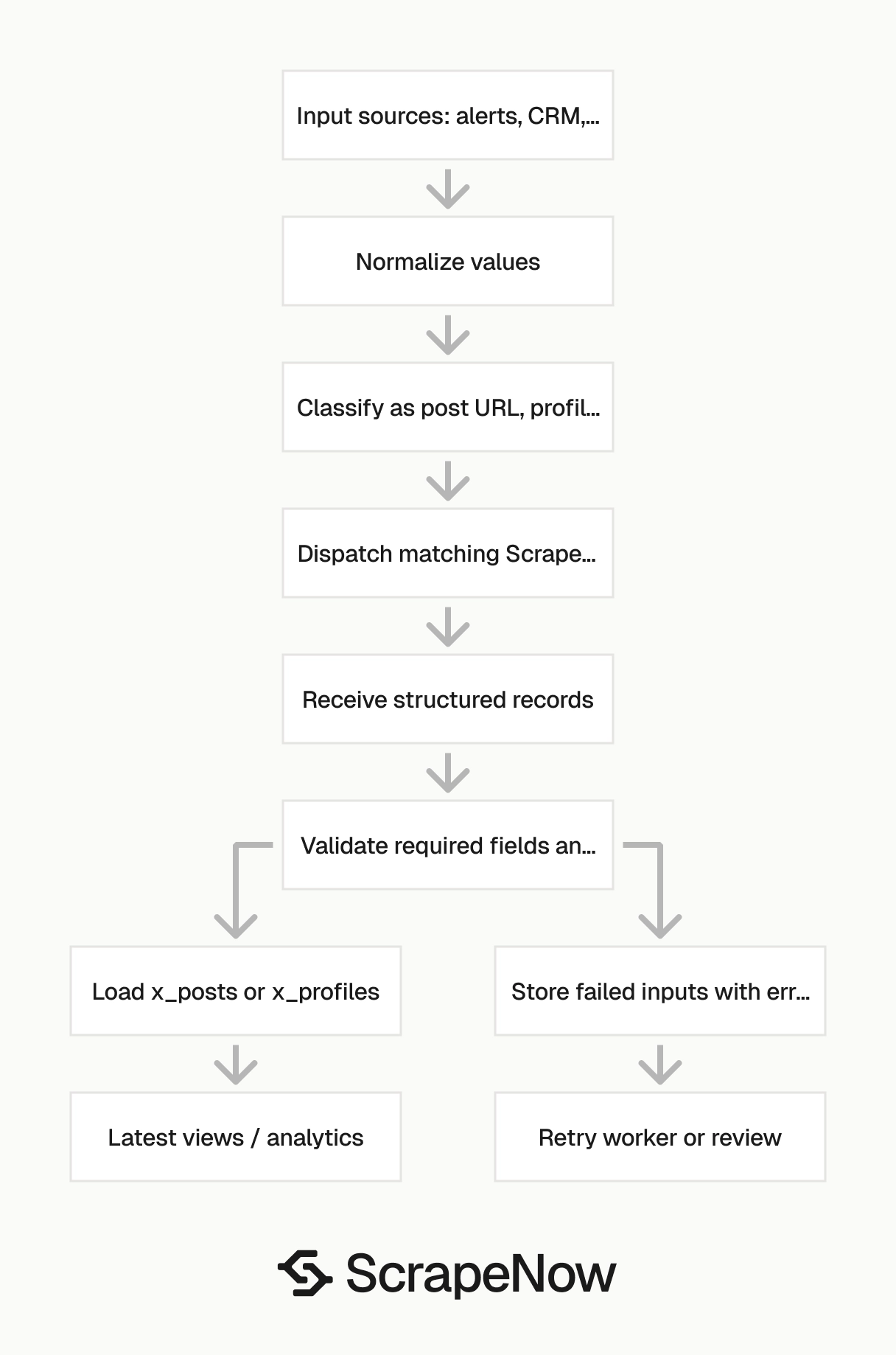
Treat X extraction as a job queue. Your application should submit inputs, poll or receive completion events, validate rows, and write results to storage.
Keep your internal job record simple:
create table x_scraper_jobs (
  job_id text primary key,
  scraper_type text,
  submitted_count integer,
  returned_count integer,
  failed_count integer,
  status text,
  created_at timestamp,
  completed_at timestamp
);
Store every submitted input in a child table. That lets you retry failed items without resubmitting a full batch.
create table x_scraper_job_inputs (
  job_id text,
  source_input text,
  normalized_input text,
  input_type text,
  status text,
  error_type text,
  extracted_at timestamp
);
The pipeline code should follow the same pattern for every ScrapeNow X scraper. Build the payload, submit it to the product workflow, receive structured rows, validate required fields, and write the results.
Example Python flow:
import os
import requests

API_KEY = os.environ["SCRAPENOW_API_KEY"]

def submit_scrapenow_job(endpoint: str, inputs: list[dict]) -> dict:
    response = requests.post(
        endpoint,
        headers={
            "Authorization": f"Bearer {API_KEY}",
            "Content-Type": "application/json"
        },
        json={"inputs": inputs},
        timeout=60
    )
    response.raise_for_status()
    return response.json()

post_inputs = [
    {"url": "https://x.com/username/status/1234567890123456789"}
]

job = submit_scrapenow_job(
    endpoint="SCRAPENOW_POSTS_ENDPOINT_FROM_PRODUCT_PAGE",
    inputs=post_inputs
)

print(job)
Keep the endpoint in configuration. That lets you deploy separate jobs for posts, profile URLs, and username search without code duplication.
Validate required fields before writing rows. For post jobs, require source_input, status, and extracted_at on every row. For successful post rows, also require post_id and author_username.
For profile jobs, require source_input, status, and extracted_at on every row. For successful profile rows, also require username and canonical_profile_url.
Failed rows still belong in the database. They carry retry value, audit value, and input-quality value. Dropping them creates invisible gaps.
Add a response validation step before loading the warehouse. Reject rows with missing source_input, unknown status, or invalid timestamps. Put rejected rows in a quarantine table with the raw response.
Here is a simple validator for post rows:
ALLOWED_STATUSES = {
    "success",
    "unavailable",
    "restricted",
    "deleted",
    "malformed_input",
    "failed_extraction"
}

def validate_x_post_row(row: dict) -> list[str]:
    errors = []

    for field in ["source_input", "status", "extracted_at"]:
        if not row.get(field):
            errors.append(f"missing_{field}")

    if row.get("status") not in ALLOWED_STATUSES:
        errors.append("unknown_status")

    if row.get("status") == "success":
        for field in ["post_id", "author_username"]:
            if not row.get(field):
                errors.append(f"missing_{field}")

    return errors
Run the same kind of validator for profile rows. Successful profile rows should include username and canonical_profile_url. Failed profile rows should still include a clear status and the original input.
Operational notes before you run X extraction
Only scrape public data you have a legitimate reason to process. Store the URL, extraction timestamp, and status for every row. That gives you an audit trail when someone asks how a record entered the dataset.
For recurring jobs, run smaller batches on a schedule. A 5,000-profile daily job is easier to monitor than a 150,000-profile monthly job that fails halfway through.
For profile monitoring, store snapshots. Follower counts, bios, display names, verification status, and locations change over time. Overwriting the previous row destroys the history you came to collect.
For post extraction, store both the canonical post URL and the post ID. URLs can change format. IDs make deduping and joins cleaner.
Add an extracted_at column to every table. Add a source_input column too. Those two fields make it easier to trace each row back to the exact URL or username submitted.
Track status separately from data fields. A row with status=deleted should not look like a successful extraction with empty text. Use explicit states for success, unavailable, restricted, malformed input, and failed extraction.
Monitor job-level metrics. Track submitted inputs, returned rows, failed rows, retry count, and average completion time. These metrics catch malformed inputs and upstream changes before analysts find empty dashboards.
Keep retries bounded. Repeating the same failed URL for hours wastes credits, proxy traffic, and queue capacity. Use retry limits, then move the row to review with a clear status.
For profile snapshots, store one row per account per run. Use a separate latest-profile view if your application needs the current state. That preserves history while keeping product queries fast.
For post monitoring, decide whether you need first-seen data, latest engagement data, or both. Campaign reporting often needs both timestamps because engagement changes after the first extraction.
For username search, keep the original submitted handle. Handles change, casing differs across source systems, and users paste leading @ characters into forms. The original value makes support tickets easier to resolve.
Keep compliance review close to the data model. Public data still needs purpose limits, retention rules, and access controls. Engineering should encode those rules before the dataset reaches analysts.
Set retention rules before the first production run. X datasets grow quickly when you store snapshots. Decide how long to keep raw job results, normalized rows, and failed-input history.
Use separate access rules for raw inputs and analyst-ready tables. Raw inputs can contain internal campaign IDs, CRM references, or comments from upstream systems. Keep those fields out of broad analytics views.
Add alert thresholds for sudden status changes. A spike in failed_extraction points to extraction or upstream page changes. A spike in malformed_input points to your source system.
Document the status contract in the same repository as the loader code. Analysts should know what restricted, deleted, and unavailable mean. Support teams should know which statuses qualify for retry.
Example production flow
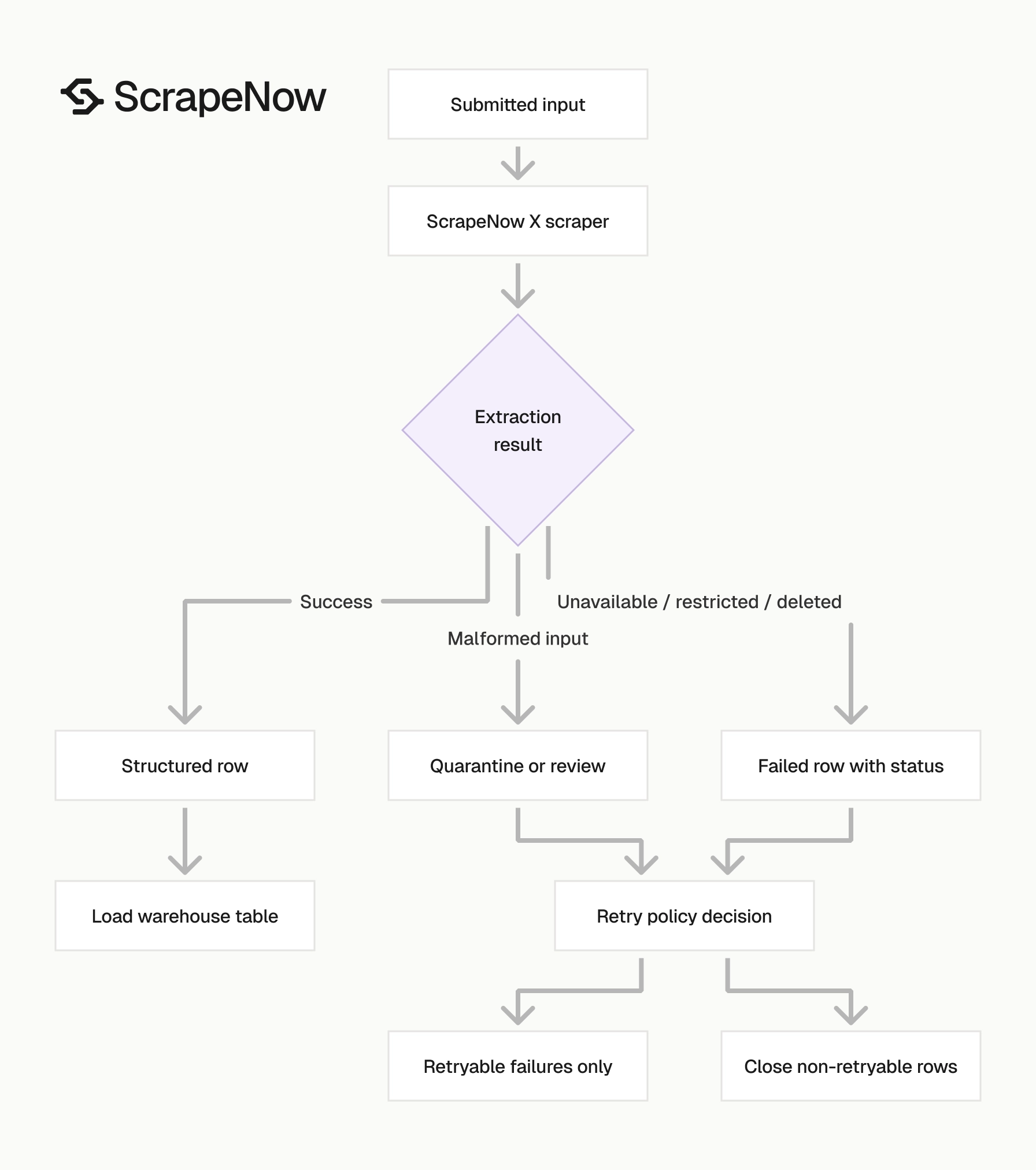
A clean production flow starts with input classification. Your ingestion job receives URLs and handles from alerts, exports, forms, or internal tables. It writes each input to a queue with source_input, input_type, normalized_input, and created_at.
The dispatcher reads pending rows by input type. It sends post URLs to the posts extractor, profile URLs to the profile URL extractor, and handles to username search. Each dispatch writes a job record with submitted count and scraper type.
The loader reads returned rows and validates the common fields. It writes successful post records to x_posts and successful profile records to x_profiles. It writes all failed rows to the matching job input table with status and error type.
The retry worker reads only retryable statuses. Network failures and temporary extraction failures can retry. Deleted posts, malformed inputs, and missing accounts should not loop forever.
The reporting layer reads from clean tables. Product teams use latest views. Analysts use snapshot tables for trend analysis. Engineering uses job tables for monitoring.
This flow keeps ScrapeNow-specific code narrow. Your application owns input routing, storage, and business rules. ScrapeNow owns extraction and structured output.
Start with the matching ScrapeNow X scraper
Use the posts scraper when you have post URLs. Use the profile URL scraper when you have full profile links. Use the username scraper when your source data stores handles.
Pick the matching product page before you write the pipeline:
- Post URLs go to the Extract X post data
- Profile URLs go to the Get X profile data
- Usernames go to the Look up X profiles by username
- Broader platform coverage starts at the Browse all 86+ scrapers
After the first sample run, lock the schema. Then set the production cadence. Daily profile snapshots, hourly campaign post checks, and weekly account audits all need different schedules.
Keep each workflow separate so failures stay contained. Smaller input contracts produce cleaner queues, clearer statuses, and fewer downstream fixes.
Run a sample with the same input format your pipeline will send. A sample made from sanitized demo URLs tells you less than a sample taken from your real queue. Include valid inputs, deleted content, restricted accounts, malformed rows, and renamed handles.
Review the returned status values before you build retries. The retry policy should follow the status contract, not a generic HTTP failure rule. That prevents endless loops on inputs that need review.
If your queue contains post URLs, start with the Extract X post data.


