The X profiles scraper extracts profile metadata, follower counts, verification status, bio text, profile images, external links, and recent posts from X profile URLs. Data teams use it for creator tracking, account enrichment, social monitoring, lead scoring, and profile datasets that need structured JSON instead of copied profile pages.
Use it when you already know which accounts to collect. Send profile URLs, set a post limit, run the job, and store the returned records with x_id as the stable account key.
How to use this scraper
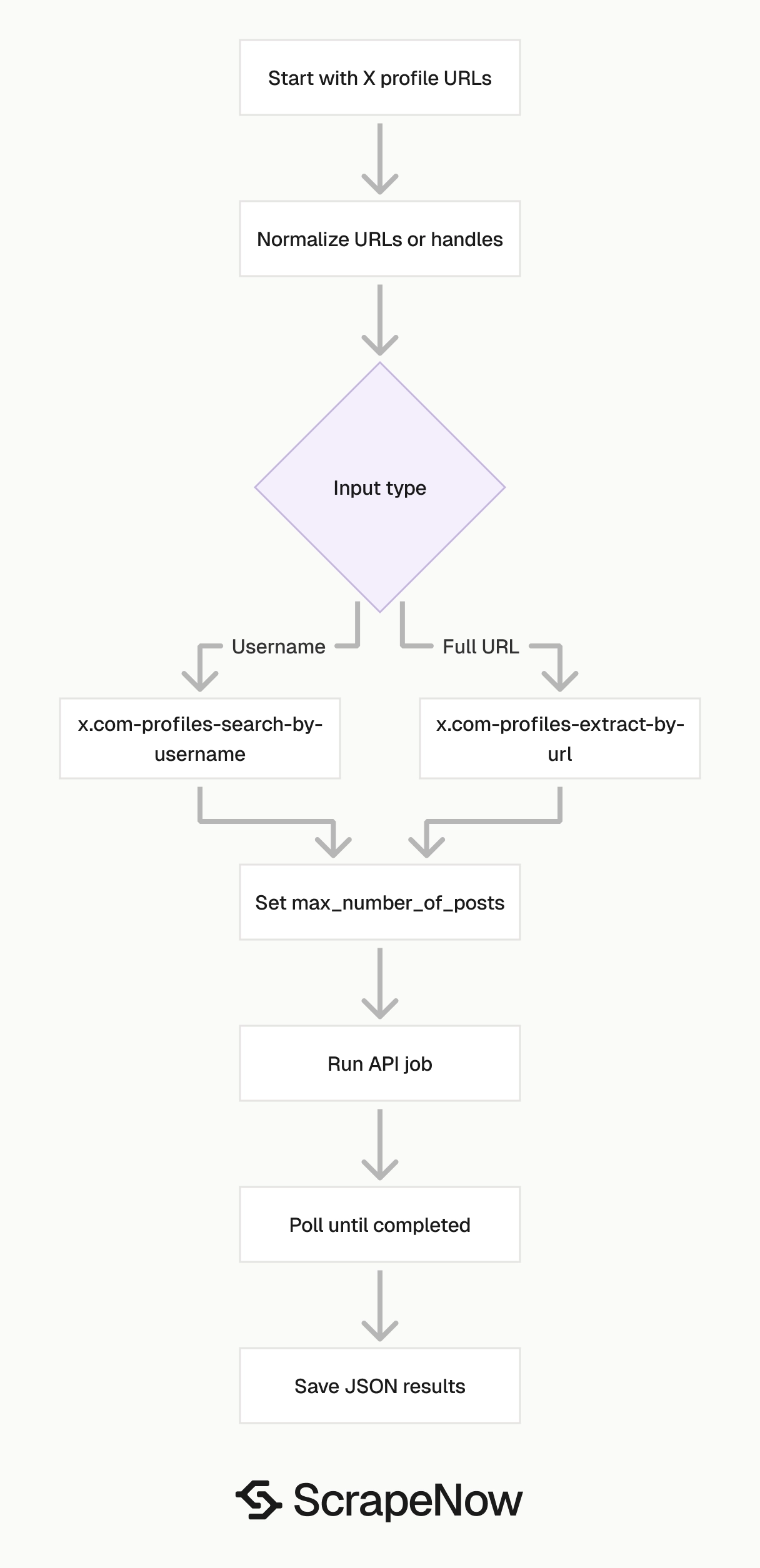
Use ScrapeNow’s Get X profile data scraper when your input is a full profile URL. Use the Look up X profiles by username scraper when your input is a handle like taylorswift13.
The two scrapers return the same profile-style output. The difference is the input shape, which matters when you build automated jobs from CRM exports, influencer lists, CSV files, or internal account records.
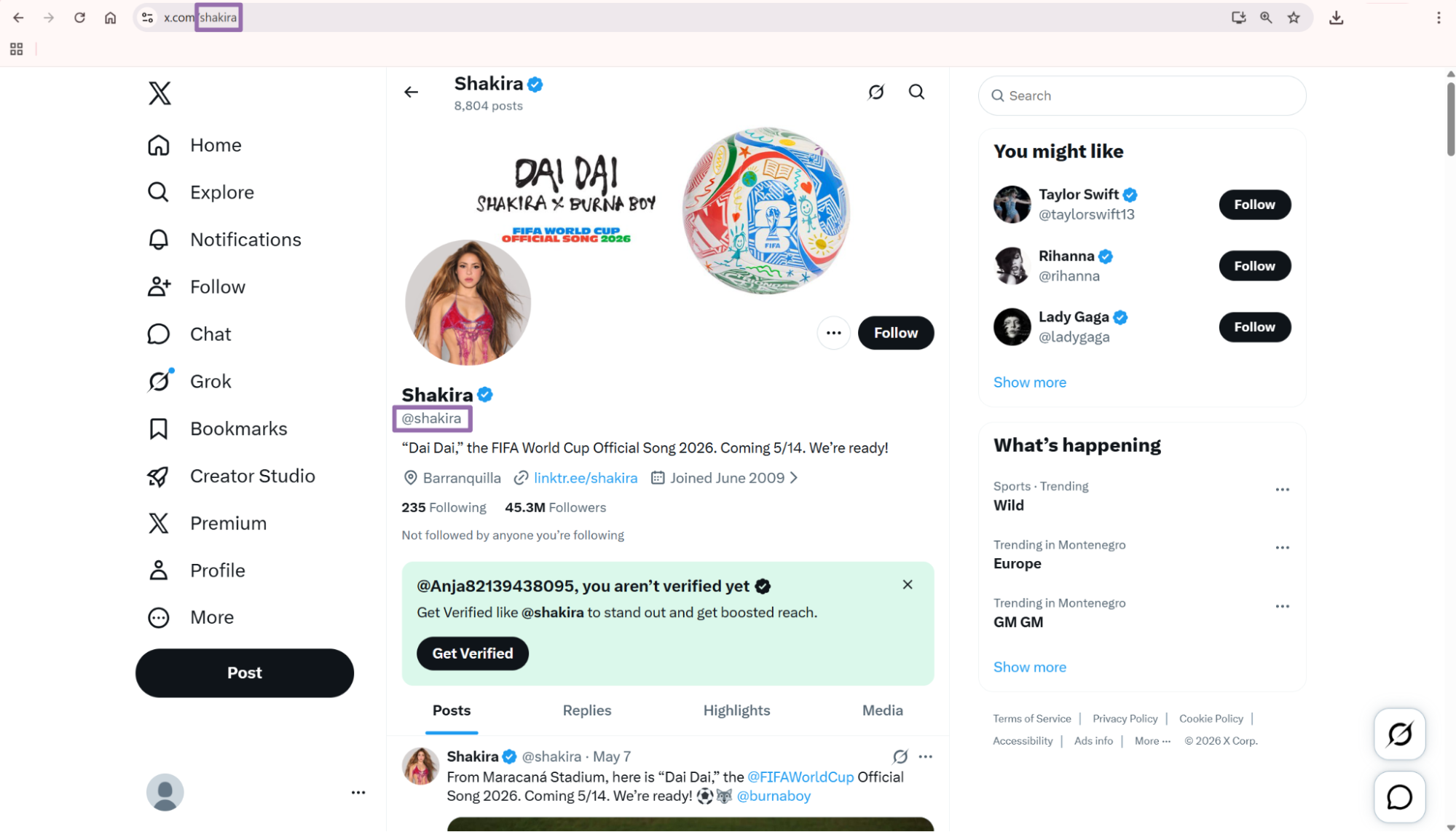
Step 1. Get the profile URL
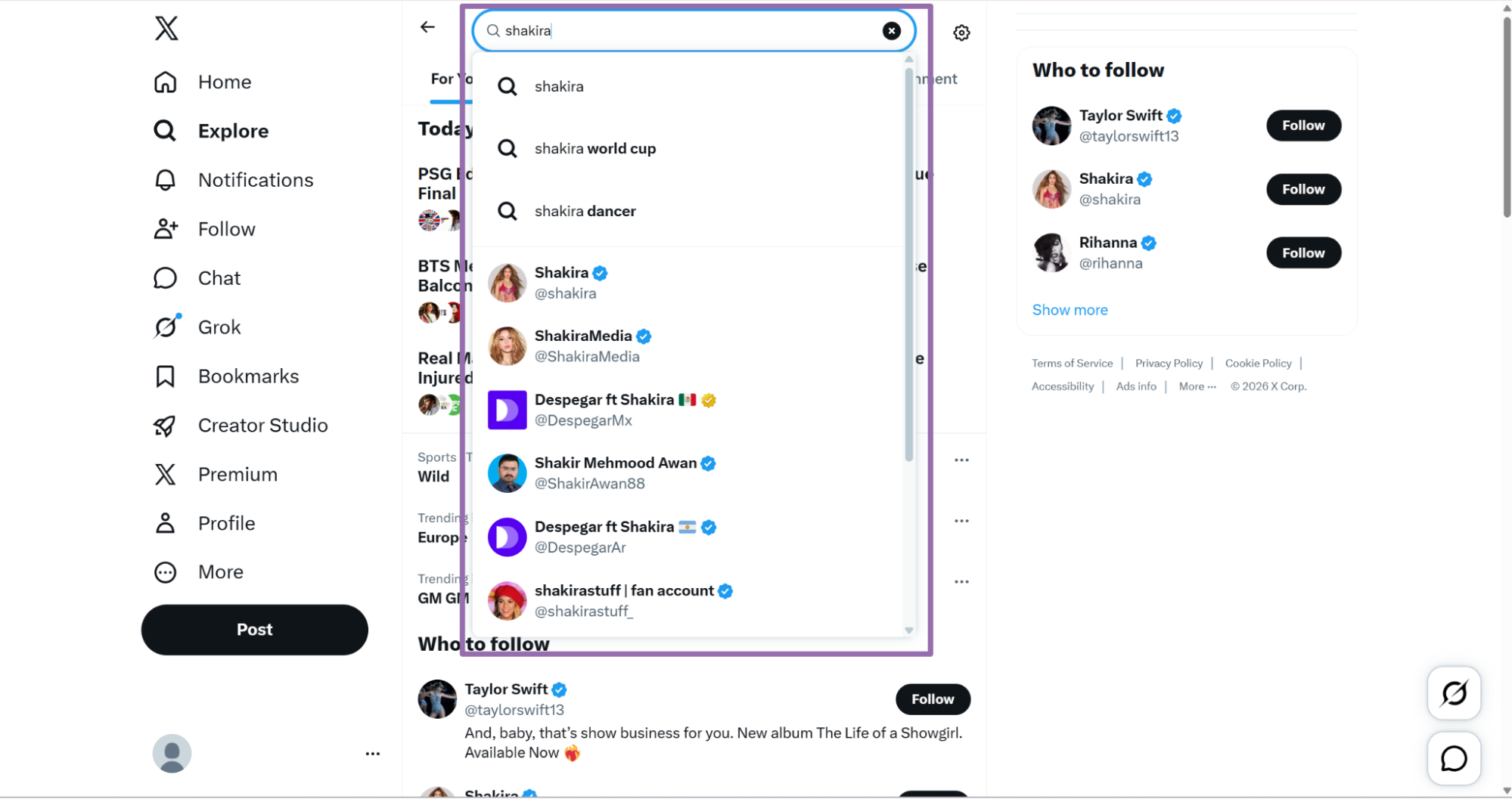
Open x.com, go to Explore, and search for the account.
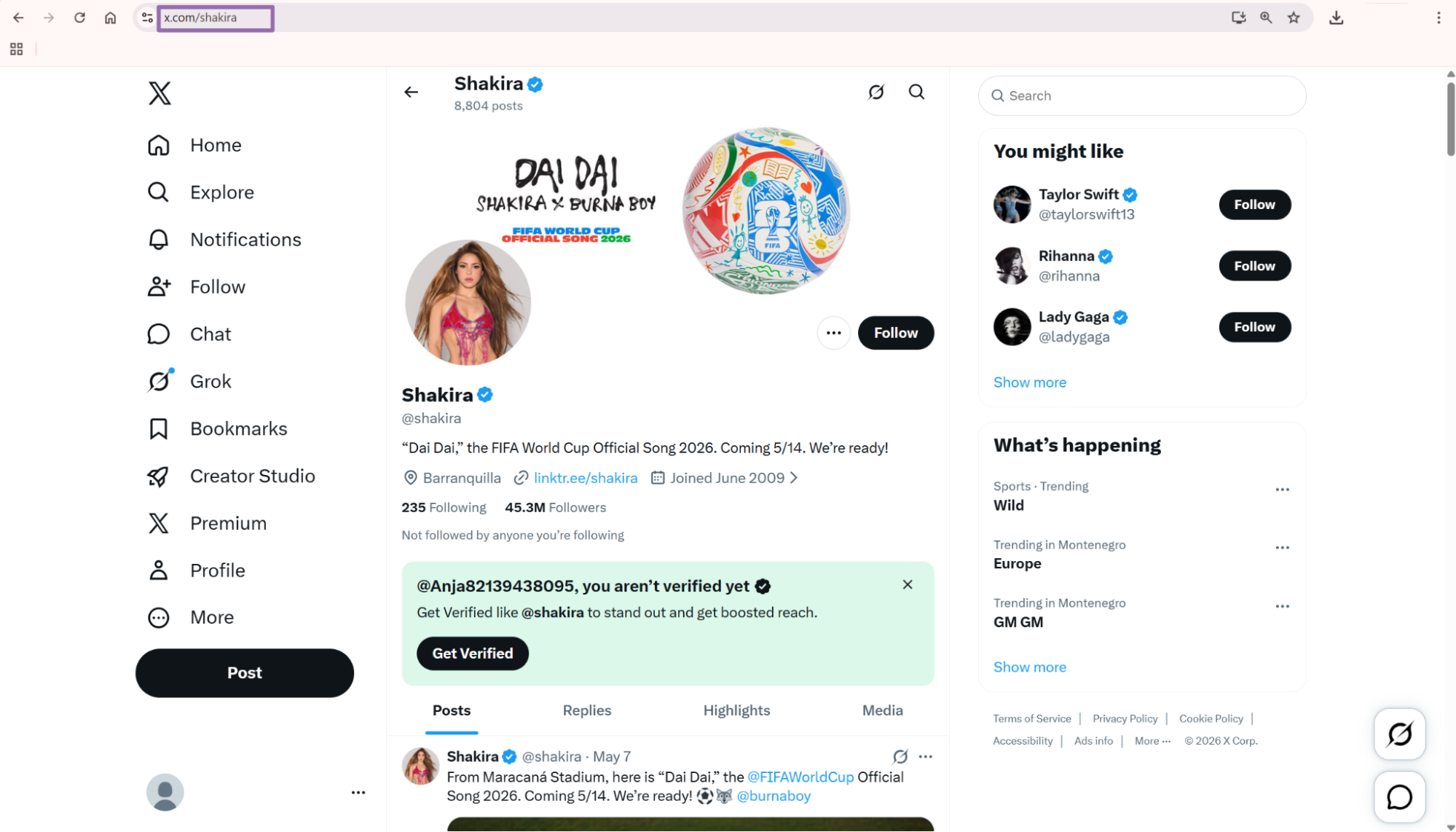
For API usage, the tested example below uses this payload:
{
  "url": "https://x.com/taylorswift13",
  "max_number_of_posts": 1
}
Store profile URLs in normalized form before you send them to the API. X profile URLs often arrive as twitter.com, x.com, www.x.com, or with trailing slashes and tracking parameters.
Step 2. Set the optional post limit
The max_posts field controls how many posts to scrape from the profile. In the API code, pass it as an integer using max_number_of_posts.
Use 1 when you need account metadata plus one recent post for freshness checks. Use a higher number when you need post-level engagement fields like replies, reposts, likes, and views.
Set this value with storage cost in mind. A batch of 10,000 profiles with max_number_of_posts set to 1 returns at least 10,000 profile records plus one post object per profile when posts are available.
Step 3. Use username input if you do not have full URLs
For the username-based scraper, pass the handle without @.
{
  "user_name": "taylorswift13"
}
The same API pattern works for the username scraper. Change the scraper slug to the X Profiles Search by Username scraper and replace SCRAPER_INPUTS.
Use username input for internal systems that store handles instead of URLs. Remove leading @ characters before submission so every job uses the same input format.
Step 4. Run the API code
This is the tested ScrapeNow API example for the X Profiles Extract by URL scraper.
"""
Configuration:
    - Set SCRAPER_SLUG to the scraper you want to run.
    - Set SCRAPER_INPUTS to the list of input dicts matching that scraper's schema.
    - Set API_KEY to your scraper API key.
"""

import sys
import time
import json
import requests
import os

API_KEY = "YOUR_API_KEY"

SCRAPER_SLUG = "x.com-profiles-extract-by-url"

SCRAPER_INPUTS = [
    {
        "url": "https://x.com/taylorswift13",
        "max_number_of_posts": 1
    }
]


BASE_URL = "https://api.scrapenow.io/api/v1/scraping"
TIMEOUT_SECONDS = 3600
POLL_INTERVAL = 5
SPINNER = "|/-\\"


def build_headers(api_key: str, content_type: str | None = None) -> dict:
    headers = {"Authorization": f"Bearer {api_key}"}
    if content_type:
        headers["Content-Type"] = content_type
    return headers


def trigger_scrape(slug: str, inputs: list[dict]) -> str:
    url = f"{BASE_URL}/scrape?scraper={slug}"
    response = requests.post(
        url,
        headers=build_headers(API_KEY, "application/json"),
        json={"inputs": inputs},
    )
    response.raise_for_status()
    return response.json()["data"]["job_id"]


def poll_until_done(job_id: str) -> str:
    start = time.time()
    i = 0
    while True:
        elapsed = time.time() - start
        if elapsed > TIMEOUT_SECONDS:
            print(f"\nTimeout after {TIMEOUT_SECONDS}s")
            sys.exit(1)
        response = requests.get(
            f"{BASE_URL}/jobs/{job_id}",
            headers=build_headers(API_KEY),
        )
        response.raise_for_status()
        data = response.json()
        status = data["data"]["status"]
        mins, secs = divmod(int(elapsed), 60)
        sys.stdout.write(
            f"\r[{SPINNER[i % 4]}] Waiting... {status} ({mins}m {secs:02d}s)  "
        )
        sys.stdout.flush()
        if status in ("completed", "failed"):
            print()
            return status
        time.sleep(POLL_INTERVAL)
        i += 1


def fetch_results(job_id: str) -> dict:
    response = requests.get(
        f"{BASE_URL}/jobs/{job_id}/results?format=json",
        headers=build_headers(API_KEY),
    )
    response.raise_for_status()
    return response.json()


def save_results(data: dict, slug: str) -> str:
    os.makedirs("output", exist_ok=True)
    filename = os.path.join("output", f"{slug}.json")
    with open(filename, "w", encoding="utf-8") as f:
        json.dump(data, f, indent=2, ensure_ascii=False)
    return filename


def main() -> None:
    print(f"Triggering scraper: {SCRAPER_SLUG}")
    job_id = trigger_scrape(SCRAPER_SLUG, SCRAPER_INPUTS)
    print(f"Job started: {job_id}")
    final_status = poll_until_done(job_id)
    if final_status != "completed":
        print(f"Job failed with status: {final_status}")
        sys.exit(1)
    print("Fetching results...")
    results = fetch_results(job_id)
    output_file = save_results(results, SCRAPER_SLUG)
    print(f"Results saved to: {output_file}")


if __name__ == "__main__":
    main()
This script does four things. It starts a scrape job, polls every 5 seconds, waits up to 3600 seconds, and saves the JSON output.
For larger jobs, keep POLL_INTERVAL = 5. Polling faster adds API noise without making the scrape finish sooner.
Keep TIMEOUT_SECONDS = 3600 for large profile batches. X profile jobs can take longer when you request posts for each account.
Step 5. Read the JSON output
A successful run returns an array of records. Each input profile gets its own output object.
[
{
"inputs": {
"url": "https://x.com/taylorswift13",
"max_number_of_posts": 1
},
"scrape_status": "success",
"x_id": "17919972",
"url": "https://x.com/taylorswift13",
"id": "taylorswift13",
"profile_name": "Taylor Swift",
"biography": "And, baby, that’s show business for you. New album The Life of a Showgirl. Available Now ❤️🔥",
"is_verified": true,
"profile_image_link": "https://pbs.twimg.com/profile_images/2019199672955387904/KoSJY5W-_normal.jpg",
"external_link": "https://taylor.lnk.to/OpaliteMusicVideo",
"date_joined": "2008-12-06T10:10:54.000Z",
"following": 0,
"followers": 79831211,
"subscriptions": 0,
"location": null,
"birth_date": null,
"posts_count": 884,
"posts": [
{
"post_id": "1266392274549776387",
"description": "After stoking the fires of white supremacy and racism your entire presidency, you have the nerve to feign moral superiority before threatening violence? ‘When the looting starts the shooting starts’??? We will vote you out in November. @realdonaldtrump",
"date_posted": "2020-05-29T15:33:41.000Z",
"post_url": "https://twitter.com/17919972/status/1266392274549776387",
"photos": null,
"videos": null,
"replies": 84673,
"reposts": 351623,
"likes": 1738615,
"views": null,
"hashtags": null
}
],
"suggested_profiles": null,
"is_business_account": false,
"is_government_account": false,
"category_name": [
"Musician"
],
"max_number_of_posts": 1,
"banner_image": "https://pbs.twimg.com/profile_banners/17919972/1759464215",
"scrape_error": null,
"scrape_error_code": null
}
]
Check scrape_status before you read profile fields. A failed record still includes the original inputs, which lets you retry or inspect the failed item.
If you also need post extraction from specific X post URLs, the Extract X post data scraper uses the same job flow.
What data you get back
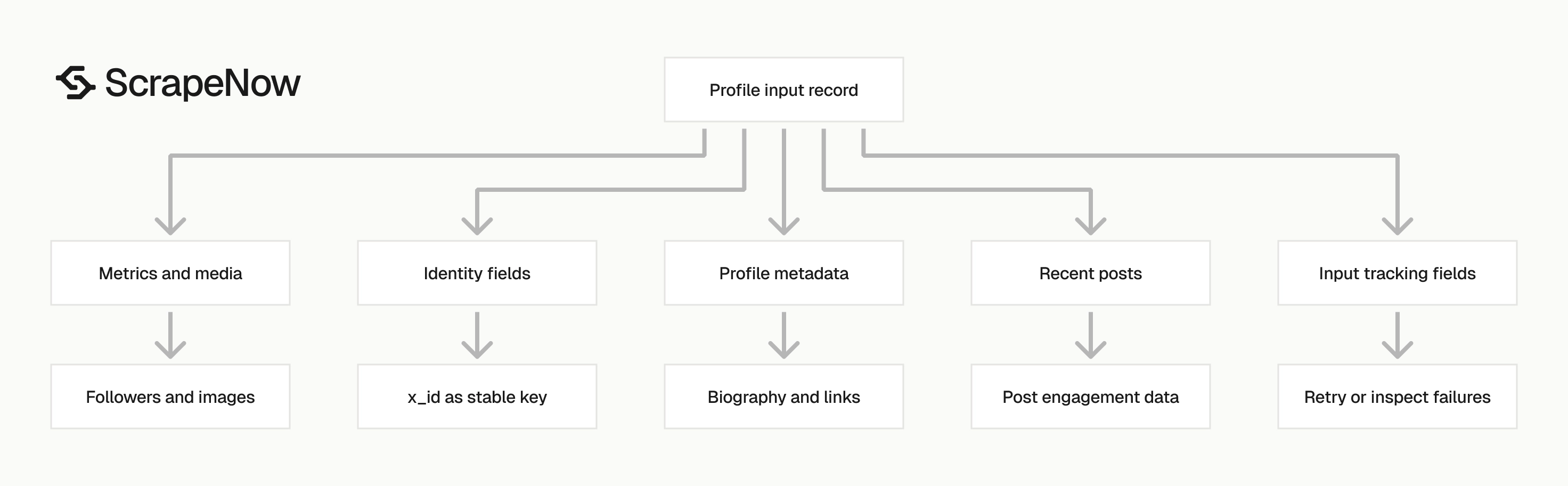
The response has five groups of fields. Store them separately if you query the data often.
| Field group | Fields | Use |
|---|---|---|
| Input tracking | inputs, scrape_status, scrape_error, scrape_error_code |
Match each result to the request that produced it |
| Profile identity | x_id, id, url, profile_name, is_verified |
Deduplicate accounts and build stable profile records |
| Profile metadata | biography, external_link, date_joined, location, birth_date, category_name |
Enrich account records |
| Metrics and media | followers, following, posts_count, profile_image_link, banner_image |
Track audience size and profile assets |
| Posts | posts[] with post_id, description, date_posted, replies, reposts, likes, views |
Capture recent content and engagement |
Design your storage around these groups. Profile identity changes less often than metrics, while post engagement changes every time a post receives new activity.
Identity fields
Use x_id as the stable account key. Handles can change, profile names can change, and URLs can get normalized.
The sample account has this identity payload:
{
  "x_id": "17919972",
  "id": "taylorswift13",
  "profile_name": "Taylor Swift",
  "url": "https://x.com/taylorswift13"
}
Store id too. It is the handle most users recognize, and it helps with search, exports, and manual review.
Keep url as the current profile URL. Treat it as display and source tracing data, rather than your primary key.
Verification and account type fields
The account classification fields are direct booleans:
{
  "is_verified": true,
  "is_business_account": false,
  "is_government_account": false,
  "category_name": ["Musician"]
}
Keep these fields separate. A profile can be verified and also have a category.
This structure works better than a single account type string. You can filter verified government accounts, verified business accounts, and categorized creator accounts without reparsing text.
Metric fields
Follower counts and post counts are returned as numbers:
{
  "following": 0,
  "followers": 79831211,
  "subscriptions": 0,
  "posts_count": 884
}
Treat these as snapshot metrics. If you scrape the same profile daily, store scraped_at in your database instead of overwriting the old row.
Follower counts move constantly on large accounts. Historical rows let you calculate daily growth, detect sudden drops, and build trend charts without rerunning old jobs.
Profile text and media fields
The profile scraper returns the biography, external link, profile image, and banner image. These fields change less often than follower counts, yet they matter for account enrichment.
Use biography for keyword tagging and account classification. Use external_link for domain matching, creator landing pages, store links, and brand attribution.
Store image URLs as strings rather than downloading every file by default. Download images only when your workflow needs an archive, thumbnail cache, or visual review queue.
Post fields
The posts array appears when max_number_of_posts is greater than 0. Each post includes the post ID, text, URL, date, and engagement counts.
If you need full post datasets, use the profile scraper for account metadata and the X posts scraper for post-specific jobs. The existing X posts scraper guide covers that flow.
Keep profile scraping and post scraping as separate jobs in production. Profile jobs answer account-level questions, while post jobs answer content-level questions.
Ready to get this data? Get X profile data.
Production tips for clean profile data
Validate URLs before sending jobs
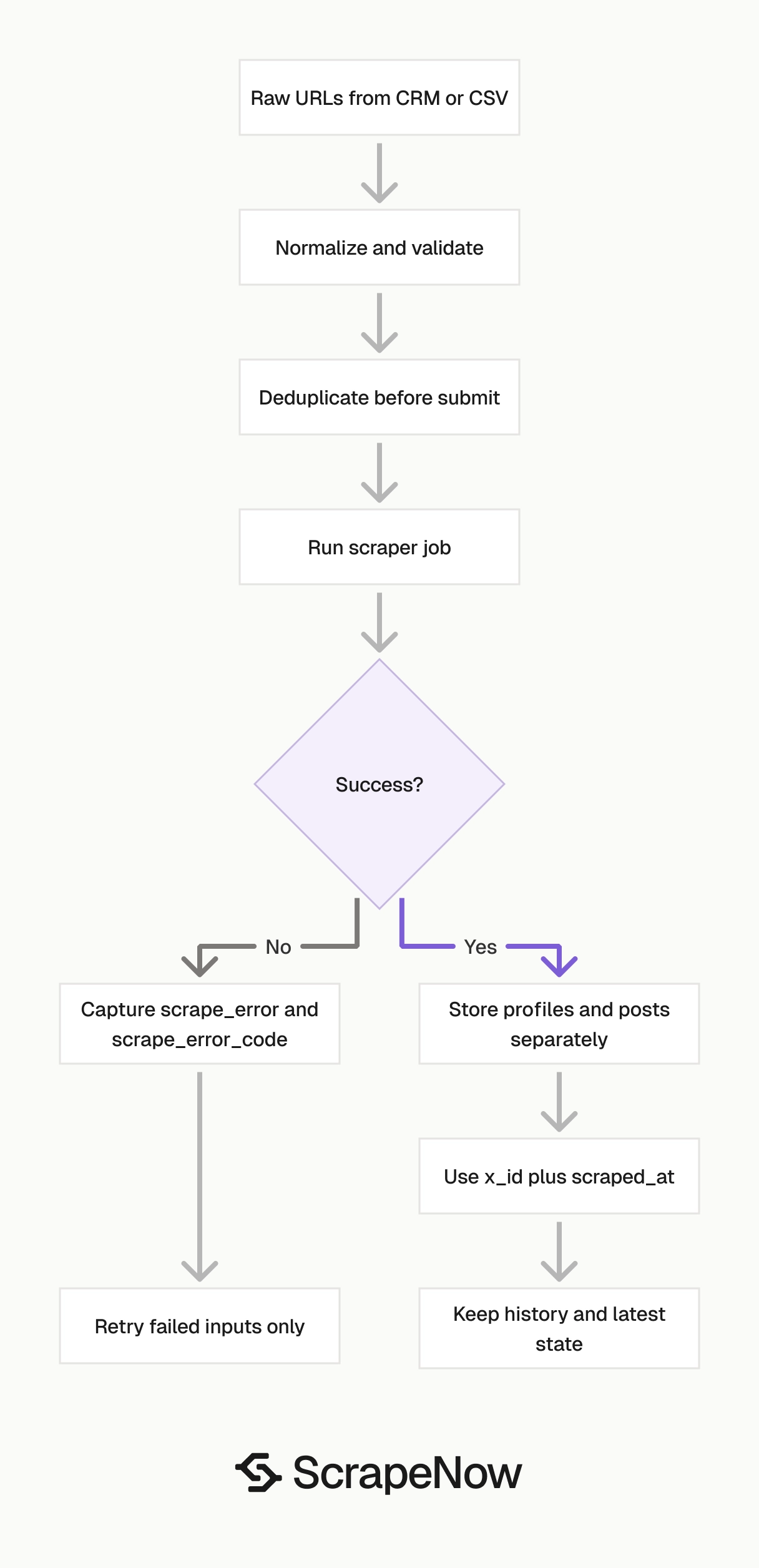
Invalid URLs waste credits and make deduplication harder. Normalize profile URLs before you call the API.
from urllib.parse import urlparse

def normalize_x_profile_url(raw_url: str) -> str:
    raw_url = raw_url.strip()

    parsed = urlparse(raw_url)
    if parsed.netloc not in {"x.com", "www.x.com", "twitter.com", "www.twitter.com"}:
        raise ValueError(f"Unsupported X profile host: {parsed.netloc}")

    username = parsed.path.strip("/").split("/")[0]
    if not username:
        raise ValueError(f"Missing username in URL: {raw_url}")

    return f"https://x.com/{username}"


urls = [
    "https://www.x.com/taylorswift13",
    "https://twitter.com/taylorswift13",
]

inputs = [
    {"url": normalize_x_profile_url(url), "max_number_of_posts": 1}
    for url in urls
]

print(inputs)
Expected output:
[
  {
    "url": "https://x.com/taylorswift13",
    "max_number_of_posts": 1
  },
  {
    "url": "https://x.com/taylorswift13",
    "max_number_of_posts": 1
  }
]
This function keeps only the first path segment as the username and makes duplicate detection more consistent.
Deduplicate before you submit
Deduplicate on normalized URL before the API call. Deduplicate again on x_id after the response.
def dedupe_inputs(inputs: list[dict]) -> list[dict]:
    seen = set()
    clean = []

    for item in inputs:
        key = item["url"].lower().rstrip("/")
        if key in seen:
            continue

        seen.add(key)
        clean.append(item)

    return clean


raw_inputs = [
    {"url": "https://x.com/taylorswift13", "max_number_of_posts": 1},
    {"url": "https://x.com/taylorswift13/", "max_number_of_posts": 1},
]

print(dedupe_inputs(raw_inputs))
Expected output:
[
  {
    "url": "https://x.com/taylorswift13",
    "max_number_of_posts": 1
  }
]
Post-response deduplication catches handle changes and URL variants. Use x_id for that second pass.
Store profiles and posts in separate tables
CREATE TABLE x_profiles (
  x_id TEXT NOT NULL,
  username TEXT NOT NULL,
  profile_name TEXT,
  url TEXT,
  biography TEXT,
  is_verified BOOLEAN,
  external_link TEXT,
  date_joined TIMESTAMP,
  following BIGINT,
  followers BIGINT,
  subscriptions BIGINT,
  location TEXT,
  birth_date TEXT,
  posts_count BIGINT,
  is_business_account BOOLEAN,
  is_government_account BOOLEAN,
  category_name JSONB,
  profile_image_link TEXT,
  banner_image TEXT,
  scraped_at TIMESTAMP NOT NULL,
  PRIMARY KEY (x_id, scraped_at)
);

CREATE TABLE x_profile_posts (
  post_id TEXT PRIMARY KEY,
  x_id TEXT NOT NULL,
  description TEXT,
  date_posted TIMESTAMP,
  post_url TEXT,
  replies BIGINT,
  reposts BIGINT,
  likes BIGINT,
  views BIGINT,
  hashtags JSONB,
  scraped_at TIMESTAMP NOT NULL
);
Use (x_id, scraped_at) as the profile primary key for a history table, or x_id alone for a latest-state table.
Handle partial failures per input
The API response includes scrape_status, scrape_error, and scrape_error_code. Do not fail the whole batch because one account is private, suspended, renamed, or unavailable.
def split_results(records: list[dict]) -> tuple[list[dict], list[dict]]:
    successes = []
    failures = []

    for record in records:
        if record.get("scrape_status") == "success":
            successes.append(record)
        else:
            failures.append({
                "inputs": record.get("inputs"),
                "error": record.get("scrape_error"),
                "error_code": record.get("scrape_error_code"),
            })

    return successes, failures
For retry jobs, send only the failed inputs. Write failed records to a dead-letter table after final retry.
Add a batch ID to your own pipeline
Add your own batch ID in your database or job runner so you can trace which import produced each record.
Use null-safe parsing
Some fields return null. Convert only after you check the value.
def to_int_or_none(value):
    if value is None:
        return None
    return int(value)


followers = to_int_or_none(record.get("followers"))
views = to_int_or_none(post.get("views"))
Pick the right scraper for the input you have
| Input you have | Scraper to run | Product page |
|---|---|---|
| Full profile URLs | the X Profiles Extract by URL scraper | Get X profile data |
Usernames without @ |
the X Profiles Search by Username scraper | Look up X profiles by username |
| Specific post URLs | the X Posts Extract by URL scraper | Extract X post data |
This keeps your pipeline predictable. URL inputs go to URL scrapers, username inputs go to username scrapers, and post URLs go to post scrapers.
If you receive mixed input types, classify them before submission. A string that starts with http:// or https:// should enter the URL path, while a handle should enter the username path.
Pricing
ScrapeNow charges per returned row. One row costs one credit, starting at $0.04 per credit for small runs and dropping with volume. No monthly contracts, no proxy fees, no charges for failed rows. See the pricing page for current rates.


