
Instagram scraping fails when selectors hit login walls, rate limits, and changing frontend markup.
An Instagram Scraper extracts public profile, post, Reel, caption, hashtag, and engagement data without manual copy-paste. Instagram has over 3 billion monthly active users, according to Hootsuite’s 2026 Instagram statistics, so teams use this data for creator discovery, brand monitoring, pricing research, and social trend tracking.
Manual collection breaks once the job grows past a few profiles. A scraper turns public Instagram pages into structured rows that your database, spreadsheet, warehouse, or reporting system can read.
Why teams scrape public Instagram data
Instagram data becomes hard to manage by hand. A single creator audit can include 500 profiles, 10,000 posts, and thousands of Reels across beauty, fitness, gaming, finance, and local business niches.
The useful fields are straightforward:
| Data type | Common fields | Typical use case |
|---|---|---|
| Profiles | Username, bio, follower count, following count, post count, profile URL | Creator discovery, lead lists, brand audits |
| Posts | Caption, media URL, likes, comments, timestamp, hashtags | Campaign tracking, content research |
| Reels | Reel URL, caption, view count, likes, comments, audio metadata | Short-form video research |
| Search results | Profile URLs, post URLs, usernames | Building input lists for deeper extraction |
Public Instagram data answers specific operational questions. Which creators are growing in a niche. Which posts mention a competitor. Which Reels crossed a target view count this week.
It also exposes signals inside public bios and captions. A profile bio can include an email address, location, agency name, discount code, brand partner, storefront link, or booking page.
ScrapeNow splits these jobs into purpose-built extractors. Each extractor handles one Instagram page type, so you avoid one oversized scraper with branching logic for posts, profiles, search pages, and Reels.
That separation matters in production. Profile pages, post pages, and Reels expose different fields. They also load different resources and fail in different ways.
A creator discovery workflow often starts with usernames from a CRM or submission form. A campaign reporting workflow usually starts with known post URLs. A short-form video benchmark starts with creator profile URLs and then pulls Reel records.
Those workflows need different input contracts. Combining them into one scraper adds conditional code, wider schemas, and harder failure handling.
Why Instagram scraping fails
Instagram blocks basic scraping scripts quickly. Plain requests.get() fails once the site requires JavaScript-rendered content, session state, fingerprint checks, or login-gated flows.
The common failure points are predictable:
| Problem | What happens | Production fix |
|---|---|---|
| Login walls | Public pages return partial HTML or redirect flows | Use session-aware extraction and public-data-only inputs |
| Rate limits | Repeated requests from one IP get throttled | Rotate IPs and control request rate |
| Bot detection | Browser fingerprints, headers, and behavior patterns get flagged | Use maintained scrapers with browser and proxy handling built in |
| Layout changes | CSS selectors fail after frontend updates | Patch extractors when markup changes |
| Missing data | Counts, captions, or media fields load from internal endpoints | Use platform-specific extraction logic |
Instagram changes markup often. A scraper that works on Monday can miss captions by Friday after a frontend update.
The first working script is the smallest part of the job. Maintenance owns the production cost.
If you scrape 50 URLs once, a short script can finish the run. If you run weekly creator discovery across 20,000 profiles, you need monitoring, retries, proxy routing, and field-level checks.
A production scraper also needs failure classification. A private profile, deleted post, expired session, rate limit, and selector miss need separate statuses.
Field validation matters too. If follower counts return null for half your accounts, the run should fail fast or mark those rows for review.
Retries need boundaries. Retrying a deleted post wastes credits and time, while retrying a temporary rate limit can recover the row.
You also need to separate input errors from extraction errors. A malformed URL should never land in the same bucket as a valid URL blocked by a login flow.
ScrapeNow's Instagram Scrapers
ScrapeNow has dedicated Instagram scrapers for posts, profiles, profile search, post search, and Reels. Each scraper takes a specific input type and returns structured rows, with pricing based on returned results.
That model keeps the job direct. You send URLs or usernames, then store the rows that come back.
ScrapeNow also handles browser execution, proxy routing, retries, and extraction changes behind the API and web interface. Your pipeline only needs clean inputs, schema checks, and storage.
A generic scraper forces one workflow to cover several page types. ScrapeNow’s Instagram scrapers use separate input contracts, which makes batch jobs easier to test and debug.
Separate contracts also keep your logs readable. A failed profile URL and a failed Reel source need different messages, different retry rules, and different owner teams.
For engineering teams, the API boundary stays small. Your application submits a batch, polls or receives the result, validates rows, and writes the output.
API request example
Use the API when Instagram data feeds a pipeline instead of a one-off spreadsheet. The request shape stays simple because the scraper owns browser and proxy handling.
Example request:
curl -X POST "https://api.scrapenow.io/api/v1/scraping/scrape?scraper=instagram-posts-extract-by-url" \
  -H "Authorization: Bearer SCRAPENOW_API_KEY" \
  -H "Content-Type: application/json" \
  -d '{
    "input": {
      "urls": [
        "https://www.instagram.com/p/POST_SHORTCODE_1/",
        "https://www.instagram.com/p/POST_SHORTCODE_2/"
      ]
    }
  }'
Example response shape:
{
  "run_id": "run_01JABCDEF123456789",
  "status": "completed",
  "scraper": "instagram-posts-extract-by-url",
  "credits_used": 2,
  "rows": [
    {
      "url": "https://www.instagram.com/p/POST_SHORTCODE_1/",
      "author_username": "example_creator",
      "caption": "Campaign caption text",
      "hashtags": ["brand", "launch"],
      "likes": 1842,
      "comments": 96,
      "published_at": "2026-02-18T14:22:00Z",
      "media_urls": [
        "https://cdn.example.com/media/image.jpg"
      ],
      "status": "success"
    }
  ]
}
Store run_id, scraper, credits_used, and row-level status with every batch. Those fields make retries and cost reporting easier when a campaign refresh runs daily.
Store the original input value too. If a submitted URL redirects, normalizes, or fails, the original value gives you an audit trail.
A thin ingestion table works well for this. Keep one row per input, then attach the scraper output and status fields after the run completes.
Instagram posts extract by URL
The Extract Instagram post data takes post URLs and extracts post-level fields. Common fields include caption, media, author, timestamps, hashtags, and engagement counts.
Use it when you already have post URLs from a campaign, competitor account, influencer brief, or monitoring system. This is the right scraper for campaign reporting because the input list is already known.
The detailed guide with code examples for Instagram posts scraping covers the manual approach, scraper inputs, and output fields. For audits where accuracy matters, start with known post URLs and avoid unnecessary discovery steps.
A typical batch is direct. Export post URLs from your campaign tracker, submit them to the scraper, then join returned rows against your creator, campaign, or SKU table.
Use post URL as the primary key. Captions change, engagement counts change, and display names change, while the post URL remains the stable record identifier.
For campaign reports, refresh the same URLs on a schedule. That gives your team time-series engagement data without changing the population of posts.
A good reporting table stores the latest metrics and the historical snapshots separately. The latest table powers dashboards, while snapshots support growth curves and post-performance audits.
Instagram posts search by URL
The Search Instagram posts by URL finds posts from Instagram URLs and returns structured post records for downstream processing. Use it when your starting point is a page or source URL and you need post records from that source.
The detailed guide with code examples for Instagram posts scraping also covers post extraction patterns and field handling. For production jobs, feed discovered post URLs into the extract-by-URL scraper when you need repeatable refreshes.
This two-step pattern gives you better control. Search finds candidate posts, and extraction refreshes the exact records your reporting table needs.
It also makes deduplication easier. Store discovered post URLs once, then use the URL as the stable key for future refreshes.
Use search for discovery runs, research tasks, and source-page collection. Use direct extraction for scheduled reporting against a fixed URL list.
A discovery run should write candidates into a staging table first. Review deduplication, status fields, and source attribution before promoting records into reporting tables.
For example, a competitor watchlist can collect post candidates weekly. Your pipeline can then extract only new URLs and skip posts already stored.
Instagram profiles extract by URL
The Get Instagram profile data takes profile URLs and returns public account metadata. Common fields include username, bio, follower count, following count, post count, and profile details.
Use it for creator databases, lead enrichment, audience research, and brand tracking. It works best when your pipeline already has profile URLs from search, CRM records, influencer platforms, or manual research.
The product page gives the current input rules and field list. The input contract matters for batch jobs because it defines how clean your upstream data needs to be.
Profile extraction is usually the account-level pass in a larger workflow. Run it before content extraction when you need to filter accounts by follower range, location, bio keywords, or posting activity.
A common filter is simple. Keep creators with at least one recent post, a follower count inside your target range, and a bio that matches your market.
Profile metadata also helps control downstream spend. If an account is private, inactive, outside your target range, or unrelated to the niche, skip content extraction.
For lead enrichment, store the bio exactly as returned. Then parse emails, domains, discount codes, and booking links in your own pipeline.
That separation keeps extraction and business rules clean. The scraper returns the public fields, and your application decides which accounts move forward.
Instagram profiles search by username
The Look up Instagram profiles by username takes usernames and returns matching public profile records. Use it when your source data has usernames from spreadsheets, bios, emails, TikTok profiles, X profiles, or creator submissions.
The product page gives the supported input format. For batch jobs, that format is the detail that prevents failed rows.
Username search cleans uneven source data. Teams often collect usernames with leading @ symbols, missing profile URLs, inconsistent casing, or free-text notes inside forms.
Run profile search before profile extraction when you need to resolve usernames into canonical profile URLs. Store both the submitted username and matched profile URL so you can audit mismatches later.
This matters when a creator changes their username. Your CRM value and the current Instagram profile value can diverge, and the stored match history explains the change.
Add a match status field to your database. Use values such as matched, not_found, private, ambiguous, and input_invalid.
Those statuses help sales, partnerships, and data teams work from the same queue. They also prevent repeated searches for handles that already failed validation.
If users submit handles through a form, normalize them before the run. Remove leading @, trim whitespace, lowercase where appropriate, and reject values with unsupported characters.
Instagram Reels extract all Reels by URL
The Pull Instagram Reels data extracts Reels from a target profile or Reel source URL. It returns fields such as Reel URL, caption, engagement counts, view count when available, media fields, and publishing metadata.
The detailed guide with code examples for Instagram Reels scraping covers how to collect Reel data without maintaining browser sessions yourself. Use this scraper for short-form video tracking, creator benchmarking, and trend research across hundreds or thousands of accounts.
Reels deserve a separate extractor because video data has different failure modes. View counts, audio metadata, and media fields change differently from static profile metadata.
For creator benchmarking, run Reels extraction after profile extraction. Filter out inactive accounts first, then spend credits on creators who still publish short-form video.
A practical benchmark table includes creator URL, Reel URL, publish time, views, likes, comments, caption, and audio metadata. That schema supports weekly ranking, growth tracking, and competitor comparisons.
Reels also need time windows. A 7-day view count, 30-day view count, and lifetime view count answer different questions.
For trend research, store audio metadata when it appears in the result. Audio reuse often matters as much as caption text for short-form video analysis.
For creator scoring, calculate engagement rates after storage. Keep raw likes, comments, views, and publish time so you can change scoring formulas later.
Pricing
ScrapeNow charges per returned row. One row costs one credit, starting at $0.04 per credit for small runs and dropping with volume. No monthly contracts, no proxy fees, no charges for failed rows. See the pricing page for current rates.
What ScrapeNow handles for you
Instagram scraping in production has moving parts outside the extraction code. The scraper needs sessions, request pacing, proxy routing, browser behavior, selector updates, retry rules, and output validation.
ScrapeNow packages those parts inside the scraper run. You still own input quality, storage, deduplication, and business logic.
That split is the right boundary for most teams. Let the scraper handle Instagram-specific mechanics, and keep your application focused on the data model.
Concrete differences show up during failed runs. A maintained scraper can separate private accounts, deleted posts, rate limits, empty outputs, and extraction misses into statuses your pipeline can process.
It also reduces code surface area. Your application sends inputs, receives rows, validates required fields, and writes records to Postgres, BigQuery, S3, or a CSV export.
This boundary also makes ownership clear. Scraper health, proxy routing, and page parsing sit with ScrapeNow, while your team owns schema design and reporting rules.
For example, your pipeline can reject rows without a URL, timestamp, or status. It can also accept missing engagement fields when the status explains why the value is empty.
That level of validation catches silent failures. Silent failures are more expensive than failed runs because they enter dashboards and reports as valid data.
Which Instagram scraper to use
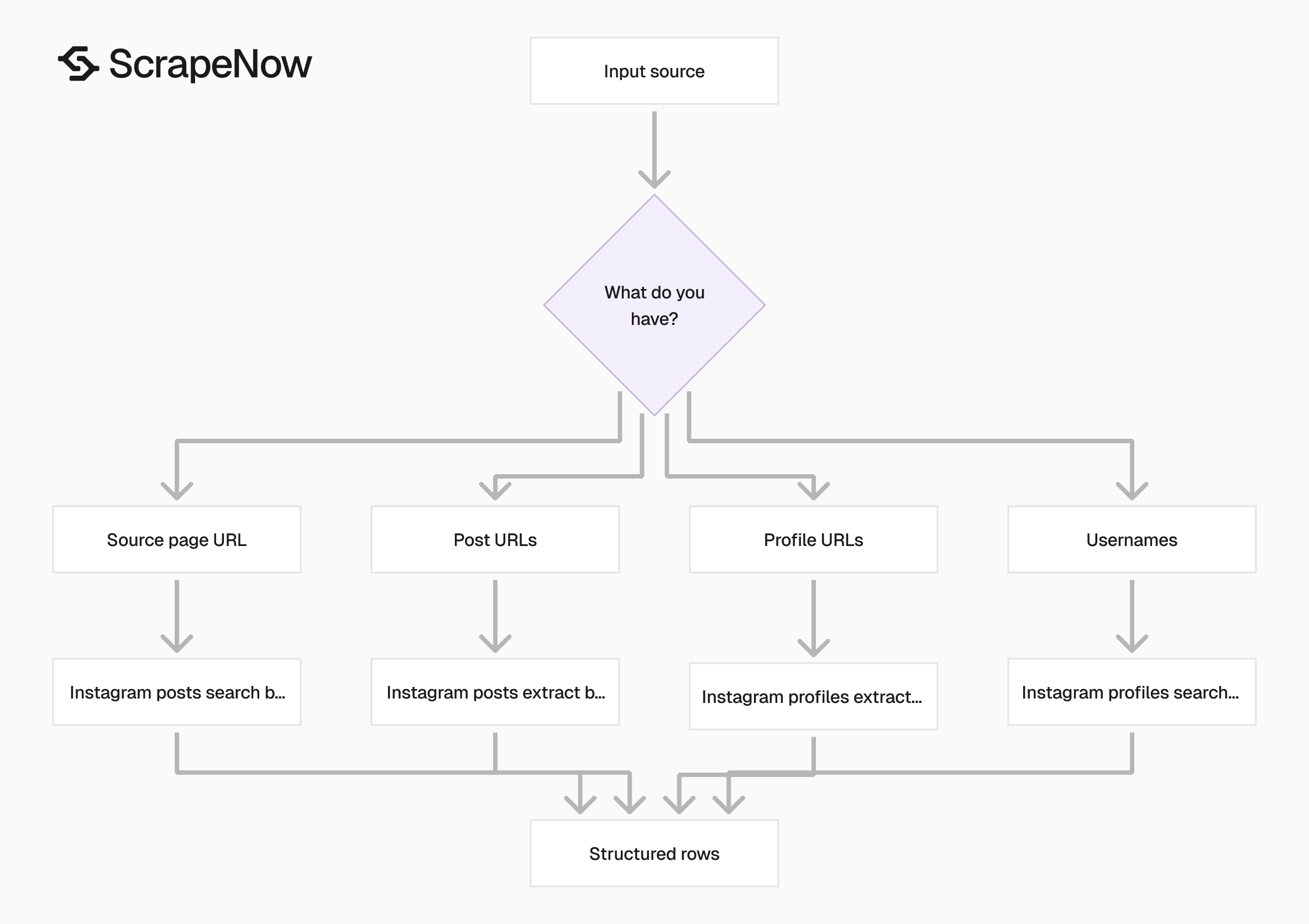
Pick the scraper based on the input you already have. Do that before thinking about fields.
| You have | Use this scraper | Why |
|---|---|---|
| A spreadsheet of post URLs | Instagram posts extract by URL | Direct extraction with minimal discovery work |
| A page URL that contains posts | Instagram posts search by URL | Finds post records from the source URL |
| A spreadsheet of profile URLs | Instagram profiles extract by URL | Best for creator audits and enrichment |
| A list of usernames | Instagram profiles search by username | Converts handles into structured profile records |
| A list of creator profile URLs for short-form video | Instagram Reels extract all Reels by URL | Pulls Reel records from each source |
For a creator monitoring pipeline, use profile search first, profile extraction second, then Reels extraction for the accounts worth tracking. This pattern turns loose usernames into profile records, then turns selected profiles into content records.
For campaign reporting, skip discovery and send known post URLs straight into post extraction. Campaign jobs usually need repeatable refreshes for the same URLs, so direct extraction keeps the dataset stable.
For competitor research, start with profile URLs if you already know the accounts. Add Reels extraction when video performance matters more than account-level metadata.
For hashtag or niche research, build a discovery list first. Then feed the resulting post or profile URLs into the specific extractor that matches your reporting table.
Avoid mixing discovery and reporting in the same table. Discovery produces candidates, while reporting tracks approved records that your team expects to refresh.
A clean workflow uses staging tables for search output. It then promotes approved post URLs, profile URLs, or Reel URLs into production tables.
This structure helps analysts trust the dataset. It also makes failed refreshes easier to trace because every record has a source and promotion path.
How this fits into a data pipeline
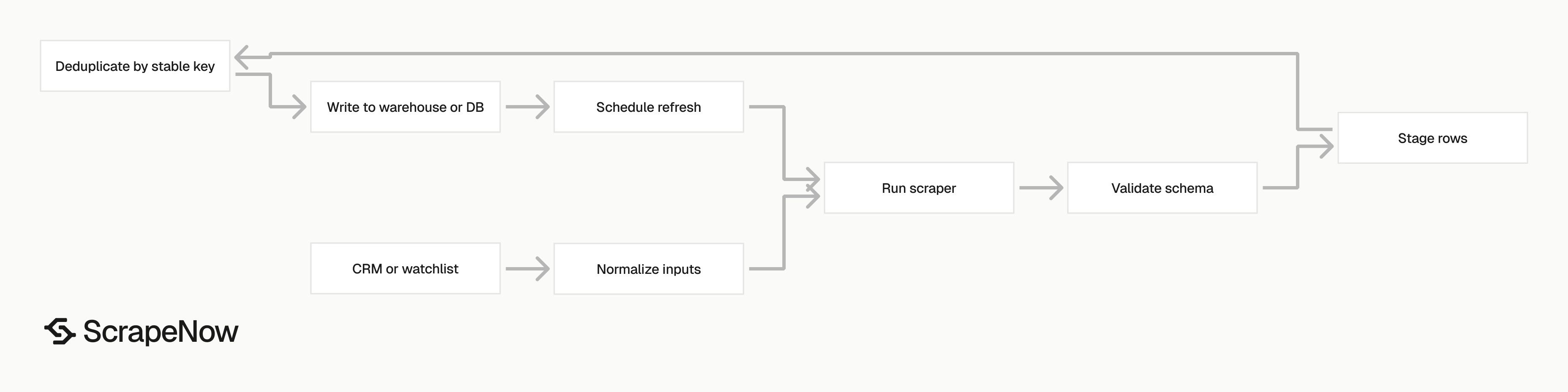
Most Instagram scraping jobs follow the same pattern. Build the input list, run the right extractor, store the returned rows, then refresh on a schedule.
A basic production setup looks like this:
| Step | Example |
|---|---|
| Input source | 2,000 creator usernames from a CRM |
| Scraper run | Profiles search by username |
| Second pass | Profiles extract by URL for matched accounts |
| Content pass | Reels extract all Reels by URL for active creators |
| Storage | Postgres, BigQuery, S3, or a CSV export |
| Refresh rate | Daily for fast-moving campaigns, weekly for research |
The main decision is refresh frequency. Daily runs make sense for campaign monitoring and viral Reel tracking.
Weekly runs are enough for competitor research, creator discovery, and account-level benchmarks. Monthly runs work for slow-moving brand audits where follower counts and bios are the primary fields.
Add validation before you write rows into production tables. Check required fields, detect duplicate URLs, and separate private or missing profiles from successful records.
Use stable keys wherever possible. Profile URL, username, post URL, and Reel URL make better join keys than captions or display names.
Store raw run metadata with each batch. Keep the scraper name, run time, input value, output status, and error message so your team can debug changes later.
ScrapeNow also has 86+ pre-built scrapers across 14 platforms, so Instagram data can sit next to TikTok, X, LinkedIn, Amazon, and Google data in the same workflow. The full catalog lives in the Browse all 86+ scrapers.
Add idempotency to the write path. If the same post URL appears twice, update the existing record instead of inserting another row.
For warehouses, keep append-only snapshot tables for metrics that change over time. Engagement counts belong in snapshots because likes, comments, and views move after publication.
For operational systems, keep one current-state table. That table should store the latest known fields and point back to the run that produced them.
Validation checklist before a large run
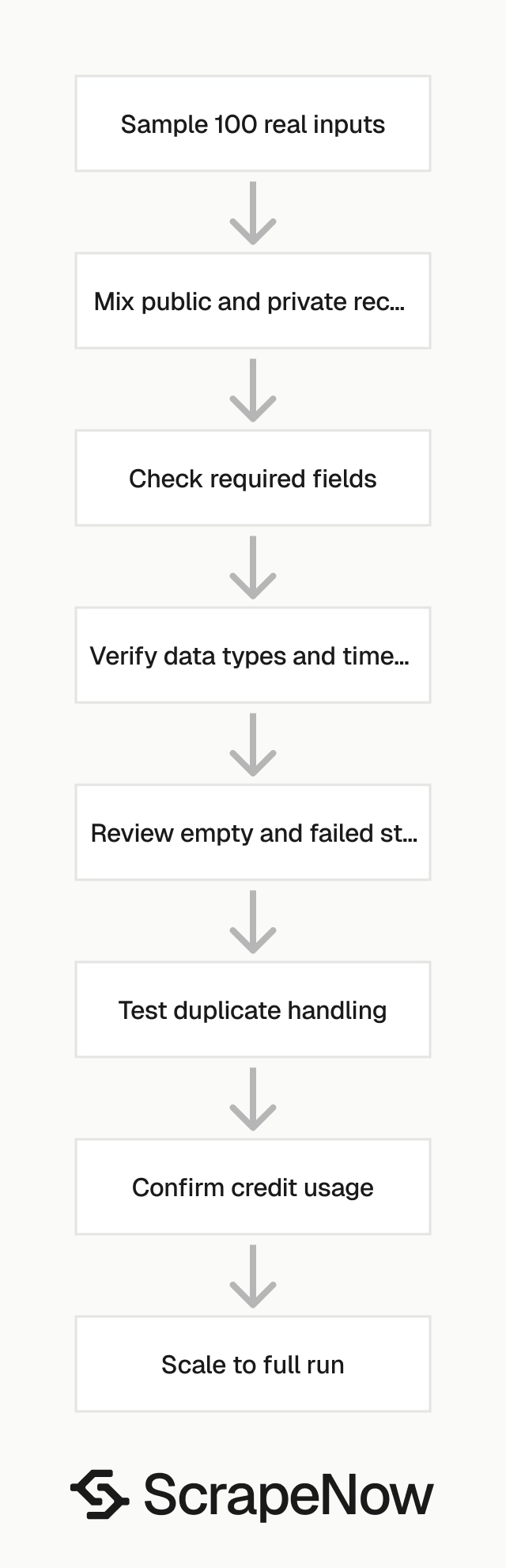
Run a small test before sending a large batch. Use 100 rows that look like your real workload.
Include public accounts, private accounts, deleted posts, high-engagement posts, low-engagement posts, and profiles with unusual bios. Add creators from different regions if location affects your reporting.
Check the returned schema against your storage table. Verify required fields, data types, timestamp format, URL normalization, and row-level status values.
Use this checklist before scaling:
| Check | What to verify |
|---|---|
| Input format | URLs, usernames, and source pages match the product page rules |
| Required fields | Your pipeline receives the fields it needs for joins and reports |
| Empty values | Private profiles and deleted posts get clean statuses |
| Duplicates | Repeated URLs do not create duplicate production records |
| Cost | Returned rows match your expected credit usage |
| Refresh behavior | Re-running the same input updates existing records |
This test gives your data team the schema they need for storage, joins, and reporting. It also shows how the scraper handles edge cases before you commit a larger run.
Add one negative test for each input type. Submit one malformed URL, one unsupported username, and one deleted record so your pipeline sees the failure shape.
Check numeric fields before using them in dashboards. Followers, likes, comments, and views should arrive as numbers or typed null values, not formatted strings.
Timestamp handling deserves a separate check. Store UTC timestamps when available, and keep the source timestamp if your reporting team needs Instagram’s displayed time.
Common schema choices
Instagram scraping works better when your schema separates identities, content, and run metadata. Profiles and posts change at different rates, so they should not share one wide table.
A practical profile table stores profile URL, username, display name, bio, follower count, following count, post count, profile image URL, status, and last seen time. Add source fields if the profile came from a CRM, search run, or manual upload.
A post table stores post URL, author username, author profile URL, caption, hashtags, media URLs, publish time, likes, comments, status, and last refreshed time. If you track campaigns, add campaign ID as a separate column.
A Reel table should include Reel URL, creator URL, caption, publish time, views, likes, comments, media URL, audio fields, status, and last refreshed time. Keep audio fields nullable because Instagram does not expose the same data for every Reel.
Run metadata belongs in its own table. Store run ID, scraper name, submit time, completion time, credits used, input count, returned row count, and failure count.
This schema makes backfills safer. You can rerun one scraper, update one table, and keep the rest of your data model untouched.
Operational tips for recurring runs
Recurring Instagram jobs need consistent inputs. If the input list changes every run, your trend lines become harder to interpret.
Keep a versioned watchlist for creators, competitors, and campaign posts. Each record should have a start date, optional end date, source, and owner.
Use staging tables for every scraper response. Validate the staging rows, then merge them into production tables with stable keys.
Alert on status changes, not only run failures. A completed run with 70 percent private or empty results needs review even if the API call succeeded.
Track row counts by status over time. A sudden rise in input_invalid, empty, or rate_limited statuses points to an upstream data issue or extraction issue.
Keep retry logic conservative. Retry temporary failures, and stop retrying permanent failures such as deleted posts or invalid URLs.
Start with the right Instagram scraper
If you have post URLs, start with the Extract Instagram post data. Send a 100-row sample, verify the returned fields, then run the same input format at full volume.
If you are tracking short-form video, start with the Pull Instagram Reels data. Run profile extraction first when you need to filter inactive creators before paying for Reel rows.
If your inputs are usernames, start with the profile search scraper. If your inputs are profile URLs, start with profile extraction.
For broader platform coverage, use the Browse all 86+ scrapers to pick the exact Instagram extractor. Keep the first run realistic because a clean sample beats a polished demo file.
The next step is concrete. Open the Extract Instagram post data, submit 100 real post URLs, and compare the returned rows against your reporting schema.


