ScrapeNow returns one structured post record per Instagram URL. Use the primary path when your pipeline already has post links.
Instagram posts scraper options
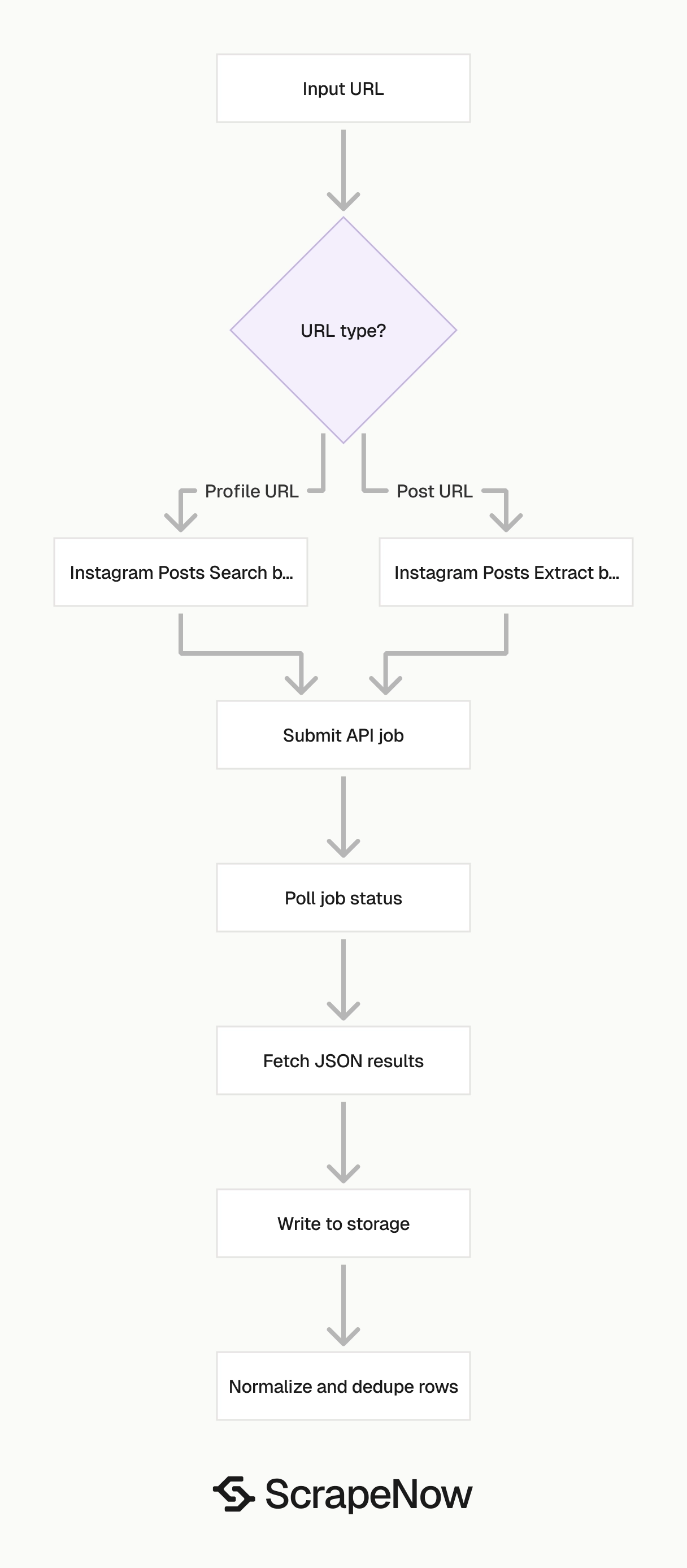
ScrapeNow has two Instagram post scrapers for the main collection paths.
| Scraper | Input | Use it when |
|---|---|---|
| Extract Instagram post data | A single Instagram post URL | You already have post URLs and need structured data for each post |
| Search Instagram posts by URL | An Instagram account URL | You need posts from a profile, with optional date and post type filters |
Pick the scraper based on the URL you already have. A post URL goes to Extract by URL. A profile URL goes to Search by URL.
The extract-by-URL scraper takes one required field. Send one public post URL per input object.
Account feed collection usually comes from scheduled monitoring. That path needs caps, date windows, and media type filters so each run stays bounded.
Get the post URL for Extract by URL
The url value must start with https://www.instagram.com/. Pass the public post URL from the browser address bar.
Remove shortened links, mobile share links, and tracking parameters before submission. Normalized URLs give you stable dedupe keys and cleaner audit logs.
Open Instagram.
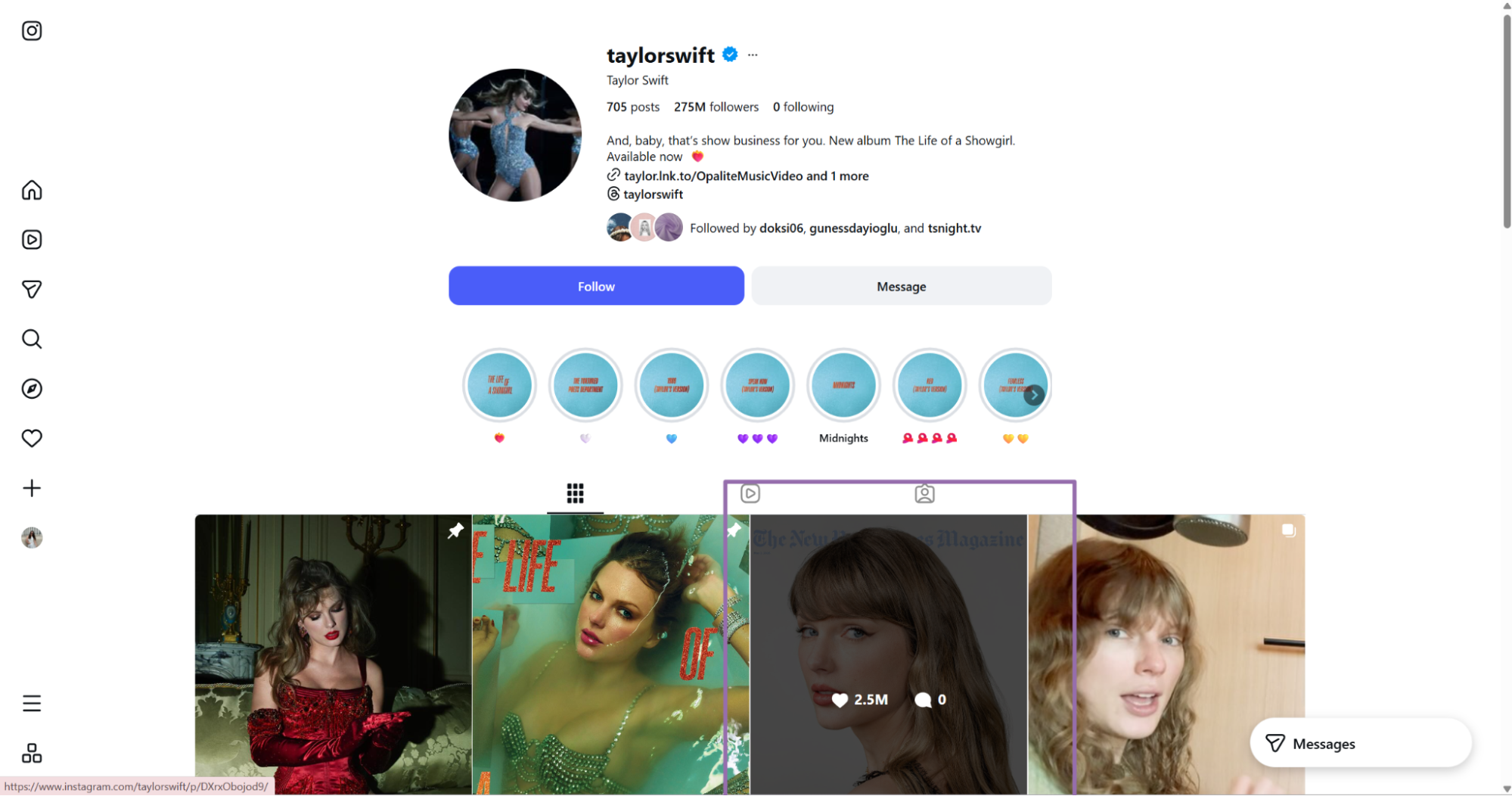
https://www.instagram.com/p/DS3DNTljQ3g
The same browser flow works from the Instagram home page.

That audit split matters during incident review. Operators can see the source value, the normalized value, and the canonical post URL returned by ScrapeNow.
Run the API request
Use this Python script. Replace YOUR_API_KEY with your ScrapeNow API key.
The script starts a scrape job, polls every 5 seconds, downloads JSON results, and writes the output to disk. It creates the output directory before saving the file, which prevents file path errors in clean environments.
"""
Configuration:
    - Set SCRAPER_SLUG to the scraper you want to run.
    - Set SCRAPER_INPUTS to the list of input dicts matching that scraper's schema.
    - Set API_KEY to your scraper API key.
"""

import sys
import time
import json
import requests
import os
from typing import Any

API_KEY = "YOUR_API_KEY"

SCRAPER_SLUG = "instagram-posts-extract-by-url"

SCRAPER_INPUTS = [
    {
        "url": "https://www.instagram.com/p/DS3DNTljQ3g"
    }
]


BASE_URL = "https://api.scrapenow.io/api/v1/scraping"
TIMEOUT_SECONDS = 3600
POLL_INTERVAL = 5
SPINNER = "|/-\\"


def build_headers(api_key: str, content_type: str | None = None) -> dict:
    headers = {"Authorization": f"Bearer {api_key}"}
    if content_type:
        headers["Content-Type"] = content_type
    return headers


def trigger_scrape(slug: str, inputs: list[dict]) -> str:
    url = f"{BASE_URL}/scrape?scraper={slug}"
    response = requests.post(
        url,
        headers=build_headers(API_KEY, "application/json"),
        json={"inputs": inputs},
    )
    response.raise_for_status()
    return response.json()["data"]["job_id"]


def poll_until_done(job_id: str) -> str:
    start = time.time()
    i = 0
    while True:
        elapsed = time.time() - start
        if elapsed > TIMEOUT_SECONDS:
            print(f"\nTimeout after {TIMEOUT_SECONDS}s")
            sys.exit(1)
        response = requests.get(
            f"{BASE_URL}/jobs/{job_id}",
            headers=build_headers(API_KEY),
        )
        response.raise_for_status()
        data = response.json()
        status = data["data"]["status"]
        mins, secs = divmod(int(elapsed), 60)
        sys.stdout.write(
            f"\r[{SPINNER[i % 4]}] Waiting... {status} ({mins}m {secs:02d}s)  "
        )
        sys.stdout.flush()
        if status in ("completed", "failed"):
            print()
            return status
        time.sleep(POLL_INTERVAL)
        i += 1


def fetch_results(job_id: str) -> dict:
    response = requests.get(
        f"{BASE_URL}/jobs/{job_id}/results?format=json",
        headers=build_headers(API_KEY),
    )
    response.raise_for_status()
    return response.json()


def save_results(data: dict, slug: str) -> str:
    os.makedirs("output", exist_ok=True)
    filename = os.path.join("output", f"{slug}.json")
    with open(filename, "w", encoding="utf-8") as f:
        json.dump(data, f, indent=2, ensure_ascii=False)
    return filename


def main() -> None:
    print(f"Triggering scraper: {SCRAPER_SLUG}")
    job_id = trigger_scrape(SCRAPER_SLUG, SCRAPER_INPUTS)
    print(f"Job started: {job_id}")
    final_status = poll_until_done(job_id)
    if final_status != "completed":
        print(f"Job failed with status: {final_status}")
        sys.exit(1)
    print("Fetching results...")
    results = fetch_results(job_id)
    output_file = save_results(results, SCRAPER_SLUG)
    print(f"Results saved to: {output_file}")


if __name__ == "__main__":
    main()
The TIMEOUT_SECONDS value is set to 3600 seconds. That gives larger batches and slow upstream responses enough room to finish before your runner exits.
Use the same polling loop in production. Queue the job, persist the job_id, then fetch results after the status changes to completed.
Persist the job ID before polling. If the runner dies mid-job, another worker can resume by reading that ID and calling the job endpoint.
The same API pattern works for Search Instagram posts by URL. Change the scraper slug and input values in the code for each scraper.
For the first test, run one known public post through Extract by URL. Check the JSON shape, then add validation and batch submission.
Instagram posts scraper for account feeds
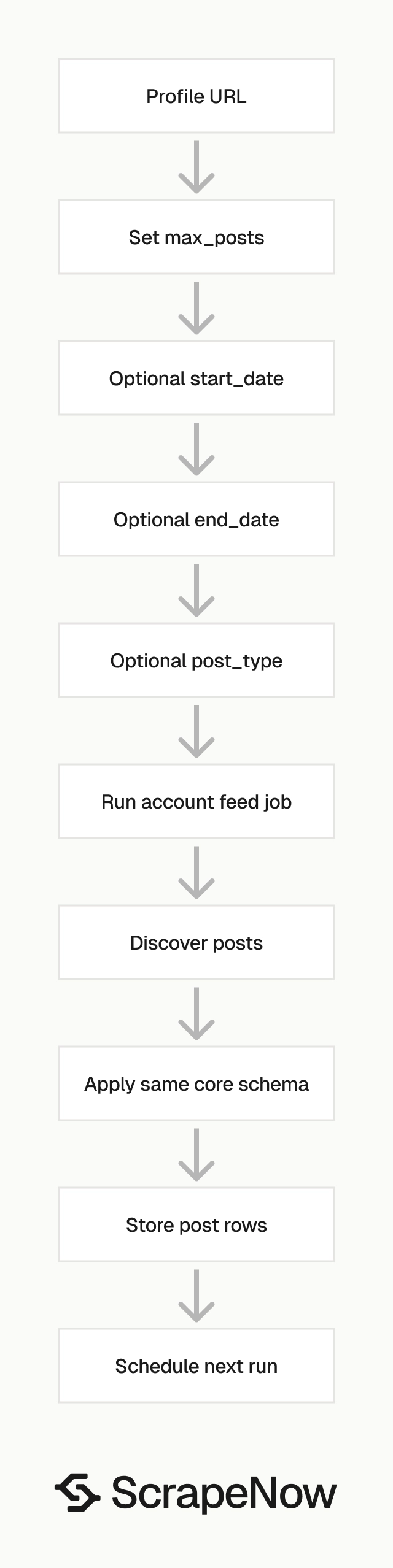
The account search scraper takes an Instagram profile URL. It returns posts from that profile, with optional filters for count, date range, and media type.
urlis the Instagram account URL. It must start withhttps://www.instagram.com/.max_postsis optional. For API usage, pass it as an integer.start_dateis optional. For API usage, pass it inYYYY-MM-DDformat.end_dateis optional. For API usage, pass it inYYYY-MM-DDformat.post_typeis optional. If set toPost, the scraper returns posts. If set toReels, the scraper returns Reels. For API usage, pass the exact value as a string.
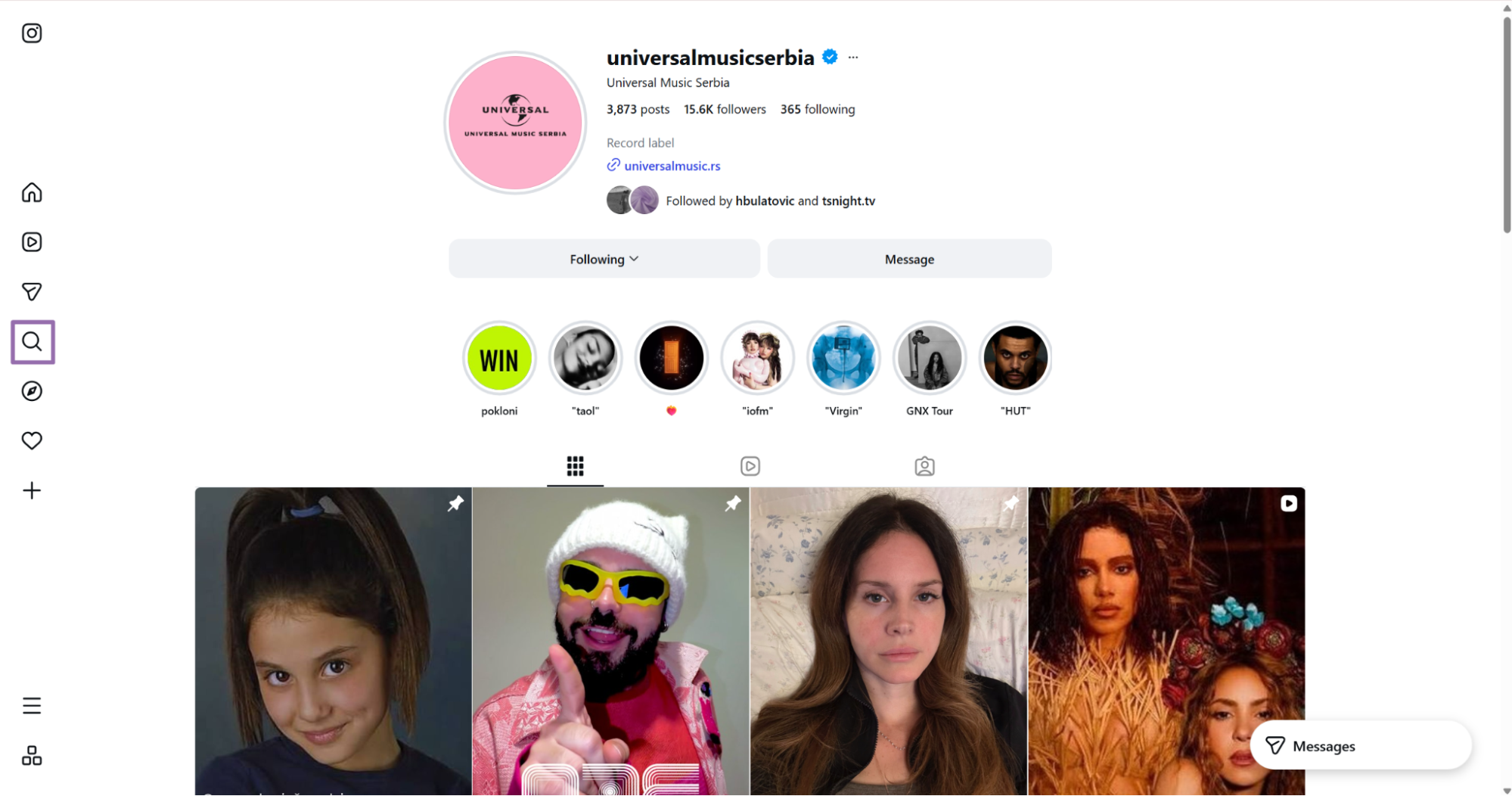
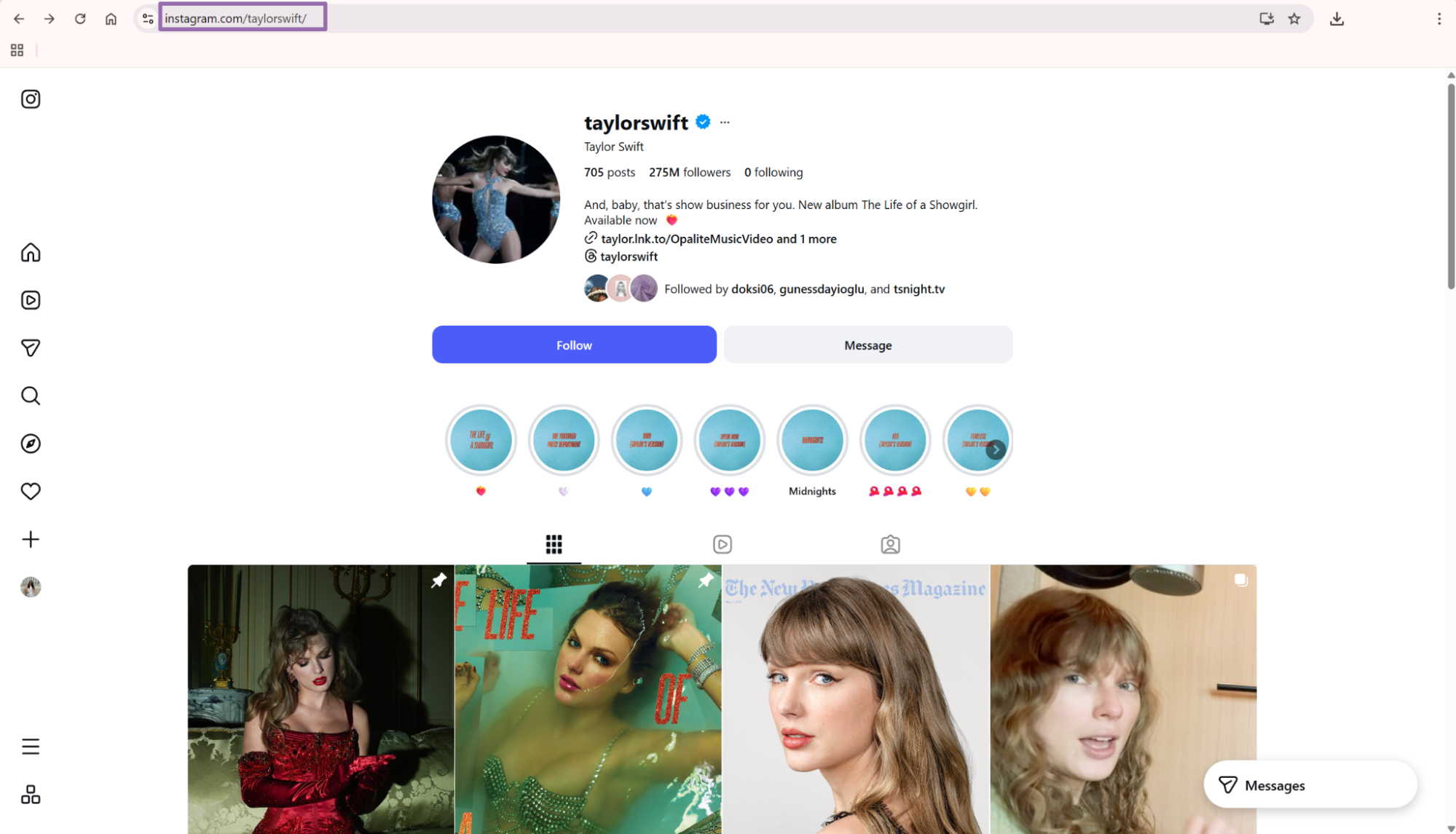
To get the account URL:
Open Instagram.
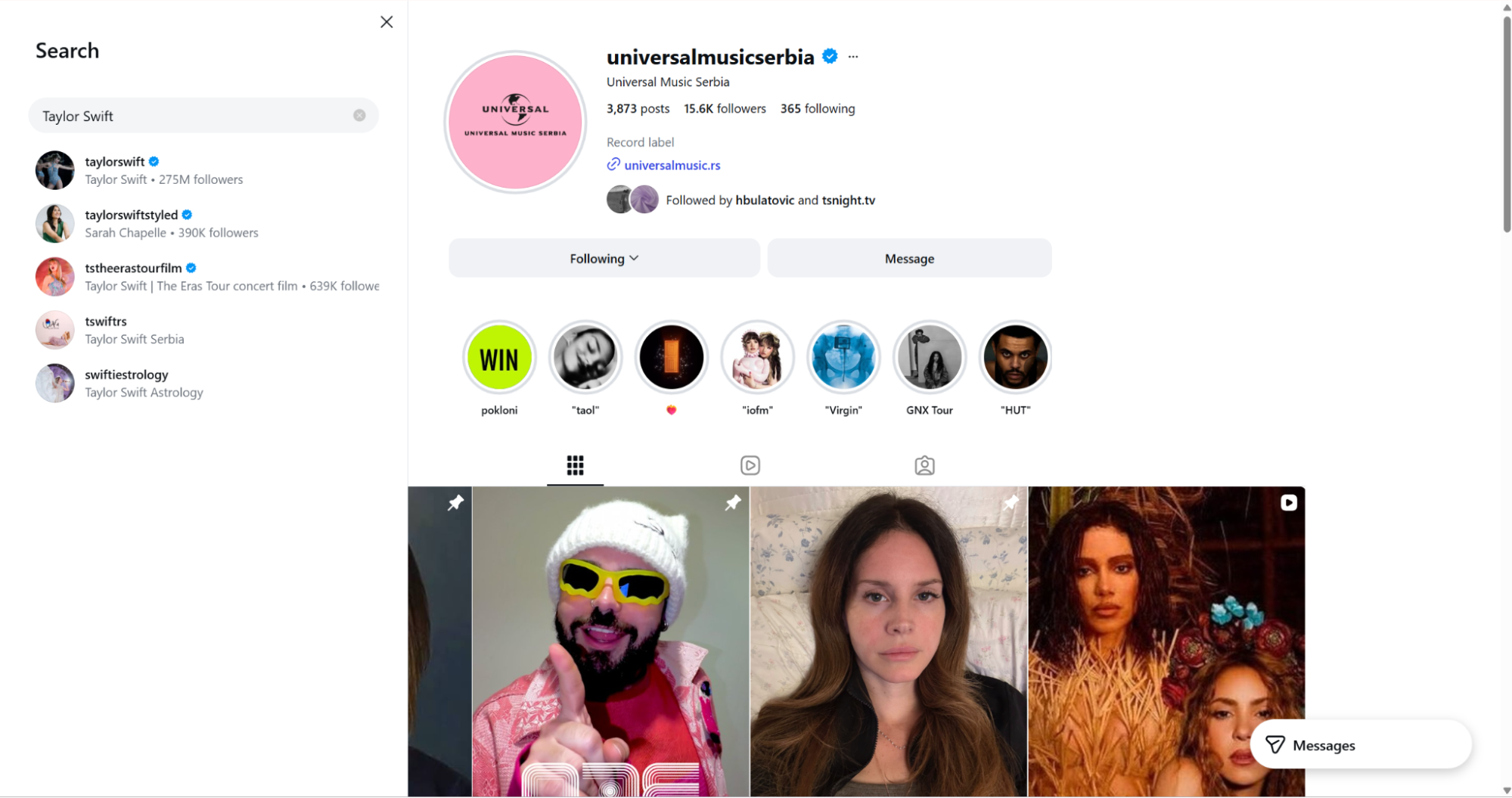
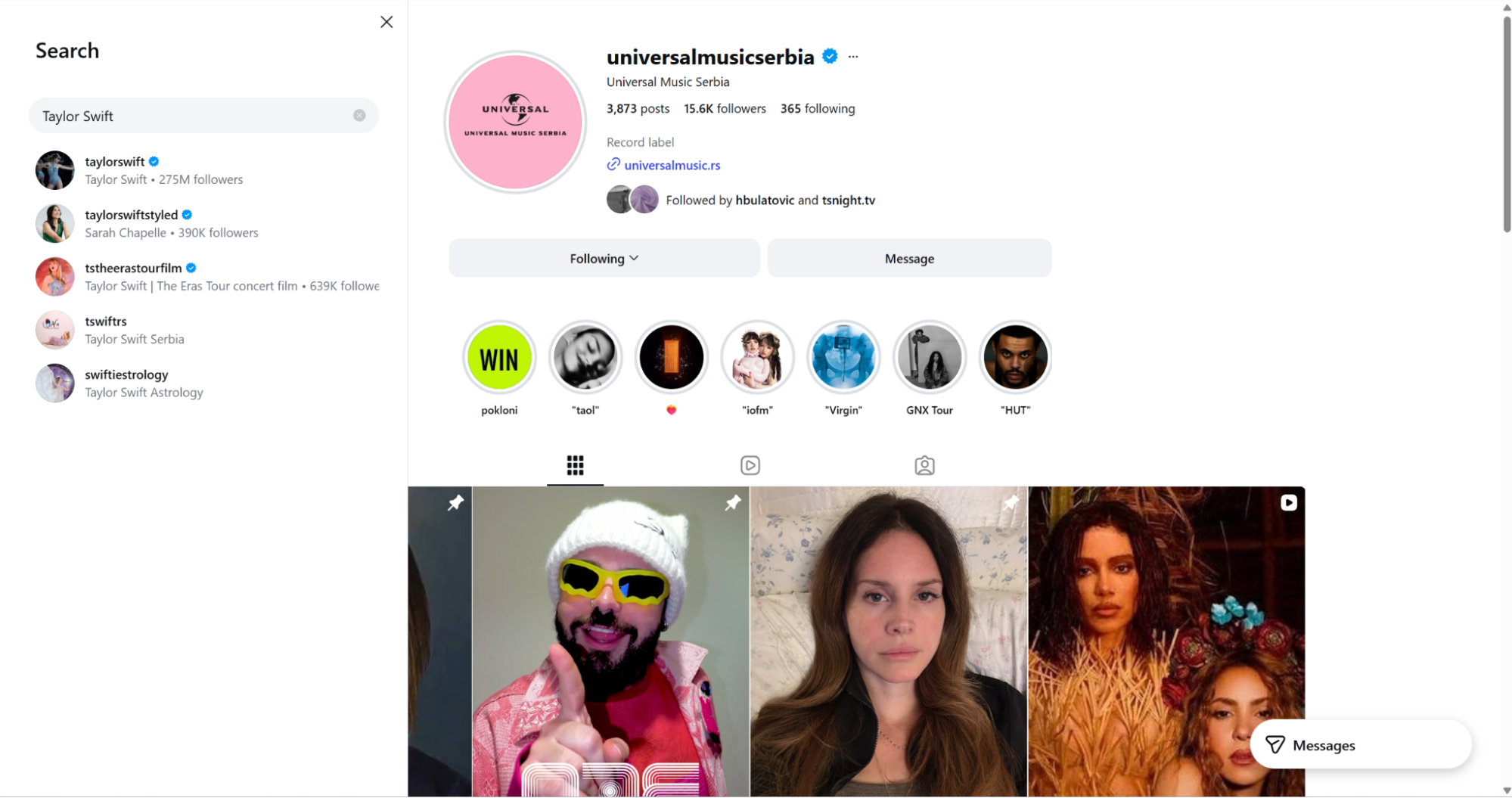
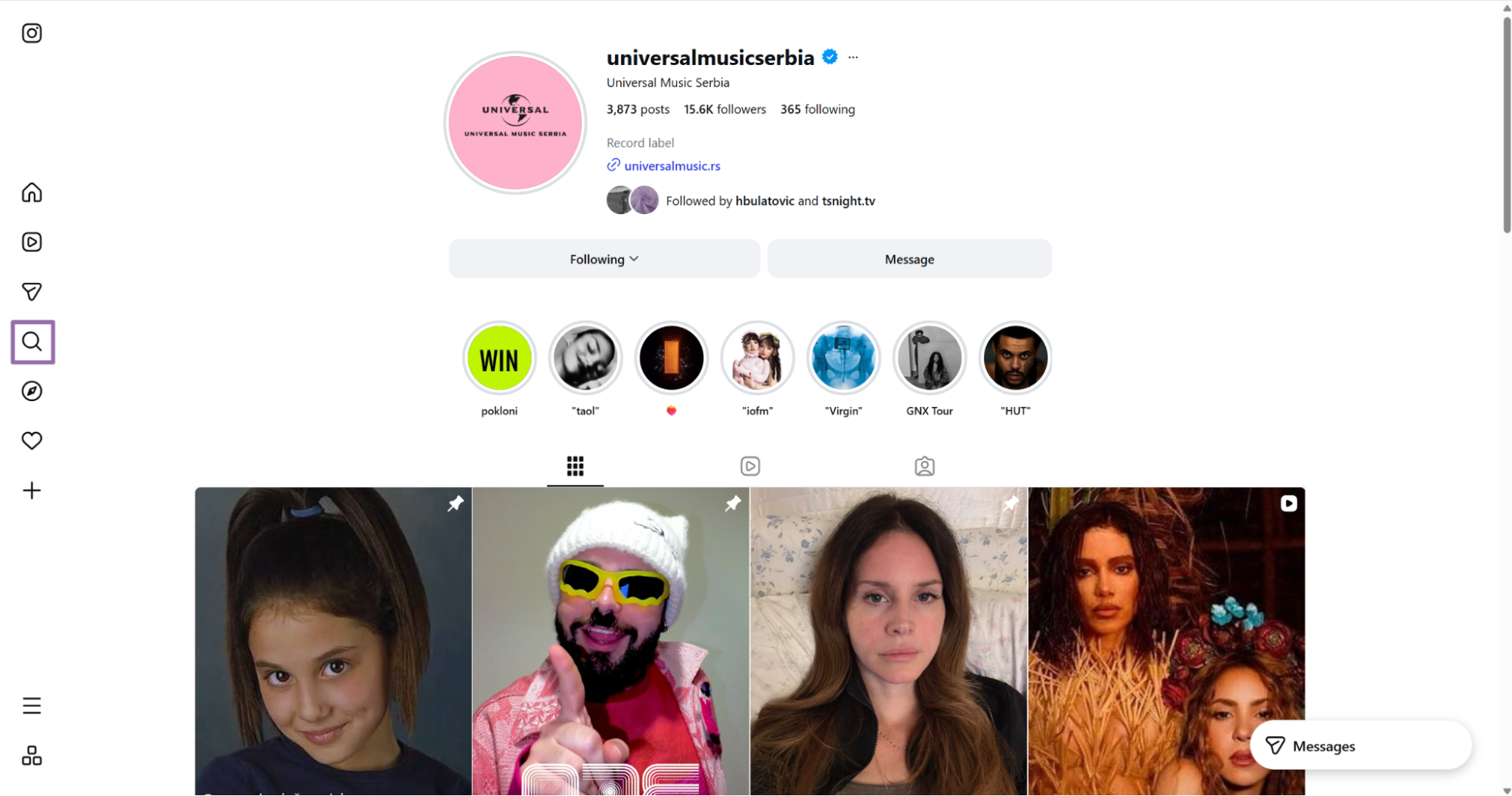
Open the Instagram account whose posts you want to scrape In the right-side navigation bar, click the search icon.
Search for an account, such as Taylor Swift.
Open the account and copy the URL from the browser address bar.
SCRAPER_SLUG = "instagram-posts-search-by-url"

SCRAPER_INPUTS = [
    {
        "url": "https://www.instagram.com/taylorswift/",
        "max_posts": 25,
        "start_date": "2025-01-01",
        "end_date": "2025-12-31",
        "post_type": "Post"
    }
]
Use the Reels filter when you need short-form video posts from a profile. For a dedicated Reels workflow, Pull Instagram Reels data pulls Reels from a profile URL.
Set max_posts to match the ingestion job. A daily monitor often needs 10 to 50 posts per profile.
Backfill jobs need a date range and a higher cap. Keep those runs separate from daily monitoring so retries and freshness checks stay predictable.
Date filters work best when you store the last successful collection date per account. On the next run, send that date as start_date and keep the output idempotent with url as the dedupe key.
Use a wider date range for historical collection. Use a narrow date range for scheduled monitoring so you avoid rereading the same feed window.
For scheduled runs, store account_url, last_successful_run_at, and the last accepted post date. Those fields let you rerun missed windows without guessing.
Instagram posts scraper API output
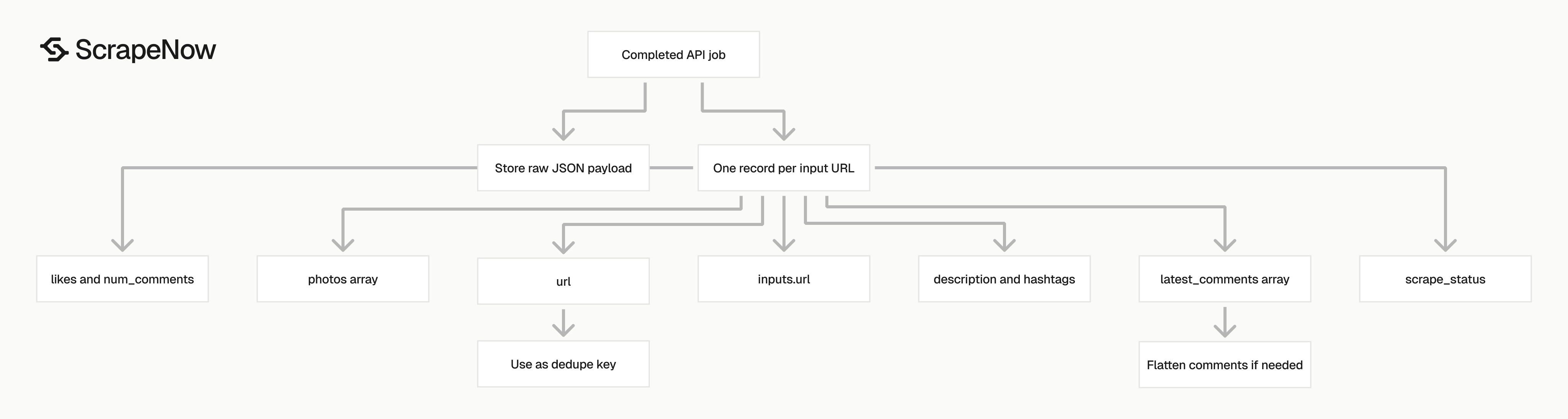
A completed extract-by-URL job returns an array of records. This trimmed sample shows the main fields.
[
  {
    "inputs": {
      "url": "https://www.instagram.com/p/DS3DNTljQ3g"
    },
    "scrape_status": "success",
    "url": "https://www.instagram.com/p/DS3DNTljQ3g",
    "user_posted": "coldplay",
    "description": "It’s almost time. RSVP via link in bio and catch #MOTSWT from Wembley Stadium in immersive VR on @MetaQuest or in the @MetaHorizon app, 30 December, 7pm GMT / 11am PT.",
    "hashtags": [
      "#MOTSWT"
    ],
    "num_comments": 510,
    "date_posted": "2025-12-29T20:06:03.000Z",
    "likes": 138987,
    "photos": [
      "https://scontent-lga3-2.cdninstagram.com/v/t51.82787-15/607549630_18547170190019909_296158325372156168_n.jpg"
    ],
    "latest_comments": [
      {
        "comments": "Dear Coldplay,\n\nI truly hope your music brings you close to me soon, wherever in the world that may be. I dream of buying the first plane ticket to see you live.\n\nYour songs bring peace to my heart, and I believe they will also reunite me with the love of my life, who lives in Australia. We promised each other that we would meet again at one of your concerts.\n\nThat is why your music is our greatest hope. We wait with all the love and excitement in the world for the day this dream comes true. ❤️✨🎶✈️",
        "user_commenting": "rebollo_1",
        "date_of_comment": "2026-05-11",
        "likes": 0,
        "profile_picture": "https://scontent-lga3-1.cdninstagram.com/v/t51.82787-19/619354332_18507589237072959_950454214335838951_n.jpg"
      },
      {
        "comments": "🇩🇴🇩🇴🇩🇴🇩🇴🇩🇴",
        "user_commenting": "elimaria2662",
        "date_of_comment": "2026-05-11",
        "likes": 0,
        "profile_picture": "https://scontent-lga3-2.cdninstagram.com/v/t51.2885-19/508393238_18467111716073177_3833900773790517128_n.jpg"
      }
    ]
  }
]
What data you get back
The response uses one post record per input URL. For search-by-URL jobs, each discovered post follows the same shape, so one storage model covers both scrapers.
inputs.url stores the URL you sent to the API. Keep this field in your database because it gives you a stable join key between input batches and output rows.
scrape_status tells you whether that input succeeded. Treat any value other than success as a failed row and retry it later with backoff.
url is the canonical post URL returned by the scraper. Use it for deduplication when your input list contains the same post more than once.
user_posted is the Instagram username that published the post. If you also need profile metadata, pair the post scraper with Get Instagram profile data.
description contains the caption text. It includes mentions, emojis, line breaks, and hashtags as they appear in the post.
hashtags is an array extracted from the caption. This removes a regex pass over the description field for basic hashtag analysis.
num_comments and likes are engagement counters. Store them as integers because string counters force casts in every sort, aggregation, and dashboard query.
date_posted is an ISO timestamp. Convert it once at ingestion time if your warehouse uses a native timestamp type.
photos is an array of media URLs. A carousel can return multiple URLs, so model this field as a child table or JSON array.
latest_comments contains recent comment objects. Each object includes comments, user_commenting, date_of_comment, likes, and profile_picture.
Store the raw JSON payload during your initial rollout. It gives you a fallback when you add fields, reprocess nested comments, or compare output after schema changes.
For analytics tables, keep normalized fields and raw payloads side by side. The normalized fields serve dashboards, and the raw payload protects you from one-way transformations.
Add collected_at during ingestion. Instagram engagement counts change, so a count without a collection timestamp creates weak time-series data.
Also store scraper_slug and job_id on every row. Those two fields make debugging easier when the same table receives multiple Instagram scraper outputs.
Ready to get this data? Extract Instagram post data.
Production tips
Validate inputs before sending them to the API. Invalid URLs consume credits and create unnecessary retries.
Run different validators for post URLs and profile URLs. A post URL starts with /p/, while a profile URL contains one username path segment.
from urllib.parse import urlparse

def validate_instagram_post_url(url: str) -> None:
    parsed = urlparse(url)

    if parsed.scheme != "https":
        raise ValueError(f"URL must use https: {url}")

    if parsed.netloc != "www.instagram.com":
        raise ValueError(f"URL must use www.instagram.com: {url}")

    if not parsed.path.startswith("/p/"):
        raise ValueError(f"URL must be an Instagram post path: {url}")


urls = [
    "https://www.instagram.com/p/DS3DNTljQ3g",
    "https://www.instagram.com/p/ABC123/"
]

for url in urls:
    validate_instagram_post_url(url)
Add a separate validator for profile URLs if you run account search jobs. Profile URLs do not start with /p/, so route them through a different check.
from urllib.parse import urlparse

def validate_instagram_profile_url(url: str) -> None:
    parsed = urlparse(url)

    if parsed.scheme != "https":
        raise ValueError(f"URL must use https: {url}")

    if parsed.netloc != "www.instagram.com":
        raise ValueError(f"URL must use www.instagram.com: {url}")

    path_parts = [part for part in parsed.path.split("/") if part]
    if len(path_parts) != 1:
        raise ValueError(f"URL must be an Instagram profile path: {url}")


validate_instagram_profile_url("https://www.instagram.com/taylorswift/")
Deduplicate before you submit a batch. Instagram links often arrive with trailing slashes, query strings, and tracking parameters.
Normalize the URL, validate the normalized value, and store both values. The original URL helps audits, and the normalized URL keeps dedupe consistent.
from urllib.parse import urlparse

def normalize_instagram_url(url: str) -> str:
    parsed = urlparse(url)
    path = parsed.path.rstrip("/")
    return f"https://www.instagram.com{path}"

raw_urls = [
    "https://www.instagram.com/p/DS3DNTljQ3g/",
    "https://www.instagram.com/p/DS3DNTljQ3g?utm_source=ig_web_copy_link",
    "https://www.instagram.com/p/XYZ987/"
]

deduped_urls = sorted({normalize_instagram_url(url) for url in raw_urls})

SCRAPER_INPUTS = [{"url": url} for url in deduped_urls]

print(SCRAPER_INPUTS)
Expected output:
[
  {
    "url": "https://www.instagram.com/p/DS3DNTljQ3g"
  },
  {
    "url": "https://www.instagram.com/p/XYZ987"
  }
]
Normalize URLs before validation if your source data includes query strings. Validate the normalized URL, then write both the original and normalized values to your audit table.
Store comments separately when you care about comment-level analysis. JSON exports work with nested comments, and relational tables work better for filtering by commenter, comment date, and comment likes.
def flatten_post_record(record: dict) -> tuple[dict, list[dict]]:
    post = {
        "url": record.get("url"),
        "input_url": record.get("inputs", {}).get("url"),
        "scrape_status": record.get("scrape_status"),
        "user_posted": record.get("user_posted"),
        "description": record.get("description"),
        "hashtags": record.get("hashtags", []),
        "num_comments": record.get("num_comments"),
        "likes": record.get("likes"),
        "date_posted": record.get("date_posted"),
        "photos": record.get("photos", [])
    }

    comments = []
    for comment in record.get("latest_comments", []):
        comments.append({
            "post_url": record.get("url"),
            "user_commenting": comment.get("user_commenting"),
            "comments": comment.get("comments"),
            "date_of_comment": comment.get("date_of_comment"),
            "likes": comment.get("likes"),
            "profile_picture": comment.get("profile_picture")
        })

    return post, comments
Handle partial failures at the row level. Retry failed rows instead of rerunning the full batch.
def split_success_and_failed(records: list[dict]) -> tuple[list[dict], list[dict]]:
    success = []
    failed = []

    for record in records:
        if record.get("scrape_status") == "success":
            success.append(record)
        else:
            failed.append({
                "url": record.get("inputs", {}).get("url"),
                "status": record.get("scrape_status")
            })

    return success, failed


results = [
    {"inputs": {"url": "https://www.instagram.com/p/DS3DNTljQ3g"}, "scrape_status": "success"},
    {"inputs": {"url": "https://www.instagram.com/p/INVALID"}, "scrape_status": "failed"}
]

success_rows, failed_rows = split_success_and_failed(results)

retry_inputs = [{"url": row["url"]} for row in failed_rows if row.get("url")]
print(retry_inputs)
Cap retries at 3 attempts with backoff. Log every failed row with input_url, scrape_status, job_id, and attempt count.
Use a fixed schema from day one. These fields cover the extract-by-URL response and also work when you add the search-by-URL scraper later.
{
  "post_url": "string",
  "input_url": "string",
  "scrape_status": "string",
  "user_posted": "string",
  "description": "string",
  "hashtags": ["string"],
  "num_comments": "integer",
  "likes": "integer",
  "date_posted": "timestamp",
  "photos": ["string"],
  "latest_comments": [
    {
      "comments": "string",
      "user_commenting": "string",
      "date_of_comment": "date",
      "likes": "integer",
      "profile_picture": "string"
    }
  ]
}
For warehouses, split this into two tables: instagram_posts and instagram_post_comments, joined on post_url. Use nullable columns for engagement counters since Instagram can hide like counts.
Add schema checks to CI. Load one saved ScrapeNow output record and verify each field type before deployment.
Batch design
Start with a small batch and inspect the output before scaling. Ten URLs are enough to validate schema mapping, retry behavior, and media URL handling.
Group batches by source. Creator monitoring, hashtag research, and paid campaign checks usually have different retry rules and freshness requirements.
Creator monitoring usually runs on a schedule. Campaign checks often run after URLs arrive from an internal tracker or UTM report.
Backfills behave differently from monitors. Keep backfills in separate jobs so a large historical run does not delay daily collection.
Keep a job table with these fields:
job_idscraper_slugsubmitted_atcompleted_atstatusinput_countsuccess_countfailed_count
Keep a row table with these fields:
job_idinput_urlpost_urlscrape_statusattemptcreated_at
This structure makes reruns safer. You can retry only failed rows, compare output across runs, and track which upstream source produced each URL.
Store the normalized input URL in the row table. Store the original source URL in a separate audit column if upstream systems send links with parameters.
Add a unique key on post_url for post-level tables. Add a compound key on post_url, user_commenting, date_of_comment, and comments for recent comment rows.
Use batch IDs from your own system as well as ScrapeNow job IDs. Your batch ID connects the scrape job to the upstream source, queue message, or scheduled run.
Keep batch size aligned with your retry model. Smaller batches make row-level replay easier, while larger batches reduce queue overhead.
For recurring jobs, record the scheduler run ID. That field connects your cron run, queue message, ScrapeNow job, and warehouse load.
For campaign reporting, tag each input row with campaign ID and creator ID before submission. Do that upstream so the scrape output joins cleanly later.
Common failure cases
Invalid URLs are the easiest failures to prevent. Reject non-HTTPS URLs, non-Instagram hosts, mobile share URLs, and empty path values before submission.
Private profiles return less data than public profiles. Keep those rows in your audit table so operators can separate access limitations from transient failures.
Deleted posts return failed rows or incomplete records. Retry once, then mark the row as unavailable if the post stays gone.
Duplicate inputs inflate costs and complicate reporting. Normalize URLs and dedupe them before building SCRAPER_INPUTS.
Schema drift in downstream code causes silent reporting errors. Keep a contract test that loads one known output record and verifies field types before deployment.
Media URLs can expire or change. Store the URL you receive for traceability, and download media separately if your workflow needs long-term media storage.
Engagement counts change over time. Store collected_at with every post row so dashboards can compare counts from the same collection window.
Profile URLs and post URLs fail for different reasons. Keep separate failure buckets so operators do not debug a profile validator with post URL examples.
Rate of change also differs by account type. Large creator accounts can add posts and comments between two collection runs, so compare by collection timestamp.
Pricing
ScrapeNow charges per returned row. One row costs one credit, starting at $0.04 per credit for small runs and dropping with volume. No monthly contracts, no proxy fees, no charges for failed rows. See the pricing page for current rates.


