
Indeed job search returns title, company, location, salary, URL, and posting metadata.
Indeed also has company pages, hiring locations, review counts, salary snippets, office data, and employer profile URLs. Teams use that data for labor market tracking, recruiting products, account research, lead lists, and competitive hiring analysis.
This Indeed scraper hub maps each data type to the right ScrapeNow scraper. Use it to choose between job search extraction, job URL enrichment, company keyword search, company-list enrichment, and industry-state company discovery.
What Indeed data is worth extracting
Indeed job pages give you a live hiring signal. A single job record can include title, company, location, salary range, employment type, posting date, job description, job URL, and source metadata.
That record tells you which company is hiring, which role is open, and which market the role targets. It also shows whether the employer describes the role as remote, hybrid, contract, full-time, or part-time.
Indeed company pages add employer-level context. Common fields include company name, industry, headquarters, rating, review count, job count, office locations, and public profile URLs.
Company data fits account research, territory planning, and employer matching. A sales team can find employers hiring in a category, then enrich each account with public Indeed profile data.
A labor market tool can track which employers expand across states. A recruiting platform can connect job volume to employer profiles, then rank accounts by hiring activity.
Timing matters because job boards change daily. Indeed Hiring Lab’s 2026 US Jobs and Hiring Trends Report says job openings are expected to stabilize in 2026.
That makes week-by-week job posting data practical for tracking hiring changes by role, market, and industry. A weekly snapshot also separates short-term posting noise from repeated hiring patterns.
For example, one software company posting five sales roles in Dallas once tells you less than the same company posting similar roles for six straight weeks. Recurrence matters because it signals planned hiring, backfill pressure, or an active territory buildout.
The same logic applies to company data. A company page with rising job count, more locations, and active role clusters gives your pipeline a stronger signal than a static employer profile.
Why scraping Indeed breaks
Indeed changes markup often enough that static CSS selectors fail. A scraper that works on Monday can return blank fields by Friday if it relies on generated class names.
The platform also uses bot checks, request throttling, geo-specific results, and login prompts on selected paths. Search pages and job detail pages behave differently, so one generic crawler wastes requests and misses fields.
Search result pages expose summary fields. Detail pages expose the full job description and fields that search cards truncate.
Company pages have a separate layout and a different failure pattern. Treating every Indeed URL as the same page type produces incomplete rows, duplicate retries, and inflated run time.
The main failure modes are predictable.
| Challenge | What happens | Practical fix |
|---|---|---|
| Rate limits | Requests return empty pages, soft blocks, or repeated challenge pages | Rotate sessions and throttle per search path |
| Geo differences | The same keyword returns different jobs by country, state, or city | Pass explicit location inputs |
| Dynamic content | Fields load after the first HTML response | Use a scraper built for the target page type |
| Markup changes | Selectors stop matching job cards or company blocks | Use maintained extractors with breakage fixes |
| Login prompts | Some paths show partial data or blocked profile sections | Avoid paths that require user-specific access |
| Duplicate URLs | Search results repeat the same job across similar queries | Dedupe before URL enrichment |
| Truncated fields | Search cards cut descriptions, salary text, or metadata | Enrich selected job URLs after search |
ScrapeNow maintains purpose-built Indeed extractors. You call a data endpoint, and ScrapeNow handles parsing, retries, proxy routing, and page-type fixes for each run.
That matters in production. Your pipeline should fail because the upstream job board returned no matching jobs, rather than because a generated class name changed overnight.
The clean pattern is simple. Use search scrapers for discovery, store stable URLs, dedupe, then enrich the URLs that need full detail.
Do the same for employer records. Use company search for discovery, then store the matched profile URL as the stable identifier for later refreshes.
ScrapeNow's Indeed scrapers
ScrapeNow lists 86+ pre-built scrapers across 14 platforms, including Indeed job and company extractors. For Indeed, the scrapers split into job extraction and company extraction because those pages use different inputs, layouts, and failure modes.
Each scraper returns structured rows. Pricing is credit-based, so 1 returned row costs 1 credit.
The split keeps your pipeline easier to debug. If a job URL enrichment run fails, inspect the job URL path and the source URL list.
If a company-list run returns no match, inspect the employer input, name normalization, and match URL. Those failure paths need different logs and different retry rules.
A clean Indeed pipeline stores three fields for every row. Keep the original input, the matched Indeed URL, and the returned structured fields.
That structure makes refresh jobs safer. You can rerun the same inputs, compare returned URLs, and catch profile changes before they pollute downstream tables.
Example API input and response shape
Run jobs through the same input shape you plan to schedule later. Start with one keyword and one location, verify the returned fields, then expand the query set.
A keyword job search payload should keep search terms explicit:
{
  "scraper": "indeed-jobs-search-by-keyword",
  "input": {
    "keyword": "data engineer",
    "location": "Austin, TX",
    "country": "US",
    "max_results": 25
  }
}
A returned row should be ready for storage without HTML parsing in your app:
{
  "job_title": "Data Engineer",
  "company_name": "Example Analytics",
  "location": "Austin, TX",
  "employment_type": "Full-time",
  "salary": "$120,000 - $145,000 a year",
  "posted_at": "2026-01-12",
  "job_url": "https://www.indeed.com/viewjob?jk=example123",
  "source": "indeed",
  "description": "Build and maintain data pipelines for product analytics."
}
For production, add your own run ID, search key, and ingestion timestamp around the ScrapeNow output. Those fields make backfills, dedupe, and audits easier.
A URL enrichment payload uses deterministic input:
{
  "scraper": "indeed-jobs-extract-by-url",
  "input": {
    "urls": [
      "https://www.indeed.com/viewjob?jk=example123",
      "https://www.indeed.com/viewjob?jk=example456"
    ]
  }
}
That pattern separates discovery from enrichment. Search runs find candidates, and URL runs resolve the exact pages you selected.
Indeed jobs search by keyword
Use keyword search when you need a fresh dataset of job postings for a role, market, or skill. The Indeed Jobs Search by Keyword scraper takes search inputs like keyword and location, then returns matching job records from Indeed search results.
This scraper fits monitoring jobs. Run the same query every morning, store the results, and compare counts by date, location, company, and title.
The detailed Indeed jobs scraper guide covers code examples, request setup, and returned fields for job search runs. Use this scraper for tracking “data engineer” postings in Austin every morning or collecting remote “sales development representative” jobs across the US.
Keyword search is also the right starting point when you do not have URLs. Pull search results first, dedupe job URLs, then send selected URLs into the detail extractor when you need the full job description.
Keep your query definitions versioned. A changed keyword can look like a market shift if your reporting layer does not track the search input.
For example, “registered nurse” and “RN” can return overlapping results with different ranking behavior. Store both the keyword and the normalized role category so analysts can separate query effects from hiring effects.
Location inputs need the same treatment. “New York, NY” and “Remote” answer different questions, so store the raw location input beside the returned job location.
When keyword search is the right path
Use keyword search for discovery, monitoring, and market snapshots. It gives you current postings without requiring a seed URL list.
This path fits daily or weekly tracking. It also fits one-time pulls where the business question starts with a role, skill, location, or employer category.
Use job URL enrichment after search when downstream users need full descriptions. Search result records are enough for counts, trend lines, and lightweight lead scoring.
Indeed jobs extract by URL
Use URL extraction when you already have job links and need the full record behind each page. The Indeed Jobs Extract by URL scraper accepts Indeed job URLs and extracts detail page data, including fields that search pages truncate.
URL extraction gives you deterministic inputs. You know exactly which job pages the run will process, which makes reconciliation easier against your source list.
The detailed Indeed jobs scraper guide covers code examples for URL-based extraction. This path fits enrichment pipelines where you collect URLs from search, alerts, ATS feeds, or internal tools.
Use this scraper after dedupe. Sending the same job URL through enrichment multiple times burns credits and creates noisy downstream records.
A good enrichment table includes the source query, canonical job URL, enrichment run ID, and extracted fields. That table lets you trace every full job record back to the discovery path.
URL extraction also gives you cleaner retry behavior. If ten URLs fail, rerun those ten URLs instead of repeating the entire keyword search.
When URL extraction is the right path
Use URL extraction for full job descriptions, enrichment, QA, and backfills. It also works when another system already collects Indeed links.
This path gives your pipeline tighter control over costs. You can enrich only jobs that pass filters, such as title match, target city, or employer segment.
For example, run keyword search for “machine learning engineer” across ten cities. Then enrich only jobs from target employers or jobs posted within the last seven days.
Indeed companies search by keyword
Use company keyword search when you want employer profiles that match a term. The Indeed Companies Search by Keyword scraper returns company records based on keyword inputs such as brand names, categories, or hiring-related terms.
This scraper fits inputs based on a market theme instead of a known company list. For example, search “logistics” to find employer profiles connected to warehouse, delivery, supply chain, and transport hiring.
The detailed Indeed companies scraper guide covers fields, inputs, and code examples for company extraction. Use this scraper to build account lists around categories like “logistics,” “healthcare staffing,” or “retail operations.”
Keyword company search also closes discovery gaps. A CRM list contains companies you already know, while keyword search finds matching employers missing from the source list.
Store the search keyword with every returned company. That makes it easier to explain why a profile entered the account list later.
Expect noisy matches for broad words. Terms like “care,” “tech,” and “services” need post-processing rules because many employer profiles include those words.
When company keyword search is the right path
Use this scraper when the input is a category, brand term, or market phrase. It gives you employer discovery without requiring a prepared account list.
This scraper also helps build seed lists before enrichment. Search by category, review the returned company profiles, then pass accepted names into CRM matching.
For best results, keep broad and narrow keywords in separate runs. That keeps reporting cleaner and avoids mixing high-volume discovery with targeted account matching.
Indeed companies search by company list
Use company list search when you already have a set of employer names. The Indeed Companies Search by Company List scraper takes company names and returns matching Indeed company profile data.
This is the cleanest path for account enrichment. Your input stays tied to your CRM, warehouse, or employer table, and each returned row adds public Indeed profile data.
The detailed Indeed companies scraper guide shows how to run company enrichment jobs with structured inputs. Use this scraper for enriching CRM accounts, normalizing company names, or adding public hiring metadata to an existing employer database.
Prepare company names before the run. Remove legal suffixes when they create duplicate variants, keep brand names intact, and store the original input beside the matched profile URL.
For example, “Acme Logistics LLC” and “Acme Logistics” should usually map to one employer profile. Store both the original CRM value and the cleaned match key so you can audit merges.
Company matching also needs review flags. If the returned profile name differs sharply from the input, send the row to manual review or a stricter matching rule.
When company-list enrichment is the right path
Use this scraper when your source of truth already has employer names. It keeps enrichment tied to your internal account IDs.
This path fits CRM enrichment, account scoring, employer profile refreshes, and sales territory planning. It also gives finance and operations teams a stable way to connect public hiring data to existing accounts.
Run small batches before large refreshes. A test run of 25 to 50 company names usually exposes naming problems, duplicate inputs, and match rules that need adjustment.
Indeed companies search by industry and state
Use industry and state search when your target list is defined by market segment and geography. The Indeed Companies Search by Industry and State scraper returns company records for a selected industry and US state.
This scraper fits territory planning and local market research. A staffing firm can build state-level employer lists, and a market research team can compare hiring footprints by industry.
The detailed Indeed companies scraper guide includes setup details and examples for company-focused runs. Use this scraper for local employer datasets, state comparisons, and industry-specific account discovery.
Keep industry and state filters explicit in your job metadata. That makes output easier to audit when teams compare states or refresh the same market every month.
Industry-state runs need stable naming. If you change an industry label between refreshes, store a versioned segment ID so reports still compare like with like.
This scraper also pairs well with company-list enrichment. Discover employers by state and industry, then refresh accepted companies through the company-list path later.
When industry-state search is the right path
Use this scraper when geography defines the business question. It answers questions like which employers appear in Texas healthcare staffing or California retail operations.
This path is stronger than keyword search for territory files because the input matches how sales and operations teams plan coverage. Store the state, industry, run date, and returned company URL together.
For recurring market reports, run the same state and industry pairs on a fixed schedule. Then compare profile counts, job counts, and location data across refreshes.
Which Indeed scraper to use
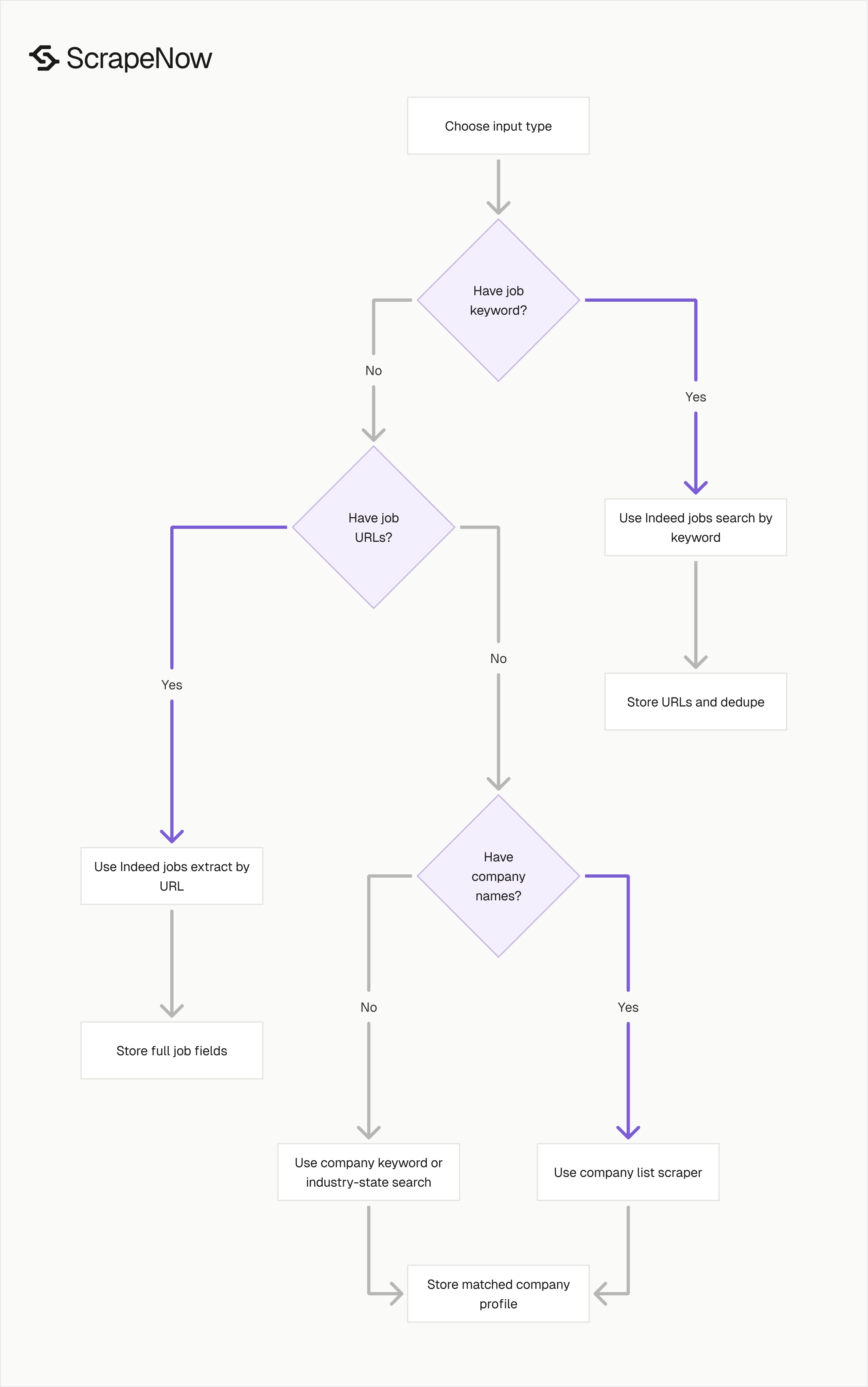
Pick the scraper based on the input you already have. Keywords, URLs, company names, and industry-state filters all map to different extraction paths.
| You have | You want | Use this scraper |
|---|---|---|
| A job keyword and location | Current matching job postings | Indeed Jobs Search by Keyword |
| A list of Indeed job URLs | Full job detail records | Indeed Jobs Extract by URL |
| A company keyword | Matching company profiles | Indeed Companies Search by Keyword |
| A list of company names | Enriched Indeed company records | Indeed Companies Search by Company List |
| An industry and state | Employer profiles in that segment | Indeed Companies Search by Industry and State |
For recurring monitoring, use search scrapers first. For enrichment, use URL or company-list scrapers because they keep inputs deterministic.
A common production flow uses both paths. Run keyword search, store job URLs, dedupe them, then enrich selected URLs for full descriptions and normalized fields.
For company data, start with the company-list scraper when your CRM already has account names. Use keyword or industry-state search when you need net-new employer discovery.
The wrong scraper usually creates extra work downstream. If you need full descriptions, search-only rows force a second pass later.
If you already have exact job URLs, search wastes credits on discovery you do not need. Start with the scraper that matches the most stable input you own.
Pricing for Indeed scraping
ScrapeNow charges by result. 1 row equals 1 credit.
At low volume, credits cost $0.04 each for 1 to 250 credits. At scale, pricing drops to $0.012 per credit at 100,000+ credits.
That pricing model fits bursty scraping jobs. You can run 500 Indeed job rows this week and a larger recurring run next month without a monthly contract.
| Monthly result volume | Credit price | Cost model |
|---|---|---|
| 1 to 250 rows | $0.04 per credit | Pay per returned row |
| Mid-volume runs | Volume-based pricing | Pay less as usage grows |
| 100,000+ rows | $0.012 per credit | Best fit for recurring pipelines |
Returned rows are the unit that matters. Failed requests, empty searches, and internal retries should not define your reporting metric.
ScrapeNow also supports REST API access, so the same scraper can run from a dashboard or from your own pipeline. Test a run manually, then move the same input shape into scheduled jobs.
For budget planning, estimate one credit per returned job or company row. Then multiply by refresh frequency, market count, and the number of search terms you plan to run.
For example, 20 role-location searches that each return 100 jobs create 2,000 returned rows per refresh. A weekly schedule turns that into a repeatable monthly budget instead of an open-ended crawl.
Company enrichment is usually easier to forecast. If your input file has 5,000 employer names, your maximum returned row count is bounded by that list.
When to use ScrapeNow instead of maintaining your own Indeed crawler
Build your own crawler for one internal experiment if breakage is acceptable. For production jobs, maintained scrapers save engineering time because Indeed extraction needs retry logic, proxy routing, parsing updates, and field QA.
A typical in-house setup needs rotating proxies, session handling, request throttling, HTML parsing, dedupe logic, and monitoring. ScrapeNow runs proxy networks with 50,000+ datacenter IPs, 10M+ residential IPs, and 99.9% uptime across the proxy layer.
Maintenance becomes the larger cost. ScrapeNow fixes scraper breakage in under 24 hours, which matters when your hiring dashboard or lead pipeline depends on daily Indeed data.
There is also an engineering cost that teams underestimate. Someone has to watch null-rate spikes, investigate selector failures, adjust retries, and keep historical output schemas stable.
For a one-off export, that work is a small operational burden. For a scheduled data product, it becomes recurring infrastructure work with no product upside.
Use ScrapeNow when the business needs rows, reporting, and repeatable refreshes. Keep engineering time for dedupe logic, matching rules, analytics, and the product layer built on top of the data.
What you still need to own
ScrapeNow handles extraction, retries, proxy routing, and page-specific parsing. Your team should still own data modeling, match logic, and business rules.
For jobs, define a canonical job key. In most pipelines, that key combines job URL, company name, title, and location.
For companies, define a canonical employer key. Keep the original input name, cleaned company name, matched profile URL, and internal account ID in the same table.
You should also track null rates by field. A sudden increase in missing salary text, job descriptions, or company ratings can signal a source change or a query issue.
Add run-level metadata to every load. Store scraper name, input payload, run time, row count, and refresh schedule.
These fields make production scraping easier to operate. They also give analysts enough context to trust trend lines and explain anomalies.
Production checklist for Indeed data
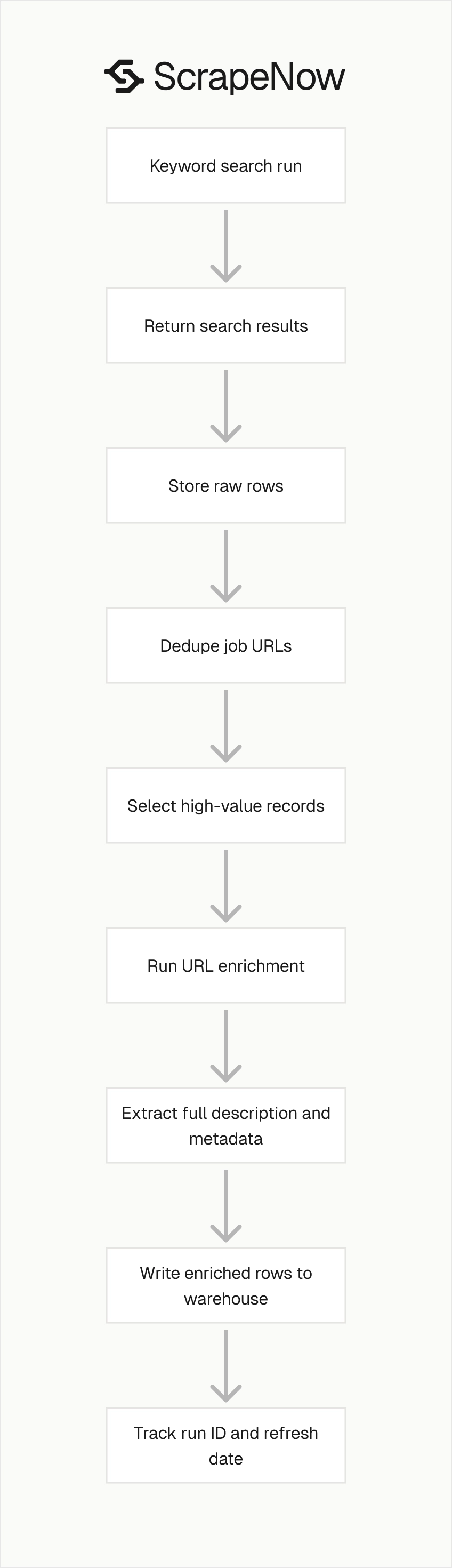
Start with the smallest run that answers the business question. One keyword, one location, and one daily refresh can prove the pipeline before you add dozens of markets.
Store raw outputs before transformation. That gives you a fallback when downstream normalization rules change.
Dedupe before enrichment. URL extractors should receive selected job URLs, not every duplicate returned by overlapping searches.
Keep search inputs stable across time series reports. Changing the keyword, location, or industry label midstream creates reporting breaks.
Use separate tables for discovery and enrichment. Discovery tables capture search results, while enrichment tables capture detail pages or matched company profiles.
Track returned row counts by scraper and input. A sudden drop in rows often points to an input issue, source-side change, or tighter filtering.
Log empty searches as successful runs with zero returned rows. That distinction matters because an empty market and a failed run require different action.
Refresh company profiles on a slower cadence than jobs. Company profile fields change less often than active job postings.
Review broad keyword runs before sending them to sales tools. Broad category terms create unrelated matches that need filtering.
Start with a named test run

Choose the scraper that matches your input type. Use Indeed Jobs Search by Keyword for fresh job discovery, Indeed Jobs Extract by URL for job enrichment, and the company scrapers for employer records.
For a recurring jobs pipeline, start with this test input. Run the Indeed Jobs Search by Keyword scraper with keyword “data engineer” and location “Austin, TX.”
Confirm the returned fields, store the job URLs, then enrich five selected URLs with the Indeed Jobs Extract by URL scraper. That proves discovery, dedupe, and enrichment before you add more roles and markets.
For company enrichment, start with a clean company list of 25 accounts. Keep your original company name, matched Indeed profile URL, and returned profile fields in the same row.
If you need employer discovery, run the Indeed Companies Search by Industry and State scraper for one industry and one state. Review the matched company profiles before adding more territories.
ScrapeNow’s full catalog is in the scrapers hub, including Indeed, LinkedIn, Glassdoor, Google, Amazon, Zillow, Yelp, YouTube, TikTok, Instagram, Facebook, X, Crunchbase, and Flipkart.


