
Extract 20+ Indeed company fields with one API job.
The Indeed companies scraper extracts company names, profile URLs, review counts, salary links, job counts, Q&A counts, photo counts, interview counts, country codes, employer ratings, and row-level scrape status from Indeed company pages.
Use it to build employer datasets, enrich recruiting systems, and monitor company profiles. You do not need to maintain selectors for Indeed markup. The scraper returns structured JSON, so your pipeline stores records instead of parsing HTML after every page change.
Pick the right Indeed company scraper
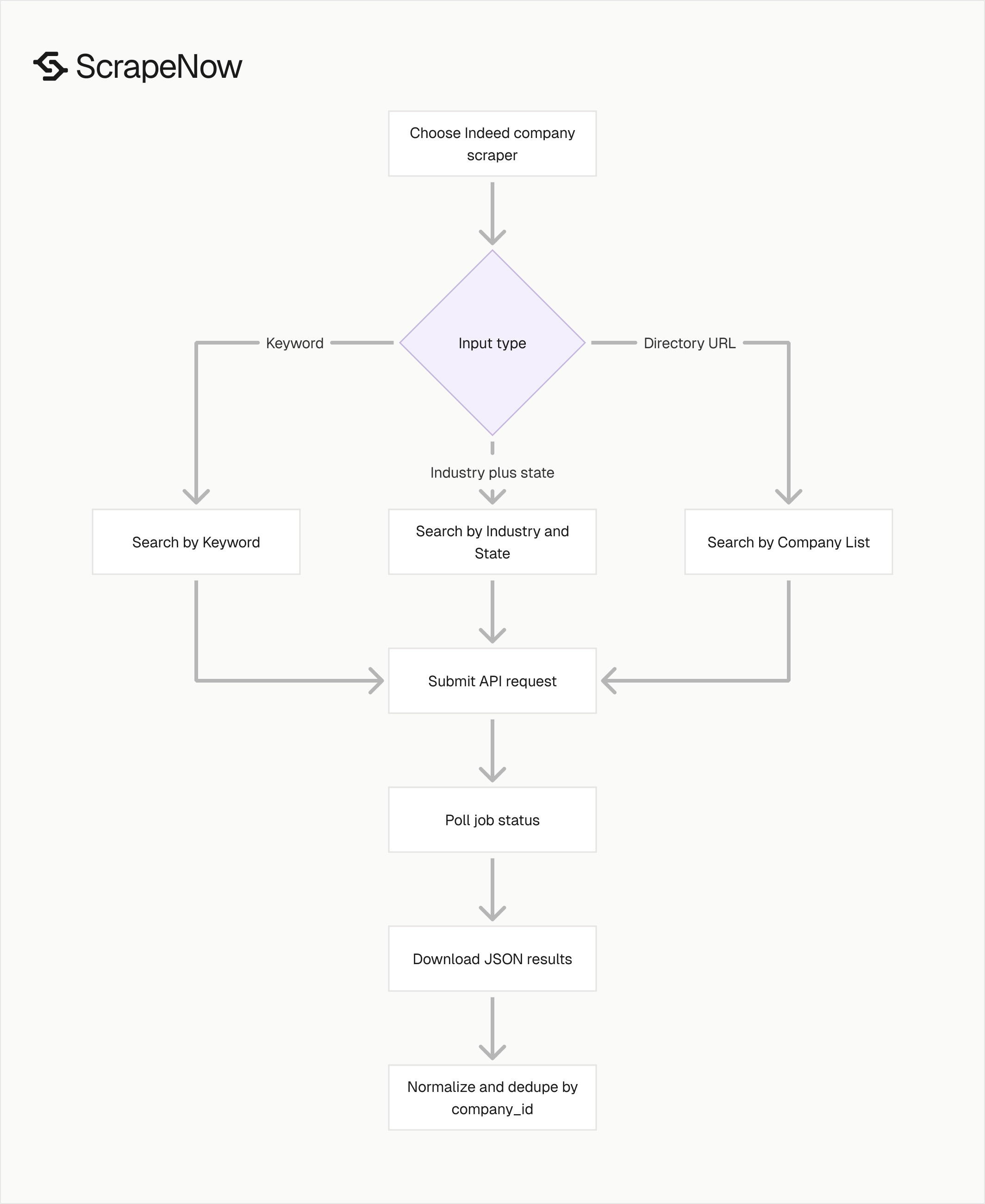
ScrapeNow has three Indeed company scrapers. Pick the scraper based on the input you already have and the dataset you want to build.
| Scraper | Best input | Use it when |
|---|---|---|
| Indeed Companies Search by Company List | Indeed company directory URL | You want companies from the Browse Companies directory |
| Indeed Companies Search by Industry and State | Industry, optional state | You want companies filtered by category and US state |
| Indeed Companies Search by Keyword | Keyword | You want companies matching a search term |
Open the Indeed Companies Search by Company List scraper when you already have the Browse Companies URL. Use the Indeed scrapers hub when your job includes company profiles, job search pages, and job detail pages.
The example below runs indeed-companies-search-by-company-list. That scraper takes a directory URL such as https://www.indeed.com/companies/browse-companies.
Use the directory scraper for broad discovery runs. Use the industry scraper when the category defines the dataset. Use keyword search when you care about a brand, segment, or market term.
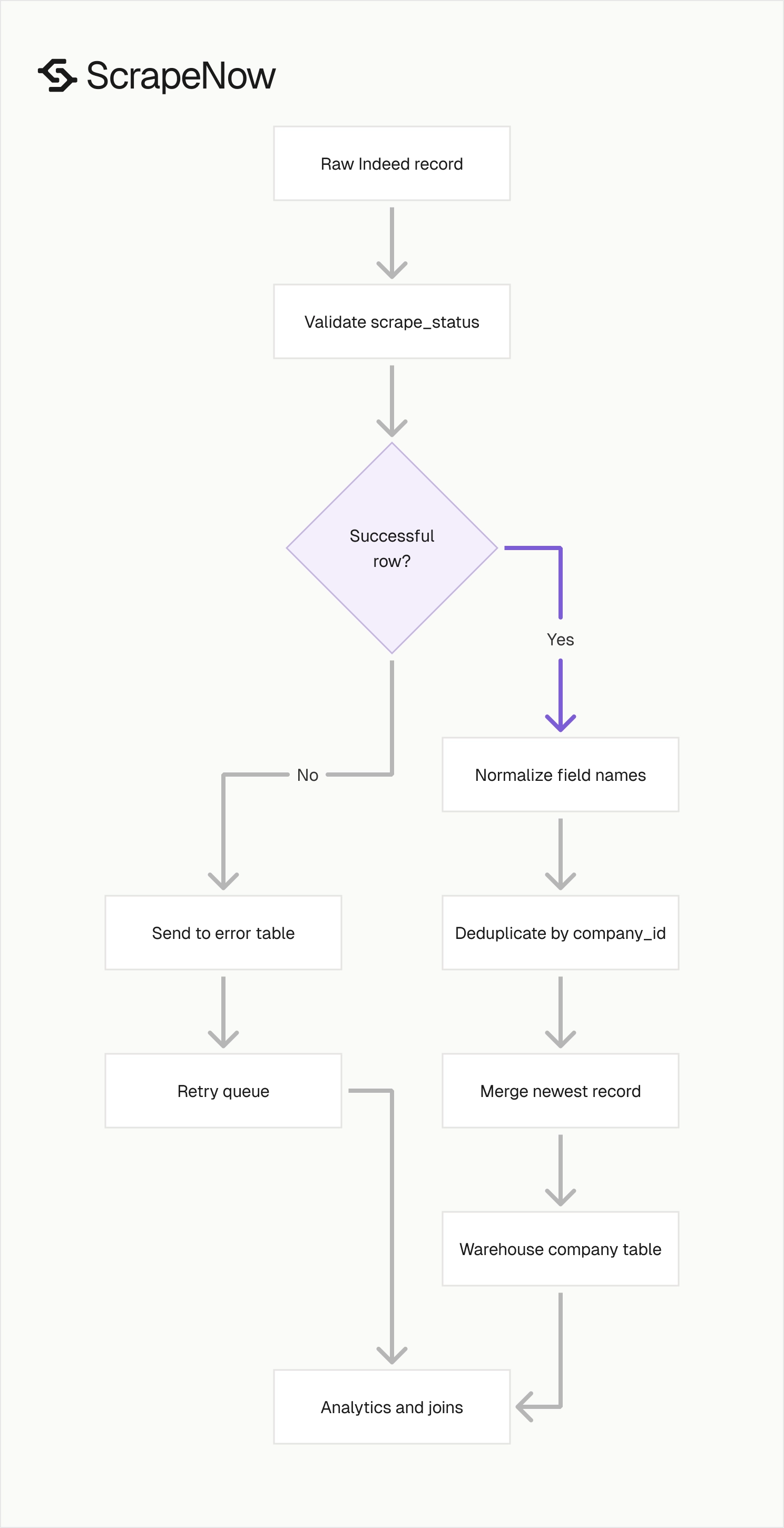
A common production path looks like this:
- Run the company list scraper to seed a company table.
- Run industry or keyword searches to fill gaps.
- Deduplicate all results by
company_id. - Load normalized rows into your warehouse.
- Join company profiles to Indeed job records when you need open roles.
This split keeps each scrape easy to reason about. Directory runs give coverage, industry runs give category context, and keyword runs give search intent.
Step 1. Get the company directory URL
Open indeed.com.
Click the Company Reviews tab in the navigation bar.
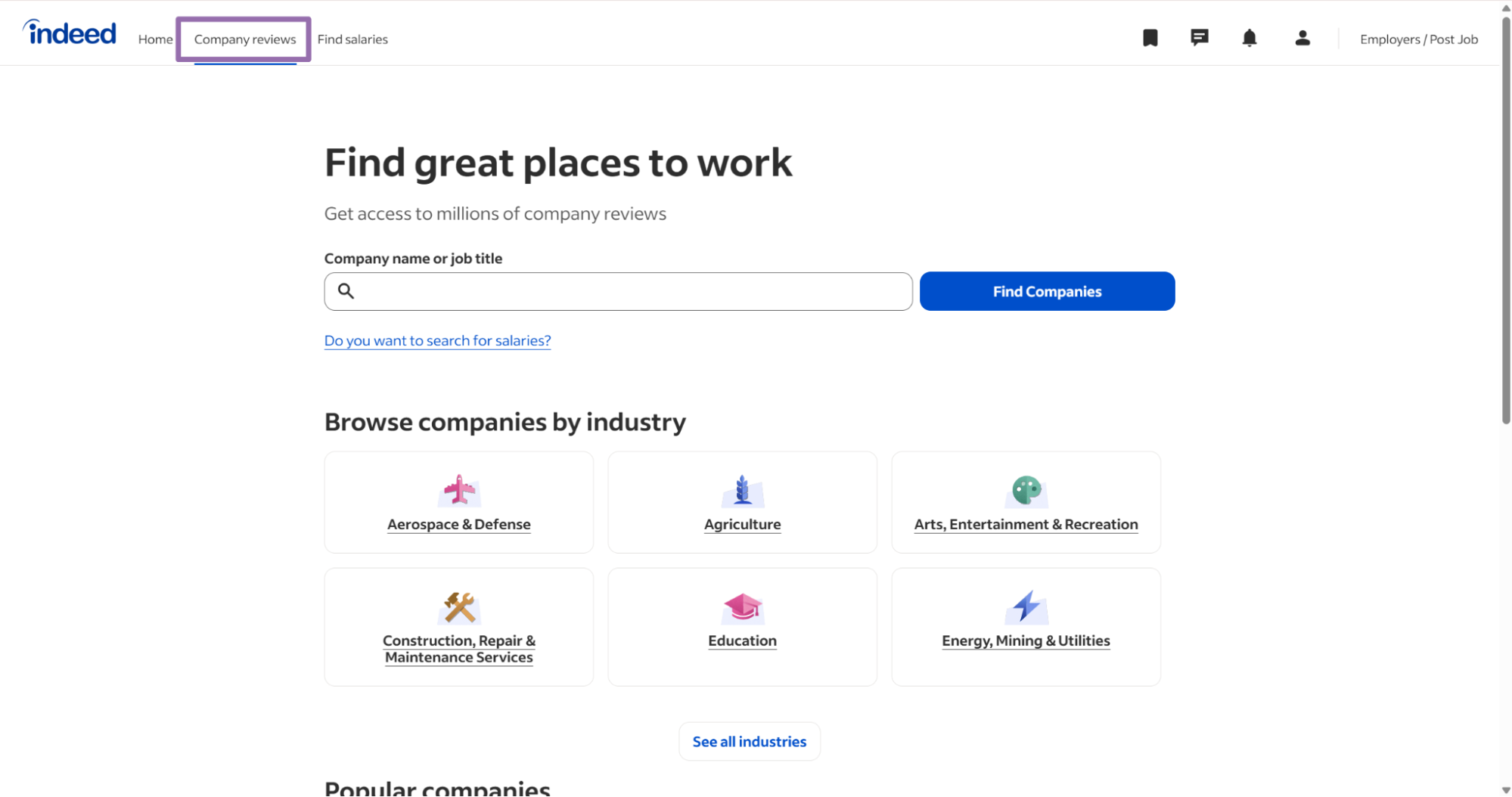
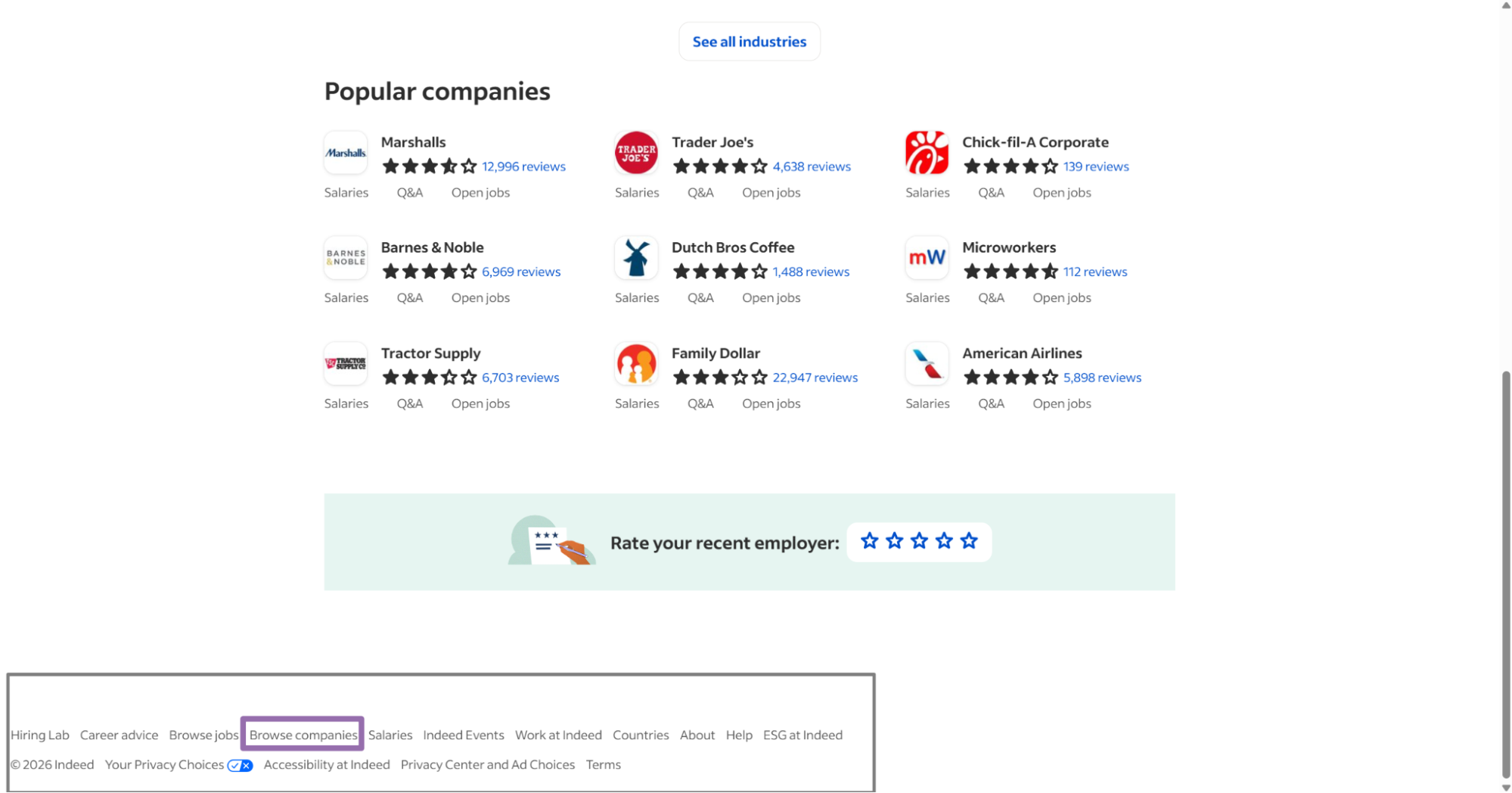
Scroll to the footer section and click the Browse Companies button.
Copy the link from the address bar.
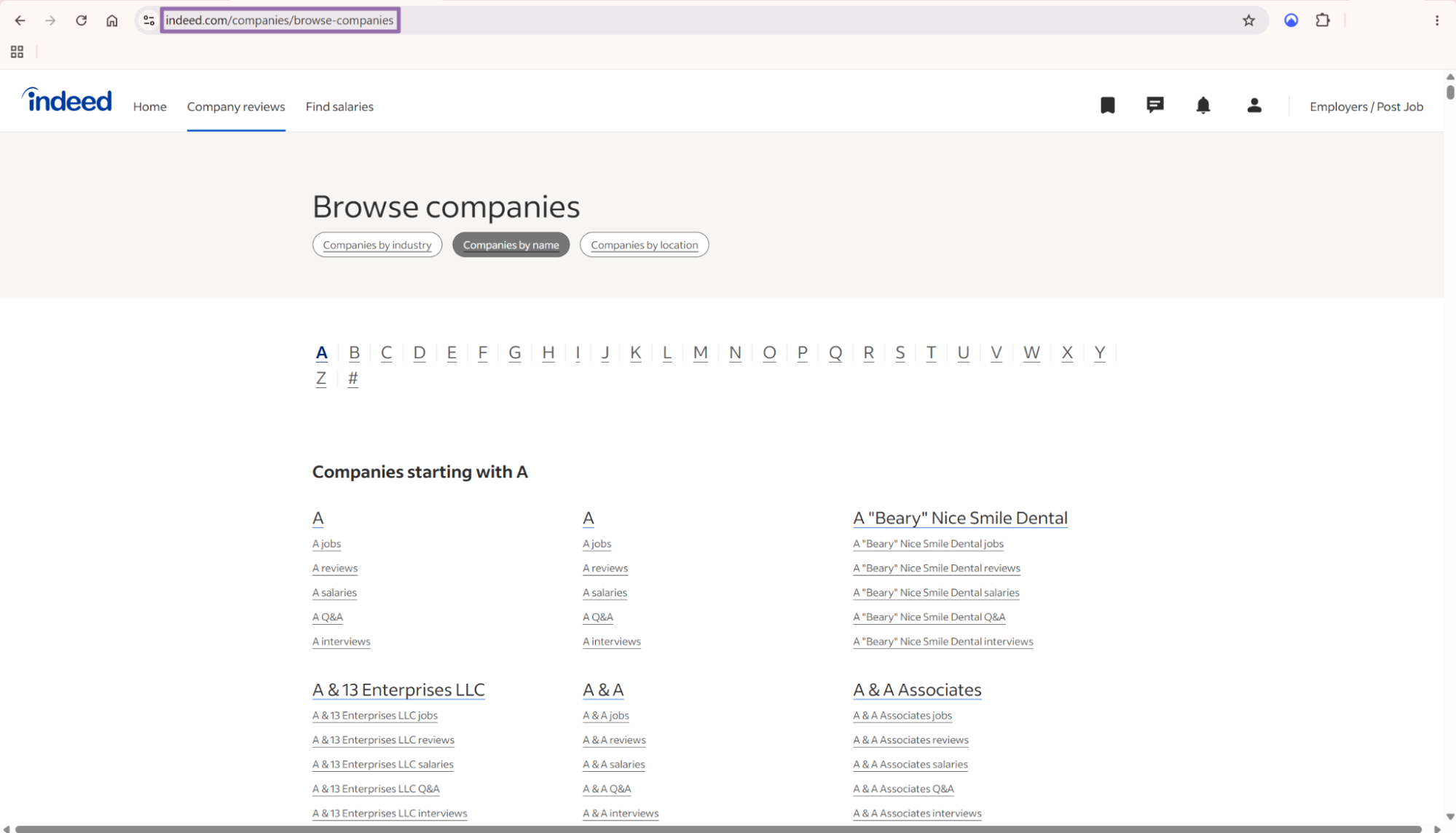
The url input must start with https://www.indeed.com/. Reject any other domain before you send the request.
A valid directory input looks like this:
{
  "url": "https://www.indeed.com/companies/browse-companies"
}
Keep this URL in config instead of hard-coding it inside one-off scripts. That makes the same job easier to run across development, staging, and production.
Store the input with the job record as well. When a run fails, you want the original URL beside the error code and job ID.
Step 2. Run the API request

Install requests if your Python environment does not include it.
pip install requests
mkdir -p output
Use this Python script as the baseline job runner. It starts a scrape, polls the job endpoint, downloads JSON results, and writes them to output/.
"""
Configuration:
    - Set SCRAPER_SLUG to the scraper you want to run.
    - Set SCRAPER_INPUTS to the list of input dicts matching that scraper's schema.
    - Set API_KEY to your scraper API key.
"""

import sys
import time
import json
import requests
import os

API_KEY = "YOUR_API_KEY"

SCRAPER_SLUG = "indeed-companies-search-by-company-list"

SCRAPER_INPUTS = [
    {
        "url": "https://www.indeed.com/companies/browse-companies"
    }
]

BASE_URL = "http://194.180.207.126:8080/api/v1/scraping"
TIMEOUT_SECONDS = 3600
POLL_INTERVAL = 5
SPINNER = "|/-\\"


def build_headers(api_key: str, content_type: str | None = None) -> dict:
    """Build headers using your API key."""
    headers = {"Authorization": f"Bearer {api_key}"}
    if content_type:
        headers["Content-Type"] = content_type
    return headers


def trigger_scrape(slug: str, inputs: list[dict]) -> str:
    """POST to the scrape endpoint and return the job_id."""
    url = f"{BASE_URL}/scrape?scraper={slug}"

    response = requests.post(
        url,
        headers=build_headers(API_KEY, "application/json"),
        json={"inputs": inputs, "limit_per_input": 1},
    )
    response.raise_for_status()
    return response.json()["data"]["job_id"]


def poll_until_done(job_id: str) -> str:
    """Poll the job status until it reaches a terminal state."""
    start = time.time()
    i = 0

    while True:
        elapsed = time.time() - start
        if elapsed > TIMEOUT_SECONDS:
            print(f"\nTimeout after {TIMEOUT_SECONDS}s")
            sys.exit(1)

        response = requests.get(
            f"{BASE_URL}/jobs/{job_id}",
            headers=build_headers(API_KEY),
        )
        response.raise_for_status()
        data = response.json()

        status = data["data"]["status"]
        mins, secs = divmod(int(elapsed), 60)

        sys.stdout.write(
            f"\r[{SPINNER[i % 4]}] Waiting... {status} ({mins}m {secs:02d}s)  "
        )
        sys.stdout.flush()

        if status in ("completed", "failed"):
            print()
            return status

        time.sleep(POLL_INTERVAL)
        i += 1


def fetch_results(job_id: str) -> dict:
    """Download the completed job results as JSON."""
    response = requests.get(
        f"{BASE_URL}/jobs/{job_id}/results?format=json",
        headers=build_headers(API_KEY),
    )
    response.raise_for_status()
    return response.json()


def save_results(data: dict, path_without_extension: str) -> str:
    """Write results to {path_without_extension}.json and return the filename."""
    filename = f"{path_without_extension}.json"
    with open(filename, "w", encoding="utf-8") as f:
        json.dump(data, f, indent=2, ensure_ascii=False)
    return filename


def main() -> None:
    print(f"Triggering scraper: {SCRAPER_SLUG}")
    job_id = trigger_scrape(SCRAPER_SLUG, SCRAPER_INPUTS)
    print(f"Job started: {job_id}")

    final_status = poll_until_done(job_id)

    if final_status != "completed":
        print(f"Job failed with status: {final_status}")
        sys.exit(1)

    print("Fetching results...")
    results = fetch_results(job_id)

    output_path = os.path.join("output", SCRAPER_SLUG)
    output_file = save_results(results, output_path)
    print(f"Results saved to: {output_file}")


if __name__ == "__main__":
    main()
The same API pattern works for the other scrapers in this group. Change SCRAPER_SLUG and SCRAPER_INPUTS for each run.
Use indeed-companies-search-by-industry-and-state when you want category and location filters. Use indeed-companies-search-by-keyword when the query term matters more than the directory source.
Keep limit_per_input at 1 for the first run. That gives you one row to inspect before you spend credits on a larger pull.
Do the first run from a local shell or a short-lived CI job. After that, move the same code into your scheduler and pass inputs from a table or config file.
Avoid mixing unrelated inputs in one test run. A small request with one input makes schema checks faster and keeps logs readable.
Step 3. Use industry and state inputs for filtered company lists
For the industry scraper, open indeed.com.
Click Company Reviews in the navigation bar.
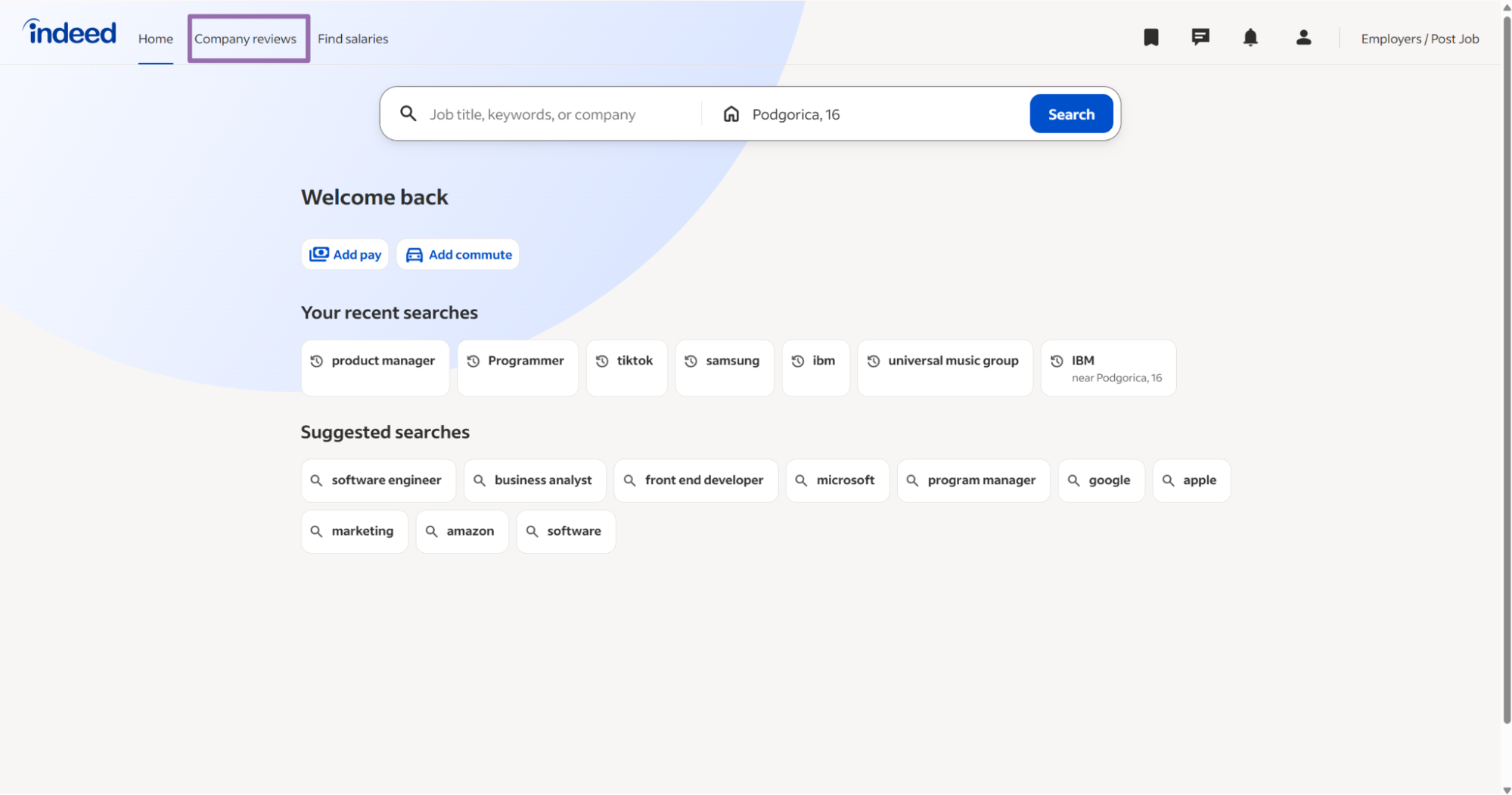
On the Browse by industry page, click See all industries.
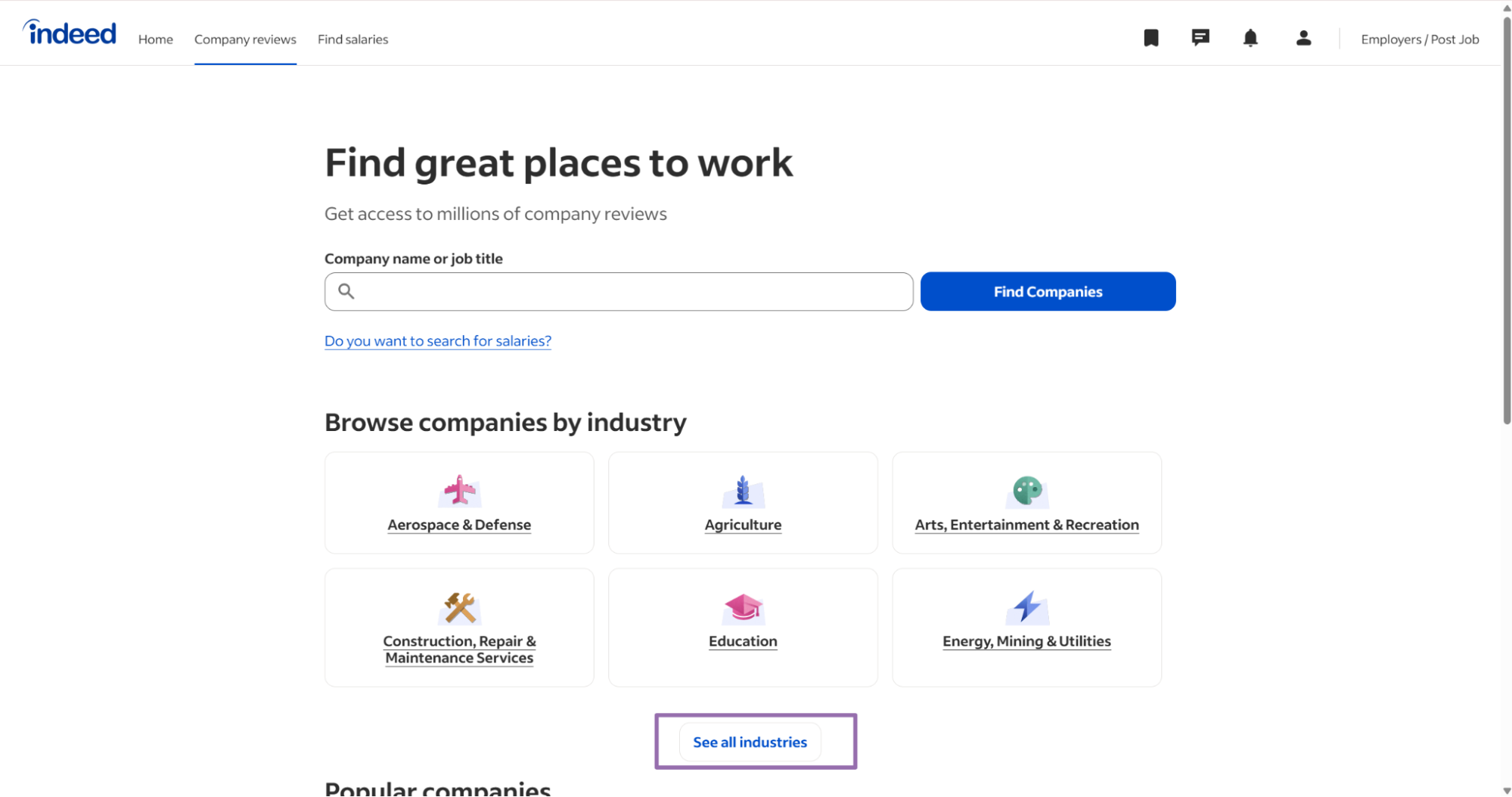
Choose the industry from the list. Pass the exact displayed value as a string.
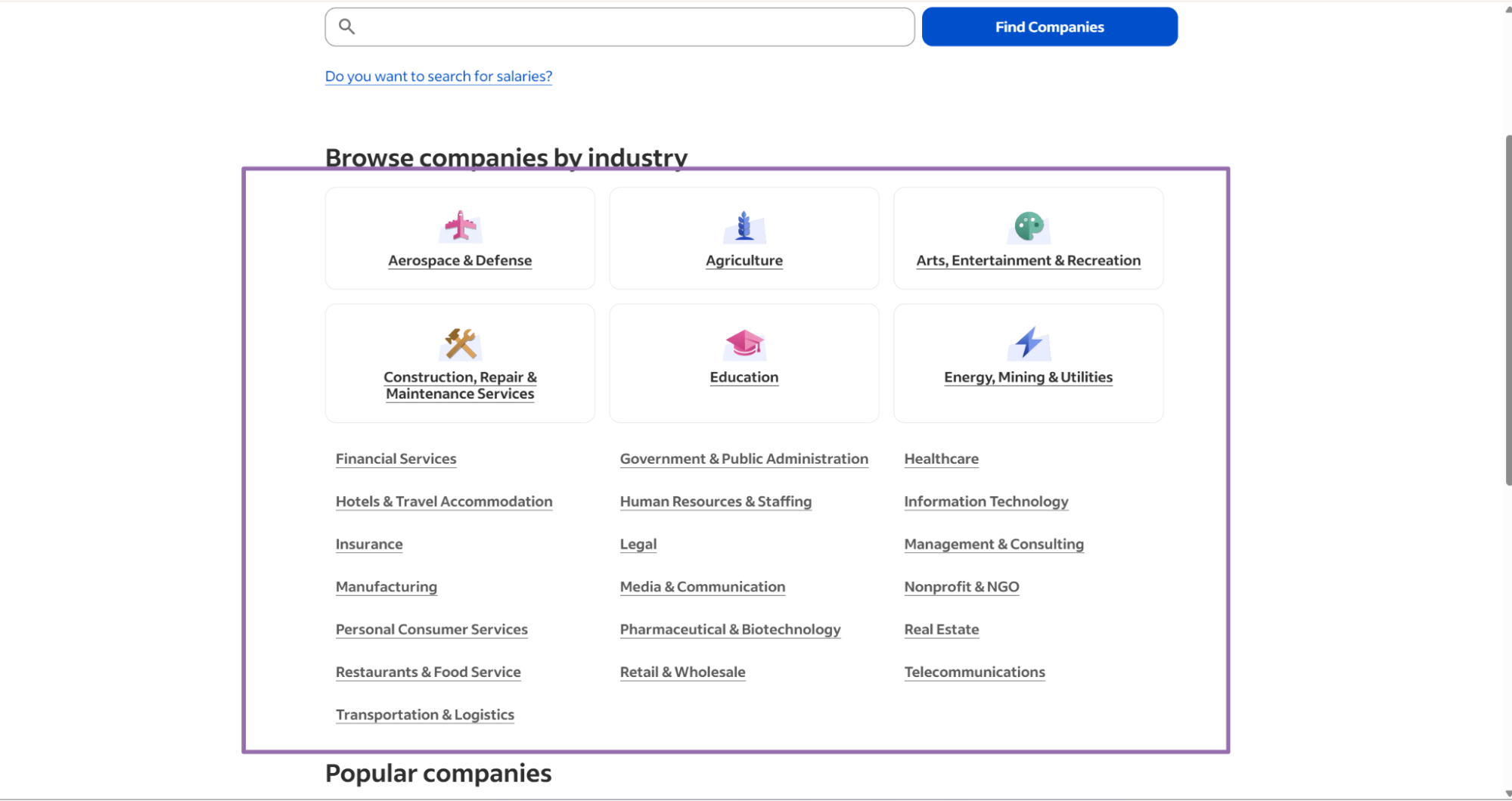
The state field is optional. Add it when you want companies from a specific US state.
A minimal input payload for the industry scraper looks like this:
{
  "inputs": [
    {
      "industry": "Healthcare",
      "state": "California"
    }
  ],
  "limit_per_input": 10
}
Store industry names in a controlled list. Treat Healthcare, Health Care, and healthcare as separate strings unless you normalize them before submission.
For repeat runs, keep industry strings in a table with three columns:
| Column | Example |
|---|---|
industry_raw |
Healthcare |
industry_normalized |
healthcare |
active |
true |
Use the raw value for the API request. Use the normalized value for deduplication, reporting, and job naming.
A controlled list also protects your scheduler from silent drift. If a teammate adds Health care as a new label, your review step catches it before the job runs.
For state-level runs, store the state input separately from the normalized industry name. That gives you a clean partition key for warehouse tables and dashboards.
Step 4. Use keyword search for company names and segments
The keyword scraper takes a search term and returns matching Indeed company profiles.
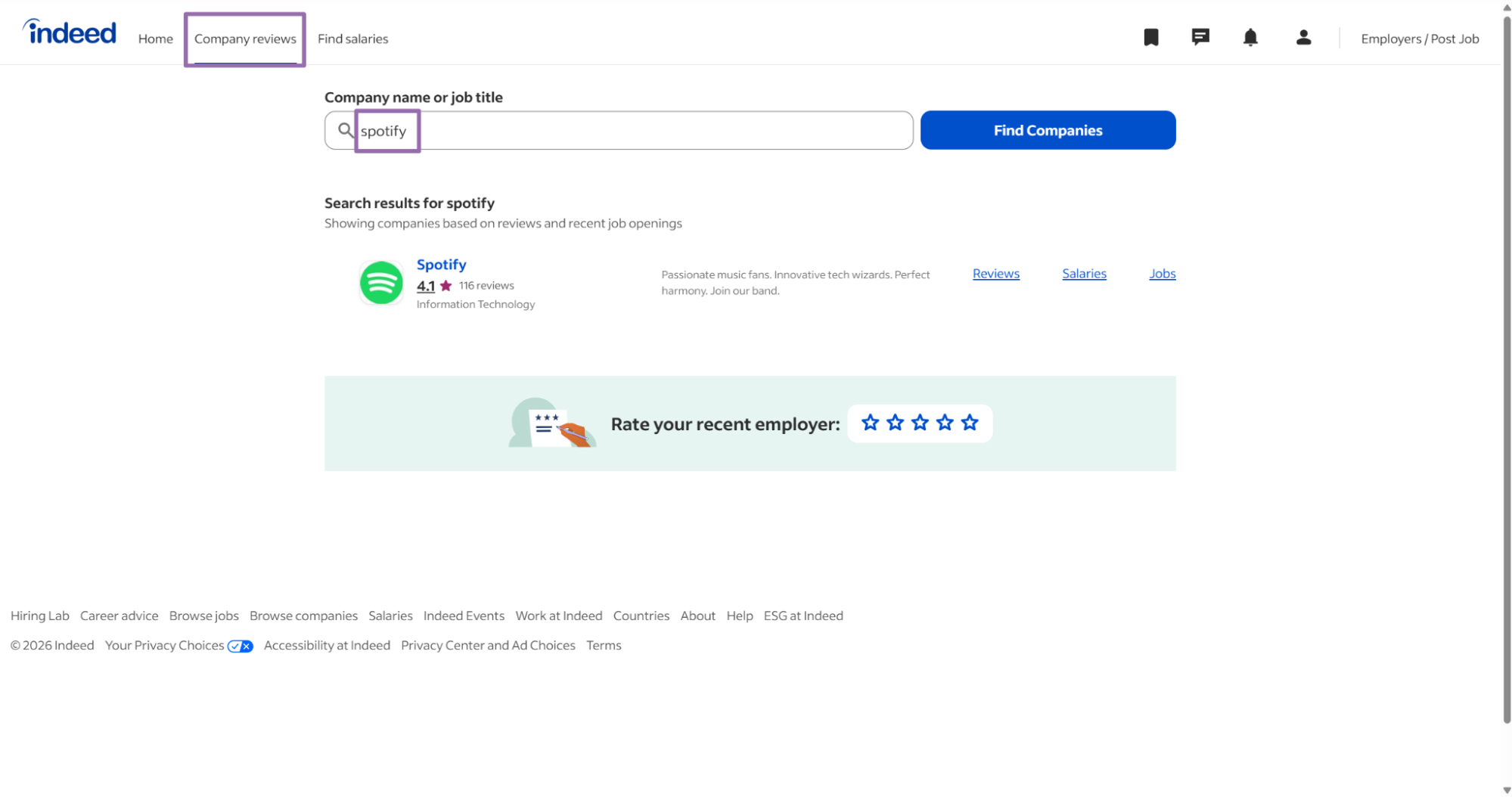
Use Indeed Companies Search by Keyword for terms such as logistics, hospital, retail, or a brand name.
Keyword runs work for market scans. They also work when you monitor a known employer list and want to catch profile variants.
Pass one keyword per input when you need clean attribution. A single input per term makes retries simpler and keeps your run metadata readable.
{
  "inputs": [
    {
      "keyword": "logistics"
    },
    {
      "keyword": "hospital"
    }
  ],
  "limit_per_input": 25
}
Store the keyword beside every returned row during ingestion. That lets you explain why a company entered the dataset later.
Keep keyword input casing in the raw run metadata. Load a lowercase, trimmed copy into analytics fields so grouping stays consistent.
For competitor monitoring, use one keyword per brand. Then compare the returned company_id values against your existing company table.
Example API response
A completed run returns JSON records. This trimmed response comes from indeed-companies-search-by-company-list.
[
  {
    "inputs": {
      "url": "https://www.indeed.com/companies/browse-companies"
    },
    "scrape_status": "success",
    "name": "Breezer Holding",
    "url": "https://www.indeed.com/cmp/Breezer-Holding",
    "country_code": "US",
    "salaries": {
      "count": 0,
      "link": "https://www.indeed.com/cmp/Breezer-Holding/salaries"
    },
    "reviews": {
      "count": 5,
      "url": "https://www.indeed.com/cmp/Breezer-Holding/reviews"
    },
    "company_id": "Breezer-Holding",
    "reviews_count": 5,
    "reviews_url": "https://www.indeed.com/cmp/Breezer-Holding/reviews",
    "salaries_count": 0,
    "salaries_url": "https://www.indeed.com/cmp/Breezer-Holding/salaries",
    "jobs_count": 0,
    "q&a_count": 3,
    "Interviews_count": 0,
    "photos_count": 0,
    "jobs_url": "https://www.indeed.com/cmp/Breezer-Holding/jobs",
    "q&a_url": "https://www.indeed.com/cmp/Breezer-Holding/faq",
    "Interviews_url": "https://www.indeed.com/cmp/Breezer-Holding/interviews",
    "overall rating": 2.8,
    "scrape_error": null,
    "scrape_error_code": null
  }
]
Each returned row uses 1 credit. ScrapeNow scraper credits start at $0.04 per credit for 1 to 250 credits and drop to $0.012 per credit at 100K+ credits.
The scrape_status field belongs to the row. A completed job can contain successful records and failed records in the same result set.
Some raw field names mirror Indeed labels or older extractor output. Normalize them once before loading warehouse tables.
The response includes both nested objects and flattened fields for some sections. Use one representation in your warehouse so downstream queries do not double-count values.
Treat company_id as the stable identifier. The profile URL is useful for navigation, but the ID gives you a better merge key.
What data you get back
The response gives you the company profile plus counts for related Indeed sections. Those counts let you rank employers by profile depth before you fetch reviews, jobs, or salaries.
Use this table to map the raw API response to warehouse names.
| Raw field | Warehouse field | Type | Meaning |
|---|---|---|---|
inputs.url |
source_url |
string | The Indeed directory URL submitted to the scraper |
scrape_status |
scrape_status |
string | success when the record was extracted |
name |
name |
string | Company name shown on Indeed |
url |
profile_url |
string | Main Indeed company profile URL |
country_code |
country_code |
string | Country code for the profile, such as US |
company_id |
company_id |
string | Stable profile identifier from the Indeed URL |
reviews_count |
reviews_count |
integer | Number of reviews shown on the company profile |
reviews_url |
reviews_url |
string | Direct link to the reviews page |
salaries_count |
salaries_count |
integer | Number of salary records shown |
salaries_url |
salaries_url |
string | Direct link to the salaries page |
jobs_count |
jobs_count |
integer | Number of jobs shown on the company profile |
jobs_url |
jobs_url |
string | Direct link to the company jobs page |
q&a_count |
qa_count |
integer | Number of Q&A entries |
q&a_url |
qa_url |
string | Direct link to the Q&A page |
Interviews_count |
interviews_count |
integer | Number of interview records |
Interviews_url |
interviews_url |
string | Direct link to the interviews page |
photos_count |
photos_count |
integer | Number of photos shown |
overall rating |
overall_rating |
number | Employer rating from Indeed |
scrape_error |
scrape_error |
string or null | Error message for failed records |
scrape_error_code |
scrape_error_code |
string or null | Machine-readable error code |
Use company_id as your primary dedupe key. Profile URLs can change through routing updates, casing changes, or redirects.
The nested reviews and salaries objects repeat data from the flattened fields. Keep flattened fields for analytics tables. Keep nested fields if a downstream app expects the original response shape.
A warehouse table works better with snake_case names. Normalize field names once at ingestion, then keep the raw JSON in object storage for audits.
Store counts as numbers during ingestion. If you leave them as strings, sorting and range filters produce incorrect results in BI tools.
Use overall_rating as a numeric field with null support. Some companies have no rating, and a blank value should stay different from 0.
Production tips
Validate inputs before submitting jobs
Invalid inputs waste credits and create retry noise. Check the scheme, host, and path before you call the API.
from urllib.parse import urlparse

def validate_indeed_company_url(url: str) -> None:
    parsed = urlparse(url)

    if parsed.scheme != "https":
        raise ValueError("Indeed URL must use https")

    if parsed.netloc != "www.indeed.com":
        raise ValueError("Indeed URL must start with https://www.indeed.com/")

    if not parsed.path.startswith("/companies"):
        raise ValueError("Expected an Indeed companies URL")

validate_indeed_company_url("https://www.indeed.com/companies/browse-companies")
Run this validation before job creation. It catches copied search URLs, localized hosts, and malformed internal test values.
For industry inputs, store the exact strings your team uses. A small lookup table prevents duplicate jobs caused by casing and spacing differences.
For keyword inputs, trim leading and trailing whitespace before submission. Store the original keyword separately if your audit log needs the exact user entry.
Add the same validation to your scheduler, not only to local scripts. Production failures usually come from batch inputs, stale config, or manual edits to a job table.
Reject empty strings before you submit keyword jobs. Empty keyword inputs create ambiguous run records and make retry queues harder to inspect.
Set limits deliberately
The API request uses limit_per_input. In the sample script, the value is 1 so you can test fast and inspect the schema.
Increase that value after your parser and loader pass a small run. For production backfills, set a limit that matches your credit budget and expected warehouse load.
A common pattern is a three-stage rollout. Run 1 row for schema checks, 100 rows for loader checks, then the full job for backfill.
Track row counts at each stage. If a full run returns fewer records than expected, compare the job metadata, input payload, and failed-row count before rerunning it.
Keep a fixed limit for scheduled monitoring jobs. A moving limit makes trend charts harder to read because scrape depth changes between runs.
For backfills, write the selected limit into your run metadata. That one field explains cost, output size, and partial coverage during later reviews.
Deduplicate by company_id
A company can appear in a directory run, an industry run, and a keyword run. Merge those records before writing to your warehouse.
def dedupe_companies(records: list[dict]) -> list[dict]:
    seen = {}

    for record in records:
        company_id = record.get("company_id")
        if not company_id:
            continue

        current = seen.get(company_id)
        if current is None:
            seen[company_id] = record
            continue

        current_reviews = current.get("reviews_count") or 0
        new_reviews = record.get("reviews_count") or 0

        if new_reviews > current_reviews:
            seen[company_id] = record

    return list(seen.values())
That tie-breaker keeps the record with more review coverage. For most employer datasets, review count is a stronger freshness signal than row order.
If two records have the same review count, keep the newest scrape timestamp from your job metadata. Store that timestamp outside the scraped payload.
You can also keep an observed_sources array for each company. That field shows whether the profile came from directory, industry, keyword, or several runs.
Deduplication should run after normalization. That order gives every record the same field names before your merge logic reads counts and IDs.
Log the number of dropped duplicates per run. A rising duplicate rate often means your inputs overlap more than expected.
Normalize field names before loading
The raw response contains overall rating, q&a_count, q&a_url, Interviews_count, and Interviews_url. Those names work in JSON, although SQL and Parquet schemas handle them poorly.
Map them once at the ingestion edge.
FIELD_MAP = {
    "url": "profile_url",
    "overall rating": "overall_rating",
    "q&a_count": "qa_count",
    "q&a_url": "qa_url",
    "Interviews_count": "interviews_count",
    "Interviews_url": "interviews_url",
}

def normalize_company(record: dict) -> dict:
    normalized = {}

    for key, value in record.items():
        normalized_key = FIELD_MAP.get(key, key)
        normalized[normalized_key] = value

    return normalized
Keep the raw JSON in object storage if you need audit trails. Load normalized records into the tables your analysts and apps query.
You can also normalize URLs during this stage. Lowercase hosts, remove tracking parameters, and store one canonical profile URL per company_id.
Use qa_count and interviews_count everywhere after normalization. Avoid mixing raw response keys with warehouse keys in application code.
Add a version number to your field mapping. When you add or rename a column, that version tells you which loader produced each row.
Keep null values as nulls during this step. Replacing missing counts with 0 can hide extraction errors and change the meaning of the data.
Treat scrape_status as a per-row status
A completed job can still contain failed rows. Check scrape_status on every record before loading it as valid company data.
def split_success_and_failed(records: list[dict]) -> tuple[list[dict], list[dict]]:
    success = []
    failed = []

    for record in records:
        if record.get("scrape_status") == "success":
            success.append(record)
        else:
            failed.append(record)

    return success, failed
Log scrape_error_code with the original input. That gives you a retry queue you can inspect without searching through raw job output.
Retry failed rows separately from successful rows. This keeps your loader idempotent and prevents duplicate inserts during recovery.
Store failures in a separate table with job_id, scraper_slug, input payload, error code, and error message. That table becomes your retry backlog.
Keep failed rows out of your main company table. Load them into an error table so analysts do not filter around partial records.
Add a retry count to the failure table. After two or three failures, route the row to manual review instead of looping through the same request.
Join company records to job records
Company profiles and job listings answer different questions. Company records give employer metadata, profile URLs, ratings, and engagement counts.
Job records give titles, locations, salaries, posting URLs, and job descriptions. Store both datasets if you want employer context beside open roles.
If you also need postings, use Indeed Jobs Search by Keyword to collect listings. Use Indeed Jobs Extract by URL to extract specific job pages.
A simple join key is the normalized company name. A stronger key is the Indeed company profile URL when the job record includes it.
For matching by name, remove suffix noise such as Inc, LLC, and Ltd. Keep the original name in a separate column for display.
Use a match confidence column when you join by name. Exact normalized-name matches get one value, and fuzzy matches get another value that requires review.
For high-volume joins, keep a company alias table. Store known variants, previous names, and normalized display names beside the canonical company_id.
Run join checks on a sample before a full merge. Review companies with common names, because names like Apple, Target, and Compass can match multiple entities.
Store run metadata
Store the job_id, scraper slug, input payload, run timestamp, and result file path for every scrape. That metadata pays for itself during backfills and incident reviews.
A minimal run metadata record looks like this:
{
  "job_id": "job_123",
  "scraper_slug": "indeed-companies-search-by-company-list",
  "input_count": 1,
  "limit_per_input": 100,
  "started_at": "2025-01-15T10:00:00Z",
  "result_path": "s3://bucket/indeed/company_runs/job_123.json"
}
Keep metadata separate from company records. Company rows change over time, and run metadata describes how you collected them.
Add completed_at, success_count, failed_count, and credit_count after each run finishes. Those fields make cost checks and alerting easier.
Store the API request body with the run metadata. That gives you a replayable record for backfills, audits, and incident reviews.
Name result files with the job ID and scraper slug. Human-readable paths save time when you inspect object storage during a failed load.
Build a stable warehouse table
Use a table layout that separates identifiers, metrics, URLs, and status fields. That structure makes updates and downstream joins easier.
A practical schema includes these columns:
| Column | Suggested type |
|---|---|
company_id |
string |
name |
string |
profile_url |
string |
country_code |
string |
overall_rating |
numeric |
reviews_count |
integer |
salaries_count |
integer |
jobs_count |
integer |
qa_count |
integer |
interviews_count |
integer |
photos_count |
integer |
scrape_status |
string |
scraped_at |
timestamp |
Use company_id for merges. Use scraped_at to keep the newest version of each company profile.
Keep counts as integers and ratings as numeric values. Casting these fields late creates avoidable errors in BI tools and downstream joins.
Add source_run_id or job_id to the table if your warehouse supports lineage columns. That lets you trace each company row back to the scrape that produced it.
For slowly changing records, keep a history table as well as a current table. The current table serves applications, and the history table serves trend analysis.
Add basic data quality checks
A small set of checks catches most ingestion issues before they reach your warehouse. Run them after normalization and before merge.
def validate_company_record(record: dict) -> list[str]:
    errors = []

    if not record.get("company_id"):
        errors.append("missing company_id")

    if not record.get("name"):
        errors.append("missing name")

    if record.get("scrape_status") != "success":
        errors.append("record is not successful")

    for count_field in [
        "reviews_count",
        "salaries_count",
        "jobs_count",
        "qa_count",
        "interviews_count",
        "photos_count",
    ]:
        value = record.get(count_field)
        if value is not None and value < 0:
            errors.append(f"{count_field} is negative")

    return errors
Reject records without company_id. Quarantine records with negative counts or invalid status values.
Log rejected rows with the source file path. That lets you trace invalid data back to the exact job and input.
Add threshold checks for production runs. If success count drops sharply, stop the merge and inspect the job before overwriting current records.
Track null rates for fields such as name, profile_url, and overall_rating. Sudden changes in those rates usually point to input drift or schema changes.
Keep raw files and normalized tables separate
Save the API response exactly as returned. Put that file in object storage before any normalization or filtering happens.
Then load cleaned records into your warehouse. This gives you a replay path when you change field mappings or add new columns.
A common path layout looks like this:
s3://bucket/indeed/raw/company_runs/{job_id}.json
s3://bucket/indeed/normalized/company_runs/{job_id}.json
Keep raw files immutable. If a loader changes, write a new normalized file and keep the raw response untouched.
This separation also helps with support tickets. You can compare the raw response, normalized record, and warehouse row without rerunning the scrape.
Pricing and run path
ScrapeNow has 86+ pre-built scrapers across 14 platforms, including Indeed company and job scrapers. For Indeed company extraction, one returned row equals one credit.
Start with Indeed Companies Search by Company List if you already have the Browse Companies URL. Use Indeed Companies Search by Industry and State for filtered company discovery.
Use Indeed Companies Search by Keyword when a brand, market segment, or competitor list drives the run. Use the broader scrapers hub if you are building a full Indeed workflow across companies and jobs.
Keep company extraction and job extraction as separate jobs. Join them in your warehouse after both datasets use normalized company names or profile URLs.
For the first production test, run the company list scraper with limit_per_input set to 100. Save the raw response to object storage and load only rows with scrape_status equal to success.
Then add one ingestion task that validates the Indeed URL, normalizes raw fields to qa_count and interviews_count, deduplicates by company_id, and merges rows by newest scraped_at.
After the first successful load, schedule a repeat run with the same limit and inputs. Compare row count, success count, failed count, and duplicate count before increasing the pull size.
For ongoing monitoring, keep a small fixed run for trend checks and a larger backfill job for coverage. That split gives you stable metrics without tying every run to the largest dataset size.


