
Flipkart blocks noisy crawlers before selectors fail.
A Flipkart scraper extracts public product, price, seller, category, search, and review data from one of India’s largest e-commerce marketplaces. Teams scrape Flipkart to track price changes, stock status, seller movement, and India-specific catalog coverage.
The useful Flipkart dataset starts with product pages. Search pages and category pages add rank position, market coverage, and competitor placement. Reviews add buyer feedback tied to specific SKUs.
For production jobs, treat Flipkart as four extraction targets. Product URLs give SKU-level data. Category pages give market coverage. Search URLs give ranking snapshots. Review pages give buyer feedback.
That split matters because each target fails in a different way. Product pages lose seller blocks. Search pages change card layouts. Reviews paginate differently across products.
Category pages expose different fields by vertical. A phone category, fashion category, and grocery category will not return the same card shape. Your extraction plan needs to account for that from day one.
What Flipkart data is worth extracting
Flipkart product pages carry the fields most e-commerce teams need. The core fields are title, brand, selling price, MRP, discount, rating, review count, seller name, availability, category breadcrumbs, product images, and variant data.
Those fields support price tracking, seller monitoring, assortment checks, and catalog enrichment. A daily product crawl gives clean diffs for price, stock, discount, seller, and rating movement.
Search and category pages add ranking context. If a phone ranks #3 for “5G mobile under 15000” today and #18 next week, that movement changes pricing, ads, and marketplace operations.
Rank changes also expose competitor activity. A new seller, larger discount, or rating jump can move a listing above your product within hours.
Reviews give you the buyer-side signal. Ratings, review text, review dates, helpful counts, and SKU-level feedback help product teams find defects. Brand teams use the same rows to track sentiment.
Review data works best when stored with SKU, URL, rating, timestamp, and review ID where available. That structure lets you group complaints by variant, seller, delivery period, or product batch.
Flipkart has enough marketplace depth to justify dedicated extraction. Public category pages expose thousands of products across phones, fashion, appliances, grocery, beauty, furniture, and personal care.
Manual monitoring fails once a category crosses a few hundred products. A category with thousands of listings needs scheduled extraction, stable identifiers, dedupe rules, and repeatable output.
Keep Flipkart rows separated by data type. A product page row answers “what is this SKU selling for now.” A search row answers “where does this SKU rank for this query.”
That distinction keeps reporting sane. Price alerts should use product rows. Share-of-shelf reports should use search or category rows. Quality reports should use review rows.
A product row usually needs stronger field validation than a search row. Missing price, seller, or stock status should fail the record. Missing badge text on a search card should not block the whole run.
Category rows need position metadata. Store page number, card index, category path, and crawl timestamp. Without those fields, weekly category comparisons turn into guesswork.
Review rows need text preservation. Keep the raw review text, rating, review date, SKU, and source URL. Normalized tags help reporting, but raw text helps when tags need changes later.
Why scraping Flipkart fails in production
Flipkart pages change often. Class names, nested product cards, pagination behavior, and offer blocks shift without warning. CSS selectors written against one page version fail during normal site changes.
Product cards also vary by category. A mobile listing, shoe listing, grocery listing, and appliance listing can expose different fields. Your parser needs fallbacks for missing MRP, variant labels, badges, and seller blocks.
Anti-bot checks show up fast when you crawl at volume. Reusing one IP for thousands of product pages triggers blocks. Sending identical headers or skipping browser-like behavior adds more risk.
Incomplete HTML creates another failure mode. A request returns HTTP 200, then the page body misses price, seller, reviews, or delivery blocks. Treat empty required fields as extraction failures.
Retry those failures with a clean session. The retry should carry the same job ID and input URL. That makes failed-page analysis easier after the run finishes.
Location adds another failure mode. Flipkart shows different price, stock, delivery promise, and seller data by pincode. A scraper without location control produces mixed data.
This matters during sales and stock changes. The same product can show one seller in Mumbai and another seller in Bengaluru. Store location inputs with every row.
Login walls also interfere with extraction. Public product and search pages usually load without an account. Some review flows, personalized blocks, and delivery checks trigger popups or account prompts.
Rate limits matter after test runs. Scraping 100 URLs from a laptop differs from scraping 50,000 SKUs every 6 hours. Production jobs need retries, proxy rotation, dedupe, queue control, and failed-page handling.
The usual DIY stack includes Python, JavaScript, Playwright, Puppeteer, BeautifulSoup, browser queues, and rotating proxies. That stack works for prototypes and small internal tools.
Maintenance becomes the job once selectors drift, blocks rise, browser costs grow, and data users expect clean rows every run. Every marketplace change becomes your on-call problem.
A production crawler also needs extraction validation. Check that title, price, URL, and SKU exist before the row enters storage. Send partial rows to a failure table.
Logging matters more than most teams expect. Store request URL, status code, retry count, proxy region, pincode, parser version, and run ID. Those fields shorten debugging when a run drops rows.
Your logs should also store response size and extraction status. A 200 response with a tiny body usually means a block, interstitial, or empty template. Status code alone will miss that.
Browser concurrency needs limits. Running too many headless sessions increases CPU cost and raises block rates. A controlled queue beats an aggressive one for long marketplace crawls.
Proxy choice affects both cost and success rate. Datacenter IPs work for light catalog checks. Residential routing performs better when Flipkart flags data center traffic or location-specific sessions.
Headers need consistency inside a session. Rotate them blindly and you create fingerprints that do not match real browsers. Keep user agent, language, viewport, and cookies aligned.
ScrapeNow’s Flipkart scrapers
ScrapeNow has five Flipkart extractors built around the data type you need. You send a category, SKU, search URL, or product URL. The scraper returns structured rows without your team maintaining selectors, browsers, or proxy pools.
Use these scrapers when the output matters more than browser control. You still decide inputs, schedule, storage, validation, and downstream checks. ScrapeNow handles extraction and returns normalized data.
Browse all 86+ scrapers to see other marketplace and search extractors. If your workflow also tracks Amazon, pair Flipkart runs with the Amazon product scraper guide for cross-market price checks.
This path fits teams that already know what data they need. Bring your URLs, categories, SKUs, or search pages. Then store the returned rows in your warehouse.
Each scraper maps to a clear input type. That keeps jobs easier to test and debug. It also prevents one parser from trying to handle every Flipkart surface.
Product search by category
The Search Flipkart by category extracts product listings from category pages. It returns product title, price, discount, rating, review count, image, and product URL.
Use it for category-level catalog monitoring. Common inputs include mobiles, laptops, running shoes, appliances, apparel, and personal care categories.
This scraper works well for market coverage checks. You can track how many products appear in a category, which brands dominate, and which sellers repeat across pages.
The detailed guide with code examples is the Flipkart products scraper guide. It covers inputs, common fields, and cases where category scraping beats URL-by-URL extraction.
Category extraction gives a wide view before SKU monitoring starts. Run it weekly to find new listings, disappearing listings, seller churn, and price bands.
Store page number and card position with each row. Those fields let you compare category placement across weekly runs without guessing where a product appeared.
Add category path and crawl timestamp as required fields. A product can appear in more than one category. That context prevents duplicate rows from looking like parser errors.
Category pulls work best as discovery jobs. Use them to find the products worth tracking. Then move the selected product URLs into a repeat product extraction job.
Product extraction by URL
The Extract Flipkart product data takes direct product URLs and returns product-level data. Use it for known SKU lists, competitor watchlists, price tracking, and daily availability checks.
URL extraction gives the cleanest path for repeat monitoring. Your input list stays stable, and each run produces comparable rows for the same products.
This scraper fits price intelligence jobs. Store yesterday’s row, store today’s row, then calculate price delta, stock change, seller change, discount change, and rating movement.
The detailed guide with code examples is the Flipkart products scraper guide. It walks through product URL extraction and the fields product pages return.
Product URL extraction also works for alerting. Trigger alerts when price drops below a floor, stock changes to unavailable, or the winning seller changes.
Use product URLs when your SKU list already exists. That input keeps the job narrow and avoids irrelevant products from broader category pages.
Treat product URL extraction as your base table. It gives one row per product snapshot. Search, category, and review data can join back to it later.
Keep canonical URLs in storage. Flipkart URLs can contain tracking parameters, search terms, and extra path segments. Normalize them before joining rows across runs.
Reviews by SKU
The Extract Flipkart reviews by SKU pulls customer reviews tied to a specific product SKU. It extracts review text, rating, public reviewer metadata, dates, and review-level signals for sentiment tracking.
Use it when product quality and buyer complaints matter. Reviews expose repeated defects, missing accessories, sizing issues, delivery complaints, and seller-specific problems.
The best review pipelines keep raw text and normalized tags. For example, tag complaints about battery, heating, packaging, fit, refund, and installation separately.
The detailed guide with code examples is the Flipkart reviews scraper guide. It covers SKU inputs and using review data for product quality checks.
Review extraction needs careful dedupe. Store review ID when available, then fall back to review text hash, rating, date, SKU, and reviewer name.
Avoid averaging all reviews into one score and stopping there. Group complaints by SKU variant, delivery period, seller, and rating bucket for better findings.
Reviews also need append-only storage. A buyer can add new text or ratings can change over time. Keep snapshots if your reporting depends on review history.
Tagging should be repeatable. Store the tagger version beside each tag. When your taxonomy changes, you can rerun tags without losing the original review.
Search results by URL
The Search Flipkart results extracts products from an existing Flipkart search URL. Use this when you already have filtered URLs with query parameters, sort order, brand filters, price ranges, or category constraints.
This scraper preserves the exact search setup you pass in. That matters when a team tracks a fixed query with price filters, brand filters, sort order, or other URL parameters.
Search URL extraction works well for rank snapshots. Store position, title, price, rating, seller, and URL for each returned product.
The detailed guide with code examples is the Flipkart search scraper guide. It explains search URL extraction and ranking data.
Use search URL extraction for ad monitoring and share-of-shelf reports. Save the exact query URL, then compare rank positions across daily or hourly runs.
Rank data changes fast during sale windows. Hourly runs catch movement that a daily crawl misses, especially for phones, appliances, and fashion categories.
Search URLs deserve version control. A changed filter changes the result set. Store the exact URL, query label, owner, and schedule beside the job.
Rank rows should remain append-only. Updating the latest rank in place destroys movement history. Time-series storage lets analysts compare rank changes by hour, day, or sale window.
Search results by category
The Search Flipkart by category runs category-based searches and returns ranked product results. Use it when you want to track the marketplace view for a category without manually building Flipkart URLs.
This scraper fits recurring category rank tracking. It gives the ranked product list for the category input and keeps the workflow simple for non-engineering users.
Use it for weekly category reports, brand share checks, and competitor rank movement. Keep the page number and rank position in storage for trend analysis.
The detailed guide with code examples is the Flipkart search scraper guide. It covers search inputs, result ranking, and common use cases.
Category search also helps teams build seed lists. Pull the ranked category, filter by brand or price band, then feed selected URLs into product extraction.
That two-step workflow gives both coverage and detail. Category search finds the market. Product URL extraction tracks the SKUs that matter.
Category search is useful when business users own the input. They can choose a category name and schedule a report. Engineering still controls storage, validation, and downstream joins.
Keep category labels stable. Changing “mobiles” to “smartphones” can split a trend line. Use an internal category ID for reporting, then map Flipkart inputs to it.
Which Flipkart scraper to use
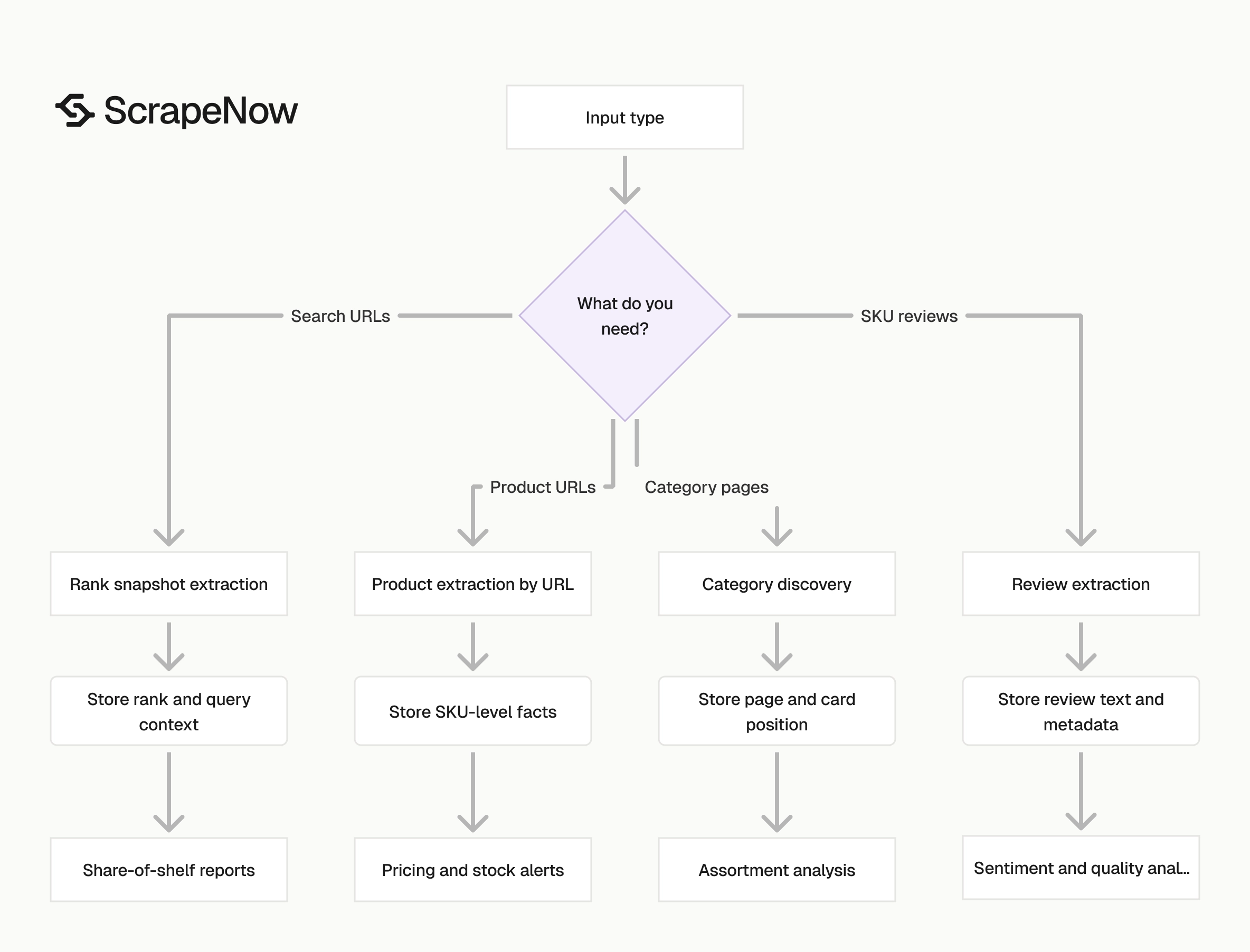
Pick the scraper based on your input. If you already have product URLs, use URL extraction. If you care about rankings, use search or category scraping.
| Job | Best scraper | Input | Typical output |
|---|---|---|---|
| Track 5,000 known SKUs daily | Product extraction by URL | Product URLs | Title, price, MRP, discount, stock, seller, rating |
| Monitor all products in a category | Product search by category | Category name or category path | Product cards, prices, ratings, URLs |
| Pull customer feedback for one SKU | Reviews by SKU | SKU | Rating, review text, review date |
| Extract a filtered Flipkart result page | Search results by URL | Flipkart search URL | Ranked products from that exact result set |
| Track category search rankings | Search results by category | Category | Ranked product list |
For price intelligence, start with product extraction by URL. It gives stable SKU-level tracking and clean daily diffs.
For assortment analysis, start with category search. It gives market coverage, seller spread, brand mix, and ranking movement.
For product research, combine category search with reviews. Search data shows what sells and ranks. Reviews show complaints, repeat-buy signals, and product quality gaps.
For ad monitoring, use search results by URL. Save the exact query and filters, then compare rank position across daily or hourly runs.
If you need one default path, start narrow. Feed a small product URL list into URL extraction, then add search extraction once your alerting works.
That order reduces noise. SKU monitoring gives stable identifiers, clear diffs, and fewer join problems than broad category extraction.
Use category scraping when discovery matters more than exact SKU history. It helps find new products, new brands, and gaps in your own catalog.
Use review scraping when the business question involves product quality. Review text carries defect patterns that price and rank rows never show.
Use search URL scraping when the query itself matters. A saved URL preserves filters, sort order, and price bands that a plain category input loses.
Pricing
ScrapeNow charges per returned row. One row costs one credit, starting at $0.04 per credit for small runs and dropping with volume. No monthly contracts, no proxy fees, no charges for failed rows. See the pricing page for current rates.
What to watch before you scrape Flipkart
Decide your unit of work before you start. Product URLs, categories, search URLs, and SKUs produce different datasets. Mixing them without a plan creates duplicate rows and fragile joins.
Store the product URL and SKU with every row. Prices, titles, sellers, and ratings change. Stable identifiers let you diff runs cleanly.
Track timestamps. A Flipkart price at 09:00 and a Flipkart price at 21:00 can differ during sales, flash offers, and stock changes.
Store location inputs where they apply. Pincode, delivery region, and session settings affect price, seller, stock, and delivery promise.
Separate raw extraction from reporting. Keep the raw ScrapeNow rows in S3, Postgres, BigQuery, or your warehouse. Build price alerts and dashboards from normalized tables.
Add validation before data reaches reporting. Check for missing price, missing URL, duplicate SKU, empty title, and sudden row-count drops.
Keep retry logic outside your analytics tables. Failed pages, partial pages, and blocked responses belong in job logs. Clean rows belong in reporting tables.
Version your parser expectations even when ScrapeNow runs the scraper. Field names, business rules, and downstream joins still belong in your data contract.
A simple contract works. Define required fields, nullable fields, identifier fields, timestamp format, currency format, and location fields before the first scheduled run.
Run small tests against each data type. A product extraction test does not validate review extraction. A category test does not validate filtered search URLs.
Build dedupe rules early. For product rows, dedupe by product URL, SKU, pincode, and timestamp bucket. For reviews, dedupe by review ID or content hash.
Keep snapshots when ranks matter. Updating one row in place destroys movement history. Append rank rows and build reports from time-series tables.
Set row-count alerts per scraper. Product URL jobs should return close to the input count. Category and search jobs should use historical ranges as the baseline.
Track null rates by field. A sudden rise in missing price, seller, or rating usually means the page changed or location state failed.
Keep raw HTML only when your policy allows it. Raw responses help debugging, but they also increase storage cost and review burden. Many teams store samples for failed rows only.
Normalize currency early. Store numeric price and currency code as separate fields. Avoid parsing rupee symbols inside dashboards.
Use one timestamp standard. UTC works best for warehouses. Store the local business date separately if your reports need India sales-day grouping.
Recommended workflow for a production Flipkart scraper
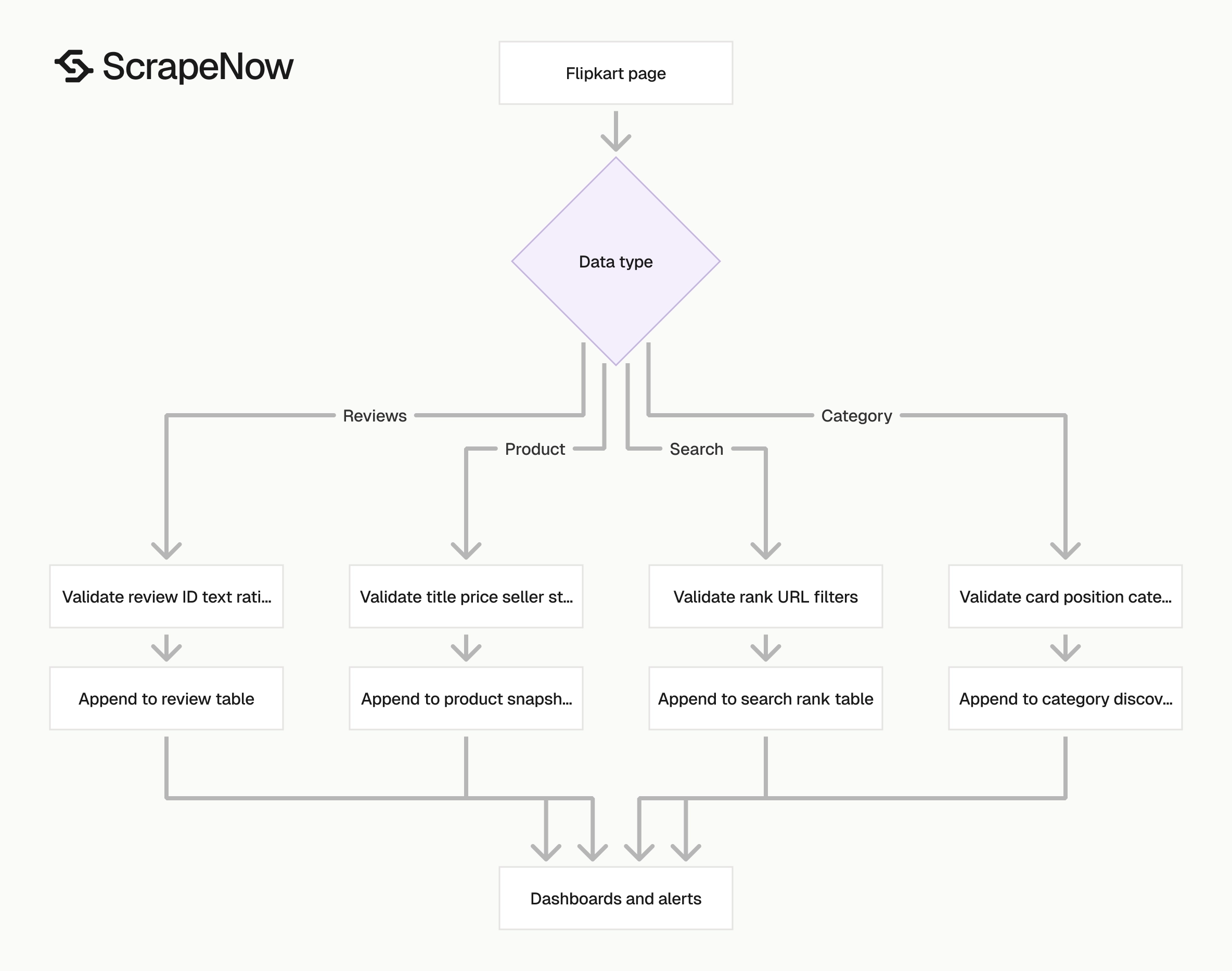
Start with 100 product URLs. Run the Extract Flipkart product data and inspect every returned field.
Check title, price, MRP, discount, seller, stock, rating, review count, URL, and timestamp. Verify that your warehouse stores price as a number and currency as a separate field.
Add 10 search URLs after product extraction passes validation. Run the Search Flipkart results and store rank position.
Compare the search output against your product table by URL. This join gives you both SKU-level facts and marketplace position.
Add reviews after the price and rank tables work. Run the Extract Flipkart reviews by SKU for your top SKUs and tag repeated complaints.
Schedule only after these checks pass. Production scraping fails less often when each dataset has its own table, validation rules, and alert thresholds.
Set alert thresholds before the first scheduled run. Price dropped more than 10 percent, seller changed, stock disappeared, rank moved more than five positions, or row count fell by 20 percent.
Those rules catch the problems that matter to the business. They also catch scraper issues before an empty dataset reaches a dashboard.
Add a dry-run mode for new inputs. The dry run should write to staging tables, not production tables. Review null rates, duplicate rates, and row counts before promotion.
Create a run manifest for every scheduled job. Store scraper name, input file, row count, start time, end time, status, and owner. That manifest becomes the first place to check during incidents.
Keep alert ownership clear. Price alerts usually belong to marketplace operations. Extraction failure alerts usually belong to data engineering.
Document the join keys. Product URL, SKU, pincode, timestamp bucket, and category label should have agreed definitions. Ambiguous joins create silent reporting errors.
A practical production setup uses three table layers. Store raw rows first, normalized facts second, and reporting aggregates third. This layout keeps debugging separate from dashboards.
Example data model for Flipkart extraction
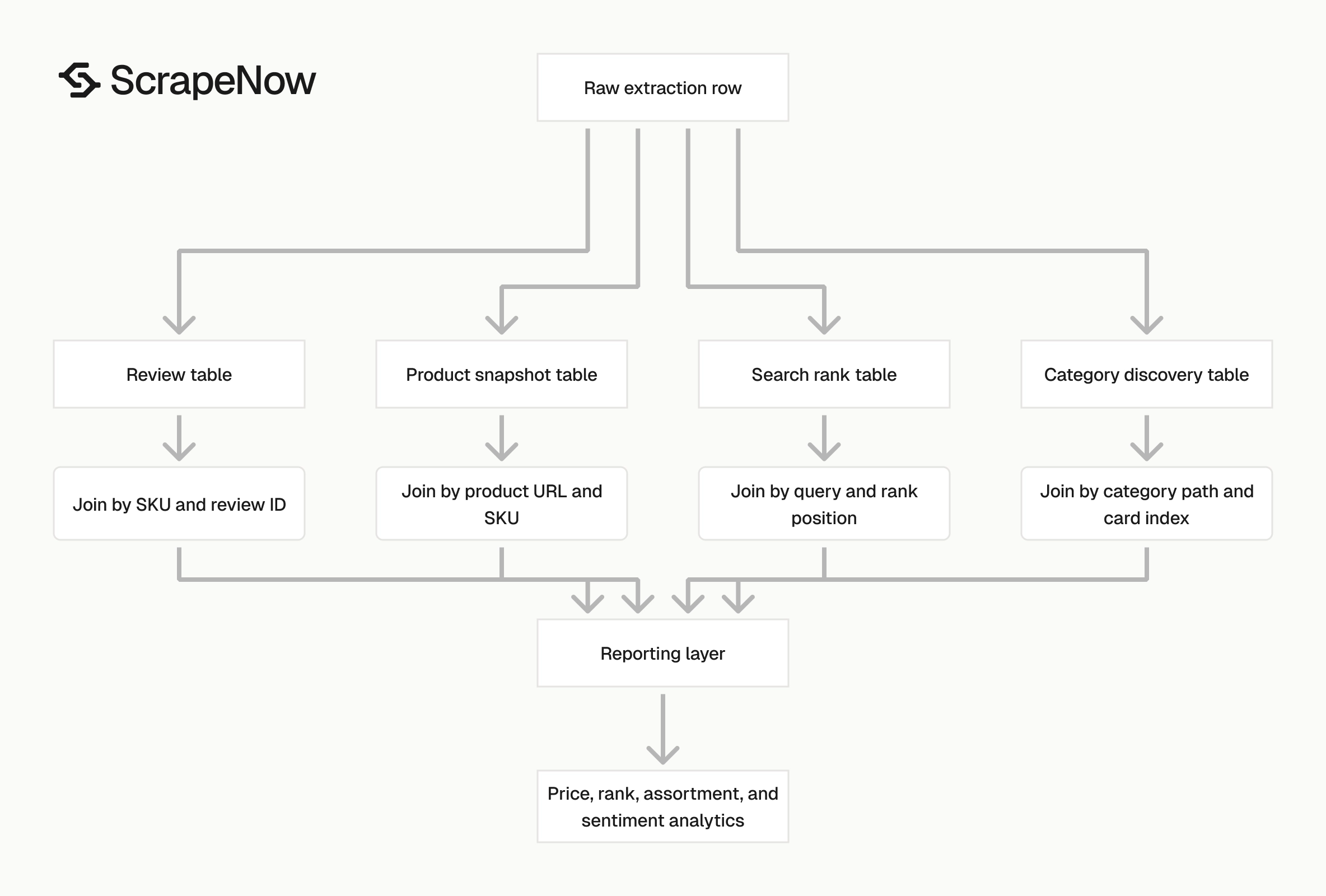
A simple product snapshot table should contain identifiers, product facts, and run metadata. Required identifiers include product URL, SKU where available, pincode, and snapshot timestamp.
Product facts should include title, brand, seller, price, MRP, discount, availability, rating, and review count. Run metadata should include scraper name, run ID, input source, and validation status.
Search rank tables need query context. Store search URL, query label, category, page number, rank position, product URL, title, price, rating, and timestamp.
Category discovery tables need placement context. Store category input, category path, page number, card index, product URL, title, brand, price, seller, and timestamp.
Review tables need stable dedupe fields. Store review ID when available. Also store SKU, product URL, rating, review text hash, review date, reviewer display name, and extraction timestamp.
Keep failed rows in separate tables. Include input, error type, HTTP status where available, retry count, and failure reason. That data shows whether failures come from inputs, blocking, parsing, or location state.
Common Flipkart scraping mistakes
Running one scraper for every question creates noisy output. Price tracking, category discovery, search rank monitoring, and reviews need different tables and validation rules.
Ignoring location state causes false price changes. A seller change caused by pincode drift should not trigger the same alert as a real marketplace change.
Treating HTTP 200 as success causes missing data. Validate fields after extraction. A successful request with missing price still failed the business requirement.
Overwriting rows removes history. Append snapshots for product prices, stock, and ranks. Use views or reporting tables to show the latest state.
Skipping dedupe creates inflated counts. Category pages can repeat products across pages, filters, and related sections. Reviews can repeat across pagination retries.
Using titles as identifiers creates join errors. Titles change during campaigns, sales, and catalog edits. Use product URL, SKU, and normalized identifiers instead.
Sending every category row into daily product monitoring wastes credits. Use category scraping to discover candidates, then monitor selected URLs.
Next step
Run one focused test before building a full pipeline. For price tracking, send 100 known product URLs to the Extract Flipkart product data.
Store the returned rows with SKU, product URL, timestamp, seller, price, MRP, discount, stock, rating, and pincode. Run the same list tomorrow and compare the two snapshots.
If those diffs match your reporting needs, schedule the same scraper for your full SKU list. Add search extraction later when you need rank tracking and share-of-shelf reporting.
Keep the first production job narrow. Add category discovery, search ranking, and reviews after the product table passes validation across repeated runs. That sequence gives you clean baselines before the pipeline grows.


