Yelp profiles expose 10+ fields per local business.
Yelp contains business names, addresses, phone numbers, categories, hours, ratings, review counts, websites, photos, and local service metadata. It covers restaurants, dentists, plumbers, salons, contractors, repair shops, medical offices, and other local businesses.
A Yelp scraper turns those pages into rows your team can query, validate, refresh, and join. Typical outputs include lead lists, local SEO audits, competitor tracking, market coverage reports, and reputation analysis.
Start with a narrow extraction target. Decide whether you need business profiles, search results, reviews, photos, or user-level data before you write code or submit URLs.
ScrapeNow’s Yelp coverage is built for business profile extraction by URL. If you already have Yelp profile URLs, use the Yelp Businesses Extract by URL scraper to return one structured business row per input URL.
This article is the Yelp hub for ScrapeNow’s local business extraction workflow. For the full extractor catalog across Google, Amazon, LinkedIn, TikTok, Instagram, Facebook, YouTube, Zillow, Indeed, Glassdoor, Flipkart, Crunchbase, Yelp, and X, use ScrapeNow scrapers.
Yelp data worth extracting
Yelp reported 330 million cumulative reviews and 8.4 million active claimed business locations in its 2025 investor materials. That makes Yelp a strong source when your dataset needs more than a business name and address.
Most teams scrape Yelp for four workflows. Sales teams build local lead lists from business category, phone, website, and location data.
SEO teams audit categories, citations, website coverage, and address consistency. Market teams track ratings, review counts, category density, and location coverage by city.
Data teams enrich internal business records with phone, website, hours, and location fields. Those fields support joins against CRM records, warehouse tables, territory models, and outbound systems.
| Data field | Why it matters |
|---|---|
| Business name | Entity matching, lead records, deduplication |
| Yelp URL | Source URL for refresh jobs |
| Phone number | Sales outreach and CRM enrichment |
| Street address | Territory mapping and local SEO audits |
| City, state, ZIP | Geo filters and market coverage reports |
| Categories | Segmentation by vertical |
| Rating | Reputation scoring |
| Review count | Demand and popularity signal |
| Hours | Store availability and local operations research |
| Website | Domain enrichment and outbound targeting |
| Price range | Restaurant and service business segmentation |
The right field mix depends on the workflow. A sales list needs phone, website, category, and location.
A local SEO audit needs category, address, website, and citation consistency. A market coverage report needs city, category, rating, review count, and claimed profile status when available.
A refresh job also needs source URL, scrape timestamp, and an internal ID for joins. Without those fields, your next run becomes harder to compare against the first run.
Yelp also has a paid Yelp data API for licensed access to selected Yelp data. That route fits teams that need Yelp-approved commercial access and can work inside the API’s data model.
ScrapeNow fits a different job. You submit known Yelp business URLs and receive extracted profile data as structured rows.
Yelp scraping fails on rate limits, CAPTCHAs, and changing pages
Yelp is harder to scrape than a static directory. Search result pages and business pages use anti-bot checks, request limits, geo-sensitive content, and markup that changes often.
The main failure modes match what production scrapers see across local directories. You receive 403 responses after request bursts.
You hit CAPTCHA pages after repeated access from the same IP. You receive partial HTML when JavaScript-rendered content changes.
You miss fields when Yelp serves a variant page for the same business URL. That failure is worse than a hard block because your job still returns rows.
Login walls create another failure point. Some review and user-level data sits behind interaction flows, which makes those pages weak targets for a basic requests script.
Geography affects results. A search for “pizza in Austin” and a direct business URL can return different surrounding metadata.
Location, language, device fingerprint, and request history all affect what Yelp returns. Direct profile URLs reduce that variability because each input points at a known business page.
Selector drift causes quiet data loss. A scraper can keep returning HTTP 200 while phone numbers, price ranges, or hours disappear from output.
Track missing-field rates as a production metric. A high HTTP success rate means little when required fields disappear from half the rows.
ScrapeNow's Yelp scrapers
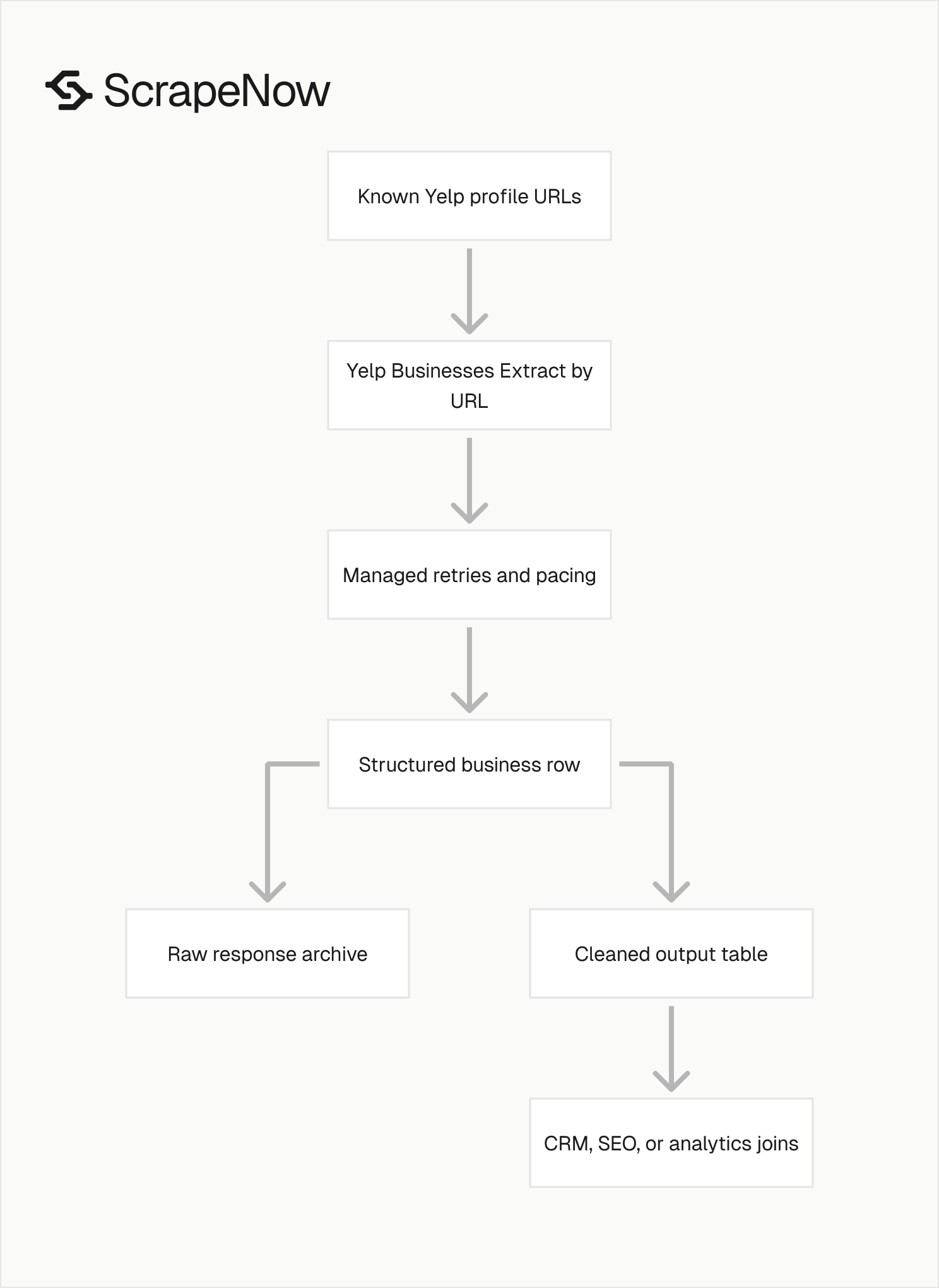
ScrapeNow’s Yelp coverage focuses on business profile extraction. You give the scraper Yelp business URLs, and it returns structured records.
Your team does not maintain proxies, browser sessions, retries, request pacing, or selectors. ScrapeNow handles those parts inside the managed scraper.
This model works best when you already know the businesses you want to extract. The scraper reads profile pages and returns normalized fields for each input URL.
ScrapeNow’s Yelp extractor is not a keyword discovery crawler. Build or source the Yelp URLs first, then submit those URLs for profile extraction.
That separation keeps the output predictable. One URL maps to one business record, which keeps joins and refresh jobs simple.
Yelp Businesses Extract by URL
The Yelp Businesses Extract by URL scraper takes one or more Yelp business profile URLs. It extracts business-level fields such as name, address, phone, rating, review count, categories, price range, website, and hours when available.
Use this scraper when you already have Yelp URLs from search, a CRM, a previous crawl, a sales list, or another discovery source. The input is direct, and the output maps one profile URL to one business record.
The detailed spoke article shows the input format, API usage, and field-level output for this scraper. The Yelp Businesses scraper guide with code examples covers the full flow.
The Yelp Businesses Extract by URL product page lets you test URLs from the dashboard or REST API. Start there when you want to verify fields against a real sample.
Example input and output
A good input payload contains the Yelp URL and your internal record ID. Keep the internal ID in every request because business names repeat across cities and chains.
Use this shape for CSV, JSON, or API submissions:
[
  {
    "yelp_url": "https://www.yelp.com/biz/example-business-san-francisco",
    "internal_id": "crm_10492"
  },
  {
    "yelp_url": "https://www.yelp.com/biz/example-restaurant-austin",
    "internal_id": "crm_10493"
  }
]
A returned row should preserve your ID and add the extracted fields. The exact field set depends on what Yelp exposes on that profile.
{
  "internal_id": "crm_10492",
  "yelp_url": "https://www.yelp.com/biz/example-business-san-francisco",
  "business_name": "Example Business",
  "phone": "+1 415-555-0199",
  "street_address": "100 Market St",
  "city": "San Francisco",
  "state": "CA",
  "zip": "94105",
  "categories": ["Restaurants", "Breakfast & Brunch"],
  "rating": 4.3,
  "review_count": 287,
  "price_range": "$$",
  "website": "https://www.example.com",
  "hours": {
    "monday": "8:00 AM - 6:00 PM",
    "tuesday": "8:00 AM - 6:00 PM"
  }
}
Store the raw response before you transform it. Raw rows give you a source record when a downstream mapping rule changes.
Store cleaned rows in a separate table. Sales, SEO, and analytics teams should query stable fields, not raw extraction payloads.
When ScrapeNow is the better fit
A custom Yelp crawler makes sense for a small one-time pull. Ten URLs with a local script and manual review will finish before you set up a production pipeline.
At 1,000 URLs, maintenance starts. You need retries, proxy rotation, request pacing, user-agent handling, selector updates, data checks, and failed-job replay.
At 10,000 URLs, uncontrolled traffic becomes the main failure source. Request timing, IP reputation, browser fingerprints, and session reuse all affect output quality.
Datacenter IPs get flagged quickly when request timing looks automated. Residential routing raises costs unless you tune rotation, sticky sessions, and concurrency.
ScrapeNow handles that infrastructure behind the scraper. You send inputs and get rows.
Your team spends time on the dataset, warehouse joins, and downstream rules. That is the work that improves the output.
| Workload | Better approach | Reason |
|---|---|---|
| 10 known Yelp URLs | Manual script | Low risk, low maintenance |
| 1,000 known Yelp URLs | ScrapeNow Yelp scraper | Faster than building retry and parsing logic |
| 10,000+ known Yelp URLs | ScrapeNow API | Batch processing, retries, structured output |
| Unknown businesses by keyword | Discovery workflow plus URL extraction | Build or source URLs first, then extract profiles |
| Protected pages or unstable markup | Managed scraper | Less breakage work for your team |
If your pipeline already stores Yelp URLs, the Yelp Businesses Extract by URL scraper is the lowest-maintenance entry point. It maps each profile URL to one structured business row.
If you still need discovery, split that job from extraction. Run discovery by keyword, city, category, CRM export, or another data source, then pass profile URLs into ScrapeNow.
That split gives you cleaner failure handling. Discovery errors stay separate from profile extraction errors.
What a production Yelp extraction job needs
A production job needs more than HTML parsing. You need input normalization, retry rules, rate controls, schema checks, and a way to replay failed rows.
Start with URL normalization. Remove tracking parameters, referral fragments, and duplicate variants before you submit inputs.
Store the original URL and the normalized URL if you need audit history. That pair helps when someone asks why two rows point at the same business.
Next, define a field contract. Mark each field as required, optional, or derived.
For example, treat business_name, yelp_url, city, and category as required fields. Keep price_range, hours, and website optional unless your workflow requires them.
Yelp profiles do not expose every field for every business. Your schema should reflect that reality.
Then track output quality. A 95% job success rate says little if phone numbers disappear from half the rows.
Measure extraction success by field, category, city, and job batch. Those cuts show whether failures cluster around one vertical, one region, or one page template.
Failed rows need replay logic. Transient blocks, network failures, and page variants should never force a full rerun.
Keep failed inputs separate and submit them again after the first batch finishes. A replay queue also keeps your warehouse load from mixing successful and failed records.
A simple job table should store the input URL, normalized URL, internal ID, batch ID, status, error code, and timestamp. That structure makes retries predictable and keeps debugging out of spreadsheets.
Add a source_system column if URLs come from several places. A CRM export, paid list, search crawler, and partner feed will have different error patterns.
Pricing for Yelp business extraction
ScrapeNow pre-built scrapers use credits. One returned row costs one credit.
Pricing starts at $0.04 per credit for 1 to 250 credits. At 100,000+ credits, pricing drops to $0.012 per credit.
A 1,000-business extraction costs less than building and debugging a custom parser for a single afternoon. Larger refresh jobs stay predictable because billing follows returned rows.
You do not budget separately for browser runtime, proxy bandwidth, CAPTCHA handling, or failed requests. Those costs sit inside the managed scraper.
| Volume | Price per credit | Rows returned |
|---|---|---|
| 1 to 250 | $0.04 | 1 credit per business |
| 100,000+ | $0.012 | 1 credit per business |
ScrapeNow also runs 86+ pre-built scrapers across 14 platforms. The catalog includes Google, Amazon, LinkedIn, TikTok, Instagram, Facebook, YouTube, Zillow, Indeed, Glassdoor, Flipkart, Crunchbase, Yelp, and X.
Use the same credit model across pre-built scrapers. That helps when a local business workflow starts on Yelp and expands to Google, LinkedIn, or another platform.
What to prepare before running a Yelp scraper
Start with clean Yelp business URLs. Direct profile URLs produce cleaner jobs because the scraper receives the exact business target.
Deduplicate inputs before submission. Yelp URLs can vary by tracking parameters, city paths, and referral fragments.
Normalize them down to the canonical business URL when possible. Keep the original URL in a separate column if you need traceability.
Decide which fields are required before you run a large job. If phone, website, and category are mandatory, validate a 50-row sample before sending 50,000 URLs.
A good input file looks like this:
| yelp_url | internal_id |
|---|---|
| https://www.yelp.com/biz/example-business-san-francisco | crm_10492 |
| https://www.yelp.com/biz/example-restaurant-austin | crm_10493 |
| https://www.yelp.com/biz/example-dentist-chicago | crm_10494 |
Keep your internal ID in the input file if you plan to join results back to a CRM, warehouse table, or enrichment pipeline. That small field saves review time when two businesses share similar names or addresses.
Also keep a batch ID. A batch ID lets you compare refresh runs, isolate failures, and measure field coverage over time.
For example, you can compare phone coverage between a January run and a March run without rebuilding your join logic. You can also roll back one batch without touching older successful records.
Add a requested_at timestamp if your data freshness matters. Local business data changes often enough that a stale scrape can mislead sales routing and SEO audits.
Data validation after the scrape
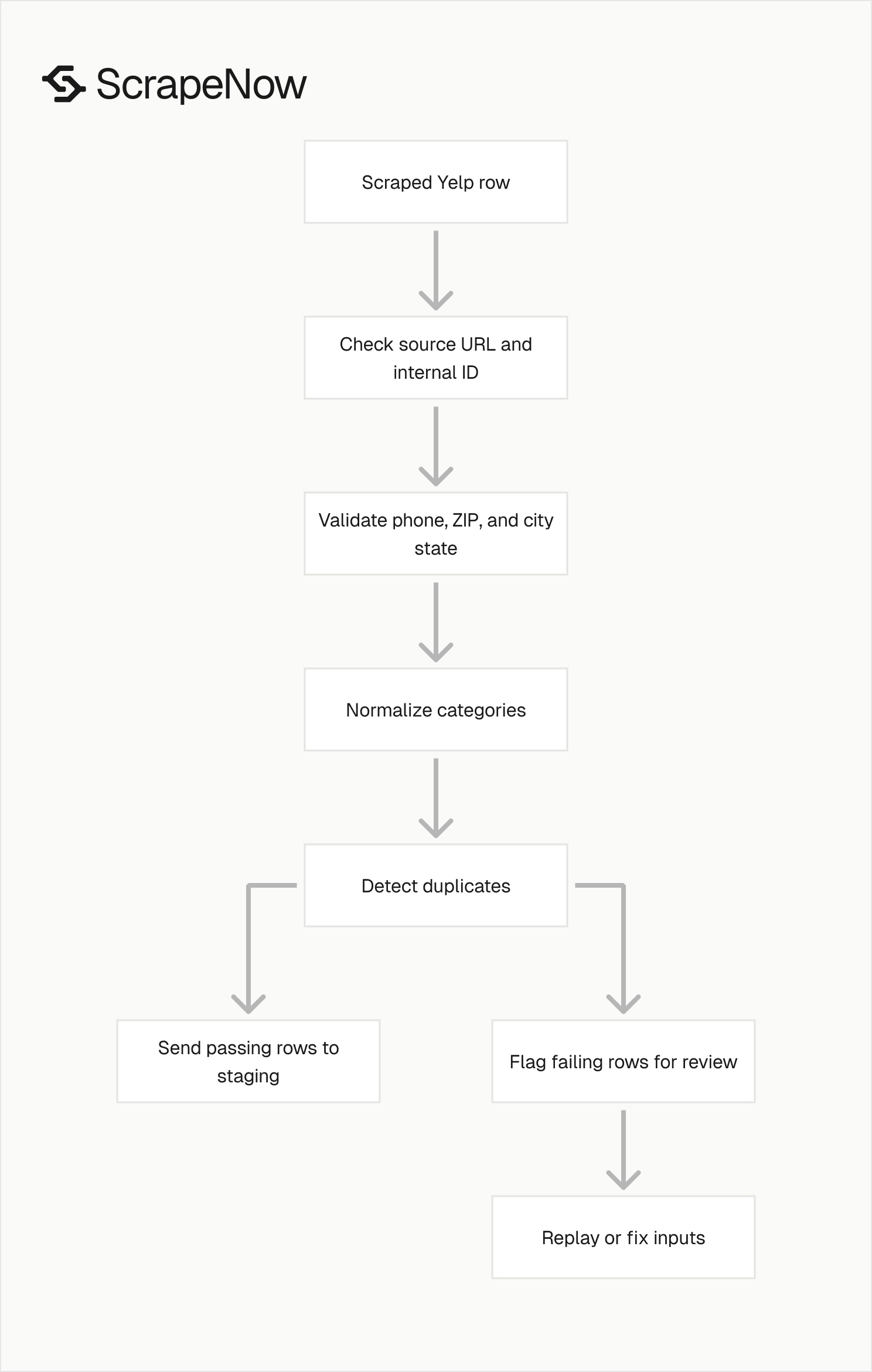
Do not load scraped rows straight into production tables. Run basic validation before the import.
Check that each output row has a source Yelp URL and your internal ID. Verify that phone numbers match the expected country format.
Confirm that ZIP codes match the returned city and state when your workflow depends on territory mapping. Flag rows that fail those checks for review or replay.
Normalize categories before analytics. Yelp category labels work well for display.
Internal reporting usually needs a smaller controlled taxonomy. Your CRM and BI tables should not depend on every Yelp category label.
Map “General Dentistry,” “Cosmetic Dentists,” and “Orthodontists” into your own dental segments if your CRM uses broader verticals. Do the same for home services, medical offices, restaurants, and retail categories.
Store raw output and cleaned output separately. Raw records help with debugging when a downstream rule changes.
Cleaned records give sales, SEO, and analytics teams a stable table to query. Keep both tables tied to the same internal ID and batch ID.
Use field-level checks before you accept a batch. The checks should flag missing required fields, invalid phone formats, empty category arrays, and duplicate internal IDs.
A lightweight Python check works well for CSV exports:
import csv
import re

required = {"internal_id", "yelp_url", "business_name", "city", "categories"}
phone_pattern = re.compile(r"^\+?[0-9().\-\s]{7,}$")

with open("yelp_businesses.csv", newline="") as f:
    reader = csv.DictReader(f)
    for row_num, row in enumerate(reader, start=2):
        missing = [field for field in required if not row.get(field)]
        if missing:
            print(row_num, "missing required fields", missing)

        phone = row.get("phone", "")
        if phone and not phone_pattern.match(phone):
            print(row_num, "invalid phone", phone)
This check will not catch every issue. It catches the failures that break joins, imports, and outbound workflows.
Add duplicate detection before loading the batch. Match on internal_id, normalized Yelp URL, phone number, and address.
A second Python pass can catch the easiest duplicate source, which is repeated internal IDs:
import csv
from collections import Counter

with open("yelp_businesses.csv", newline="") as f:
    rows = list(csv.DictReader(f))

ids = Counter(row["internal_id"] for row in rows if row.get("internal_id"))

for internal_id, count in ids.items():
    if count > 1:
        print("duplicate internal_id", internal_id, count)
Run these checks on the sample and the full batch. The sample catches setup errors, and the full batch catches long-tail data problems.
Common mistakes to avoid
Do not start with keyword searches if you already have profile URLs. Keyword discovery introduces ranking noise, duplicate businesses, and location ambiguity.
Direct URLs produce cleaner extraction jobs. They also make refresh runs easier because each input has a stable source page.
Do not assume every business has every field. Some profiles lack websites, hours, price ranges, or complete address data.
Treat optional fields as optional in your schema. Required-field rules should match the workflow, not a perfect profile model.
Do not run one large batch without a sample. A 50-row test catches malformed URLs, duplicate IDs, missing fields, and category issues before they hit a larger job.
Use the same validation rules for the sample and the full run. Otherwise, the sample gives you false confidence.
Do not discard failed inputs. Keep them with error status, timestamp, and batch ID.
That record tells you whether failures came from invalid URLs, temporary blocks, or unavailable pages. It also gives you a clean replay list.
Do not join only on business name. Local businesses share names across cities, and chains reuse names across hundreds of locations.
Use Yelp URL, address, phone, and internal ID for safer matching. For chains, include city and ZIP in your matching rule.
Do not overwrite clean production records without review. Run scraped data through staging tables, compare changes, and flag large shifts in phone, website, category, or address fields.
A changed phone number deserves review before it replaces a verified CRM value. A changed website should pass domain checks before sales tools use it.
Recommended ScrapeNow workflow
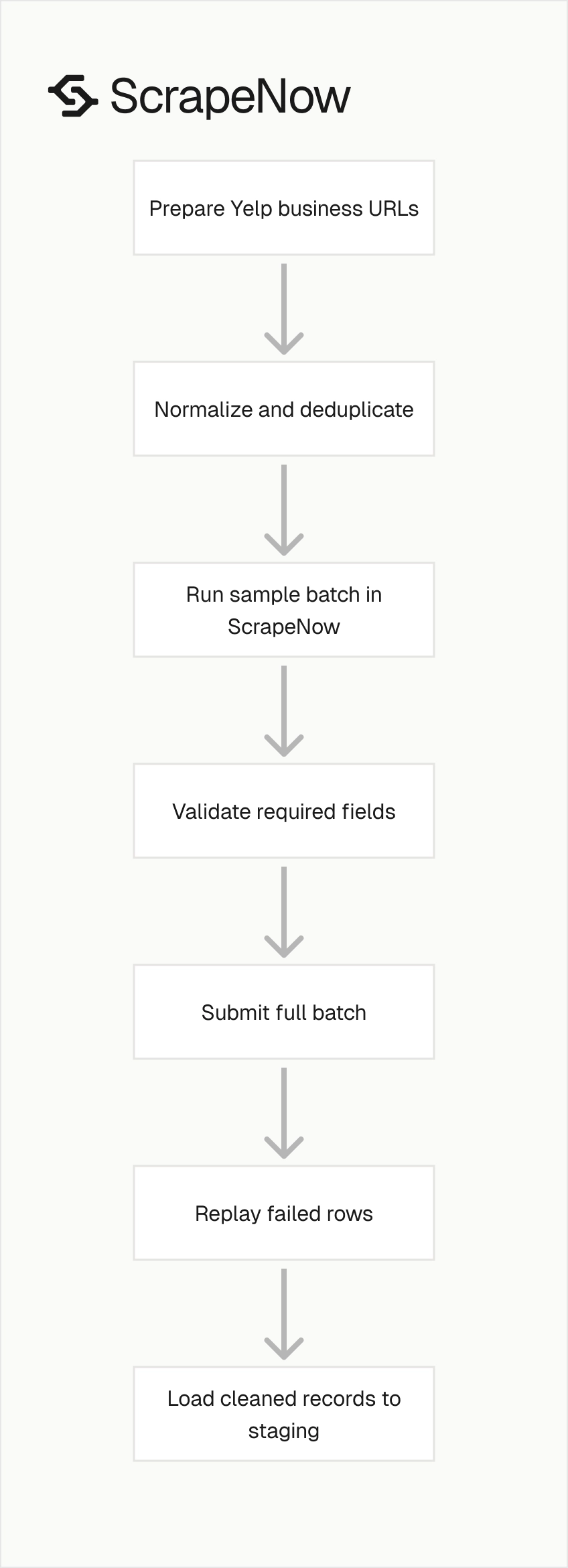
Use a five-step workflow for the first production run. Keep each step separate so failures are easy to isolate.
- Export Yelp business URLs from your source system.
- Normalize URLs and deduplicate the input file.
- Run a 25 to 50 URL sample through ScrapeNow.
- Validate required fields, duplicates, and phone formats.
- Submit the full batch and replay failed rows.
This workflow keeps discovery, extraction, validation, and loading separate. Each step produces an artifact you can inspect.
For a CRM enrichment job, the artifact is a CSV or warehouse table keyed by internal_id. For an SEO audit, it is a table keyed by domain, location, and Yelp URL.
For a market coverage report, it is a snapshot keyed by city, category, and scrape date. That snapshot lets you compare category density and reputation metrics across runs.
Keep the first run small enough to review manually. After the field contract works, increase the batch size and keep the same checks.
Where Yelp fits in a local data stack
Yelp is strongest when you need business profile signals that customers see. Ratings, review counts, categories, photos, and hours all reflect public-facing local presence.
Use Yelp alongside your internal records, Google listings, website crawls, and sales activity data. Each source answers a different part of the local business profile.
Your internal CRM tells you account ownership and pipeline stage. Yelp tells you public profile quality and consumer-facing metadata.
A website crawl tells you domain-level signals such as contact pages, booking links, and service pages. Google listings add another public local profile source.
ScrapeNow’s catalog helps when you need those adjacent sources in the same extraction pattern. Start with Yelp profiles, then add the next source through ScrapeNow scrapers when the workflow needs more coverage.
Next step
Pick 25 Yelp business URLs from your own dataset. Include internal_id, batch_id, and the normalized Yelp URL in the input file.
Run the sample and compare the output against your CRM, SEO workflow, or warehouse schema. Check success rate, missing-field rate, duplicate rate, phone format, and category mapping.
If the sample passes, increase the batch size and keep the same validation rules. Replay failed rows separately, then load cleaned records into staging before production.
Start the 25 URL test on the Yelp Businesses Extract by URL scraper.


