One Yelp business URL returns one normalized JSON profile record. The Yelp Businesses scraper extracts name, rating, review count, categories, website, phone number, address, coordinates, claimed status, and Yelp IDs.
Run it after you already have Yelp business URLs from search results, a crawler, a CRM export, or a local sales list. The scraper turns Yelp profile pages into records your code can store, join, dedupe, retry, and audit.
Developers, local data teams, sales ops teams, and SEO teams run this scraper to replace page-specific HTML parsing with a stable JSON workflow. If you need discovery before profile extraction, start with the Yelp Search Results scraper and feed the returned business URLs into this extractor.
How to use this scraper
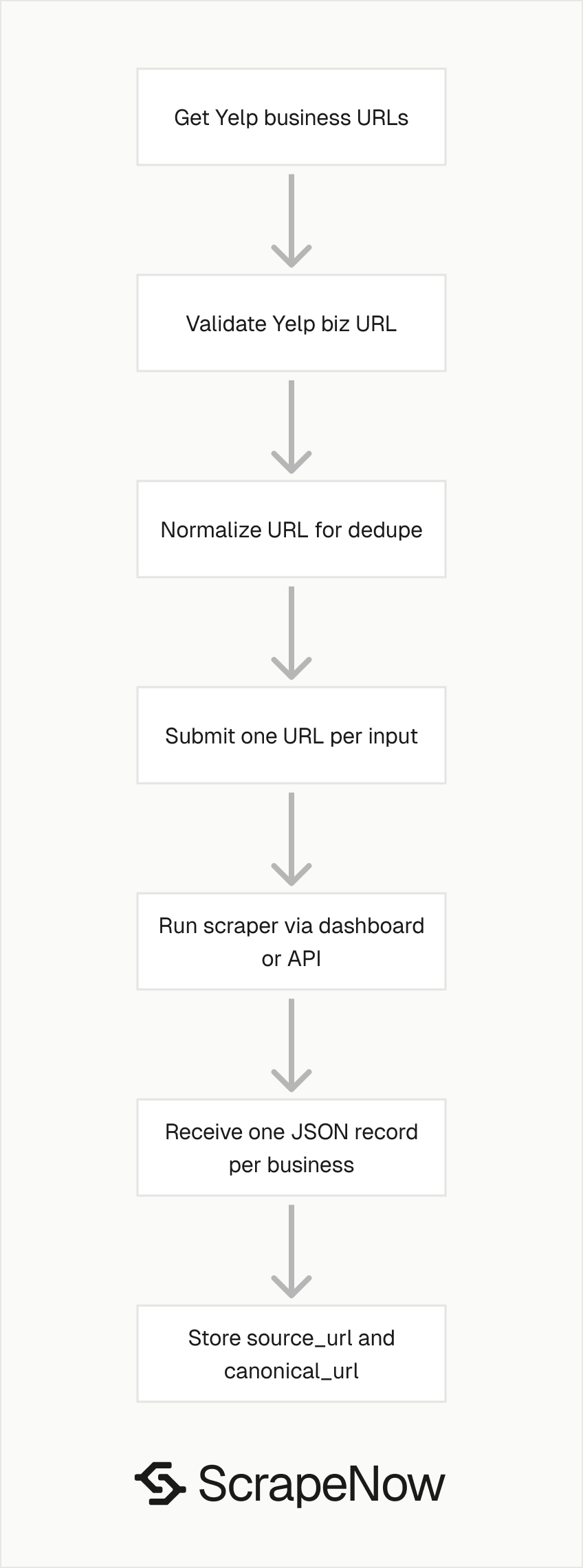
The Yelp Businesses Extract by URL scraper takes one input field, url. It returns one structured business record per Yelp business page.
Input requirements:
urlmust be a Yelp business page URL.- The URL must start with
https://www.yelp.com/. - The path should start with
/biz/. - One input object equals one business page scrape.
- One successful business page produces one output row.
Step 1. Find the Yelp business URL
Open yelp.com.
In the search bar, type the business keyword you want. For example, use Music.
Choose the location. For example, use New York.
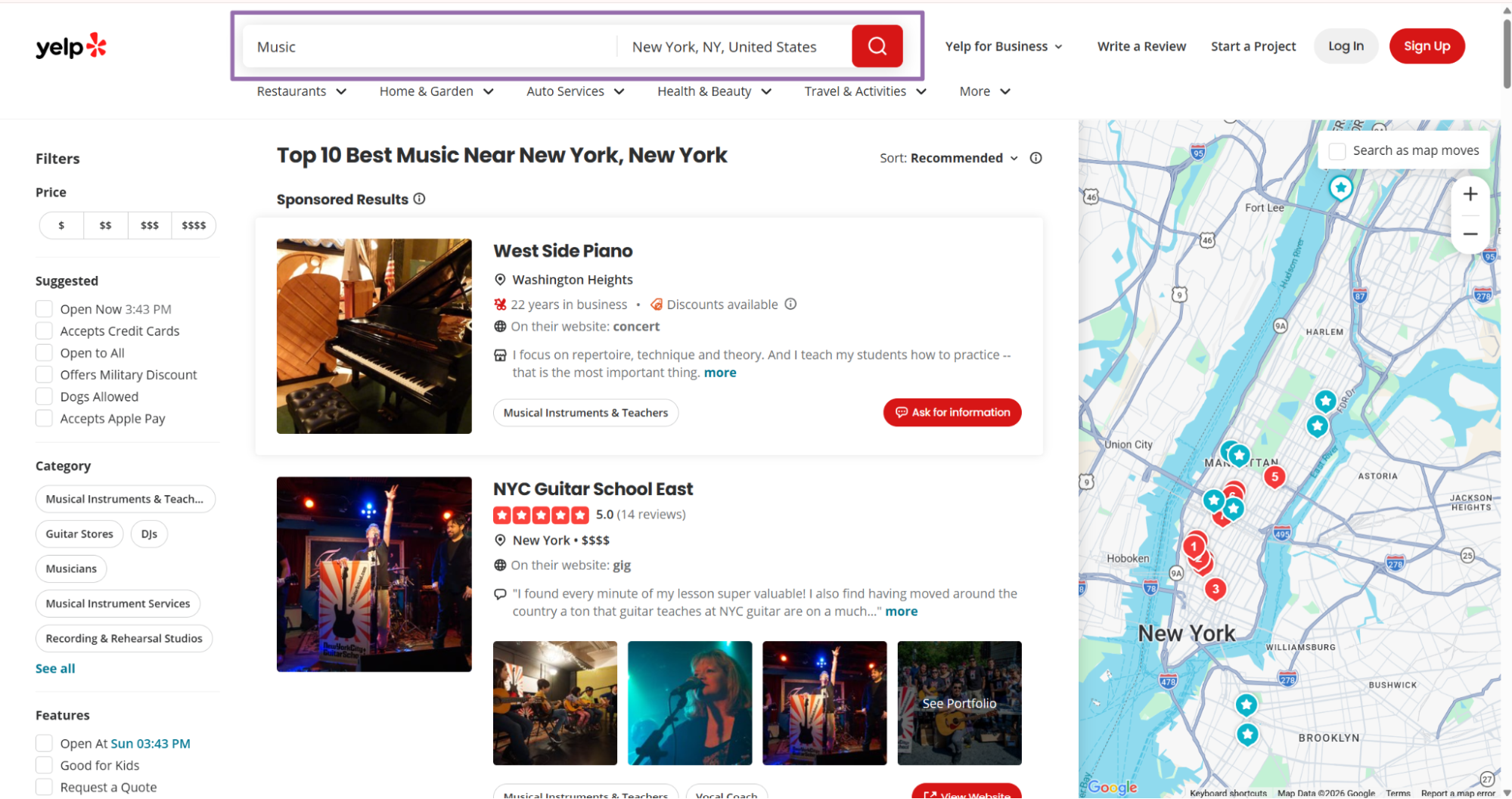
Run the search and open the results page.
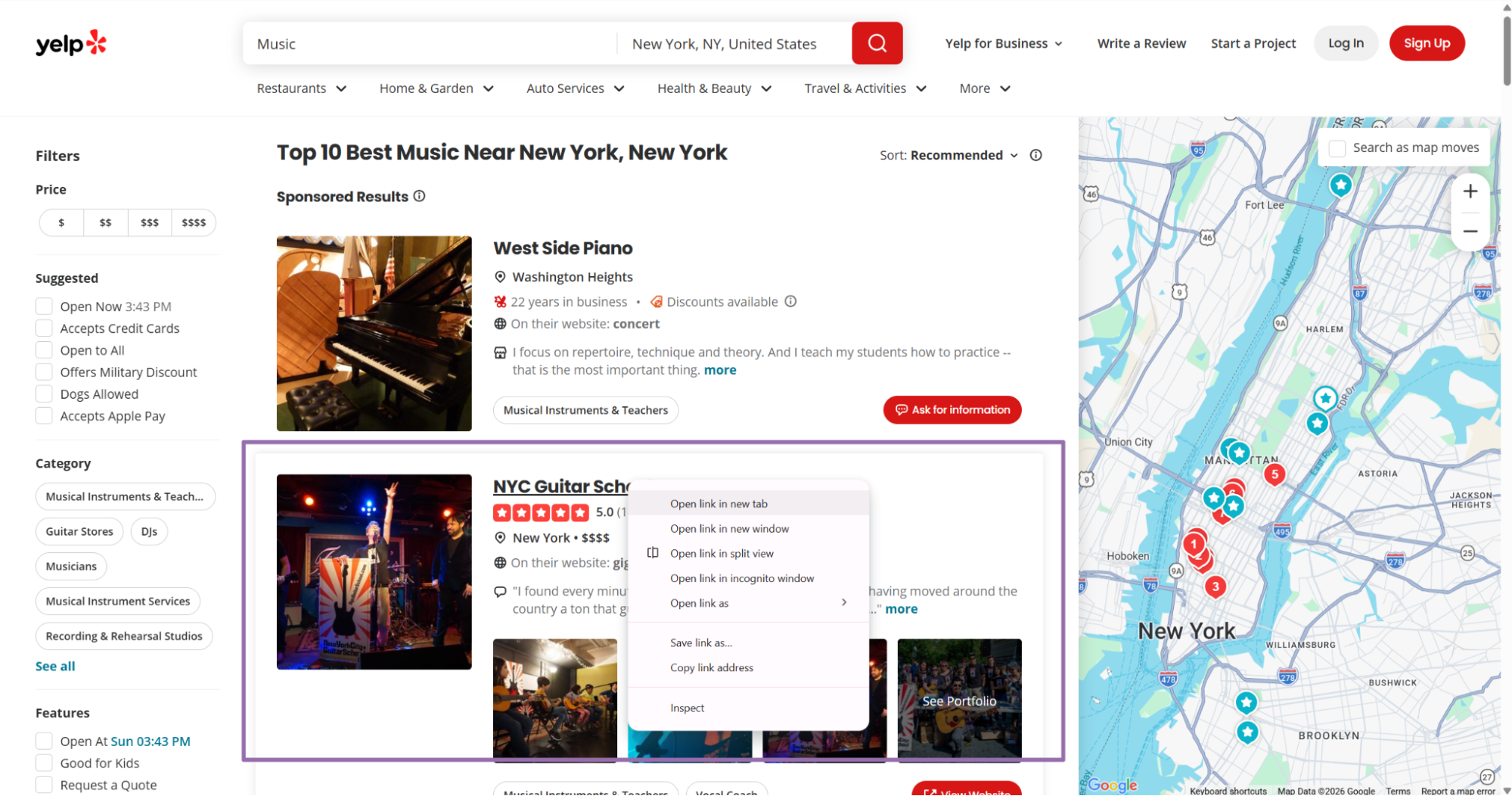
Right-click the business card you want and choose Open in new tab.
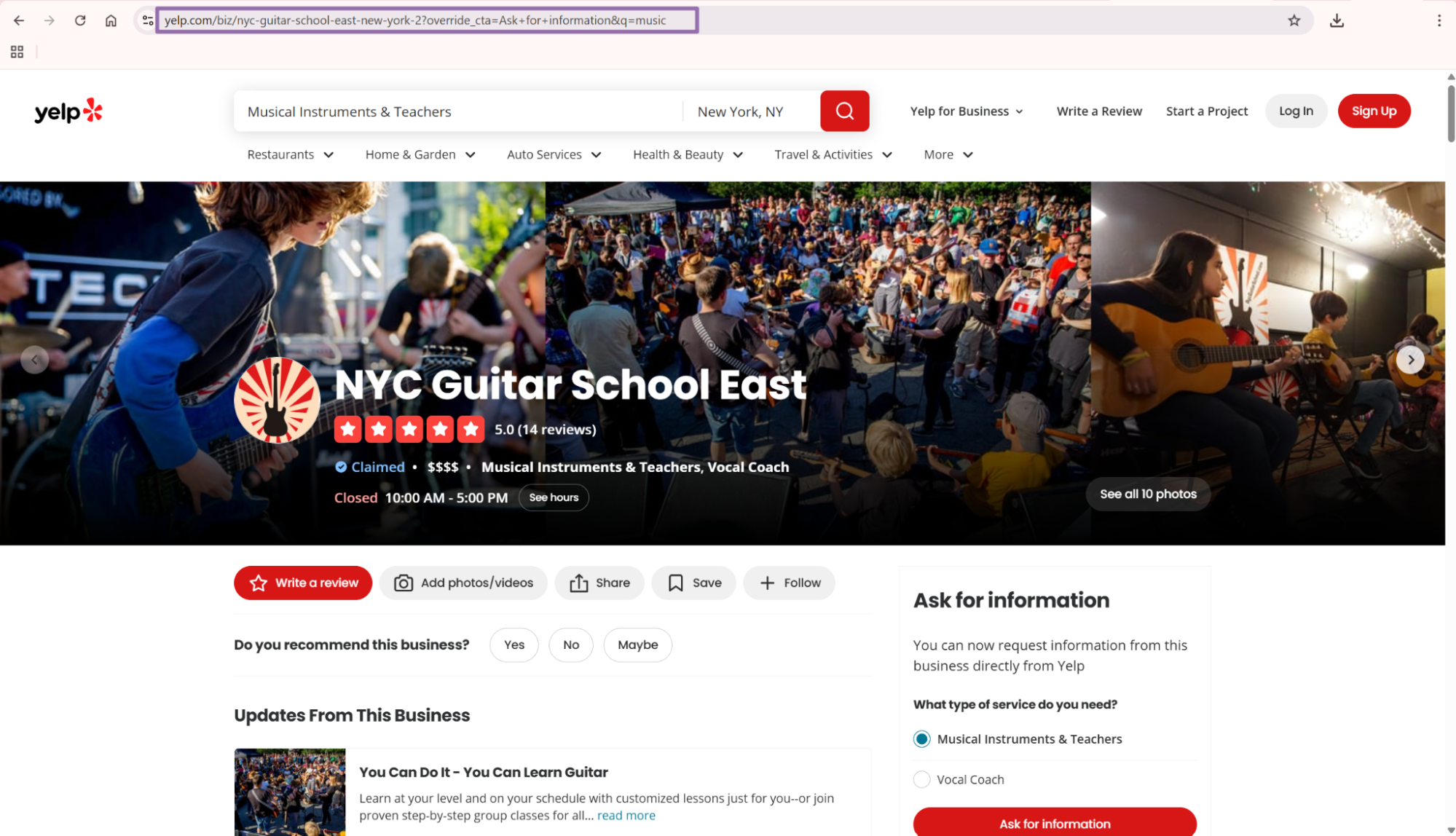
Copy the URL from the browser address bar.
A valid input looks like this:
{
  "url": "https://www.yelp.com/biz/nyc-guitar-school-east-new-york-2?override_cta=Ask+for+information&q=music"
}
Yelp search result URLs often include query parameters. Send the captured URL if it came from your source system, then normalize it before dedupe.
For production jobs, keep both versions. Store the submitted URL for audit trails and the canonical URL for joins.
Step 2. Run the scraper with the API
Use this Python script. It starts a job, polls until completion, downloads JSON results, and writes them to output/yelp-businesses-extract-by-url.json.
"""
Configuration:
    - Set SCRAPER_SLUG to the scraper you want to run.
    - Set SCRAPER_INPUTS to the list of input dicts matching that scraper's schema.
    - Set API_KEY to your scraper API key.
"""

import sys
import time
import json
import requests
import os

API_KEY = "YOUR_API_KEY"

SCRAPER_SLUG = "yelp-businesses-extract-by-url"

SCRAPER_INPUTS = [
    {
        "url": "https://www.yelp.com/biz/nyc-guitar-school-east-new-york-2?override_cta=Ask+for+information&q=music"
    }
]

BASE_URL = "http://194.180.207.126:8080/api/v1/scraping"
TIMEOUT_SECONDS = 3600
POLL_INTERVAL = 5
SPINNER = "|/-\\"


def build_headers(api_key: str, content_type: str | None = None) -> dict:
    """Build request headers using your API key."""
    headers = {"Authorization": f"Bearer {api_key}"}
    if content_type:
        headers["Content-Type"] = content_type
    return headers


def trigger_scrape(slug: str, inputs: list[dict]) -> str:
    """POST to the scrape endpoint and return the job_id."""
    url = f"{BASE_URL}/scrape?scraper={slug}"

    response = requests.post(
        url,
        headers=build_headers(API_KEY, "application/json"),
        json={"inputs": inputs},
    )
    response.raise_for_status()
    return response.json()["data"]["job_id"]


def poll_until_done(job_id: str) -> str:
    """Poll the job status until it reaches a terminal state."""
    start = time.time()
    i = 0

    while True:
        elapsed = time.time() - start
        if elapsed > TIMEOUT_SECONDS:
            print(f"\nTimeout after {TIMEOUT_SECONDS}s")
            sys.exit(1)

        response = requests.get(
            f"{BASE_URL}/jobs/{job_id}",
            headers=build_headers(API_KEY),
        )
        response.raise_for_status()

        data = response.json()
        status = data["data"]["status"]

        mins, secs = divmod(int(elapsed), 60)
        sys.stdout.write(f"\r[{SPINNER[i % 4]}] Waiting... {status} ({mins}m {secs:02d}s)  ")
        sys.stdout.flush()

        if status in ("completed", "failed"):
            print()
            return status

        time.sleep(POLL_INTERVAL)
        i += 1


def fetch_results(job_id: str) -> dict:
    """Download the completed job results as JSON."""
    response = requests.get(
        f"{BASE_URL}/jobs/{job_id}/results?format=json",
        headers=build_headers(API_KEY),
    )
    response.raise_for_status()
    return response.json()


def save_results(data: dict, output_dir: str, slug: str) -> str:
    """Write results to output_dir/{slug}.json and return the filename."""
    os.makedirs(output_dir, exist_ok=True)

    filename = os.path.join(output_dir, f"{slug}.json")
    with open(filename, "w", encoding="utf-8") as f:
        json.dump(data, f, indent=2, ensure_ascii=False)

    return filename


def main() -> None:
    print(f"Triggering scraper: {SCRAPER_SLUG}")
    job_id = trigger_scrape(SCRAPER_SLUG, SCRAPER_INPUTS)
    print(f"Job started: {job_id}")

    final_status = poll_until_done(job_id)

    if final_status != "completed":
        print(f"Job failed with status: {final_status}")
        sys.exit(1)

    print("Fetching results...")
    results = fetch_results(job_id)

    output_file = save_results(results, "output", SCRAPER_SLUG)
    print(f"Results saved to: {output_file}")


if __name__ == "__main__":
    main()
The script uses a 5-second polling interval and a 1-hour timeout. Change those values if your job runner already has queue-level timeouts.
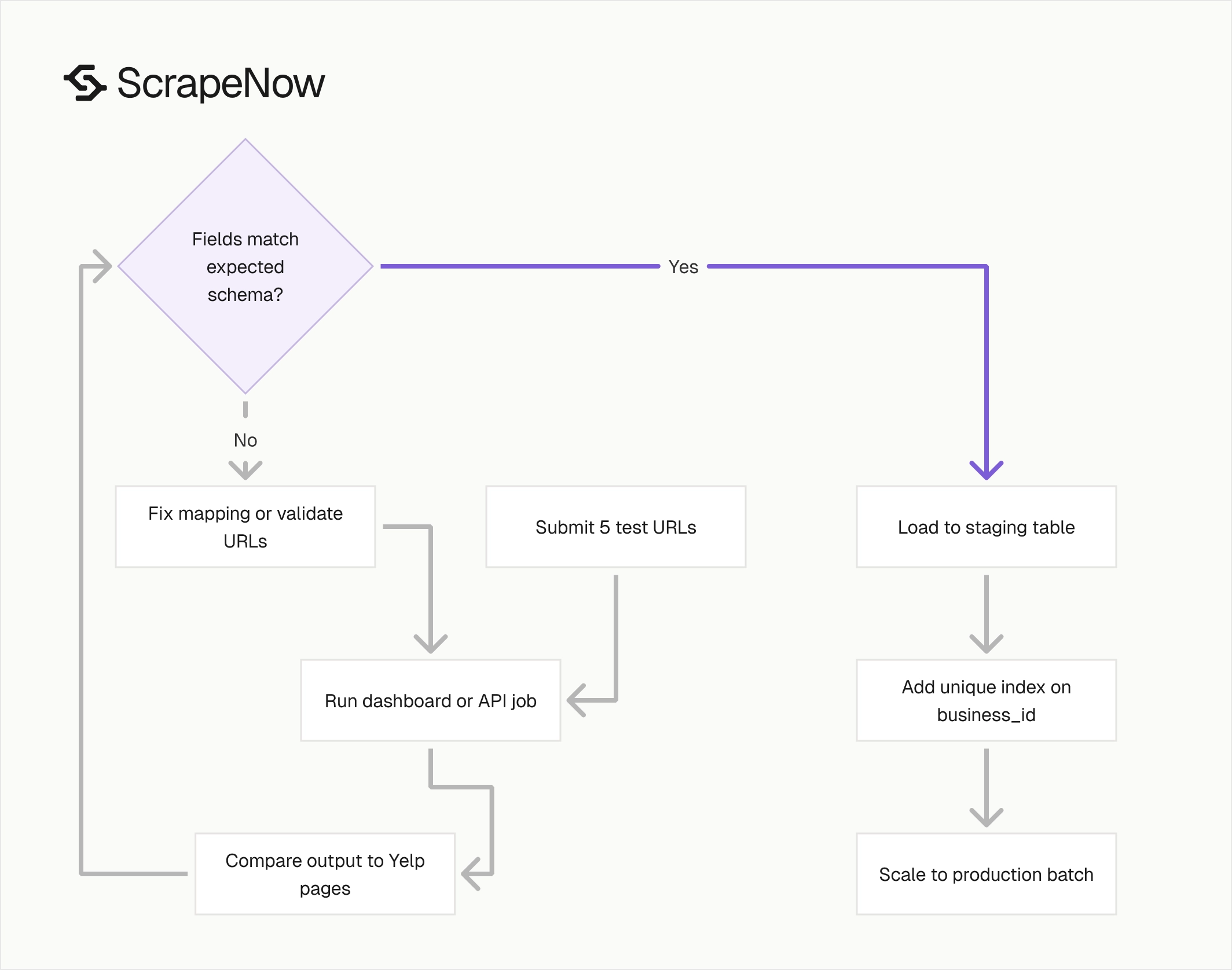
Keep SCRAPER_INPUTS small for the first run. Five known Yelp URLs give you enough data to verify the schema before you submit a larger batch.
Step 3. Read the output file
The script writes the result to this path:
output/yelp-businesses-extract-by-url.json
A successful job returns scrape_status as success.
[
  {
    "inputs": {
      "url": "https://www.yelp.com/biz/nyc-guitar-school-east-new-york-2?override_cta=Ask+for+information&q=music"
    },
    "scrape_status": "success",
    "business_id": "nyc-guitar-school-east-new-york-2",
    "yelp_biz_id": "oxLJttKLYKj21Ggttm9R_Q",
    "name": "NYC Guitar School East",
    "overall_rating": 5,
    "reviews_count": 14,
    "is_claimed": true,
    "categories": [
      "Musical Instruments & Teachers",
      "Vocal Coach"
    ],
    "website": "https://www.nycguitarschool.com",
    "phone_number": "(646) 485-7244",
    "address": {
      "City": "New York",
      "State": "NY",
      "zip_code": "10128"
    },
    "address:zip_code": "10128",
    "full_address": "1807 1st Ave, New York, NY 10128",
    "url": "https://www.yelp.com/biz/nyc-guitar-school-east-new-york-2",
    "latitude": 40.781919,
    "longitude": -73.945957,
    "city": "New York",
    "state": "NY",
    "country": "US",
    "zip_code": "10128",
    "images_videos_urls": null,
    "is_closed": null,
    "scrape_error": null,
    "scrape_error_code": null
  }
]
Save the raw response before you transform it. Raw job output makes later debugging faster when a warehouse load or dedupe rule drops records.
If your pipeline expects newline-delimited JSON, convert each array item to one line after download. Keep the original array file as the job artifact.
What data you get back

The response is an array. Each item maps back to one submitted Yelp URL.
| Field | Type | Use it for |
|---|---|---|
inputs.url |
string | Auditing which submitted URL produced the record |
scrape_status |
string | Filtering successful and failed records |
business_id |
string | Stable slug from the Yelp URL |
yelp_biz_id |
string | Yelp internal business identifier |
name |
string | Business name |
overall_rating |
number | Yelp star rating |
reviews_count |
number | Review volume |
is_claimed |
boolean | Whether the business profile is claimed |
categories |
array | Yelp category labels |
website |
string or null | Business website |
phone_number |
string or null | Business phone number |
full_address |
string | Display address |
latitude |
number or null | Map coordinate |
longitude |
number or null | Map coordinate |
scrape_error |
string or null | Failure reason |
scrape_error_code |
string or null | Machine-readable failure code |
Use business_id as your first dedupe key. It comes from the Yelp URL slug, such as nyc-guitar-school-east-new-york-2.
Use yelp_biz_id as your second dedupe key. It stays useful when submitted URLs contain query strings such as ?override_cta=Ask+for+information&q=music.
Keep inputs.url in storage. When a record fails, that field tells you which submitted page needs retry or review.
Store the normalized url field as the canonical Yelp profile URL. It removes query parameters that came from search result clicks.
The scraper returns profile-level data only. For review text, review dates, reviewer names, and rating breakdowns, run the related Yelp Reviews scraper after you store the profile URL.
For a broader local data pipeline, start from the ScrapeNow scrapers hub. The hub lists 86+ scrapers across 14 platforms, including search, profile, and review extractors.
Production tips
Validate URLs before sending jobs
Invalid inputs waste credits and create noisy failures. Reject any URL that fails the Yelp business page checks before you call the API.
The minimum validation should check scheme, host, and path. This catches wrong domains, HTTP URLs, and non-business Yelp pages.
from urllib.parse import urlparse

def validate_yelp_business_url(url: str) -> bool:
    parsed = urlparse(url)
    return (
        parsed.scheme == "https"
        and parsed.netloc == "www.yelp.com"
        and parsed.path.startswith("/biz/")
    )


urls = [
    "https://www.yelp.com/biz/nyc-guitar-school-east-new-york-2",
    "https://example.com/biz/not-yelp",
    "http://www.yelp.com/biz/wrong-scheme",
]

valid_urls = [url for url in urls if validate_yelp_business_url(url)]

inputs = [{"url": url} for url in valid_urls]
print(inputs)
Expected output:
[
  {
    "url": "https://www.yelp.com/biz/nyc-guitar-school-east-new-york-2"
  }
]
Run this validation before batching jobs. Rejecting malformed URLs in your queue costs less than paying for failed scrape attempts.
Add a failure counter at this stage. A sudden spike in rejected URLs usually means your upstream crawler started saving search pages, redirect URLs, or shortened links.
Strip tracking parameters before dedupe
Yelp business URLs often include query parameters from search results. The scraper accepts those URLs, and the response normalizes the returned url.
For storage, normalize before dedupe:
from urllib.parse import urlparse, urlunparse

def normalize_yelp_url(url: str) -> str:
    parsed = urlparse(url)
    return urlunparse((
        parsed.scheme,
        parsed.netloc,
        parsed.path.rstrip("/"),
        "",
        "",
        ""
    ))


raw_url = "https://www.yelp.com/biz/nyc-guitar-school-east-new-york-2?override_cta=Ask+for+information&q=music"
print(normalize_yelp_url(raw_url))
Expected output:
https://www.yelp.com/biz/nyc-guitar-school-east-new-york-2
Use the normalized URL for dedupe and joins. Keep the original submitted URL for audit trails and retries.
Normalize before you create your job payload if your source contains duplicates. That prevents two search-result URLs from producing duplicate work for the same business page.
Store a flat schema
The API returns both nested address data and flat address fields. For warehouses, use the flat fields.
A practical table schema uses these columns:
| Column | Type |
|---|---|
business_id | text |
yelp_biz_id | text |
name | text |
overall_rating | numeric |
reviews_count | integer |
is_claimed | boolean |
categories | json |
website | text |
phone_number | text |
full_address | text |
city | text |
state | text |
country | text |
zip_code | text |
latitude | numeric |
longitude | numeric |
source_url | text |
canonical_url | text |
scrape_status | text |
scrape_error_code | text |
scraped_at | timestamp |
Keep categories as JSON unless your downstream system needs one category per row. Yelp businesses can have one, two, or more categories.
Use source_url for inputs.url. Use canonical_url for the normalized Yelp URL returned by the scraper.
Add a unique index on business_id if you only care about one current profile row. Add a separate history table if you track rating and review-count changes over time.
Handle partial records
Do not treat every null value as a scrape failure. Some Yelp pages have no website, no public phone number, or no image data.
Use scrape_status first:
def split_success_and_failures(records: list[dict]) -> tuple[list[dict], list[dict]]:
    successes = []
    failures = []

    for record in records:
        if record.get("scrape_status") == "success":
            successes.append(record)
        else:
            failures.append(record)

    return successes, failures
Then validate required fields for your workflow. Lead lists and map datasets need different minimum fields.
For lead lists, require name and either phone_number or website. For map work, require latitude and longitude.
def is_usable_lead(record: dict) -> bool:
    return bool(
        record.get("name")
        and (record.get("phone_number") or record.get("website"))
    )


def is_usable_geo_record(record: dict) -> bool:
    return record.get("latitude") is not None and record.get("longitude") is not None
Write these checks into your import step. That gives you separate counts for successful scrapes, usable leads, and usable geo records.
Those counts matter during batch runs. A 98 percent scrape success rate still produces weak lead coverage if half the businesses hide phone numbers.
Retry failed records separately
Batch retries should send only failed URLs. Do not rerun the entire input set because one page failed out of a large batch.
def build_retry_inputs(records: list[dict]) -> list[dict]:
    retry_inputs = []

    for record in records:
        if record.get("scrape_status") != "success":
            original_url = record.get("inputs", {}).get("url")
            if original_url:
                retry_inputs.append({"url": original_url})

    return retry_inputs
A practical retry policy is 2 retries per failed URL. After that, write the record to a dead-letter file with scrape_error_code.
The dead-letter file should include inputs.url, scrape_error, scrape_error_code, and the retry count. That gives you enough data to inspect invalid pages, removed listings, and repeat failures.
Keep retries in a separate job. Separate retry jobs make billing, error rates, and post-run review easier to track.
Batch URLs from your own source
This scraper works best when another system already found the Yelp business URLs. Common sources include your crawler, CRM exports, enrichment queues, and spreadsheets from local sales teams.
Build one input object per URL:
urls = [
    "https://www.yelp.com/biz/nyc-guitar-school-east-new-york-2",
    "https://www.yelp.com/biz/example-business-new-york",
]

inputs = [{"url": normalize_yelp_url(url)} for url in urls]
Validate, normalize, then submit. That order keeps your job payload clean and makes output records easier to join back to your source table.
For larger runs, store the job ID beside your batch ID. That gives you a direct path from warehouse rows back to the API job that produced them.
Log batch metadata
Profile extraction jobs need enough metadata to support reruns. Store the source name, batch ID, submitted URL count, accepted URL count, job ID, started time, finished time, and final status.
A small metadata table prevents guesswork when a downstream team asks why a row changed. It also shows whether data loss came from input filtering, scrape failures, or import rules.
Use one row per submitted batch. If you split a large file into chunks, give every chunk its own batch ID and parent import ID.
Run it through the dashboard or API
Use the API when URLs come from your crawler, CRM, spreadsheet, or queue. Use the dashboard when you have a short list and want JSON output without wiring a job runner.
The same scraper runs behind both paths. The Yelp Businesses Extract by URL scraper accepts business page URLs and returns the fields shown above.
Use the dashboard for manual QA before you wire the API into your pipeline. Submit 5 URLs, compare the JSON fields against the Yelp pages, then lock your import mapping.
Use the API once the field mapping passes that check. The API path gives you repeatable jobs, saved artifacts, and retry control.
If you need other extractors, the ScrapeNow scrapers hub lists 86+ scrapers across 14 platforms. Use the Yelp business scraper when your source input is a Yelp business URL.
Pricing and implementation step
ScrapeNow pre-built scrapers use credits. 1 output row costs 1 credit, with pricing from $0.04 per credit for 1 to 250 credits down to $0.012 per credit at 100K+ credits.
For this scraper, one Yelp business record equals one row. A batch of 1,000 valid Yelp business URLs returns up to 1,000 rows.
Tie the first run to a concrete workflow outcome. For example, take 5 Yelp URLs from your CRM enrichment queue and verify business_id, canonical_url, phone_number, website, and scrape_status before updating any production table.
Copy the Python script above, replace YOUR_API_KEY, and run the Yelp Businesses Extract by URL scraper against those 5 known Yelp business URLs. Load the JSON into a staging table, add a unique index on business_id, and compare the row count against the submitted URL count.


