Instagram profile pages show follower counts, bio text, verification status, and recent post data, but Instagram's login walls and rate limits make automated extraction unreliable without proper session handling.
The Instagram profiles scraper extracts account metadata, follower counts, verification status, bio text, external links, and recent post objects from Instagram profile URLs. Use it for creator databases, brand monitoring, lead lists, influencer vetting, and account enrichment.
Building this in-house means browser sessions, proxy routing, selector maintenance, retry queues, rate controls, and Instagram-specific parsing. With ScrapeNow, your code submits profile URLs, polls a job ID, and downloads JSON results.
How the Instagram profiles scraper works
ScrapeNow has two profile scrapers for Instagram accounts.
| Scraper | Run it when | Input |
|---|---|---|
| Get Instagram profile data | You already have profile URLs | url |
| Look up Instagram profiles by username | You have names or handles and need matching profiles | user_name |
For profile pages, start with the URL extractor. It gives you the shortest path when your source data already contains Instagram links.
If you also need posts from specific URLs, pair this scraper with the Extract Instagram post data scraper. If you need reels from a profile, run the Pull Instagram Reels data scraper.
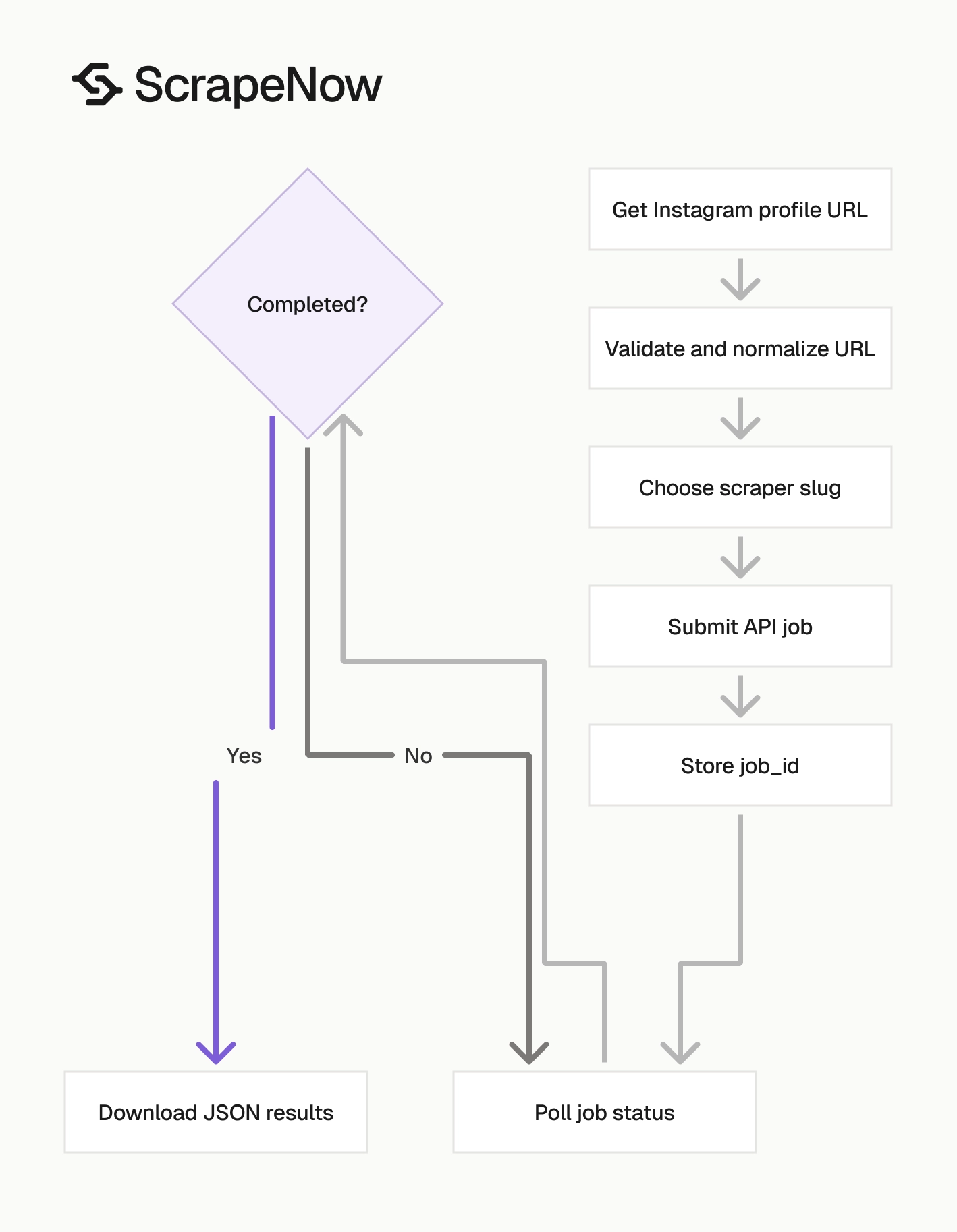
ScrapeNow uses the same job pattern across these Instagram scrapers. Change the scraper slug and input payload, then keep the polling and result download code unchanged.
Step 1. Get the Instagram profile URL
The url input must be an Instagram account URL. It should start with https://www.instagram.com/.
Example input:
{
  "url": "https://www.instagram.com/taylorswift/"
}
The input variable appears like this in ScrapeNow.
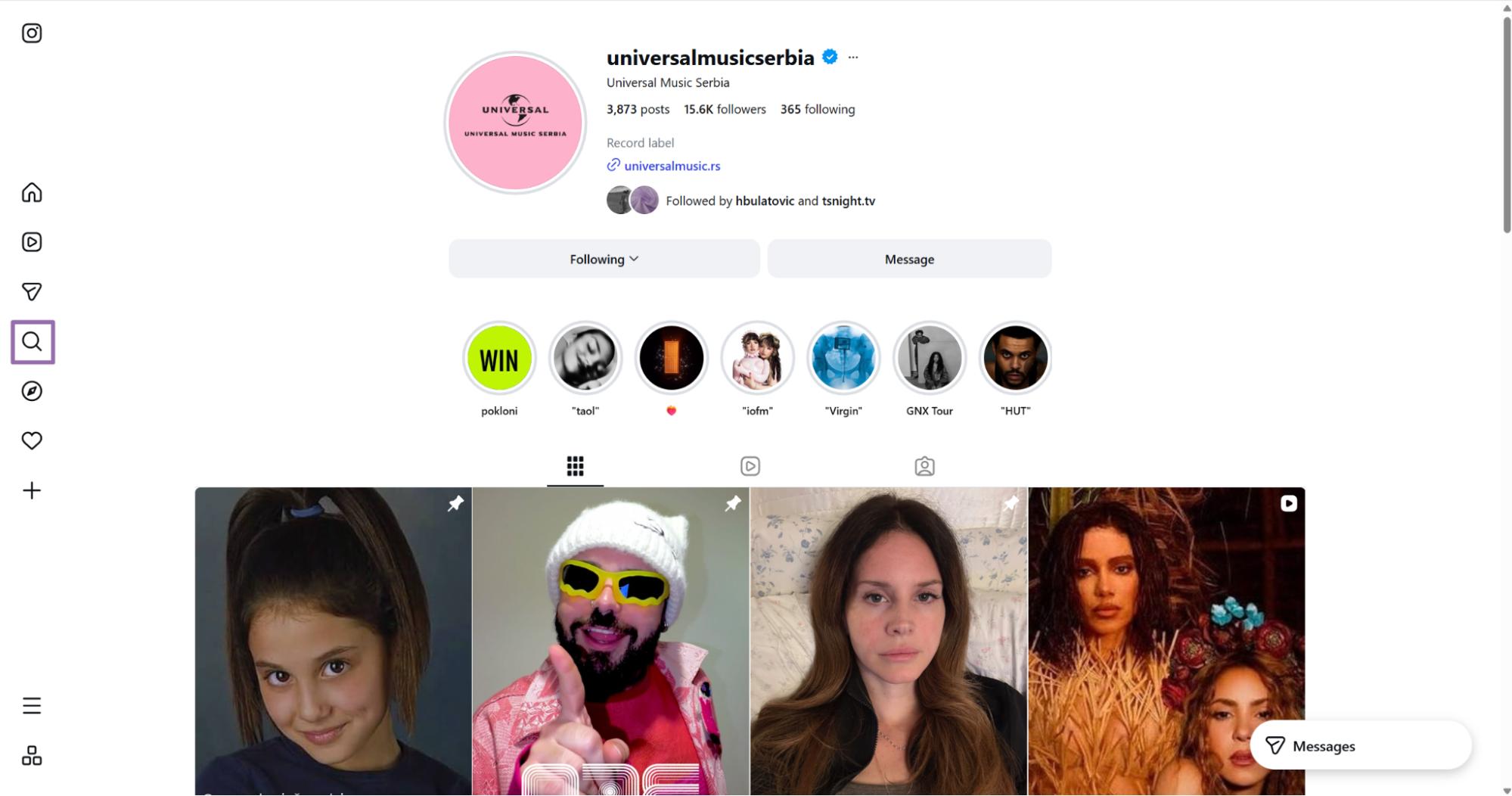
Open Instagram.
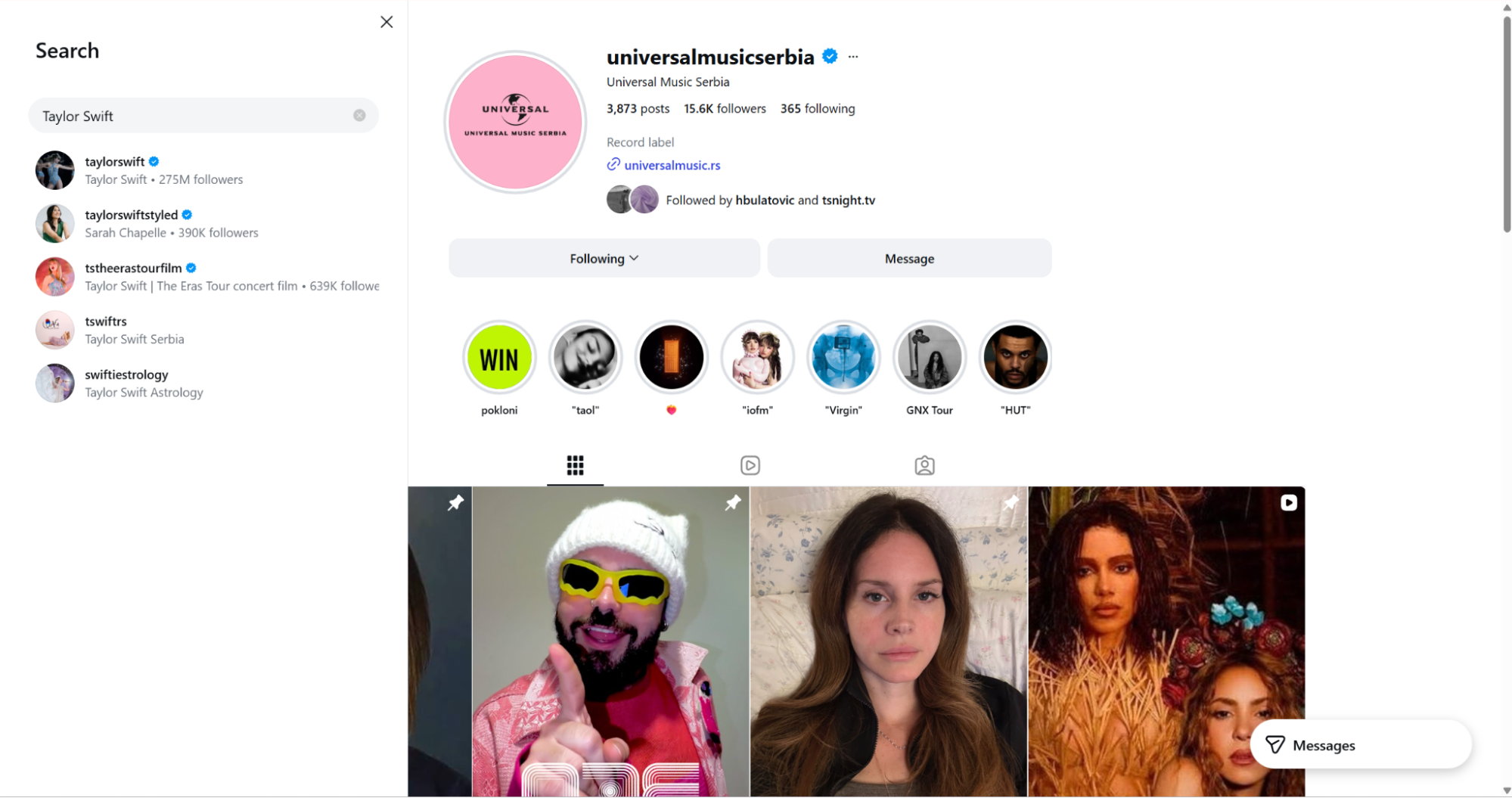
Use the search icon in the right page bar. Search for an account such as Taylor Swift, open the account, and copy the browser URL.
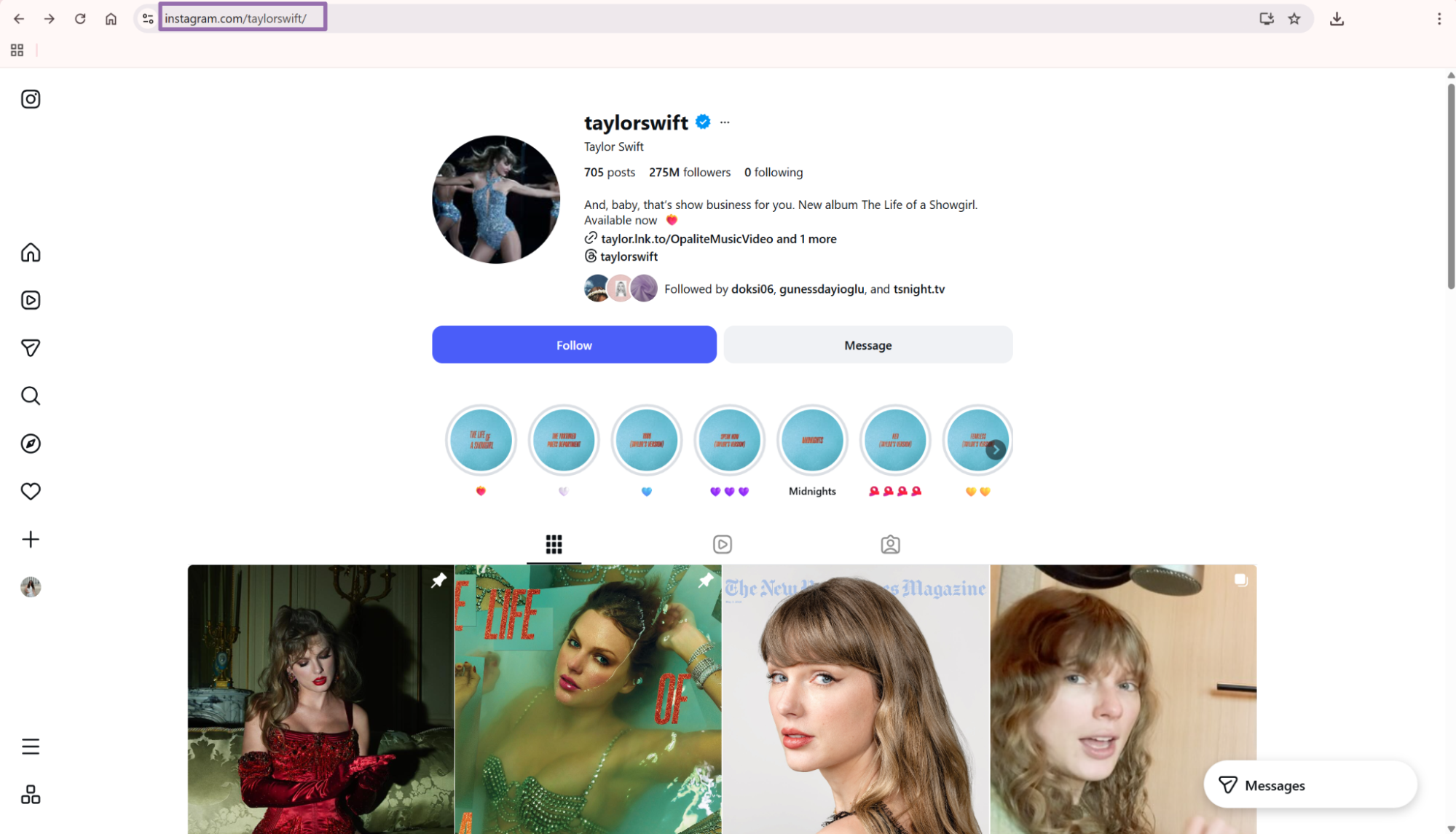
Copy the canonical profile URL when Instagram shows one. Remove tracking parameters such as ?hl=en before sending the URL to the API.
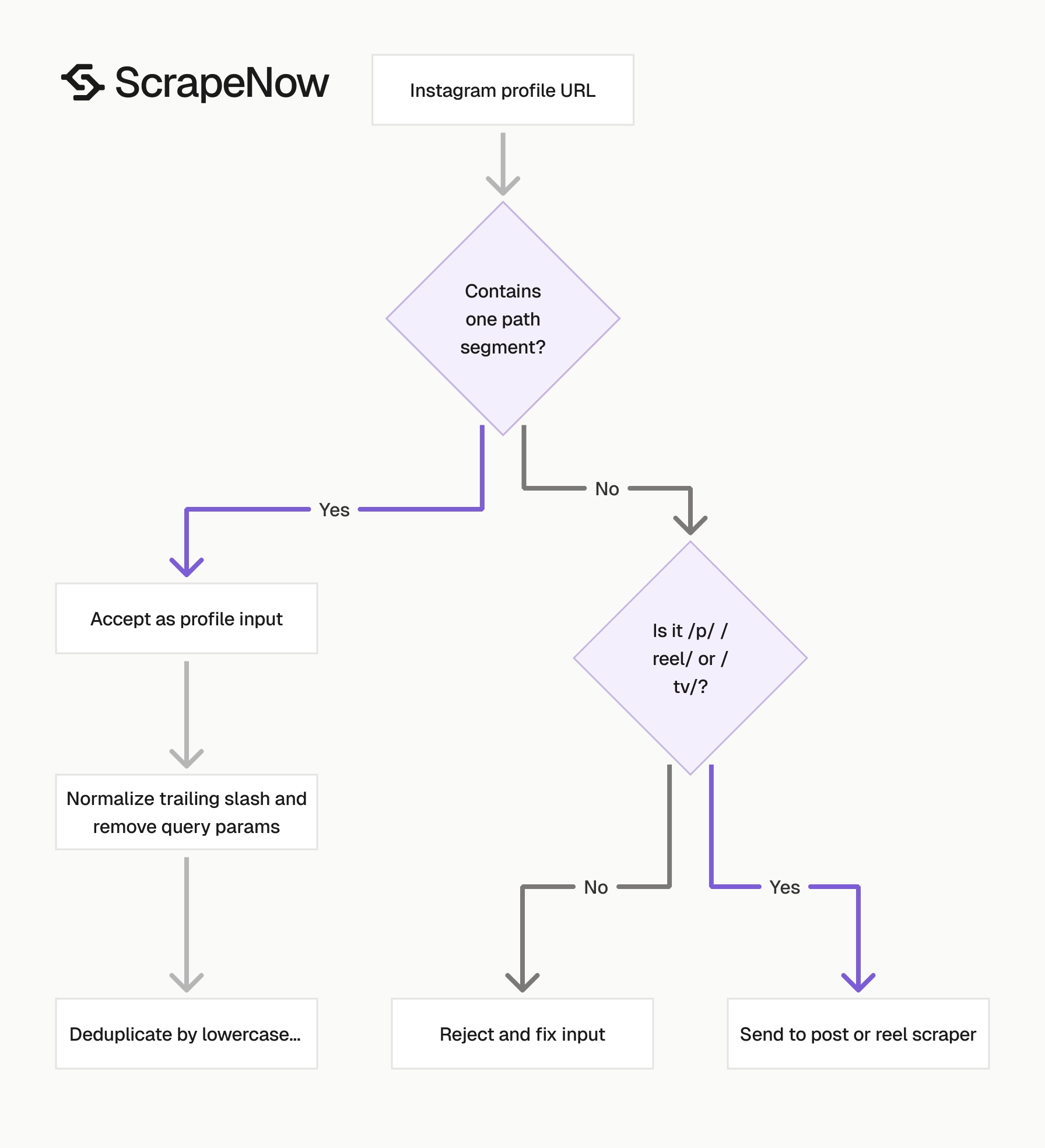
Keep profile URLs separate from post and reel URLs. A profile URL has one path segment, such as /taylorswift/, with no /p/, /reel/, or /tv/ segment.
A valid profile input should look like https://www.instagram.com/nasa/. A post URL such as https://www.instagram.com/p/ABC123/ belongs in the post scraper.
Step 2. Run the Instagram profiles scraper with the API
Use this Python script. Replace YOUR_API_KEY with your ScrapeNow API key.
"""
Configuration:
    - Set SCRAPER_SLUG to the scraper you want to run.
    - Set SCRAPER_INPUTS to the list of input dicts matching that scraper's schema.
    - Set API_KEY to your scraper API key.
"""

import sys
import time
import json
import requests
import os

API_KEY = "YOUR_API_KEY"

SCRAPER_SLUG = "instagram-profiles-extract-by-url"

SCRAPER_INPUTS = [
    {
        "url": "https://www.instagram.com/taylorswift/"
    }
]


BASE_URL = "https://api.scrapenow.io/api/v1/scraping"
TIMEOUT_SECONDS = 3600
POLL_INTERVAL = 5
SPINNER = "|/-\\"


def build_headers(api_key: str, content_type: str | None = None) -> dict:
    headers = {"Authorization": f"Bearer {api_key}"}
    if content_type:
        headers["Content-Type"] = content_type
    return headers


def trigger_scrape(slug: str, inputs: list[dict]) -> str:
    url = f"{BASE_URL}/scrape?scraper={slug}"
    response = requests.post(
        url,
        headers=build_headers(API_KEY, "application/json"),
        json={"inputs": inputs},
    )
    response.raise_for_status()
    return response.json()["data"]["job_id"]


def poll_until_done(job_id: str) -> str:
    start = time.time()
    i = 0
    while True:
        elapsed = time.time() - start
        if elapsed > TIMEOUT_SECONDS:
            print(f"\nTimeout after {TIMEOUT_SECONDS}s")
            sys.exit(1)
        response = requests.get(
            f"{BASE_URL}/jobs/{job_id}",
            headers=build_headers(API_KEY),
        )
        response.raise_for_status()
        data = response.json()
        status = data["data"]["status"]
        mins, secs = divmod(int(elapsed), 60)
        sys.stdout.write(
            f"\r[{SPINNER[i % 4]}] Waiting... {status} ({mins}m {secs:02d}s)  "
        )
        sys.stdout.flush()
        if status in ("completed", "failed"):
            print()
            return status
        time.sleep(POLL_INTERVAL)
        i += 1


def fetch_results(job_id: str) -> dict:
    response = requests.get(
        f"{BASE_URL}/jobs/{job_id}/results?format=json",
        headers=build_headers(API_KEY),
    )
    response.raise_for_status()
    return response.json()


def save_results(data: dict, slug: str) -> str:
    os.makedirs("output", exist_ok=True)
    filename = os.path.join("output", f"{slug}.json")
    with open(filename, "w", encoding="utf-8") as f:
        json.dump(data, f, indent=2, ensure_ascii=False)
    return filename


def main() -> None:
    print(f"Triggering scraper: {SCRAPER_SLUG}")
    job_id = trigger_scrape(SCRAPER_SLUG, SCRAPER_INPUTS)
    print(f"Job started: {job_id}")
    final_status = poll_until_done(job_id)
    if final_status != "completed":
        print(f"Job failed with status: {final_status}")
        sys.exit(1)
    print("Fetching results...")
    results = fetch_results(job_id)
    output_file = save_results(results, SCRAPER_SLUG)
    print(f"Results saved to: {output_file}")


if __name__ == "__main__":
    main()
The same API pattern works for the other scrapers in this group. That includes Look up Instagram profiles by username.
Change the scraper slug and input values in the code for each scraper. Keep the polling and result download code the same.
This ScrapeNow pattern keeps your runner small. Your worker sends inputs, stores job_id, polls /jobs/{job_id}, and fetches /results?format=json.
For production, store the job_id before polling. If the worker restarts, the next worker can resume the same scrape instead of creating a duplicate job.
Step 3. Search Instagram profiles by username
Use the username search scraper when you have a name or handle instead of a full profile URL.
The input is user_name.
Example:
{
  "user_name": "Taylor Swift"
}
The input variable appears like this.
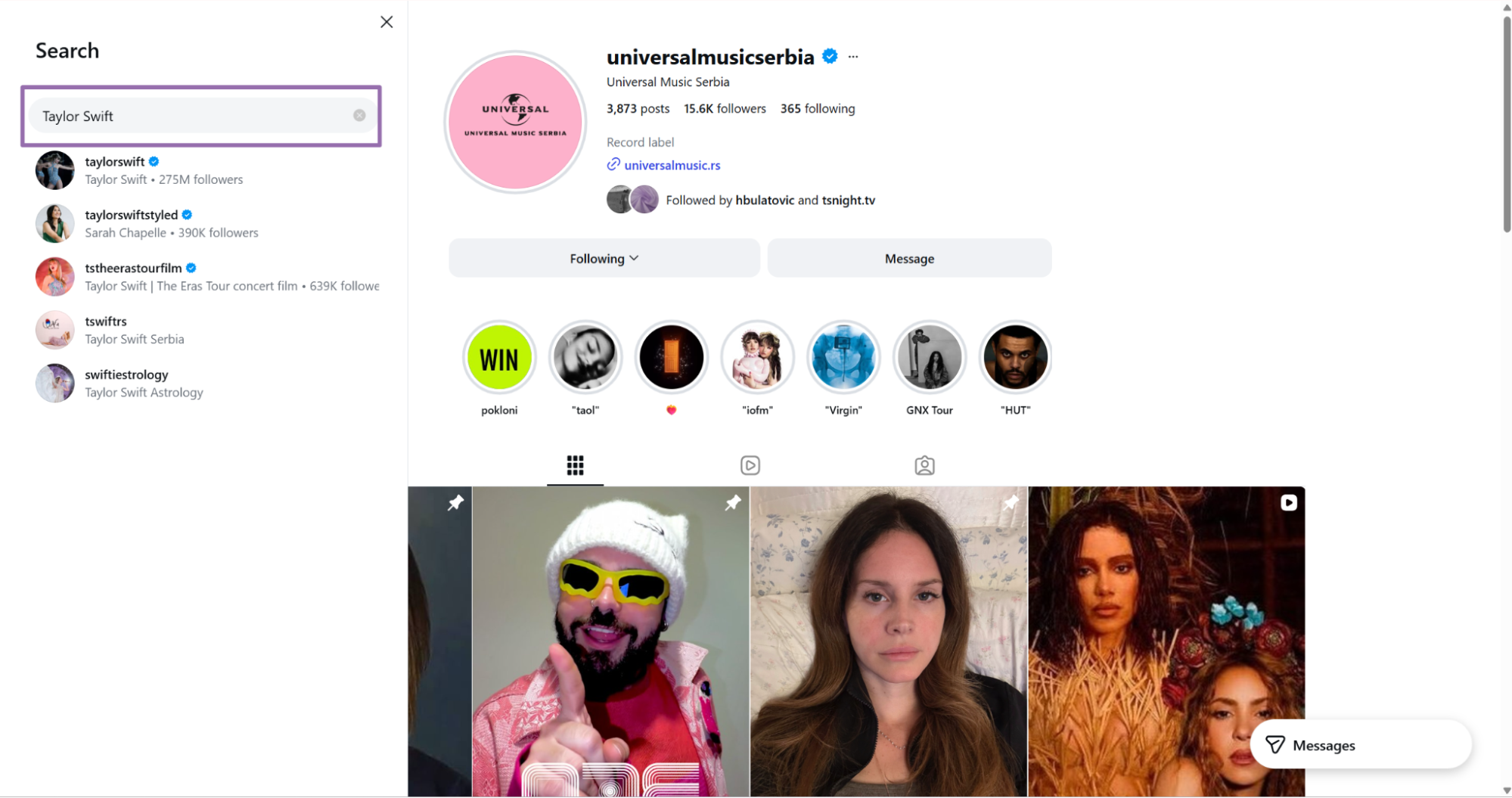
Username search works well for enrichment jobs. For example, start with a CRM export that contains creator names, then resolve each name to an Instagram profile.
This scraper also works when your upstream data contains display names from marketplaces, affiliate tools, or event attendee lists. Store the original name beside the matched account so reviewers can audit the match later.
For broader Instagram extraction work, the scraper directory at Browse all 86+ scrapers lists the Instagram profile, post, reel, and search scrapers in one place.
Use exact handles when you have them. Search by display name adds matching ambiguity, especially for creators with fan accounts, agency pages, and location-specific profiles.
Step 4. Read the Instagram profile JSON result
A completed job returns one object per input. This trimmed sample comes from the profile URL scraper.
[
{
"inputs": {
"url": "https://www.instagram.com/taylorswift/"
},
"scrape_status": "success",
"account": "taylorswift",
"fbid": "17841401648650184",
"id": "11830955",
"followers": 274084954,
"posts_count": 705,
"is_business_account": false,
"is_professional_account": true,
"is_verified": true,
"avg_engagement": 0.0158,
"external_url": [
"https://taylor.lnk.to/OpaliteMusicVideo",
"https://taylor.lnk.to/OpaliteExtendedVersions"
],
"biography": "And, baby, that’s show business for you. New album The Life of a Showgirl. Available now ❤️🔥",
"business_category_name": null,
"category_name": null,
"post_hashtags": null,
"following": 0,
"posts": [
{
"caption": "And, baby, that’s show business for you. New album The Life of a Showgirl. Out October 3 ❤️🔥\n\nAlbum Producers: Max Martin, Shellback and Taylor Swift\n📸: Mert Alas & Marcus Piggott",
"comments": null,
"datetime": "2025-08-13T23:00:20.000Z",
"id": "3698587590552170648",
"image_url": "https://instagram.fbhx4-2.fna.fbcdn.net/v/t51.82787-15/532329246_18588772861054956_7628695825992766003_n.jpg?stp=dst-jpg_e35_s1080x1080_sh2.08_tt6&_nc_ht=instagram.fbhx4-2.fna.fbcdn.net&_nc_cat=100&_nc_oc=Q6cZ2gEBlzPgiXzPup1cF-tsg9NZej9fUoEnfKTg99MePuluejNo4nZTdx6FbyVGB-aoLIQ&_nc_ohc=wZXSZCvYb8IQ7kNvwFnNhsx&_nc_gid=u1-__Z4Ley_htLLmKBTtRw&edm=AOQ1c0wBAAAA&ccb=7-5&oh=00_Af5w8FdkqRfnqjRr8amk0RJItjfNquN394ijDJwIfzB9Rg&oe=6A0A567D&_nc_sid=8b3546",
"likes": 11901301,
"post_hashtags": null,
"content_type": "Carousel",
"url": "https://www.instagram.com/p/DNUBdFRh7CY",
"video_url": null,
"is_pinned": true
},
{
"caption": "Talking about songwriting > Talking about anything else. Thank you @joecoscarelli and @nytmag. I had the (NY) Time of my life 😎\n\n📷: @stefanruizphoto \n🎥: @joshuacharow",
"comments": null,
"datetime": "2026-04-28T17:34:28.000Z",
"id": "3885415599560361853",
"image_url": "https://instagram.fbhx4-1.fna.fbcdn.net/v/t51.82787-15/675433619_18652638463054956_8608226672309439837_n.jpg?stp=dst-jpg_e35_p1080x1080_sh2.08_tt6&_nc_ht=instagram.fbhx4-1.fna.fbcdn.net&_nc_cat=1&_nc_oc=Q6cZ2gEBlzPgiXzPup1cF-tsg9NZej9fUoEnfKTg99MePuluejNo4nZTdx6FbyVGB-aoLIQ&_nc_ohc=Fot__WYxSQ0Q7kNvwGrGSOf&_nc_gid=u1-__Z4Ley_htLLmKBTtRw&edm=AOQ1c0wBAAAA&ccb=7-5&oh=00_Af7kYdCoz4TVn_-MSC-Js3ve0RWo3UgeBTl3zBV6H4iKWQ&oe=6A0A7BAF&_nc_sid=8b3546",
"likes": 2595731,
"post_hashtags": null,
"content_type": "Image",
"url": "https://www.instagram.com/p/DXrxObojod9",
"video_url": null,
"is_pinned": false
},
{
"caption": "Just a few Opalite memories to celebrate the Hot 100 #1 you guys just got this song!! I can’t even sum up my excitement and I’m so blown away by the love you’ve shown this song and video. To put this into perspective… This is
... (truncated)
What data the Instagram profiles scraper returns
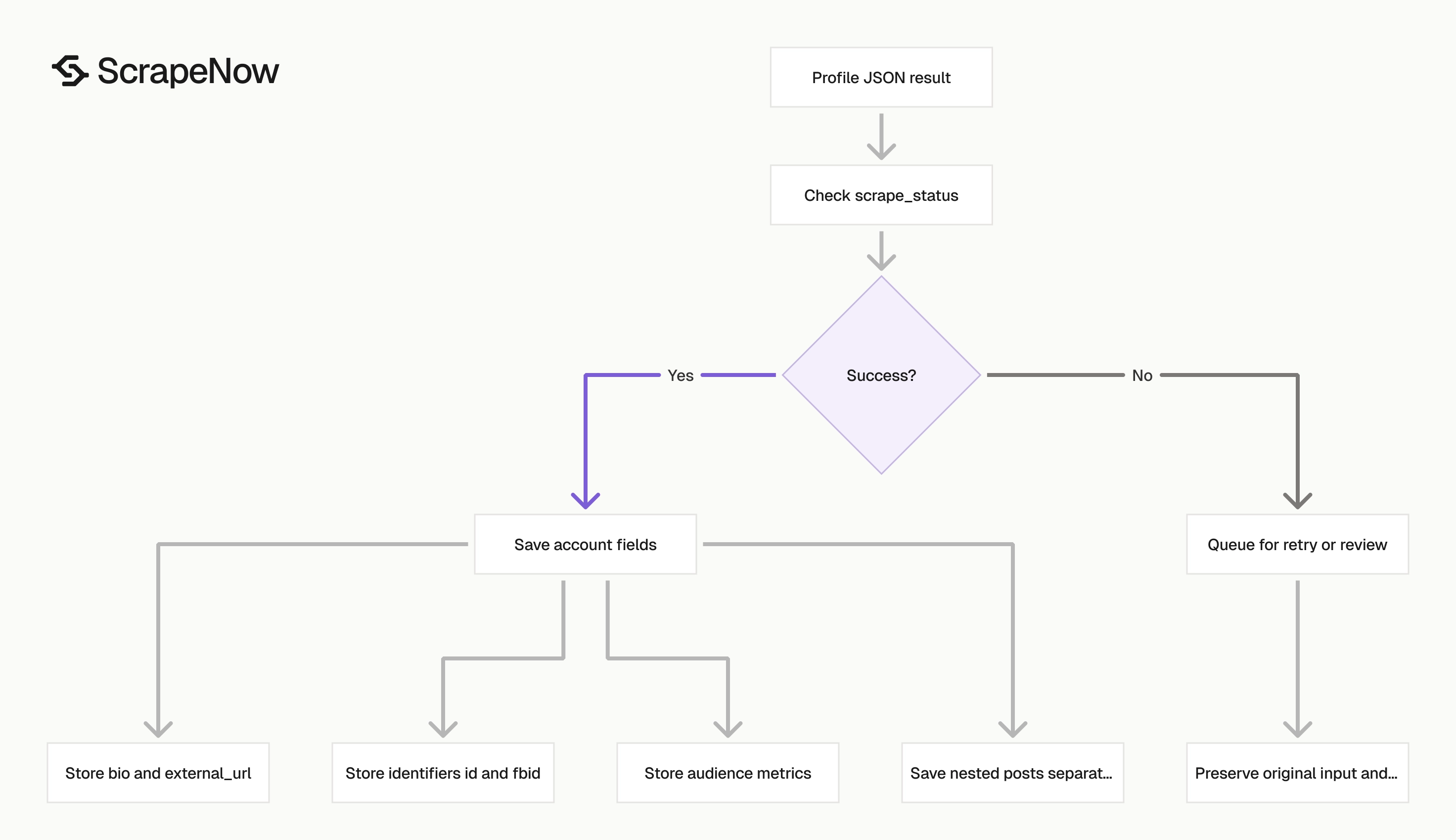
The profile scraper returns account-level fields and a nested posts array. Store the account fields in a profile table.
Store post objects in a separate post table keyed by account or id. This keeps profile snapshots separate from media records and makes updates easier to reason about.
Use the row-level scrape_status before writing data. A job can finish while individual inputs fail because an account was deleted, renamed, private, or mistyped.
Account identifiers
account is the Instagram handle. Use it as the human-readable key.
id and fbid are platform identifiers. Keep both when you merge profile data from multiple runs, because handles change.
{
  "account": "taylorswift",
  "fbid": "17841401648650184",
  "id": "11830955"
}
A handle works for dashboards and exports. A platform ID works better for joins, history tables, and deduplication.
Use the platform ID as your warehouse key when it exists. Keep the handle as a display value, because users search for handles and marketers recognize them.
If id is missing on a failed row, use the normalized input URL as the temporary key. Replace that key after a later successful scrape returns the platform ID.
Audience and profile state
followers, following, and posts_count are numeric fields. Store them as integers.
is_verified, is_business_account, and is_professional_account are booleans. These fields work well as filters before you spend credits on post-level scraping.
{
  "followers": 274084954,
  "following": 0,
  "posts_count": 705,
  "is_verified": true,
  "is_business_account": false,
  "is_professional_account": true
}
For creator discovery, filter by follower count and verification state before post extraction. That keeps your post jobs focused on accounts that match your threshold.
For brand monitoring, store these fields with a scraped_at timestamp. Follower count changes matter more when you compare snapshots over time.
For lead enrichment, store the follower count from the same run as the bio and external links. Mixing fields from different dates makes account scoring harder to debug.
Track null values separately from zero values. A missing following field means no value returned, while 0 means Instagram returned zero.
Bio and external links
biography is the profile bio text. external_url is an array because Instagram accounts can expose more than one link.
Store external_url as JSON if your database supports arrays. If you export to CSV, join it with a delimiter that normal URLs do not contain.
{
"biography": "And, baby, that’s show business for you. New album The Life of a Showgirl. Available now ❤️🔥",
"external_url": [
"https://taylor.lnk.to/OpaliteMusicVideo",
"https://taylor.lnk.to/OpaliteExtendedVersions"
]
}
External links often point to link-in-bio services, product pages, campaign landing pages, and music releases. Store the raw URL before expanding redirects.
Do redirect expansion in a separate job if you need final destinations. Link-in-bio services change targets often, so keep both the Instagram-provided URL and resolved URL.
Preserve the original bio text before cleaning emojis, line breaks, or special characters. Those characters often carry campaign context that disappears during aggressive normalization.
Recent posts
The nested posts array includes captions, media URLs, likes, post URLs, timestamps, content type, and pinned status.
If you need deeper post extraction across a list of post URLs, run the Extract Instagram post data scraper after the profile scrape. The profile scraper gives you the account snapshot and recent post references.
The post scraper treats each post as the main record. Use it when you need richer post-level fields or a larger set of post URLs.
Pinned posts deserve a separate field in your warehouse. They often represent active campaigns, launches, partnerships, or account identity content.
Treat datetime as an event timestamp. Store your own scraped_at timestamp beside it so you can separate post age from scrape time.
Store media URLs as source references, not long-term media storage. Instagram CDN URLs can expire, rotate hosts, or return different variants over time.
Ready to get this data? Get Instagram profile data.
Production tips for Instagram profile scraping
Validate inputs before creating jobs
Invalid URLs waste credits and poll time. Validate the URL before calling the API.
from urllib.parse import urlparse

def validate_instagram_profile_url(url: str) -> str:
    parsed = urlparse(url.strip())

    if parsed.scheme != "https":
        raise ValueError("Instagram profile URL must use https")

    if parsed.netloc not in ("www.instagram.com", "instagram.com"):
        raise ValueError("URL must be an Instagram URL")

    parts = [p for p in parsed.path.split("/") if p]
    if len(parts) != 1:
        raise ValueError("URL must point to one profile")

    return f"https://www.instagram.com/{parts[0]}/"


urls = [
    "https://www.instagram.com/taylorswift/",
    "https://instagram.com/nasa"
]

inputs = [{"url": validate_instagram_profile_url(url)} for url in urls]
print(inputs)
Expected output:
[
  {
    "url": "https://www.instagram.com/taylorswift/"
  },
  {
    "url": "https://www.instagram.com/nasa/"
  }
]
This validator rejects post URLs, reel URLs, and profile URLs with extra path segments. Send those URLs to the post or reel scrapers.
Run validation before deduplication. That turns mixed input formats into one canonical URL shape and makes duplicate detection deterministic.
Reject empty handles and reserved paths before queueing jobs. Paths such as /p/, /reel/, /explore/, and /accounts/ are Instagram routes, not profile handles.
Deduplicate by normalized account URL
Normalize before deduplication. Instagram URLs often include trailing slashes, query strings, or mixed casing.
def dedupe_profile_inputs(inputs: list[dict]) -> list[dict]:
    seen = set()
    clean = []

    for item in inputs:
        url = validate_instagram_profile_url(item["url"])
        key = url.lower()

        if key in seen:
            continue

        seen.add(key)
        clean.append({"url": url})

    return clean


raw_inputs = [
    {"url": "https://www.instagram.com/taylorswift/"},
    {"url": "https://www.instagram.com/TaylorSwift/?hl=en"},
    {"url": "https://instagram.com/nasa"}
]

print(dedupe_profile_inputs(raw_inputs))
Expected output:
[
  {
    "url": "https://www.instagram.com/taylorswift/"
  },
  {
    "url": "https://www.instagram.com/nasa/"
  }
]
Deduplication matters when inputs come from crawls, CRM exports, spreadsheets, and user submissions. The same profile can appear in several formats.
Normalize casing after you extract the username. Instagram handles are case-insensitive for routing, and lowercase keys reduce duplicate warehouse rows.
Keep the original submitted URL in your request table. It helps support teams trace the exact value that came from a file upload or customer system.
Use a stable schema
Use two tables for consistent analytics.
| Table | Primary key | Main fields |
|---|---|---|
instagram_profiles |
id |
account, fbid, followers, following, posts_count, is_verified, biography, external_url, avg_engagement |
instagram_profile_posts |
id |
account, datetime, caption, likes, content_type, url, image_url, video_url, is_pinned |
Keep the raw JSON too. Instagram fields change, and raw payloads make backfills easier when you add columns later.
Add scraped_at to both tables. Without that timestamp, you lose the ability to compare follower counts, post volume, and bio changes across runs.
Use id as the profile primary key when it exists. Use account as a display field and secondary lookup key.
For post rows, avoid assuming likes or comments are always present. Store nullable numeric columns and keep the raw object for fields that arrive later.
Use an upsert for the latest profile table and an append-only table for snapshots. The latest table powers lookups, while snapshots power trend analysis.
Handle partial failures per input
Treat scrape_status as the source of truth for each row. A completed job can still contain failed inputs.
def split_results(rows: list[dict]) -> tuple[list[dict], list[dict]]:
    success_rows = []
    failed_rows = []

    for row in rows:
        if row.get("scrape_status") == "success":
            success_rows.append(row)
        else:
            failed_rows.append(row)

    return success_rows, failed_rows


results = [
    {"inputs": {"url": "https://www.instagram.com/taylorswift/"}, "scrape_status": "success"},
    {"inputs": {"url": "https://www.instagram.com/not-a-real-profile/"}, "scrape_status": "failed"}
]

success_rows, failed_rows = split_results(results)
print(f"saved={len(success_rows)} retry_or_review={len(failed_rows)}")
Expected output:
saved=1 retry_or_review=1
Store failed rows with their original input. That gives you a retry queue and a review list for deleted, renamed, private, or mistyped accounts.
Avoid treating a job-level completed status as proof that every input succeeded. Check each row before writing it to your main tables.
Persist the failure payload as received. The original inputs object helps you trace failures back to the upstream file, CRM row, or queue message.
Separate retryable errors from permanent failures in your own queue. Invalid URLs and deleted accounts should not run through the same retry path as transient API errors.
Set polling limits
The sample script uses a 3600 second timeout and polls every 5 seconds. Keep those defaults unless your worker queue has stricter limits. Store the job_id before the first poll so another worker can resume if the runner restarts.
Keep retries controlled
Cap retries at 3 attempts with backoff. Put permanent failures (deleted profiles, private accounts) into a review table so your retry queue stays focused on recoverable errors.
Store raw and cleaned values
Store the raw result JSON in object storage or a JSON column. Store cleaned fields in typed columns for analytics. Instagram changes field availability over time, so raw payloads protect you from losing data your current schema does not cover.
Batch inputs with predictable ownership
Group inputs by source system or campaign before creating jobs. Keep batch sizes aligned with your worker timeout and avoid mixing unrelated customers in the same job.
Pricing for the Instagram profiles scraper
ScrapeNow pre-built scrapers use credits. 1 returned row costs 1 credit.
Pricing starts at $0.04 per credit for 1 to 250 credits. It scales down to $0.012 per credit at 100K+ credits.
That means a 250-profile test run starts at 250 credits. Larger runs use the same API pattern, so the operational work stays the same.
Run the Get Instagram profile data scraper with the Python script above when your input already contains Instagram profile URLs. Use Look up Instagram profiles by username when your input starts as names or handles.
For the first production run, send a small batch of normalized URLs and store the raw JSON plus typed profile fields. Confirm row-level scrape_status, review failed inputs, then run the same job pattern across the rest of your URL list.


