ScrapeNow's Facebook Posts Scraper extracts post text, post ID, author page, reaction breakdown, comment count, share count, media attachments, verification status, and follower count from a Facebook post URL.
Growth teams, data engineers, and social analytics teams use it when they need structured post records. They avoid maintaining selectors, browser sessions, proxy routing, and anti-bot handling for every Facebook markup change.
This scraper works best when you already have post URLs from search, page feeds, internal reports, or another ScrapeNow job. One input URL returns one post-level record.
How to use this scraper
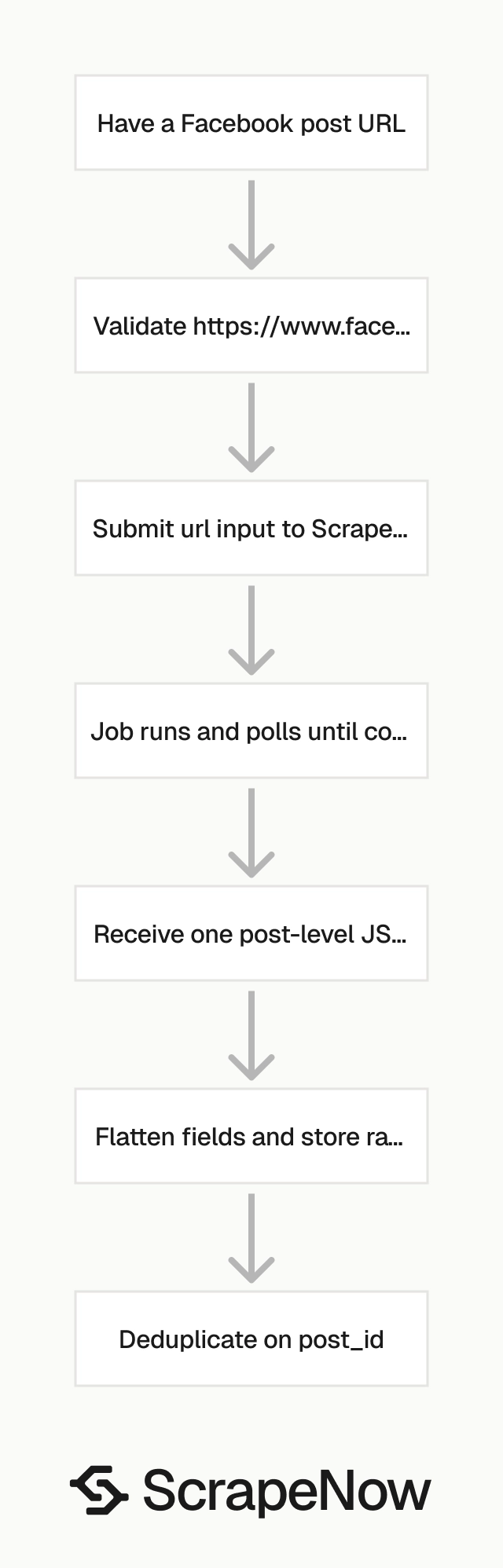
The scraper takes one input field, url. Pass a Facebook post URL that starts with https://www.facebook.com.
Use the Extract Facebook page posts scraper when you need to collect post URLs from a page. Use this scraper after that step to extract the full post payload.
ScrapeNow also has Facebook scrapers for Extract Facebook event data, Find Facebook events by venue, Search Marketplace listings, and Get Marketplace listing data.
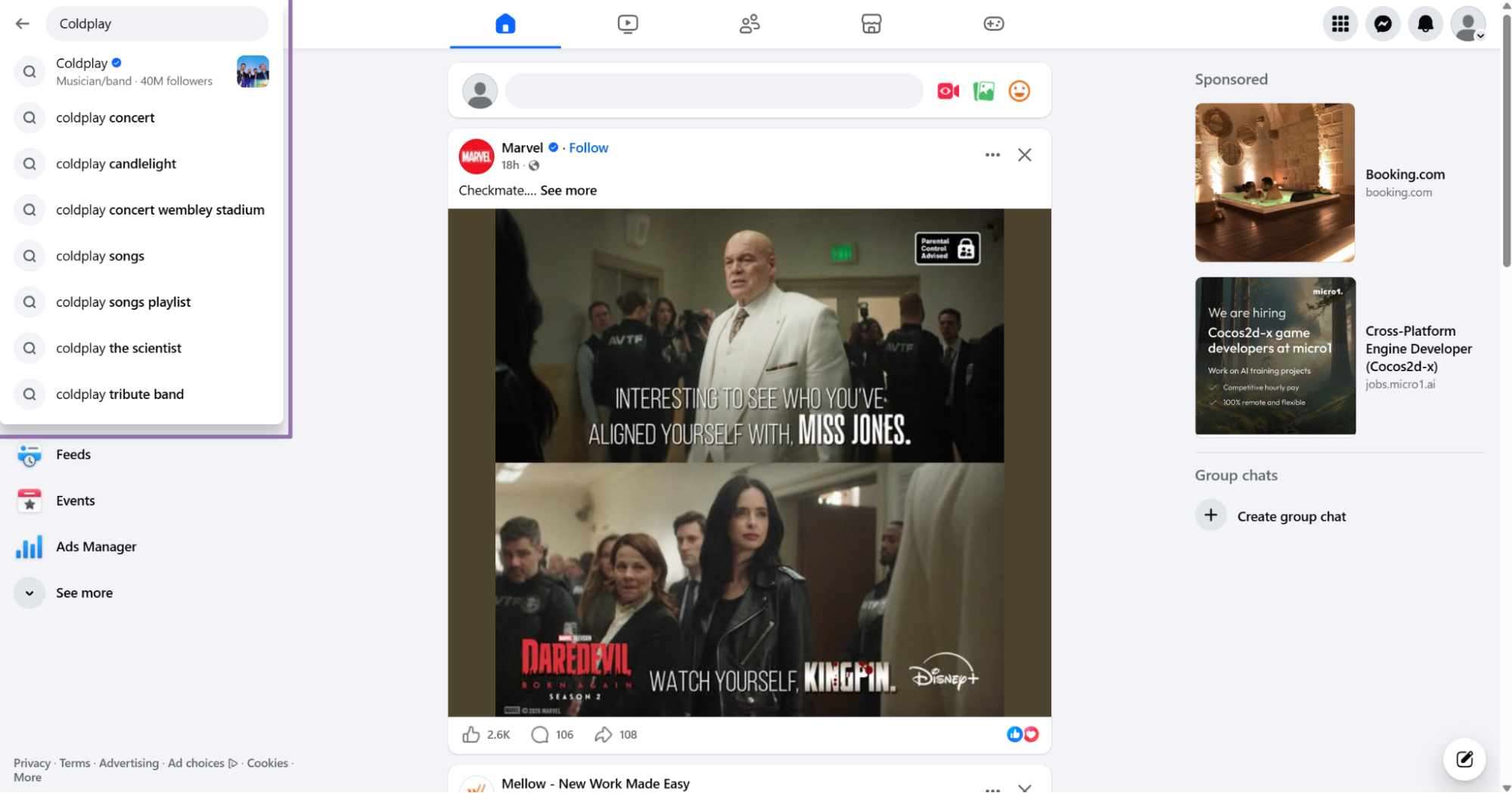
Step 1. Open Facebook and search for the page or keyword
Open facebook.com.
Type a keyword in the search bar, such as Coldplay. You can also search for a brand name, creator name, public figure, campaign hashtag, or news topic.
Step 2. Open the post from the timestamp link
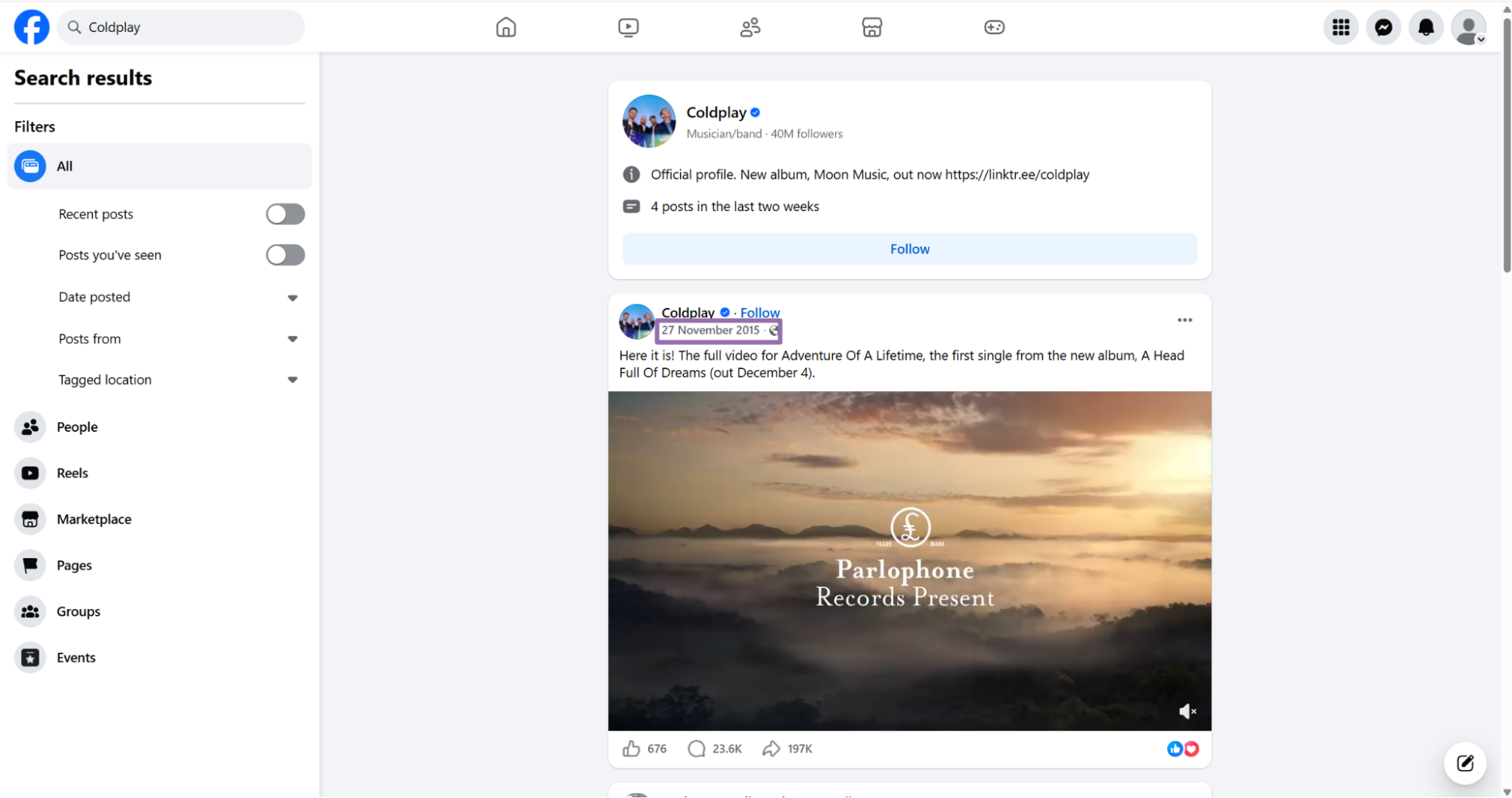
On the results page, click the post timestamp link.
Facebook opens the post in a new tab. The timestamp link gives you a post URL that works better for extraction than a feed URL with extra tracking parameters.
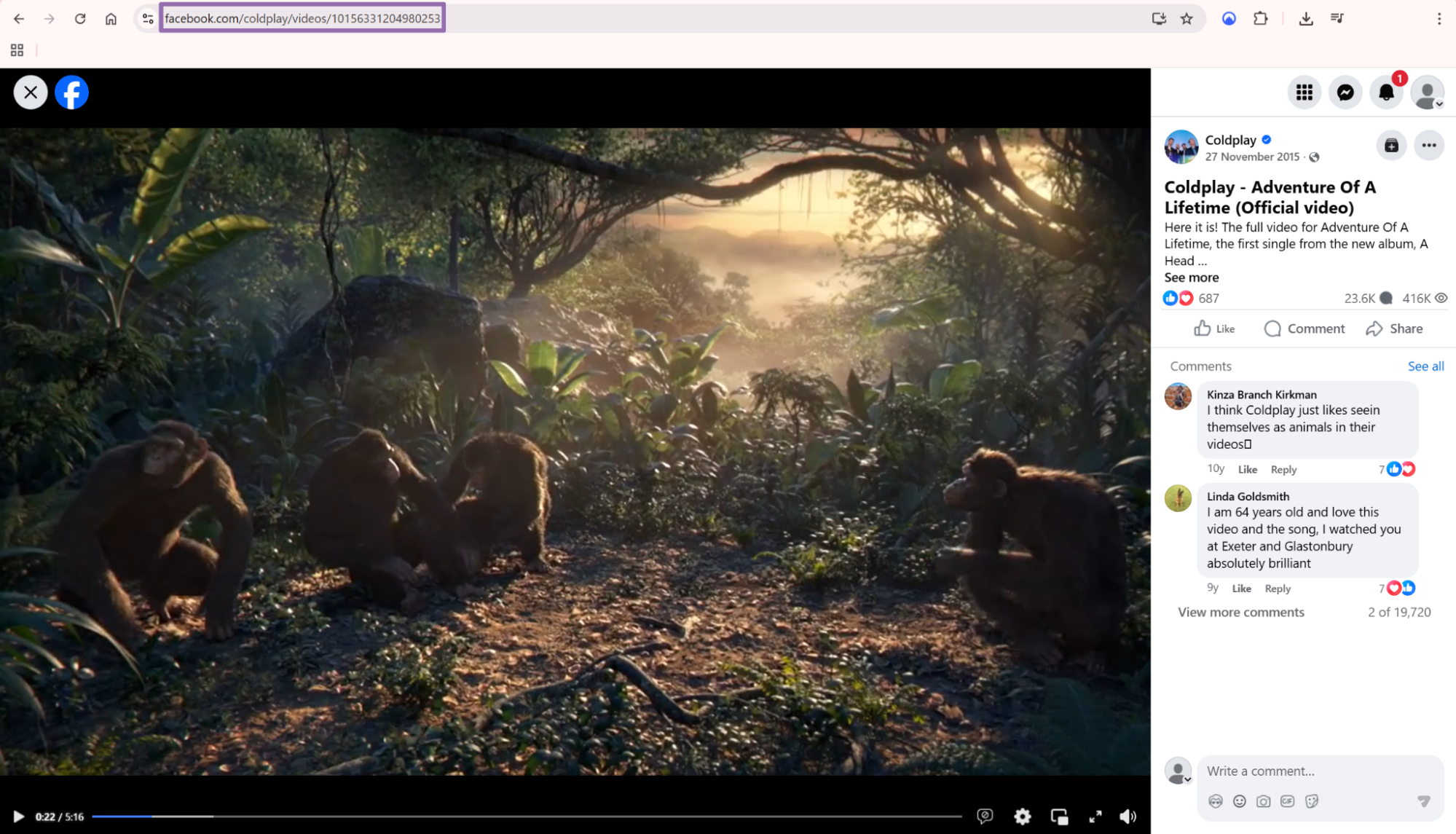
Step 3. Copy the post URL
Copy the URL from the browser address bar.
The input must start with https://www.facebook.com. Remove fragments and unrelated query parameters if your internal pipeline stores canonical URLs separately.
Step 4. Run the API job
Use this Python script. Replace YOUR_API_KEY with your ScrapeNow API key.
The script starts a job, polls until completion, downloads JSON results, and writes them to output/facebook-posts-extract-by-url.json.
"""
Configuration:
    - Set SCRAPER_SLUG to the scraper you want to run.
    - Set SCRAPER_INPUTS to the list of input dicts matching that scraper's schema.
    - Set API_KEY to your Scraper API key.
"""

import sys
import time
import json
import requests
import os

API_KEY = "YOUR_API_KEY"

SCRAPER_SLUG = "facebook-posts-extract-by-url"

SCRAPER_INPUTS = [
    {
        "url": "https://www.facebook.com/harrystyles/posts/pfbid02eZdTeHzUxcgh4MrbJFPoBbkWzxjS4ezwLQBLPd8udHnNerJaGc5z6oqvxSKgimc2l"
    }
]


BASE_URL = "https://api.scrapenow.io/api/v1/scraping"
TIMEOUT_SECONDS = 3600
POLL_INTERVAL = 5
SPINNER = "|/-\\"


def build_headers(api_key: str, content_type: str | None = None) -> dict:
    headers = {"Authorization": f"Bearer {api_key}"}
    if content_type:
        headers["Content-Type"] = content_type
    return headers


def trigger_scrape(slug: str, inputs: list[dict]) -> str:
    url = f"{BASE_URL}/scrape?scraper={slug}"
    response = requests.post(
        url,
        headers=build_headers(API_KEY, "application/json"),
        json={"inputs": inputs},
    )
    response.raise_for_status()
    return response.json()["data"]["job_id"]


def poll_until_done(job_id: str) -> str:
    start = time.time()
    i = 0
    while True:
        elapsed = time.time() - start
        if elapsed > TIMEOUT_SECONDS:
            print(f"\nTimeout after {TIMEOUT_SECONDS}s")
            sys.exit(1)
        response = requests.get(
            f"{BASE_URL}/jobs/{job_id}",
            headers=build_headers(API_KEY),
        )
        response.raise_for_status()
        data = response.json()
        status = data["data"]["status"]
        mins, secs = divmod(int(elapsed), 60)
        sys.stdout.write(
            f"\r[{SPINNER[i % 4]}] Waiting... {status} ({mins}m {secs:02d}s)  "
        )
        sys.stdout.flush()
        if status in ("completed", "failed"):
            print()
            return status
        time.sleep(POLL_INTERVAL)
        i += 1


def fetch_results(job_id: str) -> dict:
    response = requests.get(
        f"{BASE_URL}/jobs/{job_id}/results?format=json",
        headers=build_headers(API_KEY),
    )
    response.raise_for_status()
    return response.json()


def save_results(data: dict, slug: str) -> str:
    os.makedirs("output", exist_ok=True)
    filename = os.path.join("output", f"{slug}.json")
    with open(filename, "w", encoding="utf-8") as f:
        json.dump(data, f, indent=2, ensure_ascii=False)
    return filename


def main() -> None:
    print(f"Triggering scraper: {SCRAPER_SLUG}")
    job_id = trigger_scrape(SCRAPER_SLUG, SCRAPER_INPUTS)
    print(f"Job started: {job_id}")
    final_status = poll_until_done(job_id)
    if final_status != "completed":
        print(f"Job failed with status: {final_status}")
        sys.exit(1)
    print("Fetching results...")
    results = fetch_results(job_id)
    output_file = save_results(results, SCRAPER_SLUG)
    print(f"Results saved to: {output_file}")


if __name__ == "__main__":
    main()
Step 5. Read the JSON output
A completed job returns an array of records. One input URL creates one output row.
The response keeps the original inputs object, so you can trace every row back to the submitted URL. That matters when you retry failed rows or compare duplicate URLs from search, page feeds, and shared links.
[
  {
    "inputs": {
      "url": "https://www.facebook.com/harrystyles/posts/pfbid02eZdTeHzUxcgh4MrbJFPoBbkWzxjS4ezwLQBLPd8udHnNerJaGc5z6oqvxSKgimc2l"
    },
    "scrape_status": "success",
    "url": "https://www.facebook.com/harrystyles/posts/pfbid02eZdTeHzUxcgh4MrbJFPoBbkWzxjS4ezwLQBLPd8udHnNerJaGc5z6oqvxSKgimc2l",
    "post_id": "1503996387764696",
    "user_url": "https://www.facebook.com/harrystyles",
    "user_username_raw": "Harry Styles",
    "content": "KATTDO Pop-Ups.",
    "date_posted": "2026-03-04T14:05:38.000Z",
    "hashtags": [],
    "num_comments": 805,
    "num_shares": 408,
    "num_likes_type": [
      {
        "type": "Love",
        "num": 6166
      },
      {
        "type": "Like",
        "num": 4078
      },
      {
        "type": "Care",
        "num": 128
      },
      {
        "type": "Sad",
        "num": 15
      },
      {
        "type": "Wow",
        "num": 14
      },
      {
        "type": "Haha",
        "num": 2
      },
      {
        "type": "Angry",
        "num": 2
      }
    ],
    "profile_id": "100044630460255",
    "page_logo": "https://scontent-lga3-2.xx.fbcdn.net/v/t39.30808-1/616198291_1463482668482735_6359717705419257039_n.jpg?stp=dst-jpg_s200x200_tt6&_nc_cat=109&ccb=1-7&_nc_sid=2d3e12&_nc_ohc=ZWuNTTiGg4kQ7kNvwH9PWjE&_nc_oc=AdoSdEJMwgcbSUumVFJg1aHPRjK_6keDPS4zIbEOlN5MmjpytNpZOEJyjt-QkqTeQOU&_nc_zt=24&_nc_ht=scontent-lga3-2.xx&_nc_gid=ab0PQNIzDbyjNQ10sFPdIQ&_nc_ss=79289&oh=00_Af77eENADVP1Eut6b0KRTS4yjhyS4-5KBOMevKpgCrveIQ&oe=6A0A113C",
    "page_likes": null,
    "page_followers": 17000000,
    "page_is_verified": true,
    "original_post": {
      "hashtags": null,
      "attachments": null
    },
    "attachments": [
      {
        "id": "1503996281098040",
        "type": "photo",
        "url": "https://scontent-fra5-2.xx.fbcdn.net/v/t51.82787-15/645775119_18330818206217391_8897228986295042063_n.jpg?_nc_cat=106&ccb=1-7&_nc_sid=127cfc&_nc_ohc=CVyeiZB1rXkQ7kNvwGfR347&_nc_oc=AdonIQgnofhdMZthyTbvYtukz34WV9olz8pbIOto0OlExtKsC3WsC3k8KNH0g4QrXwA&_nc_zt=23&_nc_ht=scontent-fra5-2.xx&_nc_gid=37_KihaFJHLXBTgEAzlDYg&_nc_ss=79289&oh=00_Af6Upgg70TAG-SEdM77xzgtBTd-TG1GTvd7rx3xCz9BlhQ&oe=6A0A0813",
        "video_length": null,
        "source_type": null,
        "attachment_url": "https://www.facebook.com/photo.php?fbid=1503996281098040&set=a.286918702805810&type=3",
        "video_url": null,
        "thumbnail_url": null
      },
      {
        "id": "1503996314431370",
        "type": "photo",
        "url": "https://scontent-fra5-2.xx.fbcdn.net/v/t51.82787-15/645728379_18330818215217391_4742701517630113152_n.jpg?_nc_cat=106&ccb=1-7&_nc_sid=127cfc&_nc_ohc=bGc8GWmZClsQ7kNvwFzlTDg&_nc_oc=AdoMvpegk_cQzdq4LOlPI1jNH_iG639Al5FqdgWV185rtypCp1MiiQcinLNV7H6DvLw&_nc_zt=23&_nc_ht=scontent-fra5-2.xx&_nc_gid=37_KihaFJHLXBTgEAzlDYg&_nc_ss=79289&oh=00_Af7E5LWh41SKW1YRF4fpeeEZbz5xHbbnDVMbB86NyyaE_A&oe=6A0A0E7C",
        "video_length": null,
        "source_type": null,
        "attachment_url": "https://ww
... (truncated)
What data you get back

The response gives you the original input, scrape status, normalized post URL, and extracted post fields.
| Field | Type | What to use it for |
|---|---|---|
scrape_status |
string | Filter successful rows from failed rows |
url |
string | Store the canonical post URL |
post_id |
string | Deduplicate posts across repeated runs |
user_url |
string | Join posts back to a Facebook page or profile |
user_username_raw |
string | Display name from the post author |
content |
string | Post text |
date_posted |
ISO datetime | Time-series analysis and freshness checks |
hashtags |
array | Tag extraction |
num_comments |
integer | Engagement metric |
num_shares |
integer | Engagement metric |
num_likes_type |
array | Reaction counts by type |
profile_id |
string | Stable author identifier when present |
page_logo |
string | Page image URL |
page_followers |
integer or null | Page audience size |
page_is_verified |
boolean | Verification status |
attachments |
array | Photos, videos, thumbnails, and attachment URLs |
num_likes_type is more useful than a single total because Facebook reactions carry different intent. In the sample above, Love has 6166, Like has 4078, and Care has 128.
Store reaction counts as separate columns if analysts compare sentiment across posts. Keep the original array as raw JSON so you can backfill new reaction types if Facebook changes the payload.
attachments is an array because one post can contain multiple photos or videos. Each attachment includes an id, type, direct media URL, Facebook attachment URL, and video fields when Facebook exposes them.
Treat media URLs as time-sensitive assets. Facebook CDN URLs can expire, so store the attachment metadata and fetch media quickly if your workflow requires local copies.
original_post helps when the post references another post. Keep it as a nested object in your raw table, then flatten it later if your warehouse schema needs columns.
Ready to get this data? Extract Facebook post data.
Production tips

Validate inputs, deduplicate results, and write failed rows to a retry table.
Validate input URLs before creating jobs
Catch invalid URLs before calling the API.
from urllib.parse import urlparse

def validate_facebook_post_url(url: str) -> None:
    parsed = urlparse(url)

    if parsed.scheme != "https":
        raise ValueError("Facebook post URL must use https")

    if parsed.netloc != "www.facebook.com":
        raise ValueError("Facebook post URL must start with https://www.facebook.com")

    if not parsed.path or parsed.path == "/":
        raise ValueError("Facebook post URL path is empty")

urls = [
    "https://www.facebook.com/harrystyles/posts/pfbid02eZdTeHzUxcgh4MrbJFPoBbkWzxjS4ezwLQBLPd8udHnNerJaGc5z6oqvxSKgimc2l"
]

for url in urls:
    validate_facebook_post_url(url)
For page-level collection, use Extract Facebook page posts as the source of post URLs.
Deduplicate on post_id
Use post_id as your primary dedupe key. If post_id is missing on a failed scrape, fall back to the input URL.
This pattern keeps successful rows stable across repeated runs. It also keeps failed rows tied to the exact input that produced the failure.
import json

with open("output/facebook-posts-extract-by-url.json", "r", encoding="utf-8") as f:
    rows = json.load(f)

seen = set()
deduped = []

for row in rows:
    key = row.get("post_id") or row.get("inputs", {}).get("url")

    if key in seen:
        continue

    seen.add(key)
    deduped.append(row)

print(f"Input rows: {len(rows)}")
print(f"Deduped rows: {len(deduped)}")
Run this after every batch if you scrape the same accounts daily.
Store raw JSON plus a flat table
Keep the full JSON response in object storage or a raw_json column. Then write a flat table for the fields your app queries.
A practical warehouse schema looks like this:
| Column | Type |
|---|---|
post_id |
text |
url |
text |
user_url |
text |
user_username_raw |
text |
content |
text |
date_posted |
timestamp |
num_comments |
integer |
num_shares |
integer |
page_followers |
integer |
page_is_verified |
boolean |
reaction_love |
integer |
reaction_like |
integer |
reaction_care |
integer |
reaction_sad |
integer |
reaction_wow |
integer |
reaction_haha |
integer |
reaction_angry |
integer |
attachments_count |
integer |
raw_json |
json |
Flatten reactions with a small helper.
def reaction_map(row: dict) -> dict:
    reactions = {
        "reaction_love": 0,
        "reaction_like": 0,
        "reaction_care": 0,
        "reaction_sad": 0,
        "reaction_wow": 0,
        "reaction_haha": 0,
        "reaction_angry": 0,
    }

    for item in row.get("num_likes_type") or []:
        key = f"reaction_{item.get('type', '').lower()}"
        if key in reactions:
            reactions[key] = item.get("num") or 0

    return reactions
Use 0 for missing reaction types when you build metric columns. Keep null for fields that Facebook did not expose, such as page_likes in the sample response.
That difference matters in reporting. A missing field means the scraper did not receive the value, while 0 means the value exists and has no count.
Retry only failed rows
The API response includes scrape_status. Use it to split successful rows from rows that need another run.
def split_results(rows: list[dict]) -> tuple[list[dict], list[dict]]:
    success = []
    retry_inputs = []

    for row in rows:
        if row.get("scrape_status") == "success":
            success.append(row)
        else:
            original_input = row.get("inputs")
            if original_input:
                retry_inputs.append(original_input)

    return success, retry_inputs
Cap retries at 3 attempts. After that, move the URL to a review table.
Batch by job size
A practical starting point is 100 post URLs per job. For larger queues, persist job_id as soon as ScrapeNow returns it so a worker restart does not lose a running job.
Common use cases for this scraper
Use this scraper when you already have Facebook post URLs and need the post-level payload.
Good fits include:
- Tracking engagement on a known set of brand posts
- Enriching post URLs collected from Facebook search
- Pulling media attachment URLs from public posts
- Building a daily table of comments, shares, and reactions
- Checking verification and follower counts for the author page
- Auditing campaign posts across creator and brand pages
- Refreshing metrics on posts that your team already tracks
If you need event data, use Extract Facebook event data for known event URLs. Use Find Facebook events by venue when the venue is your starting point.
For commerce data, the Facebook scraping set includes Search Marketplace listings and marketplace extraction by URL.
Pricing
ScrapeNow charges per returned row. One row costs one credit, starting at $0.04 per credit for small runs and dropping with volume. No monthly contracts, no proxy fees, no charges for failed rows. See the pricing page for current rates.
Start with Extract Facebook page posts. Copy one public post URL, run the Python script above, and store the output fields your pipeline needs.
For most teams, the minimum raw table should include post_id, url, content, date_posted, num_comments, num_shares, num_likes_type, attachments, page_followers, and page_is_verified. Keep the full raw_json payload next to those columns so schema changes do not destroy data you already paid to collect.


