Facebook page metadata includes name, category, location, follower count, verification status, and contact fields. The ScrapeNow Facebook page scraper extracts all of these from a public URL and returns structured JSON, without browser sessions or proxy management.
Use this scraper when you already have the Facebook URL and need structured metadata back. The scraper handles public pages and profiles, then returns one result object for each submitted URL.
Run it as the first step in a Facebook data pipeline. Pull the page metadata once, store the canonical URL and Facebook ID, then use those keys for posts, events, creator records, or downstream enrichment.
The scraper is built for known URLs. If your source list contains search terms, shared links, mobile links, or redirect URLs, clean those inputs before submission.
How to use this scraper
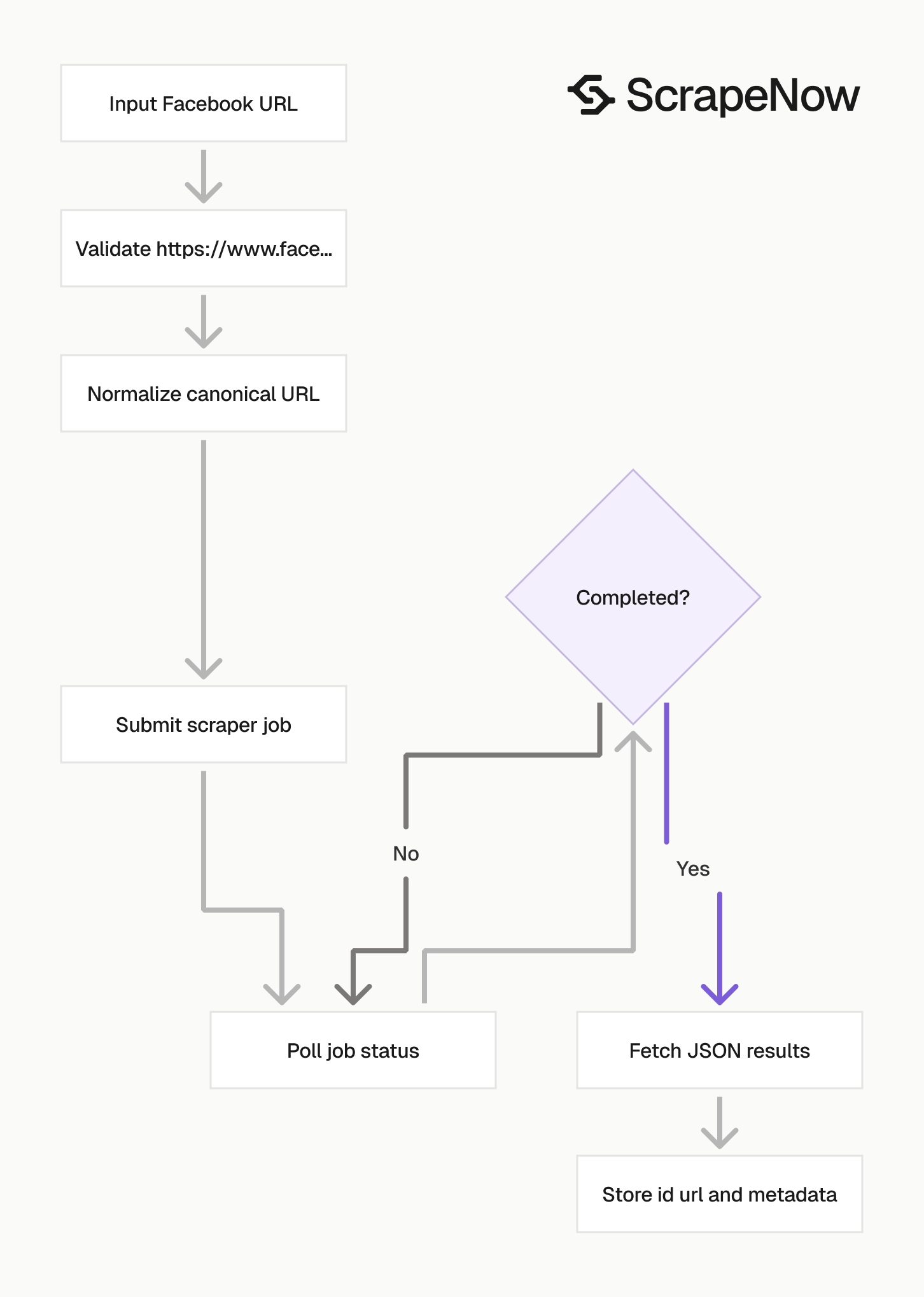
Use the the Facebook Pages and Profiles Extract by URL scraper scraper when you already have a Facebook page or profile URL. The input has one field, url, and the value must start with https://www.facebook.com/.
The scraper expects a direct Facebook URL. Normalize search result URLs, redirect links, mobile URLs, and shortened links before you create the job.
Step 1. Find the Facebook page or profile URL
Open facebook.com.
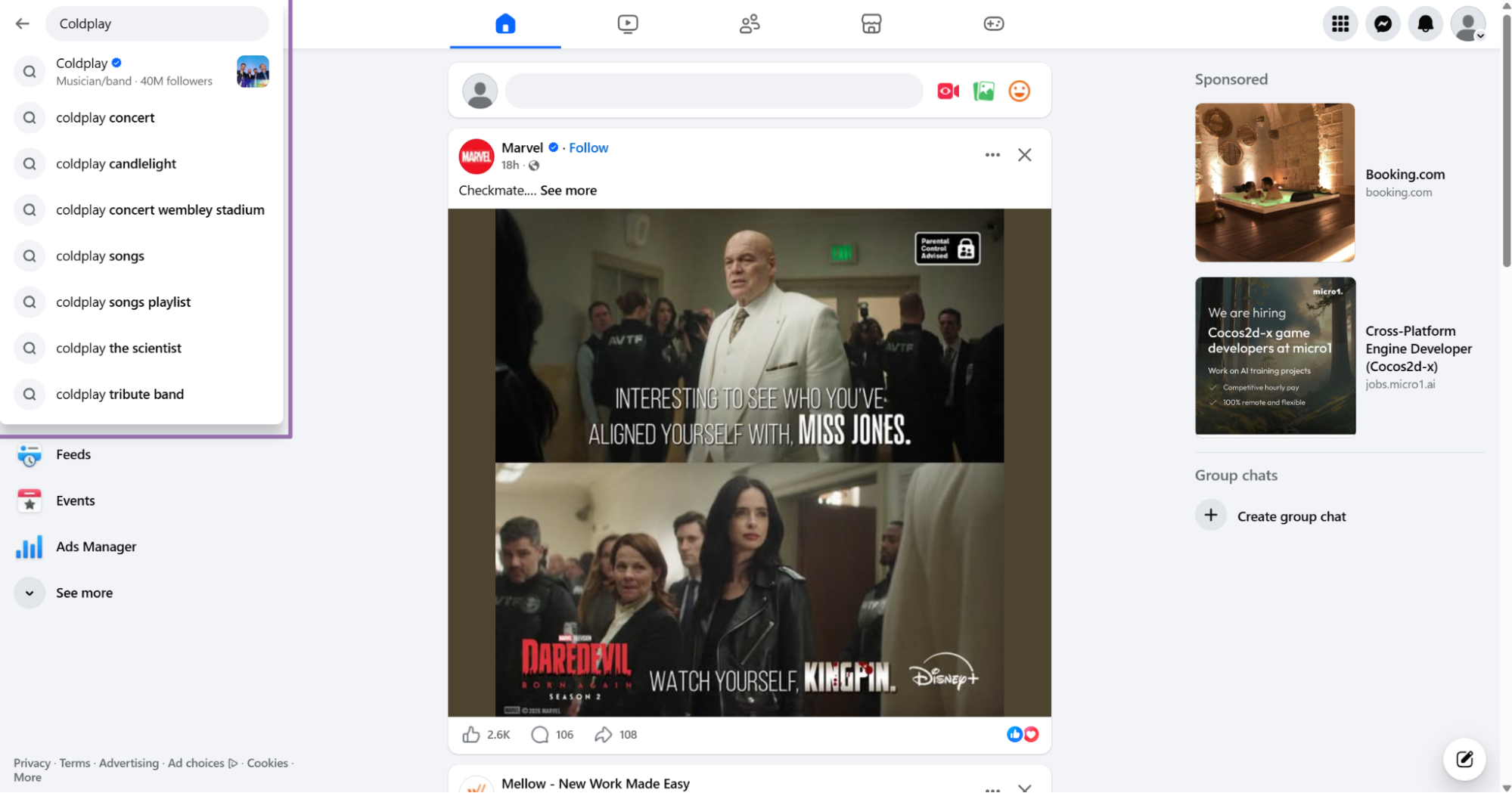
In the search bar, type the name of the page or person. Use a query such as Coldplay or Harry Styles.
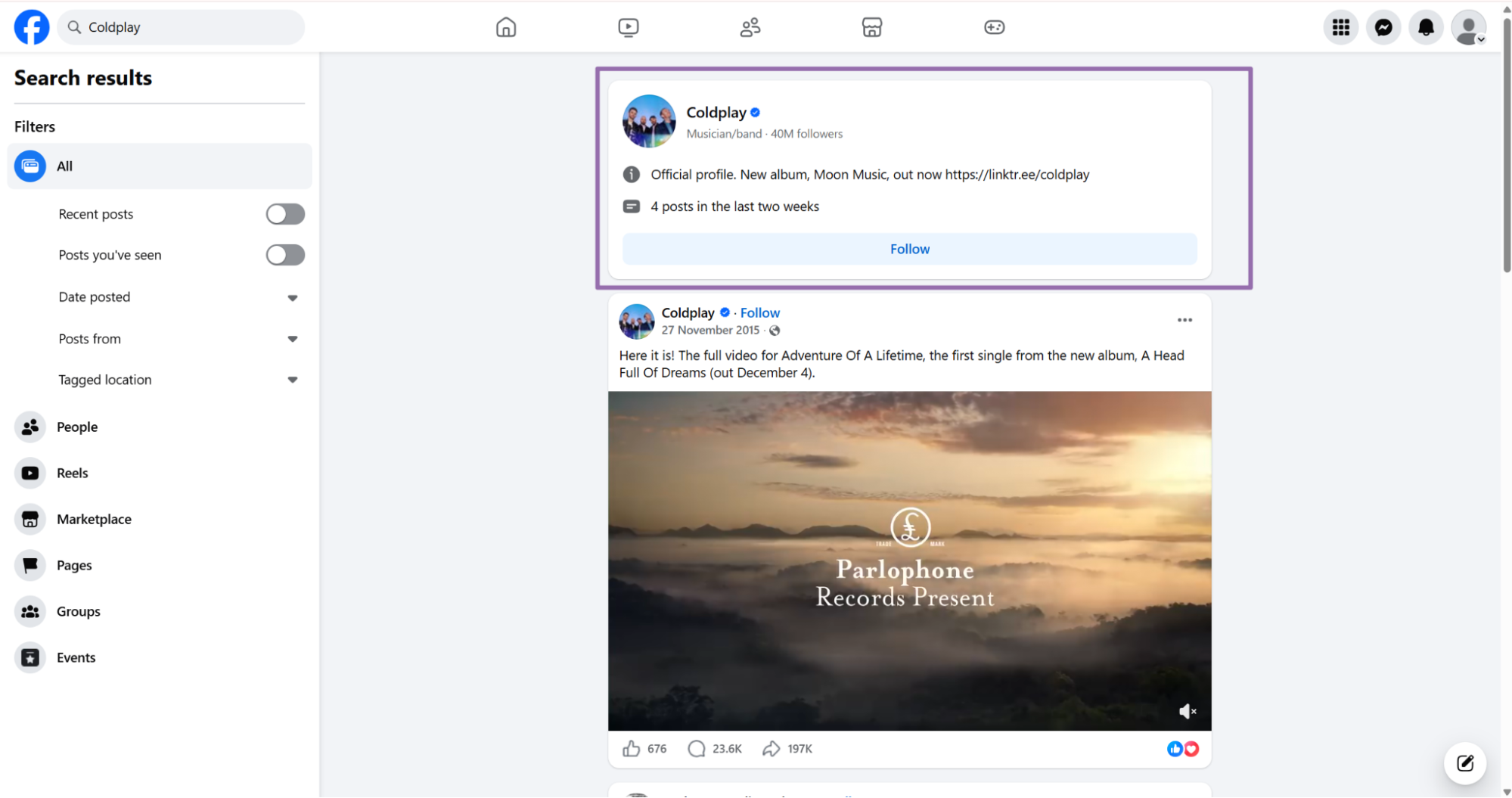
Click the target profile or page on the results page. Copy the URL from the browser address bar.
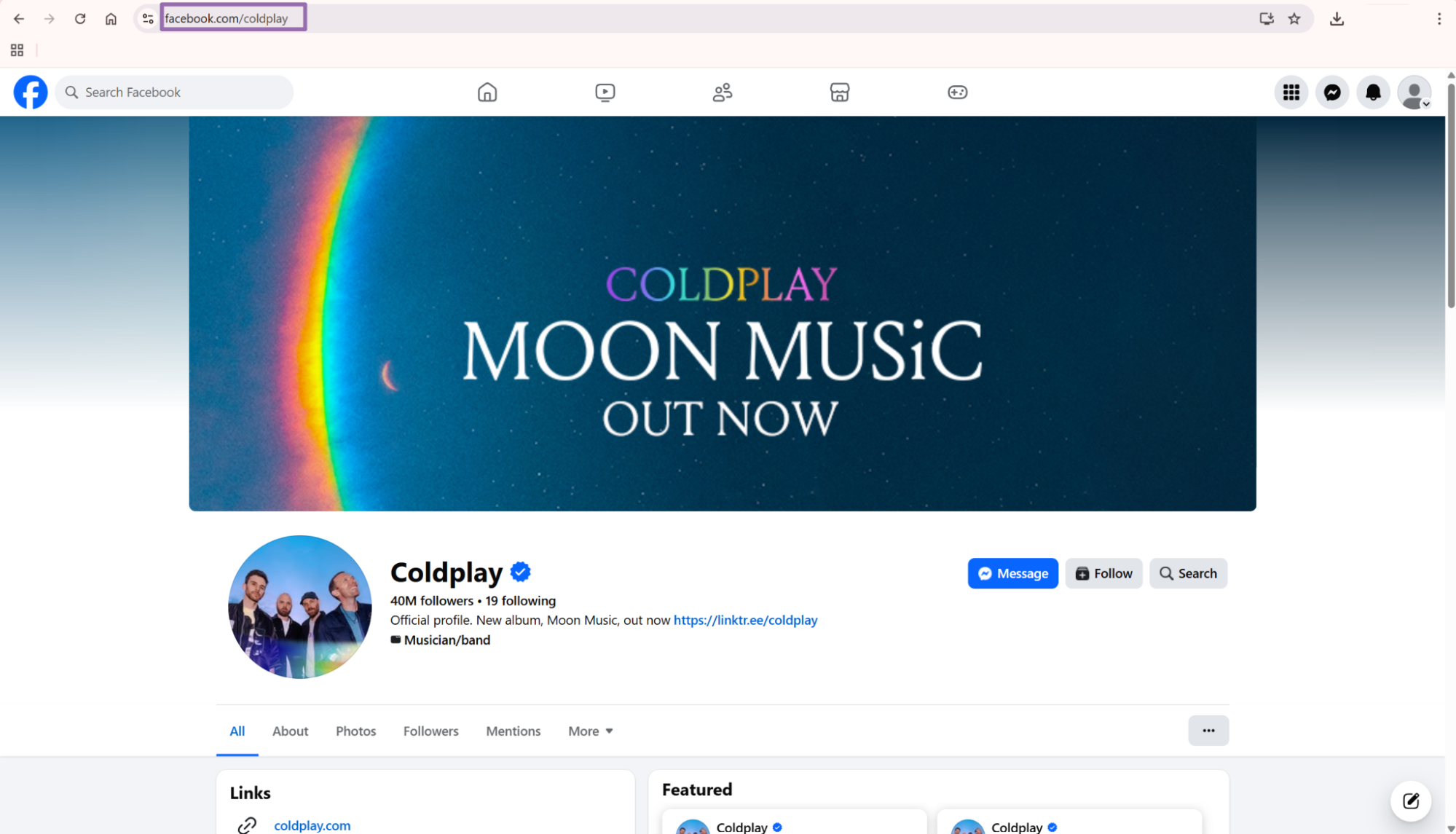
The URL should match one of these examples:
https://www.facebook.com/harrystyles
https://www.facebook.com/coldplay
Avoid URLs with tracking parameters from search results or shared links. A clean profile path gives you predictable dedupe logic later.
Keep one URL per page or profile in your source table. If your input source contains multiple variants, normalize them before the first scrape.
Store the normalized URL before you call the scraper. That gives your ingestion job a single source of truth for retries, audit logs, and dedupe checks.
If you need posts from a Facebook page after extracting page metadata, use the Extract Facebook page posts scraper. It takes a page URL and returns public post records.
Step 2. Run the scraper from Python
Use this Python script. Replace YOUR_API_KEY with your ScrapeNow API key.
"""
Configuration:
    - Set SCRAPER_SLUG to the scraper you want to run.
    - Set SCRAPER_INPUTS to the list of input dicts matching that scraper's schema.
    - Set API_KEY to your scraper API key.
"""

import sys
import time
import json
import requests
import os

API_KEY = "YOUR_API_KEY"

SCRAPER_SLUG = "facebook-pages-and-profiles-extract-by-url"

SCRAPER_INPUTS = [
    {
        "url": "https://www.facebook.com/harrystyles"
    }
]


BASE_URL = "https://api.scrapenow.io/api/v1/scraping"
TIMEOUT_SECONDS = 3600
POLL_INTERVAL = 5
SPINNER = "|/-\\"


def build_headers(api_key: str, content_type: str | None = None) -> dict:
    headers = {"Authorization": f"Bearer {api_key}"}
    if content_type:
        headers["Content-Type"] = content_type
    return headers


def trigger_scrape(slug: str, inputs: list[dict]) -> str:
    url = f"{BASE_URL}/scrape?scraper={slug}"
    response = requests.post(
        url,
        headers=build_headers(API_KEY, "application/json"),
        json={"inputs": inputs},
    )
    response.raise_for_status()
    return response.json()["data"]["job_id"]


def poll_until_done(job_id: str) -> str:
    start = time.time()
    i = 0
    while True:
        elapsed = time.time() - start
        if elapsed > TIMEOUT_SECONDS:
            print(f"\nTimeout after {TIMEOUT_SECONDS}s")
            sys.exit(1)
        response = requests.get(
            f"{BASE_URL}/jobs/{job_id}",
            headers=build_headers(API_KEY),
        )
        response.raise_for_status()
        data = response.json()
        status = data["data"]["status"]
        mins, secs = divmod(int(elapsed), 60)
        sys.stdout.write(
            f"\r[{SPINNER[i % 4]}] Waiting... {status} ({mins}m {secs:02d}s)  "
        )
        sys.stdout.flush()
        if status in ("completed", "failed"):
            print()
            return status
        time.sleep(POLL_INTERVAL)
        i += 1


def fetch_results(job_id: str) -> dict:
    response = requests.get(
        f"{BASE_URL}/jobs/{job_id}/results?format=json",
        headers=build_headers(API_KEY),
    )
    response.raise_for_status()
    return response.json()


def save_results(data: dict, slug: str) -> str:
    os.makedirs("output", exist_ok=True)
    filename = os.path.join("output", f"{slug}.json")
    with open(filename, "w", encoding="utf-8") as f:
        json.dump(data, f, indent=2, ensure_ascii=False)
    return filename


def main() -> None:
    print(f"Triggering scraper: {SCRAPER_SLUG}")
    job_id = trigger_scrape(SCRAPER_SLUG, SCRAPER_INPUTS)
    print(f"Job started: {job_id}")
    final_status = poll_until_done(job_id)
    if final_status != "completed":
        print(f"Job failed with status: {final_status}")
        sys.exit(1)
    print("Fetching results...")
    results = fetch_results(job_id)
    output_file = save_results(results, SCRAPER_SLUG)
    print(f"Results saved to: {output_file}")


if __name__ == "__main__":
    main()
The script does four things.
- Starts a ScrapeNow job with the page or profile URL.
- Polls the job every
5seconds. - Stops after
3600seconds if the job does not finish. - Writes the JSON response to
output/facebook-pages-and-profiles-extract-by-url.json.
This pattern works for small tests and scheduled production jobs. For larger batches, pass multiple input objects in SCRAPER_INPUTS, then process each returned row by scrape_status.
The script sets a 30 second request timeout for each API call. That prevents a stalled network request from blocking the worker indefinitely.
Keep the polling interval at 5 seconds unless your workload requires faster status updates. Shorter intervals add API chatter without changing extraction speed.
For broader Facebook extraction, Browse all 86+ scrapers across 14 platforms. Use the scraper that matches your input type so the pipeline stays predictable.
Step 3. Read the JSON output
A successful run returns an array of result objects. This response shows the shape returned by the Facebook pages and profiles scraper.
[
  {
    "inputs": {
      "url": "https://www.facebook.com/harrystyles"
    },
    "scrape_status": "success",
    "id": "100044630460255",
    "url": "https://www.facebook.com/harrystyles",
    "page_name": "Harry Styles",
    "username": "harrystyles",
    "entity_type": "PAGE",
    "summary_text": "Official Harry Styles Facebook Page.",
    "primary_category": "Musician",
    "address": {
      "formatted": "Holmes Chapel, United Kingdom"
    },
    "contact_and_basic_info": {
      "categories": [
        "Musician"
      ],
      "contact_info": {
        "address": {
          "formatted": "Holmes Chapel, United Kingdom"
        }
      }
    },
    "followers": 17000000,
    "logo": "https://scontent.fcok10-2.fna.fbcdn.net/v/t39.30808-1/616198291_1463482668482735_6359717705419257039_n.jpg?stp=dst-jpg_s200x200_tt6&_nc_cat=109&ccb=1-7&_nc_sid=2d3e12&_nc_ohc=ZWuNTTiGg4kQ7kNvwFqqZ8O&_nc_oc=AdqKf9a7FCVK8sYP3mnFkpNC3MpHl2n8c0_XMaYdPOSRjkIobEz7wSlYbgS-4_MUsx4&_nc_zt=24&_nc_ht=scontent.fcok10-2.fna&_nc_gid=jCKYlMcS-Nk6ThoCq122yw&_nc_ss=79289&oh=00_Af7fbNSUSi7U3nPRlo8q7GzH9pEWRBIE3rBL0QQr-4kJUA&oe=6A0A113C",
    "is_verified": true,
    "scrape_error": null,
    "scrape_error_code": null
  }
]
What data you get back
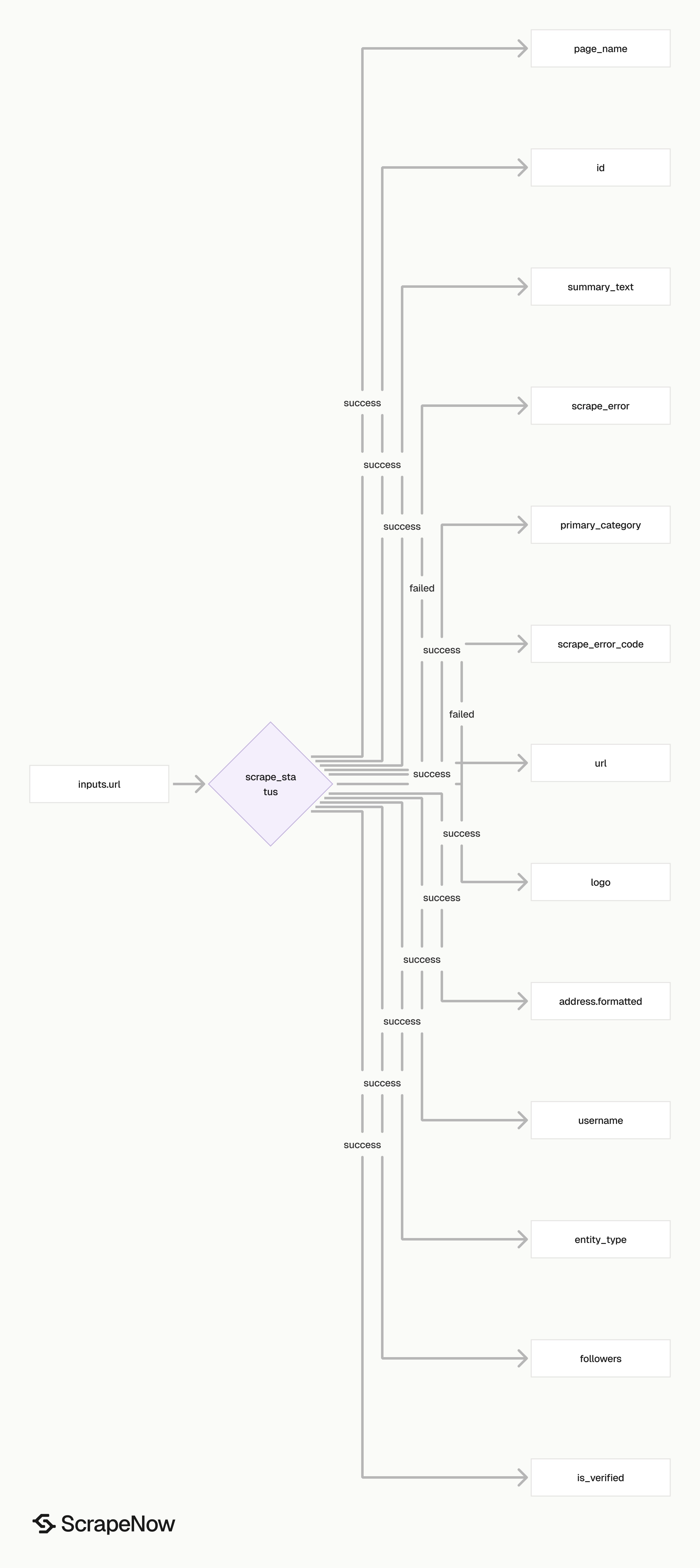
The response contains the original input, scrape status, public Facebook identifiers, page metadata, and error fields. Treat id and url as your strongest keys.
Use id for dedupe when Facebook returns it. Use url as the fallback key when the ID is missing from a failed or partial row.
Keep inputs.url in storage after you receive a canonical URL. It tells you what your system submitted and helps debug invalid source data.
| Field | Type | How to use it |
|---|---|---|
inputs.url |
string | Original URL you submitted. Keep it for traceability. |
scrape_status |
string | success means the row extracted cleanly. |
id |
string | Facebook entity ID. Use it as the stable dedupe key when present. |
url |
string | Canonical Facebook page or profile URL returned by the scraper. |
page_name |
string | Display name shown on the page. |
username |
string | Public handle from the Facebook URL. |
entity_type |
string | Entity type such as PAGE. |
summary_text |
string | Public page summary or description. |
primary_category |
string | Main page category, such as Musician. |
address.formatted |
string | Public formatted location if available. |
contact_and_basic_info.categories |
array | Category list from the page metadata. |
followers |
integer | Public follower count. |
logo |
string | Public profile image URL. |
is_verified |
boolean | Verification status. |
scrape_error |
string or null | Error message for failed rows. |
scrape_error_code |
string or null | Machine-readable error code for retries and reporting. |
Store the followers field as an integer. Text storage breaks numeric sorting and creates extra casting work in analytics queries.
The logo value often contains a long Facebook CDN URL. Facebook rotates these URLs, so refresh the value during your next scrape cycle.
The nested contact_and_basic_info object leaves room for extra page metadata. Your top-level schema stays stable when Facebook exposes another public field.
For CRM enrichment, map page_name, username, primary_category, and followers to typed columns. Keep the raw JSON payload so you reprocess rows without rescraping Facebook.
If your CRM stores social accounts separately from companies or contacts, keep Facebook IDs in the social account table. Then join the account to the person, artist, brand, venue, or organization record.
For analytics, store scrape timestamps beside the extracted values. Follower counts and verification status change over time, and timestamped rows make that history queryable.
Ready to get this data? Get Facebook page data.
Production tips
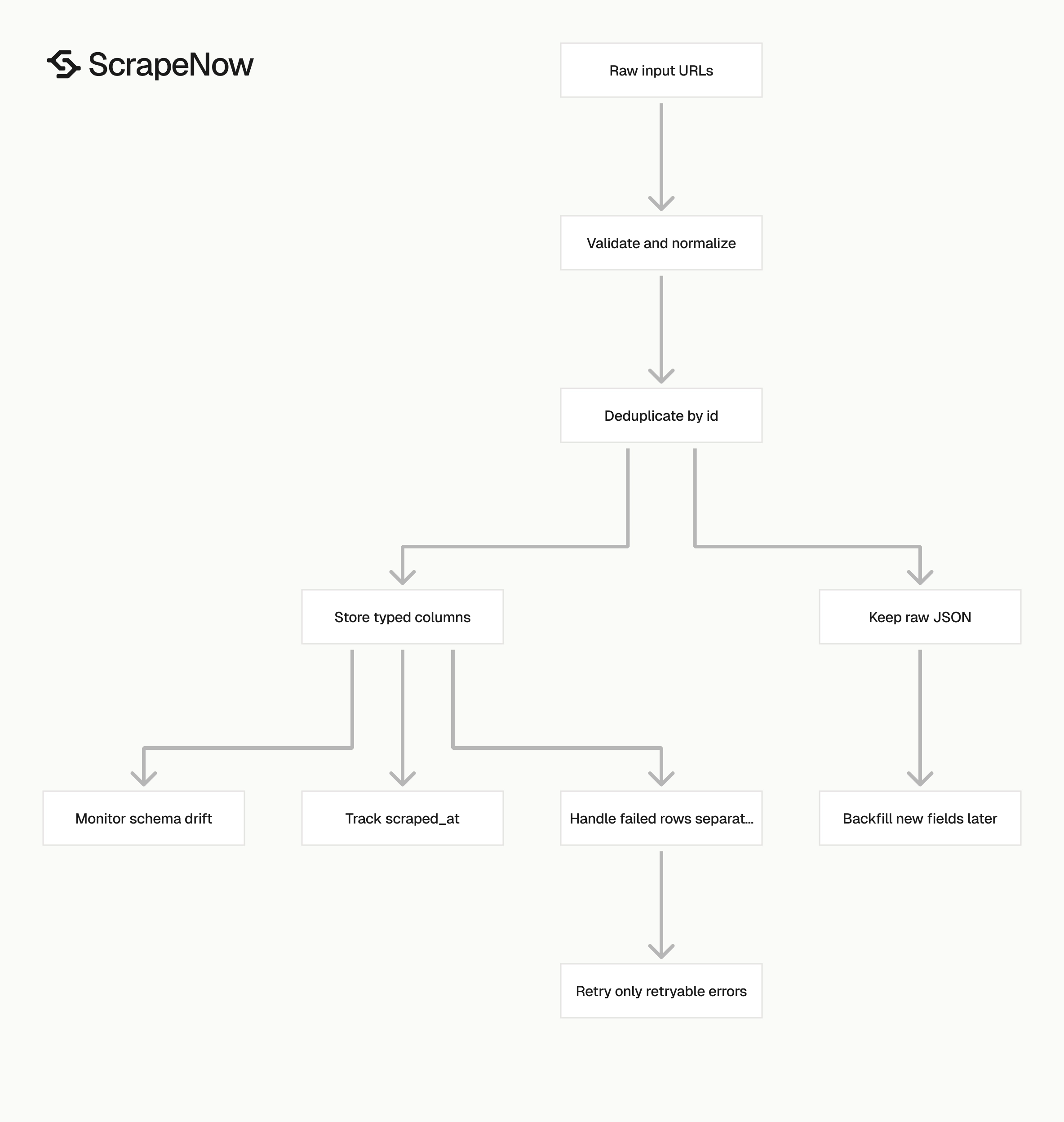
Validate before you submit jobs. Dedupe before you write rows. Check row-level status before you mark the batch as finished.
Validate URLs before sending them
Reject mobile URLs, shortened links, and non-Facebook domains before creating the job.
from urllib.parse import urlparse

def validate_facebook_url(url: str) -> str:
    parsed = urlparse(url.strip())

    if parsed.scheme != "https":
        raise ValueError(f"Invalid scheme: {url}")

    if parsed.netloc != "www.facebook.com":
        raise ValueError(f"Invalid host: {url}")

    if not parsed.path or parsed.path == "/":
        raise ValueError(f"Missing page or profile path: {url}")

    return f"{parsed.scheme}://{parsed.netloc}{parsed.path.rstrip('/')}"


urls = [
    "https://www.facebook.com/harrystyles",
    "https://www.facebook.com/coldplay",
]

validated_urls = [validate_facebook_url(url) for url in urls]
print(validated_urls)
Expected output:
[
  "https://www.facebook.com/harrystyles",
  "https://www.facebook.com/coldplay"
]
This validator keeps the path and removes a trailing slash. Add your own rules if your source system stores m.facebook.com, shared links, or internal redirect URLs.
Run validation before billing starts. Also remove query strings before scraping page or profile metadata.
Deduplicate by Facebook ID first
A page can be submitted as a vanity URL and returned with a canonical URL. Use id as your primary dedupe key when it exists.
def dedupe_results(rows: list[dict]) -> list[dict]:
    seen = set()
    deduped = []

    for row in rows:
        key = row.get("id") or row.get("url") or row.get("inputs", {}).get("url")

        if key in seen:
            continue

        seen.add(key)
        deduped.append(row)

    return deduped
For example, https://www.facebook.com/harrystyles and another URL variant for the same page should collapse into one row. Both rows return id as 100044630460255.
Use the canonical URL from url for future scrapes. Enforce dedupe at both the application layer and the database layer with a PRIMARY KEY or unique index on facebook_id.
Store a stable schema
Keep your database schema plain. Store top-level fields as typed columns, then keep the full JSON object for replay and debugging.
CREATE TABLE facebook_pages (
    facebook_id TEXT PRIMARY KEY,
    input_url TEXT NOT NULL,
    canonical_url TEXT,
    page_name TEXT,
    username TEXT,
    entity_type TEXT,
    primary_category TEXT,
    formatted_address TEXT,
    followers BIGINT,
    logo_url TEXT,
    is_verified BOOLEAN,
    scrape_status TEXT NOT NULL,
    scrape_error TEXT,
    scrape_error_code TEXT,
    raw_json JSONB NOT NULL,
    scraped_at TIMESTAMP NOT NULL DEFAULT NOW()
);
This schema keeps raw_json for fields you decide to use later. Use BIGINT for follower counts and keep nullable fields nullable.
Handle row-level failures
A completed job can contain failed rows. Check scrape_status per result instead of trusting the job status alone.
def split_success_and_failed(rows: list[dict]) -> tuple[list[dict], list[dict]]:
    success = []
    failed = []

    for row in rows:
        if row.get("scrape_status") == "success":
            success.append(row)
        else:
            failed.append(row)

    return success, failed


rows = [
    {
        "inputs": {"url": "https://www.facebook.com/harrystyles"},
        "scrape_status": "success",
        "id": "100044630460255"
    },
    {
        "inputs": {"url": "https://www.facebook.com/invalid-input"},
        "scrape_status": "failed",
        "scrape_error": "Page unavailable",
        "scrape_error_code": "PAGE_UNAVAILABLE"
    }
]

success, failed = split_success_and_failed(rows)

print(f"success={len(success)} failed={len(failed)}")
Expected output:
success=1 failed=1
Retry failed rows only when the error code is retryable. Cap retries at 3 attempts with backoff.
Track schema drift
Treat optional fields as nullable. Save raw_json on every row so you can backfill new columns later. Track row counts by scrape_status and alert on sudden drops in expected fields.
When to use the adjacent Facebook scrapers
Use the pages and profiles scraper when you need entity metadata from a known URL. Use a different scraper when your input type or target output changes.
| Goal | Scraper to use |
|---|---|
| Extract public metadata from a known page or profile URL | Facebook Pages and Profiles Extract by URL |
| Extract public posts from a known page URL | Extract Facebook page posts |
| Extract event details from a known event URL | Extract Facebook event data |
| Search events by venue | Find Facebook events by venue |
| Extract a marketplace listing from a known URL | Get Marketplace listing data |
| Search marketplace listings by keyword | Search Marketplace listings |
A common pipeline starts with page or profile metadata, then pulls page posts for the same canonical URL. That gives you account-level fields such as followers and post-level fields from the page posts scraper.
The same pattern works for creator databases, music rosters, brand monitoring, and public entity directories. Store the page row once, then attach posts, events, or marketplace records by canonical URL or Facebook ID.
For brand monitoring, refresh high-priority pages daily and long-tail pages weekly. Store each scrape timestamp so analysts separate current values from historical snapshots.
For creator databases, keep follower count history in a separate table. One row per scrape gives you growth curves without overwriting yesterday's value.
For music rosters, join Facebook page records to artist IDs in your internal catalog. Store aliases because stage names, legal names, and page names often differ.
For venue databases, keep the formatted address separate from the raw contact object. Address fields change across regions, and raw JSON helps during cleanup.
Pricing
ScrapeNow charges per returned row. One row costs one credit, starting at $0.04 per credit for small runs and dropping with volume. No monthly contracts, no proxy fees, no charges for failed rows. See the pricing page for current rates.
Run the code above with your own URL against the Get Facebook page data scraper. If you are mapping the rest of your Facebook data pipeline, Browse all 86+ scrapers and pick the scraper that matches your input type.


